





Are Portable Power Stations Worth It? 2026 Buying Guide
Last updated: September 2, 2026
Quick Answer
Yes, a portable power station is worth buying if it solves a specific power problem that matters to you: keeping a refrigerator cold during an outage, running a CPAP overnight, keeping Wi-Fi and work equipment online, powering an RV or campsite, or providing electricity where a wall outlet is not available.
It is usually not worth buying if you only want to charge a phone, expect a portable battery to run central air conditioning or electric heat for days, or buy a large station without first calculating how much energy your equipment actually uses.
For most buyers, the real return on the purchase is not lower utility bills. It is avoiding disruption when power is unavailable.

A portable power station becomes most valuable when it protects specific essentials instead of trying to replace every circuit in the house.
Who Should Buy a Portable Power Station?
A portable power station makes the most sense when losing electricity creates a real inconvenience, expense, safety concern, or interruption to something you regularly do.
| Situation | Worth Buying? | Why | Typical Capacity to Consider |
|---|---|---|---|
| Phones, tablets and small USB devices only | Usually no | A normal USB power bank is smaller and cheaper. | Power bank instead |
| Laptop, router, lights and small electronics | Often yes | You gain AC outlets, much more stored energy and longer backup time. | 250–600Wh |
| CPAP overnight backup | Often yes | Power continuity can matter much more than the purchase price. | 500–1,200Wh depending on settings and runtime |
| Refrigerator during outages | Often yes | It can help protect food during short and moderate outages when properly sized. | 1,000–2,000Wh+ |
| Weekend camping or RV use | Yes for frequent users | One battery can serve lighting, phones, laptops, fans, cameras, CPAP and compatible appliances. | 500–2,000Wh |
| Central HVAC, electric heat or whole-home operation | Usually no for a single portable unit | These loads can require far more continuous power and stored energy. | Consider a larger home-energy system or generator strategy |
If you are still learning what these products actually do, start with What Is a Portable Power Station? before comparing individual models.
The Four-Part Worth-It Test
Most buying guides start with battery size. That is too late. Before comparing watt-hours, use these four questions.
1. What happens if the power is unavailable?
If the answer is “my phone charges later,” a large power station probably has little value. If the answer is “the refrigerator warms up,” “I cannot use my CPAP,” “I lose a workday,” or “the camping trip becomes difficult,” backup power has a much clearer job.
2. Can a portable unit actually cover that job?
Check both watts and watt-hours. Watts determine whether the station can operate the load. Watt-hours determine how long it can continue doing so.
3. How will you replace the energy you use?
A 2,000Wh battery is useful for longer periods than a 500Wh battery, but both eventually become empty. For multi-day outages and off-grid use, charging speed can matter almost as much as battery capacity.
4. How often will the station solve the problem?
A station used for outages, RV weekends, camping, remote work and road trips can justify itself more easily than one purchased for a single hypothetical event and never tested again.
You do not need to calculate a precise dollar answer. The formula forces you to ask whether the battery protects something you genuinely care about.
What Makes a Portable Power Station Worth the Money?
Portable power stations generally do not make financial sense as a way to buy cheap electricity. Grid electricity is difficult for a portable battery to beat after you include the initial purchase price.
The economic value comes from what the stored electricity prevents or enables.
| Value | What the Power Station Can Prevent or Enable | Why It Matters |
|---|---|---|
| Food protection | Refrigerator or freezer support during an outage | Stored energy can be more valuable than its normal utility cost when it protects a full refrigerator. |
| Work continuity | Router, modem, laptop, monitor and phone charging | One uninterrupted workday can matter more than the cost of the electricity consumed. |
| Sleep equipment | Compatible CPAP equipment | Overnight continuity can justify a dedicated backup solution. |
| Travel flexibility | Camping, RV, road-trip and mobile equipment | The same battery can be used outside emergencies. |
| Quiet indoor backup | Lights, communications and electronics | Battery operation does not require a gasoline engine running beside the home. |
| Emergency readiness | Phones, radios, lighting and selected essential loads | The energy is already stored and available when the grid goes down. |
Cost per meaningful use is more useful than cost per kWh
A “meaningful use” might be an outage, a night of CPAP backup, a full camping day, a remote work shift, a tailgate, a field project or an RV travel day.
This is a better way to judge the purchase than asking whether recharging from the grid saves money on your electric bill.
How Much Portable Power Station Capacity Do You Actually Need?
The most common way to waste money is to start shopping before creating a load list.
Write down every device you expect to run, its wattage and the number of hours it needs to operate.
For AC loads, the full battery label capacity is not normally available at the outlet because the inverter and electronics consume some energy. For UDPOWER planning examples, this guide uses a 90% conversion-efficiency estimate.
Example 1: Remote work during a short outage
| Load | Planning Use | Energy |
|---|---|---|
| Laptop | 60W × 5 hours | 300Wh |
| Router | 12W × 5 hours | 60Wh |
| Phone | One day's charging | 20Wh |
| LED light | 10W × 3 hours | 30Wh |
| Total | 410Wh |
After allowing for AC conversion loss and reserve, a roughly 600Wh-class station is a much more practical target than a 250Wh model.
Example 2: One CPAP night
A CPAP drawing an average of 40W for eight hours would use about 320Wh before additional loads or conversion losses. Heated humidifiers and heated tubing can materially increase consumption, so use your actual machine settings whenever possible.
For a dedicated calculation, see How Long Will a CPAP Run on a Battery Backup?.
Example 3: Refrigerator plus basic outage essentials
| Load | Planning Example | Energy Over 12 Hours |
|---|---|---|
| Refrigerator | 80W average while planning | 960Wh |
| Router | 12W | 144Wh |
| LED lighting | 30W for 5 hours | 150Wh |
| Phones | Two phones | 40Wh |
| Total load energy | 1,294Wh | |
| Planning battery capacity at 90% | 1,294 ÷ 0.90 | About 1,438Wh before additional reserve |
A refrigerator does not normally draw one constant wattage. Compressor cycling, room temperature, door openings and startup demand all affect actual use. A plug-in watt meter measured over several hours is more useful than guessing from a generic refrigerator wattage chart.
Realistic Runtime by UDPOWER Battery Size
The following estimates use official battery capacities and a 90% AC conversion planning factor. They are comparison tools, not guaranteed runtimes.
| Model | Capacity | 40W CPAP | 60W Laptop | 80W Average Fridge Load | 500W Load | Official Source |
|---|---|---|---|---|---|---|
| UDPOWER C400 | 256Wh | About 5.8 hr | About 3.8 hr | About 2.9 hr | Not suitable through its 400W rated AC output | C400 specifications |
| UDPOWER S1200 | 1,190Wh | About 26.8 hr | About 17.9 hr | About 13.4 hr | About 2.1 hr | S1200 specifications |
| UDPOWER S2400 | 2,083Wh | About 46.9 hr | About 31.2 hr | About 23.4 hr | About 3.7 hr | S2400 specifications |
Small AC loads can experience a greater percentage of loss because the inverter itself consumes energy. CPAP results change with humidifier and heated-hose settings. Refrigerator results change with compressor cycling and startup behavior.
A 2,000Wh-class station may be powerful enough to operate a high-watt appliance, but using 1,500W for heat can consume almost an entire battery in a short period. Output compatibility does not automatically mean good energy economics.
When Is a Portable Power Station Most Worthwhile?
1. Home power outages
Portable power stations work particularly well when you identify a small group of priority loads rather than trying to recreate normal whole-home electricity use.
A practical outage list may include a refrigerator, router, phone charging, lights, a fan, laptop and compatible medical or comfort equipment.
For longer outage planning, use the Portable Power Station Runtime Planning for Outages guide.
2. CPAP and overnight power
Sleep is one of the strongest examples of why “cost per kilowatt-hour” is the wrong way to judge a backup battery. The value is having dependable stored power available at the time you need it.
Choose capacity based on your actual CPAP power consumption, desired number of nights and whether humidification or heated tubing is enabled.
3. Remote work
A router and laptop are modest electrical loads compared with kitchen appliances. That makes portable power stations particularly efficient for keeping internet, communications and work equipment online during short outages.
4. Camping and RV trips
Camping gives a portable power station a second job beyond emergency storage. The same battery can power lights, cameras, laptops, portable fridges, fans, phones and other compatible equipment without running a fuel engine beside your campsite.
See the UDPOWER camping and RV power station collection for models organized around outdoor use.
5. Photography, field work and mobile equipment
For cameras, drones, laptops and charging equipment, portability often matters more than buying the largest possible battery. A compact station that actually leaves the house can be more useful than a large model that stays in the garage.
6. Emergency vehicle kit
A smaller station can provide lighting and charging for roadside situations. Some models also add vehicle-specific features. The UDPOWER C400, for example, includes a dedicated 12V jump-start function.
When Is a Portable Power Station Not Worth Buying?
You only need phone charging
A compact power bank is usually the better purchase if every device you own charges through USB and your total energy demand is small.
Your main load is electric heat
Space heaters, hot plates, kettles, hair dryers and other resistive heating appliances can use energy extremely quickly. A battery may technically operate the appliance but still provide disappointing runtime.
You expect unlimited runtime
A portable power station stores energy; it does not create an unlimited supply. If a long outage consumes more energy than you can replenish, the battery eventually reaches zero.
You need normal whole-home operation
Central air conditioning, electric water heating, electric cooking, clothes drying, large pumps and other heavy household loads can quickly move you beyond the practical scope of a single portable station.
Read Can a Solar Generator Power a House? if your goal is broader home backup.
You will not maintain or test it
Emergency equipment that is discharged, missing a cable or never tested with the intended appliance has little practical value.
| Your Main Need | Better First Choice | Why |
|---|---|---|
| Phone charging only | USB power bank | Smaller, lighter and cheaper |
| High continuous load for several days | Fuel generator or larger hybrid system | Energy can be replenished with fuel when used safely outdoors |
| Automatic whole-home backup | Installed home battery or standby system | Designed to integrate with household circuits |
| Occasional one-time need | Rental may make sense | Avoids paying for equipment that will rarely be used |
For a deeper look at limitations before purchasing, read Disadvantages of Portable Power Stations.
Which UDPOWER Portable Power Station Is Worth Buying?
The right model depends on the problem you are trying to solve. These recommendations use specifications from the current official UDPOWER product pages.
UDPOWER C400: Worth It When Portability Comes First
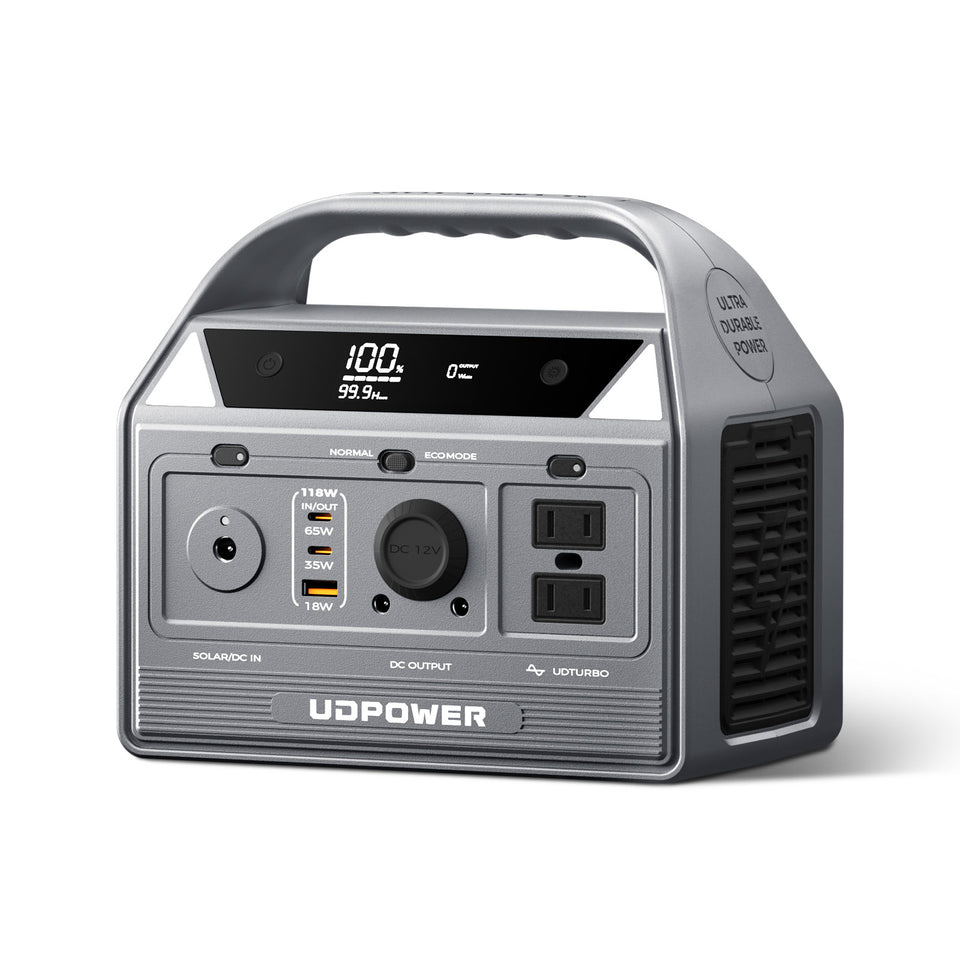
The C400 is the better choice when you want emergency charging and small-appliance power without carrying a large backup battery.
- Capacity: 256Wh
- Rated AC output: 400W pure sine wave
- UDTURBO support: up to 800W for compatible loads
- Weight: approximately 6.88 lb
- Maximum solar input: 150W
- Best for: road trips, cameras, laptops, phones, lights, short outings and vehicle emergency kits
Skip it if: your main goal is long refrigerator backup, large appliances or long overnight loads.
View UDPOWER C400UDPOWER S1200: The Best-Balanced Choice for Many Buyers

The S1200 is the size to consider when the job has moved beyond charging electronics and into meaningful home, RV or overnight backup.
- Capacity: 1,190Wh
- Rated AC output: 1,200W pure sine wave
- UDTURBO support: up to 1,800W for compatible higher-power loads
- Weight: approximately 26.0 lb
- Maximum solar input: 400W
- AC outlets: 5 on the current gray model
- UPS transfer: 10ms or less
- Best for: refrigerator planning, CPAP, home essentials, RV weekends, family camping and remote work
The 1,800W UDTURBO capability is not the same as the 1,200W rated output. When operating compatible higher-power loads above the rated level, conversion efficiency can be lower.
View UDPOWER S1200UDPOWER S2400: Worth It for Longer Runtime and Heavier Loads

The S2400 makes more sense when runtime and output headroom matter more than carrying a lightweight unit.
- Capacity: 2,083Wh
- Rated AC output: 2,400W pure sine wave
- UDTURBO support: up to 3,000W for compatible higher-power loads
- Weight: approximately 40.8 lb
- Maximum solar input: 400W
- AC outlets: 6
- UPS transfer: 10ms or less
- Best for: longer outages, larger refrigerators, multiple simultaneous loads, RV use, workshops and extended off-grid use
Skip it if: your main requirement is something lightweight enough to carry around frequently.
View UDPOWER S2400Is It Worth Adding Solar Panels?
Solar panels become valuable when the problem is no longer battery capacity alone. The question becomes whether you can replace enough of the energy you use each day.
This matters during multi-day outages, RV travel and extended off-grid camping.
Use a Solar Recovery Ratio
- Above 1.0: your planned solar harvest may theoretically replace the energy you use in a day.
- 0.5–1.0: solar may substantially extend runtime but may not fully restore the battery.
- Below 0.5: solar can slow battery depletion but probably will not sustain the same energy routine indefinitely.
For rough planning, a solar panel's nameplate wattage should not be treated as constant output. Sun angle, cloud cover, shading, panel temperature and charging losses all change production.
| Solar Input Example | 4 Peak-Sun-Hour Planning Estimate at 70% | Potential Daily Energy | Best Interpretation |
|---|---|---|---|
| 120W | 120 × 4 × 0.70 | About 336Wh | Useful for electronics, lighting and partial overnight recovery |
| 210W | 210 × 4 × 0.70 | About 588Wh | Meaningful recovery for camping and moderate daily loads |
| 400W | 400 × 4 × 0.70 | About 1,120Wh | Can replace a substantial amount of daily energy under favorable conditions |
Always keep panel voltage, current, connector type and the power station's maximum input limits within specification.
Browse the UDPOWER solar panel collection if daytime energy recovery is part of your plan.
Portable Power Station vs. Generator, Power Bank and Home Battery
A portable power station is not automatically the best backup solution. Its advantage is the combination of stored energy, portability, quick startup and operation without a combustion engine.
| Option | Main Advantage | Main Limitation | Best For | Safety / Reference |
|---|---|---|---|---|
| Portable power station | Rechargeable, portable, quiet and fast to deploy | Finite stored energy | Home essentials, apartments, camping, RVs and electronics | UDPOWER safety guide |
| Gas or fuel generator | Can continue producing electricity while fuel is available | Fuel, engine noise, maintenance and carbon-monoxide hazards | Long-duration high-energy use with safe outdoor operation | U.S. CPSC generator safety guidance |
| USB power bank | Very small and inexpensive | Limited energy and normally no standard AC appliance support | Phones, tablets and small USB electronics | Follow the product manufacturer's instructions |
| Installed home battery | Can integrate with household circuits and solar | Higher system cost and installation requirements | Automatic selected-circuit or whole-home backup | Professional design and installation may be required |
The U.S. Consumer Product Safety Commission warns that portable fuel generators must never be operated inside a home, garage, basement, crawlspace or similar enclosed space. Battery power stations do not have gasoline-engine exhaust, although they must still be kept dry, ventilated and operated according to their instructions.
For a full comparison, read Portable Power Station vs. Generator: Which Is Better?.
What Should You Check Before Buying a Portable Power Station?
- List the loads you actually care about. Separate necessities from convenience devices.
- Measure running watts. Use appliance labels or, preferably, a watt meter.
- Check startup behavior. Refrigerators, pumps, compressors and motors may require extra power when starting.
- Calculate watt-hours. Multiply expected watts by operating hours.
- Include conversion loss. Battery nameplate capacity does not equal AC energy delivered to an appliance.
- Choose a realistic reserve. Do not size a system that only works at 100% charge under ideal conditions.
- Check charging speed. Ask how quickly you can restore the energy you expect to use.
- Check solar compatibility. Voltage, current and connector limits matter more than the solar panel brand name.
- Check weight. A station that is too difficult to move may be used less often.
- Check ports. Make sure you have enough AC, USB-C, USB-A and DC connections for your actual setup.
- Check battery chemistry and protection. Look for a well-designed BMS and appropriate safety certifications.
- Check warranty and support. Backup equipment should still have support years after the initial purchase.
Then perform an acceptance test
Do not wait for a blackout to discover that the refrigerator will not start or the CPAP battery estimate was wrong.
- Fully charge the station.
- Connect each important appliance separately.
- Confirm it starts successfully.
- Record actual operating watts.
- Run the appliance long enough to estimate real battery use.
- Test the charging method you expect to use during an emergency.
- Store the correct cables with the station.
For additional precautions, see Power Station Safety: Everything You Need to Know Before You Buy.
Frequently Asked Questions
Are portable power stations really worth the money?
They are worth the money when they protect a meaningful load such as a refrigerator, CPAP, router, laptop or camping equipment and when the battery is sized for the required runtime. They are less worthwhile when the only goal is phone charging or when the intended loads exceed what a portable battery can realistically support.
What are the main disadvantages of a portable power station?
The main limitations are finite battery capacity, limited output, added weight as capacity increases, recharge time and the upfront purchase cost. High-watt heating appliances can also consume stored energy very quickly.
Is a 1000Wh portable power station worth it?
A roughly 1,000–1,200Wh station is one of the most versatile sizes for buyers who want more than electronics charging. It can be useful for CPAP backup, routers, laptops, refrigerators, RV weekends and family camping when individual loads remain within the station's output limits.
Is a 2000Wh portable power station worth it?
A roughly 2,000Wh model is more worthwhile when you need longer refrigerator runtime, multiple simultaneous loads or higher-output appliances. The trade-off is additional weight and cost compared with smaller stations.
Can a portable power station run a refrigerator?
Yes, many medium and large portable power stations can run a refrigerator, but you must check both the refrigerator's running consumption and its compressor startup demand. Runtime depends on battery capacity, refrigerator cycling, room temperature and door-opening frequency.
Can a portable power station power a house?
A portable unit can support selected household essentials, but a single portable station should not be assumed to provide normal whole-home operation. Central HVAC, electric water heating, electric cooking and other large loads require much more power and energy.
Is a portable power station better than a generator?
A power station is often more convenient for indoor essential-load backup, apartments, nighttime use, camping and electronics because it does not operate a fuel-burning engine. A fuel generator can be more suitable for very long, high-energy use when it can be operated safely outdoors and continuously supplied with fuel.
Is a portable power station worth it for camping?
Yes, especially when you regularly use phones, cameras, laptops, fans, lights, a CPAP machine or a portable refrigerator. Frequent camping also improves the value of the purchase because the battery serves a regular purpose instead of remaining unused between outages.
Is solar charging worth adding to a portable power station?
Solar is most worthwhile for multi-day outages, RV travel and off-grid trips where wall charging is unavailable. It is less important for a battery used only during short outages if you can recharge quickly from the grid afterward.
How many years does a portable power station last?
Service life depends on battery chemistry, cycle life, temperature, storage conditions, depth of discharge and battery management. Modern LiFePO4 power stations can provide thousands of equivalent charge cycles when used and stored correctly.
Choose Backup Power Based on What You Actually Need to Run
Start with your appliances, required runtime and recharge plan. Then choose enough capacity and output to cover that job without paying for battery capacity you will never use.
View All Portable Power Stations View Home Backup Options View Camping & RV Options Get the Power Station Buying GuideProduct data: UDPOWER specifications in this guide were checked against the official C400, S1200 and S2400 product pages on September 2, 2026. Appliance runtime calculations are planning estimates and actual results vary with equipment behavior, temperature, battery condition, operating mode, startup demand and charging conditions.
Generator safety: For portable fuel-generator carbon-monoxide precautions, see the U.S. Consumer Product Safety Commission generator safety guidance.
Related Articles


