





DTE Outage Map: How to Check, Report, and Plan for a Power Outage
Quick answer: Use the official DTE Outage Map to search an address, ZIP code, or county and view reported outages in DTE Electric's service territory. For the restoration estimate tied to your own home, also use DTE's address status checker.
Do not assume that seeing a nearby outage on the map means DTE has confirmed the outage at your address. Report your outage separately so DTE can associate your service location with the incident and send address-specific text or email updates.

Official DTE Outage Links
These tools serve different purposes. Using the correct one can save time and prevent you from relying on a neighborhood-level map estimate when you need information about your specific service address.
| DTE resource | Best use | What you can do |
|---|---|---|
| DTE Outage Map | Checking the surrounding area | Search by address, ZIP code, or county and view mapped outage areas and available restoration information. |
| Report an Outage | Registering your service address | Tell DTE that your property has lost power, even when an outage already appears nearby. |
| Check Outage Status | Getting address-specific updates | Check the status and estimated restoration time associated with your location. |
| DTE Outage Center | Accessing all outage tools | Open the map, report an outage, check status, and review outage information from one starting page. |
| 800-477-4747 | Phone reporting or urgent electrical hazards | Report a power problem by phone when the website is unavailable or a hazard needs immediate attention. |
How to Use the DTE Outage Map
- Open the official map. Go directly to the DTE Outage Map rather than relying on a screenshot or social media post.
- Search your location. Enter your service address. You can also explore outages by ZIP code or county when you are checking a wider area, such as a commute route or a family member's neighborhood.
- Select the outage area. Open the available incident details. Depending on the stage of the response, DTE may show the number of affected customers, current status, cause, crew information, or an estimated restoration time.
- Check your individual address. Use the DTE status checker before making plans based on the broader map estimate.
- Report the outage if you have not already done so. Reporting provides another data point that can help DTE identify the boundaries and location of an electrical problem.
- Enable text or email updates. Address-specific notifications are more practical than repeatedly refreshing the map, especially during a large storm.
- Recheck after field assessment begins. Early estimates may change after crews inspect damaged equipment and determine what repairs are actually required.
DTE Outage Map vs. Status Checker vs. Outage Report
These tools overlap, but they are not interchangeable. The map answers “What is happening around me?” The status checker answers “What does DTE currently show for my address?” The report form tells DTE, “My location is also without power.”
| Your question | Use this tool | Why |
|---|---|---|
| Are other customers in my area without power? | DTE Outage Map | It provides the clearest geographic overview. |
| What is the estimate for my home? | Check Outage Status | It connects the update to a specific service location. |
| My lights are out, but I have not contacted DTE. | Report an Outage | Do not assume a nearby map marker automatically includes your address. |
| Only part of my home has power, or lights are unusually bright or dim. | Report an Outage | Partial power and abnormal voltage can indicate a service or electrical problem that still needs reporting. |
| DTE says power was restored, but my home is still out. | Report that you are still without power | Your property may have a separate problem or may be served by a different damaged section. |
| There is a downed line, arcing, fire, or immediate danger. | Call 911 and DTE | Do not rely only on an online map for an active electrical hazard. |
How to Read a DTE Estimated Restoration Time
A restoration estimate is a planning tool, not a promise. The amount of information available usually improves as DTE completes damage assessment, assigns crews, isolates affected equipment, and begins repairs.
1. No restoration estimate yet
During the early stage of a severe storm, DTE may need several hours to assess damaged lines, poles, transformers, substations, trees, road access, and available crew resources. “Assessing damage” does not mean nothing is happening; it means the utility does not yet have enough field information to publish a dependable estimate.
At this stage, plan for at least the next four hours rather than waiting to see whether power returns in a few minutes. Charge phones from available batteries, keep the refrigerator closed, locate flashlights, and identify any medical or mobility needs that cannot wait.
2. An overall restoration goal
During a widespread storm, DTE may publish a broad goal for restoring most affected customers. That goal is useful for understanding the scale of the event, but it may not represent your street or home.
3. A specific estimate for your address
An address-level estimate is the more useful number for household planning. DTE explains that when the estimate shows only a calendar day, restoration is expected no later than 11:59 p.m. on that day. That means “Tuesday” should not automatically be read as Tuesday morning.
4. An estimate that moves later
A later estimate often means crews discovered additional damage, needed a different replacement part, encountered unsafe access conditions, or found that more than one repair was necessary. Use the revised time to update your food, medication, charging, work, pet care, and lodging decisions.
5. A restored notification when your power is still off
Check your main breaker only when it is safe to do so. If the breaker is not the issue, report that you are still without power. A nearby circuit may have been restored while a separate line, transformer, service connection, or property-level issue remains.
| Map or status message | What it generally means | Best household response |
|---|---|---|
| Investigating or assessing | DTE is gathering field information and may not have a dependable estimate yet. | Start a four-hour backup plan and conserve battery power. |
| Crew assigned | Resources have been assigned, but travel, access, and repair time can still vary. | Continue conserving power and watch for an address-specific estimate. |
| Estimated restoration shown | DTE has enough information to provide a current working estimate. | Use it for planning, but leave a buffer for changes. |
| Estimate changed | New field information changed the expected repair timeline. | Recalculate food, battery, medical, and overnight needs. |
| Restored | DTE believes the affected circuit or incident has been restored. | If your property remains out, report it again rather than waiting. |
What to Do During the First 15 Minutes, 4 Hours, and 24 Hours
- First 15 minutes: Confirm whether the outage affects only your home, check for visible hazards without approaching electrical equipment, report the outage, open the DTE map, and check your address status.
- First hour: Unplug sensitive electronics, turn off heating appliances, keep one light switched on as a restoration indicator, and begin conserving phone and backup battery capacity.
- At four hours: A closed refrigerator is reaching the commonly used food-safety limit. Decide whether frequently used food should move to an ice-filled cooler, and avoid repeatedly opening the refrigerator or freezer.
- At 12 hours: Recheck the address-specific estimate. Review CPAP, mobility, refrigeration, medication, pet, heating, cooling, and communication needs for the night.
- At 24 hours: Reassess stored food, available battery capacity, indoor temperature, fuel or charging access, and alternative accommodations. A half-full freezer may already be approaching its safe holding limit.
- At 48 hours: A fully stocked freezer that remained closed may be reaching the end of its approximate safe holding period. Evaluate food with official safety guidance rather than relying on smell or appearance alone.
| Priority | Run or protect first | Why it matters | Power-saving move |
|---|---|---|---|
| 1 | Medical and accessibility equipment | Some equipment cannot be delayed without creating a health or safety risk. | Use only necessary settings and follow the equipment provider's backup plan. |
| 2 | Phone, radio, and internet equipment | You need access to DTE updates, emergency alerts, family, and local information. | Charge in intervals and reduce screen brightness. |
| 3 | Refrigerator or freezer | Food loss becomes more likely as the outage continues. | Keep doors closed and power the appliance intermittently when appropriate. |
| 4 | Safe lighting | Falls and household injuries become more likely in dark rooms and stairways. | Use LED lights instead of incandescent bulbs. |
| 5 | Comfort devices | Fans, blankets, or approved heating options can become important in extreme temperatures. | Condition one occupied room rather than the entire home. |
For a printable-style preparation sequence, see the 24-, 48-, and 72-hour power outage checklist .
What If Your DTE Outage Is Not Showing on the Map?
A missing marker does not prove that your home has power or that DTE already knows about your problem. Outage information can change as reports arrive and crews identify the affected equipment.
- Determine whether the problem is only inside your home. Look for tripped breakers only when there is no burning smell, water exposure, damaged panel, sparking, or other unsafe condition.
- Check nearby properties without entering unsafe areas. Neighbors may have power because they are served by a different circuit or transformer.
- Report your address directly. Use DTE's report form or call 800-477-4747.
- Report partial power or voltage abnormalities. Lights that are unusually bright, dim, or flickering and rooms with only partial power should not be dismissed as a normal outage.
- Re-report after a false restoration. When DTE says service is restored but your home remains out, notify DTE that you are still without power.
DTE Outage Safety Checklist
| Situation | What to do | What not to do |
|---|---|---|
| Downed or sagging line | Stay at least 25 feet away, call 911 for immediate danger, and report it to DTE. | Do not touch the line, nearby tree, fence, vehicle, puddle, or object contacting it. |
| Line touching a vehicle | Remain inside unless fire or another immediate danger forces evacuation. Call 911. | Do not step from the vehicle onto the ground while touching the vehicle. |
| Fuel-burning generator | Operate it outdoors, away from doors, windows, and vents, following the manufacturer's instructions. | Never run it in a house, garage, basement, shed, or enclosed porch. |
| Battery power station | Keep vents clear, use undamaged cables, stay within rated output, and follow the product manual. | Do not expose it to water, block ventilation, or connect it to home wiring through an improvised cable. |
| Restoration occurs | Reconnect appliances gradually and check for abnormal smells, heat, sounds, or voltage behavior. | Do not immediately restart every high-power appliance at once. |
| Food refrigeration | Keep doors closed and use official time-and-temperature guidance. | Do not taste food to decide whether it is safe. |
A refrigerator generally keeps food cold for about four hours when unopened. A full freezer may hold a safe temperature for approximately 48 hours, while a half-full freezer is closer to 24 hours. Review the current Ready.gov power outage guidance and the UDPOWER refrigerator and freezer food-safety guide before deciding what to keep.
DTE Outage Credits: Current Eligibility Rules
DTE states that qualifying electric customers receive a $42 outage credit for eligible outages occurring on or after October 1, 2025. The qualifying duration depends on how widespread the outage event is.
| Outage condition | Initial qualifying threshold | Additional credit |
|---|---|---|
| The outage event affects 1% or less of DTE Electric customers | More than 16 hours | Another credit for each additional 24-hour period after qualification |
| The outage event affects more than 1% but less than 10% of customers | More than 48 hours | Another credit for each additional 24-hour period after qualification |
| Catastrophic conditions, including a state emergency or an event affecting at least 10% of customers | More than 96 hours | Another credit for each additional 24-hour period after qualification |
| Frequent interruption | Six outages lasting more than five minutes within a 12-month period | Subject to DTE's current eligibility rules |
DTE says qualifying credits are generally applied automatically and may appear within one or two billing cycles, or up to 90 days. Keep in mind that an outage credit is different from reimbursement for spoiled food, hotel costs, appliance damage, or other losses.
Review the latest terms directly on DTE's outage credit and damage claim page, because credit amounts and regulatory thresholds can change.
Backup Power for a DTE Outage
The DTE Outage Map helps you understand the restoration timeline. A portable power station helps cover the gap between the start of the outage and the return of utility power.
Choose capacity by adding the running watts of the devices you must operate, checking the highest startup requirement, and deciding how many hours those devices need to run. Portable power stations are designed for selected essentials, not automatic whole-home backup.
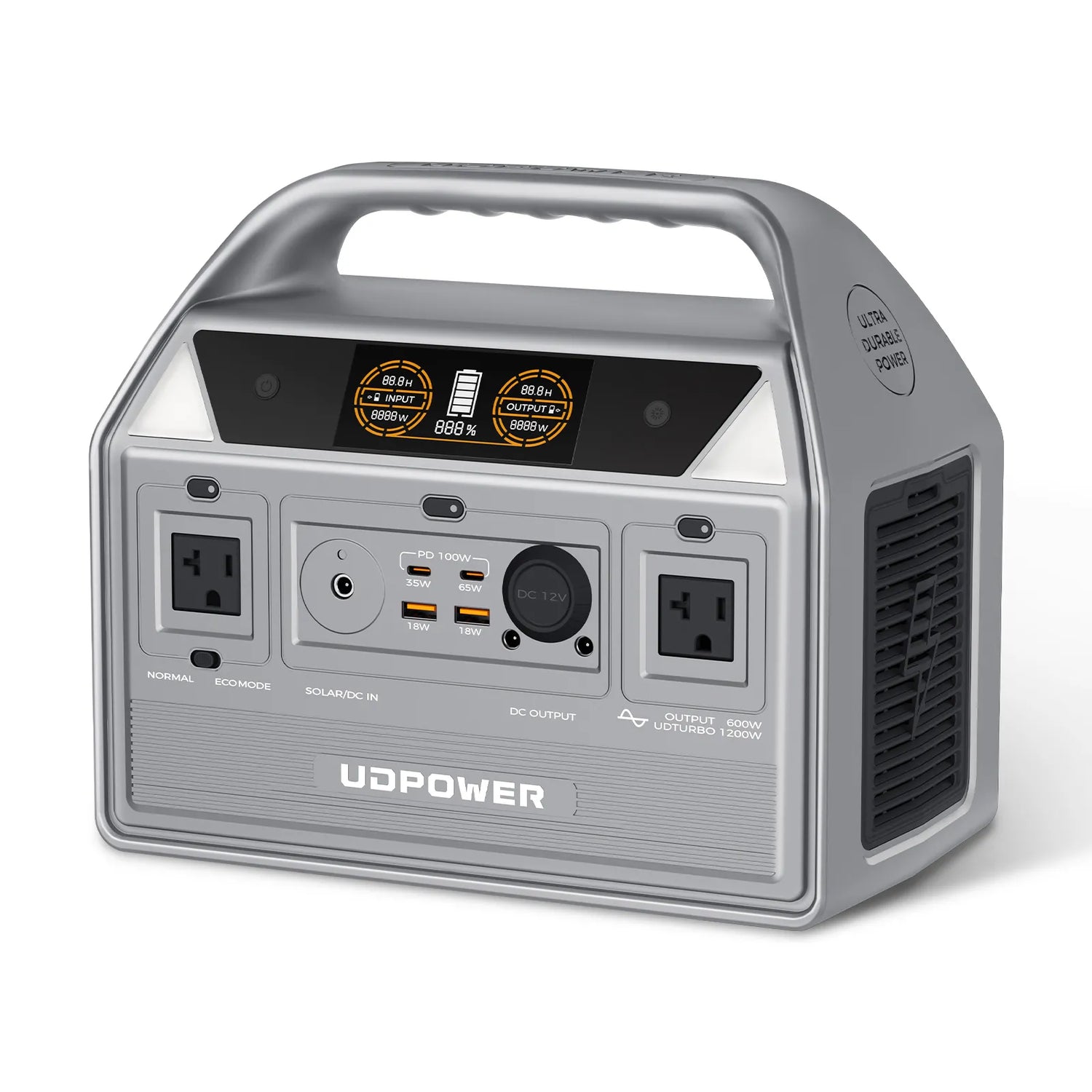
UDPOWER C600
Best for: Short outages, phone charging, internet equipment, LED lighting, and lower-wattage CPAP setups.
- 596Wh battery capacity
- 600W rated AC output
- 1,200W surge output
- Approximately 12.3 lb
- Up to 240W solar input
- LiFePO4 battery chemistry
The C600 is the easiest of these three models to carry. It works well when the priority is maintaining communication, lighting, or one smaller essential load rather than running several appliances together.
UDPOWER S1200
Best for: Refrigerator support, router and modem, CPAP, lighting, and a practical overnight essentials plan.
- 1,190Wh battery capacity
- 1,200W rated AC output
- 1,800W surge output
- Approximately 26 lb
- Five AC outlets
- Up to 400W solar input
- UPSPRIME transfer time of 10 milliseconds or less
The S1200 offers roughly twice the stored energy of the C600. It is a more practical starting point when refrigeration and overnight runtime matter.
UDPOWER S2400
Best for: Longer outages, multiple essential devices, higher appliance loads, and households that want more runtime headroom.
- 2,083Wh battery capacity
- 2,400W rated AC output
- 3,000W surge output
- Approximately 40.8 lb
- Six AC outlets
- Up to 400W solar input
- UPSPRIME transfer time of 10 milliseconds or less
The S2400 is the strongest option of the three for running several essentials or supporting larger loads. It is still important to create a load budget rather than treating it as a whole-house system.
Estimated Runtime for Common Outage Loads
A useful planning estimate is:
The table below uses a 90% planning efficiency. Real results vary with appliance cycling, startup demand, battery temperature, battery condition, cable loss, output mode, and the actual power draw measured at the power station.
| Example continuous load | Typical use | C600 596Wh |
S1200 1,190Wh |
S2400 2,083Wh |
|---|---|---|---|---|
| 20W | Efficient modem and router combination | About 26.8 hours | About 53.6 hours | About 93.7 hours |
| 40W | Lower-wattage CPAP without heated humidification | About 13.4 hours | About 26.8 hours | About 46.9 hours |
| 100W | Combined communication, lighting, and charging load | About 5.4 hours | About 10.7 hours | About 18.7 hours |
| 140W | Small essentials bundle running continuously | About 3.8 hours | About 7.7 hours | About 13.4 hours |
| 250W | Larger essentials bundle or an appliance during part of its operating cycle | About 2.1 hours | About 4.3 hours | About 7.5 hours |
For a device-by-device sizing method, read How to Know if a Portable Power Station Can Power Your Device .
You can also review the UDPOWER S1200 vs. S2400 comparison when deciding between a lighter unit and a higher-capacity outage setup.
A Better Way to Plan Around the DTE Map
Instead of asking only, “When will the power return?” match the current DTE status to a household decision. This reduces last-minute food loss, dead batteries, and unnecessary appliance use.
| DTE status situation | Planning horizon | Recommended action |
|---|---|---|
| No address estimate | Next 4 hours | Report the outage, protect food, charge communication devices, and conserve backup power. |
| Estimate later today | Through 11:59 p.m. | Plan for meals, medical equipment, work, lighting, and refrigeration through the entire day. |
| Estimate extends overnight | 12 to 24 hours | Prioritize sleeping temperature, CPAP, pets, accessibility, freezer protection, and battery capacity. |
| Estimate exceeds one day | 24 to 72 hours | Consider additional charging access, ice, relocation, medication storage, and a larger backup plan. |
| Estimate repeatedly changes | Use a conservative buffer | Do not consume the final portion of your battery based on the earliest estimate. |
The same approach is explained in more detail in What to Run First During a Power Outage .
DTE Outage Map FAQ
What is the official DTE Outage Map?
The official map is available at outage.dteenergy.com/map. It allows customers to search an address and review mapped outage information within DTE Electric's service territory.
Should I report my outage if it is already visible on the map?
Yes. DTE advises customers not to assume the utility already knows that their specific property is out. A report helps associate your service location with the outage and can provide address-specific updates.
How do I report a DTE power outage?
Use the online outage report or call 800-477-4747. Report downed wires and immediate hazards by phone, and call 911 when there is an emergency.
Why does the DTE map not show an estimated restoration time?
DTE may still be assessing damage, confirming the affected equipment, assigning crews, or determining what repairs and replacement parts are required. Large storms can make that assessment take several hours.
What does a day-only restoration estimate mean?
DTE states that when an estimate identifies a day without a specific time, restoration is expected by no later than 11:59 p.m. on that day. Plan for the full day rather than assuming service will return in the morning.
Why did my estimated restoration time change?
Estimates may change after crews discover additional damage, access problems, multiple failed components, or more complex repairs than the initial assessment indicated.
What should I do if DTE says power is restored but my home is still out?
Check your breaker only when it is safe. If the problem is not inside your home, use DTE's option to report that you are still without power. Your address may have a separate electrical problem.
Does the DTE Outage Map show every cause immediately?
Not necessarily. The cause may remain unavailable or preliminary until crews inspect the affected equipment. Early map information can be updated as field conditions become clearer.
Can I receive a DTE outage credit?
Qualifying customers may receive a $42 credit under DTE's current duration and frequency rules. Eligibility depends on the length and scale of the outage. Check DTE's official credit page for the rules that apply to your event.
Can a portable power station run a refrigerator during a DTE outage?
It can when the power station's continuous output and surge capability meet the refrigerator's actual requirements. Runtime depends on battery capacity, compressor cycling, room temperature, appliance efficiency, door openings, and other connected loads. See Can a Portable Power Station Run Your Refrigerator? for a detailed sizing guide.
Related Power Outage Guides
How This Guide Was Checked
This guide was reviewed against DTE's official outage map, outage reporting tool, address status checker, outage FAQ, contact information, and current outage credit rules. UDPOWER model specifications and product links were checked against current official UDPOWER product pages on August 5, 2026.
Build a Practical Outage Backup Plan
Start with the devices that protect health, communication, food, and safety. Then compare their actual wattage and required runtime with the battery capacity and output of the power station.
Official References
Related Articles


