





FPL Outage Map: Check Florida Power Outages, Restoration Times & Status
Quick Answer
If your power is out in Florida Power & Light territory, start with the official FPL Power Tracker. Enter your street address, city, or ZIP code, then select the outage marker for your area. Depending on the outage, FPL may show the outage report time, estimated restoration time, number of customers affected, restoration status, cause, and the time the information was last updated.
If you need the status tied to your actual service location, or your outage does not appear on the public map, use FPL's separate Report or Check an Outage system. The public Power Tracker can search by address, but FPL does not display precise property-level outage information on the map for safety and privacy reasons.
FPL says Power Tracker normally updates approximately every 15–30 minutes. During a major tropical storm or hurricane, however, the tracker may enter storm mode. In affected counties, detailed neighborhood-level information may temporarily be replaced by broader restoration information while crews assess damage.

This article is not a live outage feed. Outage numbers can change while you are reading. Use FPL's official Power Tracker or outage-status system for the latest information instead of relying on screenshots, social posts, or an old outage total.
Which FPL Outage Tool Should You Use?
One reason FPL outage searches become confusing is that the public map and the individual outage-status system do different jobs. Searching “FPL outage map,” “FPL outage status,” and “FPL outage by address” should not always lead you to the same screen.
Swipe left or right to view the full table on mobile.
| Tool | Best For | What You Can Learn | Important Limitation | Official Source |
|---|---|---|---|---|
| FPL Power Tracker | Seeing outages around an address, city, or ZIP code | Outage locations, customers affected, outage time, status, cause, and estimated restoration time when available | The public map does not reveal precise property-level outage information | FPL Power Tracker |
| FPL Web Outage System | Reporting your outage or checking an existing outage tied to your service location | More relevant individual outage-status information | Different from simply viewing nearby outage markers | FPL Outage System |
| FPL Storm Center | Hurricanes, tropical storms, and widespread severe-weather events | Storm preparation, restoration information, outage resources, and FPL storm updates | Broad storm information may be more useful than neighborhood data immediately after landfall | FPL Storm Center |
| FPL Mobile App | Checking outage information from a phone while home power is unavailable | Account and outage information on a mobile device | Your phone still needs battery power and a working cellular or internet connection | FPL Storm Center |
If FPL's website asks you to choose between FPL and FPL Northwest FL, select the region associated with your electric account before checking outage information.
How to Use the FPL Outage Map
1. Open the official Power Tracker
Go directly to the official FPL Power Tracker. This reduces the chance of confusing an unofficial crowdsourced outage map with FPL's own utility data.

2. Search your street address, city, or ZIP code
An exact street address is usually the most useful starting point because it moves the map toward your neighborhood. A city or ZIP code is better when you want a wider look at outages across the surrounding area.

3. Zoom in until individual outage markers appear
FPL uses outage icons to represent incidents. When several outages are close together, the map can group them into a cluster. Continue zooming in to separate the cluster into individual outage markers.

4. Select the outage that appears to cover your area
The information box may show when the outage was reported, the estimated restoration time, number of customers affected, current status, cause, and when the information was last refreshed.
5. Refresh if the outage was just reported
FPL says Power Tracker normally updates approximately every 15–30 minutes. A newly reported outage may therefore not appear immediately.
6. Use the individual outage-status system when needed
If you reported the outage but still cannot find useful information on the public map, check your outage through FPL's Web Outage System.
What the FPL Power Tracker Information Actually Means
Seeing an outage marker is only the first step. The useful part is knowing how to interpret the information behind it.
Swipe left or right to view the full table on mobile.
| Power Tracker Field | What It Means | How to Use It | Source |
|---|---|---|---|
| Outage reported | When the outage began or was reported to FPL | Helps you estimate how long you have already been without grid power | FPL Power Tracker FAQ |
| Estimated time of restoration | FPL's current estimate for when affected customers may have service restored | Use it as a planning estimate, not a guaranteed deadline | FPL Power Tracker FAQ |
| Customers affected | Estimated number of FPL customers associated with that outage | Shows the scale of that particular incident, not the number of people in each household | FPL Power Tracker FAQ |
| Status | The current stage of outage restoration | Look for changes after field assessment or repair activity | FPL Power Tracker FAQ |
| Cause | The known or suspected reason the outage occurred | A confirmed cause may make the restoration estimate more meaningful | FPL Power Tracker FAQ |
| Last updated | When the outage information was most recently refreshed | Check this before assuming an old ETR is still current | FPL Power Tracker FAQ |
| Cluster icon | Several outages grouped together while the map is zoomed out | Zoom in until individual outages become visible | FPL Power Tracker FAQ |
A marker near your neighborhood does not necessarily sit directly over the homes that are out. FPL explains that an outage marker represents the general location of an outage, and larger incidents can cover a wider area.
FPL Outage by Address vs. “FPL Outage Near Me”
These searches sound almost identical, but there is an important difference.
If you want to know what is happening around your neighborhood
Use Power Tracker and enter your street address. The address helps center the map on the correct area so you can see nearby outage incidents.
If you want to know whether FPL recognizes an outage at your specific service location
Use the FPL outage reporting and status system. That is more appropriate than trying to determine exact property status from the location of a public map marker.
If you only want to see outages near your current area
Search your city or ZIP code in Power Tracker and zoom in. Remember that a nearby outage does not prove that your home is attached to the same circuit or damaged equipment.
FPL specifically says the public map does not zoom all the way down to reveal outage information for an individual street address. Entering an address helps locate the neighborhood; it does not turn the public tracker into a property-level customer status page.
Why Is My FPL Outage Not Showing on the Map?
There are several possible explanations, and repeatedly refreshing every few seconds will not solve most of them.
Swipe left or right to view the full table on mobile.
| Situation | What May Be Happening | Best Next Step |
|---|---|---|
| You just reported the outage | The public map may not have completed its next update cycle | Wait approximately 15 minutes, refresh, and check your individual outage status |
| Your address is dark but no icon is directly over it | The outage marker may represent the center of a larger affected area | Check nearby markers and use the service-address outage system |
| Only your home appears to be affected | The problem may be your breaker, service connection, transformer, or other localized equipment | Check breakers safely and report the individual outage if power remains off |
| Your lights flickered briefly and came back | Power Tracker is designed for outages and does not necessarily reflect brief interruptions or flickers | Monitor for recurring power-quality problems rather than expecting a map outage marker |
| You live in a new development | Map address databases may not yet recognize a new address correctly | Try the city or ZIP and use FPL's service-specific outage system |
| A hurricane has just passed | Power Tracker may be operating in storm mode while FPL performs large-scale damage assessments | Use the FPL Storm Center and broader restoration updates as well as your outage status |
| Your electric provider is not FPL | You may be looking at the wrong utility's map | Check the utility name on your electric bill and use that provider's outage system |
If you are in a Duke Energy service area instead, use our Duke Energy outage map guide for Florida rather than FPL's tracker.
How to Read an FPL Restoration Time
The estimated time of restoration, often shortened to ETR, is one of the most useful pieces of information on an outage map. It is also one of the easiest to misunderstand.
FPL says its restoration estimate considers factors such as the cause of the outage, availability of restoration resources, and how long the repair is expected to take. The estimate can change as crews learn more about the damage.
An ETR is therefore better treated as a planning window than a promise.
Why can an FPL restoration time move later?
- The original cause turns out to involve more equipment than expected.
- Crews discover additional downstream damage after restoring a larger line.
- Flooding, debris, or unsafe conditions slow access.
- A replacement transformer, pole, conductor, or other equipment is required.
- Continuing severe weather interrupts repair work.
- Your address is part of a smaller outage hidden behind a larger outage that was repaired first.
A practical way to use the restoration estimate
The table below is a household planning framework, not an FPL promise.
Swipe left or right to view the full table on mobile.
| What You See | Reasonable Household Response | Backup-Power Strategy |
|---|---|---|
| Restoration expected within roughly 1–2 hours | Keep refrigerator and freezer doors closed and avoid unnecessary loads | Save battery capacity for phones, medical equipment, lighting, and communication |
| Restoration several hours away | Start a controlled essential-load plan | Prioritize refrigerator, CPAP, router, fan, phones, and limited lighting |
| No ETR yet | Prepare for more uncertainty instead of assuming a short outage | Reduce convenience loads and reserve enough energy for overnight needs |
| ETR keeps moving later | Recalculate food, cooling, medical-device, and charging needs | Move from “temporary backup” to an energy-budget approach |
| Hurricane storm mode | Expect broader estimates until field assessments become more detailed | Plan conservatively and assume you may need more than one recharge cycle |
What Happens to the FPL Outage Map During a Hurricane?
This is one of the most important differences between a normal afternoon outage and a major Florida hurricane.
FPL states that when a major tropical storm or hurricane affects its service territory, Power Tracker may enter storm mode. During the initial restoration phase, affected counties may not display the same real-time neighborhood-level information you would normally expect.
That does not mean FPL has stopped tracking outages. The problem is that immediately after a major storm, crews first need to assess widespread damage before detailed restoration estimates can be assigned reliably.
Swipe left or right to view the full table on mobile.
| Approximate Stage After a Major Storm | What FPL Says It Aims to Provide | What It Means for You | Official Source |
|---|---|---|---|
| As soon as practical after the storm passes | A preliminary restoration estimate using models and information from similar storms | Treat this as an early planning estimate while damage assessment continues | FPL Power Tracker FAQ |
| Within about 24 hours | Updated systemwide restoration information based on initial damage assessments | You should begin getting a clearer idea of the overall restoration timeline | FPL Restoration Priorities |
| Within about 48 hours | County-level restoration estimates | Your county should have more useful planning information than the initial statewide estimate | FPL Power Tracker FAQ |
| Within roughly 72–96 hours | More localized or sub-county restoration information | Estimates can become more relevant to the area where you actually live | FPL Power Tracker FAQ |
Large-storm restoration information becomes more specific as damage assessment moves from the system level to counties and then smaller areas.
How FPL Restores Power After a Major Storm
After a hurricane, power is not necessarily restored in the order customers lost it. FPL says its restoration strategy is designed to restore service safely to the largest number of customers as quickly as possible.
1. Power plants, transmission lines, and substations
These form the backbone of the electric system. Large sections of the distribution network cannot function until major upstream infrastructure is available.
2. Critical facilities
Hospitals, police and fire stations, water-treatment facilities, communication systems, and other critical services receive priority restoration attention.
3. Repairs that restore large groups of customers
FPL then works on infrastructure that can restore the greatest number of customers efficiently, including areas serving major roads and community services such as pharmacies, supermarkets, and gas stations.
4. Smaller neighborhoods and groups
As major sections of the grid return, crews move deeper into the distribution network and repair smaller groups of customers.
5. Localized and individual service problems
A home can remain without power even after the larger circuit has been restored if there is a damaged transformer, service line, meter equipment, or customer-owned electrical equipment.
That restoration sequence explains why an outage affecting thousands of customers may sometimes be repaired before a small outage affecting one street.
See FPL's official restoration-priority explanation for its current storm-restoration process.
Why Do My Neighbors Have Power but I Don't?
This is common enough after major storms that FPL addresses it directly.
If the house across the street has power, it may simply be connected to a different electric line. Even homes that look like they are on the same block can be supplied by different circuits or transformers.
If homes on your side of the street have power but yours does not, the problem may be more localized.
What to check
- Check your circuit breakers. A tripped main or branch breaker may prevent power from returning even though utility service is available.
- Look at the electrical service area from a safe distance. If the meter box, attached pipes, wires, or service connection are visibly bent, broken, or damaged, do not touch them.
- Use a licensed electrician when customer-owned equipment is damaged. Some repairs must be completed before the property can safely receive utility power again.
- Report the outage again if everything looks normal but the house remains dark. A smaller transformer, fuse, service line, or other localized utility problem may remain.
Stay away from the area. FPL advises customers to report dangerous conditions such as downed power lines immediately through emergency services or FPL. Never approach a downed line, especially near standing or flood water.
Florida Power Outage Action Plan: What to Do as the Hours Add Up
Knowing the FPL outage status is useful, but the map does not make decisions for your household. Your priorities should change as the outage gets longer.
Swipe left or right to view the full table on mobile.
| Outage Duration | What to Check | Power Priorities | Food & Comfort |
|---|---|---|---|
| First 15 minutes | Check breakers, nearby homes, FPL Power Tracker, and report the outage if necessary | Phones, medical equipment, emergency lighting | Keep refrigerator and freezer closed |
| 15 minutes–4 hours | Look for an FPL status update or ETR | Keep battery loads low until you understand likely outage duration | An unopened refrigerator can generally keep food cold for about four hours |
| 4–12 hours | Recheck the restoration estimate and last-update time | Refrigerator, CPAP, fan, router, phones, essential lights | Start actively managing refrigeration and cooling |
| 12–24 hours | Check whether ETR has changed or whether storm-mode updates are available | Use an energy budget instead of leaving every appliance plugged in | Use coolers or ice where necessary; limit refrigerator door openings |
| 24–48 hours | Follow county or local storm restoration information | Plan your next battery recharge rather than only watching remaining percentage | A full unopened freezer can generally hold temperature for about 48 hours |
| 48+ hours | Expect highly localized restoration conditions in heavily damaged areas | Prioritize sustainable recharging, medical needs, communication, food, and safe cooling | Follow official food-safety guidance rather than guessing whether food is safe |
FoodSafety.gov states that an unopened refrigerator keeps food cold for about four hours, while a full unopened freezer can hold temperature for approximately 48 hours, or about 24 hours if half full. See the official FoodSafety.gov emergency guidance for detailed instructions.
How Much Backup Power Do You Need During an FPL Outage?
The most useful way to size backup power is not to ask, “How big of a generator do I need?” Start with two simpler questions:
- What do I actually need to keep running?
- How many hours do I want those loads to operate before I can recharge?
For the planning examples below, we use a 90% conversion-efficiency assumption for a portable power station.
This calculation estimates energy capacity. You must also confirm that the power station's rated AC output and appliance startup requirements are compatible.
Battery capacity needed by outage length
Swipe left or right to view the full table on mobile.
| Average Essential Load | 4 Hours | 12 Hours | 24 Hours | 48 Hours | Typical Interpretation |
|---|---|---|---|---|---|
| 50W | About 222Wh | About 667Wh | About 1,333Wh | About 2,667Wh | Light communications, CPAP without heavy heated accessories, or a small fan/light setup |
| 100W | About 444Wh | About 1,333Wh | About 2,667Wh | About 5,333Wh | A measured average refrigerator load or several small essential devices |
| 150W | About 667Wh | About 2,000Wh | About 4,000Wh | About 8,000Wh | Refrigeration plus communications or medical equipment |
| 200W | About 889Wh | About 2,667Wh | About 5,333Wh | About 10,667Wh | Several household essentials running together |
The table shows why a multi-day hurricane outage is different from a two-hour thunderstorm outage. Once your energy demand extends past a day, recharging becomes as important as battery size.
A 2,000Wh-class portable station can provide a substantial emergency reserve, but it is not the same as unlimited whole-home electricity. During a long outage, managing loads and finding a safe recharge window can matter more than simply plugging in everything at once.
For a deeper explanation, see our practical guide to powering home essentials with a solar generator.
Estimated Runtime for Common Florida Outage Essentials
The estimates below use 90% conversion efficiency and assume the listed wattage is the actual average load. Real results vary with appliance cycling, startup demand, battery condition, room temperature, output method, and other devices connected at the same time.
Swipe left or right to view the full table on mobile.
| Essential Load | Planning Wattage | UDPOWER S1200 1,190Wh |
UDPOWER S2400 2,083Wh |
Outage Planning Note |
|---|---|---|---|---|
| LED emergency light | 10W | About 107.1 hours | About 187.5 hours | Lighting is a low-cost load; use efficient LEDs instead of large lamps |
| Wi-Fi router + modem | 20W | About 53.6 hours | About 93.7 hours | Your local internet infrastructure must still be operating |
| CPAP without heated humidification | 40W | About 26.8 hours | About 46.9 hours | Measure your actual CPAP setup before storm season |
| Box fan | 50W | About 21.4 hours | About 37.5 hours | A practical cooling load during warm Florida outages |
| CPAP with higher-power heated setup | 80W | About 13.4 hours | About 23.4 hours | Heated humidification and tubing can significantly increase consumption |
| Full-size refrigerator average | 100W | About 10.7 hours | About 18.7 hours | Actual refrigerators cycle on and off; a 24-hour watt-meter reading gives a better estimate |
| Refrigerator + router + fan + two LED lights | About 190W combined | About 5.6 hours | About 9.9 hours | This shows how quickly runtime falls when several essentials stay on continuously |
For refrigerator-specific calculations, read Can a Portable Power Station Run Your Refrigerator?. If someone in your household relies on PAP therapy, use our CPAP, APAP, and BiPAP backup-power guide to size the battery from actual overnight energy use.
UDPOWER Backup Power Options for Florida Outages
For an FPL outage, the right product depends more on your essential-load list and expected outage window than on the number of appliances in your home. The two S-Series options below are better suited to emergency home backup than trying to run an entire house from a small battery.
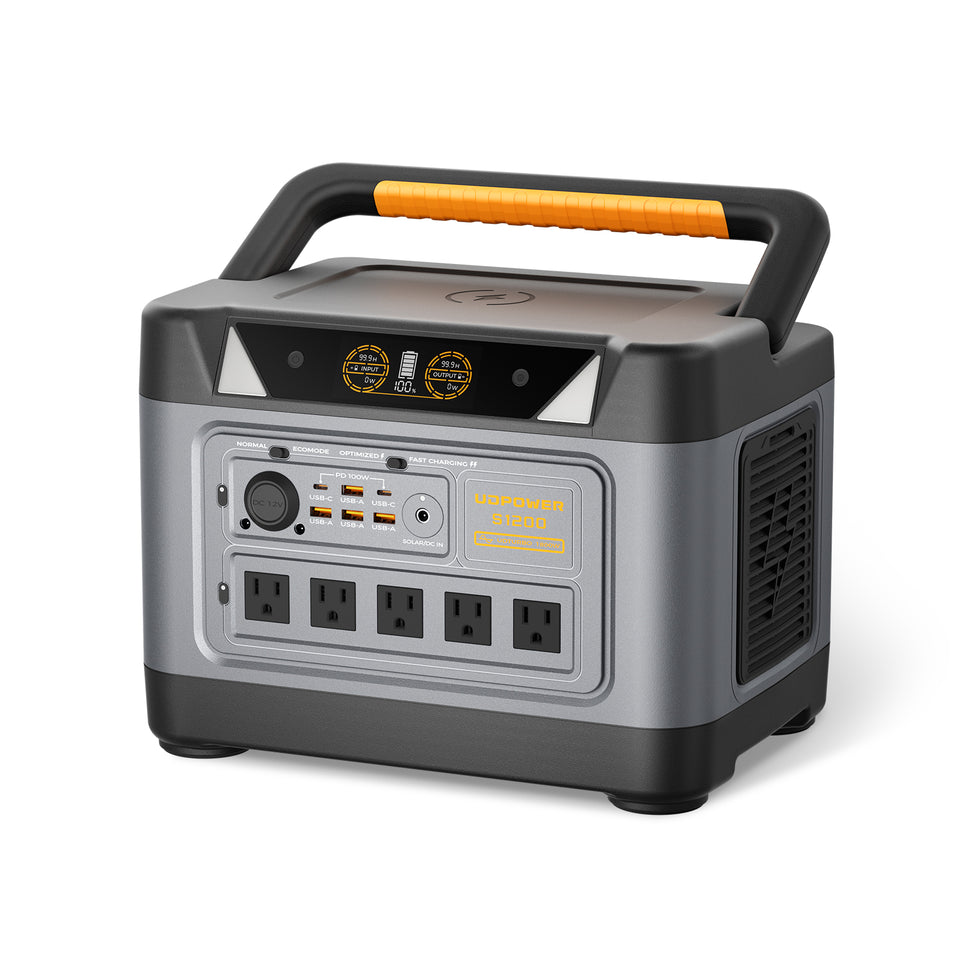
UDPOWER S1200: Practical Backup for Shorter Outages
The UDPOWER S1200 is a strong fit when your goal is to protect a smaller set of essentials rather than run an entire home.
- Battery capacity: 1,190Wh
- Rated AC output: 1,200W pure sine wave
- Battery chemistry: LiFePO4
- AC outlets: 5 on the current 5-AC model
- UPS-style switchover: under 10 ms
- Solar input: up to 400W
- Typical role: refrigerator, CPAP, fan, router, phones, lights, laptop, and other priority devices within the unit's output limits
It makes the most sense for a household that wants a portable emergency reserve for a several-hour outage, overnight medical equipment, refrigeration management, or a smaller essential-load plan.
View UDPOWER S1200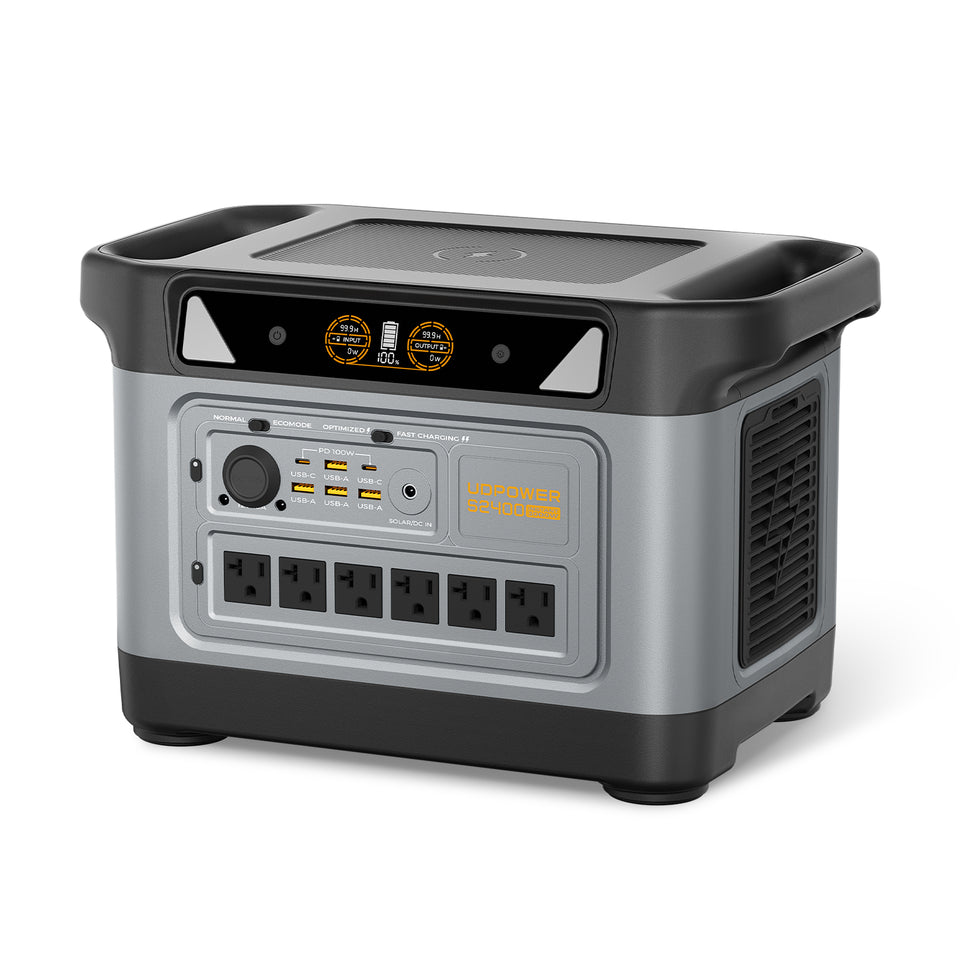
UDPOWER S2400: More Reserve for Longer Florida Outages
The UDPOWER S2400 is the better fit when you want more energy reserve, higher AC output, or several essential appliances operating from the same station.
- Battery capacity: 2,083Wh
- Rated AC output: 2,400W pure sine wave
- Battery chemistry: LiFePO4
- AC outlets: 6
- UPS-style switchover: 10 ms or less
- Solar input: up to 400W
- Typical role: refrigerator plus communications, CPAP, fans, lighting, electronics, and limited higher-power appliance use within the station's ratings
For hurricane preparation, the extra capacity is especially useful because the first restoration estimate can change while crews assess damage. A larger battery gives you more room to wait for better information before deciding when and how to recharge.
View UDPOWER S2400A larger battery only postpones the next recharge. If you are preparing for hurricane season, consider your safe daytime recharge plan as well. UDPOWER offers solar generator kits and portable solar panels for compatible setups.
How to Prepare Before the Next Florida Hurricane Outage
The official Atlantic hurricane season runs from June 1 through November 30, although tropical systems can occur outside those dates. Florida residents should treat backup power as something to prepare before a storm is near the coast, not something to figure out after the grid is already down.
See the National Hurricane Center's tropical cyclone climatology for official hurricane-season information.
48–72 hours before likely severe weather
- Charge your portable power station fully.
- Charge phones, tablets, power banks, rechargeable lights, and medical-device batteries.
- Confirm that your essential appliances actually work with your backup station.
- Measure refrigerator or medical-device energy use if you have not done so before.
- Bookmark the official FPL Power Tracker and Storm Center.
- Check that your phone can access your FPL account without relying on a desktop computer.
- Freeze water containers and gel packs to extend refrigerator and freezer cold time.
- Decide which devices will be disconnected if the outage lasts longer than expected.
When the storm arrives
- Do not wait for the battery to reach a very low percentage before reducing loads.
- Keep refrigerator and freezer doors closed as much as possible.
- Do not deploy portable solar panels outside during unsafe wind, lightning, flooding, or other dangerous conditions.
- Keep backup equipment dry, ventilated, and away from flood water.
- Use FPL's official status tools instead of relying only on neighborhood social-media reports.
After the storm
- Check whether Power Tracker is operating normally or in storm mode.
- Use FPL's restoration updates to decide whether to conserve battery or begin recharging.
- Only set up portable solar charging when weather and ground conditions are safe.
- If the neighborhood is restored but your home is not, check breakers and visible service equipment before assuming FPL's map is wrong.
For more on why thunderstorms, wind, vegetation, equipment problems, and other events can interrupt service, read Why Did Power Go Out During Storms?
One Important Florida Planning Insight: Don't Size Backup Power From the ETR Alone
It is tempting to look at an FPL restoration estimate of 8:00 p.m., calculate enough battery to make it until 8:00 p.m., and stop there. That approach leaves no margin if the estimate moves.
A better plan is to separate your loads into three levels:
Level 1: Must stay powered
Medical equipment, communication, essential lighting, and other safety-critical devices belong here.
Level 2: Protects food or basic comfort
Refrigerators, freezers, fans, internet equipment, and limited electronics generally fit here.
Level 3: Convenience loads
Televisions, gaming devices, countertop cooking appliances, coffee makers, and other optional loads should usually wait until you know the likely outage duration.
This matters because a 1,000W cooking appliance used for ten minutes consumes roughly 167Wh before conversion losses. That single short cooking session can use as much energy as many hours of phone charging or LED lighting.
During an uncertain hurricane outage, energy priority is often more important than battery percentage.
Frequently Asked Questions About the FPL Outage Map
What is the official FPL outage map?
Florida Power & Light's official outage map is called Power Tracker. You can access it through FPL Power Tracker and search by street address, city, or ZIP code.
How do I check an FPL outage by address?
Enter your street address into FPL Power Tracker to move the map to your neighborhood. For outage information tied specifically to your service location, use FPL's Web Outage System.
How often does the FPL outage map update?
FPL says Power Tracker normally updates approximately every 15–30 minutes. A newly reported outage may not appear immediately, so refresh after the next update cycle rather than assuming your report was not received.
Why isn't my FPL outage showing on the map?
The outage may be too new to appear, the marker may represent a wider area rather than your exact property, the problem may affect only a small number of customers, or Power Tracker may be in storm mode after a major weather event. Report or check your individual outage if the public map is unclear.
Does the FPL map show the exact house that is without power?
No. FPL allows you to enter a street address to locate the correct neighborhood, but says Power Tracker does not display precise street-address outage information publicly for safety and security reasons.
How do I find my FPL restoration time?
Select the relevant outage marker in Power Tracker and look for the estimated time of restoration. You can also check the status associated with your reported outage through FPL's outage-status system.
Why did my FPL restoration time change?
An ETR is an estimate based on the information available at that time. The schedule can change after crews inspect equipment, identify additional damage, encounter flooding or access problems, or determine that more repair work is required.
What happens to the FPL outage map during a hurricane?
During a major tropical storm or hurricane, FPL may place Power Tracker into storm mode. Affected counties may temporarily receive broader restoration information instead of normal real-time neighborhood details while crews perform damage assessments.
How long after a hurricane does FPL provide restoration estimates?
FPL says it aims to provide an initial broad estimate as soon as practical after the storm, update systemwide information within about 24 hours, provide county-level restoration information within about 48 hours, and more localized information within roughly 72–96 hours. Actual conditions vary by storm.
How do I report an FPL outage?
Use FPL's official online outage reporting system. You should not assume that seeing a nearby outage marker means FPL has automatically associated your individual service location with that incident.
Why does my neighbor have power when I don't?
Nearby homes can be connected to different lines or transformers. If homes around you are restored but your house remains out, safely check your breakers and visually inspect the meter and service area for obvious damage. Do not touch damaged electrical equipment. If no problem is apparent, report your outage to FPL.
Can the FPL Power Tracker show brief flickers?
Not necessarily. FPL states that Power Tracker is intended to show outages and does not track or reflect every flicker or brief power interruption.
What size portable power station is useful for an FPL outage?
It depends on your average wattage and desired runtime. A roughly 1,000–1,200Wh class station can be practical for shorter essential-load backup, while a roughly 2,000Wh class unit provides more room for refrigeration, CPAP equipment, fans, communications, and longer outages. Calculate your actual loads instead of choosing capacity from the number of appliances alone.
Can a portable power station run a refrigerator during a Florida outage?
Yes, if the power station can handle both the refrigerator's running demand and startup requirements. Runtime depends heavily on the refrigerator's actual average energy use. A watt-meter measurement over 24 hours is usually more useful than relying only on the compressor's nameplate wattage.
Should I rely on solar charging during a hurricane?
No. Fully charge your backup battery before severe weather arrives. Portable solar can be useful for recharging after the storm when conditions are safe and adequate sunlight is available, but clouds, rain, debris, flooding, and high winds can reduce or prevent safe solar charging when you need it most.
Official Resources Used in This Guide
Build Your Florida Outage Backup Plan Before the Next Storm
Do not wait until Power Tracker turns red around your neighborhood to find out how long your refrigerator, CPAP, router, or fan will run. List your essential loads, calculate the energy you need, and choose a backup system with enough reserve for changing restoration estimates.
View Portable Power Stations View Solar Generator Options Get the Home Backup Sizing GuideEditorial note: UDPOWER is not affiliated with Florida Power & Light Company. Live outage locations, restoration estimates, and utility status should always be confirmed through FPL's official services. Runtime figures in this guide are planning estimates and actual performance varies with appliance load, cycling, startup demand, temperature, battery condition, and operating conditions.
Related Articles


