Portable Power Station vs UPS for Home Backup (Which One Do You Need?)
ZacharyWilliamPortable Power Station vs UPS for Home Backup: Which One Do You Actually Need?
Latest updated: May 26, 2026 · Written for U.S. homeowners, renters, remote workers, and emergency-preparedness buyers
When people search for “battery backup,” they often mean two very different problems: keeping sensitive electronics from rebooting and running essentials for hours when the outage lasts longer than a few minutes. A UPS and a portable power station both use batteries, but they are not interchangeable in every situation.
Quick answer: choose a UPS for no-reboot protection, choose a portable power station for runtime
A UPS is best for short power blips, desktop computers, routers, modems, NAS devices, and anything that must stay on without even a brief interruption. A portable power station is better for longer outages, larger batteries, multiple devices, solar recharging, and practical home essentials such as lights, phones, fans, CPAP, Wi-Fi gear, and refrigerator cycling.
For many homes, the best setup is not “UPS or power station.” It is a small UPS for the devices that cannot reboot, plus a portable power station for the hours that follow.

UPS vs portable power station: the real difference
A UPS is built around continuity. It sits between the wall outlet and your electronics, watches the incoming power, and switches to its battery when utility power drops. That is why people use UPS units for desktops, network equipment, security systems, and small office gear.
A portable power station is built around usable energy. It gives you a much larger watt-hour battery, AC outlets, DC ports, USB ports, and often solar input. It is usually much better for a real outage plan because you can choose what to run, move it around the home, recharge phones and laptops directly, and power essential loads for hours instead of minutes.
| Feature | UPS | Portable power station | What it means at home | Source |
|---|---|---|---|---|
| Main job | Prevent shutdowns and reboots during short outages or voltage events. | Store more energy and power devices for longer outages. | UPS = continuity. Power station = runtime. | ENERGY STAR UPS overview |
| Typical runtime goal | Usually enough time to ride out a brief blip or shut equipment down safely. | Hours for small loads; longer with careful load management and recharging. | Do not buy a small UPS expecting it to behave like a large home battery. | UDPOWER runtime calculator |
| How sizing is shown | VA and watts. The watt rating matters for the load you can support. | Watt-hours for capacity and watts for output. | For UPS, check VA and W. For power stations, check Wh and W. | Eaton VA vs watts guide |
| Best load type | Router, modem, ONT, desktop, NAS, small switch, security hub. | Phones, lights, fans, laptops, CPAP, Wi-Fi gear, small appliances, refrigerator cycling. | Use the UPS for gear that cannot blink. Use the power station for the rest of the outage. | Keep Wi‑Fi running during an outage |
| Recharging options | Usually wall charging only. | Wall charging, car charging, generator charging, and solar charging on compatible models. | Solar input matters when outages last beyond one battery cycle. | Solar recharging during an outage |
| Portability | Usually stays beside a desk or router. | Designed to move around the home, garage, RV, campsite, or work area. | One power station can serve several needs if you prioritize loads. | Portable power stations |
Important nuance: Some portable power stations include UPS-style backup mode, but sensitive equipment can still vary. Test your actual router, desktop, NAS, or security system before relying on any backup setup during a real outage.
Which one should you buy? Use the problem, not the product name
The easiest way to decide is to start with the thing that goes wrong during your outage. A five-second blink and a five-hour outage are different problems.
| Your situation | What usually goes wrong | Best first choice | Better long-term setup | Why |
|---|---|---|---|---|
| Your router or modem reboots during short blips. | Internet drops even though the outage is brief. | UPS | UPS for no-reboot protection, power station for longer runtime. | The UPS solves the blink. The power station solves the long outage. |
| You work from home and cannot lose a video call. | Desktop, monitor, router, or modem resets. | UPS | UPS for network/desktop + power station for laptop, lights, and backup charging. | You need continuity first, then endurance. |
| You want phones, lights, fan, laptop, and Wi‑Fi for several hours. | Small devices run out of charge while the outage continues. | Portable power station | Power station sized by watt-hours and load priority. | Runtime depends on Wh capacity, not just outlet count. |
| You want to protect food during a long outage. | Fridge warms up; you start opening doors and guessing. | Portable power station | Power station + food safety plan + thermometer + cooler/ice plan. | Food safety is about temperature and time, not powering the fridge nonstop. |
| You have a NAS, desktop workstation, or security recorder. | Data corruption or abrupt shutdown. | UPS | UPS with enough watt rating and safe shutdown settings. | A dedicated UPS is still the safer tool for sensitive electronics. |
| You are preparing for storm season or multi-hour outages. | You need a practical “essential loads” plan. | Portable power station | Power station + optional small UPS for critical no-reboot devices. | Most households need energy management more than whole-home backup. |
Common home backup loads and realistic runtime expectations
Most outage plans fail because people try to power everything at once. A better approach is to build tiers. Start with communication and safety, then add comfort, then add food protection or medical equipment based on your household.
| Priority tier | Example load | Typical watts to plan around | UPS fit? | Power station fit? | Planning note |
|---|---|---|---|---|---|
| Tier 1: communication | Modem/ONT + router | 15–35W | Excellent for no-reboot protection. | Excellent for longer runtime. | Keep the network load separate from large appliances. |
| Tier 1: safety | LED lamps, phone charging, radio | 10–60W | Not the best use of a UPS. | Excellent. | Direct USB charging is usually more efficient than using AC adapters for every small device. |
| Tier 2: work | Laptop + router + one light | 45–90W | Good for short continuity. | Excellent for hours of work. | A laptop already has a battery, so prioritize router/ONT continuity first. |
| Tier 2: sleep/comfort | CPAP without heated humidifier, small fan | 30–70W | Useful if no interruption is required. | Excellent if sized properly. | Measure your exact device; heated humidifiers can change the math. |
| Tier 3: food | Refrigerator cycling | 60–150W average, higher startup surge | Poor fit for most small UPS units. | Good with enough output and surge headroom. | Use a thermometer and avoid opening doors. Do not run the fridge constantly if you only need burst cooling. |
| Tier 4: high draw | Microwave, kettle, coffee maker, toaster, space heater | 700–1,800W+ | Usually poor fit. | Only with a high-output model and short runtime expectations. | Heating loads drain batteries quickly. Use them briefly or avoid them during an outage. |
For a complete priority-load workflow, pair this article with UDPOWER’s what to run first during a power outage guide and the 24/48/72-hour power outage checklist.
How to size a UPS without overbuying
UPS shopping gets confusing because many models advertise VA first. VA is not the same as usable watts. For a home office or network closet, look for the UPS model’s watt rating and runtime chart, then add margin.
Common choices are modem/ONT, router, desktop computer, NAS, security recorder, and a small switch. Do not add lamps, phone chargers, fans, or kitchen devices to the UPS unless there is a real no-reboot reason.
Use a plug-in watt meter when possible. If you only have adapter labels, treat them as a rough ceiling, not a perfect runtime estimate.
A practical rule is to keep your load comfortably below the UPS watt rating. Eaton’s UPS sizing guidance recommends capacity above the protected load, with margin for growth. For typical home use, that means a 120W critical load should not be paired with a tiny UPS that is already near its limit.
| UPS use case | Devices to include | Devices to leave off | What to check before buying | Source |
|---|---|---|---|---|
| Network continuity | Modem/ONT + router + maybe small switch | TV, desktop monitor, printer, speakers | Runtime at your measured watts and whether outlets are battery-backed. | UDPOWER Wi‑Fi outage guide |
| Desktop safe shutdown | Desktop tower + one monitor + router if needed | Laser printer, heater, mini fridge, gaming accessories | UPS watt rating, USB shutdown support, sine wave needs, runtime chart. | Eaton UPS sizing guide |
| NAS/security recorder | NAS/NVR + network gear | Large displays and nonessential chargers | Shutdown compatibility, voltage regulation, battery replacement cost. | ENERGY STAR UPS criteria |
Do not treat a UPS as a whole-home battery. A UPS protects selected electronics. If you need multi-hour power for lights, phones, fans, CPAP, food protection, or a longer internet plan, switch your thinking from VA to watt-hours.
How to size a portable power station for home backup
Power stations are easier to size because the math matches how people use power during an outage:
Estimated runtime = battery capacity in Wh × 0.90 ÷ device watts
For UDPOWER runtime planning, this article uses 90% conversion efficiency. Real runtime can change with temperature, device cycling, inverter self-consumption, battery age, and how many ports are active.
Runtime table: common loads on UDPOWER C600, S1200, and S2400
The numbers below are estimates for planning. For refrigerators, the average wattage depends heavily on compressor cycling, room temperature, door opening, and appliance age.
| Example load | Planning watts | UDPOWER C600 596Wh × 90% |
UDPOWER S1200 1,190Wh × 90% |
UDPOWER S2400 2,083Wh × 90% |
Best use |
|---|---|---|---|---|---|
| Router + modem/ONT | 20W | About 26.8 hours | About 53.6 hours | About 93.7 hours | Internet, alerts, work-from-home basics |
| Network gear + mesh/switch | 35W | About 15.3 hours | About 30.6 hours | About 53.6 hours | Larger Wi‑Fi setups |
| Laptop + router + LED light | 65W | About 8.3 hours | About 16.5 hours | About 28.8 hours | Remote work during outages |
| CPAP without heated humidifier | 40W | About 13.4 hours | About 26.8 hours | About 46.9 hours | Overnight medical comfort planning |
| Small fan | 50W | About 10.7 hours | About 21.4 hours | About 37.5 hours | Warm-weather comfort |
| TV + router | 110W | About 4.9 hours | About 9.7 hours | About 17.0 hours | News, alerts, short entertainment windows |
| Refrigerator cycling average | 80W | About 6.7 hours | About 13.4 hours | About 23.4 hours | Food protection with door discipline and thermometer checks |
| High-draw appliance | 1,000W | About 0.5 hours | About 1.1 hours | About 1.9 hours | Short, intentional use only |
Use the UDPOWER Portable Power Station Runtime Calculator to estimate your own devices, then build a priority list with Portable Power Station Runtime Planning for Outages.
The best home backup setup: continuity first, runtime second
Most homes do not need one oversized device trying to do everything. A cleaner plan is to split your backup into two jobs.
Put the modem/ONT, router, desktop, NAS, or security recorder on a properly sized UPS. This protects against short power blips and gives sensitive devices time to stay online or shut down cleanly.
Use the power station for longer runtime: phones, lights, fan, laptop, CPAP, small appliances, and timed refrigerator cycling. Keep the load small and deliberate.
If your outage risk is 24–72 hours, add a recharge plan. That may be wall charging before a storm, car charging, generator charging where safe, or solar panels matched to the station’s input range.
| Home setup | UPS role | Power station role | Who it fits | Useful UDPOWER guide |
|---|---|---|---|---|
| Apartment essentials | Router/modem no-reboot protection. | Phones, lights, laptop, fan, CPAP if needed. | Renters who cannot use a gas generator. | 24/48/72 outage checklist |
| Remote worker setup | Desktop/network continuity. | Laptop charging, lighting, longer Wi‑Fi runtime. | Work-from-home users in areas with brief blips and longer outages. | Wi‑Fi runtime guide |
| Food protection setup | Usually not needed for the fridge itself. | Timed refrigerator cycling and small kitchen essentials. | Homes that mainly worry about food spoilage. | Food safety during power outages |
| Storm-season prep | Critical electronics only. | Priority loads plus solar or scheduled recharge. | Households planning beyond the first night. | Solar recharging during an outage |
Avoid wasteful battery stacking. Plugging a UPS into a power station can work in some setups, but it can also waste energy through multiple conversions. For sensitive electronics, test the whole chain under real conditions before an outage. For long runtime, keep the load as direct and simple as possible.
Recommended UDPOWER portable power stations for home backup
These recommendations are based on the backup job, not just the product size. Always match your appliance running watts, startup surge, and runtime goal before buying.
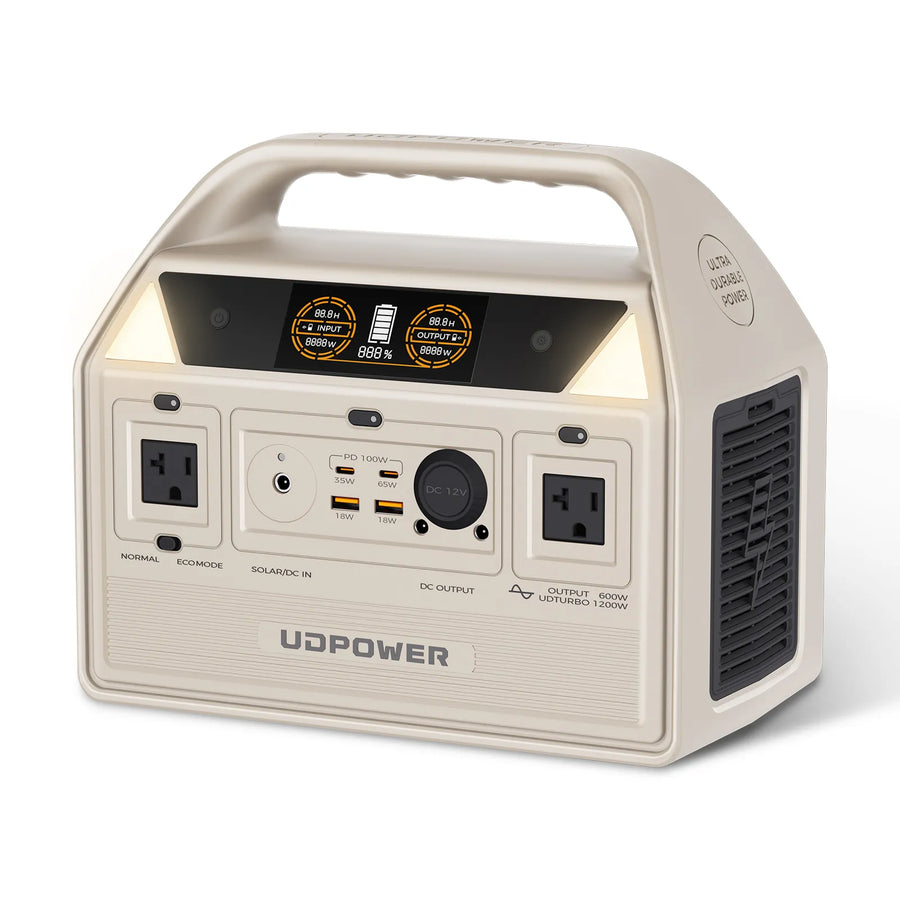
UDPOWER C600 — best for small essentials and quiet backup
The C600 is the practical choice for low-to-moderate loads: router, modem, phones, laptop, LED lights, small fan, camera batteries, and short appliance use. It is not the model to choose if your main goal is a no-reboot UPS for sensitive desktop equipment, but it is a strong portable battery for longer small-load runtime.
- Capacity: 596Wh LiFePO4
- AC output: 600W rated, 1200W peak
- Ports: 2 AC outlets, USB-C, USB-A, and 12V car outlet
- Weight: about 12.3 lbs
- Best fit: router, laptop, phones, lights, fan, small camping/home essentials
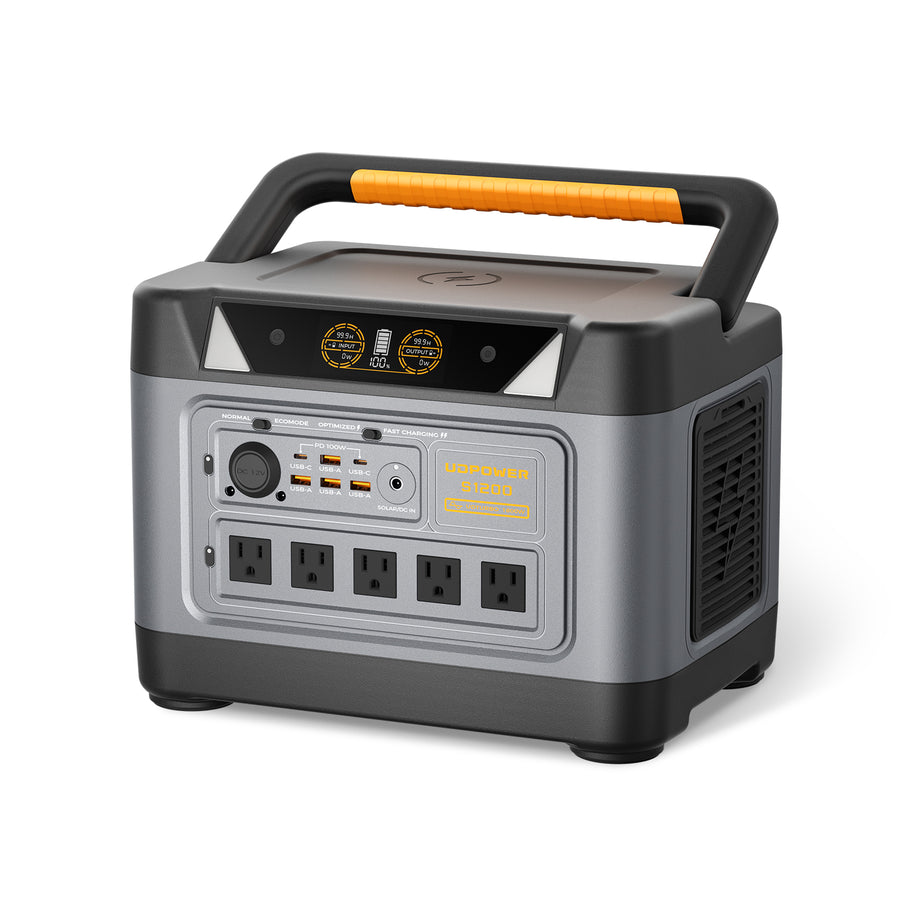
UDPOWER S1200 — best all-around home backup size for essentials
The S1200 is the better fit when you want one portable station for a serious essentials plan: Wi‑Fi, phones, lights, laptop, fan, CPAP, and timed refrigerator cycling. UDPOWER lists <10ms UPSPRIME switching on the S1200, so it can help with brief interruptions for many essential devices, but you should still test your exact equipment before relying on it for sensitive electronics.
- Capacity: 1,190Wh LiFePO4
- AC output: 1,200W rated pure sine wave, UDTURBO up to 1,800W surge
- UPS feature: <10ms UPSPRIME technology listed by UDPOWER
- Ports: 5 AC outlets + 10 DC outputs
- Weight: about 26.0 lbs
- Best fit: core home essentials, Wi‑Fi runtime, fridge cycling, CPAP planning, work-from-home backup
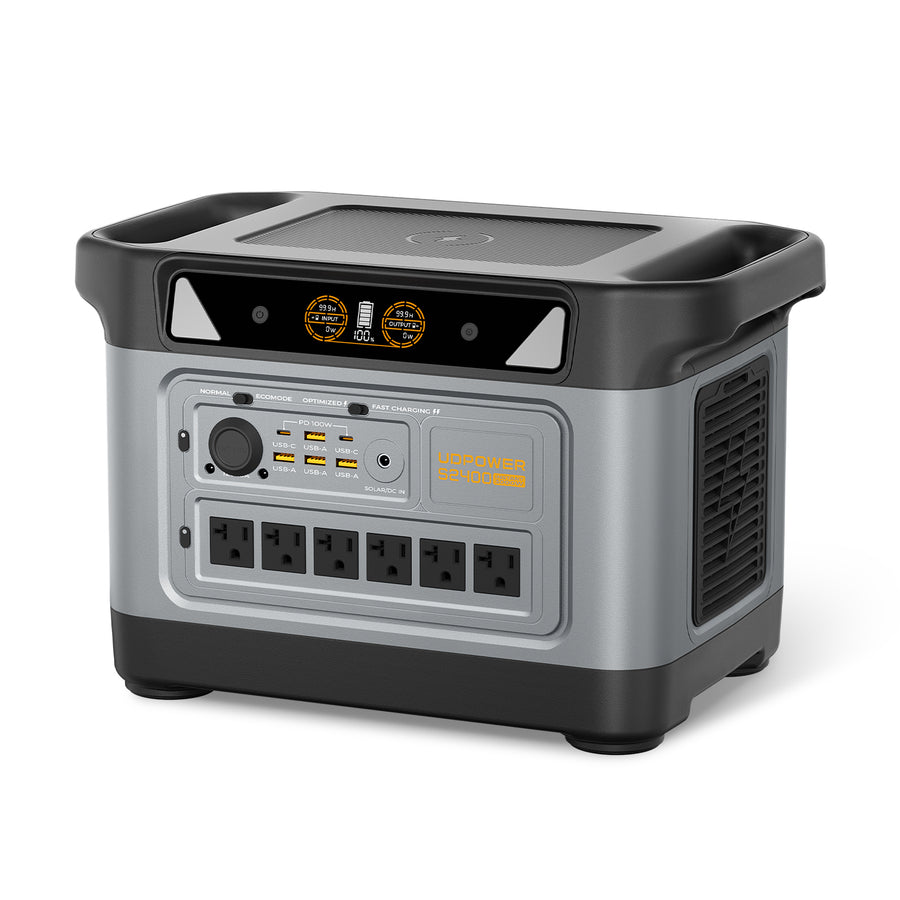
UDPOWER S2400 — best for larger backup loads and longer runtime
The S2400 is the strongest fit when you want more headroom for refrigerator cycling, kitchen appliances used briefly, multiple devices, or a more comfortable 24-hour backup plan. UDPOWER lists 2,083Wh capacity, 2,400W pure sine wave AC output, up to 3,000W surge support, six AC outlets, and UPSPRIME switchover time ≤10ms.
- Capacity: 2,083Wh LiFePO4
- AC output: 2,400W pure sine wave, UDTURBO surge up to 3,000W
- UPS feature: UPSPRIME response time ≤10ms
- Ports: 6 AC outlets + 10 DC outputs, including USB-C up to 100W and wireless charging
- Solar input: 12–50V, 10A max, up to 400W solar input
- Weight: about 40.8 lbs
- Best fit: longer outages, larger essentials, refrigerator strategy, storm-season backup, RV/camping crossover use
| Model | Capacity | Output | UPS-style feature | Best home backup role | Official product page |
|---|---|---|---|---|---|
| UDPOWER C600 | 596Wh | 600W rated, 1200W peak | Not positioned as the primary UPS choice; use as portable runtime backup. | Small essentials, lights, laptop, phones, router runtime after outage starts. | C600 specs |
| UDPOWER S1200 | 1,190Wh | 1,200W rated, 1,800W surge | <10ms UPSPRIME listed by UDPOWER. | Balanced home essentials and longer Wi‑Fi/CPAP/fridge-cycling plan. | S1200 specs |
| UDPOWER S2400 | 2,083Wh | 2,400W rated, 3,000W surge | UPSPRIME response time ≤10ms listed by UDPOWER. | Larger essentials, longer runtime, refrigerator strategy, higher-watt devices used briefly. | S2400 specs |
Safety, food, and whole-home limits people often miss
1. Indoor safety is a major reason people choose power stations
Portable power stations are battery-based and do not burn gasoline while operating, so they are suitable for many indoor backup scenarios when used within the manual’s limits. Gas generators are different: Ready.gov advises using generators outdoors and at least 20 feet away from windows, doors, and attached garages.
2. Food safety is not just a runtime problem
The FDA says refrigerated food can remain safe for about 4 hours during a power outage if the doors stay closed, and perishable refrigerated food should be discarded if it has been above 40°F for 4 hours or more. That means a good fridge plan includes a thermometer, door discipline, a cooler/ice plan, and timed power cycling—not just a battery.
3. Do not assume a portable power station is a whole-house system
Most portable power stations are designed to power devices directly from their outlets. UDPOWER stations provide standard 120V AC output for compatible loads; they are not automatically 240V whole-home backup systems. Any transfer switch or home wiring setup should be reviewed and installed by a licensed electrician.
4. High heat loads drain batteries fast
Space heaters, kettles, hair dryers, microwaves, and toasters can consume hundreds or thousands of watts. Even when a high-output station can run them, runtime can drop quickly. During an outage, use high-draw appliances briefly and intentionally.
5. Test before the outage
Do one full test with your real devices: router, modem/ONT, laptop, CPAP, fridge, fan, or lights. Write down the wattage and runtime. Label the cords. Put the setup in your outage checklist. The best backup system is the one your household can use calmly in the dark.
Build your backup plan before the next outage
If your problem is short power blips, start with a UPS for the devices that cannot reboot. If your problem is a multi-hour outage, choose a portable power station by watt-hours, output watts, and the devices you actually need to run.
For most homes, a small UPS plus a UDPOWER portable power station gives the cleanest balance: no-reboot protection for sensitive electronics and practical runtime for the rest of the outage.
View UDPOWER portable power stations Use the runtime calculatorFAQ
Can a portable power station replace a UPS?
Sometimes for basic backup, but not always for sensitive electronics. A dedicated UPS is still the safer first choice when your main goal is preventing a desktop, NAS, router, modem, or security recorder from rebooting. A portable power station is better when your main goal is longer runtime and more flexible home backup.
Is a UPS or portable power station better for a router?
For short power blips, a UPS is usually the simplest way to keep a router and modem from rebooting. For hours of Wi‑Fi runtime, a portable power station gives you more usable energy. Many homes use both: UPS for no-reboot protection, power station for longer runtime.
Is a portable power station safe to use indoors?
Yes, when used within the product manual’s limits, kept dry and ventilated, and not overloaded. Unlike a gas generator, a battery power station does not run an engine indoors. Still, avoid blocking vents, using damaged cables, exceeding output ratings, or charging outside the allowed temperature range.
How big of a portable power station do I need for home backup?
Start with the wattage of your priority devices, then calculate runtime: capacity in Wh × 0.90 ÷ load watts. For small essentials, a 596Wh model may be enough. For a stronger home essentials plan, 1,000Wh to 2,000Wh+ gives more room for Wi‑Fi, lights, laptop, CPAP, fan, and timed refrigerator cycling.
Can a power station run a refrigerator?
Yes, if the refrigerator’s running watts and startup surge are within the station’s output limits. Runtime depends on the fridge’s average wattage, compressor cycling, room temperature, door openings, and battery capacity. For food safety, use a thermometer and avoid unnecessary door opening.
Should I plug a UPS into a portable power station?
Only after testing your exact setup. It can help preserve no-reboot protection for sensitive electronics, but it may waste energy through extra AC conversion and charging behavior. For small network loads, a dedicated UPS plus a separate power station plan is often cleaner.
What should I power first during an outage?
Start with communication and safety: phone charging, lights, modem/ONT, router, and any medical device your household depends on. Then add comfort loads such as a fan or laptop. Add refrigerator cycling with a food-safety plan instead of running high-draw appliances continuously.
Do I need solar panels for home backup?
Not for every outage. If your outages are short, pre-charging the station may be enough. If you plan for 24–72 hours, solar can extend runtime when weather and sunlight cooperate. Always match solar panel voltage, current, connector, and wattage to the power station’s input limits.