
Volts vs Amps: What Actually Matters When You Plug In, Charge Up, or Size a Power Station
Volts and amps are often confused, but they do very different jobs. This guide explains how voltage, current, watts, and watt-hours work together, how to read power labels correctly, and how to use those numbers when choosing a charger, battery setup, or portable power station.
Most people do not get into trouble because they forgot the definition of voltage. They get into trouble because they buy the wrong adapter, compare amps across different voltages, or assume a big amp number automatically means “more power.” This guide fixes that in plain English.
You will learn what volts and amps really mean, how they work together, how to read a device label in seconds, and how to use those numbers when choosing a charger, a battery setup, or a portable power station.

Quick answer
Volts are the electrical push. Amps are the amount of current flowing. Neither number tells the full story by itself.
Amps = Watts ÷ Volts
Volts = Watts ÷ Amps
That means a device using 120 watts can get that power in more than one way:
- 120V × 1A = 120W
- 24V × 5A = 120W
- 12V × 10A = 120W
The power is the same. The voltage-current mix is different.
What volts and amps actually mean
Volts
Voltage tells you how hard electricity is being pushed. In everyday conversation, it is the number that must match first. If your device wants 12V and you feed it 24V, that is a bad day. Too much voltage is the fastest way to damage electronics.
Amps
Amperage tells you how much electrical current is moving. Think of it as the amount of flow available or being drawn. A device pulls the current it needs when the voltage is correct and the power source can safely supply it.
What matters more in practice?
When you are matching a charger, adapter, battery, inverter, or portable power station, match voltage first. Then make sure the power source can supply enough current and enough total wattage for the load.
Reference basis: NIST SI units, NIST ampere introduction, and U.S. DOE Electricity 101.
How volts and amps work together
Volts and amps are not competitors. They work together to produce power.
That is why a spec sheet that only shows amps can be misleading. Five amps at 5V is not the same thing as five amps at 120V.
| Example | Voltage | Current | Power | What it feels like in real life |
|---|---|---|---|---|
| USB charger | 5V | 3A | 15W | Phone charging territory |
| USB-C PD laptop charger | 20V | 3.25A | 65W | Common for office laptops |
| Household outlet device | 120V | 1A | 120W | More than enough for routers, TVs, and small electronics |
| Microwave on a U.S. outlet | 120V | 10A | 1200W | Now you are in serious appliance range |
The punch line: amps only make sense when you know the voltage too.
If you want to go one step further, UDPOWER’s AC vs. DC voltage guide helps connect this concept to the outlets, ports, and battery systems you actually use.
Same power, different voltage and current mix
This is the part many “volts vs amps” articles barely explain, even though it is one of the most useful ideas for normal buyers.
If the wattage stays the same, raising voltage lowers current. Lowering voltage raises current.
| Power target | At 12V | At 24V | At 120V | Why it matters |
|---|---|---|---|---|
| 60W | 5A | 2.5A | 0.5A | Low-voltage systems need much higher current for the same work |
| 120W | 10A | 5A | 1A | Why the same appliance can look “amp-heavy” on 12V DC but modest on 120V AC |
| 600W | 50A | 25A | 5A | High current demands thicker wiring and more attention to losses |
| 1200W | 100A | 50A | 10A | This is why big loads are usually discussed in watts, not just amps |
Practical background: DOE electricity grid basics explains that for the same power, higher voltage reduces current.
How to read a device label without overthinking it
When you check a label, work in this order:
- Look for voltage first. That tells you compatibility.
- Look for amps or watts next. That tells you how much power the device may need.
- If you only have volts and amps, calculate watts.
| Label you might see | What it means | Quick math | Plain-English takeaway |
|---|---|---|---|
| 12V ⎓ 5A | 12-volt DC device drawing up to 5 amps | 12 × 5 = 60W | You need a 12V source that can safely deliver at least 5A |
| 120V ~ 1.5A | 120-volt AC appliance drawing about 1.5 amps | 120 × 1.5 = 180W | It is a light-to-moderate household load |
| 100-240V ~ 50/60Hz 1.5A Max | Power supply accepts worldwide AC input | Not a fixed everyday draw | This is usually an adapter input range, not proof the device constantly pulls 1.5A |
| 65W | Only wattage is shown | Amps depend on voltage | At 120V, that is about 0.54A; at 20V, that is about 3.25A |
Fast shortcut
If a device label gives you watts, you can usually stop there for power-station shopping. If it only gives you volts and amps, turn it into watts first. That is the number you will compare against the station’s AC or DC output rating.
Helpful next reads: How do you know if a portable power station can power your device?, the Battery & Power Unit Conversion Tools, and UDPOWER’s runtime calculator.
Mistakes people make all the time
| Mistake | Why it is wrong | Better way to think about it |
|---|---|---|
| “This one has more amps, so it is more powerful.” | Amps alone do not tell you power unless voltage is the same. | Compare watts, or compare volts and amps together. |
| “A 20A circuit means my device uses 20A.” | The circuit rating is the limit of the circuit, not the device’s normal draw. | Check the appliance label for actual watts or amps. |
| “My adapter says 3A, but the device only needs 2A, so that is dangerous.” | If the voltage is correct and polarity/connector are correct, extra current capacity is not the problem. Wrong voltage is. | Match voltage first. Then make sure the supply can provide enough current. |
| “This battery says 100Ah, so I know how long it will run everything.” | Amp-hours are not enough by themselves unless voltage is also known. | Convert capacity to watt-hours for fair comparison. |
| “Low amps means long runtime.” | Runtime depends on energy capacity and actual load, not a single amp number floating by itself. | Think in watts for draw and watt-hours for runtime. |
Volts vs amps vs watts vs watt-hours
This is where buyers finally stop mixing up how hard, how much flow, how much power, and how much stored energy.
| Term | What it tells you | What question it answers | Example |
|---|---|---|---|
| Volts (V) | Electrical push | Is this source compatible? | 12V car accessory, 120V wall outlet |
| Amps (A) | Current flow | How much current is being supplied or drawn? | 5A DC load, 1A AC device |
| Watts (W) | Real-time power use | Can the station run it right now? | Router 12W, microwave 1200W |
| Watt-hours (Wh) | Stored energy | How long can it run? | 596Wh, 1190Wh, 2083Wh |
If you are comparing batteries or portable power stations, watt-hours are usually more useful than amp-hours because watt-hours already include voltage in the story.
Useful tools and explainers from UDPOWER:
How this helps you choose a portable power station
When shopping for a power station, do not start with amps. Start with this checklist:
- Match the output type and voltage. AC appliance, USB-C device, 12V car device, or DC barrel input all behave differently.
- Check running watts. This tells you whether the station can keep the device on.
- Check surge needs. Fridges, pumps, and tools often need extra startup power.
- Check watt-hours. This tells you how long the station can run that load.
| Device | Typical power | At 120V | What to care about most |
|---|---|---|---|
| Wi-Fi router | 10–15W | About 0.08–0.13A | Runtime, not surge |
| Laptop charger | 45–100W | About 0.38–0.83A | Right port and enough runtime |
| CPAP | 30–65W | About 0.25–0.54A | Runtime and output compatibility |
| Mini fridge | 60–120W running | About 0.5–1A running | Running watts plus startup surge |
| Microwave | 900–1500W | About 7.5–12.5A | High AC output and realistic runtime expectations |
For practical planning, these UDPOWER guides pair especially well with this article: what to run first during an outage, runtime planning for outages, how to keep Wi-Fi running during a power outage, and CPAP battery backup planning.
UDPOWER picks by real-world use
Below, the important numbers are not just volts or amps. They are the full picture: capacity, output, battery chemistry, and use case. All specs below are based on UDPOWER official product pages.

UDPOWER C400
256Wh400W rated outputUp to 800W peakLiFePO4
If your world is routers, phones, cameras, laptops, LED lights, and other small essentials, the C400 is the easy entry point. It is small enough to stay useful instead of becoming a “garage-only” backup.
- Official capacity: 256Wh
- Official AC output: 400W rated, up to 800W peak in UD-TURBO mode
- Official solar input: up to 150W
- Best fit: short outages, car kit, compact camping, light electronics

UDPOWER C600
596Wh600W rated output1200W peakLiFePO4
The C600 is where “small backup” starts to feel much more practical. It is still portable, but the extra capacity gives you far less stress for overnight basics and longer device rotations.
- Official capacity: 596Wh
- Official output: 600W rated, 1200W peak
- Best fit: laptops, cameras, small fridges, travel power, lighter home backup
- Helpful when you care about runtime more than ultra-small size
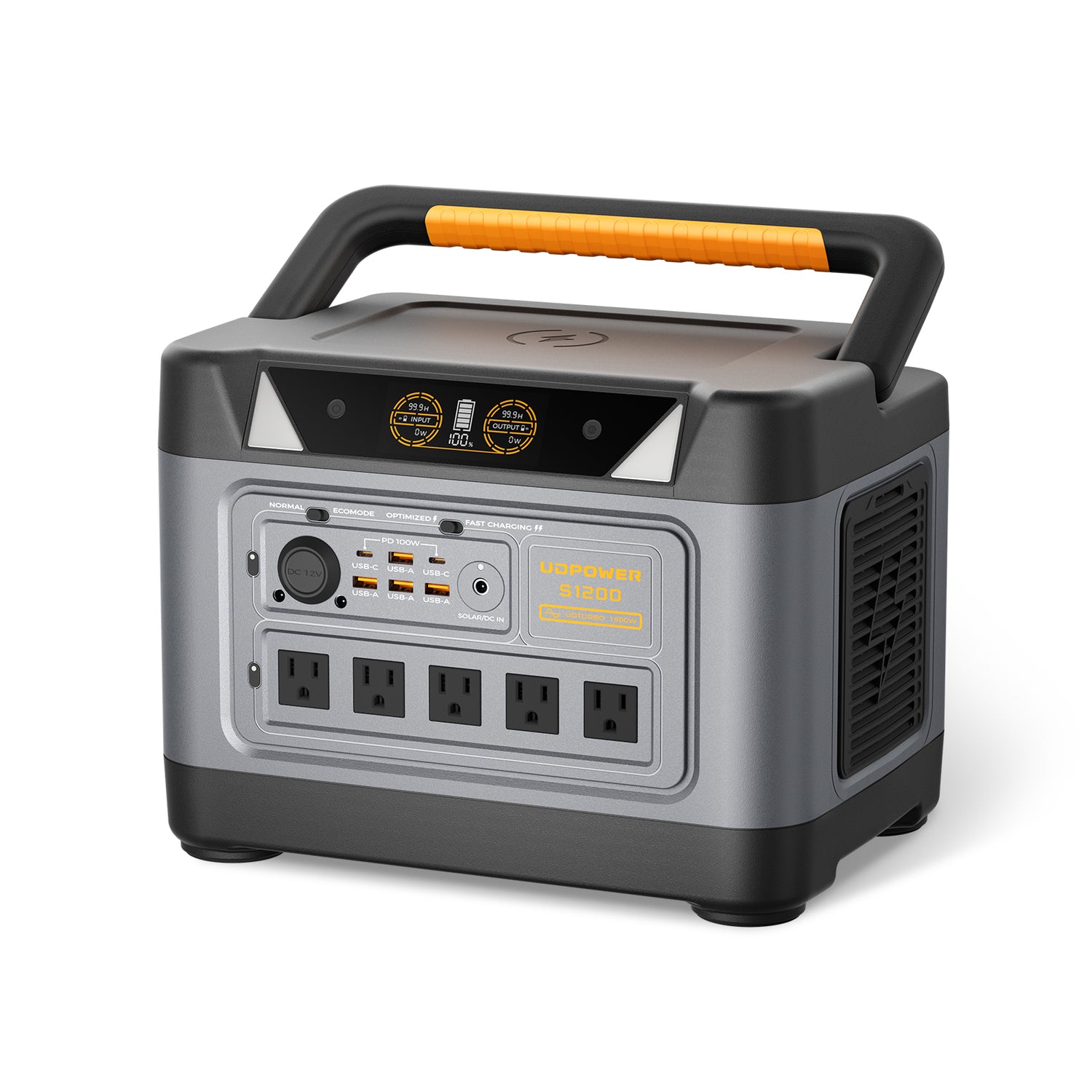
UDPOWER S1200
1,190Wh1,200W rated output1,800W surgeLiFePO4
Once your shopping list includes home-office gear, routers, CPAP use, mini fridges, kitchen basics, and longer outages, watts and watt-hours matter more than raw “amps” talk. That is where the S1200 starts making a lot of sense.
- Official capacity: 1,190Wh
- Official output: 1,200W rated with UDTURBO up to 1,800W
- Official highlights: UPS support, LiFePO4 battery, up to 5 AC outlets depending on version
- Best fit: home backup essentials, RV use, moderate appliance loads, longer runtime planning

UDPOWER S2400
2,083Wh2,400W rated output3,000W surgeLiFePO4
For higher-wattage appliances, multi-device backup, and more serious outage coverage, the S2400 shifts the conversation away from “How many amps is that?” and toward the better question: “Can it run the load safely, and for how long?”
- Official capacity: 2,083Wh
- Official output: 2,400W continuous with up to 3,000W surge support
- Official highlights: UPS backup mode, 6 AC outlets, 4,000+ cycle LiFePO4 battery
- Best fit: microwave-ready backup, fridge support, coffee maker use, bigger outage plans
Practical takeaway
If you are comparing these products, the right question is not “Which one has more amps?” The right question is:
- What voltage and output type does my device need?
- How many watts does it use while running?
- Does it have a startup surge?
- How many watt-hours do I need for the runtime I actually want?
If you are building out a fuller reading path on UDPOWER, the strongest follow-up articles here are portable power station vs. generator, runtime planning for outages, and the fridge runtime comparison page.
Continue Reading on UDPOWER
Reference links used in this article
FAQ
Which matters more, volts or amps?
For compatibility, volts matter first. For whether a power source can safely keep up, amps and watts matter next. In real buying decisions, you usually need all three: volts, amps, and watts.
Can two devices have the same watts but different amps?
Yes. If they run at different voltages, they can have very different amp draws while delivering the same total wattage.
Is higher amperage always better?
No. Higher current is not automatically better. It only tells part of the story. Without the voltage, amperage alone can mislead you.
What happens if voltage is wrong but amperage looks fine?
Wrong voltage is the bigger danger. Too much voltage can damage a device. Too little voltage can cause unstable operation or failure to start.
Can a power supply have more amps than my device needs?
Yes, as long as the voltage, connector, and polarity are correct. The device draws what it needs. The supply simply must be able to provide enough current.
Why do power stations usually advertise watts and watt-hours instead of amps?
Because watts tell you what the unit can run right now, and watt-hours tell you how long it can run it. Those numbers are more useful to most buyers than an amp figure by itself.
How do I convert amps to watts?
Use watts = volts × amps. For example, 120V × 2A = 240W.
How do I convert watts to amps?
Use amps = watts ÷ volts. For example, 60W on 120V is 0.5A. The same 60W on 12V is 5A.
Why does a 12V system often show such high amps?
Because lower voltage needs more current to deliver the same power. That is normal and one reason big DC loads can demand thicker cables and tighter planning.
What should I check before powering a device with a portable power station?
Check the output type, voltage, running watts, startup surge, and expected runtime. If you want a shortcut, compare your device’s wattage to the station’s output rating, then compare your runtime goal to the station’s watt-hour capacity.
Related Articles





