





Portable Power Station vs UPS: Which Is Better for Home Backup?
Latest updated: October 29, 2026
Quick Answer: UPS for Continuity, Portable Power Station for Runtime
Choose a UPS if your main problem is a device rebooting when the power flickers. Desktop computers, NAS units, network equipment, security recorders, and other electronics that cannot tolerate even a brief interruption are the natural UPS use case.
Choose a portable power station if your main problem is what happens after the first few seconds. A larger battery is far more useful when you need Wi-Fi, laptops, phones, lights, fans, CPAP equipment, refrigerator cycling, or other household essentials for several hours.
For many homes, I would not treat this as an either-or decision. The most practical setup is often a small UPS protecting equipment that cannot blink, plus a portable power station providing the watt-hours needed for the rest of the outage.
That distinction sounds simple, but it solves the biggest mistake I see when people shop for home backup power: they compare battery products before defining the failure they are trying to prevent.
A five-second power interruption, a 30-minute outage, and a two-day blackout are three different problems. The best backup system changes with the problem.
On This Page
- The real difference between a UPS and portable power station
- Which one should you choose?
- Does transfer time really matter?
- Standby vs line-interactive vs online UPS
- How to size a UPS
- How to size a portable power station
- Home backup runtime examples
- The daily energy budget most buying guides miss
- Why UPS + power station is often the strongest setup
- Recommended UDPOWER models
- Common backup-power mistakes
- Frequently asked questions
UPS vs Portable Power Station: The Real Difference
A UPS and a portable power station both contain batteries, but they are designed around different priorities.
A UPS, or uninterruptible power supply, is first a continuity device. It normally sits between utility power and the equipment being protected. When incoming power fails or moves outside the UPS's operating limits, the system either switches to battery power or, in an online double-conversion design, is already supplying conditioned power through its inverter.
A portable power station is first an energy-storage device. Its job is to give you a much larger pool of watt-hours that can be distributed among AC appliances, USB devices, DC equipment, communications gear, lighting, and other essential loads.
| Decision Factor | Traditional UPS | Portable Power Station | What It Means at Home | Source |
|---|---|---|---|---|
| Primary job | Prevent interruption or provide time for a controlled shutdown | Store enough energy to keep useful equipment operating longer | UPS solves the first milliseconds and minutes; a power station solves the hours that follow | ENERGY STAR |
| Main sizing numbers | VA, watts, runtime at a given load | Watt-hours and output watts | Do not compare VA directly with Wh | Eaton |
| Typical role | Desktop, NAS, router, modem, switch, security recorder | Laptop, Wi-Fi, phones, lighting, fan, refrigerator, CPAP, appliances | Protect interruption-sensitive devices separately from long-runtime loads | UDPOWER Wi-Fi Backup Guide |
| Power conditioning | Can include AVR, surge protection, monitoring, and online double-conversion depending on topology | Depends on the individual model | A power station with fast switching is not automatically equivalent to a dedicated UPS | Eaton UPS Types |
| Recharge options | Usually utility AC | Commonly AC, vehicle, and solar depending on model | Alternative charging matters more as an outage stretches into a second day | UDPOWER Solar Panels |
| Mobility | Usually stays beside the protected equipment | Designed to move between different loads and locations | One power station can support several outage priorities at different times | Portable Power Stations |
The important point is that power continuity and stored energy are separate requirements. A device can have excellent transfer performance but very little runtime. Another battery can hold enough energy for an entire workday but still lack the monitoring, voltage regulation, or shutdown functions of a dedicated UPS.
Which One Should You Choose?
I find it easier to start with the failure you are trying to avoid rather than starting with a product category.
| Your Situation | Main Problem | Best Starting Point | Stronger Long-Term Setup |
|---|---|---|---|
| Router resets during quick power flickers | Brief interruption causes a reboot | UPS | UPS for continuity + power station for longer internet runtime |
| Desktop PC cannot shut down unexpectedly | Lost work or unsafe shutdown | Properly sized UPS | Managed UPS with a larger energy source available for long outages |
| You work mainly from a laptop | Internet and charging disappear during an outage | Portable power station | UPS on network gear + power station for laptop, monitor, and lighting |
| You want Wi-Fi all day | Small constant loads need many hours of energy | Portable power station | Small UPS for no-reboot network continuity + larger power station |
| You need lights, phones, fan, and laptop | Several low-watt devices need long runtime | Portable power station | Size the battery from total watt-hours required |
| You have a NAS or home server | Unsafe shutdown or storage corruption | UPS | UPS with monitoring/shutdown support + extended backup source |
| You want refrigerator backup | Food temperature becomes the priority | Portable power station | High-capacity station + thermometer + recharge plan |
| You prepare for hurricanes, winter storms, or multi-hour outages | Energy becomes limited over time | Portable power station | Power station + selective UPS protection + recharge strategy |
Choose by outage duration, too
| Power Event | Main Risk | Best Tool | Planning Goal |
|---|---|---|---|
| Fraction of a second | Desktop, router, NAS, or recorder resets | UPS or verified fast-transfer backup system | Continuity |
| 1–10 minutes | Unsaved work and abrupt shutdown | UPS | Ride through the event or shut down safely |
| 10–60 minutes | Work and communications interruption | UPS or portable power station depending on load | Keep critical electronics operating |
| 1–8 hours | Loss of workday, communications, comfort, or food protection | Portable power station | Manage watt-hours carefully |
| 8–24 hours | Battery depletion | Larger power station + recharge strategy | Prioritize essential loads |
| 24–72 hours | Daily energy consumption exceeds stored battery energy | Power station + solar, vehicle, or another supported recharge source | Manage energy per day rather than battery percentage alone |
If you are preparing for a longer event, pair this article with the 24-, 48-, and 72-hour power outage checklist and the what to run first during a power outage guide.
Does UPS Transfer Time Really Matter?
Yes, particularly for desktop computers and equipment that does not have its own internal battery.
When a standby or line-interactive backup system detects an interruption, there is normally a short interval before battery power takes over. Whether the connected equipment notices that interruption depends on both the backup device and the electronics being protected.
Intel's ATX Version 3 guidance is a useful reference point for desktop computers. The current timing table specifies an AC-loss-to-PWR_OK hold-up time greater than 11 milliseconds as required and greater than 16 milliseconds as recommended under the defined conditions.
Source: Intel ATX Version 3 Power Supply Design Guide
The UDPOWER S1200 and S2400 both publish UPSPRIME switching of 10ms or less. That makes them useful for many home-backup applications where you want both fast transfer and significantly more stored energy than a typical desktop UPS.
But fast transfer does not magically add every feature found in a dedicated UPS. If you need automatic operating-system shutdown, sophisticated power monitoring, automatic voltage regulation, or zero-transfer double-conversion power, look at the UPS topology and feature set rather than transfer time alone.
Pass-through charging is not automatically the same as UPS operation
This distinction matters. A battery device may allow equipment to run while the battery itself is charging, but that does not tell you what happens when utility power suddenly disappears.
When continuity matters, look for an actual published UPS or backup transfer specification and test the complete setup.
Standby vs Line-Interactive vs Online UPS
Another reason the question is more complicated than "UPS vs power station" is that UPS units themselves are not all built the same way.
| UPS Type | How It Works | Good Fit | Main Advantage |
|---|---|---|---|
| Standby / offline | Normally passes utility power and switches to battery when needed | Basic desktop and home-network protection | Simple and relatively inexpensive |
| Line-interactive | Can correct certain voltage problems without immediately using the battery | Desktop workstations, networking, NAS, locations with voltage fluctuations | Automatic voltage regulation |
| Online double-conversion | Continuously converts incoming power to DC and then back to AC | Mission-critical and highly sensitive equipment | Zero transfer time during normal double-conversion operation and stronger power conditioning |
Source: Eaton — Types of UPS Systems
This is why battery capacity alone is a poor way to compare the two categories. A 1,000Wh portable power station can contain far more stored energy than a desktop UPS while the UPS can still offer power-management functions the larger battery does not.
How to Size a UPS Without Guessing
UPS shopping can be confusing because VA is often printed more prominently than watts.
VA and watts are not the same measurement. VA describes apparent power, while watts describe real power being delivered to the load. The relationship depends on power factor.
A 1500VA label therefore does not tell you how many watts the unit supports or how many minutes it will run your desktop. You need the UPS's actual watt rating and the manufacturer's runtime data.
A practical UPS sizing process
- List only devices that truly cannot reboot. This might include a desktop, NAS, modem, ONT, router, network switch, or security recorder.
- Measure actual power use. A plug-in watt meter is better than assuming the maximum wattage printed on a power adapter or PC power supply.
- Check both the VA and watt ratings. Neither should be exceeded.
- Leave useful capacity headroom. Avoid designing the system to operate permanently at its absolute limit.
- Check runtime at your actual load. Runtime changes dramatically as load increases.
- Decide whether you need AVR, pure sine wave output, monitoring, or automatic shutdown software.
For a deeper runtime discussion, see How Long Will a UPS Last?
How to Size a Portable Power Station for Home Backup
For longer outages, watt-hours become the more useful number because they describe stored energy.
For UDPOWER runtime planning, I use a 90% conversion-efficiency assumption:
For example, a 1,190Wh battery powering an average 100W load gives:
This is a planning estimate, not a guaranteed runtime. Real-world performance changes with battery temperature, inverter self-consumption, device cycling, battery condition, output type, and the exact load.
Watts and watt-hours answer two different questions
| Measurement | Question It Answers | Example |
|---|---|---|
| Watts | Can the power station operate this load? | A 1,500W appliance requires sufficient AC output capacity |
| Watt-hours | How long can the battery keep supplying energy? | A 1,000Wh-class battery can run a 100W load for many hours |
| Startup demand | Can the inverter handle a motor or compressor starting? | Refrigerators can briefly require more power when the compressor starts |
If you already know your device wattage, use the UDPOWER Runtime Calculator to run your own numbers.
Home Backup Runtime Examples
The table below uses the current S1200 and S2400 battery capacities with the 90% planning factor. Loads are examples, not guarantees for every device.
| Example Setup | Planning Load | S1200 1,190Wh |
S2400 2,083Wh |
Planning Note |
|---|---|---|---|---|
| Modem / ONT + router | 25W | About 42.8 hours | About 75.0 hours | Your ISP's upstream equipment must also remain operational |
| Laptop + router | 60W | About 17.9 hours | About 31.2 hours | Laptop draw changes as its internal battery charges |
| Laptop + monitor + network | 100W | About 10.7 hours | About 18.7 hours | A useful work-from-home planning load |
| Heavier laptop workstation | 150W | About 7.1 hours | About 12.5 hours | Measure real consumption rather than relying only on charger rating |
| Desktop + monitor | 250W | About 4.3 hours | About 7.5 hours | A dedicated UPS may still be useful for continuity |
| Desktop + monitor + network gear | 350W | About 3.1 hours | About 5.4 hours | Add all accessories connected to the backup source |
| Creator or gaming workstation | 500W | About 2.1 hours | About 3.7 hours | Actual desktop consumption varies substantially with workload |
| Refrigerator cycling average | 80W | About 13.4 hours | About 23.4 hours | Startup demand and compressor duty cycle must also be checked |
| High-draw load | 1,000W | About 1.1 hours | About 1.9 hours | High wattage consumes battery energy very quickly |
For computers specifically, do not size backup power from the wattage printed on the PC's power supply. An 850W PSU does not mean the computer constantly consumes 850W. See How Many Watts Does a Computer Use? for a more detailed breakdown.
The Daily Energy Budget Most Backup Guides Miss
Runtime tables are useful for short outages, but once an outage lasts a full day, I stop thinking only in terms of "How many hours will this battery last?"
The better question becomes:
This is the point where even a large battery can disappear surprisingly quickly.
| Example Essential Load | Example Average Power | Hours Used Per Day | Approx. Daily Energy |
|---|---|---|---|
| Modem / ONT + router | 25W | 24 hours | 600Wh |
| Laptop | 60W | 8 hours | 480Wh |
| LED lighting | 10W | 5 hours | 50Wh |
| CPAP planning example | 40W | 8 hours | 320Wh |
| Refrigerator cycling average | 80W | 24 hours equivalent | 1,920Wh |
| Total example | — | — | 3,370Wh/day |
This example is intentionally revealing: even a 2kWh-class portable power station cannot support every load indefinitely.
That is why a serious 24- to 72-hour outage plan needs at least one of the following:
- lower average consumption,
- intentional refrigerator cycling,
- turning off nonessential equipment,
- solar recharging,
- vehicle charging,
- another supported charging source,
- or a larger backup-energy system.
The battery is only the starting inventory. Your daily energy budget determines whether the system works after the first night.
Low-watt loads deserve special attention
Very small devices can produce excellent headline runtime numbers, but inverter self-consumption becomes proportionally more important as the load gets smaller.
If you are running only a low-power router or small electronics, an appropriately matched DC or USB output can sometimes reduce conversion losses compared with powering an AC adapter through the inverter. Only do this when voltage, polarity, current requirements, and connectors are fully compatible. When in doubt, use the device's original AC adapter.
Why UPS + Portable Power Station Is Often the Better Setup
For homes that experience both short power flickers and longer blackouts, one device does not have to solve every problem.
Layer 1: Protect the devices that cannot reboot
Put your desktop, NAS, security recorder, or other interruption-sensitive electronics on a properly sized UPS.
Layer 2: Protect the network
Keep the modem or fiber ONT and router powered. A small dedicated UPS can prevent repeated resets during short interruptions.
If maintaining internet access is important, read How to Keep Wi-Fi Running During a Power Outage.
Layer 3: Add enough stored energy for the outage itself
Use a portable power station for the hours that follow: laptop charging, monitors, lighting, phones, fans, refrigerator cycling, and other household essentials.
Layer 4: Add a recharge plan
If outages in your area can last a day or longer, stored battery capacity alone is not enough. Decide in advance whether you will recharge from utility power before a storm, a vehicle, compatible solar panels, or another supported charging source.
Should you plug a UPS into a portable power station?
It can work in some setups, but I would not assume every combination behaves identically.
There are two issues to consider. First, repeated AC-to-DC and DC-to-AC conversion can reduce overall efficiency. Second, some UPS units can respond differently to inverter output or charging behavior.
If the setup protects important equipment, test the full chain with your actual devices before a real outage.
Recommended UDPOWER Portable Power Stations for Home Backup
For this particular use case, I would focus primarily on the S1200 and S2400. Both combine a LiFePO4 battery, pure sine wave AC output, and published UPSPRIME transfer of 10ms or less with significantly more stored energy than a typical desktop UPS.
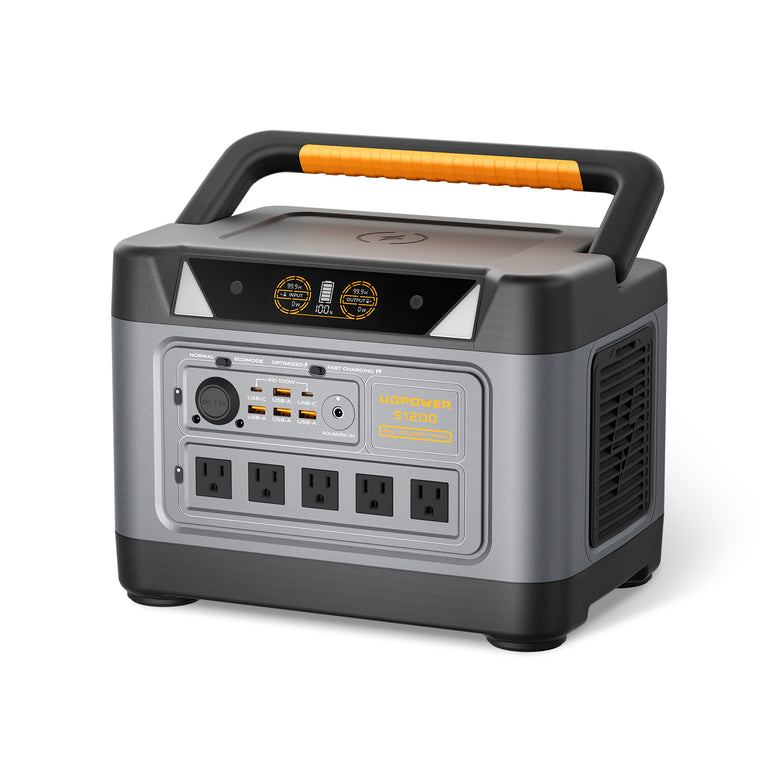
UDPOWER S1200: Best All-Around Size for Home Office and Essential Loads
The S1200 is the model I would start with for a normal home-office or essentials-first backup plan. Its 1,190Wh battery gives substantially more runtime than a conventional desktop UPS without moving into a much larger 2kWh-class unit.
- Battery capacity: 1,190Wh LiFePO4
- Rated AC output: 1,200W pure sine wave
- UDTURBO: supports compatible higher-power loads up to 1,800W; conversion efficiency decreases above the rated output
- UPS mode: UPSPRIME response under 10ms
- AC outlets: up to 5 depending on current variant
- Maximum solar input: 400W
- Weight: approximately 26.0 lb
- Battery cycle benchmark: approximately 80% remaining capacity after 3,000 cycles and 70% after 4,000 cycles
Best fit: home office, Wi-Fi, laptop and desktop backup, monitors, lighting, CPAP planning, fans, refrigerator cycling, and general outage essentials.
View UDPOWER S1200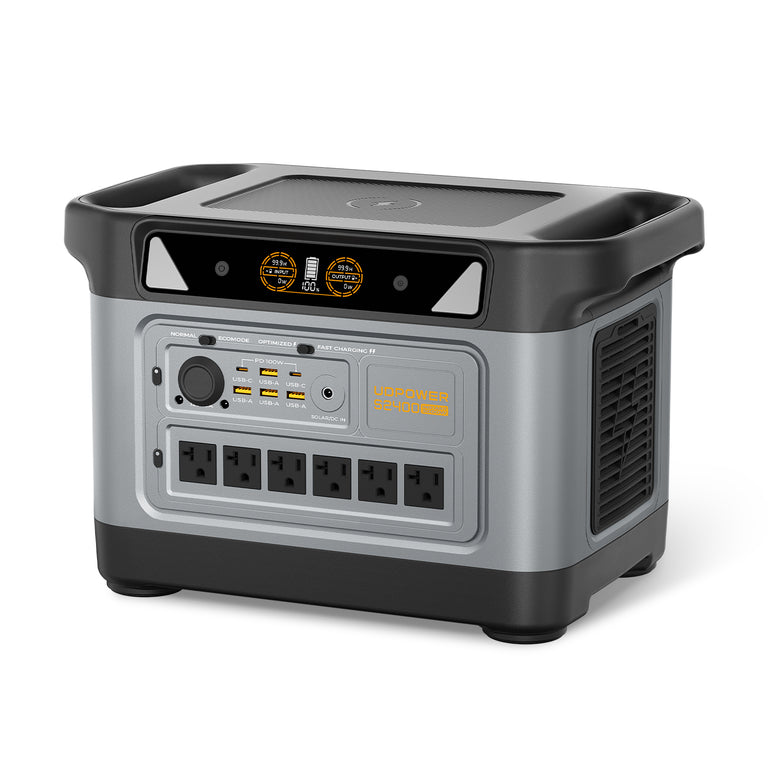
UDPOWER S2400: Better for Larger Loads and Longer Outages
The S2400 makes more sense when the home office is only one part of the backup plan. Its larger battery and higher rated AC output provide considerably more room for refrigeration, several simultaneous electronics loads, and short periods of higher-power appliance use.
- Battery capacity: 2,083Wh LiFePO4
- Rated AC output: 2,400W pure sine wave
- UDTURBO: supports compatible higher-power loads up to 3,000W; conversion efficiency decreases above the rated output
- UPS mode: UPSPRIME response 10ms or less
- AC outlets: 6
- Maximum recommended solar input: 420W
- Weight: approximately 40.8 lb
- Battery cycle benchmark: approximately 80% remaining capacity after 3,000 cycles and 70% after 4,000 cycles
Best fit: larger workstations, refrigerator backup, multiple household essentials, longer outages, storm preparation, and situations where higher AC output provides useful headroom.
View UDPOWER S2400| Model | Capacity | Rated AC Output | UPS Response | Solar Input | Best Home Backup Role | Official Specs |
|---|---|---|---|---|---|---|
| UDPOWER S1200 | 1,190Wh | 1,200W | <10ms UPSPRIME | Up to 400W | Home office, Wi-Fi, CPAP planning, refrigerator cycling, core essentials | S1200 |
| UDPOWER S2400 | 2,083Wh | 2,400W | ≤10ms UPSPRIME | 420W maximum recommended | Larger workstations, refrigeration, multiple devices, extended outages | S2400 |
Not sure which capacity is right for you? Use the UDPOWER Power Station Comparison or browse the full portable power station lineup.
Common Backup-Power Mistakes
1. Buying by watts and forgetting watt-hours
Watts tell you whether the backup source can operate the equipment. Watt-hours tell you approximately how long it can keep doing it. A good home-backup decision requires both.
2. Comparing VA directly with Wh
A 1500VA UPS is not automatically "larger" or "smaller" than a 1,000Wh portable power station. They are different measurements describing different things.
3. Putting every home-office device on the UPS
Reserve limited UPS battery capacity for devices that actually need uninterrupted power. A battery-powered laptop, phone charger, desk lamp, or small fan normally does not need the same protection priority as a desktop, NAS, or router.
4. Sizing a computer backup from the PSU label
A desktop with an 850W PSU may consume far less than 850W during normal work. Measure the whole workstation at the wall if runtime matters.
5. Assuming fast transfer equals every UPS feature
Transfer time is one characteristic. Dedicated UPS models can also offer AVR, monitoring, replaceable batteries, surge protection, network management, and automatic computer shutdown depending on model.
6. Assuming your internet will work just because the router has power
Your modem or fiber ONT also needs power, and your ISP's upstream infrastructure needs to remain operational. A mobile hotspot is a useful second communications path for critical remote work.
7. Ignoring inverter overhead on tiny loads
A 10W or 20W device can run for a long time from a large battery, but the power station itself also consumes energy while the AC inverter is operating. This matters more as the connected load gets smaller.
8. Treating refrigerator runtime as the only food-safety rule
FoodSafety.gov says an unopened refrigerator generally keeps food cold for about four hours during an outage, while a full freezer can hold temperature for about 48 hours if kept closed.
That means a good backup plan also includes a refrigerator thermometer, disciplined door opening, and a cooler or ice strategy rather than relying only on a runtime calculation.
Source: FoodSafety.gov — Food Safety in a Disaster or Emergency
For a complete strategy, see Food Safety During a Power Outage.
9. Trying to backfeed household wiring
Do not connect a portable power station or generator to a household receptacle in an attempt to energize home wiring. Circuit-level or whole-home backup requires properly rated equipment and appropriate installation.
10. Confusing a portable power station with a combustion generator
A battery-based portable power station does not produce gasoline-engine exhaust during normal operation and is suitable for many indoor backup situations when used within the manufacturer's operating instructions.
A combustion generator is completely different. The CDC says generators should be operated outdoors and more than 20 feet from windows, doors, and vents because of carbon monoxide risk.
Source: CDC — Carbon Monoxide Poisoning Basics
If you are deciding between those two categories, read Portable Power Station vs Generator for Power Outages.
11. Waiting until the outage to test everything
Run a controlled test while utility power is available. Check your router, modem or ONT, desktop, monitor, refrigerator, lights, and other priority loads. Record their actual wattage and confirm that the equipment behaves normally during transfer.
The best backup system is not the one with the most impressive specification sheet. It is the one your household already understands before the room goes dark.
What I Would Choose for Common Home Scenarios
| Scenario | Recommended Architecture | Reason |
|---|---|---|
| Router and modem only | Small UPS; add power station if outages last hours | Prevent reboot first, then extend runtime |
| Laptop-based remote worker | UPS for network + portable power station for the desk | The laptop already has an internal battery |
| Desktop remote worker | Dedicated UPS for desktop + power station for extended runtime | Protect the desktop from the first interruption while preserving a larger energy reserve |
| NAS / home server | Managed UPS | Safe shutdown and monitoring can matter more than raw battery capacity |
| Apartment outage kit | Portable power station + optional small network UPS | Quiet battery power works well for communication, lighting, work, and essentials |
| Refrigerator + Wi-Fi + lights | 1–2kWh-class power station | Stored energy matters much more than a small desktop UPS |
| Storm-season 24-hour plan | Larger power station + load priority list + recharge plan | You are managing an energy budget, not simply bridging a short interruption |
| 72-hour resilience | Power station + recharge strategy + selective UPS protection | No finite portable battery should be treated as unlimited energy |
If remote work is your main concern, the Remote Work Setup Guide covers internet, desk equipment, and backup-power planning together.
Frequently Asked Questions
Is a portable power station better than a UPS?
Neither is universally better. A UPS is usually better when preventing an interruption is the priority. A portable power station is usually better when you need more stored energy and many hours of backup runtime.
Can a portable power station replace a UPS for a computer?
For some computers, yes, particularly when the power station has a published fast-transfer backup mode. But it is not automatically equivalent to a dedicated UPS. Traditional UPS models may also provide automatic voltage regulation, monitoring, power conditioning, surge protection, and automatic shutdown support.
Is a 10ms transfer time fast enough for a desktop PC?
It can be fast enough for many modern desktops. Intel's current ATX Version 3 guidance lists an AC-loss-to-PWR_OK hold-up requirement above 11ms and recommends above 16ms under its defined test conditions. That does not guarantee that every desktop, PSU, monitor, NAS, or accessory will tolerate the same interruption, so test critical systems.
Is a UPS or portable power station better for a router?
If the goal is preventing the router and modem from rebooting during brief interruptions, a UPS is the simpler choice. If the goal is running the network for many hours, a portable power station provides much more stored energy. Using both can give you continuity and endurance.
How much battery backup do I need for a home office?
Measure the average watts of the equipment you want to power and multiply that load by the number of hours you need. Then allow for conversion losses. For UDPOWER planning, I use battery capacity in Wh × 0.90 ÷ average load in watts.
Should I put my laptop on a UPS?
Usually it is not the first priority because the laptop already has an internal battery. For a remote worker, protecting the modem, ONT, and router may be more valuable. A portable power station can then recharge the laptop and power the rest of the desk during a longer outage.
Should I plug a UPS into a portable power station?
Only after testing the exact combination. It can preserve UPS functions while adding a larger external energy reserve, but extra conversion stages can reduce efficiency and different UPS models can react differently to inverter power.
Does a portable power station protect against brownouts like a UPS?
Not necessarily. Line-interactive UPS systems commonly use automatic voltage regulation to correct certain low- or high-voltage conditions without immediately relying on their battery. Portable power station behavior varies by model, so a UPS-style transfer specification should not be interpreted as a complete replacement for every UPS function.
Can a portable power station run a refrigerator and computer at the same time?
Yes, if the combined running load and refrigerator startup demand remain within the power station's supported output. Runtime then depends on the combined average load, battery capacity, refrigerator cycling, and other devices connected at the same time.
Can a portable power station be used indoors?
Battery-based portable power stations can be used indoors when operated according to the manufacturer's instructions, kept dry, adequately ventilated, and not overloaded. They do not operate a combustion engine. Gasoline and other fuel-burning generators require outdoor placement because of carbon monoxide risk.
Do I need solar panels for home backup?
Not necessarily. For a short outage, a fully charged battery may be enough. Solar becomes more valuable when you are preparing for outages that last long enough to consume a significant portion of the battery each day. Always match panel voltage, current, connector, and recommended input limits to the power station.
What should I power first during a blackout?
Start with communication, lighting, essential network equipment, phones, and any critical household equipment. Add comfort and food-protection loads only after those priorities are covered. Avoid wasting battery capacity on continuous high-watt heating appliances unless they are genuinely necessary.
Is a bigger battery always better for home backup?
No. A larger battery gives you more stored energy, but it also costs more and weighs more. A better approach is to calculate the devices you actually need, the hours you need them, and the recharge options available during a long outage.
How is a UPS different from a home battery system?
A desktop UPS is usually designed for selected electronics and short-duration continuity. A portable power station provides more flexible stored energy for individual appliances and electronics. A permanently installed home battery system is a different category that can be integrated with household circuits and, depending on the system, support much larger portions of a home.
Build the Backup System Around the Failure You Actually Need to Prevent
If your biggest concern is a desktop, NAS, modem, or router restarting when the grid blinks, start with a properly sized UPS.
If your concern is staying connected, working, keeping the lights on, protecting food, or powering useful household equipment for several hours, start planning in watt-hours.
For many households, the strongest answer is not UPS versus portable power station. It is a small UPS protecting equipment that cannot blink and a larger portable power station handling everything that needs to keep running afterward.
Plan Your Home Backup Setup
Start with your real load, calculate the runtime you need, then choose the smallest system that comfortably covers it.
Compare UDPOWER Models View Portable Power Stations Calculate Your Backup Runtime Get the 24 / 48 / 72-Hour Outage GuideRelated Articles


