





Portable Power Station for Remote Property: Cameras, Gates, Pumps, Tools & Backup Power
A remote property creates a different power problem from a campsite or a normal home outage. You may need electricity when nobody is there, you may have several buildings spread across the land, and your smallest devices can matter more than your biggest tools because cameras, routers, gateways, sensors, and monitoring equipment may run 24 hours a day.
I approach remote-property power by separating the loads into two groups: the equipment that quietly consumes energy every hour and the equipment that draws much more power for only a few minutes. That distinction makes sizing a portable power station much more useful than simply adding up appliance wattages.

Size the inverter from the largest load you need to start or run. Size the battery from total daily watt-hours. Size the solar array from how many watt-hours you must put back every day.
Why Remote Property Power Is Different
At a normal house, the grid hides most energy-management problems. You turn something on and electricity arrives. At a remote property, you are managing a limited energy inventory.
That changes the question from “How many watts can my power station produce?” to three separate questions:
| Question | What It Determines | Example |
|---|---|---|
| What is my highest simultaneous load? | Required inverter output in watts | A saw, pump, compressor, coffee maker, or several devices running together |
| How many watt-hours do I use between charges? | Required battery capacity | Cameras + networking running all night, plus daytime tools |
| How many watt-hours can I replace each day? | Required solar recovery | Your panels must recover yesterday's consumption before the battery gradually runs down |
This matters because a 1,500W saw used for ten minutes is a very different battery load from a 50W camera and networking system running continuously.
The saw uses:
A 50W always-on system uses:
The smaller load actually consumes almost five times as much energy over the day.
That is the first major lesson of remote-property power: continuous low-power loads often determine your battery and solar requirements more than occasional high-wattage equipment.
The Four Remote Property Power Zones
Instead of creating one giant appliance list, I find it more useful to divide the property into four power zones.
Zone 1: Always-On Infrastructure
This is the load that remains when you lock the gate and drive home.
- Security cameras
- NVR or local recorder
- Wi-Fi router
- Cellular gateway or modem
- Weather station
- Alarm and access-control electronics
- Low-power sensors
This zone deserves the most attention on an unattended property because it consumes energy every hour, including at night and during cloudy weather.
Zone 2: Intermittent Property Infrastructure
- Gate opener
- Intercom
- Water transfer pump
- Small pressure pump
- Driveway or barn lighting
- Utility shed equipment
These loads may have higher wattage, but they often operate for only seconds or minutes at a time. Their main sizing issue can be startup power rather than daily energy.
Zone 3: Maintenance Loads
- Cordless-tool battery chargers
- Drills
- Circular saws
- Shop vacuums
- Small compressors
- Battery maintainers
- Portable work lights
Maintenance is usually irregular. The inverter has to handle the equipment, but the battery only pays for the actual time the tool operates.
Zone 4: Occupancy Loads
- Refrigerator
- Coffee maker
- Laptop
- Fans
- TV
- Phone charging
- Small kitchen appliances
These loads may be completely absent while the property is empty, then dramatically increase energy use when somebody arrives for a weekend.
This four-zone method makes it possible to build two separate energy budgets: the empty-property budget and the occupied-property budget.
Typical Remote Property Loads: What to Measure First
The ranges below are planning ranges rather than universal appliance specifications. Equipment varies considerably, particularly pumps, motor loads, compressors, gate systems, and security hardware. Check the label, manual, smart plug, watt meter, or manufacturer specifications for the actual equipment you own.
| Equipment | Planning Load | Energy Pattern | Main Sizing Concern | Source / Check |
|---|---|---|---|---|
| Security camera | Often around 5–15W each | Potentially 24/7 | Daily Wh adds up quickly with multiple cameras | UDPOWER camera backup guide |
| NVR / recorder | Varies with recorder, hard drives, and PoE load | Usually 24/7 | Include cameras powered through PoE if the NVR supplies them | Check recorder input rating |
| Wi-Fi router | Usually a relatively small continuous load | 24/7 if remote access is required | Continuous energy consumption | Check power adapter |
| Starlink Mini | 20–40W average | Potentially continuous | Daily energy use | Starlink |
| Starlink Standard-class system | 75–100W average for current listed Standard 4 / Standard 4 X systems | Potentially continuous | A major 24-hour load if left online continuously | Starlink |
| Gate opener | Model dependent | Short operating cycles | Startup power, voltage, approved connection method | Check gate operator manual |
| Small transfer pump | Model dependent | Intermittent | Motor startup and total minutes per day | Check pump nameplate |
| Deep-well pump | Highly system dependent | Intermittent | Many are 240V and/or have substantial startup requirements | Check pump/controller nameplate before selecting a station |
| LED lighting | Add actual fixture wattages | Hours after dark | Operating hours matter more than startup | Check bulb or fixture label |
| Cordless-tool charger | Model dependent | Intermittent | Input wattage × charge time | Check charger label |
| Corded saw / drill | Often several hundred watts to well above 1,000W | Short bursts | Rated output and motor behavior | Check tool nameplate |
| Refrigerator | Measure daily kWh rather than relying only on running watts | Cycling 24/7 | Compressor startup plus daily energy | U.S. Department of Energy |
Remote Property Security: Cameras, NVR, Router & Cellular Gateway
A remote security system is not one load. It is a chain.
For remote viewing and dependable recording, that chain may include:
- Camera power
- PoE switch or PoE NVR
- Recorder or local storage
- Wi-Fi router
- Modem, fiber ONT, Starlink, or cellular gateway
- Any hub required by the camera system
If only the camera stays powered but the router shuts down, remote viewing may disappear. If the router stays alive but the PoE switch loses power, the cameras may disappear. If cameras remain powered but the recorder shuts down, local footage may stop being stored.
I covered that failure chain in more detail in What Happens to Security Cameras When the Power Goes Out?.
Why PoE Can Make Backup Simpler
A wired PoE system can actually be convenient for backup planning because several cameras may receive power from one central PoE switch or PoE NVR. Instead of finding backup power at every camera, you may be able to protect the central equipment.
The important step is measuring the actual total draw at the power source.
A 40W Security System Is a 960Wh/Day Load
Suppose your complete camera, recording, and communications stack averages 40W.
Using a 90% conversion-efficiency planning assumption, a 1,190Wh battery provides about:
1,071Wh ÷ 40W ≈ 26.8 hours
A 2,083Wh battery provides about:
1,874.7Wh ÷ 40W ≈ 46.9 hours
That is useful backup, but it also demonstrates why an unattended remote property usually needs a recharge strategy. Even a modest always-on system can consume an entire portable battery every one or two days.
Gate Openers, Intercoms & Access Control
Automatic gates are different from cameras because the gate motor normally runs for a short period. That can make the daily energy requirement surprisingly small even when the motor itself is relatively powerful.
For a gate system, check four things:
- Voltage: determine whether you are dealing with a plug-in 120V supply, a low-voltage controller, an internal battery system, or hardwired equipment.
- Running input: identify the real electrical input requirement.
- Startup behavior: motors can require more power when starting.
- Daily cycles: a gate used ten times a day consumes very differently from one operating every few minutes.
Intercoms, keypads, card readers, and access-control electronics may consume far less power than the gate motor but can remain active all day. On an unattended property, include their standby consumption in the always-on budget.
Water: Small Pumps, Transfer Pumps & Well Monitoring
Water is one of the easiest places to oversimplify remote-property power.
There is a major difference between:
- A small 120V transfer pump
- A compact pressure pump
- A livestock or irrigation pump
- A deep-well pump
- A pump controller or well-monitoring device
Small 120V Pumps
A compatible plug-in 120V pump can be a good portable-power application when its running and startup requirements stay within the station's output capabilities.
Energy use is calculated from actual operating time. For example, a hypothetical 500W pump that operates for 20 minutes per day consumes:
The battery impact is modest. The important compatibility question is whether the power station can handle the pump when it starts.
240V Well Pumps Are a Different Category
The current U.S. UDPOWER S1200 and S2400 provide 120V, 60Hz AC output. They do not directly provide 240V output.
That means a 240V well pump should not be treated as a normal S1200 or S2400 load. If your remote property relies on a deep well, check the pump voltage before doing any other calculation.
Lighting for Sheds, Driveways, Barns & Storage Buildings
Lighting is usually one of the simplest remote loads to calculate.
If four LED fixtures total 40W and operate for four hours:
The real challenge is deciding whether the lights belong in the unattended baseline or only operate while someone is at the property.
Motion-activated security lighting can have a small daily energy budget if activations are brief. Barn, shed, and workshop lights used for several hours during a maintenance day can consume more.
If your main use case is a detached shed rather than an entire property, see my dedicated Portable Power Station for a Shed sizing guide.
Maintenance: Cordless Charging, Saws, Drills & Compressors
Tools reverse the camera problem. The instantaneous wattage can be high, but daily energy may remain relatively low because the tool does not run continuously.
Suppose a 1,200W saw has a total trigger-on time of 15 minutes during a property-maintenance session:
The battery needs roughly 300Wh plus conversion losses for that work. But the inverter still needs to operate the tool while it is pulling approximately 1,200W.
Cordless Tool Batteries Are Often Easier
If you do not need continuous corded-tool operation, bringing several charged tool batteries and using the portable power station to recharge them can make energy management easier.
For every charger, check the input label rather than the voltage printed on the tool battery. A “20V” tool does not mean its charger only consumes 20 watts.
Compressors Need Extra Attention
Compressors combine a motor, startup load, and potentially long run time. Do not choose a station based on the compressor's category or horsepower label alone. Check actual electrical requirements and understand how frequently it cycles.
For farm, ranch, fence-repair, irrigation, and other agricultural scenarios, see Portable Power for Farms & Ranches: Equipment, Runtime & Sizing Guide.
Communications: Wi-Fi, Cellular & Starlink
Communications equipment can be one of the largest hidden loads at a remote property because it often stays on continuously.
Starlink Mini
Starlink currently lists the Mini at approximately 20–40W average, depending on operating conditions.
Using 30W as a simple planning example:
That means even before adding cameras, lighting, or a recorder, an always-on satellite connection can use hundreds of watt-hours per day.
Starlink Standard-Class Equipment
Starlink currently lists current Standard 4 / Standard 4 X systems at approximately 75–100W average. At an 85W example average:
That is essentially an entire S2400-class battery's nameplate capacity every day before conversion losses.
This does not mean you cannot use Starlink at a remote property. It means you need to decide whether it really needs to operate 24/7.
The Scheduling Opportunity
For some properties, communications only needs to be available during certain windows. If your equipment and monitoring requirements allow it, reducing unnecessary operating hours can dramatically reduce the battery and solar requirement.
For example, an 85W communications load running eight hours uses:
The same equipment running 24 hours uses 2,040Wh.
That one operational decision saves 1,360Wh per day.
For current Starlink power specifications, see Starlink's official power guidance.
Property Monitoring: Weather Stations, Sensors & Trail Cameras
Not every remote-property device needs to be connected to the main AC system.
Trail cameras, battery sensors, standalone weather stations, and purpose-built solar devices may already have their own batteries or solar charging. In many cases, the best energy strategy is to leave those devices independent instead of routing every small load through a central AC inverter.
This is especially useful because converting battery energy to 120V AC just to run a tiny low-voltage device may add unnecessary conversion losses.
When designing a remote system, ask:
- Can this device run from its own battery?
- Does it support direct USB-C or DC power?
- Does it need the main router?
- Does it truly need 24/7 connectivity?
- Can it record locally if the network is down?
The goal is not to connect the greatest number of devices to the power station. The goal is to preserve the functions that matter while minimizing the always-on energy budget.
Occasional Occupancy: Refrigerator, Coffee Maker, Laptop, Fans & Small Appliances
A property may have a very small energy footprint for five days, then become a completely different system when you arrive on Friday afternoon.
That is why I recommend creating a second load sheet for occupied days.
| Example Occupancy Load | Example Use | Example Energy | What Matters Most |
|---|---|---|---|
| Four LED lights | 40W total × 4h | 160Wh | Operating time |
| Laptop | 60W × 4h | 240Wh | Actual charger draw varies |
| Fan | 45W × 6h | 270Wh | Long operating time |
| Coffee maker | 900W × 10 min | 150Wh | High watts, short duration |
| Refrigerator | Cycles throughout the day | Measure actual daily kWh | Startup + 24-hour energy use |
The U.S. Department of Energy publishes refrigerator efficiency data in annual kWh because refrigeration is a cycling load. That is the better way to think about battery sizing as well. A refrigerator that draws several hundred watts while its compressor is running does not necessarily draw that amount continuously.
You can review current federal refrigerator efficiency guidance at the U.S. Department of Energy.
Unattended vs. Regularly Visited Remote Property
This is one of the most important distinctions in the entire design.
| Property Type | Primary Concern | Battery Strategy | Solar Strategy |
|---|---|---|---|
| Visited every day | Tools, pumps, work loads | Enough energy for one workday may be sufficient | Solar is useful but wall/vehicle recharge may be available |
| Weekend property | Occupancy loads plus idle days | Separate empty-day and occupied-day budgets | Battery should recover between visits |
| Visited every few weeks | Continuous monitoring | Battery alone cannot bridge weeks of 24/7 loads | Daily solar balance becomes critical |
| Seasonally unattended | Weather, temperature, snow, shading, communications failure | More capacity does not solve a persistent daily energy deficit | Design around poor-season production, not best summer conditions |
The Autonomy Window
I use the term autonomy window for how long the property can remain operational when solar produces little or nothing.
If your critical baseline is 40W, daily energy is 960Wh.
A battery with approximately 1,875Wh of 90%-planning energy gives:
So the property has roughly two days of battery autonomy before recharge becomes necessary.
If you need three cloudy days of autonomy at the same load, you would need substantially more stored energy or a lower critical load.
How Much Battery Capacity Does a Remote Property Need?
For AC loads, I use 90% conversion efficiency as a practical UDPOWER runtime-planning assumption unless actual measured data is available.
For multiple devices, add their average simultaneous wattage before calculating runtime.
Always-On Load Runtime Examples
| Continuous Load | S1200 1,190Wh | S2400 2,083Wh | What It Could Represent |
|---|---|---|---|
| 25W | About 42.8 hours | About 75.0 hours | Very light communications / monitoring |
| 40W | About 26.8 hours | About 46.9 hours | Lean camera + network system |
| 60W | About 17.9 hours | About 31.2 hours | Larger monitoring stack |
| 100W | About 10.7 hours | About 18.7 hours | Communications plus multiple continuous devices |
These are planning estimates, not guaranteed runtimes. Temperature, battery condition, inverter behavior, device cycling, low-load behavior, and actual consumption affect results.
You can also use the UDPOWER Portable Power Station Runtime Calculator for individual loads.
Solar Recovery Strategy: Replace What You Use Every Day
For remote property use, I care less about how quickly a panel can charge an empty battery on a perfect summer afternoon and more about whether the system can replace the energy the property actually consumed yesterday.
That is the daily energy-balance problem.
If your property consumes 900Wh per day but solar only puts 650Wh back, the battery loses roughly 250Wh every day.
A larger battery only delays the eventual shutdown. It does not fix the energy deficit.
A Practical Solar Planning Formula
For early planning, you can estimate panel nameplate wattage from:
I use a conservative 0.75 planning factor in the examples below to leave room for panel angle, temperature, conversion losses, imperfect conditions, and other real-world reductions. This is a solar-production planning factor, not the same as the 90% battery-to-load runtime assumption.
Example: 1,000Wh/Day Property
| Effective Solar Window | Approx. Panel Requirement at 75% Planning Yield | Interpretation |
|---|---|---|
| 5 hours | About 267W | Comfortable for a 400W-class charging system in good conditions |
| 4 hours | About 333W | Still realistic for a 400W-class system |
| 3 hours | About 444W | Begins to exceed a 400W input class |
| 2 hours | About 667W | The daily energy target is larger than these portable stations can realistically recover through their supported solar input in that short window |
This is why a remote system that works perfectly in July can gradually lose charge during shorter, cloudier winter days.
For site-specific solar modeling, the NREL PVWatts Calculator uses location and solar-resource data to estimate photovoltaic energy production.
Do Not Size Solar From Panel Wattage Alone
A 420W panel configuration does not mean the battery receives exactly 420W for every hour the sun is out. Solar production changes with:
- Time of day
- Season
- Latitude
- Cloud cover
- Tree shadows
- Panel orientation
- Panel temperature
- Dirt, snow, leaves, and debris
- Battery state of charge
- Power station input limits
For additional seasonal planning, see Off-Grid Solar for Fall Projects: How Much Power Do You Need?.
Current UDPOWER Solar Input Limits
| Model | Battery | Solar Input | Good Remote-Property Role | Official Source |
|---|---|---|---|---|
| S1200 | 1,190Wh | Up to 400W | Moderate monitoring, weekend property, light pumps, chargers, tools | S1200 specifications |
| S2400 | 2,083Wh | Up to 420W recommended | Larger monitoring load, refrigeration, heavier maintenance, more reserve | UDPOWER FAQ / specifications |
You can view current compatible options in the UDPOWER Solar Panels collection or compare complete UDPOWER Solar Generator kits.
Three Remote Property Sizing Examples
Example 1: Unattended Camera Property
Assume the measured average critical load is:
- Cameras: 12W total
- NVR: 14W
- Router: 8W
- Cellular gateway: 6W
Total:
40W × 24h = 960Wh/day
An S1200 provides approximately 1,071Wh using the 90% planning assumption. Without solar, that is roughly 26.8 hours.
An S2400 provides approximately 1,874.7Wh of planning energy, or around 46.9 hours.
For this property, the S2400 gives more weather reserve, but the long-term solution still depends on replacing roughly 960Wh each day. With four effective solar hours and a 75% planning yield:
That is a realistic target for a 400–420W-class solar input system under favorable conditions.
Example 2: Weekend Property With Tools and Lights
Assume there is no significant unattended baseline. During a workday you use:
- LED lighting: 160Wh
- Tool battery charging: 300Wh
- Corded saw: 300Wh of actual trigger time
- Small transfer pump: 170Wh
- Laptop and phone charging: 180Wh
Total:
The S1200 is close to a full usable-energy day at this load. The S2400 leaves substantially more reserve and gives much more rated AC output for larger 120V tools.
For this use case, the largest tool may determine whether you choose S1200 or S2400 even though total daily energy is only around 1.1kWh.
Example 3: Remote Cabin With Always-On Monitoring
Suppose the property uses:
- 25W monitoring baseline × 24h = 600Wh
- Lighting = 160Wh
- Laptop = 240Wh
- Fan = 270Wh
- Coffee maker = 150Wh
Total occupied-day energy:
The S1200 is undersized if you expect to supply that entire day from one full battery without meaningful recharge.
The S2400 provides approximately 1,875Wh under the 90% planning assumption and can cover this example with some remaining reserve, assuming all connected appliances are compatible with its output.
But the solar side matters again. To replace 1,420Wh with four effective solar hours at a 75% planning yield:
That is above the S2400's maximum recommended 420W solar input.
This tells us something important: the battery may be large enough for the day while the recharge system is not large enough to sustain that same usage every day.
You would need to reduce daily consumption, recharge from another source, accept a gradual battery deficit, or move to a different energy system.
Recommended UDPOWER Portable Power Stations for Remote Property Use
For this particular use case, I would focus primarily on the S1200 and S2400 rather than selecting purely by the smallest possible battery.
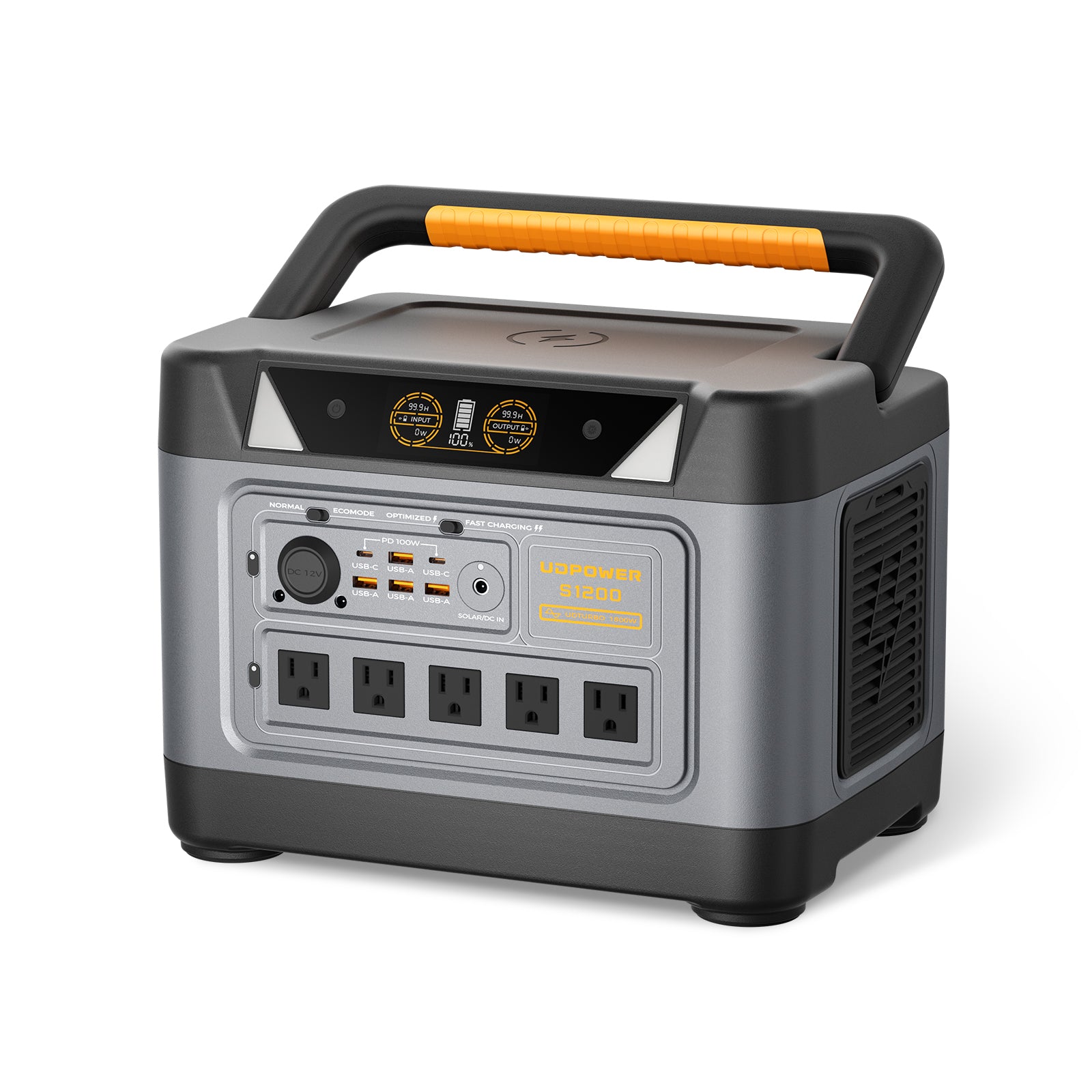
UDPOWER S1200: Best All-Around Starting Point
- Capacity: 1,190Wh
- Rated AC output: 1,200W pure sine wave
- UDTURBO: up to 1,800W for compatible higher-power loads
- AC output: 120V / 60Hz
- Solar input: up to 400W
- Weight: approximately 26 lb
- 90% runtime-planning energy: approximately 1,071Wh
Best fit: moderate camera and networking systems, gate-support electronics, lights, tool charging, smaller compatible pumps, weekend cabins, sheds, and property-maintenance trips.
The S1200 makes the most sense when your continuous load is modest and your largest 120V equipment stays within its output capabilities. Its 400W maximum solar input also gives it a much better daily-recovery path than a small portable station.
For loads above the normal 1,200W rated output, confirm compatibility before use. Higher-power operation is not the same as increasing the battery's stored energy, and conversion efficiency can decrease at elevated loads.
View UDPOWER S1200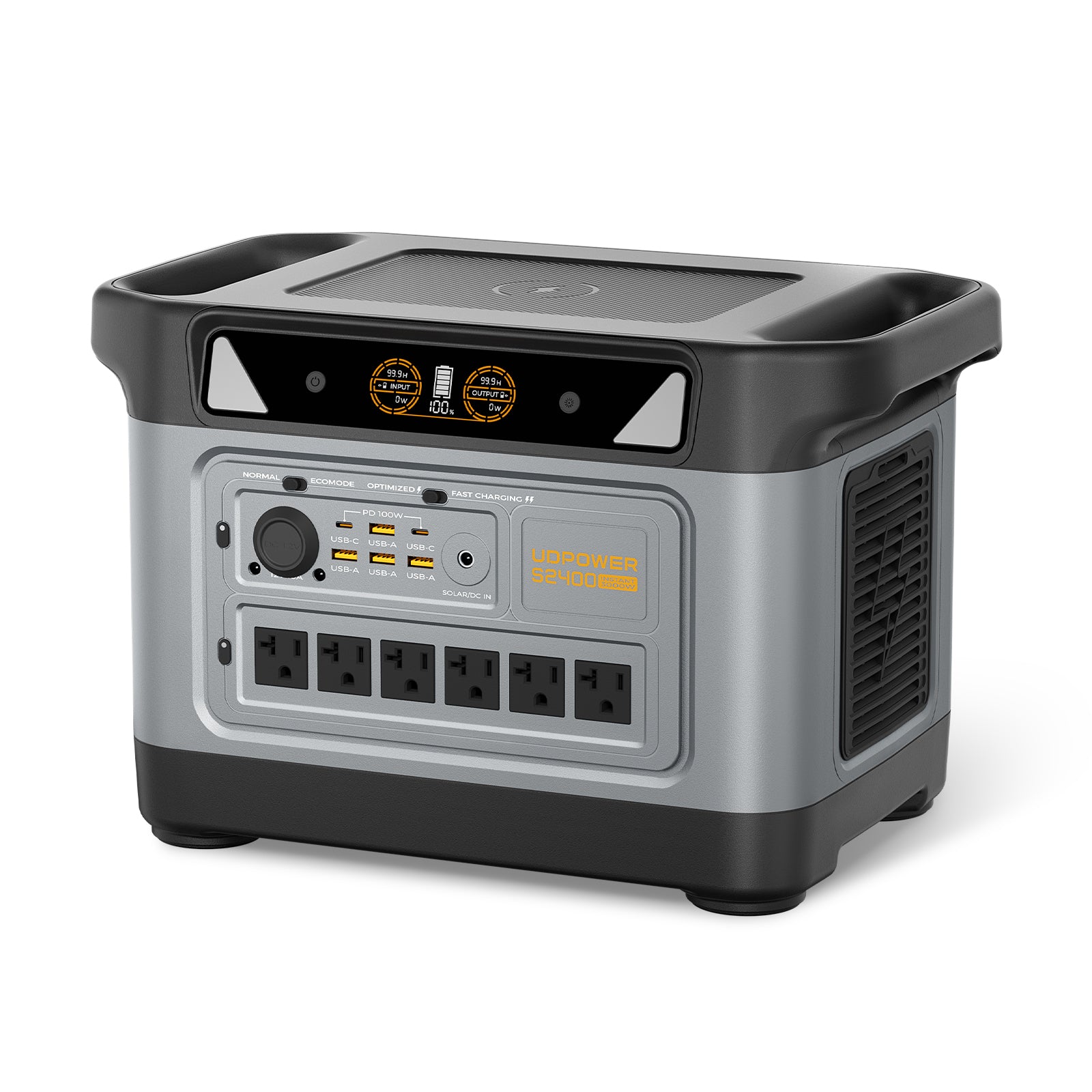
UDPOWER S2400: Best for Larger Loads and More Reserve
- Capacity: 2,083Wh
- Rated AC output: 2,400W pure sine wave
- UDTURBO: up to 3,000W constant-power output in battery/inverter mode for compatible loads
- AC output: 120V / 60Hz
- Maximum recommended solar input: 420W
- Weight: approximately 40.8 lb
- 90% runtime-planning energy: approximately 1,875Wh
Best fit: larger camera and communications systems, refrigerators, maintenance days involving higher-wattage 120V tools, compatible pumps, extended property visits, and installations where additional cloudy-weather reserve matters.
The biggest reason to move from S1200 to S2400 is not simply “more battery.” You also get substantially more rated AC output, which matters when pumps, tools, compressors, or multiple appliances overlap.
The S2400 is still a 120V portable station. It does not directly supply 240V equipment and should not be treated as a whole-property electrical service.
View UDPOWER S2400S1200 vs. S2400 for Remote Property Use
| Requirement | S1200 | S2400 |
|---|---|---|
| Small camera / network system | Good fit if daily Wh is controlled | More reserve |
| 24/7 monitoring | Solar recovery becomes important quickly | Better autonomy, but solar still required for long-term operation |
| Weekend property | Strong all-around choice | Better for heavier occupancy loads |
| Cordless-tool charging | Good fit | Good fit with more reserve |
| Higher-wattage 120V corded tools | Check each tool carefully | Better starting point |
| Small compatible 120V pump | Possible depending on pump | More output headroom |
| 240V well pump | Not directly compatible | Not directly compatible |
| Solar recovery | Up to 400W | Up to 420W recommended |
| Battery capacity | 1,190Wh | 2,083Wh |
| Rated AC output | 1,200W | 2,400W |
| Official product data | S1200 | S2400 |
When a Portable Power Station Is Not the Right Remote-Property Solution
A portable power station works best when you are powering a defined group of plug-in loads. It becomes less appropriate as the property starts behaving like a full-time house.
Consider a Larger Installed System When You Need:
- Continuous full-time off-grid living
- Several kilowatt-hours of consumption every day
- 240V well pumps
- Central air conditioning
- Electric water heating
- Large workshop equipment
- Electric resistance heating
- Whole-building panel backup
- Multi-day autonomy with high continuous loads
- A solar array much larger than the station's supported input
A portable station can still be useful inside a larger strategy for communications, cameras, electronics, emergency loads, or maintenance equipment, but it should not be forced into a role it was not designed to perform.
Remote Property Power Checklist
- List everything that must operate while nobody is at the property.
- Measure the average wattage of that always-on group.
- Multiply the continuous load by 24 hours.
- Add intermittent gate, pump, lighting, and monitoring energy.
- Create a separate energy budget for occupied days.
- Identify the single largest 120V load.
- Check motor startup requirements.
- Confirm whether any pump or equipment requires 240V.
- Calculate how many hours or days of battery autonomy you want.
- Calculate how much solar energy must be recovered each day.
- Use poor-season solar conditions rather than only summer performance.
- Protect the station from rain, standing water, excessive heat, and unsuitable charging temperatures.
- Confirm remote equipment will reconnect automatically after a power or network interruption.
- Test the complete system before leaving the property unattended.
Frequently Asked Questions
Can a portable power station power a remote property?
Yes, when the goal is to power selected equipment rather than the entire property's electrical system. Cameras, networking equipment, lights, small compatible pumps, tool chargers, 120V tools, refrigerators, laptops, and other plug-in loads can be practical applications. Full-time off-grid homes, 240V pumps, HVAC systems, and large hardwired loads usually require a larger installed energy system.
What size portable power station is best for remote property?
There is no single size based on acreage or building size. A roughly 1,000–1,200Wh station is a useful starting point for moderate loads, while a roughly 2,000Wh station gives more reserve for 24/7 monitoring, refrigeration, tools, pumps, and longer periods between charging. Size the system from measured daily watt-hours and maximum simultaneous wattage.
How long will a portable power station run security cameras?
Add the wattage of the cameras, recorder, PoE equipment, router, gateway, and any other required network hardware. Using a 40W total example and 90% conversion efficiency, a 1,190Wh S1200 is approximately 26.8 hours and a 2,083Wh S2400 is approximately 46.9 hours. Actual results depend on the equipment and operating conditions.
Can a portable power station run a gate opener?
Potentially, if the gate operator uses a compatible power supply and its voltage, running power, and startup requirements stay within the station's limits. Many gate systems use dedicated low-voltage batteries, solar controllers, or hardwired equipment, so follow the manufacturer's approved power arrangement rather than improvising a connection.
Can the UDPOWER S2400 run a well pump?
It depends on the pump. The U.S. S2400 provides 120V AC output, so it cannot directly run a 240V well pump. A compatible 120V pump may work if its running and startup requirements remain within the S2400's capabilities. Check the actual pump nameplate and controller before selecting a power station.
How much solar do I need for an unattended remote property?
Start with daily energy consumption in watt-hours. Your solar system needs to replace roughly that amount over time. For example, a 960Wh/day critical load with four effective solar hours and a conservative 75% production-planning factor requires approximately 320W of panel capacity. Actual solar production varies by location, weather, season, shading, orientation, and equipment.
Is a bigger battery or more solar more important?
They solve different problems. More battery extends the time you can operate through night and poor weather. More solar increases how quickly you replace consumed energy. If the battery starts each day lower than the day before, the underlying problem is usually an energy deficit, not simply insufficient battery capacity.
Can Starlink run from a portable power station at a remote property?
Yes, with a compatible power setup. The important issue is daily energy consumption. Starlink currently lists Mini at roughly 20–40W average and current Standard 4 / Standard 4 X systems at roughly 75–100W average. Continuous 24-hour operation can therefore become one of the largest loads in a small remote-power system.
Can I leave a portable power station at a remote property year-round?
Only if the environment stays within the manufacturer's storage and operating requirements. Remote sheds and cabins can become much hotter or colder than expected. Protect the station from rain, standing water, excessive moisture, blocked ventilation, and temperatures outside its specified range. Pay particular attention to charging-temperature limits in winter.
Is a portable power station better than a gas generator for remote property?
For cameras, communications, electronics, lighting, short tool use, and other moderate loads, a battery station is quiet, requires no gasoline, and can recharge from solar. A fuel generator can be better for sustained high-energy loads or situations where solar cannot replace daily consumption. Some remote properties benefit from using each technology for the job it handles best rather than expecting one power source to cover everything.
Related UDPOWER Guides
Final Takeaway
The best portable power station for a remote property is not necessarily the model with the highest advertised wattage. What matters is whether the system can survive the way your property actually operates.
Start with the equipment that stays on after you leave. Calculate its 24-hour energy use. Then add gates, pumps, lighting, maintenance tools, and occupied-day appliances separately.
After that, ask two questions:
- How long can the battery support the property if solar production is poor?
- Can the solar system replace the watt-hours the property consumes every day?
If those two numbers work, a portable power station can be an extremely practical way to provide quiet, plug-and-play power for cameras, communications, gates, lighting, maintenance work, small pumps, and occasional stays.
If they do not work, buying a larger battery without fixing the daily energy deficit only postpones the problem.
Build the Right Remote Property Power Setup
Compare battery capacity, rated output, solar input, and the loads you actually need to keep running before choosing a system.
View UDPOWER Portable Power Stations View Solar Generator Kits Compare Models & Find the Right Size Calculate Your RuntimeRelated Articles


