





How Long Can a Solar Generator Run Essentials?
Last updated: May 11, 2026
Quick Answer
A solar generator can run home essentials anywhere from a few hours to several days, depending on battery capacity, the wattage of each device, and whether solar panels are adding power during the day. For realistic planning, a 1,000–1,200Wh solar generator can usually run a router, phones, LED lights, and a CPAP for one night or longer. If you add a refrigerator, runtime often drops to roughly a workday unless the fridge is very efficient, doors stay closed, and solar charging helps during the day.
The simple rule is:
Estimated runtime = battery capacity (Wh) × 0.85 ÷ total running watts
That 0.85 factor leaves room for inverter losses, fan use, display power, and real-world conditions. For very small AC loads, runtime may be shorter because the inverter itself uses power. When possible, power phones, routers, lights, and USB devices from DC or USB ports instead of AC outlets.

What “Running Essentials” Really Means
When people ask how long a solar generator can run essentials, they usually do not mean the whole house. They mean the things that make an outage manageable:
Refrigerator or freezer Wi-Fi router Phones LED lights CPAP Laptop Fan Small TV
These loads are very different. A Wi-Fi router may use about 10 watts. A CPAP may use 30–60 watts without heated humidification. A refrigerator is more complicated because it cycles on and off, and the startup surge can be much higher than the average running draw. A coffee maker or microwave may be an “essential” for comfort, but both use heavy power while heating.
The best way to plan is to separate your essentials into three groups:
1. Must stay on continuously
Router, modem, security camera hub, medical equipment, or refrigerator if the outage is long.
2. Only needed for short sessions
Microwave, coffee maker, laptop charging, phone charging, or TV news check-ins.
3. Nice to have, but battery-hungry
Space heaters, electric blankets, air conditioners, hot plates, electric kettles, hair dryers, and large pumps. These can drain even a large battery quickly.
For a deeper overview of what solar generators are good at, see UDPOWER’s related guide: Are Solar Generators Any Good?
The Runtime Formula That Actually Helps
Use watt-hours, not just watts. The battery capacity is measured in watt-hours (Wh). The device load is measured in watts (W). Runtime is how long the battery can feed that load.
Runtime hours ≈ usable battery Wh ÷ total running watts
For a planning estimate, use about 85% of the listed battery capacity for AC-powered appliances. That means:
| UDPOWER model | Listed battery capacity | Planning usable energy at 85% | Rated AC output | Solar input | Product source |
|---|---|---|---|---|---|
| UDPOWER C400 | 256Wh | About 218Wh | 400W pure sine wave, 800W surge | Up to 150W solar input | C400 specs |
| UDPOWER C600 | 596Wh | About 507Wh | 600W pure sine wave, 1200W max surge | Up to 240W solar input | C600 specs |
| UDPOWER S1200 | 1191Wh | About 1012Wh | 1200W pure sine wave, 1800W max | 12V–75V, 12A, 400W max solar charging input | S1200 specs |
| UDPOWER S2400 | 2083Wh | About 1771Wh | 2400W pure sine wave, 3000W startup surge | 12V–50V, 10A solar input | S2400 specs |
Why 85%? It is a practical planning number, not a fixed lab result. AC inverter losses, cooling fans, display power, battery temperature, and low-load behavior can all change real runtime. The display on the power station is the best real-time reference once your actual devices are connected.
Essential Device Wattage Chart
Use this table to build your own outage plan. Your device label or a plug-in watt meter is more accurate than any online chart, but these ranges are useful for planning before a storm.
| Essential device | Typical planning watts or energy | Runtime note | How to verify / source |
|---|---|---|---|
| Wi-Fi router / modem | 10–15W common planning range | Usually a steady load. Use DC output if your router supports the right voltage and connector. | U.S. DOE Energy Saver estimating method |
| LED bulb | 8–15W per bulb | Small load, but multiple bulbs add up over a long night. | Appliance energy chart |
| Phone charging | About 10–15Wh per full charge for many phones | Use USB ports. Phone charging is usually not the runtime problem. | UDPOWER C200 runtime examples |
| Laptop | 30–70W common planning range | Higher while charging hard or running heavy workloads. Charge in sessions instead of leaving it plugged in. | Energy-efficient computer guidance |
| CPAP without heated humidifier | 30–60W common planning range | Runtime improves a lot when heated humidifier and heated tubing are off. Always follow your device requirements. | UDPOWER CPAP power guide |
| CPAP with heated humidifier or heated tube | 60–100W or more depending on settings | This can cut overnight runtime almost in half compared with a low-power setup. | UDPOWER CPAP power guide |
| Fan | 30–100W depending on size and speed | Use the lowest comfortable speed. A small DC fan may run much longer than a large AC fan. | U.S. DOE Energy Saver estimating method |
| Refrigerator | Often planned by daily energy use, such as 0.8–1.5kWh/day for many homes | Cycles on and off. Startup surge matters. Door openings, room heat, and age of fridge change runtime. | ENERGY STAR refrigerator data |
| Coffee maker | 600–1500W while heating | Short use only. Turn it off after brewing; warming plates waste battery. | UDPOWER coffee maker wattage guide |
| Microwave | 900–1500W input is common | High draw, but short sessions may be practical on larger models. | UDPOWER 2000W power station guide |
How Long Different UDPOWER Models Run One Essential
The chart below uses the 85% planning method. It is best for quick comparison. For refrigerators, use the fridge’s EnergyGuide label or a watt meter when possible.
| Essential load | Planning watts | C400 256Wh | C600 596Wh | S1200 1191Wh | S2400 2083Wh | Source / check |
|---|---|---|---|---|---|---|
| Router or one LED light | 10W | About 21.8 hrs | About 50.7 hrs | About 101.2 hrs | About 177.1 hrs | DOE estimating method |
| CPAP, humidifier off | 40W | About 5.4 hrs | About 12.7 hrs | About 25.3 hrs | About 44.3 hrs | CPAP runtime guide |
| Laptop | 60W | About 3.6 hrs | About 8.4 hrs | About 16.9 hrs | About 29.5 hrs | Energy-efficient computer guidance |
| Fan | 75W | About 2.9 hrs | About 6.8 hrs | About 13.5 hrs | About 23.6 hrs | DOE estimating method |
| Refrigerator average draw | 80W average after cycling | About 2.7 hrs | About 6.3 hrs | About 12.7 hrs | About 22.1 hrs | DOE refrigerator cycling note |
| Small TV | 100W | About 2.2 hrs | About 5.1 hrs | About 10.1 hrs | About 17.7 hrs | DOE estimating method |
| Coffee maker while brewing | 900W | Not recommended | About 0.6 hr if within output limit | About 1.1 hrs | About 2.0 hrs | Coffee maker wattage guide |
Important: Runtime and output are not the same thing. A small unit may have enough battery for a device, but not enough inverter output for a high-startup load. Always check both the running wattage and the surge wattage.
Real Outage Setups: Router, CPAP, Fridge, Lights, Fan
Most outages are not one-device situations. You might need Wi-Fi, lights, a phone, a fan, and a refrigerator at the same time. The table below uses common “essential bundles” and keeps the math simple.
| Emergency setup | What is running | Estimated combined load | C400 256Wh | C600 596Wh | S1200 1191Wh | S2400 2083Wh |
|---|---|---|---|---|---|---|
| Communication only | Router + phone charging sessions | 25W | About 8.7 hrs | About 20.3 hrs | About 40.5 hrs | About 70.8 hrs |
| CPAP night kit | CPAP + router + phone | 55W | About 4.0 hrs | About 9.2 hrs | About 18.4 hrs | About 32.2 hrs |
| Food + communication | Refrigerator average + router + phone | 95W | About 2.3 hrs | About 5.3 hrs | About 10.7 hrs | About 18.6 hrs |
| Lean home essentials | Refrigerator average + router + two LED lights + phone | 120W | About 1.8 hrs | About 4.2 hrs | About 8.4 hrs | About 14.8 hrs |
| Small comfort kit | Refrigerator average + router + two LED lights + fan | 165W | About 1.3 hrs | About 3.1 hrs | About 6.1 hrs | About 10.7 hrs |
| Office outage kit | Router + laptop + two LED lights | 90W | About 2.4 hrs | About 5.6 hrs | About 11.2 hrs | About 19.7 hrs |
These numbers show why “essentials” should be prioritized. A router and lights are easy. A CPAP night is manageable with the right size battery. A refrigerator plus comfort devices becomes a very different load. If you want to power more of the home, read Can a Solar Generator Power a House?
24-Hour Essential Power Plan
If you expect a long outage, plan by watt-hours per day, not just hours on a single device. Here is a practical 24-hour example.
| Daily essential | Planning use | Daily energy estimate | Battery-saving tip | Source / check |
|---|---|---|---|---|
| Router / modem | 10W × 24 hours | 240Wh/day | Turn off overnight if you do not need alerts, security cameras, or internet access. | DOE estimating method |
| Four LED bulbs | 10W × 4 bulbs × 6 hours | 240Wh/day | Use one or two task lights instead of lighting the whole room. | Appliance energy chart |
| Two phone charges | About 11Wh × 2 | About 22Wh/day | Use USB ports and low-power mode. | UDPOWER phone charge example |
| Laptop | 60W × 3 hours | 180Wh/day | Charge to a useful level, then unplug. Use battery saver mode. | Computer energy guidance |
| CPAP, humidifier off | 40W × 8 hours | 320Wh/night | Turn off heated humidifier and heated tubing only if that works for your prescribed setup. | CPAP power guide |
| Fan | 75W × 8 hours | 600Wh/night | Use a small fan, lower speed, or run it in timed sessions. | DOE estimating method |
| Refrigerator | Varies by model and conditions | Often roughly 800–1500Wh/day for many planning scenarios | Keep doors closed, cool the room if possible, and use the fridge’s EnergyGuide label. | ENERGY STAR refrigerator data |
What this means in plain English
A router, lights, phones, laptop, and CPAP can approach about 1,000Wh in a full day if used as shown above. That is already near the planning usable energy of a 1191Wh power station. Add a refrigerator and the daily demand can move into the 1,800–2,500Wh range. That is why fridge strategy and solar recharging matter so much during a multi-day outage.
How Solar Panels Change Runtime
A solar generator does not have a fixed runtime if solar panels are charging it during the day. In good sunlight, panels can replace part of the energy you used overnight. In cloudy weather, shaded yards, winter sun, or poor panel angle, solar input can be much lower.
For portable panels, plan conservatively. A clear-day planning range of about 50–80% of rated panel output during strong sun is more useful than assuming the panel will hold its full rated wattage all day. For location-specific solar production, the NREL PVWatts Calculator is a helpful reference.
| Solar setup | Clear-day planning input during strong sun | Approx. energy added in 5 strong-sun hours | What it can offset | Best fit |
|---|---|---|---|---|
| 120W portable solar panel | About 60–96W | About 300–480Wh | Phones, router, LED lights, partial CPAP night | C600, light emergency kits, camping |
| 210W portable solar panel | About 105–168W | About 525–840Wh | CPAP night, router/lights, partial refrigerator use | S1200, S2400, heavier daily recharge |
| Two 210W panels | About 210–336W | About 1050–1680Wh | A lean home essentials day if sunlight is strong and loads are managed | S1200 or S2400 when within input limits and wired correctly |
Solar input is not guaranteed. Shade, clouds, window glass, panel angle, cable loss, heat, and mismatched panel wiring can reduce charging. During an outage, place panels in direct open sun, adjust tilt, and check the real-time input watts on the power station display.
Need a broader emergency setup explanation? Read Solar Emergency Generator: Everything You Need to Know.
Best UDPOWER Solar Generators for Running Essentials
Choose by the load you need to keep alive, not by the biggest number on the box. Here are practical matches for common essential-power needs.

UDPOWER C400 — Light Essentials, Short Backup, Road Trips
The C400 is best for phones, lights, laptops, cameras, short fan use, and compact camping setups. Its 256Wh LiFePO4 battery and 400W output make it useful for small essentials, but it is not the right primary choice for a refrigerator during a long outage.
- 256Wh capacity
- 400W pure sine wave AC output, 800W surge
- Up to 150W solar input
- Compact backup choice when portability matters more than all-night home coverage
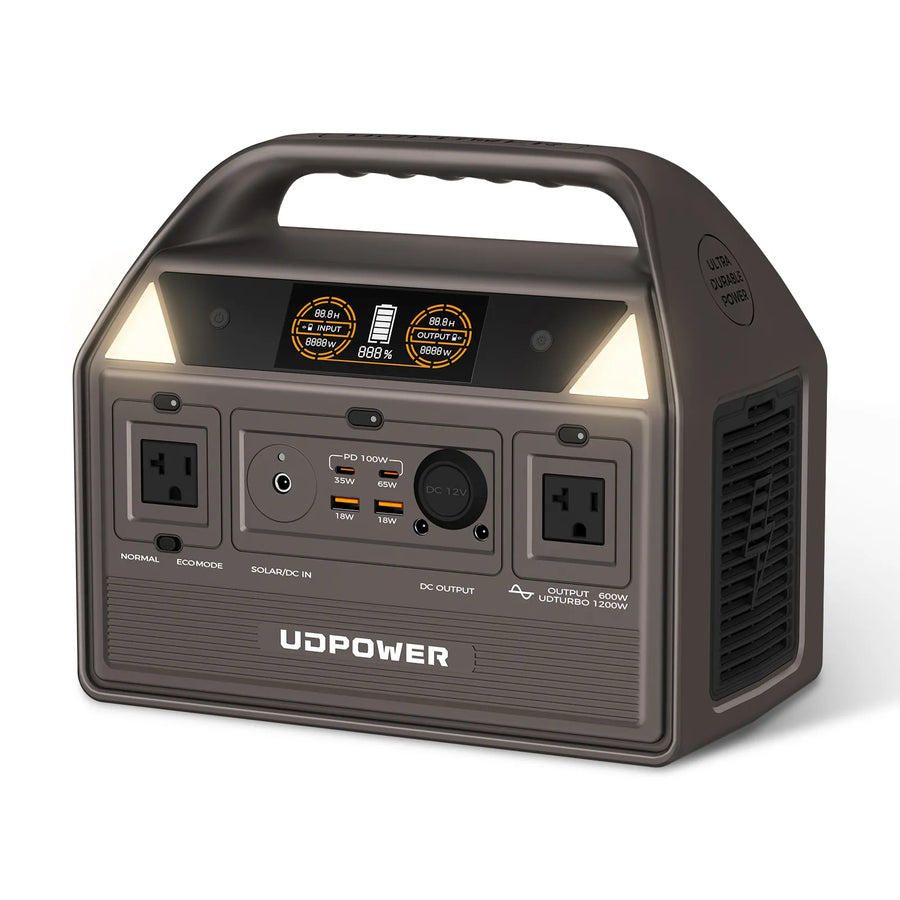
UDPOWER C600 — CPAP Night, Router, Lights, Camping Fridge
The C600 is a stronger small-home and camping option. With 596Wh capacity, 600W rated AC output, quiet operation, and up to 240W solar input, it can cover a CPAP night, router, lights, and light device charging when loads are managed.
- 596Wh LiFePO4 capacity
- 600W pure sine wave AC output
- Up to 240W solar input
- Good fit for CPAP, Wi-Fi, lights, small electronics, and short fridge support
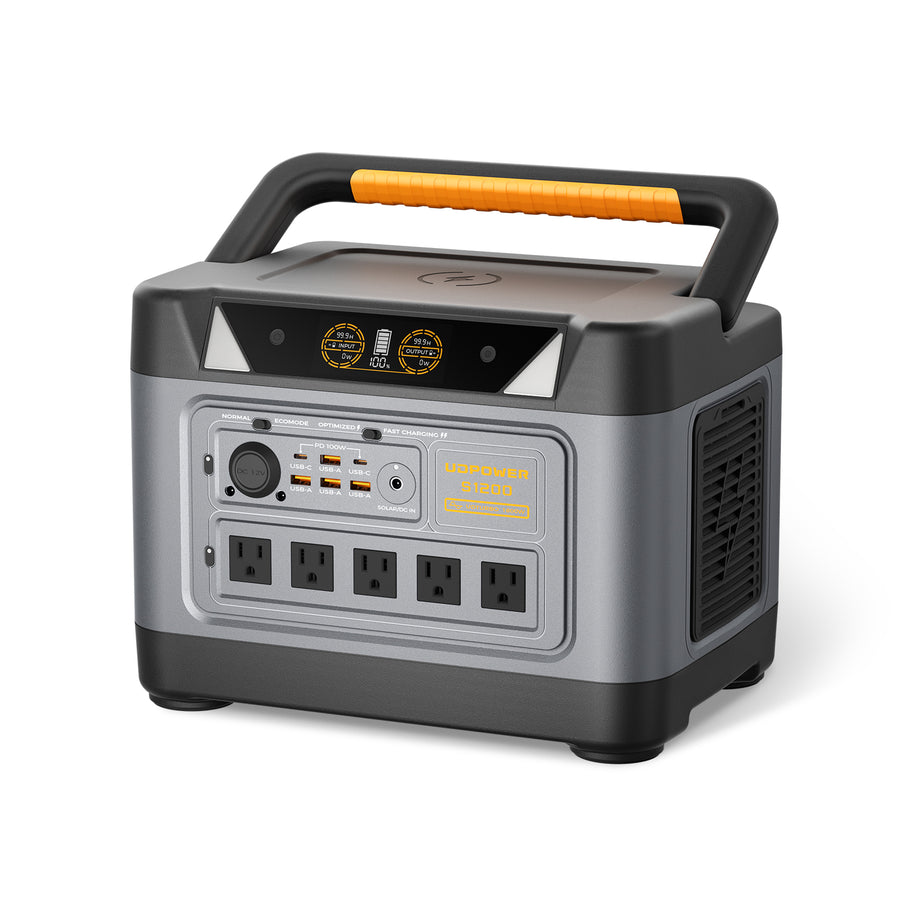
UDPOWER S1200 — Best Balance for Home Essentials
The S1200 is the practical middle ground for most home essentials. It has enough output for many household plug-in devices and enough battery capacity to support a refrigerator, CPAP, router, lights, and phones when you prioritize loads carefully. Its UPS function also helps with devices like routers or computers when the grid drops.
- 1191Wh capacity
- 1200W pure sine wave AC output, 1800W max
- Solar charging input up to 400W
- UPS Prime response time ≤10ms
- Strong pick for fridge support, CPAP, Wi-Fi, lights, laptop, and emergency backup
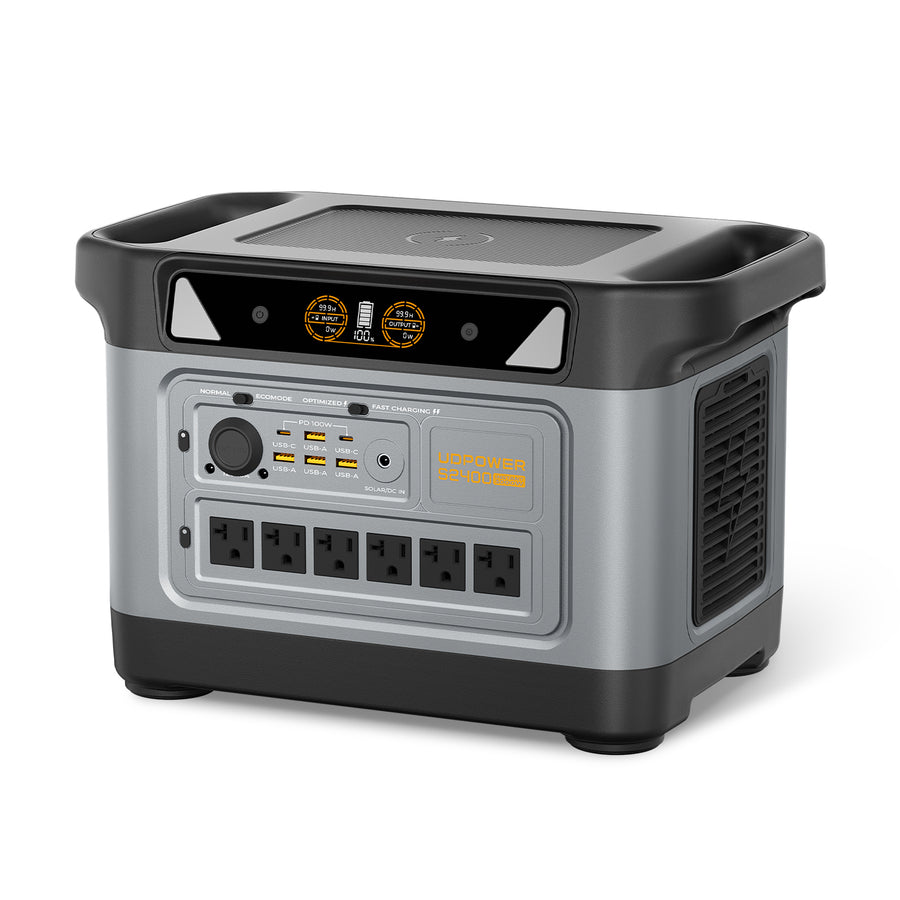
UDPOWER S2400 — Longer Runtime and Bigger Essential Loads
The S2400 is the better choice when your essentials include a refrigerator, router, lights, CPAP, fan, short microwave use, or heavier kitchen loads. Its 2083Wh battery gives much more breathing room, and the 2400W AC output handles more appliances at once than smaller units.
- 2083Wh capacity
- 2400W pure sine wave AC output
- 3000W startup surge
- Six AC outlets and 16 total ports
- Good fit for longer outages and larger essential-power plans
Quick buying logic
Choose C400 for light portable backup. Choose C600 for CPAP, router, lights, and camping essentials. Choose S1200 for a balanced home-outage setup. Choose S2400 when you want more runtime, more AC output, and more room for refrigerators or heavier short-use appliances.
Compare all models here: UDPOWER Portable Power Stations. For solar-ready bundles, see UDPOWER Solar Generators and UDPOWER Solar Panels.
Refrigerator Strategy During an Outage
The refrigerator is usually the load that changes the whole plan. A router and phones are easy. A fridge adds compressor startup surge, cycling behavior, and food-safety timing.
Do not open the fridge unless you need to
Ready.gov says a refrigerator can keep food cold for about four hours if the door stays closed, and a full freezer can hold temperature much longer. FDA food-safety guidance also recommends keeping doors closed and checking food temperature after a power outage.
Ready.gov power outage guidance | FDA food safety during power outages
Best way to stretch refrigerator runtime
- Keep the refrigerator and freezer doors closed as much as possible.
- Do not run every appliance at the same time. Give the fridge priority when it cycles on.
- Use a thermometer so you know when power is truly needed.
- If the outage is short, focus first on medical devices, communications, and lighting.
- When solar is available, recharge during the strongest sun and run the fridge during daytime if possible.
For a dedicated refrigerator runtime guide, see How Long Will a 1000W Portable Solar Generator Run a Refrigerator?
What Not to Run Unless You Really Need To
Some devices are technically possible on larger solar generators but are poor use of battery power. In an outage, a 10W router can run for days on the same energy a heater can burn in minutes.
| Load | Why it drains fast | Better outage alternative | Related guide |
|---|---|---|---|
| Space heater | Often 750–1500W continuous. Even a large battery drains quickly. | Layer clothing, use blankets, heat one small area only if necessary. | 1500W power station guide |
| Electric kettle | High heating load, commonly around 1500W. | Use short sessions only, or heat water another safe way if available. | 2000W power station guide |
| Hot plate / electric stove | High continuous cooking load; not ideal for battery backup. | Use no-cook food, insulated food storage, or safe outdoor cooking equipment. | Electric stove wattage guide |
| Large air conditioner | High running watts plus startup surge; may exceed output or drain fast. | Use fans, shade, ventilation, and cooling one room only. | RV AC watts guide |
| Large well pump or hardwired 240V appliance | May require high surge, 240V, or hardwired transfer equipment. | Use a properly designed backup system instead of a plug-in portable unit. | Water pump wattage guide |
Common Runtime Mistakes
Mistake 1: Looking only at “watts”
A 1200W power station rating tells you the maximum output it can handle. It does not mean the battery will run a 1200W appliance for many hours. Capacity in Wh is what tells you runtime.
Mistake 2: Forgetting refrigerator startup surge
A refrigerator may average far less power over a day, but the compressor can need a higher startup surge. If the power station cannot handle that surge, runtime does not matter because the fridge may not start reliably.
Mistake 3: Leaving AC on for tiny loads
For phones, USB lights, and small DC devices, use USB or DC outputs when possible. AC inverters are convenient but can waste energy on low-power loads.
Mistake 4: Running comfort loads before critical loads
During a long outage, prioritize medical devices, food safety, communication, and basic lighting. Coffee, TV, microwave, and fans can be used in short sessions after the critical loads are covered.
Mistake 5: Assuming solar will save the plan every day
Solar can extend runtime dramatically, but cloudy weather and shade can change everything. Always plan for at least one night of battery-only use if the outage risk is serious.
FAQ
How long can a solar generator run basic essentials?
For light essentials such as a router, phones, and LED lights, many mid-size solar generators can run from one night to several days. Once you add a refrigerator, CPAP, fan, or microwave, runtime drops quickly. Use battery Wh × 0.85 ÷ total watts for a realistic starting estimate.
Can a solar generator run a refrigerator all night?
Yes, if the generator has enough battery capacity and inverter surge output for that refrigerator. A 1,000–1,200Wh model may run many efficient refrigerators through a shorter outage window, but exact runtime depends on the fridge’s daily kWh use, room temperature, compressor cycling, and door openings.
Can a solar generator run a CPAP overnight?
Yes, many solar generators can run a CPAP overnight, especially when the heated humidifier and heated tube are off. A CPAP using around 40W needs about 320Wh for an 8-hour night before losses. Always check your CPAP power supply label and therapy requirements.
Is a 1000Wh solar generator enough for emergency essentials?
It can be enough for a lean emergency setup: router, phones, LED lights, laptop charging, and possibly a CPAP night. If your plan includes a refrigerator for a full day plus other loads, a larger battery or daytime solar recharge is usually a better fit.
How much solar input do I need to run essentials continuously?
Start by estimating daily watt-hours. If your essentials use 1,000Wh per day, your panels need to replace about that much energy during usable sunlight. A 420W portable solar setup may add roughly 1050–1680Wh on a strong clear day, but much less in shade or cloudy weather.
Can I use a solar generator while it is charging?
Many portable power stations support pass-through use, but heat, input power, output load, and battery management still matter. For best results, keep output loads lower than input power when possible and give the unit ventilation.
What is the best UDPOWER model for home essentials?
For most home essentials, the S1200 is the balanced choice because it combines 1191Wh capacity, 1200W output, UPS function, and up to 400W solar charging input. For longer outages or heavier appliances, the S2400 provides more capacity and output.
Should I power my fridge immediately when the outage starts?
Not always. If the door stays closed, a refrigerator can keep food cold for several hours. For a short outage, you may save battery for medical devices, communication, and lights first. For longer outages, rotate power to the fridge and monitor temperature.
Why is my real runtime shorter than the calculator says?
Common reasons include inverter losses, startup surges, hidden standby loads, heated CPAP accessories, fridge cycling in a hot room, battery temperature, and low-load AC overhead. The display runtime estimate is useful, but testing your own essentials before an outage is better.
Can a solar generator run a whole house?
A portable solar generator can run selected household essentials, not usually the entire home like grid power. For whole-home backup, you need to know total loads, surge requirements, 120V/240V needs, transfer equipment, and daily energy use. Start with critical loads first.
Build Your Essential Power Plan
Start with the devices you truly need: refrigerator, CPAP, router, phones, lights, fan, and laptop. Add the watts, estimate hours, then choose a power station with enough battery capacity and output headroom.
- For light backup and portability: UDPOWER C400
- For CPAP, router, lights, and camping essentials: UDPOWER C600
- For balanced home outage essentials: UDPOWER S1200
- For longer runtime and heavier essential loads: UDPOWER S2400
Related Articles


