What Is an AC Adapter? How It Works, How to Read the Label, and How to Choose the Right One
ZacharyWilliamLatest update: May 8, 2026
An AC adapter is the small power supply that sits between a wall outlet and the device you want to run. For most everyday electronics, it takes household AC power and turns it into the lower-voltage DC power the device actually needs.
Quick answer
An AC adapter converts wall power into device-safe power. In the United States, a wall outlet normally supplies AC power. Many devices such as routers, LED strips, laptops, speakers, cameras, CPAP accessories, and small electronics cannot use that raw AC directly, so the adapter changes it to a specific DC voltage, current limit, connector shape, and polarity.
The safest replacement rule is simple: match the voltage, match the plug size, match the polarity, and choose an adapter with equal or higher current capacity. For USB-C devices, the charger and cable must also support the wattage and Power Delivery profile your device requires.

What is an AC adapter?
An AC adapter, also called an AC/DC adapter, power adapter, wall charger, or external power supply, is a separate power unit that plugs into a wall outlet and feeds your device the correct electrical output.
The key word is external. Instead of putting the power conversion hardware inside the device, manufacturers move it into a brick, wall plug, or inline adapter. That keeps the device smaller, reduces heat inside the device, and makes it easier to replace the power supply if the cord fails.
| Common name | What people usually mean | Typical devices | Important note |
|---|---|---|---|
| AC adapter | A power supply that takes wall AC input and provides a usable output | Laptops, routers, cameras, LED strips, audio gear | Many AC adapters output DC, so check the output label before replacing one. |
| AC/DC adapter | A more specific name for an adapter that converts AC input to DC output | Most small electronics | This is the most common type in homes and offices. |
| Charger | A power supply used to charge a battery-powered device | Phones, tablets, laptops, cameras, power stations | Some charging control happens inside the device, not in the adapter. |
| Power brick | A larger inline adapter that sits on the floor or desk | Laptops, monitors, game consoles, high-power accessories | Often used when the wattage is too high for a small wall plug. |
| Wall wart | A compact adapter that plugs directly into the outlet | Routers, speakers, smart home hubs | Can block nearby outlets if the body is large. |
AC vs. DC: why adapters exist
Household outlets supply alternating current, commonly written as AC. Batteries and many electronics use direct current, written as DC. That is why a router might say “12V DC,” a laptop charger might say “20V,” and a portable power station may offer both AC outlets and DC/USB ports.
| Power type | Where you see it | Why it matters for adapters | Related source |
|---|---|---|---|
| AC power | Wall outlets, generators, inverter AC outlets | The adapter must be rated for the outlet voltage and frequency, such as 100–240V~ 50/60Hz or a U.S.-specific input. | UDPOWER AC vs. DC guide |
| DC power | Batteries, USB-C, 12V ports, barrel plugs | The output voltage, current, connector, and polarity must match the device’s requirement. | UDPOWER AC vs. DC guide |
| USB-C Power Delivery | Modern phones, tablets, laptops, docks | The charger, device, and cable negotiate a supported voltage/current profile. USB PD 3.1 increased the specification ceiling to 240W. | USB-IF USB Power Delivery |
How an AC adapter works
Most modern adapters are switching power supplies. You do not need to understand the circuit board to buy the right one, but the basic process helps explain why voltage, current, and safety markings matter.

AC input enters the adapter
The adapter receives electricity from the wall outlet. A universal-input adapter may accept 100–240V~ 50/60Hz, which is useful for travel when paired with the correct plug adapter.
The adapter converts AC into DC
Inside the adapter, the input is rectified and converted into a controlled DC output. This is why the output label might say 12V⎓2A, 19V⎓3.42A, or 24V⎓5A.
The output is regulated
Regulation keeps the output close to the target voltage even when the device’s power draw changes. Better adapters also include short-circuit, over-current, over-voltage, and thermal protection.
The connector delivers power to the device
This final part is where many mistakes happen. A connector can look close but still be wrong. A 5.5 × 2.1 mm barrel plug and a 5.5 × 2.5 mm barrel plug are not the same.
How to read an AC adapter label
The label is the fastest way to judge whether an adapter is suitable. Read the device label first, then compare the adapter label. Never guess from appearance alone.
| Label item | What it means | Replacement rule | Example |
|---|---|---|---|
| Input | What the adapter can accept from the outlet | Must match your region’s outlet power. Universal 100–240V~ 50/60Hz is common for travel. | 100–240V~ 50/60Hz |
| Output voltage | The DC voltage sent to the device | Match the device voltage unless the manufacturer specifies an allowed range. | 12V DC, 19V DC, 24V DC |
| Output current | The maximum current the adapter can supply | Adapter current should be equal to or higher than the device requirement. | 2A, 3.75A, 5A |
| Output power | Voltage × current, shown in watts | Choose enough watts for the device, with reasonable headroom. | 24V × 5A = 120W |
| Polarity | Which part of a barrel connector is positive or negative | Must match exactly. Center-positive is common, but not universal. | Center positive |
| Connector size | The physical plug dimensions and shape | Must fit securely without forcing, wobbling, or overheating. | DC7909, DC5521, USB-C, barrel plug |
| Efficiency/safety marks | Indicates testing, energy performance, or emissions compliance | Prefer reputable certified adapters, especially for unattended use. | ETL, UL, FCC, DOE Level VI |
How to choose a replacement AC adapter
Use this order. It prevents the most common mistakes.
- Find the device’s required input. Look on the device label, manual, original adapter, or official product page.
- Match the voltage. If the device needs 24V DC, use a 24V DC adapter unless the manufacturer clearly allows a different range.
- Match AC or DC output type. Most electronics need DC output. Do not replace a DC adapter with an AC-output adapter.
- Match polarity. For barrel plugs, check the polarity symbol. Reversed polarity can damage equipment immediately.
- Choose enough current. A device rated 24V 3A can use a 24V 5A adapter if the connector and polarity match. The device draws only what it needs.
- Check wattage. Watts = volts × amps. Add headroom when the device runs hot, starts motors, or operates for long periods.
- Check connector fit. A loose plug causes voltage drop, heat, and intermittent shutdowns.
- Avoid unknown ultra-cheap replacements. For anything used overnight or near furniture, certification and build quality matter.
Easy sizing formula
Watts = Volts × Amps. A 24V 5A adapter can provide up to 120W. A 24V 3.75A adapter can provide up to 90W. A 12V 2A adapter can provide up to 24W.
Common AC adapter connector types
The connector is just as important as the voltage. Two adapters can have the same electrical rating but different plug shapes.
| Connector type | Where it is used | What to check | Common mistake |
|---|---|---|---|
| Barrel plug | Routers, LED strips, speakers, cameras, small appliances | Outer diameter, inner pin size, voltage, current, polarity | Assuming all round plugs are interchangeable |
| USB-C | Phones, tablets, laptops, monitors, docks | PD wattage, cable rating, voltage/current profile | Using a low-watt cable with a high-watt charger |
| DC5521 / DC5525 | Portable electronics, LED systems, small power devices | 5.5 mm outer diameter plus the correct inner diameter | Confusing 2.1 mm and 2.5 mm inner pins |
| DC7909 / 8 mm | Solar generator and portable power station charging inputs | Voltage range, current limit, center polarity, input wattage | Using a cable that fits physically but exceeds the input spec |
| Proprietary laptop tip | Some older laptops and brand-specific devices | OEM part number, voltage, wattage, smart-pin compatibility | Buying a universal adapter without verifying tip compatibility |
| 3-prong AC power cord | Power stations, monitors, desktop PSUs, UPS units | Wire gauge, current rating, plug type, cord length | Replacing a heavy-duty cord with a thin undersized cord |
Real-world examples: what adapter do common devices need?
Use the examples below as a practical starting point. Always confirm the device’s own label before buying a replacement.
| Device | Common adapter range | What matters most | Portable power station note |
|---|---|---|---|
| Wi-Fi router | 9–12V DC, often 1–2A | Voltage and barrel plug size | Can often run for many hours from a small power station or 12V/DC output if compatible. |
| LED strip | 12V or 24V DC, current depends on strip length | Total wattage and voltage | Long strips need more amperage; do not undersize the adapter. |
| Laptop | 45–140W common; USB-C PD or brand-specific barrel tip | Wattage, cable rating, and PD profile | USB-C laptops can often charge directly from power station USB-C output if the wattage is sufficient. |
| Camera charger | Often 5–12V DC or USB | OEM charging dock compatibility | A portable station can run several camera chargers at once during field work. |
| CPAP accessories | Varies by model and humidifier use | Manufacturer-approved adapter or DC cable | For overnight backup, calculate watt-hours and use a pure sine-wave station when running the original AC adapter. |
| Portable power station charger | Model-specific DC adapter or AC input cord | Exact charger rating and input port type | Use the official or matching-rated charger. For solar/car charging, follow the station’s DC input specs. |
Common AC adapter mistakes that damage devices
1. Matching the plug but not the voltage
A plug that fits is not proof of compatibility. A 24V adapter plugged into a 12V device can permanently damage it.
2. Ignoring polarity
Many barrel plugs are center-positive, but some are not. Reversed polarity can cause instant failure.
3. Buying too little current
An undersized adapter may run hot, buzz, shut down, or make the device behave unpredictably. Choose equal or higher current capacity.
4. Treating USB-C as “one size fits all”
USB-C is a connector shape. It does not guarantee the charger, cable, and device support the same wattage. For higher-power USB-C devices, use PD-rated chargers and cables.
5. Covering the adapter while it runs
Adapters create heat during conversion. Do not bury one under bedding, insulation, rugs, or tightly packed furniture.
Efficiency and safety marks to check
For a low-cost adapter used once in a while, people often focus only on voltage and plug shape. For anything used daily, overnight, or during travel, efficiency and certification become more important.
| Mark or standard | What it tells you | Why buyers should care | Source |
|---|---|---|---|
| DOE external power supply standards | U.S. energy conservation rules and test procedures for covered external power supplies | Helps reduce wasted standby and conversion energy. | U.S. Department of Energy |
| Energy Efficiency Level VI | A common efficiency marking for modern external power supplies | More efficient adapters waste less energy as heat. | DOE standards table |
| ETL / UL safety certification | Indicates the product has been evaluated against relevant safety standards | Useful for adapters left plugged in for long periods. | UL power supply testing |
| FCC Part 15B | Electromagnetic interference compliance for electronic equipment | Helps reduce interference with nearby electronics. | UDPOWER 120W adapter specs |
| CPSC recall history | Real recalls show that unsafe adapters and cords can overheat or create fire/shock hazards | Buy from reliable sources and check older adapters for recalls. | U.S. CPSC recall example |
When a portable power station is better than a single AC adapter
A replacement adapter is the right answer when one device needs one exact power supply. A portable power station makes more sense when you want one power source for many devices, backup during outages, camping power, RV use, or a cleaner alternative to a gas generator for small electronics.
| Use case | Single AC adapter | Portable power station | Best choice |
|---|---|---|---|
| Replacing a lost router adapter | Low cost and direct fit if specs match | Can keep router running during an outage | Adapter for normal use; power station for backup |
| Charging laptop, phone, camera, and lights outdoors | Needs an outlet or multiple adapters | Offers AC outlets, USB, and DC ports in one unit | Power station |
| Home outage backup for Wi-Fi, CPAP, lights, and small appliances | Does not help if the wall outlet is dead | Stores energy and can run devices from battery | Power station |
| Running sensitive electronics from AC | Works when grid power is available | Pure sine-wave output is preferred for many sensitive loads | Power station with pure sine-wave inverter |
| Fast daily device charging at home | Simple and efficient for one device | Useful when you also need mobility or backup | Adapter unless backup is needed |
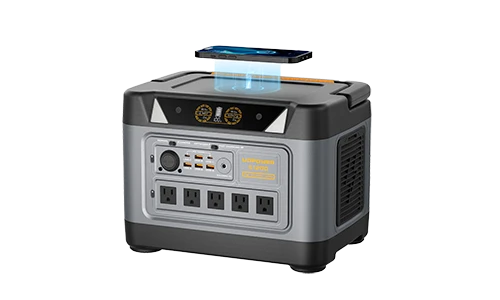
UDPOWER portable power stations are built around LiFePO4 battery chemistry, multiple output ports, pure sine-wave AC output, and solar-ready charging options. On the portable power station collection page, current models are organized by capacity and output so readers can match the station to the devices they actually need to power.
UDPOWER product picks by power need
These recommendations are matched to the real-world adapter question: small DC replacement, everyday electronics, and backup power when the wall outlet is not available.

UDPOWER 90W Power Adapter for C400 / C200
Best for: replacing or adding a matching AC/DC adapter for compatible C-Series models.
- Output: 24V DC / 3.75A, 90W max
- Input: 100–240VAC nominal, 50/60Hz
- Efficiency: Level VI, typical efficiency ≥88%
- Protection: short-circuit, over-current, and over-voltage protection
- Safety/EMI: ETL 62368-1 and FCC Part 15B listed on product page

UDPOWER 120W AC to DC Wall Power Adapter for C600
Best for: users who need a regulated 24V 5A adapter for compatible 24V DC equipment and C600 charging needs.
- Output: 24V DC / 5A, 120W max
- Input: 100–240VAC nominal, 50/60Hz
- Efficiency: Level VI, typical average efficiency ≥88%
- Standby power: ≤0.21W
- Protection: short-circuit, over-current, and over-voltage protection

UDPOWER C400 Portable Power Station
Best for: laptops, routers, lights, small DC devices, cameras, and compact camping or road-trip setups.
- Capacity: 256Wh LiFePO4
- AC output: 400W rated, 800W surge
- Fast charging: 1.5H listed on product page
- Battery life: 4,000+ cycles
- Ports: AC, USB-C, USB-A, 12V car port, DC5521, and EC5 jump starter port
- Solar input: up to 150W listed on product page

UDPOWER C600 Portable Power Station
Best for: users who need more capacity than a compact unit while still keeping the setup easy to move.
- Capacity: 596Wh LiFePO4
- Output: 600W rated, 1200W peak
- Battery life: 4,000+ cycles
- Ports: 2 AC outlets, USB-C, USB-A, 12V car outlet
- Useful for: laptops, cameras, smartphones, mini-fridges, routers, and lights

UDPOWER S1200 Portable Power Station
Best for: home Wi-Fi backup, CPAP support, RV electronics, multiple adapters at once, and outage preparation.
- Capacity: 1,190Wh
- Output: 1,200W rated, UDTURBO up to 1,800W surge
- UPSPrime: <10 ms switchover listed on product page
- Noise: <25 dB listed on product page
- Ports: 5 AC outlets plus USB-A, USB-C, DC5521, car port, and wireless charging on the 5-AC model

UDPOWER S2400 Portable Power Station
Best for: larger home backup loads, multiple AC adapters, larger appliances, and longer runtime needs.
- Capacity: 2,083Wh
- Output: 2,400W pure sine-wave AC output, UDTURBO surge support up to 3,000W
- Ports: 6 AC outlets plus 10 DC outputs
- UPSPrime: ≤10 ms switchover listed on product page
- Solar input: 12–50V, 10A max, up to 400W solar charging listed on product page
Simple runtime math when using adapters with a power station
When a device runs through an AC adapter, some energy is lost in conversion. A practical estimate is:
For quick planning, use 80–90% usable efficiency depending on AC/DC path, load, temperature, and device behavior. A router that averages 12W is very different from a laptop charger that peaks at 100W but may draw less once the battery is full.
| Device or adapter load | Estimated draw | C400 256Wh example | S1200 1190Wh example | S2400 2083Wh example |
|---|---|---|---|---|
| Wi-Fi router adapter | 10–15W | About 14–23 hours | About 63–107 hours | About 111–187 hours |
| LED lighting adapter | 20–30W | About 7–12 hours | About 32–54 hours | About 56–94 hours |
| Laptop charger | 45–100W | About 2–5 hours | About 10–24 hours | About 18–42 hours |
| Camera battery chargers | 20–60W | About 3–12 hours | About 16–54 hours | About 28–94 hours |
| Small appliance adapter | 100–200W | About 1–2 hours | About 5–10 hours | About 9–18 hours |
These are estimates, not guarantees. Real runtime depends on the adapter’s efficiency, the device duty cycle, battery temperature, and whether you use AC output, DC output, or USB-C direct charging.
FAQ
Is an AC adapter the same as a charger?
Sometimes, but not always. An AC adapter supplies the required output power. A charger may also communicate with the device or follow a charging profile. For battery-powered devices, use the manufacturer-recommended charger or a properly rated USB-C PD charger.
Can I use an adapter with higher amps?
Yes, if the voltage, output type, connector, and polarity match. A device draws the current it needs. For example, a 12V 2A device can usually use a 12V 3A adapter, but not a 24V adapter.
Can I use a lower-amp adapter?
Do not do it. A lower-amp adapter may overheat, shut down, buzz, or fail. It can also make the device restart or behave unpredictably.
Does voltage have to match exactly?
In most cases, yes. Match the voltage printed on the device or original adapter unless the official manual gives an acceptable input range.
What does center-positive mean?
Center-positive means the inside pin of a barrel connector is positive and the outside sleeve is negative. Many adapters use this layout, but not all. Check the polarity symbol before connecting.
Why does my adapter get warm?
Some warmth is normal because power conversion creates heat. Unplug the adapter if it becomes too hot to touch, smells unusual, buzzes loudly, melts, flickers, or repeatedly shuts off.
Can a portable power station run an AC adapter?
Yes. A portable power station with pure sine-wave AC outlets can run many standard AC adapters, as long as the adapter’s wattage is within the station’s output rating. For better efficiency, use a compatible DC or USB-C output when possible.
Is USB-C safer than a barrel adapter?
USB-C can be very convenient because compatible devices and chargers negotiate power, but the charger and cable still need to support the correct wattage. For high-power USB-C devices, use a certified PD charger and a cable rated for the required power.
What is the difference between an AC adapter and an inverter?
An AC adapter usually converts wall AC into lower-voltage DC. An inverter does the opposite: it converts battery DC into AC outlet power. Portable power stations include an inverter so they can power normal AC adapters away from the wall.
What adapter should I buy for UDPOWER C400 or C600?
For UDPOWER models, use the official product page and accessory listing. UDPOWER lists a 90W 24V 3.75A adapter for C400/C200 and a 120W 24V 5A adapter for C600. Match the model before ordering.
Need one power source for more than one adapter?
If you only lost one small adapter, replace that exact adapter. If you want backup power for routers, laptops, CPAP accessories, cameras, lights, and small home essentials, a portable power station is usually the more flexible choice.
View UDPOWER portable power stations View UDPOWER accessories