Ultimate Guide to Lithium-Ion Battery Voltage Chart
ZacharyWilliam
Battery Basics for Real Buyers
Most articles jump straight into a table and leave readers with the wrong impression: that there is one universal lithium-ion voltage chart. There is not. A phone-style 3.6V/3.7V lithium-ion cell does not behave the same way as a LiFePO4 power station, a 12V RV battery, or a 48V solar storage bank. If you use the wrong chart, the voltage reading may look “normal” while the battery is actually much lower or higher than you think.
This guide fixes that. You will see the right chart for the right chemistry, learn how to convert cell voltage into 12V, 24V, and 48V pack voltage, and understand when voltage is useful, when it is only a rough estimate, and how to avoid the charging mistakes that shorten battery life.
What a lithium-ion battery voltage chart actually tells you
A voltage chart is a reference table that matches battery voltage to a rough state of charge. That sounds simple, but three details matter more than most people realize.
- Voltage depends on chemistry. A LiFePO4 battery has a lower nominal cell voltage than a standard 3.6V/3.7V lithium-ion cell, so the same number on a multimeter can mean very different things.
- Voltage depends on timing. A battery measured right after charging will read higher than the same battery after resting. A battery under load will read lower because of voltage sag.
- Voltage is an estimate, not magic. It is most useful near the top and bottom of the charge range. In the middle, some chemistries—especially LiFePO4—hold a flatter voltage plateau, so one small voltage change does not always equal one neat jump in percentage.
Reference reading: Battery University on state-of-charge measurement, Battery University on lithium voltage ratings, and Battery University chemistry summary.

The chemistry cheat sheet: the first chart to check
If you only read one table before buying, charging, or troubleshooting a battery, read this one. It separates the two charts people confuse the most: standard lithium-ion and LiFePO4.
| Battery type | Typical nominal voltage per cell | Typical full-charge voltage per cell | Typical low-end cutoff range | Where you usually see it | What chart to use |
|---|---|---|---|---|---|
| Standard lithium-ion (NMC / NCA / many consumer cells) | 3.6V–3.7V | 4.2V | About 2.8V–3.0V in many packs; some cells specify 2.5V absolute minimum | Phones, laptops, power tools, some EV modules | Use a standard 3.6V/3.7V lithium-ion chart |
| LiFePO4 (LFP) | 3.2V | 3.6V–3.65V | About 2.5V per cell in many charts; system BMS may stop higher | Portable power stations, solar storage, RV and marine batteries | Use a LiFePO4 chart |
That distinction matters a lot for portable power stations. UDPOWER’s current power stations use LiFePO4, so the LiFePO4 chart is the one that fits those products best—not the classic 3.7V consumer-cell chart. If you want a quick refresher on where voltage, current, and wattage fit together, UDPOWER’s guide to low, medium, and high voltage currents is a strong companion read.

Standard 3.6V/3.7V lithium-ion voltage chart
This is the chart most people expect when they hear “lithium-ion battery,” and it is a good fit for many consumer cells. Treat it as an approximate rested-voltage guide, not as a lab-grade SoC meter.
| Approx. state of charge | Rested voltage range per cell | What it usually means in plain English |
|---|---|---|
| 100% | 4.15V–4.25V | Fully charged |
| 90% | 4.00V–4.10V | Still near full |
| 80% | 3.85V–3.95V | Healthy working range |
| 70% | 3.75V–3.85V | Comfortable mid-high range |
| 60% | 3.65V–3.75V | Middle of the pack |
| 50% | 3.55V–3.65V | Half charge, roughly speaking |
| 40% | 3.50V–3.55V | Start thinking about recharging soon |
| 30% | 3.45V–3.50V | Lower working range |
| 20% | 3.35V–3.45V | Low battery territory |
| 10% | 3.20V–3.30V | Recharge now |
| 0% | About 3.0V and below | Near empty; many packs will shut down before damage |
If you want an even simpler version for quick field checks, this shortcut works well for a standard 3.7V cell: 4.2V is full, 3.9V is roughly three-quarters, 3.7V is about half, 3.5V is roughly one-quarter, and 3.0V is basically empty.

LiFePO4 voltage chart for single cells and battery packs
LiFePO4 deserves its own section because its discharge curve is flatter than standard lithium-ion. That is one reason LiFePO4 has become so popular in power stations and solar storage: it delivers stable output, strong safety, and long cycle life. The tradeoff is that mid-range voltage is less dramatic, so voltage alone tells a less precise story in the middle of the pack.
LiFePO4 single-cell voltage chart
| Approx. state of charge | Voltage per cell | Reading note |
|---|---|---|
| 100% (rest after charge) | 3.40V | Common rested full reading |
| 100% (right after charge / charging) | 3.60V–3.65V | Fresh-off-charger reading; let it rest before judging SoC |
| 90% | 3.35V | Still close to full |
| 80% | 3.32V | Upper working range |
| 70% | 3.30V | Stable plateau zone |
| 60% | 3.27V | Midrange |
| 50% | 3.26V | Very close to the plateau |
| 40% | 3.25V | Still stable |
| 30% | 3.22V | Lower midrange |
| 20% | 3.20V | Time to plan a recharge |
| 10% | 3.00V | Low |
| 0% (recommended cutoff) | 2.50V | Do not treat this as a target; many systems cut off earlier |
LiFePO4 12V / 24V / 48V battery voltage chart
Because LiFePO4 packs are built from the same 3.2V cells in series, you can scale the voltage up. That is why a 12V LiFePO4 battery is usually 12.8V nominal, a 24V pack is usually 25.6V nominal, and a 48V pack is usually 51.2V nominal.
| Approx. state of charge | 12V LiFePO4 pack | 24V LiFePO4 pack | 48V LiFePO4 pack |
|---|---|---|---|
| 100% (rest after charge) | 13.60V | 27.20V | 54.40V |
| 100% (right after charge / charging) | 14.40V–14.60V | 28.80V–29.20V | 57.60V–58.40V |
| 90% | 13.40V | 26.80V | 53.60V |
| 80% | 13.28V | 26.56V | 53.12V |
| 70% | 13.20V | 26.40V | 52.80V |
| 60% | 13.08V | 26.16V | 52.32V |
| 50% | 13.04V | 26.08V | 52.16V |
| 40% | 13.00V | 26.00V | 52.00V |
| 30% | 12.88V | 25.76V | 51.52V |
| 20% | 12.80V | 25.60V | 51.20V |
| 10% | 12.00V | 24.00V | 48.00V |
| 0% (recommended cutoff) | 10.00V | 20.00V | 40.00V |
How to convert cell voltage into 12V, 24V, and 48V pack voltage
Pack voltage is just cell voltage multiplied by the number of cells wired in series. Once you understand that, a lot of battery labels suddenly make sense.
| Common pack type | Cell chemistry | Typical series count | Nominal pack voltage | Full pack voltage | What you usually see it in |
|---|---|---|---|---|---|
| “12V” standard lithium-ion pack | 3.6V/3.7V cell | 3S | 10.8V–11.1V | 12.6V | Small electronics and compact tool packs |
| “12V” LiFePO4 pack | 3.2V cell | 4S | 12.8V | 14.6V | RV, marine, solar, backup power |
| “24V” standard lithium-ion pack | 3.6V/3.7V cell | 7S | 25.2V–25.9V | 29.4V | E-bikes, tools, specialized packs |
| “24V” LiFePO4 pack | 3.2V cell | 8S | 25.6V | 29.2V | Solar and larger backup systems |
| “48V” standard lithium-ion pack | 3.6V/3.7V cell | 13S | 46.8V–48.1V | 54.6V | EV, e-mobility, high-power systems |
| “48V” LiFePO4 pack | 3.2V cell | 16S | 51.2V | 58.4V | Home storage and off-grid systems |
This math also helps you spot bad assumptions. A battery sold as “12V lithium” may be standard lithium-ion or LiFePO4. The label alone is not enough. Check the chemistry, the nominal voltage, or the charging voltage before you match a charger, inverter, or solar controller. If you need to move between Wh, Ah, mAh, volts, watts, and kWh while doing that homework, use UDPOWER’s battery unit conversion tools.
Underlying voltage references: Battery University
Why some lithium-ion cells say 3.8V or 3.85V
This is one of the most overlooked parts of battery shopping. Not every standard lithium-ion cell tops out at 4.2V. Some high-voltage consumer cells use higher full-charge limits, and that means the charger must match the battery.
| Nominal cell label | Typical end-of-discharge | Typical full-charge voltage | What matters in real life |
|---|---|---|---|
| 3.6V | 2.8V–3.0V | 4.2V | The classic cobalt-based lithium-ion profile |
| 3.7V | 2.8V–3.0V | 4.2V | Very common consumer-cell labeling |
| 3.8V | 2.8V–3.0V | 4.35V | Do not assume a 4.2V charger is correct |
| 3.85V | 2.8V–3.0V | 4.4V | Charger mismatch can cause charging problems or worse |
If you remember only one thing from this section, remember this: nominal voltage and full-charge voltage are not the same number. A cell labeled 3.7V is not charged to 3.7V. It is charged to 4.2V. And if a cell is a 4.35V or 4.4V design, you need hardware that is built for that higher voltage.
That same mindset matters when you shop for a power station: one headline number never tells the whole story. If you are already comparing real products, UDPOWER’s portable power station reliability guide and best portable power station for the money guide both show how voltage, battery chemistry, output, and input limits fit into an actual buying decision.
How to measure battery voltage the right way
A bad voltage reading usually comes from bad timing, not bad equipment. Use this simple process and your chart will be much more useful.
- Identify the chemistry first. Confirm whether the battery is standard lithium-ion or LiFePO4.
- Stop charging and remove heavy loads. A battery fresh off the charger can read artificially high. A battery under load can read artificially low.
- Let the battery rest. A rest period matters. For accurate voltage-based state-of-charge checks, resting open-circuit voltage is far more useful than an instant reading taken during use.
- Use a reliable meter or built-in display. A decent multimeter or a trustworthy battery monitor is enough for routine checks.
- Compare the reading to the correct chart. Do not compare a LiFePO4 battery to a 3.7V consumer-cell chart.
- Use voltage as one clue, not the only clue. If your system has a battery management system, app reading, or amp-hour counter, combine those with voltage for a better picture.
For readers who want the bigger safety picture, UDPOWER’s voltage and current guide is worth reading next because it explains why connector fit, solar input limits, and current handling matter just as much as the voltage number on the display.
Why voltage readings change even when the battery did not “lose” that much power
Readers often panic when voltage drops fast under load or stays higher than expected after charging. In most cases, that is normal behavior.
| Situation | What you will see | Why it happens | What to do |
|---|---|---|---|
| Fresh off the charger | Voltage looks unusually high | Surface charge has not settled yet | Let the battery rest, then read again |
| Heavy load is running | Voltage sags lower than expected | Current draw and internal resistance pull voltage down temporarily | Check again at light load or at rest |
| Cold environment | Voltage and usable capacity both feel lower | Cold hurts battery performance and can trigger earlier cutoffs | Warm the battery before charging and expect shorter runtime |
| LiFePO4 in the middle of the charge range | Voltage hardly changes for a while | LiFePO4 has a flatter discharge curve | Use BMS/app data too, not voltage alone |
| Battery sits at 100% for long periods | No obvious short-term problem | High charge voltage over time adds stress, especially with heat | Charge fully when needed, but do not park there for long storage |
If your end goal is not just reading voltage but planning backup time, pair this section with UDPOWER’s battery runtime basics and the portable power station runtime calculator. If your setup includes panels, the next practical step is solar recharging during a power outage, especially for readers trying to connect voltage charts to real charging behavior.
Sources: Battery University on voltage-based SoC limits, Battery University on heat and high-charge stress, and Battery University on discharge behavior and cold-temperature losses.
Charging and storage habits that protect battery life
The chart tells you where the battery is. Your charging habits decide how long it stays healthy.
- Do not use voltage alone to pick a charger. Match the charger to the battery chemistry and charge ceiling.
- Avoid deep discharge as a habit. It is better to recharge low batteries before they live near cutoff for long periods.
- Do not leave lithium batteries hot and full for weeks at a time. Heat and high charge voltage create extra stress.
- Use the manufacturer’s recommended charging limits. That matters even more on higher-voltage lithium-ion chemistries.
- For longer storage, think cool, dry, and moderate charge. Short-term full charge is fine when you need the energy. Long-term storage is different.
- If your pack has a BMS, respect it. Built-in protections are there to stop overcharge, over-discharge, or charging in the wrong conditions.
Need a practical next step after checking voltage? Start with UDPOWER’s battery unit conversion tools if you are converting mAh, Ah, Wh, and volts. Then use how to calculate watt-hours (Wh) to turn battery numbers into something useful, and finish with the runtime calculator if your real question is how long that stored energy will actually last.
If you are matching panels to a power station, read solar recharging during a power outage before you buy cables or wire panels together. For readers comparing backup units instead of just learning voltage theory, UDPOWER S1200 vs S2400 and how to choose the best portable power station for the money are the strongest next reads.
References: Battery University on prolonging lithium-based batteries and Battery University on lithium-ion charging basics.
Recommended UDPOWER LiFePO4 products
If you want to apply the LiFePO4 voltage chart to real gear, these are the UDPOWER models worth starting with. They all use LiFePO4 chemistry, which means you should use the LiFePO4 chart in this article—not the classic 3.7V cell chart.

UDPOWER S1200
This is the sweet spot for readers who want a real home-backup or camping upgrade without jumping straight into a heavier 2kWh-class unit.
- 1,190Wh capacity
- 1,200W rated AC output with UDTURBO up to 1,800W
- LiFePO4 battery with 4,000+ cycles
- About 26.0 lbs
- <10ms UPS backup feature
- 5 AC outlets + 10 DC outputs on the 5-AC model
Best for: routers, CPAP setups, lights, laptop charging, short outages, weekend camping, and anyone who wants LiFePO4 in a compact package.
Source: official S1200 product page.
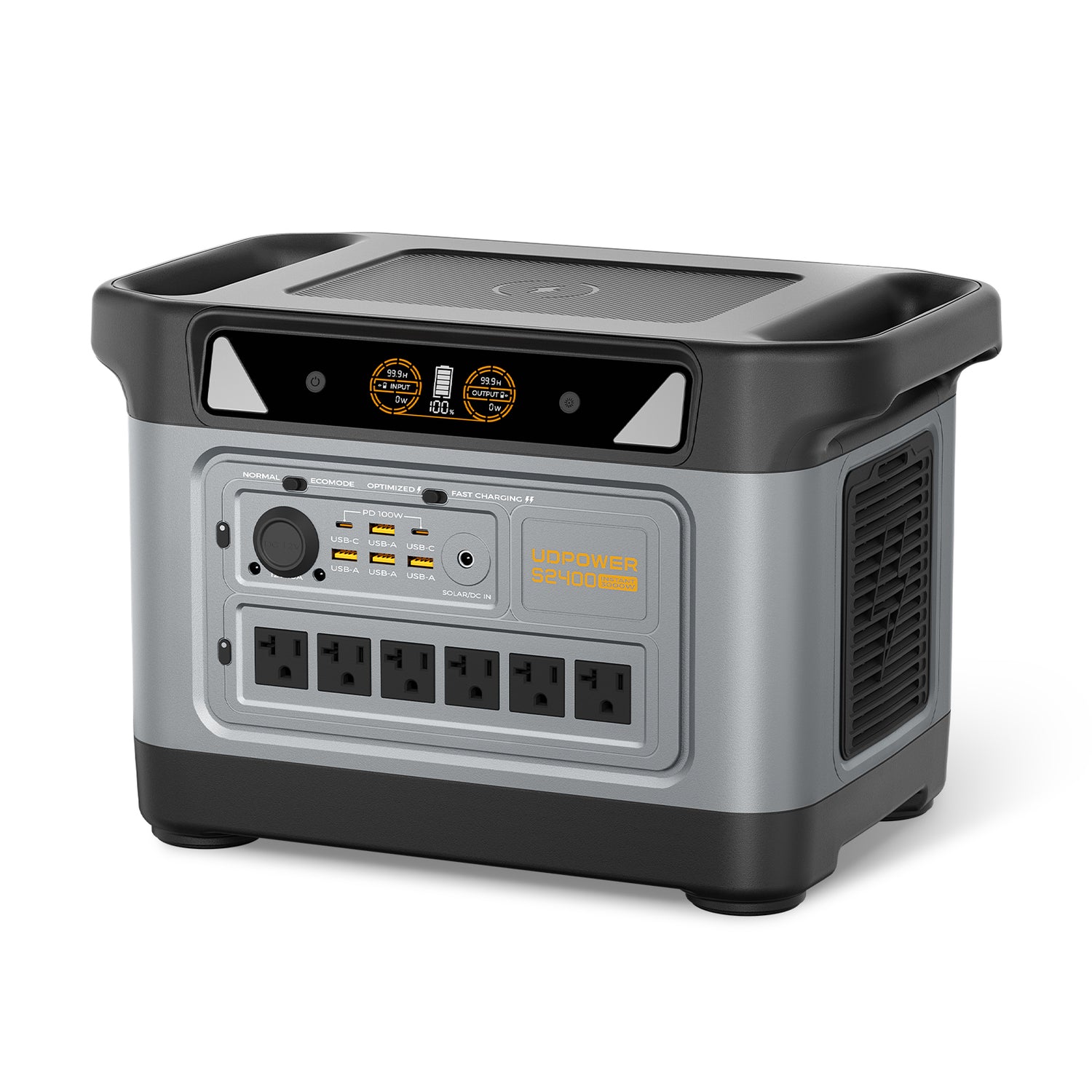
UDPOWER S2400
If your question is less “what does voltage mean?” and more “which LiFePO4 station actually gives me room to breathe?”, this is the step-up model.
- 2,083Wh capacity
- 2,400W pure sine wave AC output with surge support up to 3,000W
- LiFePO4 battery with 4,000+ cycles
- 6 AC outlets + 10 DC outputs
- About 40.8 lbs
Best for: bigger appliances, longer backup windows, heavier RV use, and buyers who want a larger LiFePO4 reserve.
Sources: official S2400 product page and UDPOWER S1200 vs S2400 comparison for the listed weight and use-case context.

UDPOWER C600
This is the small, easy-entry option for readers who want LiFePO4 chemistry without buying a full-size backup unit.
- 596Wh capacity
- 600W rated output, 1,200W peak
- LiFePO4 battery with 4,000+ cycles
- 2 AC outlets, USB-C, USB-A, and 12V car outlet
Best for: road trips, compact emergency kits, camera gear, small electronics, and first-time buyers who mainly need portable AC and DC power.
Source: official C600 product page.

UDPOWER 120W Portable Solar Panel
If you want a simpler solar pairing and lighter carry weight, start here.
- 120W rated power
- 22% efficiency
- IP65 weather resistance
- Compatible with C200, C400, C600, S1200, and S2400
Source: official 120W solar panel page.
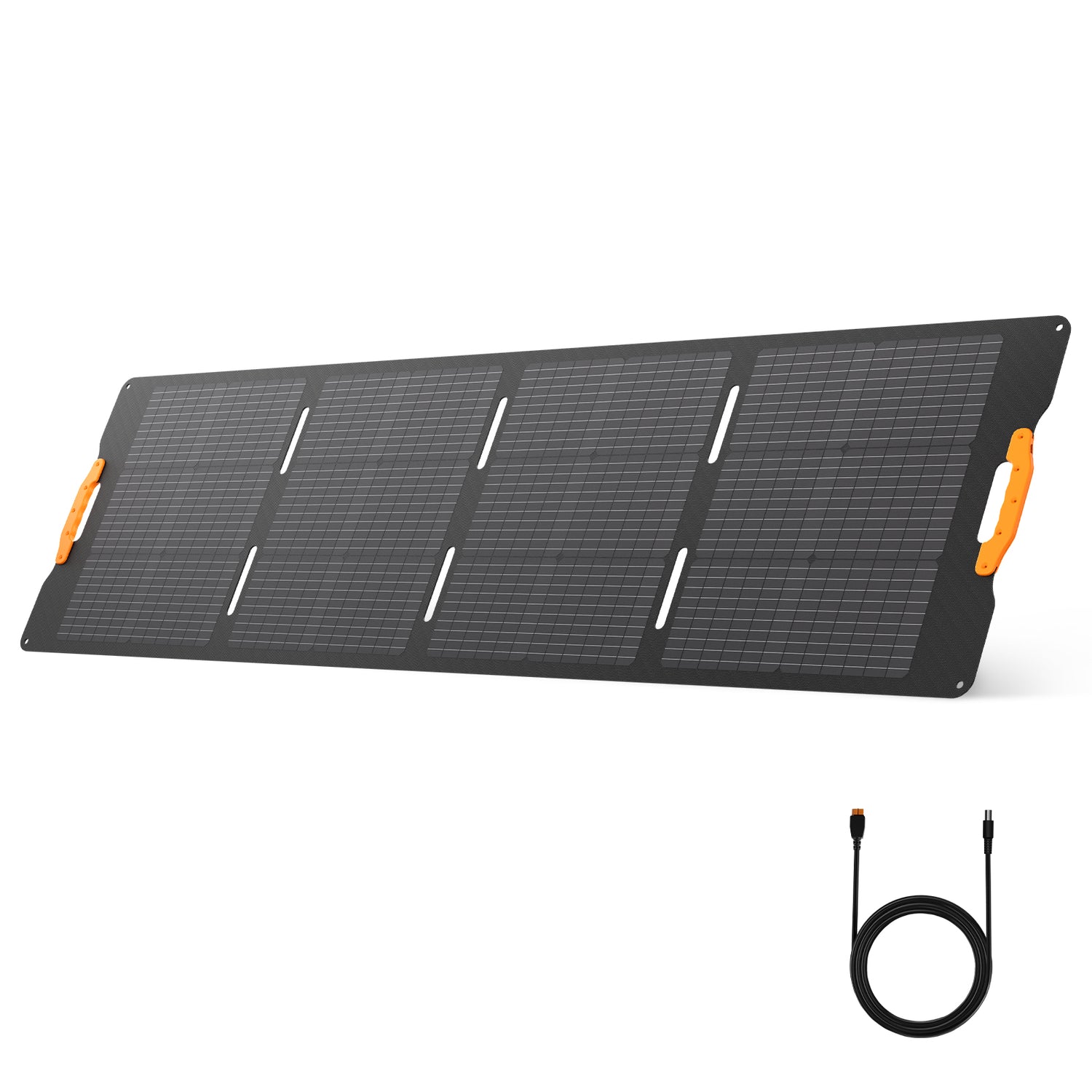
UDPOWER 210W Foldable Solar Panel
This is the better fit for buyers who want faster solar input with the S1200 or S2400.
- 210W output
- ≥22% conversion efficiency
- IP65 water resistance
- Adjustable stand from 60° to 90°
- Compatible with C600, S1200, and S2400 according to the product page
Important compatibility note: UDPOWER’s 120W solar panel page also notes that the C600 only supports 18V solar panels and should not use the 210W panel. That makes the 120W panel the safer pick for the C600, while the 210W panel is the more natural upgrade for the S1200 and S2400.
Sources: official 210W panel page and official 120W panel page.
Still comparing stations? This official brand guide is also useful: UDPOWER S1200 vs S2400 comparison.
FAQ
Is there one universal lithium-ion battery voltage chart?
No. The first thing to check is chemistry. Standard 3.6V/3.7V lithium-ion cells and LiFePO4 cells do not share the same voltage curve.
What is full voltage for a standard 3.7V lithium-ion cell?
For many common consumer cells, full charge is 4.2V per cell. The “3.7V” number is the nominal voltage, not the full-charge voltage.
What is full voltage for a LiFePO4 cell?
Typically 3.6V to 3.65V per cell. A 12V LiFePO4 battery is usually 14.4V to 14.6V right after charge and about 13.6V after resting.
Why does my battery voltage look lower under load?
That is usually voltage sag. Current draw and internal resistance temporarily pull the voltage down while the load is running.
Why does my battery still show a high voltage right after charging?
That is normal. The battery has not settled yet. A rested reading is better for comparing to a state-of-charge chart.
How accurate is voltage for estimating state of charge?
It is useful, but it is only an estimate. It is generally more helpful near full or near empty. In the middle range—especially on LiFePO4—voltage alone can be less precise.
Can I use a 3.7V lithium-ion chart for a LiFePO4 power station?
No. That is one of the most common mistakes. LiFePO4 uses a different voltage range and a flatter discharge curve.
What is the difference between nominal voltage and full-charge voltage?
Nominal voltage is the battery’s typical working voltage used for labeling and design. Full-charge voltage is the higher number the charger reaches at the top of the charge cycle.
What chart should I use for UDPOWER power stations?
Use the LiFePO4 chart. UDPOWER’s current C600, S1200, and S2400 product pages list LiFePO4 battery chemistry.
What is the best beginner-friendly way to use a voltage chart?
Match the battery chemistry, take the reading after rest, and use the chart as a range guide instead of trying to turn every decimal place into an exact percentage.
Read next on UDPOWER
- Battery & power unit conversion tools — best follow-up if you are converting mAh, Ah, Wh, volts, watts, and kWh.
- How to calculate watt-hours (Wh) — useful when readers know the battery label but still cannot compare stored energy.
- Portable power station runtime calculator — the fastest next click when the real question is “how long will this run?”
- Solar recharging during a power outage — the most natural next read for readers matching panels to voltage limits.
- UDPOWER S1200 vs S2400 — best for readers choosing between a lighter and a larger LiFePO4 backup unit.
- What is the most reliable portable power station? — a stronger trust-building follow-up for buyers comparing build quality and battery chemistry.
- How to choose the best portable power station for the money — a helpful bridge from voltage theory to real shopping decisions.
Final word
The best battery voltage chart is not the prettiest one—it is the one that matches your battery chemistry. Once you separate standard lithium-ion from LiFePO4, most of the confusion disappears. From there, the smart move is simple: read voltage at the right time, use it as an estimate rather than a magic truth machine, and pair it with the battery’s chemistry, charger limits, and built-in protections.
If your goal is portable backup power, that matters even more. A LiFePO4 power station is not just a bigger phone battery. It follows a different voltage curve, a different charging ceiling, and a different real-world behavior. Get the chart right first, and the rest of your buying, charging, and troubleshooting decisions get much easier.