





CenterPoint Outage Map: Houston Outages, Restoration Estimates & Backup Power
Last updated: September 9, 2026
Quick Answer
If your power is out in the Houston area, start with the official CenterPoint Outage Tracker. The tracker provides a map of active outages, customers affected, outage details and estimated restoration times. CenterPoint says new data is pulled into the tracker about every five minutes.
Search for your address or select the outage affecting your area and look for Estimated Restoration Time. If the estimate says Pending, CenterPoint says the outage is still under review. Treat any restoration time as a planning estimate rather than a guarantee because field damage, access, additional equipment failures and smaller “nested” outages can change the timeline.
If your home is still dark but the map shows the surrounding area restored, report your specific outage again and consider whether a transformer, fuse, service drop or customer-owned electrical equipment may still be damaged. During a longer Houston outage, prioritize refrigeration, communication, medical equipment, lighting and safe cooling before using backup power for convenience loads.

Check Houston Power Outages Now
A static article cannot reliably tell you how many CenterPoint customers are without power at this moment. Outage totals can change minute by minute, especially during thunderstorms, hurricanes, extreme heat or restoration work.
Open CenterPoint Outage Map Open CenterPoint Action CenterUse the live tracker rather than screenshots, old news reports or social-media outage counts when you need the current status of your address.
How to Use the CenterPoint Outage Map in Houston
The official CenterPoint outage map is more useful when you use it to answer three separate questions:
- Is CenterPoint aware that power is out in my area?
- How large is the outage around me?
- Has CenterPoint published an estimated restoration time for this specific outage?
Step 1: Open the official tracker
Go directly to the CenterPoint Outage Tracker. CenterPoint's Action Center also links directly to the same outage map.
Step 2: Make sure you are viewing the Texas service area
CenterPoint operates in more than one state. If prompted, choose the Texas service area. Also remember that the Houston metropolitan area is larger than CenterPoint's electric service territory. If the tracker says your location is outside the Houston service area, check your electric bill for the name of the transmission and distribution utility serving your address.

Step 3: Search for your address
Address search is more useful than simply looking at a citywide map. Houston is too large for a regional view to tell you whether one street, apartment complex or small group of homes is still without power.

Step 4: Select the outage affecting your area
CenterPoint's tracker displays outage circles representing the approximate location of outages and the estimated number of customers affected nearby. The circle should not be interpreted as an exact boundary around every home without electricity.
Step 5: Look for the estimated restoration time
Open the outage details and find the Estimated Restoration Time. If CenterPoint has enough information to publish an estimate, it will appear there. If the tracker shows Pending, CenterPoint says the outage is still under review.

Step 6: Sign up for address-specific alerts
The map gives you geographic context, but CenterPoint's Power Alert Service can send outage notifications, restoration-time estimates and restoration notices by text, email or phone.


What the CenterPoint Outage Map Numbers Actually Mean
One of the easiest mistakes is assuming every number on the tracker refers to all of Greater Houston. CenterPoint states that some outage overview information relates to the visible area on the map. Zooming or moving the map can therefore change the geographic area represented by the summary.
| Map Item | What It Means | How to Use It | Source |
|---|---|---|---|
| Customers affected | Estimated number of customers currently affected in the displayed area. | Useful for understanding the scale of an outage, not for confirming the status of one individual home. | CenterPoint Outage Tracker |
| Active outages | Separate outage events currently shown within the viewed area. | A neighborhood can contain multiple separate outage events even when they look like one large blackout. | CenterPoint Outage Tracker |
| Outage circle | An estimated outage location with an estimated number of affected customers in the vicinity. | Do not treat the circle as a precise property-level outage boundary. | CenterPoint Outage Tracker Fact Sheet |
| Estimated Restoration Time | CenterPoint's current estimate for when the associated outage may be restored. | Use it for planning food, cooling, medical equipment and battery use, but allow extra margin. | CenterPoint Tracker Information |
| Pending | The outage is under review and an estimated restoration time is not yet available. | Prepare for uncertainty rather than assuming the outage will be brief. | CenterPoint Tracker Information |
| Customers restored in the past 24 hours | A rolling restoration-progress indicator. | Useful during large storms for seeing overall progress, but it does not indicate when your individual address will be restored. | CenterPoint Outage Tracker |
CenterPoint states that tracker data is pulled in approximately every five minutes. That does not mean the status of your outage changes every five minutes. The page can refresh without a new restoration estimate if crews have not yet supplied new field information.
How Accurate Is the CenterPoint Estimated Restoration Time?
An ETR is best treated as a working estimate, not an appointment.
For a small equipment failure on a normal day, the estimate may become fairly useful once the problem is identified. During a hurricane, derecho, flood, severe thunderstorm or widespread wind event, the estimate can move because crews may discover more damage than was visible during the first assessment.
Why an estimated restoration time can change
| What Changes in the Field | Why It Can Move Your ETR | What You Should Do |
|---|---|---|
| Additional damage is discovered | A repair that initially looked like one failed component may involve poles, conductors, transformers or vegetation. | Keep enough backup energy for a longer window than the first ETR suggests. |
| Downed trees or blocked access | Electrical work may have to wait until an area is made safe and accessible. | Do not approach crews or blocked electrical equipment to ask for a faster estimate. |
| Flooding or standing water | Electrical hazards and access restrictions can slow assessment and repair. | Stay away from standing water near electrical equipment. |
| Upstream equipment must be repaired first | A local transformer or line cannot always be restored until a larger circuit or upstream component is operational. | Look at neighborhood restoration progress, not only the closest visible crew. |
| A smaller nested outage remains | The main circuit can be restored while a smaller fuse, transformer or service problem still leaves a few customers without electricity. | Report that your address is still out even if nearby homes have power. |
| Customer-owned equipment is damaged | CenterPoint cannot restore power through damaged customer-owned equipment such as a weatherhead until it is repaired. | Have a qualified electrician inspect damaged customer equipment. |
How CenterPoint Restores Power After a Houston Storm
Seeing a CenterPoint truck nearby does not necessarily mean your home is next. Utility restoration is based on the electrical system, safety and the number of customers that can be restored by each repair.
CenterPoint describes its general restoration sequence this way:
| Priority | Restoration Work | What It Means for Residents |
|---|---|---|
| 1 | Key facilities important to public safety, health and welfare, including hospitals and police/fire facilities, plus securing dangerous downed lines. | Public-safety infrastructure can take priority before residential streets. |
| 2 | Major lines, transmission, substations and fuses that can restore power to large numbers of customers. | Large neighborhood groups may return before isolated homes. |
| 3 | Transformers and more localized distribution problems. | Your street can remain dark after a nearby main circuit is repaired. |
| 4 | Service drops, underground lines and individual-home issues. | The final customers in an outage can take longer because each remaining problem restores fewer homes. |
See CenterPoint's official power restoration process.
Why your neighbor can have power while you do not
Homes that appear to be next to each other are not always fed by exactly the same transformer, fuse or branch of the distribution network. Even when the larger circuit is energized, a smaller problem can remain downstream.
This is why a Houston outage can appear to shrink from thousands of customers to hundreds, then take additional time to eliminate the final pockets.
CenterPoint Map Says Restored, but My House Still Has No Power
If nearby homes are back on but yours is still dark, do not assume the map is intentionally ignoring your home. Treat it as a separate problem until proven otherwise.
- Stay clear of downed lines. CenterPoint currently advises staying at least 35 feet away from a downed power line.
- Check whether the problem affects only your home. Look from a safe location to see whether neighboring houses and streetlights have electricity.
- Search your exact address on the outage tracker. Do not rely only on the color or marker covering the wider neighborhood.
- Report your outage if CenterPoint is not showing it. A smaller outage may need to be identified separately.
- Check your electrical panel only if conditions are dry, there is no visible damage and you already know how to operate it safely. Do not open or touch damaged or wet electrical equipment.
- Look for visible storm damage from a safe distance. Do not touch the meter, weatherhead, service line or any fallen equipment.
- Use a licensed electrician when customer-owned equipment is damaged. CenterPoint states that damaged customer-owned equipment such as a weatherhead or certain service equipment may have to be repaired before utility service can be restored.
CenterPoint's official safety information explains that the utility repairs its system to the point of connection, while some equipment attached to the home is the customer's responsibility. See CenterPoint's post-storm electrical safety guidance.
A Practical Houston Power Outage Action Plan
The best response depends less on the total number of CenterPoint outages and more on how long your home may be without electricity.
| Outage Window | What to Do | Backup Power Priority |
|---|---|---|
| First 5–15 minutes | Confirm the outage, check the CenterPoint tracker, unplug unnecessary sensitive electronics and keep refrigerator/freezer doors closed. | Phone, router/ONT if needed, essential lighting, medical equipment. |
| 15 minutes–2 hours | Check for an ETR and sign up for alerts. Avoid repeatedly opening the refrigerator. | Communication and medical loads. Refrigerator usually does not need immediate intervention if kept closed. |
| 2–4 hours | Re-check the ETR. Begin planning for food protection and heat if the estimate is moving. | Add fans and refrigerator support when appropriate. |
| 4–8 hours | Food-safety planning becomes more important. Consider cooler/ice options and monitor indoor temperature. | Refrigerator, communication, lighting, medical devices and limited cooling. |
| 8–12 hours | Shift from “waiting for power” to managing an extended outage. Conserve battery energy and identify a cooled location if the home becomes unsafe. | Use energy only for essential loads. Avoid high-wattage cooking and convenience appliances unless capacity is abundant. |
| 12–24+ hours | Plan recharge, food storage, medications, transportation and a possible temporary relocation. | A larger battery or a solar-recharge strategy becomes much more valuable. |
This approach matters in Houston because the most dangerous problem during a summer outage may not be a dead phone or warm refrigerator. It can be prolonged indoor heat.
How Much Backup Power Do You Need for a CenterPoint Outage?
Do not choose a backup power station only from the wattage printed on the largest appliance. You need to answer two different questions:
- Output in watts: Can the power station run the connected devices at the same time?
- Battery capacity in watt-hours: How long can it run them?
Start with essential loads, not the entire house
For most Houston households using a portable battery station, the goal during a blackout should be to keep a short list of critical plug-in devices running rather than attempting to duplicate normal household electricity use.
| Device | Illustrative Power Range | Priority During an Outage | Notes |
|---|---|---|---|
| Wi-Fi router / modem / ONT | About 10–30W combined | High | Internet service may still fail if upstream telecom equipment is down. |
| Phone charging | Usually low | High | USB charging is generally more efficient than running an AC adapter through the inverter. |
| LED lights | About 8–15W each | High after dark | Use only the rooms you actually need. |
| Box or pedestal fan | Often about 40–80W | High in warm conditions | Fan wattage varies by model and speed. |
| CPAP | Often roughly 30–60W, but can vary significantly | High when medically needed | Heated humidification can increase consumption. Check the actual device specification. |
| Refrigerator | Often averages well below compressor startup wattage | High during longer outages | Measure your own refrigerator where possible. Compressor cycling causes power draw to vary over time. |
| Television | Often about 50–150W | Medium | Use a phone or radio for alerts when conserving battery. |
| Coffee maker / toaster / microwave | Often hundreds to more than 1,000W | Low | Short use can consume energy quickly and requires sufficient inverter output. |
| Central air conditioner | Typically far beyond practical portable-station backup for extended runtime | Do not plan around it | For unsafe indoor heat, relocation to a cooled location is usually a better emergency plan. |
The runtime formula
This uses a practical 90% conversion factor for UDPOWER backup-power planning. Actual runtime varies with load behavior, inverter losses, temperature, battery state, device efficiency and power-station settings.
For example, if an essential-load setup averages 162W:
- 80W average refrigerator load
- 12W router
- 20W of LED lighting
- 50W fan
A 1,190Wh battery has about 1,071Wh of practical AC energy using the 90% planning factor. At a continuous 162W average load, that is roughly 6.6 hours. A 2,083Wh battery provides about 1,875Wh under the same assumption, or roughly 11.6 hours.
That example is intentionally conservative because a refrigerator compressor does not normally run continuously. Your real result depends on the refrigerator, room temperature, door opening, fan speed and other loads.
Backup Battery Runtime Table for Houston Outages
The table below compares approximate AC runtime for the UDPOWER S1200 and S2400 at several average load levels using the same 90% planning factor.
| Average Load | S1200 Approx. Runtime | S2400 Approx. Runtime | Example Use |
|---|---|---|---|
| 50W | 21.4 hours | 37.5 hours | Router, phones, a few LED lights or a low-power medical/electronic load. |
| 100W | 10.7 hours | 18.7 hours | Communication equipment plus lighting, fan or intermittent small loads. |
| 150W | 7.1 hours | 12.5 hours | Small essential-load package including cooling and electronics. |
| 250W | 4.3 hours | 7.5 hours | Multiple essentials or a refrigerator plus additional devices. |
| 500W | 2.1 hours | 3.7 hours | Heavier combined household loads. |
| 1,000W | 1.1 hours | 1.9 hours | Short-duration high-power appliance use. |
Runtime is not determined by rated inverter wattage. A 2,400W power station does not automatically use 2,400W. If your connected devices average only 100W, battery use is based primarily on that actual load.
For a deeper appliance-by-appliance explanation, see Can a Portable Power Station Run Your Refrigerator? and Basics of LFP Home Battery Backups.
UDPOWER Backup Power Options for Houston CenterPoint Outages
For Houston outage preparedness, the most useful difference between the S1200 and S2400 is not simply maximum wattage. It is how much essential-load runtime you want before you need to recharge.
Both are LiFePO4 portable power stations designed for plug-in appliances and electronics. They are best treated as essential-load backup systems rather than substitutes for a permanently installed whole-home generator.
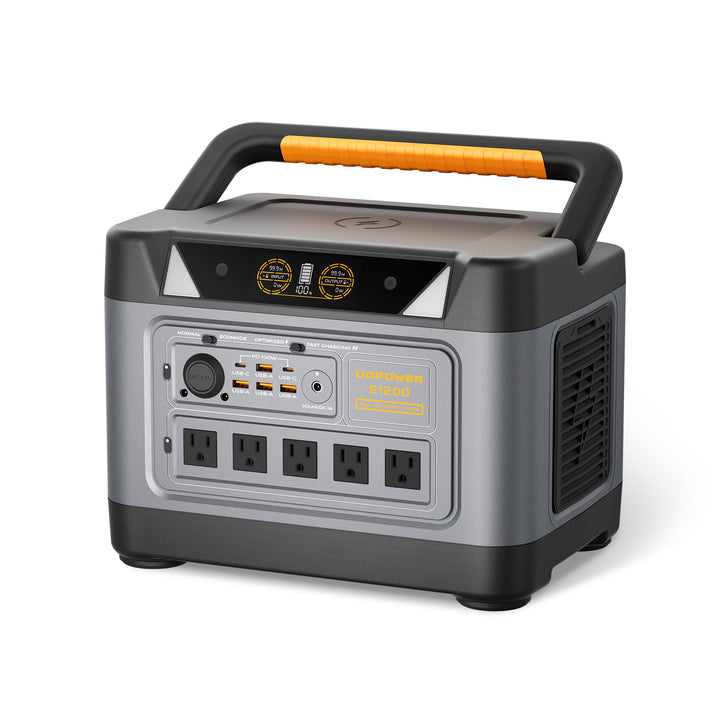
UDPOWER S1200: Practical Short-to-Medium Outage Backup
The UDPOWER S1200 is a practical choice when the priority is refrigerator support, Wi-Fi, phones, lights, a fan, CPAP equipment, laptops and other everyday emergency loads without moving to a much heavier 2,000Wh-class battery.
- Battery capacity: 1,190Wh class
- Rated AC output: 1,200W pure sine wave
- UDTURBO output: up to 1,800W
- AC outlets: 5
- Total outputs: 14
- USB-C: up to 100W
- Solar input: up to 400W
- UPSPrime: ≤10 ms transfer
- Battery chemistry: LiFePO4
- Weight: approximately 26 lb
- Warranty: 5 years
Best fit: Houston households wanting a portable, indoor battery solution for communication, refrigeration, sleep equipment, fans and electronics during shorter outages.
View UDPOWER S1200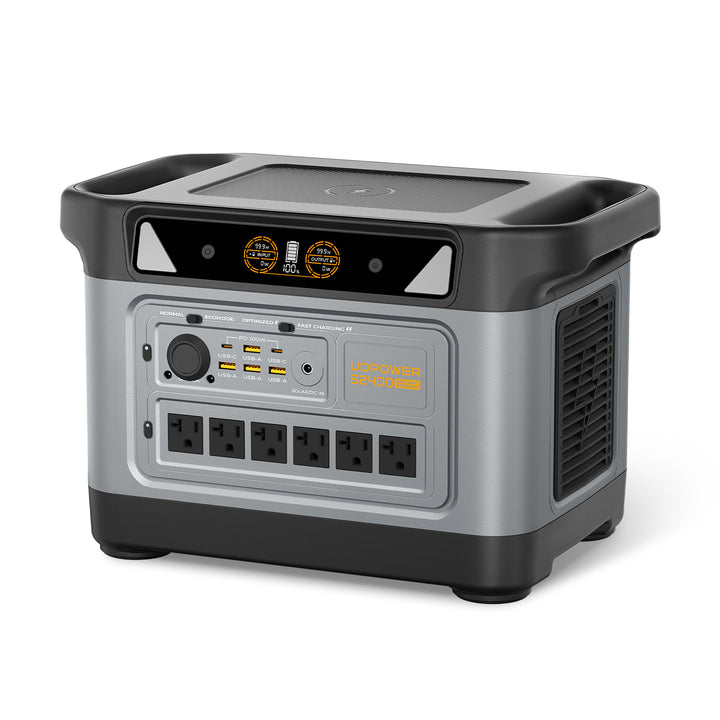
UDPOWER S2400: Better for Longer Outages and More Simultaneous Loads
The UDPOWER S2400 provides substantially more stored energy and twice the rated AC output of the S1200. For a Houston household preparing for overnight outages, longer hurricane-related restoration periods or several essential appliances at once, the extra capacity gives considerably more flexibility.
- Battery capacity: 2,083Wh
- Rated AC output: 2,400W pure sine wave
- UDTURBO output: up to 3,000W
- AC outlets: 6
- Total outputs: 15
- USB-C: up to 100W
- Solar input specification: DC7909 12–50V, 10A max
- Solar configuration offered: up to a 420W UDPOWER solar setup
- UPSPrime: ≤10 ms transfer
- Battery chemistry: LiFePO4
- Weight: approximately 40.8 lb
- Warranty: 5 years
Best fit: Longer CenterPoint outages, refrigerator plus fan and communication loads, multiple household essentials, RV backup and users who want more runtime before recharging.
View UDPOWER S2400S1200 vs. S2400 for a Houston blackout
| Need | S1200 | S2400 |
|---|---|---|
| Phones, Wi-Fi, lights | Excellent | Excellent with longer runtime |
| CPAP plus basic electronics | Strong choice | Better for longer overnight backup or multiple loads |
| Refrigerator backup | Good for shorter outage planning | Better for longer outage planning |
| Fan plus refrigerator plus networking | Practical when power is carefully budgeted | More runtime margin |
| Several higher-wattage appliances | More limited by 1,200W rated output | 2,400W rated output provides more headroom |
| Portability | Much easier at about 26 lb | Heavier at about 40.8 lb |
| Best outage profile | Short-to-medium essential-load backup | Longer or heavier essential-load backup |
For a detailed comparison, read UDPOWER S1200 vs. S2400. You can also browse the Portable Power Station collection, Home Backup collection or 1,000Wh+ Large Portable Power Stations.
Houston Power Outage Safety: Heat Changes the Priorities
In Houston, a long summer outage is not just an inconvenience. Indoor heat can become a health risk, particularly for older adults, children and people with certain medical conditions.
The CDC recommends staying cool and hydrated during extreme heat and notes that fans should only be used when indoor temperatures are below 90°F; above that level, a fan can contribute to increased body temperature rather than provide adequate protection.
See CDC extreme-heat guidance.
Use backup energy in this order
- Life-sustaining or medically necessary equipment.
- Phones and communication.
- Safe lighting.
- Refrigeration when the outage is becoming prolonged.
- Fans while indoor conditions remain appropriate for fan use.
- Laptops and other necessary electronics.
- Comfort and entertainment only after essential needs are covered.
If you use a gas generator
Battery power stations and engine generators have different safety requirements. A portable battery power station does not burn gasoline during normal battery operation and therefore does not produce engine exhaust or carbon monoxide.
A gasoline, propane or other combustion generator must never be operated indoors, in a garage or near openings where exhaust can enter the home. Ready.gov advises operating generators outdoors at least 20 feet away from windows, doors and garage openings.
Read FEMA/Ready.gov power outage safety guidance.
For battery-system safety, see Are Portable Power Stations Safe?.
Food, Medical Devices and Internet During a Long Houston Outage
Refrigerator and freezer
The USDA recommends keeping refrigerator and freezer doors closed. An unopened refrigerator generally keeps food safely cold for about four hours. A full freezer can hold its temperature for about 48 hours, while a half-full freezer is closer to 24 hours if the door remains closed.
| Food Storage | General No-Power Window | What to Do | Source |
|---|---|---|---|
| Refrigerator | About 4 hours unopened | Keep the door closed. Use a cooler with ice or another safe refrigeration method for a longer outage. | USDA FSIS |
| Full freezer | About 48 hours unopened | Keep the door closed and monitor temperature. | USDA FSIS |
| Half-full freezer | About 24 hours unopened | Group frozen food together and minimize door opening. | USDA FSIS |
This is why immediately connecting a refrigerator to backup power is not always necessary during a 20-minute outage. Preserving battery energy can be more important if CenterPoint's restoration estimate is still pending.
Medical equipment
If someone in the home depends on an electrically powered medical device, do not rely only on CenterPoint's estimated restoration time. The FDA recommends having a specific backup plan for devices that require electricity, understanding available battery or generator options and knowing who to contact if the device cannot operate.
See FDA guidance for medical devices during power outages.
Internet and Wi-Fi
Keeping your router powered does not guarantee internet access. Your modem, fiber ONT, cable equipment or upstream provider infrastructure may also need electricity.
If internet access matters during storms, identify every powered device between the wall connection and your Wi-Fi network before the outage. A router drawing 10W is not much help if the fiber ONT next to it is unplugged.
This same principle is covered in more detail in the UDPOWER guide to Weather Station Power Backup, where keeping the complete communications path powered is more important than powering one device in isolation.
How to Prepare Before the Next CenterPoint Outage
The easiest time to solve an outage problem is before the thunderstorm warning arrives.
1. Bookmark the official CenterPoint outage map
Save tracker.centerpointenergy.com/map directly rather than searching through old news articles during a storm.
2. Set up Power Alert Service before bad weather
Do not wait until cellular service is overloaded or your phone battery is low. Configure CenterPoint outage alerts ahead of time.
3. Write down your essential-load wattages
Record the actual wattage or measured power draw of:
- Refrigerator
- Freezer
- CPAP or other required medical equipment
- Router, modem and ONT
- Fans
- Lights
- Laptop
- Phone chargers
4. Test backup power before hurricane season
Do not discover during a midnight outage that an appliance exceeds your power station's output or that a needed charging cable is missing.
Connect the devices you actually intend to use, observe their wattage and estimate runtime before an emergency.
5. Keep the battery charged
When severe weather is forecast, recharge your backup battery before conditions deteriorate. If your system supports solar charging, make sure panels and cables are accessible rather than buried in storage.
6. Build a two-stage backup plan
A useful Houston strategy is:
- Stage 1: Phones, communications, lighting and medical loads while the restoration estimate is uncertain.
- Stage 2: Refrigerator and longer-duration comfort loads once the outage is clearly becoming extended.
This prevents a common mistake: using a large portion of the battery on coffee makers, televisions or other high-power conveniences in the first hour, only to discover later that restoration has been delayed.
7. Have a heat relocation plan
A power station can support a fan, electronics and refrigeration, but it should not be the only plan for prolonged extreme heat. Know where you can safely go if air conditioning is unavailable for an extended period.
8. Keep an appliance thermometer in the refrigerator and freezer
Temperature tells you more about food safety than guessing how warm food “feels.”
9. Inspect storm-damaged electrical equipment from a safe distance only
After high winds or falling trees, never touch a damaged service line, meter area or weatherhead. Electrical damage can remain dangerous even when the neighborhood appears de-energized.
10. Learn why storm outages happen before the next one
For a practical explanation of wind, lightning, trees, fuses, transformers and distribution failures, read Why Did Power Go Out During Storms?.
CenterPoint Outage Information: Which Source Should You Trust?
| Source | Best For | Limitation |
|---|---|---|
| CenterPoint Outage Tracker | Current CenterPoint outages, map locations and ETRs. | ETRs can change and small local outages may require separate reporting. |
| CenterPoint Action Center | Storm updates, safety information, reporting and restoration resources. | Not a replacement for searching your individual address. |
| Power Alert Service | Address-specific outage and restoration notifications. | Requires enrollment/contact information. |
| Local TV and news outlets | Weather context, road conditions, shelters, cooling locations and major restoration announcements. | Published outage counts can become outdated quickly. |
| Social media and neighborhood groups | Seeing what nearby residents are experiencing. | Reports are unverified and may refer to different circuits or older conditions. |
Primary Sources
This guide prioritizes utility and government sources for outage, restoration and safety information.
- CenterPoint Energy Outage Tracker
- CenterPoint Energy Action Center
- CenterPoint Outage Tracker Information
- CenterPoint Outage Tracker Fact Sheet
- CenterPoint Systematic Power Restoration
- CenterPoint Downed Power Line Safety
- USDA Food Safety During Emergencies
- CDC Extreme Heat Guidance
- FEMA Ready.gov Power Outage Guidance
- FDA Medical Device Power Outage Guidance
Frequently Asked Questions
What is the official CenterPoint outage map for Houston?
The official map is the CenterPoint Energy Outage Tracker at tracker.centerpointenergy.com/map. It shows active outages, affected customers and estimated restoration information for the CenterPoint service area.
How often does the CenterPoint outage map update?
CenterPoint says new data is pulled into the outage tracker approximately every five minutes. Your individual outage status may remain unchanged until new information becomes available.
How do I find the CenterPoint restoration time for my address?
Open the outage tracker, search for your address and select the outage associated with your location. Look for the Estimated Restoration Time in the outage details.
What does Pending mean on the CenterPoint outage map?
CenterPoint says Pending means the outage is under review. An estimated restoration time has not yet been established for that outage.
Why did my CenterPoint estimated restoration time change?
Restoration estimates can change when crews discover additional damage, encounter access or safety problems, need to complete upstream repairs first or identify smaller outages after a larger circuit is restored.
Why does the CenterPoint map show power restored when my house is still out?
Your home may have a smaller localized outage involving a fuse, transformer, service drop or customer-owned electrical equipment. Search your exact address and report the remaining outage rather than assuming the wider neighborhood status applies to your home.
What should I do if CenterPoint does not show my outage?
If your home has no electricity but the tracker does not show an outage, report it to CenterPoint. If nearby homes have power, also consider whether your breaker or customer-owned electrical equipment may be involved. Do not touch wet or damaged electrical equipment.
How long will food stay safe when CenterPoint power is out?
USDA guidance says an unopened refrigerator generally keeps food safely cold for about four hours. A full freezer can maintain temperature for about 48 hours, while a half-full freezer is approximately 24 hours if the door remains closed.
Can a portable power station run a refrigerator during a Houston outage?
Yes, if the power station has enough AC output for the refrigerator's compressor startup demand and enough battery capacity for the desired runtime. A 1,000–1,200Wh-class battery is useful for shorter refrigerator backup, while a roughly 2,000Wh-class model provides more runtime margin.
Which UDPOWER model is better for a Houston power outage?
The S1200 is the more portable option for shorter essential-load backup, with a 1,190Wh-class battery and 1,200W rated AC output. The S2400 provides 2,083Wh and 2,400W rated output, making it more suitable for longer outages or more devices at the same time.
Can the S1200 or S2400 power my whole house?
They are better used as portable essential-load backup systems for devices such as refrigerators, routers, phones, fans, CPAP equipment, lights, laptops and selected appliances. They should not be treated as direct replacements for a professionally installed whole-home backup system.
Can I run a central air conditioner from a portable power station during a Houston outage?
Central air conditioning typically requires much more power and energy than a portable station can practically provide for an extended outage. During dangerous Houston heat, have a plan to reach a safe air-conditioned location rather than relying on a portable battery to maintain whole-home cooling.
Is a battery power station safe to use indoors during an outage?
A properly used portable battery power station does not burn gasoline during normal battery operation and does not produce engine exhaust or carbon monoxide. It must still be kept dry, adequately ventilated, protected from damage and operated according to its manual.
How far should I stay from a downed CenterPoint power line?
CenterPoint's current Action Center advises staying at least 35 feet away from a downed power line. Never assume a fallen line is de-energized.
Prepare Before the Next Houston Outage
CenterPoint's outage map can tell you what the utility knows. Your backup plan determines what happens inside your home while you wait. Start with the devices you cannot afford to lose, calculate their real power consumption and choose enough battery capacity for the outage window you want to cover.
View Home Backup Options View All Power Stations Get the S1200 vs. S2400 GuideRelated Articles


