





Weather Station Power Backup: How to Keep Your Weather Data Running During an Outage
Direct answer: The most reliable weather station power backup protects the entire indoor data path—not only the weather display. That usually means keeping the weather station console or hub, modem or fiber ONT, and Wi-Fi router powered.
Built-in AA or AAA batteries may preserve settings but may not keep the screen, Wi-Fi connection, or cloud uploads working. A small UPS is best for preventing a reboot during a brief power interruption. A portable power station is better for keeping the system running through a longer outage. For important storm monitoring, the strongest setup is a small UPS for instant transfer combined with a larger portable power station for extended runtime.

Why Weather Stations Need Backup Power
A home weather station is most valuable when the weather is at its worst. Unfortunately, thunderstorms, hurricanes, winter storms, high winds, falling trees, and utility equipment failures are also common causes of power interruptions.
Without backup power, a weather station may stop displaying current conditions, lose its Wi-Fi connection, stop uploading to an online dashboard, or create a gap in the historical record. Even a one-second utility interruption can reboot a console, router, or network hub.
The important distinction is that weather data continuity has several layers:
- Sensor continuity: The outdoor sensor continues measuring wind, rain, temperature, humidity, and pressure.
- Receiver continuity: The indoor console or hub remains powered and continues receiving sensor transmissions.
- Network continuity: The router, modem, fiber ONT, or Ethernet equipment stays on.
- Cloud continuity: The internet connection remains available so data can continue uploading.
Some systems include internal memory and can upload stored observations after the connection returns. Others may permanently lose part of the outage period. Check the weather station manual before assuming that missing data will be recovered automatically.
What Parts of a Weather Station Actually Need Backup Power?
Most wireless home weather stations do not require you to power every component from the same backup battery. Outdoor sensors often use a small solar panel, rechargeable storage, disposable lithium batteries, or a combination of these. The indoor equipment is usually the part that depends on household electricity.
| Component | Normal power source | Does it need backup? | What happens without power? |
|---|---|---|---|
| Outdoor sensor array | Solar panel, capacitor, rechargeable cell, or replaceable batteries | Often already self-powered | The sensor may continue collecting or transmitting even when the house loses power. |
| Indoor display console | AC adapter, USB cable, or batteries | Usually yes | The display may shut down, reboot, lose settings, or stop receiving data. |
| Weather station Wi-Fi hub | 5V USB or wall adapter | Yes | Local sensor reception or cloud uploads may stop. |
| Wi-Fi router | AC adapter | Yes, for online data | The weather hub may remain on but lose network access. |
| Cable modem or fiber ONT | AC adapter or provider-installed power supply | Yes, for internet service | The router may broadcast Wi-Fi without having an active internet connection. |
| PoE switch or injector | AC power | Yes, when used | Any network-powered weather device loses both data and power. |
| Computer, tablet, or wall display | AC or internal battery | Optional | The station may continue recording even though the extra dashboard is unavailable. |
On a phone, swipe the table sideways to view every column.
Do Not Assume the Console Batteries Run Everything
Battery behavior varies significantly between weather station models. In some products, backup batteries run the console. In others, they only preserve the clock, alarms, Wi-Fi credentials, or maximum and minimum records.
| Manufacturer example | Documented backup behavior | Practical takeaway | Source |
|---|---|---|---|
| Davis Vantage Pro2 legacy console | The console can use AC or batteries, but battery runtime changes depending on the connected configuration. | Confirm runtime for the exact console, data logger, and connection type. | Davis Instruments FAQ |
| Davis WeatherLink Console | The manufacturer states that its backup battery lasts less than one day after AC power is lost. | Internal backup may bridge a short outage but may not cover a prolonged storm. | WeatherLink Console Support |
| Ambient Weather WS-8482 example | The manual states that the battery preserves selected settings but does not operate the display console. | A battery compartment does not always mean full operational backup. | Ambient Weather Manual |
| Tempest Hub Power Bank | The manufacturer lists a 20,000mAh backup with pass-through charging and up to seven days of hub runtime. | A low-power USB hub can run for days when the backup is designed specifically for continuous operation. | Tempest Hub Backup |
Weather Station Backup Power Options Compared
There is no single best battery for every weather station. The right choice depends on whether you need to preserve settings, prevent a reboot, maintain internet uploads, or run additional household equipment during a long outage.
| Backup option | Best use | Expected coverage | Main advantage | Main limitation |
|---|---|---|---|---|
| Console backup batteries | Clock, settings, memory, or brief console operation | Minutes to months, depending on model | Simple and inexpensive | May not run the screen, Wi-Fi, modem, or router |
| USB power bank | 5V weather hubs and small displays | Hours to several days | Compact and efficient | May shut off when the load is too low |
| DC mini UPS | Weather hub, router, modem, or ONT | Several hours | Automatic transfer with low conversion loss | Voltage, connector, and capacity options are limited |
| Desktop AC UPS | No-reboot protection for consoles and network equipment | Minutes to several hours | Fast automatic switchover and surge protection | Smaller batteries and less useful for long outages |
| Portable power station | Long weather station, internet, lighting, and device backup | Hours to multiple days | High capacity, multiple ports, and solar charging options | Some models may not provide zero-interruption transfer |
| UPS plus portable power station | Critical storm monitoring and extended outages | Seamless transfer plus long runtime | Combines continuity and capacity | Requires more equipment and a planned connection method |
| Solar panel and battery system | Remote or unattended installations | Potentially continuous | Works away from utility power | Needs weatherproofing, charge control, and careful system sizing |
For most homeowners, the practical choice is either a small UPS or a portable power station. People who cannot tolerate a console or router reboot may benefit from using both.
Can a Power Bank Run a Weather Station?
Yes. A USB power bank can run many weather station hubs and displays that accept 5V USB power. It is often an affordable solution for a short outage or temporary installation.
However, four compatibility checks matter:
- Voltage: Confirm that the weather station accepts 5V USB power. Do not connect a 9V or 12V console to a basic 5V output.
- Connector: Match USB-C, Micro USB, USB-A, or the correct round DC connector.
- Continuous output: Confirm that the power bank can remain on while supplying a very small load.
- Pass-through behavior: Confirm whether the power bank can charge itself while continuing to power the weather station.
The Low-Power Auto-Shutoff Problem
Many power banks are designed to charge phones. When the connected device draws very little current, the power bank may interpret the low load as a fully charged device and turn off its output.
A small weather hub may therefore stop running even when the power bank still has plenty of energy remaining. Look for terms such as:
- Always-on output
- Continuous output
- Low-current mode
- Trickle charging mode
- Pass-through charging
When a Power Bank Makes Sense
- The weather hub uses 5V USB input.
- You need a compact backup for a few hours or days.
- The power bank supports low-current continuous output.
- You do not need to run a modem, router, computer, or other AC-powered equipment.
When a Power Bank Is Not Enough
- The console requires 9V, 12V, or 120V AC power.
- You also need to run the modem and router.
- The system must not reboot during transfer.
- You expect a multi-day outage and cannot recharge the power bank.
- The backup battery would have to remain outdoors in heat, rain, snow, or freezing conditions.
UPS vs. Portable Power Station for a Weather Station
A UPS and a portable power station solve different parts of the problem.
Choose a UPS When Preventing a Reboot Is the Priority
An uninterruptible power supply remains connected between the wall outlet and the equipment. When utility power fails, it switches to battery operation. This can prevent a weather console, hub, router, or modem from restarting during a brief outage.
A UPS is particularly useful when:
- The console loses data or settings when it reboots.
- The router takes several minutes to reconnect.
- You experience frequent power flickers or brownouts.
- You need regulated power and surge protection.
ENERGY STAR describes a UPS as equipment designed to protect connected electronics from power interruption. You can review its UPS buying information for additional background.
Choose a Portable Power Station When Runtime Is the Priority
A portable power station usually provides far more watt-hours than a typical desktop UPS. It can power the weather station, network equipment, phones, lights, laptops, and other essentials during a longer outage.
It is the better choice when:
- You need many hours or multiple days of runtime.
- You want AC, USB, and DC outputs in one unit.
- You want the option to recharge from solar panels.
- You need backup power for more than the weather station.
For a broader comparison, read Portable Power Station vs. UPS for Home Backup .
The Best Storm-Monitoring Setup: Use Both
For a weather station that must remain online through both a one-second power flicker and a 24-hour outage, use a two-stage system:
- Connect the weather station hub, modem, and router to a small UPS.
- Use the portable power station as the longer-duration energy source.
- Test whether the UPS accepts power from the power station without alarms or transfer problems.
- Keep high-wattage appliances off the weather-station circuit so they do not reduce runtime.
How to Calculate Weather Station Backup Runtime
Do not size a backup battery from the weather console alone. Add every device required to maintain the type of service you want.
Step 1: List the Equipment
- Weather station console or hub
- Wi-Fi router
- Cable modem or fiber ONT
- Ethernet switch or PoE injector
- Local display, tablet, or computer if required
- Phone or hotspot charging if the internet connection fails
Step 2: Find the Actual Power Consumption
The best method is to use a plug-in watt meter. Measure the equipment while it is operating normally and note the combined wattage.
If a watt meter is not available, read the adapter label. For example:
- 5V × 1A = 5W maximum
- 9V × 1A = 9W maximum
- 12V × 1A = 12W maximum
- 12V × 2A = 24W maximum
The adapter rating is usually the maximum available output, not necessarily the device’s constant consumption. It is still useful as a conservative starting point.
Step 3: Calculate Runtime
The 0.90 factor allows for approximately 10% conversion loss. Real results may be lower because of inverter standby consumption, temperature, battery condition, cable losses, and automatic shutdown behavior.
Example: A 20W Weather Station and Internet Setup
Suppose the weather hub, modem, and router draw a combined 20W. With a 596Wh power station:
A useful second calculation is daily energy demand:
This makes multi-day planning easier. A continuously operating 20W system needs approximately 480Wh per day before adding conversion losses and reserve capacity.
You can also enter your measured load into the UDPOWER Portable Power Station Runtime Calculator .
Weather Station Backup Runtime Tables
Daily Energy Use by Total System Load
| Total continuous load | Energy used in 8 hours | Energy used in 24 hours | Example setup |
|---|---|---|---|
| 5W | 40Wh | 120Wh | Low-power USB hub or simple console |
| 10W | 80Wh | 240Wh | Weather hub plus efficient network device |
| 20W | 160Wh | 480Wh | Weather hub, modem or ONT, and router |
| 35W | 280Wh | 840Wh | Weather system, internet equipment, switch, and small display |
Estimated Runtime with UDPOWER Models
The following estimates use 90% of the listed battery capacity. They are planning values rather than guaranteed operating times.
| UDPOWER model | Official capacity | 5W load | 10W load | 20W load | 35W load |
|---|---|---|---|---|---|
| C600 | 596Wh | About 107 hours | About 54 hours | About 27 hours | About 15 hours |
| S1200 | 1,190Wh | About 214 hours | About 107 hours | About 54 hours | About 31 hours |
| S2400 | 2,083Wh | About 375 hours | About 188 hours | About 94 hours | About 54 hours |
On a phone, swipe the table sideways to view every runtime column.
AC, USB, or DC: Which Connection Gives the Best Runtime?
| Connection method | Advantage | Disadvantage | Best practice |
|---|---|---|---|
| 120V AC outlet | Works with the weather station’s original adapter | Inverter overhead may reduce low-load runtime | Use AC when voltage or polarity is uncertain. |
| 5V USB | Efficient and convenient for compatible hubs | Low-current shutdown and cable compatibility can be problems | Confirm continuous output and the required USB voltage. |
| Regulated DC output | Can avoid AC conversion loss | Wrong voltage, plug size, or polarity can damage equipment | Use only when every electrical specification matches. |
| USB-C PD trigger cable | Can provide selected voltages from compatible USB-C ports | Requires the correct PD profile and cable configuration | Use only when the device voltage and polarity are confirmed. |
Recommended UDPOWER Options for Weather Station Power Backup
A weather station alone normally has a modest power requirement. The right UDPOWER model therefore depends less on output wattage and more on how many additional devices you want to keep running and how long the outage may last.
These recommendations use official product specifications. Actual runtime depends on the measured load, connection method, temperature, battery state, and whether other devices share the power station.
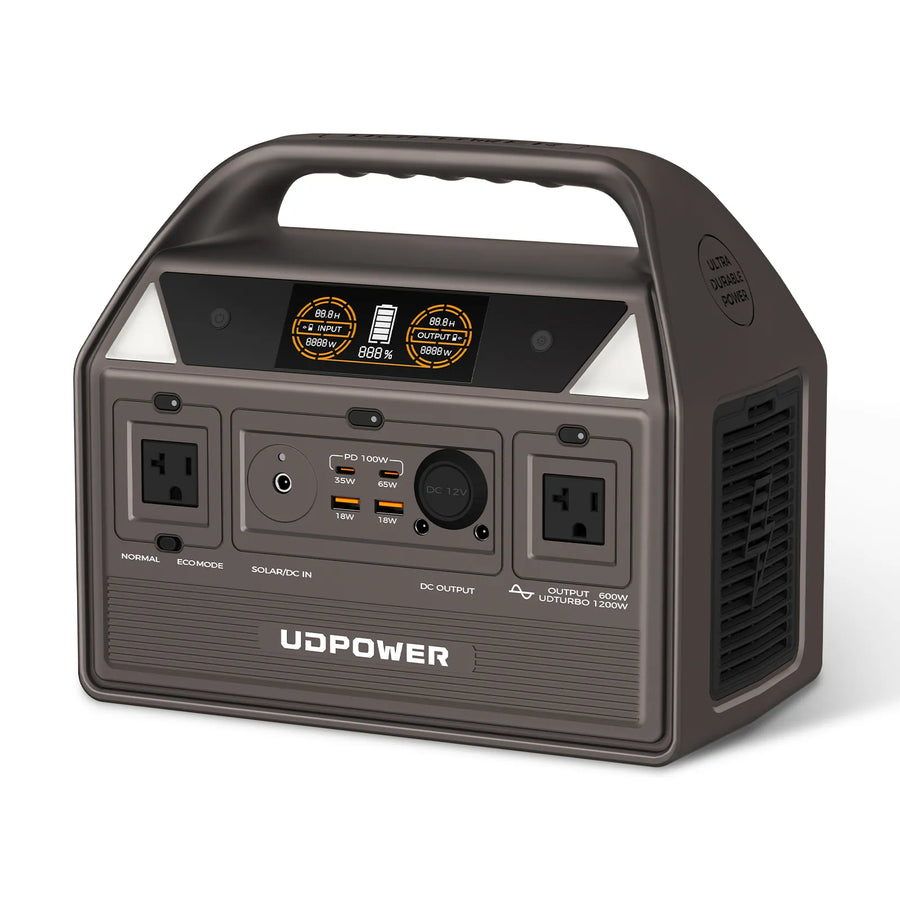
UDPOWER C600: Best for a Dedicated Weather Station and Network Setup
- Battery capacity: 596Wh
- Rated AC output: 600W
- Peak output: 1,200W
- Battery chemistry: LiFePO4
- Outputs: Two AC outlets, USB-C, USB-A, and 12V output
The C600 provides far more output power than a typical home weather station requires, but its 596Wh battery is useful for keeping a console, modem, router, phones, and small lights operating during a short or moderate outage.
For equipment that cannot tolerate a reboot, place a compatible mini UPS or desktop UPS between the critical network equipment and the power source. Do not assume that every portable power station will function as a zero-interruption UPS unless the feature is specified and tested.
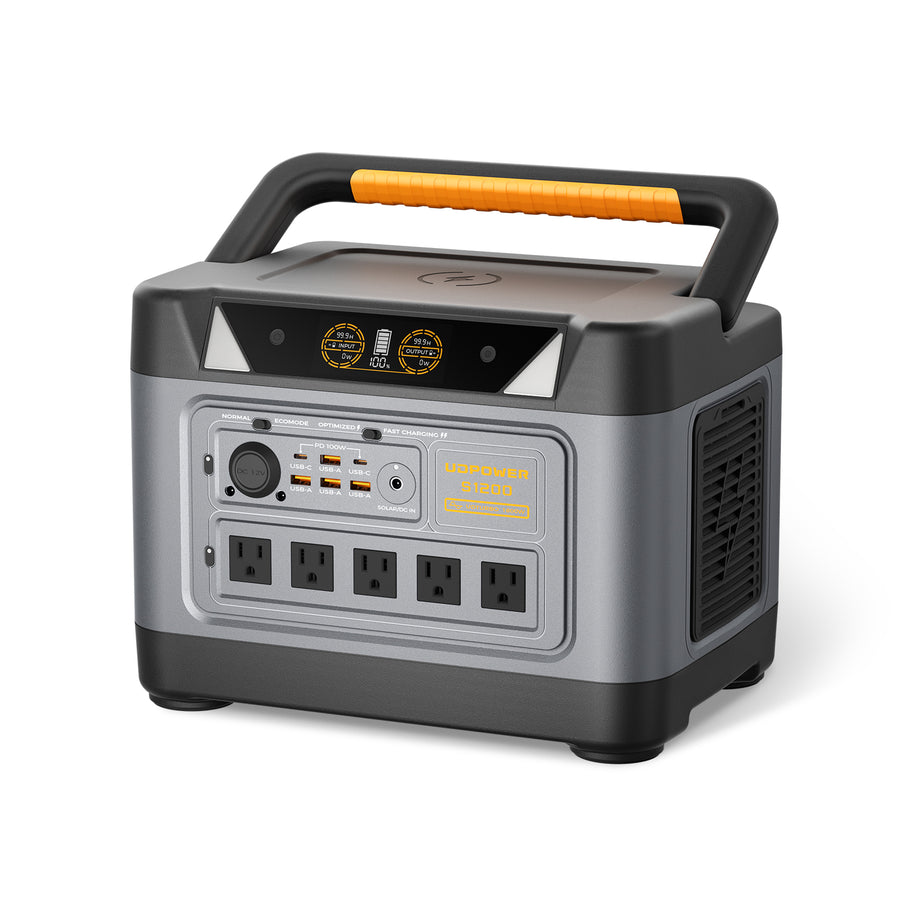
UDPOWER S1200: Best for Weather Data, Internet, and Other Essentials
- Battery capacity: 1,190Wh
- Rated AC output: 1,200W pure sine wave
- UDTURBO output: Up to 1,800W
- UPSPrime switchover: Less than 10 milliseconds
- Battery life: 4,000+ cycles
- AC outlets: Five on the current gray version
The S1200 is the strongest all-around choice for a home weather station backup plan. Its capacity is large enough to keep a weather hub, modem, router, phone charging, lights, and a laptop operating through an extended outage.
The listed sub-10ms UPSPrime transfer time may help compatible electronics remain powered during sudden outages. Because power supplies respond differently, test the weather station, router, and modem together before storm season.
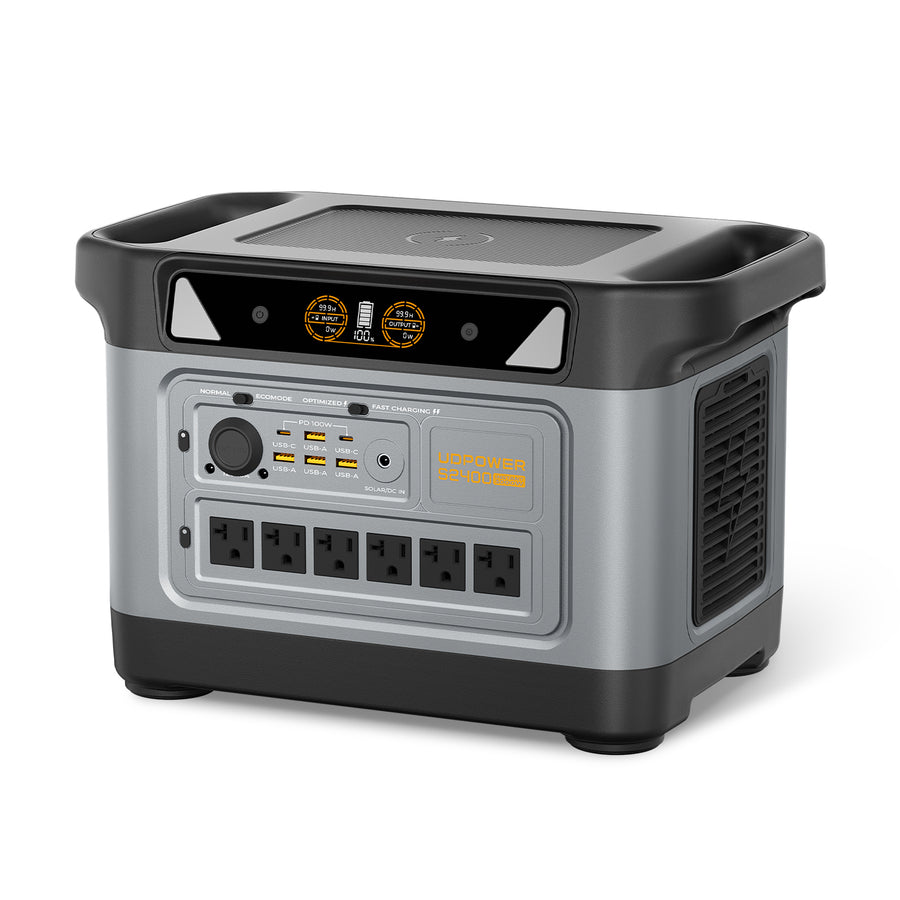
UDPOWER S2400: Best When the Weather Station Shares Backup Power
- Battery capacity: 2,083Wh
- Rated AC output: 2,400W pure sine wave
- UDTURBO surge support: Up to 3,000W
- UPSPrime switchover: Less than 10 milliseconds
- Battery life: 4,000+ cycles
- AC outlets: Six
The S2400 is more capacity than most people need for a weather station by itself. It becomes appropriate when the same backup system must also support a refrigerator, CPAP machine, fans, security equipment, work devices, or additional home essentials.
Keeping the weather station and network load small will preserve considerably more runtime for other critical devices.
To compare the full range by capacity and output, visit the UDPOWER Portable Power Station collection .
How to Build a Reliable Weather Station Backup Setup
Step 1: Decide What Must Continue Working
Choose one of these goals before buying equipment:
- Local readings only: Back up the console or hub.
- Cloud uploads: Back up the hub, modem or ONT, and router.
- Storm communications: Add phone charging, lights, and a hotspot plan.
- Home outage support: Add carefully selected household essentials.
Step 2: Measure the Complete Load
Plug the intended devices into a watt meter or a power-monitoring outlet. Measure the load after the router and weather station have fully started. Startup and Wi-Fi reconnection may temporarily use more power than steady operation.
Step 3: Choose the Required Runtime
| Outage target | Recommended approach | Planning priority |
|---|---|---|
| Power flickers and outages under 30 minutes | Built-in battery or small UPS | Prevent a console or router reboot |
| 2–8 hours | Mini UPS, desktop UPS, or compact power station | Maintain local data and internet equipment |
| 8–24 hours | Portable power station | Run the complete weather and network path |
| 24–72 hours | Higher-capacity power station plus recharge plan | Reduce nonessential loads and schedule charging |
| Remote continuous operation | Solar panel, charge controller, battery, and weatherproof enclosure | Design for low-sun days, temperature, and maintenance access |
Step 4: Use the Original Adapters When Possible
The safest and simplest connection method is often to plug the weather station’s original AC or USB adapter into the backup power source. This avoids guessing about voltage, current, connector size, and polarity.
A direct DC connection can reduce conversion loss, but it should only be used when all specifications match exactly.
Step 5: Keep the Backup System Indoors
Consumer power banks, UPS batteries, and portable power stations should not be left outdoors unless the manufacturer specifically designed them for that environment.
- Keep the battery dry.
- Keep ventilation openings clear.
- Do not place it inside a hot, sealed box in direct sunlight.
- Do not charge a lithium battery outside its specified temperature range.
- Protect cables from water entry, pinching, and trip hazards.
Review the UDPOWER Power Station Safety Guide before building a permanent outage setup.
Step 6: Keep Weather and Network Loads Separate
Do not casually add a television, coffee maker, heater, or cooking appliance to the same backup plan. A small continuous weather station load can run for days, while a high-wattage heating appliance can consume the same energy in less than an hour.
For a broader load-priority system, use the Portable Power Station Runtime Planning Guide .
How to Test Weather Station Backup Power Before a Storm
A backup system is not ready merely because every plug fits. Test the complete setup under realistic conditions.
The 30-Minute Basic Test
- Fully charge the backup battery.
- Connect the weather station hub, modem or ONT, and router.
- Confirm that the weather data is updating locally and online.
- Disconnect utility power.
- Watch for any console, modem, router, or hub reboot.
- Confirm that new observations continue appearing online.
- Leave the system running for at least 30 minutes.
- Reconnect utility power and confirm normal charging resumes.
The Overnight Runtime Test
Before hurricane, tornado, wildfire, or winter-storm season, perform a longer test:
- Record the starting battery percentage.
- Run the exact intended load for 8–12 hours.
- Record the ending battery percentage.
- Check the weather station record for missing observations.
- Check whether the router or internet connection restarted.
- Use the measured battery consumption to estimate a full-day runtime.
What to Record on a Backup Label
- Total measured watts
- Expected runtime
- Which outlets should be used
- Which devices must remain disconnected
- Date of the last full test
- Required cables and adapters
Store the cables with the power station instead of searching for them after the lights go out.
Common Weather Station Backup Power Mistakes
1. Backing Up the Display but Not the Router
The console may show local readings while cloud uploads remain offline. Back up the modem or ONT and router when remote data access matters.
2. Assuming Wi-Fi Means the Internet Is Working
A powered router can continue broadcasting a Wi-Fi network even when the modem, fiber terminal, neighborhood equipment, or internet provider is offline.
Read How to Keep Wi-Fi Running During a Power Outage for a complete network backup plan.
3. Trusting the Battery Compartment Without Reading the Manual
The batteries may only protect settings and memory. Test whether they actually operate the screen, receiver, Wi-Fi radio, and data logger.
4. Using the Adapter Rating as the Exact Continuous Load
A 12V, 2A adapter can provide up to 24W, but the connected equipment may normally use much less. Measure actual consumption whenever possible.
5. Ignoring Low-Load Shutdown
A power bank or power station may turn off because the weather station draws too little current. Test the system for several hours, not just several minutes.
6. Expecting Solar Charging to Match the Panel Rating
Solar output changes with clouds, panel angle, shade, temperature, season, and daylight duration. Treat solar as a recharge opportunity rather than guaranteed continuous input.
For realistic multi-day planning, see How Long Can a Solar Generator Run Essentials? .
7. Using an Incorrect DC Cable
A connector can physically fit while having the wrong voltage or polarity. Incorrect direct-DC connections can damage the weather station or network equipment.
8. Leaving the Backup Battery Outdoors
Rain, condensation, freezing temperatures, and direct summer heat can shorten battery life or create a safety problem. Keep the battery indoors unless the complete system is rated and enclosed for outdoor use.
9. Adding High-Wattage Loads During the Outage
A weather station and router may run for days on a large battery. A heater, kettle, microwave, or hair dryer can quickly consume the same stored energy.
10. Never Testing Automatic Transfer
A listed transfer time does not guarantee that every connected power adapter will remain online. A real unplug test is the only way to confirm system behavior.
Frequently Asked Questions About Weather Station Power Backup
Does a home weather station need backup power?
Backup power is not required for basic operation, but it is valuable if you want uninterrupted storm data, local readings, or cloud uploads during a utility outage. The indoor console, weather hub, modem, and router are usually the main devices to protect.
Can I use a regular phone power bank for a weather station?
Yes, when the weather station hub or display accepts compatible 5V USB power. Confirm that the power bank supports low-current continuous output and does not automatically shut off after a short period.
Why does my power bank turn off while powering the weather station?
The weather station may draw less current than the power bank’s minimum detection threshold. The power bank may interpret the low load as a fully charged device and disable its output.
Is a UPS or portable power station better for a weather station?
A UPS is better for preventing a reboot during a power flicker. A portable power station is better for providing many hours or days of energy. A combined setup is appropriate when you need both seamless transfer and long runtime.
How much battery capacity does a weather station need?
Multiply the total measured load in watts by the required number of hours, then add conversion loss and reserve capacity. A 20W weather and internet setup uses approximately 480Wh per day before adding reserve.
Do outdoor weather sensors need a separate backup battery?
Many outdoor sensor arrays already use solar power, a capacitor, or replaceable batteries. Check the manual and battery condition. The indoor receiver and network equipment are often more vulnerable to a household outage.
Will powering the router keep weather data uploading?
Only when the modem, fiber ONT, weather hub, and internet provider’s local network are also operating. A powered router can broadcast Wi-Fi even when there is no working internet connection.
Can I power a 12V weather console from a USB power bank?
Not directly from a standard 5V USB output. A compatible regulated converter or USB-C PD trigger cable may work, but the output voltage, available current, connector size, and polarity must match the console exactly.
Can a solar panel keep a weather station running indefinitely?
It can support long-term operation when the solar panel, charge controller, and battery are correctly sized for the daily energy load and expected low-sun periods. Cloud cover, snow, shade, and seasonal daylight changes require additional battery reserve.
Is a portable power station safe to use indoors?
A battery-powered portable power station does not use a gasoline engine or produce combustion exhaust. Follow the manufacturer’s instructions, keep the unit dry, maintain ventilation, avoid covering cooling openings, and stay within its rated output and temperature limits.
Does a transfer time under 10 milliseconds guarantee no reboot?
No. It can improve compatibility with sensitive electronics, but individual power adapters have different hold-up times and responses. Test the exact weather station, modem, and router by disconnecting wall power under normal operation.
How often should I test my weather station backup?
Perform a basic test at least every three to six months and before the local severe-weather season. Recharge the battery, inspect cables, verify cloud uploads, and repeat the outage simulation after changing any device or adapter.
Related UDPOWER Guides
- Compare UDPOWER Portable Power Stations
- Portable Power Stations for Home Backup
- Portable Power Station vs. UPS for Home Backup
- How to Keep Wi-Fi Running During a Power Outage
- Portable Power Station Runtime Planning for Outages
- Portable Power Station Runtime Calculator
- How Long Can a Solar Generator Run Essentials?
- Portable Power Station Safety Guide
External Sources and Manufacturer References
Build a Backup Plan Around Your Actual Weather Station Load
Measure the combined wattage of your console, hub, modem, and router. Then choose enough battery capacity for the outage duration you want, with reserve for conversion loss and unexpected use.
Related Articles


