





4-Hour vs 12-Hour vs 24-Hour vs 48-Hour Battery Backup: How Much Battery Do You Actually Need?
Last updated: October 23, 2026

Quick answer: A battery backup should be sized by average watts × hours, not by the number of hours alone.
Using a 90% conversion-efficiency planning factor and keeping a 20% reserve, a steady 100W load needs approximately:
- 4 hours: 556Wh
- 12 hours: 1,667Wh
- 24 hours: 3,333Wh
- 48 hours: 6,667Wh
That is why a 48-hour backup for a 20W router-and-network setup can require less battery than a four-hour backup for a 500W collection of appliances. The runtime target only makes sense after you know the average load.
4-Hour vs 12-Hour vs 24-Hour vs 48-Hour Battery Backup at a Glance
The easiest way to understand these four backup targets is to think of them as four different outage strategies rather than four battery sizes.
| Backup Window | Best Viewed As | Typical Priorities | Main Sizing Challenge | Best Strategy |
|---|---|---|---|---|
| 4 hours | Short outage bridge | Internet, phones, lights, computers, medical equipment, security equipment | Making sure the inverter can handle startup loads | Protect essential electronics and avoid wasting battery on convenience loads |
| 12 hours | Overnight backup | Refrigerator, networking, CPAP, lights, phones, fan, laptop | Stored energy starts becoming more important than output wattage | Build an overnight energy budget |
| 24 hours | Full-day outage plan | Food preservation, communications, medical needs, limited comfort | Small continuous loads accumulate into several kWh | Reduce average load and identify a recharge option |
| 48 hours | Multi-day resilience plan | Critical loads only | Battery capacity grows rapidly even at modest loads | Combine storage, load shedding and recharging |
The biggest mistake is shopping backward. A buyer decides, “I want 24 hours of backup,” and then starts comparing 1,000Wh and 2,000Wh batteries without first calculating the load.
A better question is:
Once those numbers are known, battery sizing becomes much more predictable.
How to Calculate the Battery Capacity You Need
For a steady load, the basic calculation is simple:
The 0.90 factor allows for conversion and system losses rather than assuming every advertised watt-hour reaches your appliance.
For emergency planning, it is also reasonable to avoid sizing a battery so tightly that the calculation ends at 0% remaining. If you want to keep roughly 20% in reserve:
In other words, divide the required load energy by 0.72.
Example: 100W of essential equipment
If your refrigerator's long-term average, internet equipment, lighting and charging needs combine to an average of 100W:
- 4 hours of actual load energy = 400Wh
- 12 hours = 1,200Wh
- 24 hours = 2,400Wh
- 48 hours = 4,800Wh
After accounting for 90% conversion efficiency and a 20% reserve, the nominal battery targets become approximately 556Wh, 1,667Wh, 3,333Wh and 6,667Wh.
If you want a deeper explanation of watt-hours versus watts, see How Long Will a 1kWh Battery Last?
Battery Capacity Needed for 4, 12, 24 and 48 Hours
The table below uses a 90% conversion factor and keeps 20% of rated battery capacity as a planning reserve. These are capacity targets, not promises of exact runtime.
| Average Continuous Load | 4 Hours | 12 Hours | 24 Hours | 48 Hours | How to Interpret It |
|---|---|---|---|---|---|
| 20W | 111Wh | 333Wh | 667Wh | 1,333Wh | Internet equipment, small electronics or another very light continuous load |
| 50W | 278Wh | 833Wh | 1,667Wh | 3,333Wh | Small essential-load bundle |
| 100W | 556Wh | 1,667Wh | 3,333Wh | 6,667Wh | Moderate essentials or an efficient cycling appliance plus electronics |
| 200W | 1,111Wh | 3,333Wh | 6,667Wh | 13,333Wh | Several home essentials operating together |
| 500W | 2,778Wh | 8,333Wh | 16,667Wh | 33,333Wh | A substantial continuous household load |
Planning formula: load × hours ÷ 0.72. Your real requirement can be higher or lower depending on inverter overhead, temperature, battery condition, device cycling and how closely measured wattage reflects actual use.
What a 4-Hour Battery Backup Is Good For
Four hours is where relatively compact battery systems can be very effective.
If your backup load is only 20W, a 4-hour target requires little stored energy. Even at 100W, the conservative target is about 556Wh. At 200W, however, the target jumps to roughly 1.11kWh.
This is also the point where load prioritization gives you unusually large returns. There is often little reason to run every appliance during the first minutes of a blackout.
A practical first-four-hours priority list
- Medically necessary equipment
- Internet and communications equipment
- Security equipment that must remain online
- Essential lighting
- Phone charging
- Computers required for work
- Refrigeration when needed
- Comfort and entertainment only after essential loads are covered
For network cameras, NVRs and routers, the backup load can be surprisingly modest. The important part is backing up the entire chain rather than only the camera. See What Happens to Security Cameras When the Power Goes Out?
What a 12-Hour Battery Backup Is Good For
Twelve hours is the point where many buyers discover that output wattage and battery capacity are two different problems.
A 2,400W inverter may easily start a refrigerator, but that tells you almost nothing about whether the battery can keep your selected loads running until morning.
At 12 hours:
- A 20W load needs about 333Wh with a 20% planning reserve.
- A 50W load needs about 833Wh.
- A 100W load needs about 1.67kWh.
- A 200W load needs about 3.33kWh.
This makes a 1–2kWh power station a useful overnight option when your average load stays controlled, but it is not automatically a 12-hour solution for every collection of household appliances.
Why overnight loads are easy to underestimate
A router may only use a small amount of power, and an LED light may be almost negligible. But an appliance operating for 12 continuous hours accumulates energy use.
A 60W average load running overnight consumes 720Wh before conversion losses. A 120W average load consumes 1,440Wh. The time multiplier matters just as much as the wattage.
For CPAP-specific calculations, see How Long Will a CPAP Run on a Battery Backup?
What a 24-Hour Battery Backup Is Good For
A 24-hour outage changes the problem. You are no longer simply waiting out a short interruption. You are managing a finite energy supply.
At this point, keeping the average load low is usually more important than having a huge inverter rating.
The difference between 60W and 200W over one day
A steady 60W load consumes 1,440Wh in 24 hours. With 90% conversion efficiency and a 20% reserve, the planning target is about 2,000Wh.
A 200W average load consumes 4,800Wh in the same period. The conservative battery target becomes about 6.67kWh.
That is more than three times the storage requirement simply because the household kept another 140W of average load running.
This is why a refrigerator, router, a few LED lights and phone charging can be a realistic battery-backup plan while electric space heating, portable air conditioning, electric water heating and continuous cooking loads can quickly overwhelm portable storage.
What a 48-Hour Battery Backup Is Good For
Forty-eight hours should usually be treated as a small energy system rather than simply a large battery.
Even modest continuous loads become large energy requirements:
- 20W for 48 hours = 960Wh delivered load energy
- 50W for 48 hours = 2.4kWh
- 100W for 48 hours = 4.8kWh
- 200W for 48 hours = 9.6kWh
- 500W for 48 hours = 24kWh
With conversion losses and a 20% reserve, the 100W example requires roughly 6.67kWh of rated battery capacity.
That is why a single 2kWh portable power station can provide 48-hour backup for a very small load, but not for 48 hours of unrestricted household use.
The right question changes after 24 hours
For a four-hour outage, the question is usually, “How big does my battery need to be?”
For a 48-hour outage, the better questions are:
- Which loads genuinely need to stay on?
- Which loads can run intermittently instead of continuously?
- Can I recharge during daylight?
- Can I safely recharge from a vehicle or another approved source?
- How much energy must remain available overnight?
- What happens if the second day is cloudy?
At 48 hours, energy replenishment becomes just as important as stored capacity.
The Important 4-Hour, 24-Hour and 48-Hour Refrigerator Rule
The 4-, 24- and 48-hour marks also have a separate meaning during a household power outage: food safety.
According to the USDA, an unopened refrigerator can keep food safely cold for about four hours. A full freezer can maintain temperature for approximately 48 hours, while a half-full freezer is approximately 24 hours if the door remains closed.
| Appliance | Approximate No-Power Window | Condition | Why It Matters for Battery Planning | Source |
|---|---|---|---|---|
| Refrigerator | About 4 hours | Door kept closed | A very short outage may not require immediately spending battery energy on refrigeration. | USDA FSIS |
| Half-full freezer | About 24 hours | Door kept closed | The freezer itself provides a substantial thermal buffer. | USDA FSIS |
| Full freezer | About 48 hours | Door kept closed | A full freezer may not need continuous battery power from the first minute of an outage. | USDA FSIS |
This does not mean you should simply ignore refrigeration for four hours. Use an appliance thermometer, keep doors closed and follow USDA food-safety guidance.
But it does reveal an important backup-power principle: you do not always need to power every load continuously from minute one.
If the outage turns out to be brief, using the refrigerator's existing cold temperature can preserve battery capacity for communications, medical equipment or other immediate needs.
For detailed refrigerator runtime calculations, read Can a Portable Power Station Run Your Refrigerator?
How Different Loads Change a 4-, 12-, 24- or 48-Hour Backup Plan
Generic wattage charts are useful for rough planning, but real devices vary. The most reliable number is the average power consumption of your own equipment measured over a representative period.
This is especially important for refrigerators, freezers, pumps and other cycling equipment. A refrigerator may draw substantially more power while its compressor is running but spend part of the hour with the compressor off.
| Planning Load | Possible Use | 4-Hour Strategy | 12-Hour Strategy | 24-Hour Strategy | 48-Hour Strategy |
|---|---|---|---|---|---|
| 20W average | Very light communications or electronics load | Easy for compact batteries | Compact station can work | About 667Wh planned | About 1.33kWh planned |
| 50W average | Small essential-load bundle | About 278Wh planned | About 833Wh planned | About 1.67kWh planned | About 3.33kWh planned |
| 100W average | Moderate outage essentials | About 556Wh planned | About 1.67kWh planned | About 3.33kWh planned | About 6.67kWh planned |
| 200W average | Several appliances and electronics combined | About 1.11kWh planned | About 3.33kWh planned | About 6.67kWh planned | About 13.33kWh planned |
| 500W average | Heavy continuous essential-load plan | About 2.78kWh planned | About 8.33kWh planned | About 16.67kWh planned | About 33.33kWh planned |
Why nameplate watts can mislead you
If an appliance says 600W on its label, that does not necessarily mean it draws 600W every second of every day. Likewise, an appliance that normally averages only 60W may briefly require much more power when a motor or compressor starts.
You therefore need to pass two separate tests:
- Power test: Can the power station handle the running and startup demand?
- Energy test: Does the battery contain enough watt-hours for the desired duration?
A unit can pass one test and fail the other.
How Much Average Load Can Current UDPOWER Models Support?
The following table reverses the normal runtime calculation. Instead of asking how many hours a battery lasts, it shows the approximate average load each model can support for a target backup duration while using a 90% conversion factor and keeping 20% as a planning reserve.
| UDPOWER Model | Rated Capacity | 4-Hour Avg. Load | 12-Hour Avg. Load | 24-Hour Avg. Load | 48-Hour Avg. Load | Official Specs |
|---|---|---|---|---|---|---|
| C400 | 256Wh | About 46W | About 15W | About 8W | About 4W | C400 product page |
| S1200 | 1,190Wh | About 214W | About 71W | About 36W | About 18W | S1200 product page |
| S2400 | 2,083Wh | About 375W | About 125W | About 62W | About 31W | S2400 product page |
These numbers are conservative planning estimates, not guaranteed runtimes. Very low AC loads may be affected more noticeably by inverter standby consumption. Cycling loads, temperature, battery condition and device behavior also change real results.
This table makes the central point of the article easy to see. The S2400 can be a substantial four-hour backup at roughly 375W average under this planning method, but reaching 48 hours requires reducing the continuous average load to approximately 31W.
The battery has not changed. The energy budget has.
Recommended UDPOWER Battery Backup Options
There is no single UDPOWER model that automatically equals four, 12, 24 or 48 hours. The correct choice depends on the load.
For current models, these are the most practical starting points.
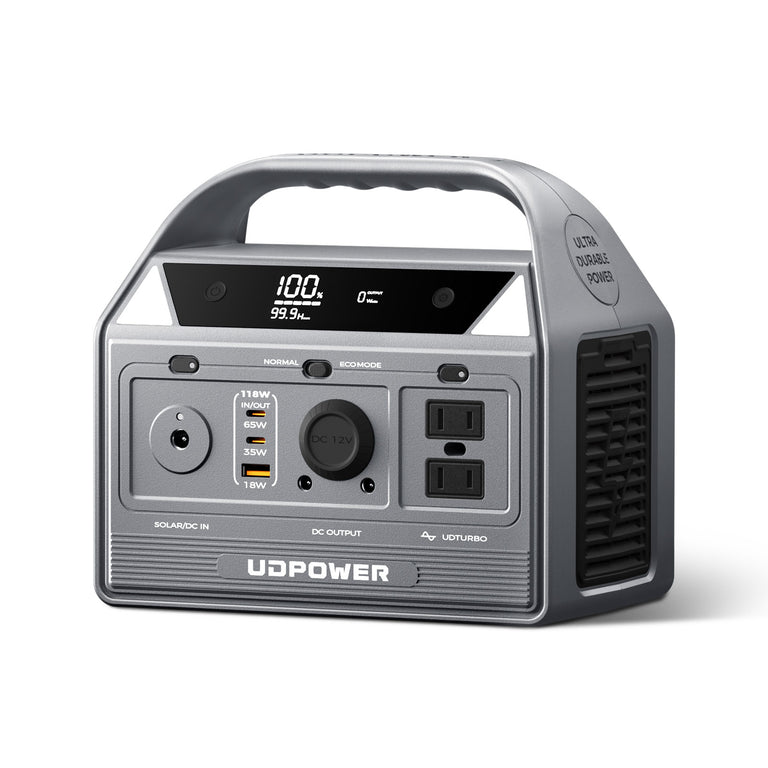
UDPOWER C400 — Best for Light 4-Hour Backup Loads
The C400 makes the most sense when the goal is not to power a refrigerator plus an entire workstation for hours, but to protect lighter electronics such as networking equipment, lights, phones, laptops or another carefully measured load.
- Battery capacity: 256Wh
- Rated AC output: 400W
- Battery chemistry: LiFePO4
- Solar input: Up to 150W
- Best role in this guide: Short-duration, low-average-load backup
A 256Wh battery has about 230Wh of calculated output energy at a 90% efficiency assumption. It is therefore better suited to light four-hour loads than refrigerator-heavy or overnight home backup.
The C400 should be treated as a planned/manual backup source rather than an automatic UPS system for equipment that requires uninterrupted transfer.
View UDPOWER C400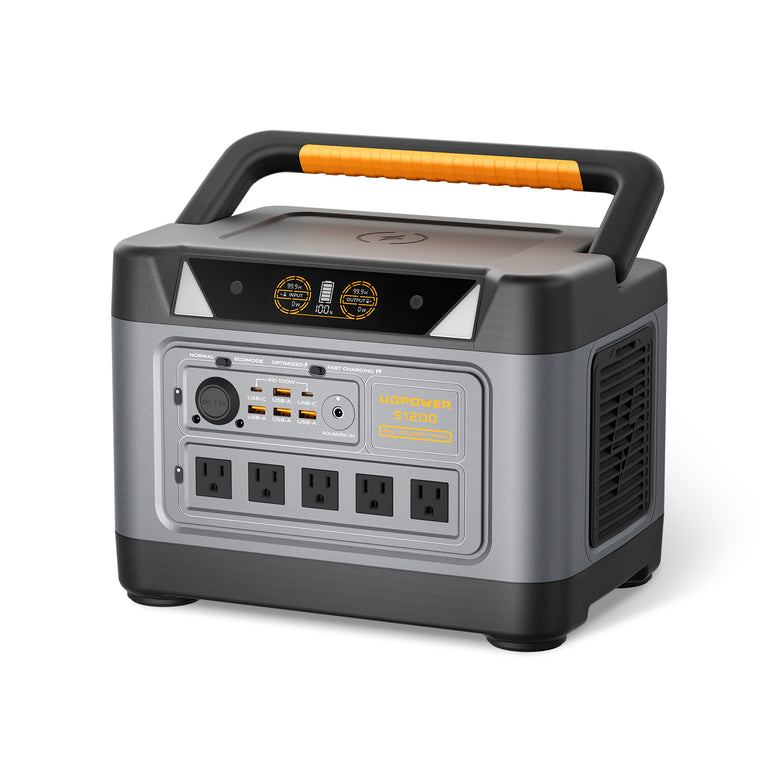
UDPOWER S1200 — Best Balanced Choice for Short and Overnight Backup
The S1200 moves into a very different backup class. Its 1,190Wh battery makes it suitable for more meaningful refrigerator, CPAP, networking, security, laptop and lighting plans, while its 1,200W rated output provides more appliance flexibility than compact stations.
- Battery capacity: 1,190Wh
- Rated AC output: 1,200W pure sine wave
- Higher-power capability: Up to 1,800W for compatible loads
- UPSPRIME transfer: Less than 10ms
- Maximum solar input: 400W
- Best role in this guide: Four-hour moderate loads or overnight low-to-moderate essentials
Using the conservative 90% efficiency plus 20% reserve method, the S1200 can support an average load of roughly 214W for four hours, 71W for 12 hours, or 36W for 24 hours.
That makes it especially useful when your goal is not “power the whole house,” but maintain a carefully selected set of critical plug-in devices.
View UDPOWER S1200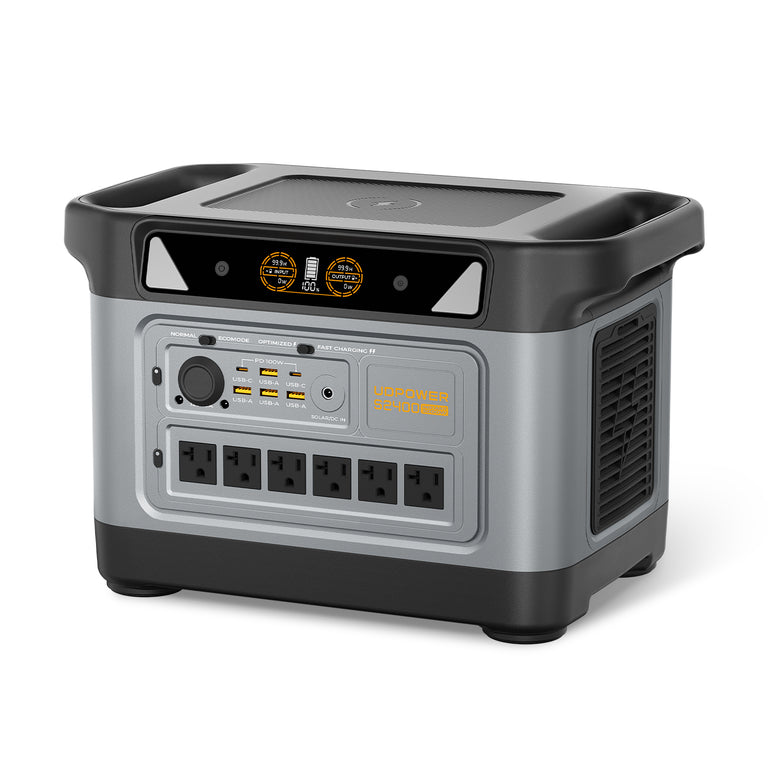
UDPOWER S2400 — Best for Longer Outages and Larger Essential Loads
The S2400 is the better starting point when refrigerator runtime, several simultaneous essentials or an overnight outage matters more than maximum portability.
- Battery capacity: 2,083Wh
- Rated AC output: 2,400W pure sine wave
- Higher-power capability: Up to 3,000W for compatible loads
- UPSPRIME transfer: Less than 10ms
- Maximum recommended solar input: 420W
- Best role in this guide: Overnight essentials, longer refrigerator backup and low-load 24-hour plans
With the same conservative planning method, a fully charged S2400 corresponds to approximately 375W average for four hours, 125W for 12 hours, 62W for 24 hours or 31W for 48 hours.
This does not make it a universal 48-hour home battery. It shows how dramatically runtime changes when the average load is reduced.
View UDPOWER S2400Simple UDPOWER selection guide
- Need four hours for light electronics? Start with the C400 and calculate the actual load.
- Need four hours for several essentials or an overnight low-load plan? S1200 provides a much larger energy reserve.
- Need refrigerator backup, multiple devices or a longer overnight window? S2400 provides the most stored energy and AC output of these three.
- Need 24–48 hours of substantial household loads? Do not rely on one portable station alone. Reduce the load and build a recharging strategy or move to a larger energy-storage architecture.
For 24- or 48-Hour Backup, Recharging Can Matter More Than Buying a Bigger Battery
Once an outage extends beyond a full day, buying more battery capacity is only one way to solve the problem.
The other is replacing energy while the outage is still happening.
The UDPOWER S1200 supports up to 400W of solar input, while the S2400 supports up to 420W. That does not mean a solar panel will always produce its rated power. Weather, season, shading, panel angle, temperature and available sunlight all matter.
But solar can change the logic of a 48-hour plan.
Example: 100W average load for 48 hours
The load itself consumes:
A battery-only plan therefore requires several kilowatt-hours of storage.
If part of that energy can be replenished during the first and second day, the required starting battery capacity may be lower. The exact answer depends on how much solar energy actually reaches the battery and how much power the connected equipment is using at the same time.
That leads to a more useful multi-day equation:
This is why solar is more valuable for a 48-hour plan than for a four-hour outage. In a short blackout, stored energy usually does all the work. In a multi-day outage, the ability to refill the battery becomes part of the backup system.
How to Build a Better 4-, 12-, 24- or 48-Hour Power Plan
1. Measure the loads you actually care about
Do not begin with every electrical appliance in the house. Build an essential list first.
A useful order is:
- Medical and personal safety equipment
- Refrigerator or freezer where necessary
- Router, modem or ONT
- Phones and communications
- Security system
- Essential lighting
- Fans or other temperature-related loads when appropriate
- Laptop or work equipment
- Entertainment and convenience loads last
2. Separate continuous loads from intermittent loads
A router is relatively continuous. A refrigerator compressor cycles. A microwave may consume a lot of power but only for a few minutes.
Energy planning should use watt-hours, not simply add every appliance's maximum wattage and assume it operates continuously.
3. Check startup power separately
A battery may contain enough energy for a refrigerator to run all night but still fail if its inverter cannot handle compressor startup.
Use the power station's normal rated output for continuous planning and check motor or compressor startup requirements separately.
4. Add a reserve before you shop
A backup plan that works only when every assumption is perfect is not much of a backup plan.
Allowing roughly 20% reserve gives you room for:
- Longer-than-expected outages
- Extra phone charging
- Higher appliance cycling
- Cold or hot operating conditions
- Inverter overhead
- Battery aging
- A second unexpected load
5. Change your behavior as the outage gets longer
A smart backup strategy is not static.
| Outage Stage | Recommended Behavior | Main Goal |
|---|---|---|
| 0–4 hours | Turn off nonessential loads, preserve refrigerator cold, keep communications working | Avoid unnecessary battery use |
| 4–12 hours | Begin managing food, overnight medical needs and lighting | Reach morning with useful reserve |
| 12–24 hours | Move to a strict hourly energy budget | Protect critical loads for the full day |
| 24–48 hours | Reduce continuous loads further and actively recharge where safely possible | Make generation and storage work together |
6. Do not treat whole-home wiring like another appliance
Portable power stations are simplest when compatible appliances are plugged directly into them.
If you want to supply selected household circuits, transfer-switch compatibility, voltage, grounding, neutral configuration and installation requirements must be evaluated correctly.
For circuit-level backup planning, read Can You Connect a Portable Power Station to a Transfer Switch?
Which Backup Duration Should You Choose?
Choose a 4-hour target if:
- Your outages are usually short.
- Your priority is internet, computers, phones, lighting or security equipment.
- You can reduce refrigerator use during the first few hours.
- You have another option if the outage extends overnight.
Choose a 12-hour target if:
- You want to get through the night without recharging.
- You need CPAP, refrigerator, router, lights or fans overnight.
- You want more reserve than a conventional short-runtime UPS provides.
Choose a 24-hour target if:
- You live in an area where outages can last most of a day.
- Refrigeration and communications need to remain available.
- You are willing to actively reduce unnecessary loads.
- You have a possible solar, vehicle or other approved recharge method.
Choose a 48-hour target if:
- You regularly prepare for severe storms or multi-day outages.
- You can operate from a strict critical-load list.
- You have enough storage or a realistic way to recharge.
- You understand that 48 hours of normal household electricity can require tens of kilowatt-hours, not simply a larger portable power station.
A Better Way to Think About Battery Backup
The most useful battery specification is not “4-hour,” “12-hour,” “24-hour” or “48-hour.” It is how much usable energy the system can deliver to the loads that matter to you.
A 2,083Wh power station can be a strong four-hour home-essential backup, a useful overnight system, a 24-hour solution for a carefully controlled low load, or a 48-hour battery for only a very small continuous load.
All four descriptions can be correct.
The difference is what you plug into it.
Related UDPOWER Guides
Frequently Asked Questions
How much battery do I need for 4 hours of backup?
Multiply your average load in watts by four. Then account for conversion losses and reserve. Using 90% efficiency and a 20% reserve, a 100W average load needs about 556Wh of rated battery capacity, while a 200W load needs about 1,111Wh.
How much battery do I need for 12 hours?
Using the same planning assumptions, a 50W average load needs about 833Wh, a 100W load needs about 1,667Wh and a 200W load needs about 3,333Wh for 12 hours.
How much battery do I need for 24 hours?
A 24-hour battery requirement depends heavily on average load. At 50W, plan around 1,667Wh. At 100W, around 3,333Wh. At 200W, around 6,667Wh when using 90% conversion efficiency and maintaining a 20% reserve.
How much battery do I need for 48 hours?
A 48-hour target quickly becomes a multi-kWh system. A 20W average load requires roughly 1,333Wh under the planning method used in this guide. A 50W load needs about 3,333Wh, while a 100W average load needs about 6,667Wh.
Is a 1,000Wh battery enough for 12 hours?
It can be if the average load is low enough. With 90% conversion efficiency and a 20% reserve, a 1,000Wh battery provides about 720Wh for planned use. Spread across 12 hours, that corresponds to an average load of roughly 60W.
Is a 2,000Wh battery enough for 24 hours?
It can support a low continuous load for 24 hours, but not unrestricted household use. With the same conservative assumptions, a 2,000Wh battery corresponds to about 60W average for 24 hours.
Can a portable power station run a refrigerator for 24 hours?
Possibly, but the answer depends on the refrigerator's average energy use rather than only its compressor running watts. An efficient refrigerator may average much less power than its momentary operating draw. Measure the refrigerator over several compressor cycles or use its EnergyGuide annual consumption for a better estimate.
Can the UDPOWER S2400 provide 24 hours of backup?
Yes for sufficiently low average loads. Using its 2,083Wh capacity, a 90% conversion factor and a 20% planning reserve, the S2400 corresponds to about 62W average for 24 hours. Higher loads reduce runtime proportionally.
Can the UDPOWER S2400 provide 48 hours of backup?
It can approach a 48-hour planning target when the average load is very small. Under the conservative method used here, the corresponding average load is about 31W. A refrigerator plus multiple household appliances would require significantly more energy or periodic recharging.
Does a higher watt output mean longer battery runtime?
No. Output watts tell you how much power the station can supply at one time. Watt-hours tell you how much energy is stored. A higher inverter rating does not automatically create longer runtime.
Should I size battery backup with extra reserve?
Yes. A reserve reduces the chance that slightly higher appliance consumption, unexpected charging, temperature, inverter overhead or a longer outage leaves the battery empty earlier than expected. This guide uses a 20% planning reserve in its conservative capacity tables.
Can solar panels make a battery backup last indefinitely?
No. Solar can extend runtime only when the energy collected is enough to replace a meaningful portion of what your loads consume. Available sunlight, weather, shading, panel orientation, charging limits and conversion losses all affect how much energy reaches the battery.
Should I run my refrigerator immediately when the power goes out?
Not always. USDA guidance says an unopened refrigerator can generally keep food safely cold for about four hours. Keeping the door closed may allow you to preserve battery power for more urgent loads during a short outage. Use an appliance thermometer and follow current food-safety guidance.
Is a UPS the same as a portable power station?
No. A conventional UPS is primarily designed to keep sensitive equipment running through brief interruptions or provide time for shutdown. A portable power station generally provides much more stored energy. Some power stations, including current UDPOWER S-Series models, also include fast UPS-style transfer capability for supported devices.
Choose Your Backup Power by Runtime, Not Guesswork
Start with the devices you actually need, calculate their average load, choose your target outage window, and then match that energy requirement to the right battery capacity.
View Portable Power Stations View UDPOWER S1200 View UDPOWER S2400 Read the Battery Runtime GuideRelated Articles


