





What Happens to Security Cameras When the Power Goes Out?
Last updated: October 20, 2026

A power outage does not affect every security camera the same way. A plug-in Wi-Fi camera, PoE camera, traditional wired CCTV camera, NVR, DVR, router, modem, or fiber ONT will stop working when its power source disappears unless that part of the system has backup power. A battery-powered or solar camera may keep operating, but remote viewing, cloud recording, and alerts can still disappear if the router or internet connection goes down.
The most important rule is this: keeping the camera powered is not enough. For continuous surveillance, you need to identify where the video is recorded and which network equipment must stay alive. A resilient system backs up the entire critical path: camera power, recorder or local storage, PoE equipment when applicable, router, and modem or ONT if remote access is required.
The Four Links That Decide What Survives a Power Outage
Security-camera outages are easier to understand when you stop thinking about the camera as a single device and instead look at the complete path that footage has to travel.
There are four separate links:
- Camera power: Can the camera itself stay on?
- Recording: Is there still somewhere for the footage to be stored?
- Local network: Can cameras still communicate with an NVR, hub, or other equipment inside the property?
- Internet connection: Can footage, alerts, and live video still reach you when you are away from the property?
These links can fail independently. That is why a camera can appear to be working while your phone cannot connect to it, or why a recorder can remain powered while all of its PoE cameras have gone offline.
Ask four questions in order: Is the camera powered? Is the footage still being stored? Is the local network alive? Is the property still connected to the internet?
What Happens to Each Type of Security Camera When the Power Goes Out?
| Camera system | During a grid outage with no backup | Can local recording continue? | What needs backup power? |
|---|---|---|---|
| Plug-in Wi-Fi camera | Camera turns off. | No, because the camera itself has no power. | Camera adapter plus any router, hub, or recorder the system depends on. |
| Battery Wi-Fi camera | Camera can remain powered from its battery. | Possibly, if the camera supports onboard storage or another powered local recorder. | Router or hub if app access, cloud upload, or centralized storage is required. |
| Solar battery camera | Usually unaffected immediately if its battery is charged. | Depends on the storage design. | Router, base station, or hub if those functions are required. |
| PoE camera | Stops when its PoE source loses power. | Yes, if the PoE source and NVR remain powered. | PoE NVR, PoE switch, injector, recorder, and network equipment as needed. |
| Analog CCTV + DVR | Cameras stop if their power supply fails; DVR also stops without power. | Yes, if both cameras and DVR remain powered. | Camera power supply and DVR. Router is optional for local-only recording. |
| Cellular battery camera | May remain operational independently of household power and broadband. | Depends on onboard storage and battery level. | Usually the camera battery itself; cellular network availability still matters. |
Power Outage vs. Internet Outage: They Are Not the Same Failure
This distinction matters more than whether a camera is advertised as “wired” or “wireless.”
An internet outage removes the connection between your property and the outside world. A power outage can shut down the equipment that creates both your local network and your recording system.
| Function | Internet out, power still on | Power out, no backup | Power out with correctly designed backup |
|---|---|---|---|
| Camera image capture | Usually continues. | Stops on mains-powered cameras. | Can continue. |
| Recording to microSD | Often continues. | Stops if camera loses power. | Can continue. |
| Recording to local NVR/DVR | Usually continues if the local path remains intact. | Stops when recorder or camera power is lost. | Can continue without internet. |
| Remote phone viewing | Usually unavailable. | Unavailable. | Available only if modem/ONT/router and ISP connection also survive. |
| Push notifications | Usually unavailable. | Usually unavailable. | May continue if internet or cellular backup remains available. |
| Cloud recording | Interrupted. | Interrupted. | Can continue only if the camera and internet path both remain online. |
The practical takeaway is that local recording is much easier to preserve during a long outage than remote access. Keeping an NVR recording inside the house may require only tens of watts. Keeping cloud cameras accessible remotely requires the camera system plus the entire internet chain.
What Happens to Wi-Fi Security Cameras During a Power Outage?
The word “Wi-Fi” describes how the camera communicates. It does not tell you how the camera is powered.
A plug-in Wi-Fi camera still depends on a wall outlet. When that outlet dies, the camera dies unless the outlet or power adapter is backed up.
A battery-powered Wi-Fi camera is different. The camera may continue detecting motion and capturing footage during the outage because its own battery remains available. But its Wi-Fi connection may disappear as soon as the router loses power.
Whether footage is actually saved depends on where the camera stores it:
- A camera with a microSD card may continue recording locally.
- A camera that records to a powered local hub may continue if that hub also has backup power.
- A cloud-dependent camera may lose cloud recording when the internet connection disappears.
- Remote live view and phone alerts normally require a functioning internet path.
The camera battery solves only the first link in the chain. You still need to know where footage is stored and whether the system needs a powered router or base station.
What Happens to PoE Cameras During a Power Outage?
Power over Ethernet can actually make backup planning simpler because power for several cameras is concentrated at one location.
A typical PoE camera receives both data and electricity through the same Ethernet cable. The electricity normally comes from one of three places:
- A PoE NVR
- A dedicated PoE network switch
- A PoE injector
If that central power source shuts down, every camera connected to it can shut down at once.
But the same architecture creates an advantage: instead of placing a battery at every camera, you can often protect the PoE switch or PoE NVR with one properly sized backup system.
A PoE system that should keep recording locally
A practical outage-resistant arrangement is:
Backup battery → PoE NVR or PoE switch → cameras
If a separate NVR is used:
Backup battery → PoE switch + NVR
If remote viewing is also required:
Backup battery → PoE switch + NVR + router + modem/ONT
Reolink, for example, states that its PoE cameras and NVRs can perform local functions without internet, although remote access and internet-dependent notifications are unavailable. See the Reolink PoE offline-operation documentation.
What Happens to Traditional Wired CCTV and DVR Systems?
Traditional analog CCTV usually separates the video cable from the power cable. A coaxial cable carries video to the DVR, while the camera may receive 12V DC from a central power supply.
That means two pieces must survive the outage:
- The power supply feeding the cameras
- The DVR storing the footage
If the DVR remains powered but the camera power supply shuts down, the DVR may stay on while recording blank or lost channels. If the cameras remain powered but the DVR shuts down, there is no recorder available to save the footage.
The router is not normally required for basic local DVR recording. It is required if you want remote viewing, remote alerts, or cloud-related features.
What Happens to Battery and Solar Security Cameras?
Battery-powered cameras have an obvious advantage during a grid outage: the loss of household electricity does not immediately shut down the camera.
However, battery cameras often work differently from continuously recording wired cameras. Many conserve energy by remaining in a low-power state until motion is detected, then recording an event clip.
Solar cameras usually combine a rechargeable battery with a panel that replenishes the battery during daylight. A utility outage does not directly affect that energy source, but extended clouds, snow, shade, cold conditions, heavy activity, or poor solar orientation can still drain the battery faster than it recharges.
For an isolated property, the most resilient architecture is often:
- Battery or solar power at the camera
- Local microSD or hub storage
- Optional cellular connectivity for remote access
That removes several dependencies on the building's electrical and broadband systems.
What Happens to Ring, Arlo, and Reolink Cameras During an Outage?
Brand behavior depends on the exact model and storage configuration, so the model manual should always take priority. These are the important architectural differences documented by the manufacturers.
| System | If household power fails | If internet fails but equipment stays powered | Important detail | Official source |
|---|---|---|---|---|
| Ring battery camera | The camera battery can keep the camera powered, but the network path may still disappear. | Internet-dependent functions are affected unless backup connectivity is available. | Compatible Ring devices can use Ring Edge with Alarm Pro for local processing and storage. Alarm Pro requires appropriate backup power to maintain full Wi-Fi functionality during a power outage. |
Ring Edge Ring Alarm Pro |
| Arlo wire-free camera + SmartHub/Base Station | The camera may have battery power, but the SmartHub/Base Station must also remain powered for hub-based local storage. | Supported configurations can continue saving triggered recordings to local USB or microSD storage while internet is unavailable. | Local-storage behavior depends on the SmartHub/Base Station model and camera compatibility. | Arlo local storage |
| Reolink battery Wi-Fi camera | Reolink documents that supported battery cameras can continue microSD recording and siren operation while battery power remains. | Local recording may continue, while network-dependent functions can be unavailable. | Push notifications, email, cloud and other online functions depend on connectivity. | Reolink outage behavior |
| Reolink wired Wi-Fi / PoE / NVR | Wired equipment requires backup power to stay operating. | Supported systems can perform local recording without internet. | Back up the PoE source, NVR or hub as well as the cameras. | Reolink PoE/NVR offline use |
Ring has an important power-outage distinction
Ring Alarm Pro includes an internal backup battery, but Ring explains that the system enters a reduced-power state when relying on that internal battery. Full Wi-Fi functionality during an outage requires the appropriate external backup arrangement. Ring also offers backup internet capabilities on supported subscriptions and configurations.
That distinction matters because keeping an alarm base station alive is not necessarily the same as keeping the entire Wi-Fi camera network operating normally.
Arlo users should protect the SmartHub or Base Station
A battery-powered Arlo camera can have plenty of battery remaining while its local storage path disappears because the indoor hub lost power.
If local recording during an outage matters, include the SmartHub or Base Station in the backup-power plan.
Reolink makes the local-vs-network distinction especially clear
Reolink's support documentation distinguishes between camera operation, local microSD or NVR recording, and network-based features. That is the right way to think about any security-camera system regardless of brand.
Will Security Cameras Keep Recording If the Internet Goes Down?
Many will, provided recording is local and every device involved in that local recording path still has power.
| Where footage is stored | Does internet loss normally stop recording? | What must remain powered? |
|---|---|---|
| microSD inside camera | Often no. | The camera. |
| Local NVR | Usually no. | Cameras, PoE source if applicable, NVR, and required LAN equipment. |
| Local DVR | Usually no. | Cameras, camera power supply, and DVR. |
| Local camera hub | Often no, depending on model. | Camera and hub/base station. |
| Cloud only | Yes, cloud recording is interrupted when the internet path disappears. | Camera, router, modem/ONT, ISP connection, and cloud service. |
This is why a locally recording camera system can be surprisingly resilient. You may lose the ability to watch the driveway from your phone while away from home, but the NVR can continue building a complete local video record for later review.
Do Your Router, Modem, and Fiber ONT Need Backup Power?
If you want remote viewing or cloud recording during an outage, the answer is usually yes.
Backing up only your router can still leave you offline because the router is only one part of the internet path.
Depending on your service, the chain may look like:
Cable internet: ISP network → modem/gateway → router → camera
Fiber internet: ISP fiber → ONT → router → camera
DSL: telephone network → modem/router → camera
The ONT is especially easy to overlook. Verizon, for example, states that its Fios ONT requires electrical power, and some Verizon battery-backup products are designed to preserve basic voice service rather than internet service. See Verizon's ONT documentation and battery-backup information.
You can keep your modem, ONT, and router powered while the ISP's neighborhood equipment or upstream network is also experiencing an outage. Local recording is therefore the safer foundation for outage resilience.
Exactly What Should You Put on Backup Power?
Do not start by counting cameras. Start by tracing the power path.
For one plug-in Wi-Fi camera
- Camera power adapter
- Wi-Fi router
- Modem or ONT if remote access is important
- Local hub if footage is stored there
For a 4-camera PoE system
- PoE NVR or PoE switch
- NVR if separate
- Router if remote access is required
- Modem or ONT if internet access is required
For an analog CCTV system
- Central 12V camera power supply
- DVR
- Router and modem/ONT only if remote access is required
What usually does not need to stay on
A monitor is often the easiest load to remove. The recorder can continue operating without continuously powering a display.
A monitor consuming 25W for 24 hours uses 600Wh by itself. During a long blackout, turning it off can preserve hours of additional camera runtime.
UPS vs. Portable Power Station for Security Cameras
A traditional UPS and a portable power station solve related but slightly different problems.
| Backup type | Best use | Typical strength | Main limitation |
|---|---|---|---|
| Small computer UPS | Brief interruptions and zero-reboot continuity | Fast transfer and equipment protection | Limited battery capacity |
| Portable power station | Multi-hour or multi-day outages | Much larger stored energy and multiple outputs | Transfer behavior and low-load behavior should be tested with the exact security system |
| UPS + portable power station | Systems that need both instant continuity and long runtime | UPS bridges sensitive equipment while the larger battery provides extended energy | Extra conversion loss and additional equipment complexity |
The simplest configuration
If your portable power station has a suitable UPS mode, connect the critical camera system to the station and leave the station connected to utility power according to its manual.
When utility power disappears, the station switches to battery operation.
When a separate UPS can still make sense
An NVR, server, or sensitive network device may benefit from a dedicated UPS even when a larger battery station is available.
A layered configuration can be:
Wall outlet → portable power station → dedicated UPS → sensitive NVR/network equipment
The small UPS deals with very short interruptions while the larger portable power station supplies energy during the longer outage.
This arrangement introduces additional conversion losses, so it is not always necessary. Test the exact UPS, power station, recorder, and network equipment together before depending on it.
Use the normal approved AC or DC outputs specified for each device. Do not connect a portable power station to household wiring through a wall outlet, and do not use an unverified DC cable simply because the plug fits.
How Much Battery Do You Need for 8, 24, 48, or 72 Hours of Security Camera Backup?
The correct battery size depends on the complete system load, not the number of cameras.
For UDPOWER planning examples, a practical estimate uses 90% usable conversion efficiency:
For example, a security system averaging 50W for 24 hours requires approximately:
50 × 24 ÷ 0.90 = 1,333Wh
That is the theoretical planning requirement. Actual runtime can vary because of inverter standby consumption, temperature, battery state of charge, camera night-vision load, PoE conversion loss, recorder activity, and other connected equipment.
| Example security load | 8 hours | 24 hours | 48 hours | 72 hours | Typical example |
|---|---|---|---|---|---|
| 20W | 178Wh | 533Wh | 1,067Wh | 1,600Wh | One low-power camera plus network equipment |
| 50W | 444Wh | 1,333Wh | 2,667Wh | 4,000Wh | Small multi-camera system with local recorder |
| 65W | 578Wh | 1,733Wh | 3,467Wh | 5,200Wh | Typical 4-camera PoE system plus network gear |
| 100W | 889Wh | 2,667Wh | 5,333Wh | 8,000Wh | 8-camera system with NVR and networking |
| 175W | 1,556Wh | 4,667Wh | 9,333Wh | 14,000Wh | Larger multi-camera or small-business system |
Why 72-hour planning changes the system design
An 8-hour backup can often be solved with stored battery capacity alone. A 72-hour outage is different.
At 65W, three days of continuous operation represents more than 4.6kWh of actual load energy. After conversion allowance, the nominal battery requirement is roughly 5.2kWh.
At that point you should normally combine several strategies:
- Turn off nonessential monitors and accessories.
- Separate security equipment from high-power household appliances.
- Use local recording so internet equipment does not have to stay powered if remote access is not essential.
- Recharge from solar or another approved source when possible.
- Prioritize critical entrances or perimeter cameras if the system allows selective shutdown.
How Long Can UDPOWER Run a Security Camera System?
The following estimates use the current official capacities of the UDPOWER S1200 and UDPOWER S2400 together with the same 90% planning efficiency used throughout UDPOWER runtime calculations.
| Security-system load | S1200 1,191Wh | S2400 2,083Wh | What that means in practice |
|---|---|---|---|
| 20W | About 53.6 hours | About 93.7 hours | Both can cover a full day; S2400 can approach four days under the stated assumptions. |
| 50W | About 21.4 hours | About 37.5 hours | S1200 is suitable for overnight backup; S2400 provides more than a full day. |
| 65W | About 16.5 hours | About 28.8 hours | A useful comparison for a 4-camera PoE system with recorder and network equipment. |
| 100W | About 10.7 hours | About 18.7 hours | An 8-camera setup normally benefits from the larger S2400 capacity. |
| 175W | About 6.1 hours | About 10.7 hours | Larger systems require more stored energy or a recharging strategy for long outages. |
These are planning estimates rather than guaranteed runtimes. Measure the actual system at the wall whenever possible, especially after dark when infrared LEDs, spotlights, heaters, and other camera functions may increase consumption.
For detailed camera wattage ranges, PoE budgets, and NVR power examples, see UDPOWER's How Many Watts Does a CCTV Camera Use? guide.
Recommended UDPOWER Backup Power for Security Cameras
Security-camera systems rarely need enormous AC output. For this use case, battery capacity, continuous operation, output stability, and outage transfer behavior matter more than headline wattage.
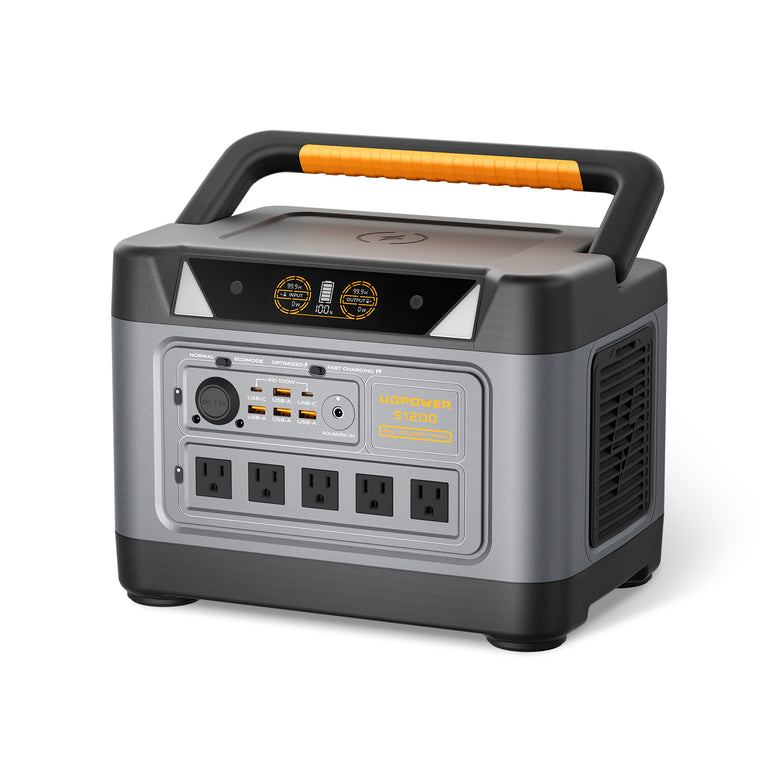
UDPOWER S1200: Best All-Around Choice for a Home Security System
The S1200 is the more practical fit when your priority is a focused backup load such as cameras, a PoE switch, an NVR, Wi-Fi equipment, and other low-power electronics.
- Battery capacity: 1,191Wh
- Rated AC output: 1,200W pure sine wave
- UPS Prime response: ≤10ms
- Maximum solar input: 400W
- Weight: approximately 26 lb
For a 50W security load, the planning estimate is approximately 21.4 hours. For a 20W camera-and-network setup, it is approximately 53.6 hours.
The S1200 is therefore a strong match for a small home NVR system, router backup, a few PoE cameras, or a security setup that mainly needs to survive an overnight outage.
Its published UPS response time is useful for equipment that should not reboot when grid power disappears, but the exact NVR, router, switch, and camera system should still be tested before relying on automatic transfer.
View UDPOWER S1200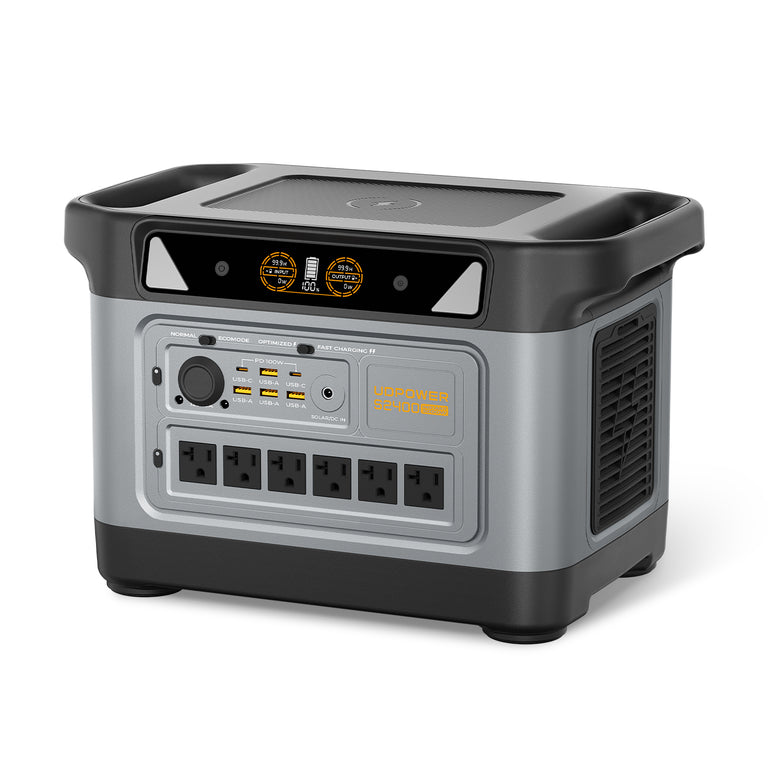
UDPOWER S2400: Better for Longer Outages and Larger Camera Systems
The S2400 is the better fit when the security system includes more cameras, a larger recorder, multiple network devices, or when you want a longer outage window without immediately recharging.
- Battery capacity: 2,083Wh
- Rated AC output: 2,400W pure sine wave
- UPS Prime response: ≤10ms
- Recommended maximum solar input: up to 420W
- Weight: approximately 40.8 lb
At a 50W average load, the planning estimate is approximately 37.5 hours. At 65W, it is approximately 28.8 hours. At 100W, it is approximately 18.7 hours.
That makes the S2400 a better fit for a full 4-camera PoE system that needs to stay recording for a day, an 8-camera system that needs overnight backup, or a remote-property setup where longer reserve capacity matters.
View UDPOWER S2400Which one should you choose for security-camera backup?
| Use case | Better starting point | Reason |
|---|---|---|
| Single camera + router | S1200 | Very long runtime at low loads without paying for unnecessary capacity. |
| Small Wi-Fi camera system + hub | S1200 | Good balance of capacity and portability. |
| 4-camera PoE + NVR | S1200 for shorter outages; S2400 for roughly one-day coverage | Runtime becomes more important than AC output. |
| 8-camera NVR system | S2400 | More stored energy for the larger continuous load. |
| Security cameras + internet + other home essentials | S2400 | Additional loads quickly reduce camera runtime. |
See all current models on the UDPOWER Portable Power Stations page or browse the Home Backup Power Station collection.
Three Practical Outage Setups
Setup 1: One porch camera that you still want to view remotely
Back up:
- Camera
- Router
- Modem or ONT
If the combined system averages approximately 20W, the S1200 planning estimate is about 53.6 hours and the S2400 estimate is about 93.7 hours.
However, remote access still depends on your ISP's infrastructure remaining operational.
Setup 2: Four PoE cameras with an NVR
Back up:
- PoE switch or PoE NVR
- NVR if separate
- Router only if remote access is required
- Modem/ONT only if remote access is required
A complete setup often lands around 45–70W, although the exact total should be measured.
If the goal is evidence preservation rather than remote access, keeping the local PoE and NVR chain alive while leaving the modem/router off can significantly extend battery runtime.
Setup 3: Eight cameras, NVR, router, and remote monitoring
A system in this category may average around 80–130W depending on the cameras, recorder, hard drives, PoE equipment, and nighttime load.
At a 100W planning load, an S2400 provides approximately 18.7 hours under the stated assumptions. A true 24-hour target at 100W requires about 2,667Wh of nominal battery capacity at 90% conversion efficiency, so recharging or further load reduction becomes important.
How to Test Your Security Cameras Before a Real Power Outage
The best outage plan is one you have already tested.
Do this while everyone is home and there is no severe weather:
- Confirm that all cameras are online and recording normally.
- Check that the NVR, DVR, microSD card, or hub is actually storing footage.
- Note the power station's battery level and the total wattage shown while the security system is operating.
- Wait until nighttime if you use IR night vision or spotlights so you can observe the higher load.
- Disconnect utility input from the backup system rather than turning the cameras off manually.
- Confirm that the NVR or DVR does not reboot unexpectedly.
- Confirm that every camera remains visible on the recorder.
- Check local recording after 10–15 minutes.
- Use cellular data on your phone to test remote access from outside the home Wi-Fi network.
- Leave the system operating long enough to confirm that low-load shutdown or ECO behavior does not unexpectedly turn an output off.
Infrared LEDs, white spotlights, PTZ movement, heaters, and additional image processing can increase camera power after dark. A daytime-only test can underestimate your real outage load.
Common Mistakes That Cause Security Cameras to Fail During an Outage
1. Backing up the camera but not the recorder
A powered camera is not useful if the NVR, DVR, or hub that stores its footage has shut down.
2. Backing up the NVR but not the PoE switch
The recorder may remain perfectly healthy while every camera connected through an unpowered PoE switch disappears.
3. Assuming a battery camera guarantees cloud recording
The camera may stay powered while the router and internet connection are offline.
4. Powering the router but forgetting the modem or ONT
A router can continue broadcasting Wi-Fi while having no actual internet connection.
5. Leaving a monitor on for the entire blackout
A screen can consume energy that would otherwise keep cameras recording for several additional hours.
6. Sizing from daytime camera wattage
Night vision and illumination can increase consumption after sunset.
7. Using the power adapter's maximum rating as actual consumption
A 12V 2A adapter can supply up to 24W, but the connected device may normally use much less. A plug-in watt meter gives a much more useful whole-system number.
8. Ignoring very low power draw
Some battery systems can automatically shut off an output when the connected load is extremely small. For continuous cameras, sensors, routers, or network equipment, perform a long-duration test and use the operating mode recommended for continuous low-power devices.
9. Assuming solar makes runtime unlimited
Solar output changes with season, weather, panel temperature, shade, sun angle, and daylight hours. Size the battery so the system can survive periods when solar production is poor.
10. Never checking what happens after power returns
After an outage, verify that all cameras reconnect, recording resumes, the NVR sees every channel, system time is correct, and remote access returns.
What Is the Most Resilient Security Camera Setup for a Power Outage?
If continuous evidence recording is your highest priority, a strong home or small-business design is usually:
- PoE cameras powered from a centralized PoE switch or NVR
- Local NVR storage
- Backup power for the PoE source and NVR
- Backup power for router and modem/ONT when remote access matters
- Local storage that keeps recording even if the ISP goes down
- Enough battery capacity for the expected outage window
- Optional cellular failover when remote access is critical
For a simpler consumer system, a battery or solar camera with onboard microSD storage reduces the number of devices that have to survive the outage.
There is no single architecture that is best for everyone. The right design depends on which failure matters most to you: losing recording, losing live remote access, losing alerts, or losing all three.
Frequently Asked Questions
Do security cameras work when the power goes out?
Battery-powered and properly designed solar cameras may continue operating. Plug-in Wi-Fi cameras, PoE cameras, wired CCTV cameras, NVRs, DVRs, routers, and other mains-powered equipment require backup power if they are expected to continue working during a blackout.
Will security cameras keep recording during a power outage?
They can, but only if the camera and its recording destination remain powered. A PoE system may need backup power for both the PoE source and NVR. A battery camera may continue recording to a microSD card if the model supports offline local recording.
Do security cameras work if the internet goes out but the power stays on?
Many cameras continue operating without internet. Systems that record to microSD, an NVR, DVR, or compatible local hub can often continue recording locally. Remote live view, cloud upload, email alerts, and push notifications may stop until internet service returns.
Do PoE cameras work during a power outage?
Not unless the PoE equipment supplying them with electricity is backed up. Powering a PoE switch or PoE NVR from a UPS or portable power station can keep multiple cameras operating from one central backup point.
Will an NVR keep recording without internet?
Many locally configured NVR systems can continue recording without internet as long as the NVR, cameras, and required local network equipment remain powered. Internet is mainly needed for remote viewing, cloud functions, and external notifications.
Does a Wi-Fi camera need internet to record?
It depends on the camera. Some Wi-Fi cameras record locally to a microSD card or hub without internet. Others rely heavily on cloud services. Check the storage method for your exact camera model.
Will Ring cameras work during a power outage?
A battery-powered Ring camera can retain camera power, but its network and recording capabilities depend on the rest of the Ring and Wi-Fi setup. Ring Alarm Pro supports backup options, and compatible Ring devices can use Ring Edge for local storage. Check your specific Ring camera, Alarm Pro configuration, subscription, and backup-power arrangement.
Will Arlo cameras keep recording if the internet goes down?
Arlo documents that supported cameras connected to compatible SmartHub or Base Station local storage can continue saving automatically triggered recordings locally when internet service is unavailable, provided the camera and hub remain powered.
Will Reolink cameras work during a power outage?
Reolink battery cameras can retain certain functions while their battery has power, including supported microSD recording. Wired Wi-Fi cameras, PoE cameras, NVRs, and Home Hubs require electrical power, so backup power is needed during a utility outage.
Do I need to back up my router for security cameras?
Back up the router if your cameras require Wi-Fi, a local network connection, remote viewing, or cloud access. If you only need a directly connected PoE NVR to continue recording locally, internet equipment may not be necessary for the recording itself.
Do I need to back up the fiber ONT too?
Yes if your internet service requires a powered ONT and you want to maintain internet connectivity during the outage. Backing up the router alone does not help if the ONT feeding the router has shut down.
How large a battery do I need for 24 hours of security-camera backup?
Multiply your complete average system load by 24 hours and divide by your planning efficiency. Using a 90% efficiency estimate, a 20W system requires about 533Wh, a 50W system about 1,333Wh, a 65W system about 1,733Wh, and a 100W system about 2,667Wh of nominal battery capacity.
Should I use a UPS or portable power station for security cameras?
A small UPS is excellent for brief interruptions and preventing sensitive equipment from rebooting. A portable power station provides much more energy for extended outages. Systems that require both instant continuity and long runtime may benefit from a carefully tested combination of both.
Can solar panels keep security cameras running indefinitely?
Solar can greatly extend runtime, but it should not be treated as unlimited guaranteed power. Weather, season, panel angle, shade, temperature, and battery capacity all affect whether daily solar production can replace the energy consumed by the security system.
Sources and Further Reading
| Topic | Source | Why it matters |
|---|---|---|
| Ring local video storage | Ring Support: Ring Edge | Explains compatible local processing and video storage through Ring Alarm Pro. |
| Ring outage backup | Ring Alarm Pro FAQs | Documents battery backup and backup internet behavior. |
| Arlo local recording | Arlo SmartHub Local Storage | Explains supported local recording when internet is unavailable. |
| Reolink outage behavior | Reolink Power and Internet Outage Guide | Shows which battery, wired, NVR, and hub functions survive different outages. |
| PoE/NVR without internet | Reolink PoE/NVR Offline Operation | Documents local access and recording without internet. |
| Fiber ONT power requirements | Verizon ONT Support | Example of why fiber equipment must also be considered in an outage plan. |
| UDPOWER S1200 specifications | UDPOWER S1200 | Official battery capacity, AC output, UPS, solar input, and product image. |
| UDPOWER S2400 specifications | UDPOWER S2400 | Official battery capacity, AC output, UPS, solar-input information, and product image. |
Keep Your Cameras Recording When the Grid Goes Down
Start by measuring the total watts used by your cameras, recorder, PoE equipment, router, and modem or ONT. Then choose enough battery capacity for the outage window you actually need rather than sizing backup power from the camera alone.
View Portable Power Stations View S1200 View S2400 Get the Security Camera Runtime GuideRelated Articles


