





Xcel Power Outage Map Colorado & Denver: Check Outages and Prepare Backup Power
Colorado outage guide
Latest updated: July 7, 2026
Quick answer
The fastest way to check an Xcel Energy power outage in Denver or anywhere in Colorado is to open the official Xcel electric outage map, enter your service address, and click the outage icon or highlighted area for details such as estimated restoration time, affected customers, and crew status when available.
If your home has no power but the map does not show your address yet, report the outage instead of waiting. Xcel also lists outage status tools, checklist guidance, and public safety power shutoff information on its official outage pages.
For outage prep, prioritize the refrigerator, medical devices, CPAP, Wi-Fi, phones, basic lighting, and one small fan or heater-safe alternative. A battery power station can run indoor essentials quietly without gasoline fumes, but it should be sized by real wattage, not by guesswork.

Where to check Xcel outages in Colorado and Denver
During a Denver-area outage, do not rely on neighborhood posts alone. Start with Xcel’s official outage tools, then use local emergency channels only when there is a safety issue, evacuation notice, wildfire risk, or road hazard.
| Need | Best place to check | What it helps you confirm | Source |
|---|---|---|---|
| Check a current outage near your address | Official Xcel electric outage map | Outage area, affected customers, estimated restoration time when posted, and outage detail panel | Xcel outage map |
| Check whether Xcel already knows about your outage | Xcel outage status page | Status tied to your account or service address | Check outage status |
| Know what to do safely during an outage | Xcel outage checklist | Reporting steps, estimated restoration time, mast damage checks, food safety reminders, and emergency preparation | Xcel outage checklist |
| Understand wildfire-related planned shutoffs | Xcel PSPS page and Colorado community notices | Whether an outage may be related to wildfire risk, inspection, and public safety power shutoff planning | Xcel PSPS information |
| Get help during a Colorado planned shutoff | 2-1-1 Colorado PSPS resource page | Front Range guidance, medical needs reminders, and links to Xcel resources | 2-1-1 Colorado |
For most households, the practical workflow is simple: check the map, confirm the address, report the outage if it is not listed, then start protecting food, medical equipment, communication, and indoor safety.
How to read the Xcel outage map correctly
The outage map is useful, but it should not be treated like a guarantee. Restoration estimates can change after crews inspect damage, weather shifts, or additional outages are reported. Use the map as a decision tool, not just a curiosity check.
| Map item | What it usually means | How to use it | Common mistake |
|---|---|---|---|
| Address search | Looks up outages near a specific service area | Enter your address instead of only zooming around Denver manually | Assuming no icon nearby means Xcel knows your home is out |
| Outage icon or shaded area | Shows an outage event or a cluster of affected customers | Click or tap the marker for the detail panel | Reading color alone without opening the details |
| Estimated restoration time | Xcel’s current estimate for when power may return | Use it to decide whether to keep fridge doors closed, move food to a cooler, or start backup power | Treating the first estimate as final |
| Affected customers | Rough scale of the outage | A large count may mean a feeder or broader neighborhood issue; a small count may be more localized | Assuming small outages are always restored faster |
| Crew status or cause | May indicate investigation, repair, weather, equipment, or other known cause when available | Use it to judge whether you should prepare for a short interruption or a longer wait | Waiting too long to report hazards such as downed lines |
Map colors and icon styles can change over time. The safer habit is to click the event and read the outage detail panel. If your block is dark but the map does not show your address, report the outage.
What to do if the map is slow, blank, or not updated yet
Outage maps can lag during storms because thousands of people may be checking the same system at once. A missing marker does not always mean your outage is isolated, and a visible marker does not always mean your individual address has been reported.
| Situation | What to do | Why it matters |
|---|---|---|
| Your home is out, but the map is blank | Report the outage through Xcel’s official outage tools | It helps Xcel connect your address to the event instead of assuming the issue is already known |
| The map shows an outage, but no restoration time | Start a short-term backup plan and check again later | Crews may need to inspect the cause before posting a useful estimate |
| The estimate keeps moving | Protect food, charge phones, and reduce nonessential battery use | Changing estimates often mean repair conditions are still evolving |
| Your neighbors have power, but you do not | Check breakers safely, inspect for visible service damage from a distance, then report the outage | Your home may be affected by a smaller service issue instead of a neighborhood outage |
| You see downed lines, sparking, fire, or a dangerous condition | Stay away and call emergency services or the utility emergency line | Do not wait for the map when there is an immediate hazard |
A Denver-ready outage plan for apartments and homes
Denver outages are not all the same. A short transformer issue in a neighborhood, a winter storm, a summer heat outage, and a wildfire-related public safety shutoff require different decisions. The best plan is built around the devices you cannot comfortably lose.
| Household situation | Priority devices | Best first move | Backup power note |
|---|---|---|---|
| Apartment or condo in Denver | Phone, router, small lights, medical devices, laptop | Keep a charged power bank or portable power station in an easy-to-reach place | Battery backup is easier indoors than fuel-based equipment, which must not be used inside |
| Single-family home | Refrigerator, Wi-Fi, lights, garage door access, phones | Keep fridge/freezer closed and start backup only for essentials | Choose enough capacity for fridge cycling, not just phone charging |
| CPAP or medical device user | CPAP/APAP/BiPAP, oxygen-related support equipment, phone | Test your backup setup before outage season | Confirm wattage with your device label or power adapter and follow your healthcare provider’s guidance |
| Work-from-home setup | Router, modem, laptop, monitor, phone | Keep internet and laptop running first; postpone high-wattage appliances | A modest load can run much longer than a kitchen appliance |
| Winter outage | Phone, lights, medical devices, safe heat plan | Conserve heat, close unused rooms, use safe blankets and layers | Battery stations are not ideal for long-running electric space heaters |
| Summer outage | Phone, fan, fridge, medical devices, router | Use shade, ventilation, and a low-watt fan before trying to run large cooling appliances | Fans are realistic; large air conditioners may require much more output and capacity |
What PSPS means in Colorado
PSPS stands for public safety power shutoff. In Colorado, this usually means power may be turned off in certain areas when wildfire risk, wind, dry conditions, or equipment safety concerns make energized power lines more dangerous. Xcel’s PSPS information explains that customers may be notified by text, phone, and email when wildfire risk is high and a PSPS event is possible.
A PSPS event can feel different from a normal storm outage because restoration may require line inspection before power is turned back on. That is why your home backup plan should not depend only on a short restoration estimate during high-wind or wildfire conditions.
PSPS planning shortcut
If Xcel or local emergency channels mention wildfire risk, high winds, or line inspection, prepare for a longer outage window than a typical neighborhood outage. Charge phones, charge your backup battery, cool the refrigerator before conditions worsen, and keep medical backup plans ready.
What to do in the first 15 minutes, first hour, and after 4 hours
Most people waste battery power early in an outage because they plug in everything at once. A better approach is to make decisions by time window.
| Time window | What to do | What not to do | Why it matters |
|---|---|---|---|
| First 15 minutes | Check the Xcel outage map, confirm neighbors, report the outage if not listed, unplug sensitive electronics if power flickers | Do not open the refrigerator repeatedly | Early information helps you decide whether this is a short outage or a backup-power event |
| First hour | Power phones, router, modem, CPAP or medical devices, and one or two lights | Do not run high-wattage appliances just because backup power is available | Small loads keep communication alive and stretch runtime |
| After 4 hours | Follow food safety rules, use a cooler with ice if available, and decide whether to power the refrigerator in cycles | Do not taste questionable food to decide if it is safe | Food safety guidance treats 4 hours as a key refrigerator threshold when doors stay closed |
| Overnight | Run only sleep-critical and safety-critical loads: CPAP, phone, small light, router if needed | Do not drain the battery on TV, gaming, or large kitchen appliances | Nighttime backup is about safety, medical continuity, and communication |
| Next day | Recheck restoration status, recharge from AC if power returns, or solar if conditions and equipment allow | Do not assume a returned grid is stable if lights are still flickering | Recovery can include short interruptions while crews finish work |
Food safety during an outage
FoodSafety.gov states that a refrigerator keeps food safe for about 4 hours during a power outage if the door stays closed. Ready.gov and CDC guidance also emphasize keeping refrigerator and freezer doors closed and using generators only outdoors and away from windows.
| Appliance | Safe time if closed | Best action | Source |
|---|---|---|---|
| Refrigerator | About 4 hours | Keep closed. After 4 hours, move perishables to a cooler with ice if available or discard unsafe items. | FoodSafety.gov |
| Full freezer | About 48 hours | Keep closed. Group frozen items together and use a thermometer when power returns. | CDC |
| Half-full freezer | About 24 hours | Keep closed. Add ice or frozen gel packs if available. | CDC |
| Fuel generator | Not for indoor use | Use only outdoors and away from windows, doors, and vents. | Ready.gov |
How much backup power you need during an Xcel outage
Backup power should be sized by wattage and runtime. The two questions are:
- Output power: Can the power station handle the device’s running watts and startup surge?
- Battery capacity: How many hours can it run your priority load?
For simple planning, use this formula:
Estimated runtime = battery capacity × 0.90 ÷ device watts
The 0.90 factor gives a practical planning estimate for UDPOWER portable power stations. Real runtime changes with device efficiency, temperature, compressor cycling, AC/DC connection type, and battery condition.
| Priority load | Planning watts | C600 596Wh estimate | S1200 1190Wh estimate | S2400 2083Wh estimate | Outage note |
|---|---|---|---|---|---|
| Modem/router | 12W | About 44.7 hours | About 89.3 hours | About 156.2 hours | Great first load because it uses little power |
| Phone charging + LED lamp | 25W | About 21.5 hours | About 42.8 hours | About 75.0 hours | Useful for communication and basic night lighting |
| CPAP without heated humidifier | 30W | About 17.9 hours | About 35.7 hours | About 62.5 hours | Actual draw varies by model, pressure, mask leak, and DC vs AC connection |
| CPAP with heated humidifier | 60W | About 8.9 hours | About 17.9 hours | About 31.2 hours | Heating features can cut runtime sharply |
| Full-size refrigerator average cycle | 80W | About 6.7 hours | About 13.4 hours | About 23.4 hours | Startup surge matters; older fridges may need more headroom |
| Fridge + router + 3 LED lights | 120W | About 4.5 hours | About 8.9 hours | About 15.6 hours | A practical evening outage setup |
| Laptop + router + monitor | 100W | About 5.4 hours | About 10.7 hours | About 18.7 hours | Good for work-from-home continuity |
| Microwave or coffee maker | 900W–1500W | Not recommended for C600 | Short bursts only if within output limit | Better headroom for short use | Use briefly; high heat loads drain batteries fast |
The main takeaway: a small load can run for a long time, while heat-producing appliances drain a battery quickly. During an Xcel outage, keep backup power focused on what protects health, food, communication, and safety.
Recommended UDPOWER backup options for Colorado outages
The best UDPOWER model depends on how much of your home you want to keep running. For Denver apartments, the goal may be Wi-Fi, phone, lights, and CPAP. For a single-family home, the refrigerator and higher surge headroom become more important.
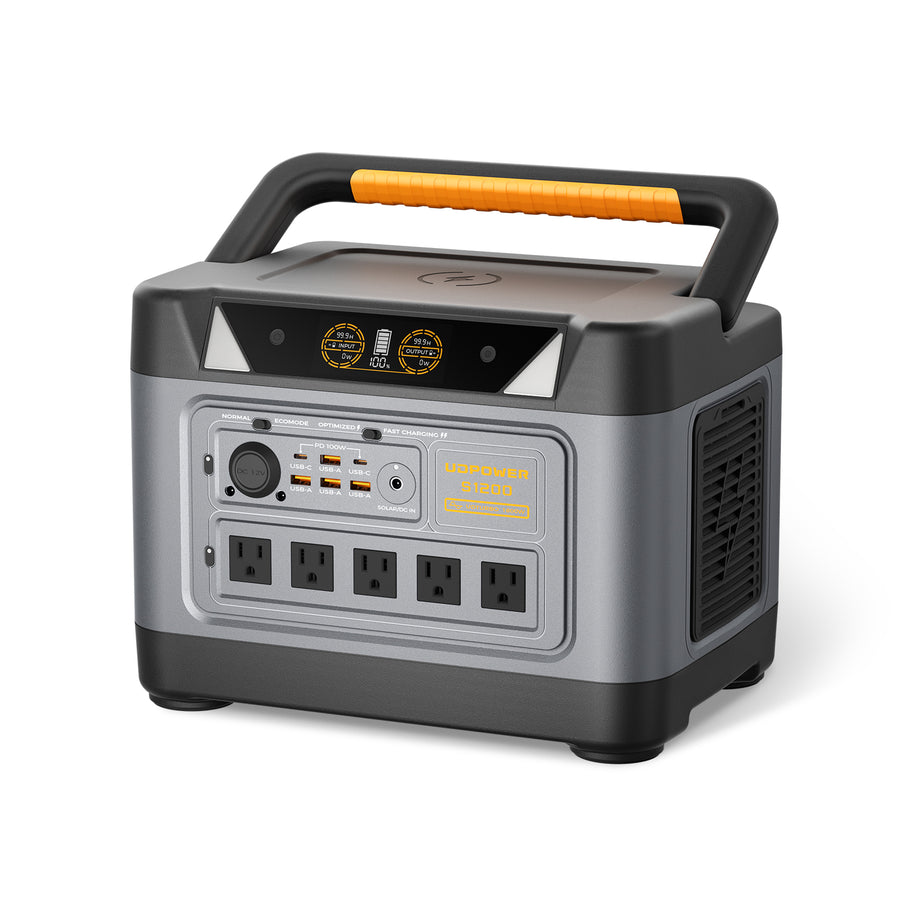
Best all-around choice: UDPOWER S1200 Portable Power Station
The S1200 is the strongest fit for most Denver households that want backup for a refrigerator, Wi-Fi, CPAP, phones, lights, and work-from-home devices without moving into very heavy equipment.
1,190Wh capacity 1,200W output 1,800W surge LiFePO4 About 26 lb
| Spec | S1200 official data | Why it matters during an outage |
|---|---|---|
| Battery capacity | 1,190Wh | Enough for meaningful essential-load backup instead of only phone charging |
| AC output | 1,200W pure sine wave | Supports many household essentials when total load stays within the limit |
| Surge power | Up to 1,800W | Helpful for startup spikes from refrigerators and similar motor loads |
| Output ports | 5 AC outlets plus USB, DC, car output, and wireless charging | Lets you run a practical mix of fridge, router, phones, and lighting |
| Best fit | Home backup, CPAP, refrigerator, work-from-home essentials | The most balanced option for short to overnight outages |
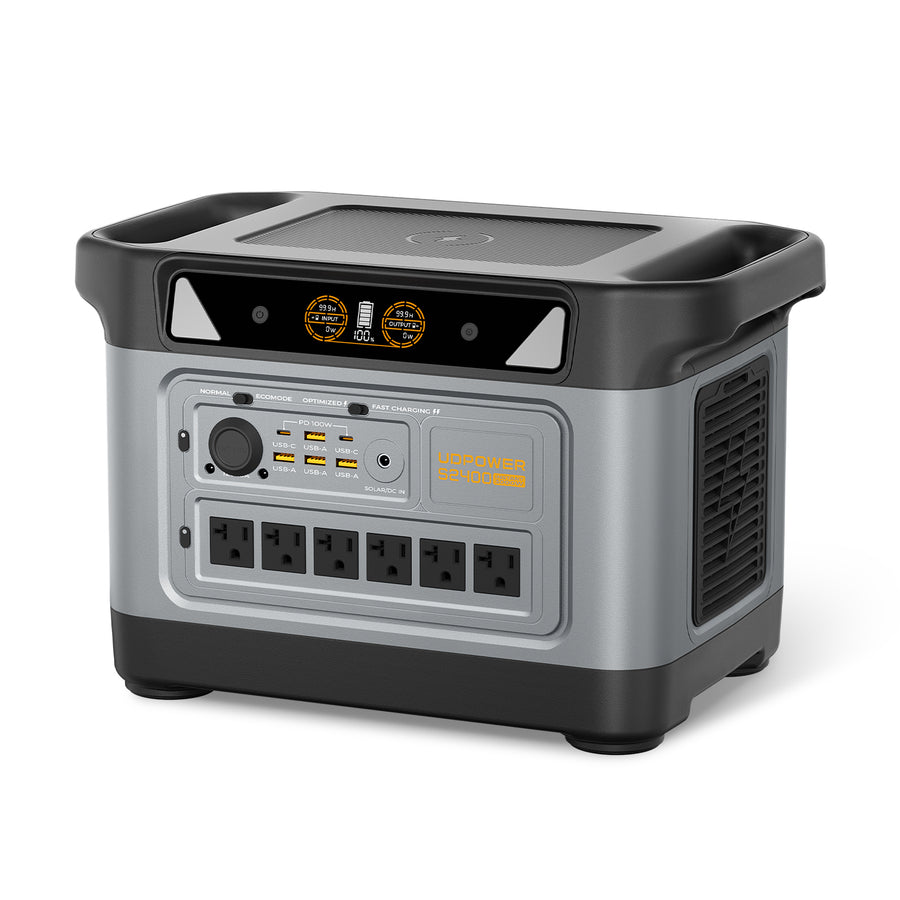
Best for larger backup loads: UDPOWER S2400 Portable Power Station
The S2400 is better when you want more runtime and more output headroom for a refrigerator plus router, lights, CPAP, laptops, small kitchen bursts, or multiple essential devices at once.
2,083Wh capacity 2,400W output 3,000W surge LiFePO4 About 40.8 lb
| Spec | S2400 official data | Why it matters during an outage |
|---|---|---|
| Battery capacity | 2,083Wh | Longer runtime for refrigerator and multi-device backup |
| AC output | 2,400W pure sine wave | More headroom for larger appliances and mixed household loads |
| Surge power | Up to 3,000W | Better for startup-heavy appliances and brief high-wattage use |
| Output ports | 16 ports, including 6 AC outlets | Useful when several essentials need power at the same time |
| Best fit | Family backup, refrigerator-focused backup, extended outages | A stronger choice when restoration time is uncertain |

Lightweight backup option: UDPOWER C600 Portable Power Station
The C600 is a compact option for phones, Wi-Fi, laptops, cameras, small lights, and some mini-fridge or CPAP use. It is not the right pick for large kitchen appliances, but it is useful for apartment dwellers who mainly need communication and basic comfort.
596Wh capacity 600W output 1,200W peak LiFePO4 About 12.3 lb
| Use case | Recommended model | Why | Next step |
|---|---|---|---|
| Apartment Wi-Fi, phones, lights, laptop | C600 | Portable, easy to store, enough for small essential loads | Check C600 |
| Fridge + router + phones + lights | S1200 | Balanced capacity and output for common home outage essentials | Check S1200 |
| Fridge + CPAP + work-from-home devices | S1200 or S2400 | S1200 fits many short outages; S2400 gives more runtime and headroom | Compare models |
| Longer outage or uncertain restoration time | S2400 | More battery capacity and stronger output for mixed loads | Check S2400 |
| Solar-ready emergency setup | S1200 or S2400 solar bundle | Solar can help extend backup during daylight when weather allows | View portable power stations |
FAQ: Xcel power outage map, Denver outages, and backup power
What is the official Xcel power outage map for Colorado?
The official electric outage map is available on Xcel Energy’s Colorado outage safety page. It lets customers check nearby outages, view available outage details, and access reporting or safety resources.
Why does my Denver address not show on the Xcel outage map?
The map may not have updated yet, the outage may be very localized, or your address may not be tied to the listed event. If your power is out and your address is not shown, report the outage through Xcel’s official outage tools.
Can I rely on the estimated restoration time?
Use it as a planning estimate, not a promise. Restoration time can change after crews inspect equipment, identify damage, wait for weather to improve, or complete line safety checks.
What should I power first during a Denver outage?
Start with the devices that protect safety and communication: phone, router, modem, CPAP or medical devices, basic LED lighting, and refrigerator backup if the outage lasts long enough to threaten food safety.
How long is food safe in the refrigerator during a power outage?
FoodSafety.gov says a refrigerator keeps food safe for about 4 hours during a power outage if the door stays closed. After that, move perishables to a cooler with ice if available or discard unsafe items.
Is a battery power station safe indoors?
A battery power station does not burn gasoline and does not create carbon monoxide like a fuel generator. Use it according to the manual, keep it dry and ventilated, and do not backfeed a home electrical panel without a proper transfer setup installed by a qualified professional.
Can a portable power station run a refrigerator?
Yes, if the refrigerator’s running watts and startup surge stay within the power station’s output rating. For outage planning, choose a model with enough surge headroom and battery capacity. The UDPOWER S1200 and S2400 are better suited to refrigerator backup than smaller models.
Which UDPOWER model is best for a Colorado power outage?
For most households, the S1200 is the best all-around outage backup choice. Choose the S2400 if you need longer runtime, more AC output, or more device headroom. Choose the C600 if you mainly need phones, Wi-Fi, laptop charging, lights, and compact apartment backup.
Can I run a space heater from a portable power station?
Technically, some power stations can run certain electric heaters if the wattage is within the output limit, but it is usually a poor use of battery capacity. Electric heat drains batteries quickly. During a winter outage, focus on safe insulation, layers, small electronics, medical devices, and communication first.
What does PSPS mean on an Xcel outage update?
PSPS means public safety power shutoff. It may be used when wildfire risk or severe weather creates safety concerns. During a PSPS event, restoration may take longer because lines may need to be inspected before power is restored.
Build your outage backup plan before the next map alert
The outage map tells you what is happening now. A backup plan decides how comfortable and safe your home stays while you wait. Start by listing your must-run devices, estimating their watts, and choosing a power station with enough output and battery capacity for your expected outage window.
Related Articles


