





What Can a 300-Watt Power Station Run? A Practical Guide with Real-World Runtimes
Last updated: July 3, 2026
Quick Answer: What Can a 300-Watt Power Station Run?
A 300-watt portable power station can run most low-power electronics and compact essentials that draw less than 300 watts continuously. Good matches include phones, tablets, laptops, Wi-Fi equipment, LED lights, cameras, drone chargers, small fans, portable monitors, many TVs, projectors, Starlink Mini, and some CPAP setups.
It may run a 12V compressor cooler or small mini fridge if the appliance's startup surge stays within the power station's peak output. It is generally not suitable for coffee makers, microwaves, electric kettles, hair dryers, space heaters, air fryers, toaster ovens, or other high-heat appliances.
The most important detail is that 300 watts describes output, not battery capacity. A 300W station with a 250Wh battery can operate a 50W device for roughly four to five hours, but it may operate a 250W device for less than one hour.
For shoppers who want slightly more output margin, the UDPOWER C400 is the closest practical option in the current UDPOWER lineup. It provides 256Wh of capacity, 400W rated AC output, and up to 800W surge support.

What Does “300-Watt Power Station” Actually Mean?
The 300W rating normally refers to the maximum continuous AC output the inverter can supply. It answers one question: can the station deliver enough power to operate the device right now?
It does not tell you how long the device will operate. Runtime depends on a different specification called watt-hours, abbreviated as Wh.
| Specification | What It Tells You | Why It Matters | Example |
|---|---|---|---|
| Continuous output | How many watts the station can supply steadily | Your combined running load must remain within this limit | A 300W station can normally support a steady 100W load |
| Surge or peak output | Short-duration power available during startup | Important for compressors, pumps, motors, and some power adapters | A 70W fridge may briefly need several times its running draw |
| Battery capacity | How much stored energy is available | Determines whether a device runs for minutes or hours | A 256Wh battery stores more energy than a 192Wh battery |
| Port rating | How much power an individual AC, USB, or DC port can deliver | A suitable total output does not guarantee every port supports the same load | A laptop may require a 65W or 100W USB-C PD port |
This distinction also explains why two products advertised as “300W power stations” can deliver very different runtimes. One may contain a 200Wh battery, while another may contain 300Wh or more.
For a broader explanation of compatibility, see How Do You Know if a Portable Power Station Can Power Your Device?
Use This Four-Part Test Before Plugging In a Device
Do not judge compatibility by the device name alone. Two mini fridges, projectors, or laptop chargers can have very different power requirements. Use the following checks before relying on a 300W station.
1. Check the device's running watts
Look at the appliance label, power adapter, manual, or manufacturer specifications. If the label lists volts and amps instead of watts, use:
For example, a device rated at 120 volts and 1.5 amps may draw up to approximately 180 watts.
2. Check startup or surge power
Appliances with compressors, motors, pumps, or heating controls may draw a short burst of extra power when they start. Common examples include mini fridges, compressor coolers, printers, blenders, small pumps, and power tools.
A device can therefore have a running draw below 300W and still overload a small station during startup.
3. Add every device that will run at the same time
A 60W laptop, 100W TV, 20W router, and 10W phone charger create a combined load of about 190W. The station sees the combined load, not each device separately.
4. Check the connection method
USB-C and regulated DC connections can be more efficient than converting battery power to household AC and then back to DC through a device's wall adapter. When a compatible direct connection is available, it can reduce energy loss and extend runtime.
What Can a 300W Portable Power Station Run?
The table below uses common planning ranges. Actual consumption varies by device model, settings, charging state, temperature, brightness, workload, and startup behavior. The appliance label or manufacturer manual remains the deciding source.
| Device | Typical Planning Range | 300W Compatibility | Main Limitation | Best Connection |
|---|---|---|---|---|
| Smartphone charging | 5–30W | Yes | Fast charging increases draw but remains easy for this class | USB-C or USB-A |
| Tablet | 10–35W | Yes | Charging speed varies by port | USB-C |
| Laptop | 35–100W | Usually yes | Gaming and workstation laptops may exceed 100W | USB-C PD when supported |
| Portable monitor | 8–25W | Yes | Brightness affects consumption | USB-C |
| Wi-Fi router | 8–20W | Yes | Modem or fiber terminal may add another load | DC or AC |
| Router, modem, and fiber terminal | 15–35W combined | Yes | Confirm the full networking setup, not only the router | DC where compatible |
| LED lamp or campsite light | 5–20W | Yes | Very low loads may be affected by automatic shutoff settings | USB or DC |
| Small fan | 15–60W | Yes | High speed can double consumption compared with low speed | USB, DC, or AC |
| Camera battery charger | 10–30W | Yes | Multiple batteries increase total energy use | USB-C or AC |
| Drone battery charger | 40–120W | Usually yes | Multi-battery charging hubs can approach the output limit | USB-C or AC |
| CPAP without heated humidification | 20–50W | Usually yes | Battery capacity may be too small for a full night | Approved DC cable where available |
| CPAP with humidifier and heated tube | 50–100W or more | Maybe | Heating can reduce runtime dramatically | Manufacturer-approved connection |
| Starlink Mini | About 25–40W average | Yes | Requires a compatible power source and cable | Approved DC or USB-C PD setup |
| Standard Starlink system | About 75–100W average | Usually yes | Runtime will be relatively short on a 200–300Wh battery | Manufacturer-specified power supply |
| Small LED TV | 40–100W | Usually yes | Screen size, brightness, and speakers affect draw | AC |
| Large LED TV | 80–180W | Maybe | Leaves less power for a console, soundbar, or streaming device | AC |
| Portable projector | 50–150W | Usually yes | High-brightness modes consume more energy | AC or USB-C |
| Game console | 70–220W | Often, with limits | Console and TV must remain below 300W together | AC |
| Electric blanket | 50–100W | Usually yes | Long runtime requires more battery capacity | AC |
| 12V compressor cooler | 30–70W while compressor runs | Maybe | Startup surge, ambient heat, and duty cycle | 12V DC |
| Small AC mini fridge | 50–120W running | Maybe | Compressor startup can exceed the station's surge rating | AC |
| Small blender | 200–400W | Borderline | Many models exceed 300W or have a strong motor surge | AC |
| Inkjet printer | 20–100W while printing | Often yes | Check startup and maintenance-cycle consumption | AC |
| Laser printer | Several hundred watts during heating | Usually no | Fuser heating can create a large short-term load | AC |
| Coffee maker | 600–1,500W | No | Heating element exceeds the inverter rating | AC |
| Microwave | 900–1,500W or more from the wall | No | Input power is often higher than the cooking-watt label | AC |
| Electric kettle | 1,000–1,500W | No | High-resistance heating load | AC |
| Hair dryer | 1,200–1,875W | No | Both fan motor and heating element draw substantial power | AC |
| Space heater | 750–1,500W | No | Even low settings usually exceed 300W | AC |
| Air fryer or toaster oven | 1,000–1,800W | No | Heating elements require much larger inverter output | AC |
General appliance calculations should be checked against the device label. The U.S. Department of Energy explains the standard watts × operating-hours method in its appliance energy-use guide . Starlink figures are based on the official Starlink Mini specifications and Standard Kit specifications .
How Long Will a 300W Power Station Run a Device?
Runtime depends primarily on battery capacity, device draw, conversion loss, and whether the load remains constant.
The 0.90 factor is a practical planning allowance for conversion and system losses in UDPOWER runtime estimates. Actual results may be lower when the AC inverter, cooling fan, display, low temperatures, aged batteries, or inefficient adapters consume additional energy.
Example: 256Wh battery running a 60W laptop
This estimate assumes the laptop continuously draws 60W. In real use, a laptop may consume less during light browsing and more during gaming, rendering, charging, or high screen brightness.
Example: 256Wh battery running a 250W appliance
That is roughly 55 minutes in ideal planning math. Runtime near the inverter's maximum output may be shorter because high loads generate more heat and can increase conversion loss.
Why real runtime may differ from the formula
- The appliance may cycle on and off instead of running continuously.
- AC conversion uses more energy than many direct USB or DC connections.
- Cold or very hot conditions can reduce battery performance.
- Aging batteries gradually hold less energy.
- Some devices draw more power during startup or charging.
- Very small loads may be affected by the station's own operating overhead.
- Displays, wireless controls, cooling fans, and standby circuits also consume energy.
Real-World Runtime Estimates by Battery Size
The following estimates use 90% of the stated battery capacity. They are planning figures rather than guaranteed test results.
| Load | UDPOWER C200 192Wh / 200W |
UDPOWER C400 256Wh / 400W |
UDPOWER C600 596Wh / 600W |
Practical Interpretation |
|---|---|---|---|---|
| 5W LED light | About 34.6 hours | About 46.1 hours | About 107.3 hours | System overhead can noticeably reduce very-low-load runtime |
| 10W router | About 17.3 hours | About 23 hours | About 53.6 hours | Excellent outage load if internet service remains active |
| 20W router and modem setup | About 8.6 hours | About 11.5 hours | About 26.8 hours | Include every network device in the total |
| 30W fan | About 5.8 hours | About 7.7 hours | About 17.9 hours | Lower fan speed can extend runtime substantially |
| 40W CPAP load | About 4.3 hours | About 5.8 hours | About 13.4 hours | C600 is the more comfortable overnight choice |
| 60W laptop | About 2.9 hours | About 3.8 hours | About 8.9 hours | Actual laptop draw changes with workload and charging state |
| 90W projector | About 1.9 hours | About 2.6 hours | About 6 hours | Eco mode and lower brightness may improve runtime |
| 120W TV or entertainment load | About 1.4 hours | About 1.9 hours | About 4.5 hours | Include streaming devices and speakers in the total |
| 200W appliance | About 0.9 hours | About 1.2 hours | About 2.7 hours | C200 is operating at its rated limit |
| 300W appliance | Not compatible | About 0.8 hours | About 1.8 hours | A 300W load leaves no output reserve on a true 300W station |
The C200, C400, and C600 specifications in this table are based on their official product pages. See UDPOWER C200, UDPOWER C400, and UDPOWER C600.
What Can You Run at the Same Time?
A compact station is often more useful when powering several efficient essentials rather than one large appliance. Add the running watts of every active device and leave some output margin for normal fluctuations.
| Example Setup | Estimated Combined Load | C400 Estimated Runtime | C600 Estimated Runtime | Verdict |
|---|---|---|---|---|
| Router, modem, LED light, and phone charging | About 35W | About 6.6 hours | About 15.3 hours | Excellent compact outage setup |
| Laptop, portable monitor, router, and phone | About 100W | About 2.3 hours | About 5.4 hours | Good for short remote-work sessions |
| Small fan, LED light, and two phones | About 50W | About 4.6 hours | About 10.7 hours | Practical camping or summer-outage kit |
| Starlink Mini, light laptop use, and phone | About 90W | About 2.6 hours | About 6 hours | Works, but capacity matters |
| CPAP without heat plus phone charging | About 45W | About 5.1 hours | About 11.9 hours | C600 is safer for a full night |
| 80W TV and 150W game console | About 230W | About 1 hour | About 2.3 hours | Technically possible, but runtime is short |
These examples assume all listed devices remain at the stated draw. Real consumption may rise or fall during use.
Can a 300W Power Station Run These Popular Devices?
Can a 300W power station run a mini fridge?
Sometimes. Small fridges often have modest running wattage, but the compressor may require a much larger startup burst. A fridge rated at 70W while running is not automatically compatible with every 300W inverter.
Battery capacity is another limitation. Even when a compact station starts the fridge successfully, a 200–300Wh battery may not provide dependable overnight or all-day food protection.
A 12V compressor cooler is often a better match because it can use a direct DC connection and may avoid AC inverter losses. However, temperature, insulation, food temperature, ventilation, and compressor duty cycle all affect consumption.
Read the dedicated guides: Can a Portable Power Station Run Your Refrigerator? and How to Power a Camping Fridge .
Can a 300W power station run a CPAP machine?
The inverter output is usually sufficient for many CPAP machines, but a compact battery may not last through an entire night. Heated humidification and heated tubing can substantially increase energy use.
A 256Wh station supplying a steady 40W load has an estimated runtime of about 5.8 hours using the 90% planning formula. At 70W, the estimate drops to about 3.3 hours.
Use only an approved power adapter or DC converter for your CPAP. Do not change prescribed therapy settings solely to save battery power without following the device manufacturer's instructions or guidance from your healthcare provider.
ResMed publishes battery-planning information in its official battery guide . For additional runtime examples, see How Long Will a CPAP Run on a Battery Backup?
Can a 300W power station run Starlink?
Starlink Mini is a realistic compact-power load. Its official specification sheet lists average consumption of approximately 25–40W. A 256Wh battery could theoretically support a 35W average load for about 6.6 hours using the 90% formula, although network conditions, temperature, cable loss, and other connected devices can reduce that figure.
Standard Starlink hardware consumes more power. Official specifications list an average of approximately 75–100W for current Standard hardware. A compact station may operate it, but runtime can fall to only a few hours.
Always confirm the required voltage, cable, and USB-C PD capability. Output wattage alone does not guarantee electrical compatibility.
Can a 300W power station run a TV?
Most modern LED TVs that remain below 300W can operate from a suitable station. The real limitation is runtime and any additional equipment. Streaming boxes, soundbars, game consoles, and lighting must be added to the total load.
A 70W TV alone may run for roughly three hours from a 256Wh battery. Adding a 150W console raises the combined draw to about 220W and reduces estimated runtime to close to one hour.
Can it charge a laptop?
Yes. Laptop charging is one of the strongest uses for this size. A typical productivity laptop may draw 45–65W, while a larger gaming laptop can require 100W, 140W, 180W, or more.
When the station and laptop both support USB-C Power Delivery, a direct USB-C connection may be simpler and more efficient than using the laptop's AC wall adapter.
Can it run a desktop computer?
A low-power office desktop and monitor may stay below 300W, but gaming desktops and workstations can exceed the limit, especially during startup or high GPU load. Measure the full computer, monitor, router, and accessories rather than relying on the computer power supply's printed maximum rating.
Practical 300W-Class Power Plans
Short home outage
Prioritize internet access, communication, lighting, and one work device. A sensible setup is a router and modem, one LED lamp, phone charging, and occasional laptop use.
Avoid connecting heat-producing appliances. Keeping the load under 50–100W makes a compact battery far more useful.
One-night camping trip
A compact station works well for headlamps, phones, camera batteries, a small fan, portable speakers, and a laptop top-up. It is much less suitable for electric cooking.
Camp stoves designed for outdoor cooking are normally a more practical energy source than trying to run a kettle, hot plate, or air fryer from a small battery.
Remote-work backup
Use USB-C for the laptop and portable monitor when possible. Keep only the necessary networking equipment powered and lower screen brightness.
A 256Wh-class battery is suitable for completing a short work session, but it should not be treated as an all-day office backup when the combined load is near 100W.
Photography and drone kit
Cameras, drones, phones, portable SSDs, and lightweight laptops are a natural fit. Charge the smallest batteries directly through USB-C where possible, and avoid running every charger simultaneously unless necessary.
CPAP travel backup
Output power is usually not the main concern; stored energy is. Calculate the machine's actual overnight watt-hours based on its prescribed settings and manufacturer-approved power connection.
For a dependable full-night margin, a larger battery such as the UDPOWER C600 is normally more appropriate than a 200–300Wh unit.
For complete trip planning, see How Many Watt-Hours Do I Need for Camping?
What a 300W Power Station Usually Cannot Run
The biggest limitation is electric heat. Appliances that create heat quickly usually require far more than 300 watts.
| Appliance | Common Input Range | Why It Is a Poor Match | More Appropriate Direction |
|---|---|---|---|
| Coffee maker | 600–1,500W | Heating element exceeds the inverter limit | Check a 1,200W or larger station |
| Microwave | 900–1,500W+ | Actual input is often higher than cooking output | Consider a 2,000W-class setup |
| Electric kettle | 1,000–1,500W | High continuous resistance-heating load | Use a larger station or non-electric outdoor cooking method |
| Hair dryer | 1,200–1,875W | Motor and heater operate together | Requires a much higher-output inverter |
| Space heater | 750–1,500W | High draw and extremely short battery runtime | Not recommended for compact battery backup |
| Air fryer | 1,200–1,800W | Heating element and fan exceed 300W | Consider 2,000W output with adequate capacity |
| Toaster or toaster oven | 800–1,500W | Heating elements exceed compact inverter limits | Use a larger power station |
| Portable air conditioner | 700–1,500W+ | High running draw plus compressor startup | Requires a high-output, high-capacity system |
How to Get More Runtime from a Compact Power Station
- Use USB-C or DC when compatible. Avoid unnecessary AC-to-DC conversion for phones, laptops, routers, and other electronics.
- Lower display brightness. TVs, laptops, monitors, and projectors can use noticeably less power at moderate brightness.
- Reduce fan speed. A fan that draws 50W on high may consume much less on a lower setting.
- Charge devices before the outage or trip. Use the station to maintain devices rather than filling every battery from empty.
- Turn off unused ports. Disable the AC inverter when only USB or DC output is needed.
- Do not leave unnecessary devices in standby. Streaming boxes, speakers, displays, and chargers can create a meaningful combined load.
- Measure uncertain appliances. A plug-in watt meter is more useful than guessing from appliance type.
- Pre-cool a fridge or cooler. Starting with cold contents reduces the work required from the compressor.
- Keep ventilation openings clear. Excessive heat can increase fan use and may reduce performance.
- Recharge during the day. Compatible solar input can replace part of the energy used during camping or an extended outage.
Recommended UDPOWER Products for 300W-Class Needs
UDPOWER does not currently position an exact 300W model as the primary product in this category. The C400 is the closest practical step-up, while the C200 covers lighter loads and the C600 provides substantially longer runtime.
UDPOWER C400 Portable Power Station

The C400 provides more output margin than a true 300W model without moving into a large, heavy home-backup unit. It is well suited to laptops, routers, lighting, cameras, fans, projectors, road trips, and short emergency use.
- Battery capacity: 256Wh
- Rated AC output: 400W pure sine wave
- Surge support: Up to 800W
- Battery chemistry: LiFePO4
- Cycle life: 3,000+ cycles to approximately 80% capacity
- Weight: 6.88 lbs
- Solar input: Up to 150W
- Maximum combined charging input: Up to 165W
- Additional feature: 12V vehicle jump-start support
Best for: buyers who expected to purchase a 300W station but want enough margin for a 200–300W combined load.
Not ideal for: full-night CPAP backup with heating, dependable refrigerator backup, electric cooking, or long-duration high-watt loads.
View UDPOWER C400UDPOWER C200 Portable Power Station

The C200 is intended for lighter electronics-focused use. It is a good fit when portability matters more than running appliances near 300W.
- Battery capacity: 192Wh
- Rated AC output: 200W pure sine wave
- Surge support: Up to 400W
- Battery chemistry: LiFePO4
- Cycle life: 4,000+ cycles stated on the product page
- Weight: 5.4 lbs
- Solar input: Up to 120W according to the comparison page
Best for: phones, routers, cameras, LED lighting, portable monitors, small fans, and short laptop use.
Important: A device drawing more than 200W is outside the C200's rated continuous output, even though this article discusses the broader 300W category.
View UDPOWER C200UDPOWER C600 Portable Power Station
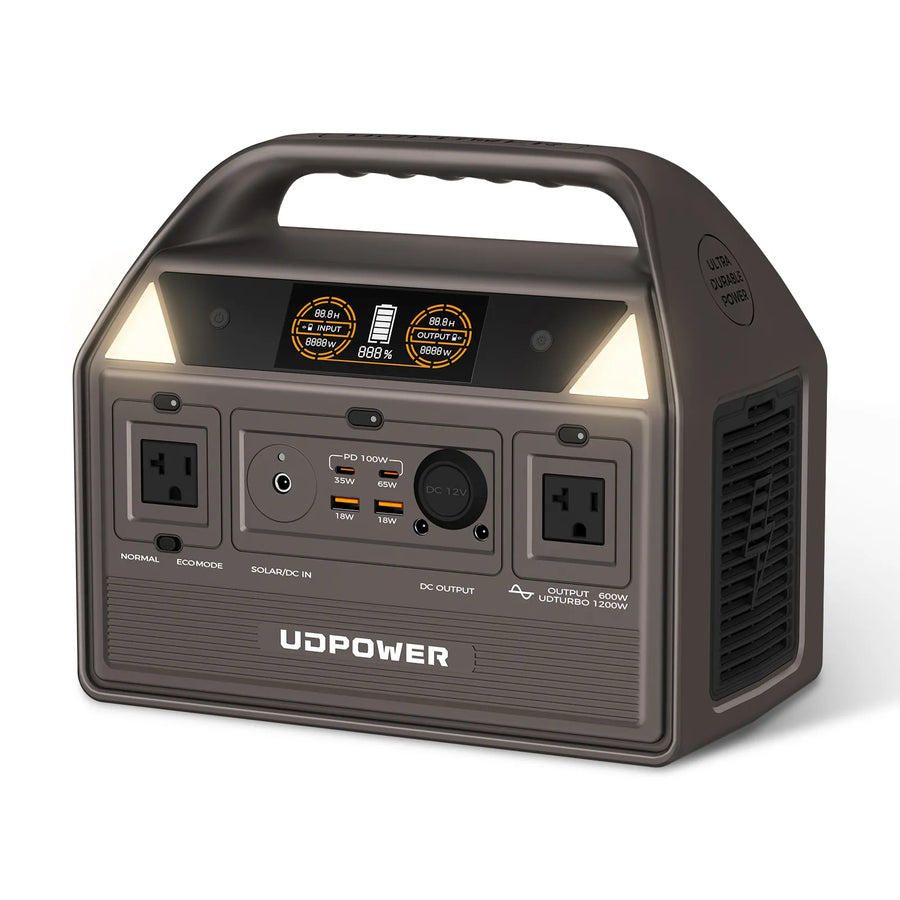
The C600 is the better choice when the issue is not whether a device can run, but whether it can run long enough. Its 596Wh battery provides more than twice the stored capacity of the C400.
- Battery capacity: 596Wh
- Rated AC output: 600W pure sine wave
- Peak output: Up to 1,200W
- Battery chemistry: LiFePO4
- Cycle life: 3,000+ cycles to approximately 80% capacity
- Weight: 12.3 lbs
- Solar input: Up to 240W
- AC outlets: Two
- USB-C output: Up to 100W combined specification
Best for: overnight CPAP planning, longer remote-work sessions, multi-device camping setups, projectors, portable coolers, and users who do not want to recharge after every short session.
The C600 is not designed as a fast-transfer UPS. Sensitive equipment that requires automatic sub-10ms switching should use a model specifically designed for that purpose.
View UDPOWER C600| Model | Capacity | Rated Output | Surge | Weight | Best Fit |
|---|---|---|---|---|---|
| C200 | 192Wh | 200W | 400W | 5.4 lbs | Ultra-light electronics and short trips |
| C400 | 256Wh | 400W | 800W | 6.88 lbs | Closest practical match for a 300W shopper |
| C600 | 596Wh | 600W | 1,200W | 12.3 lbs | Longer runtime and stronger mixed-use setups |
You can also use the UDPOWER Portable Power Station Comparison to compare capacity, output, solar input, weight, ports, and recommended use cases.
300W Power Station Buying Checklist
- List every device you must power. Include adapters, routers, displays, speakers, and accessories.
- Find the highest continuous load. The station's rated output must exceed the full simultaneous load.
- Check startup surge. This is essential for fridges, coolers, pumps, printers, and motor-driven equipment.
- Calculate required watt-hours. Multiply device watts by the desired operating time, then allow for energy loss.
- Check individual ports. Confirm USB-C PD wattage, DC voltage, AC outlet count, and connector compatibility.
- Choose pure sine wave AC output. This is the preferred choice for laptops, medical equipment, TVs, chargers, and sensitive electronics.
- Consider LiFePO4 battery chemistry. It offers long cycle life and strong thermal stability for regular use.
- Review recharge speed. A small battery is easier to live with when it can recharge quickly from wall, car, USB-C, or solar.
- Check low-load behavior. Some stations automatically turn off after detecting a very small load.
- Leave output margin. Avoid planning a permanent 295W load on a station rated for exactly 300W.
Browse the UDPOWER portable power stations under 300Wh for compact options, or view the complete portable power station collection .
Frequently Asked Questions
How long will a 300W power station last?
The answer depends on battery capacity and the connected load. A 256Wh battery running a steady 50W load may last about 4.6 hours using a 90% planning factor. The same battery operating a 250W load may last less than one hour.
Is 300W the same as 300Wh?
No. Watts measure instantaneous power output. Watt-hours measure stored energy. A 300W inverter may be paired with a battery smaller or larger than 300Wh.
Can a 300W power station run a refrigerator?
It may run some small mini fridges or 12V compressor coolers, but startup surge and battery capacity are common problems. A larger station is generally more dependable for food refrigeration.
Can a 300W power station run a CPAP all night?
It may run the CPAP, but a typical 200–300Wh battery may not last a complete night, especially when heated humidification or heated tubing is enabled. Calculate the machine's actual overnight energy requirement before relying on it.
Can a 300W power station run Starlink?
Starlink Mini is normally within the output range and has an official average power figure of about 25–40W. Standard Starlink hardware also fits below 300W in normal operation, but consumes more energy and therefore provides shorter runtime.
Can it power a TV and game console together?
Sometimes. Add the TV, console, streaming device, and sound equipment. Many combinations remain below 300W, but a high-powered console and large TV can leave little output margin and drain a compact battery quickly.
Can a 300W station run a coffee maker?
Most cannot. Standard coffee makers commonly use far more than 300W because they heat water. Check the label, but expect to need a larger inverter.
Can a 300W station run a microwave?
No in most cases. Microwave wall input is commonly around 900–1,500W or more, which is far beyond the output of a 300W inverter.
Can I use all the ports at the same time?
Multiple ports may be used simultaneously, but the combined load must remain within the station's total output limits. Individual USB, DC, and AC sections may also have separate limits.
What happens if I connect a device over 300W?
A properly protected station should trigger overload protection and stop output. Do not repeatedly force an oversized load or assume that a brief startup means the appliance is fully compatible.
Should I buy a 300W or 600W power station?
Choose the smaller class for phones, laptops, routers, lights, cameras, and short portable use. Choose a 600W model when you need longer runtime, stronger compressor-starting ability, overnight CPAP planning, portable coolers, or several devices at once.
Is the UDPOWER C400 better than an exact 300W model?
For many shoppers, yes. Its 400W rated output provides additional operating margin while retaining a compact 6.88-pound design. However, its 256Wh battery is still intended for short and efficient loads rather than long-duration appliance backup.
Related UDPOWER Guides
Data Sources and Verification
- UDPOWER C200 official product specifications
- UDPOWER C400 official product specifications
- UDPOWER C600 official product specifications
- UDPOWER model comparison page
- U.S. Department of Energy: Estimating Appliance and Home Electronic Energy Use
- Starlink Mini official specification sheet
- Starlink Standard Kit official specification sheet
- ResMed official battery guide
Choose a Power Station Based on Your Real Load
A 300W-class station is excellent for efficient electronics, connectivity, lighting, cameras, travel, and short emergency use. When your plan includes overnight medical equipment, refrigeration, multiple work devices, or longer off-grid use, move up in battery capacity instead of relying on the inverter rating alone.
Compare UDPOWER Models View All Portable Power Stations View Solar Generator KitsRelated Articles


