





USB-A vs USB-C: What’s the Difference and Why UDPOWER Supports Both
Charging Guide
If you have ever looked at a power station and thought, “Why not just make everything USB-C already?” you are not alone. The short answer is simple: USB-C is the modern favorite, but USB-A still solves real everyday problems. On a portable power station, having both is not old-fashioned. It is practical.
This guide breaks down what actually changes between USB-A and USB-C, which port you should use for phones, tablets, laptops, lights, and accessories, and why UDPOWER keeps both in the mix across its C-Series and S-Series.

Table of Contents
- USB-A vs USB-C at a glance
- The part most people miss: shape is not speed
- Why USB-A still matters on a power station
- Why USB-C matters more every year
- Why UDPOWER supports both
- Which port should you use for each device?
- Best UDPOWER products for mixed USB charging
- USB buying mistakes that waste time and money
- Final take
- FAQ
USB-A vs USB-C at a glance
The easiest way to think about it is this: USB-A is the familiar legacy connector, while USB-C is the newer, more flexible connector. But the shape alone does not tell the whole story.

| Point of comparison | USB-A | USB-C | What it means for you | Source |
|---|---|---|---|---|
| Connector shape | Flat rectangular plug | Small reversible oval plug | USB-C is easier to plug in correctly the first time, especially in the dark, in a tent, or during an outage. | USB-IF: USB Type-C |
| Reversible | No | Yes | USB-C is more convenient when you are quickly topping off a phone, tablet, or handheld. | USB-IF: USB Type-C |
| Typical role today | Older cables, small accessories, legacy charging | New phones, tablets, power banks, many laptops, modern fast charging | Most households still need both because device generations are mixed. | UDPOWER charger guide |
| Common charging range in everyday gear | Often used for lower-power charging, commonly enough for earbuds, lights, fans, and older phones | Can support much higher power with USB Power Delivery; many modern devices use 20W, 30W, 45W, 65W, or 100W, and the USB-PD spec now reaches up to 240W with supported hardware and cables | USB-C is the better fit for larger devices and faster charging, but USB-A is still great for lighter loads. | USB-IF: USB Power Delivery |
| Data capability | Depends on the actual port and device; many older USB-A ports are USB 2.0 or USB 3.x | Also depends on the actual port, cable, and device; USB-C can carry USB 2.0, USB 3.2, or more | You cannot judge speed by the connector shape alone. | USB-IF: USB 3.2 |
| Cable labeling | Usually simpler legacy cable buying | Certified USB-C cables may be marked for 60W or 240W | If you want serious laptop charging, cable choice matters almost as much as the port itself. | USB-IF: Cable & Connector guidance |
Bottom line: USB-C is more capable, but USB-A is still useful. That is exactly why a mixed-port power station makes sense.

The part most people miss: shape is not speed
One of the biggest mistakes shoppers make is assuming that USB-C automatically means “fast” and USB-A automatically means “slow.” That is not how it works.
USB names get confusing because the connector, the charging standard, the cable, and the data protocol are not the same thing. A USB-C port can be excellent, average, or very limited depending on how the product was built. The same goes for cables.

What you should actually check before you buy
Port wattagePD or PPS supportCable ratingDevice input requirement
For example, a laptop that wants 65W USB-C PD will behave very differently on a 35W port versus a 100W port. That difference matters more than the connector shape.
| Label or spec to check | Why it matters | Real UDPOWER example | Best takeaway | Source |
|---|---|---|---|---|
| USB-C wattage | A 35W USB-C port and a 100W USB-C port are not interchangeable for larger devices. | C600 lists one 65W PD port plus one 35W Type-C port; S2400 lists 2 USB-C ports up to 100W. | Check the exact per-port rating before assuming a laptop will charge normally. | UDPOWER C600 · UDPOWER S2400 |
| USB Power Delivery (PD) | PD is the main reason USB-C can power tablets, handhelds, and many laptops. | S1200 lists dual 100W USB-C PD ports; C400 lists 2 PD3.0 USB-C ports. | If your device is a laptop, tablet, or newer handheld, PD is usually what you want. | USB-IF: USB Power Delivery · UDPOWER S1200 · UDPOWER C400 |
| PPS support | PPS can help some modern phones charge more efficiently at supported voltages. | S2400 lists USB-C up to 100W with PPS. | Useful if you fast-charge newer phones and want a better match than basic fixed-voltage charging. | UDPOWER S2400 |
| Cable rating | A weak cable can become the bottleneck even when the port is powerful. | USB-IF requires USB-C cable labeling for 60W or 240W in certified categories. | If a device charges slowly, do not blame the power station first. Check the cable. | USB-IF: Cable & Connector guidance |
| Actual device requirement | Some ultrabooks charge happily on 45W to 65W. Some bigger laptops want 96W to 100W or more. Some gaming machines still need AC bricks. | UDPOWER’s laptop charging guides point users toward matching the device’s wattage, not guessing. | Match the device’s real input need to the port, then use AC only when necessary. | Laptop watts guide · MacBook charging guide |
This is where UDPOWER’s port mix becomes helpful. Instead of forcing every device through the same connector, you can match the device to the right port and keep your higher-power USB-C outputs free for the devices that truly need them.
Why USB-A still matters on a power station
USB-A is not the exciting port anymore, but it is still the port people reach for constantly. That is especially true during travel, camping, and outages, when you start charging lots of small things at once.
Think about what many families already own: rechargeable lanterns, headlamps, Bluetooth speakers, mini fans, older phones, older power banks, camera battery chargers, and random USB accessories that have been in a drawer for years. A lot of that gear still uses USB-A.

| Common everyday device | Why USB-A is still useful | Better to save USB-C for? | What this means on a power station |
|---|---|---|---|
| Rechargeable lights and lanterns | Many still ship with legacy USB-A charging cables. | Phones, tablets, or laptops | USB-A handles the small stuff so your faster ports stay open. |
| Earbuds, small speakers, and fans | These usually do not need high wattage. | A tablet or handheld gaming device | USB-A is often the simplest, cleanest match. |
| Older phones and power banks | A lot of people still keep older cables in the car, RV, or emergency kit. | Newer fast-charge phones | You do not need adapters just to keep older gear useful. |
| Camera accessories and battery chargers | Many small camera accessories still use legacy inputs or included USB-A cables. | USB-C laptop charging | USB-A helps creators and travelers charge more things at the same time. |
| Mixed-family device piles | Real households rarely upgrade every cable and device at once. | The newest high-draw device in the group | Both ports together reduce friction and cable chaos. |
In other words, USB-A is not there because a brand forgot to modernize. It is there because many people still need it.
Why USB-C matters more every year
USB-C is where most of the momentum is going. It is now the everyday standard for newer phones, tablets, many laptops, handheld gaming systems, and an increasing number of accessories.
On a power station, the biggest reason USB-C matters is simple: it can do jobs USB-A usually cannot. That includes higher-power charging for devices that are no longer “phone only” products.

| Device type | Why USB-C is usually the better fit | Typical practical need | Good UDPOWER match | Source |
|---|---|---|---|---|
| Modern smartphones | Faster charging, better compatibility with new cables and chargers, and easier reversible plug-in. | Fast top-ups on the go | C400, C600, S1200, S2400 | USB-IF: USB Power Delivery |
| Tablets and larger handhelds | Higher power support makes USB-C more practical than legacy USB-A for heavier charging needs. | 20W to 45W+ depending on device | C600 or larger | USB-IF: USB Power Delivery |
| Ultrabooks and many laptops | Many newer laptops can charge directly over USB-C PD, which is simpler than carrying a separate wall brick. | 45W to 100W is common for many smaller laptops | S1200 or S2400 for dual 100W USB-C; C600 for lighter laptop use | Laptop watts guide · MacBook charging guide |
| Newer accessories | More brands are moving away from older cable standards toward USB-C. | Cleaner cable ecosystem | Any current UDPOWER model with USB-C | UDPOWER charger guide |
| Future-proofing | USB-C can scale much higher with the right hardware, cables, and standards support. | More room for tomorrow’s gear | S2400 is the strongest mixed-port option in the current lineup | USB-IF: USB Power Delivery · UDPOWER S2400 |
If your device supports USB-C charging natively, that is usually the first port to try. It is often the cleanest and most convenient route. But “usually” is the key word. Some larger laptops and specialty devices still work better through their original AC adapter.
Why UDPOWER supports both
UDPOWER’s port choices make more sense when you stop thinking about one device and start thinking about real-world device piles. People do not buy a portable power station just to charge one phone. They use it to handle a mix of old and new devices at the same time.
That is true on a campsite, in an RV, during a blackout, on a backyard movie night, or while working remotely away from an outlet. Some devices want USB-C. Some still use USB-A. Some should go through AC. The best power station is the one that does not force you to choose between convenience and compatibility.
| Real-life scenario | Why USB-A helps | Why USB-C helps | Why both together are better |
|---|---|---|---|
| Family outage setup | Charge lights, speakers, and older phones | Fast-charge newer phones and tablets | You can keep small loads off the premium ports and still move faster on the devices that matter most. |
| Travel or road trip | Supports whatever legacy cable is already in the car bag | Works better for current tablets, power banks, and handhelds | You pack fewer adapters and waste less time. |
| Remote work | Handles accessories like small lights or speakers | More realistic for a work laptop or tablet | You keep the workspace powered without using AC for every single device. |
| Camping and creator kits | Useful for action-cam chargers, fans, and accessories | Better for phones, tablets, and many modern cameras or monitors | Your charging setup becomes flexible instead of cable-dependent. |
| Mixed old and new household gear | No need to retire perfectly good USB-A devices | No need to give up fast charging for newer gear | You get a smoother upgrade path instead of a forced one. |
That mixed-port design is also why UDPOWER’s lineup scales well. The smaller models give you compact flexibility, while the bigger models become true charging hubs for households, field work, and backup power plans.
Which port should you use for each device?
Here is the simple version. Use the port that fits the device’s actual need, not the port that happens to be open.
| Device | Best first choice | Why | Fallback option |
|---|---|---|---|
| New phone with fast charging | USB-C | Usually the fastest and cleanest option | USB-A if you only need a slower top-up |
| Older phone or accessory using a legacy cable | USB-A | No adapter needed, perfectly fine for lighter charging jobs | USB-C plus adapter if necessary |
| Tablet | USB-C | Better fit for higher power than basic USB-A charging | AC charger if the tablet has unusual needs |
| Ultrabook or USB-C laptop | USB-C PD | Direct charging is easier than carrying the wall brick | AC outlet with original charger |
| Gaming laptop or large workstation laptop | AC outlet | Many still need more power than everyday USB-C ports provide in practice | USB-C only if the device specifically supports it at the right wattage |
| Headlamp, speaker, mini fan, small light | USB-A | These loads rarely need your best USB-C port | USB-C if that is the only cable you packed |
| Router or modem backup | Usually AC or the correct DC method | Networking gear often depends on its own power adapter or DC setup | USB only when the device is designed for it |
A smart rule for outage planning is this: put small accessories on USB-A, reserve USB-C for modern high-value devices, and use AC only when the device truly needs it.
Best UDPOWER products for mixed USB charging
The right model depends less on “USB-A vs USB-C” by itself and more on how many devices you want to charge at once, how much battery capacity you want, and whether laptops or outage essentials are part of the plan.

Best for light, modern charging kits
UDPOWER C400 Portable Power Station
The C400 makes sense for people who mostly charge newer mobile gear and want a compact station that still keeps one foot in the USB-A world. It is the smallest model here, but it is surprisingly flexible for weekend trips, quick backup, and mobile charging kits.
| Spec | Details | Why it matters | Source |
|---|---|---|---|
| Battery | 256Wh LiFePO4 | Compact enough for short trips and everyday carry use. | C400 product page |
| AC output | 400W rated, 800W surge | Enough headroom for smaller electronics and light appliance duty. | C400 product page |
| USB mix | 2 PD3.0 USB-C ports + 1 USB-A 18W | Leans modern, but still keeps one legacy USB-A port available. | C400 product page |
| Charging speed | Up to 165W combined charging; 0–80% in about 1.5 hours | Fast turnaround is valuable when you are between trips or short on time. | C400 product page |
| Best fit | Phone + tablet + small accessories, day trips, car kit, short blackouts | Best if your device stack is modern and you do not need huge battery capacity. | Related UDPOWER guide |

Best balanced option for mixed USB households
UDPOWER C600 Portable Power Station
The C600 is one of the easiest UDPOWER models to recommend when you want both USB-A and USB-C to feel equally useful. It gives you two USB-C ports with different power levels, plus two 18W USB-A ports, which makes it a strong match for travel, camera kits, family charging piles, and lighter remote-work setups.
| Spec | Details | Why it matters | Source |
|---|---|---|---|
| Battery | 596Wh LiFePO4 | Much more comfortable for multi-device charging than ultra-small stations. | C600 product page |
| AC output | 600W rated, 1200W peak | Gives you useful AC backup without moving into heavy home-backup size. | C600 product page |
| USB mix | 1 USB-C PD 65W + 1 USB-C 35W + 2 USB-A 18W | That mix works well for one larger mobile device plus several accessories. | C600 product page |
| Noise | Below 30dB | Better fit for overnight or indoor use than louder gear. | C600 product page |
| Best fit | Weekend camping, mixed old/new devices, creator bag, backup for several chargers at once | If you want a balanced port layout without jumping to a much larger station, this is a sweet spot. | C600 product page |
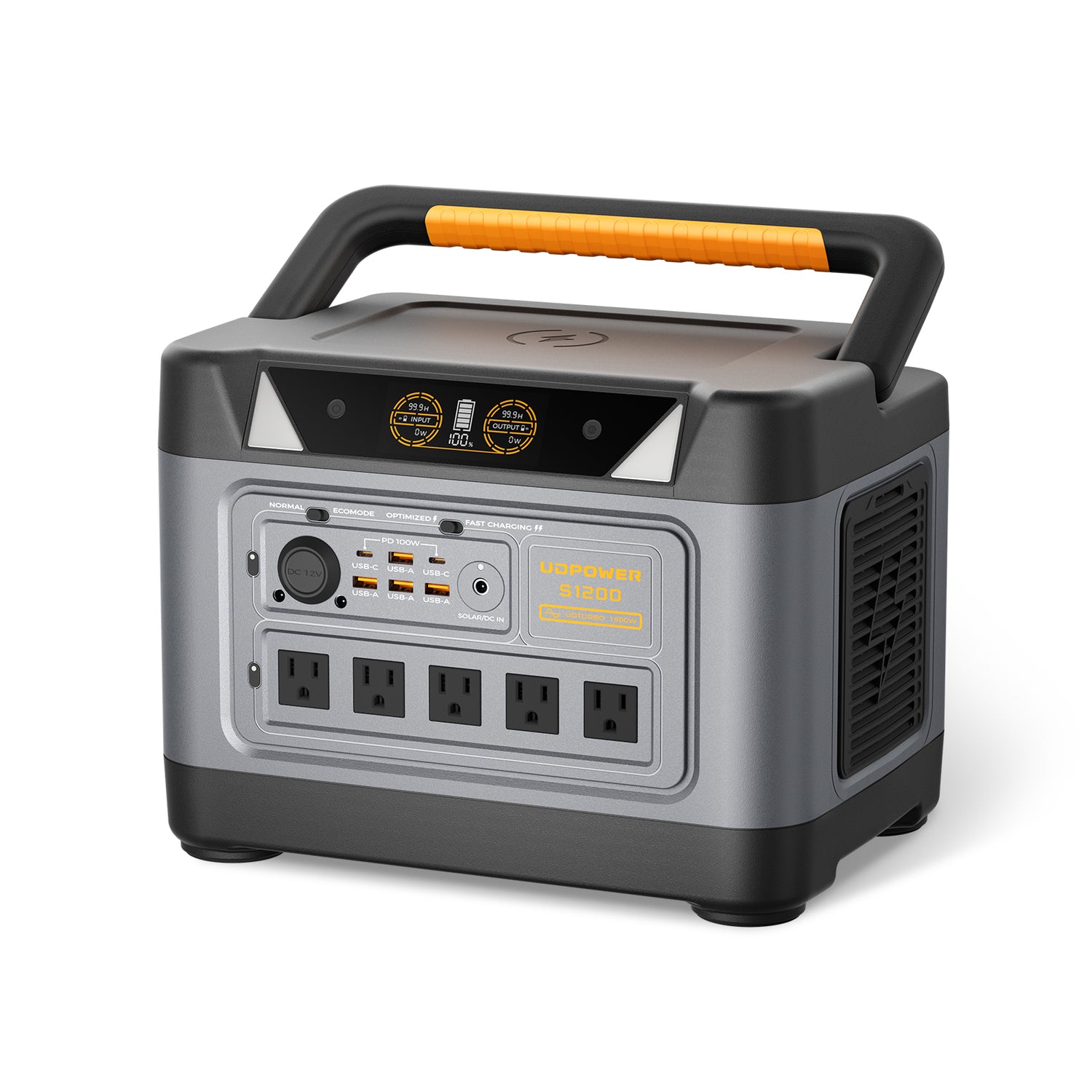
Best for serious backup plus strong USB-C laptop charging
UDPOWER S1200 Portable Power Station
The S1200 moves from “charging convenience” into “real backup tool.” It is a much better fit when you want two 100W USB-C ports, plenty of battery capacity, and the ability to keep multiple small devices running without feeling like you are babying every watt.
| Spec | Details | Why it matters | Source |
|---|---|---|---|
| Battery | 1,190Wh LiFePO4 | A meaningful jump for outage prep, overnight use, and all-day work setups. | S1200 product page |
| AC output | 1,200W rated, UDTURBO up to 1,800W | Large enough to cover more than just charging jobs. | S1200 product page |
| USB mix | 2 USB-C PD 100W ports + USB-A ports; the 5-AC version lists 4 USB-A, while the 3-AC version lists 2 USB-A | One of the best current UDPOWER options for mixed USB charging plus laptop support. | S1200 product page |
| Extra feature | UPSPRIME under 10ms switchover listed | Helpful for home backup planning when continuity matters. | S1200 product page |
| Best fit | Home essentials, laptop-heavy kits, family charging during outages, longer off-grid days | This is where “both USB-A and USB-C” stops being nice and starts being genuinely useful. | Related backup guide |
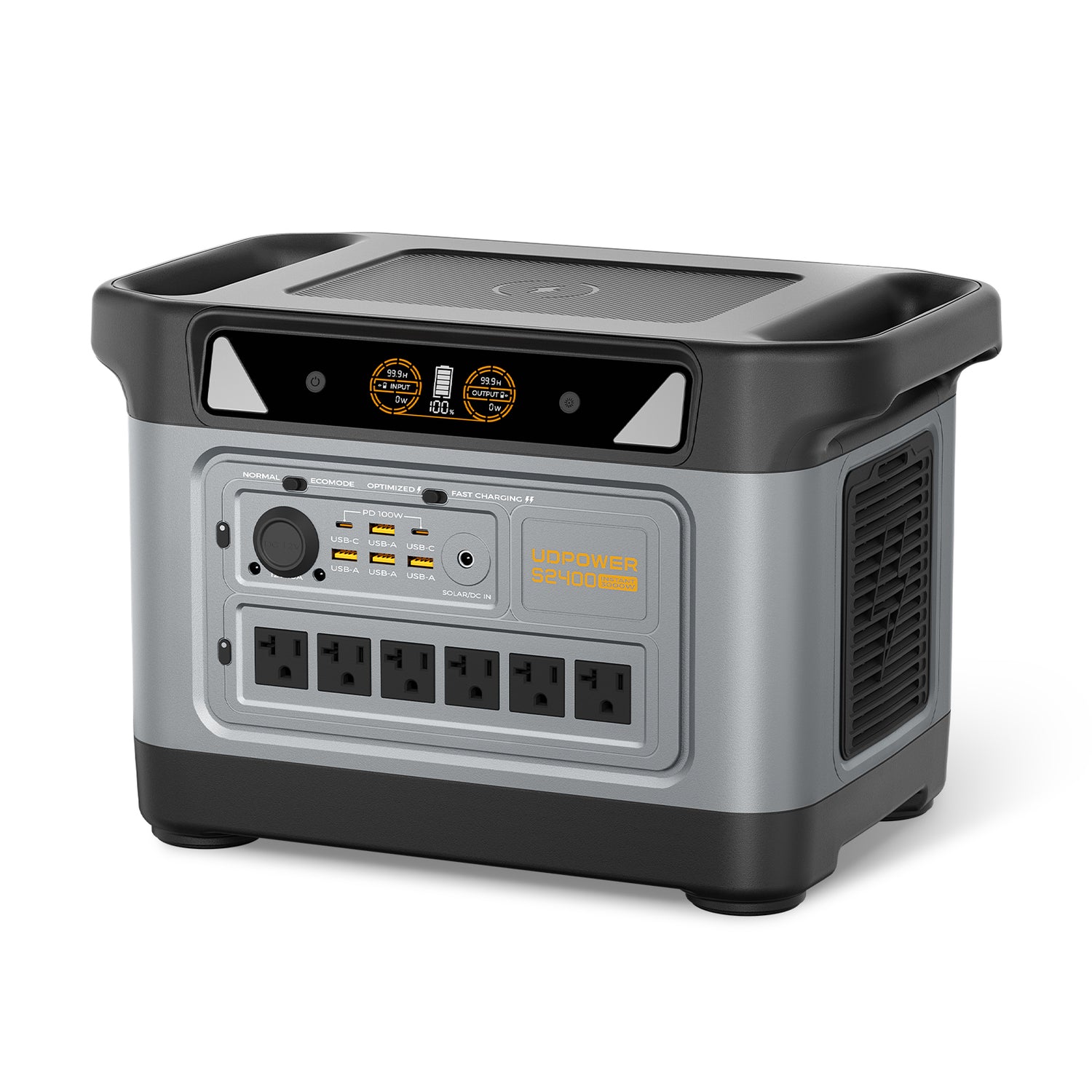
Best for large mixed-device charging and premium flexibility
UDPOWER S2400 Portable Power Station
The S2400 is the strongest answer in the lineup for anyone who wants a real charging hub, not just a battery box. It gives you six AC outlets, four USB-A ports, dual USB-C up to 100W with PPS, DC outputs, and wireless charging. If your question is “Why keep both USB-A and USB-C?” the S2400 is the clearest example.
| Spec | Details | Why it matters | Source |
|---|---|---|---|
| Battery | 2,083Wh LiFePO4 | Built for longer runtime, larger device piles, and more serious backup plans. | S2400 product page |
| AC output | 2,400W rated, UDTURBO surge up to 3,000W | Gives the station room to handle much more than USB charging alone. | S2400 product page |
| USB mix | 4 USB-A + 2 USB-C up to 100W with PPS | Excellent when a household or crew needs both legacy and modern charging at once. | S2400 product page |
| Extra feature | UPSPRIME switchover listed at 10ms or less | Useful when pairing the station with outage continuity planning. | S2400 product page |
| Best fit | Family backup, RV use, large work setups, mixed device charging for hours | Best choice if you want the strongest port flexibility in the current UDPOWER range. | S2400 product page |
USB buying mistakes that waste time and money
Most charging frustration does not come from the power station itself. It usually comes from a mismatch between the device, the port, and the cable.
| Mistake | What goes wrong | Smarter move | Source |
|---|---|---|---|
| Assuming every USB-C port is “full-speed” or “laptop ready” | You plug in a laptop and the charge is slow, unstable, or not enough. | Check the listed wattage and whether PD is supported. | USB-IF: USB Power Delivery |
| Blaming the power station when the cable is weak | The port is capable, but the cable limits the result. | Use a properly rated cable, especially for higher-power USB-C charging. | USB-IF: Cable & Connector guidance |
| Using your best USB-C port for tiny accessories | You tie up premium charging capacity with a device that did not need it. | Put small legacy loads on USB-A first when possible. | UDPOWER charger guide |
| Trying to make USB handle a device that really wants AC | Charging is slow, unreliable, or just impossible. | Match the device’s real requirement, then use the AC outlet if that is the correct tool. | Laptop watts guide |
| Thinking USB-A is “obsolete” and therefore useless | You forget how much existing gear still depends on it. | Use USB-A as the support port that keeps older and smaller devices out of your USB-C lane. | UDPOWER charger guide |
A mixed-port station is not clutter. It is what keeps charging practical in the real world.
Final take
USB-C is the future-facing connector, and for many devices it is already the best choice. But that does not make USB-A pointless. In actual homes, cars, RVs, and backup kits, USB-A is still the easiest way to keep lots of smaller or older devices in the game.
That is why UDPOWER supports both. It is not about hanging onto old tech for the sake of it. It is about building power stations that work with the gear people already own while still supporting the devices they are buying now.
If your setup is mostly newer mobile gear, the C400 or C600 can be a smart fit. If you want stronger laptop charging, outage flexibility, and room for a bigger device mix, move up to the S1200 or S2400.
The best connector is not the one that sounds newer. It is the one that matches the device in front of you. The best power station is the one that gives you enough options to stop thinking about adapters and start thinking about getting things done.
FAQ
Is USB-C always faster than USB-A?
Not automatically. USB-C usually supports better fast-charging options, but the real answer depends on the device, the port rating, and the cable. A weak USB-C setup can still underperform a well-matched USB-A setup for small accessories.
Can I charge a laptop from a USB-C port on a power station?
Often yes, if the laptop supports USB-C charging and the port provides enough wattage. Many smaller laptops do well on 45W to 100W USB-C PD. Bigger laptops may still need their original AC charger.
Why not remove USB-A and just give people more USB-C?
Because a lot of real-world gear still depends on USB-A, especially smaller accessories and older cable kits. Keeping both avoids adapters, makes mixed-device charging easier, and leaves your high-power USB-C ports available for the devices that benefit most.
What is the biggest advantage of USB-C on a portable power station?
Higher-power direct charging. That is the big one. USB-C with PD is much more useful for modern phones, tablets, handhelds, and many laptops than basic legacy USB ports.
What is the biggest advantage of USB-A on a portable power station?
It keeps older and lower-draw devices simple. You can charge lights, fans, earbuds, older phones, and random travel accessories without burning one of your premium USB-C ports.
How do I know whether my cable is the problem?
If charging is slower than expected, swap the cable before assuming the port is weak. Higher-power USB-C charging especially depends on using a cable that can actually carry the required power.
Which UDPOWER model is best if I mostly charge phones, tablets, and small accessories?
The C400 is great for light modern charging, while the C600 is better if you want a more balanced mix of USB-C, USB-A, and extra battery capacity.
Which UDPOWER model is best if I want USB-C for laptops and USB-A for everything else?
The S1200 and S2400 are the better choices. They offer stronger USB-C output for larger mobile devices while still keeping enough USB-A ports for smaller gear and family charging needs.
Related Articles


