Steam Deck Charger Wattage: How Many Watts Do You Really Need?
William ZacharySteam Deck Charging Guide
The Steam Deck is simple to charge, but easy to misunderstand. The official answer is 45W USB-C Power Delivery. The real-world answer is more useful: 45W is the safe baseline, 65W is the better everyday replacement if you also use a dock or laptop charger, and 100W is safe but will not make the Steam Deck charge faster than it is designed to charge.
Quick Answer: The Best Charger Wattage for Steam Deck
The official Steam Deck charger is a 45W USB-C PD charger. For most people, the best replacement charger is a reputable 45W to 65W USB-C PD charger. A 30W charger can work for lighter games or idle charging, but it may not keep up while playing demanding titles. A 65W or 100W USB-C PD charger is safe because the Steam Deck only draws the power it needs.
Best minimum: 45W USB-C PD Best all-around: 65W USB-C PD Power station connection: USB-C PD direct Avoid: non-PD phone chargers for gaming

Official Steam Deck Charger Specs
Valve lists the Steam Deck power input as a PD3.0 Type-C power supply, 45W. The Steam Deck LCD uses a 40Wh battery, while the Steam Deck OLED uses a 50Wh battery. That means the charger does two jobs at once: it powers the handheld while you play and, when there is enough headroom, sends extra power into the internal battery.
| Item | Official / Practical Spec | What It Means for Charging | Source |
|---|---|---|---|
| Included charger | 45W USB-C PD 3.0 | Enough to play and charge under normal conditions. | Valve Steam Deck tech specs |
| Steam Deck LCD battery | 40Wh battery; 2–8 hours of gameplay, content dependent | Demanding games can drain the battery much faster than indie games or streaming. | Valve LCD / OLED model comparison |
| Steam Deck OLED battery | 50Wh battery; 3–12 hours of gameplay, content dependent | The OLED model has more battery capacity and usually lasts longer, but it still ships with a 45W charger. | Valve Steam Deck OLED specs |
| Replacement charger target | 45W to 65W USB-C PD | 45W matches the official charger. 65W gives more room for docks, hubs, phones, and laptops. | iFixit genuine Steam Deck AC adapter |
The Steam Deck does not need a charger labeled “Steam Deck charger.” It needs a reliable USB-C PD charger with enough wattage and the right voltage profiles.
18W vs 30W vs 45W vs 65W vs 100W: What Actually Happens?
Charger wattage is the charger’s available power, not the amount the Steam Deck is forced to take. With USB-C PD, the device and charger negotiate a safe profile. A higher-watt charger does not “push” extra power into the Steam Deck.
| Charger Wattage | Will It Charge? | Playing While Charging | Best Use | What to Watch |
|---|---|---|---|---|
| 18W phone charger | Sometimes, slowly | Not recommended for gaming | Emergency idle charging only | The battery may still drop while the charging icon is showing. |
| 30W USB-C PD | Yes, if it supports suitable PD profiles | Okay for lighter games; weak for demanding titles | Travel backup, indie games, sleep-mode top-up | Heavy games, high brightness, downloads, or docked use can exceed the charger’s headroom. |
| 45W USB-C PD | Yes | Recommended baseline | Direct replacement for the official charger | Use a good USB-C cable and avoid no-name adapters. |
| 65W USB-C PD | Yes | Excellent | Best one-charger setup for Steam Deck, dock, phone, and many laptops | The Steam Deck will not charge faster just because 65W is available. |
| 100W USB-C PD | Yes | Excellent, but overkill for the Deck alone | Shared charger for laptop + Steam Deck + accessories | Use a cable rated for the charger’s output, especially above 60W. |
How Much Power the Steam Deck Actually Uses
The Steam Deck rarely uses a full 45W continuously just to run a game. In many gaming sessions, the system load is closer to the teens or mid-20s in watts. The 45W charger matters because it gives the Deck enough room to run the game, support the screen, Wi-Fi, fan, storage, and still charge the internal battery.
| Steam Deck Use Case | Approx. Whole-System Draw | Charger That Feels Comfortable | What You Will Notice |
|---|---|---|---|
| Menu, downloads, light streaming, very light 2D games | About 6W–10W | 30W+ USB-C PD | Most decent USB-C PD chargers can top up the battery. |
| Balanced 3D gaming with frame-rate cap | About 12W–18W | 45W USB-C PD | The Deck can play and charge without running the adapter at its limit. |
| Demanding AAA games, high brightness, Wi-Fi active | About 22W–30W | 45W–65W USB-C PD | Low-watt chargers may slow the drain but not fully keep up. |
| Docked play with hub, controller, external display, accessories | Varies by dock and accessories | 65W USB-C PD | More headroom helps the dock and accessories stay stable. |
Practical tip: If your Deck shows the charging icon but the battery percentage still drops during a demanding game, the charger is not necessarily broken. It usually means the game load is higher than the charger’s usable output after negotiation and cable losses.
USB-C PD Charger Buying Checklist for Steam Deck
Use this checklist before buying a replacement wall charger, car charger, power bank, or portable power station for your Steam Deck.
- Choose USB-C Power Delivery, not just USB-C. A charger can have a USB-C-shaped port and still lack the PD behavior the Steam Deck expects.
- Look for at least 45W output on one USB-C port. Multi-port chargers sometimes advertise total wattage, but one port may only deliver 30W or less when other ports are active.
- Prefer 65W if you use a dock. It gives useful overhead for a hub, display adapter, controller receiver, or another small device.
- Use a quality USB-C to USB-C cable. For 60W+ chargers, use a cable rated for the output. A weak cable can make a good charger behave like a slow charger.
- Avoid relying on USB-A ports for the Deck. USB-A can charge smaller devices well, but it is usually the wrong choice for sustained Steam Deck play.
Recommended UDPOWER Power Stations for Steam Deck
A wall charger solves home charging. A portable power station solves long gaming sessions away from an outlet, weekend camping, road trips, power outages, and charging more than just the Steam Deck. For Steam Deck use, the most important specs are usable watt-hours, USB-C PD output, weight, and whether you also need AC outlets for monitors, routers, laptops, or a TV.

Best compact pick: UDPOWER C400
The UDPOWER C400 is the best fit if you want a small power station for Steam Deck, phone, camera, laptop, router, or short camping backup. Its 65W USB-C PD output is enough for the Steam Deck, and the 256Wh LiFePO4 battery gives far more runtime than a pocket-size power bank.
| Capacity | 256Wh LiFePO4 |
|---|---|
| AC output | 400W rated, 800W surge |
| USB-C output | 65W Type-C output |
| Weight | Approx. 6.88 lb |
| Best for | Steam Deck + phone + small travel electronics |
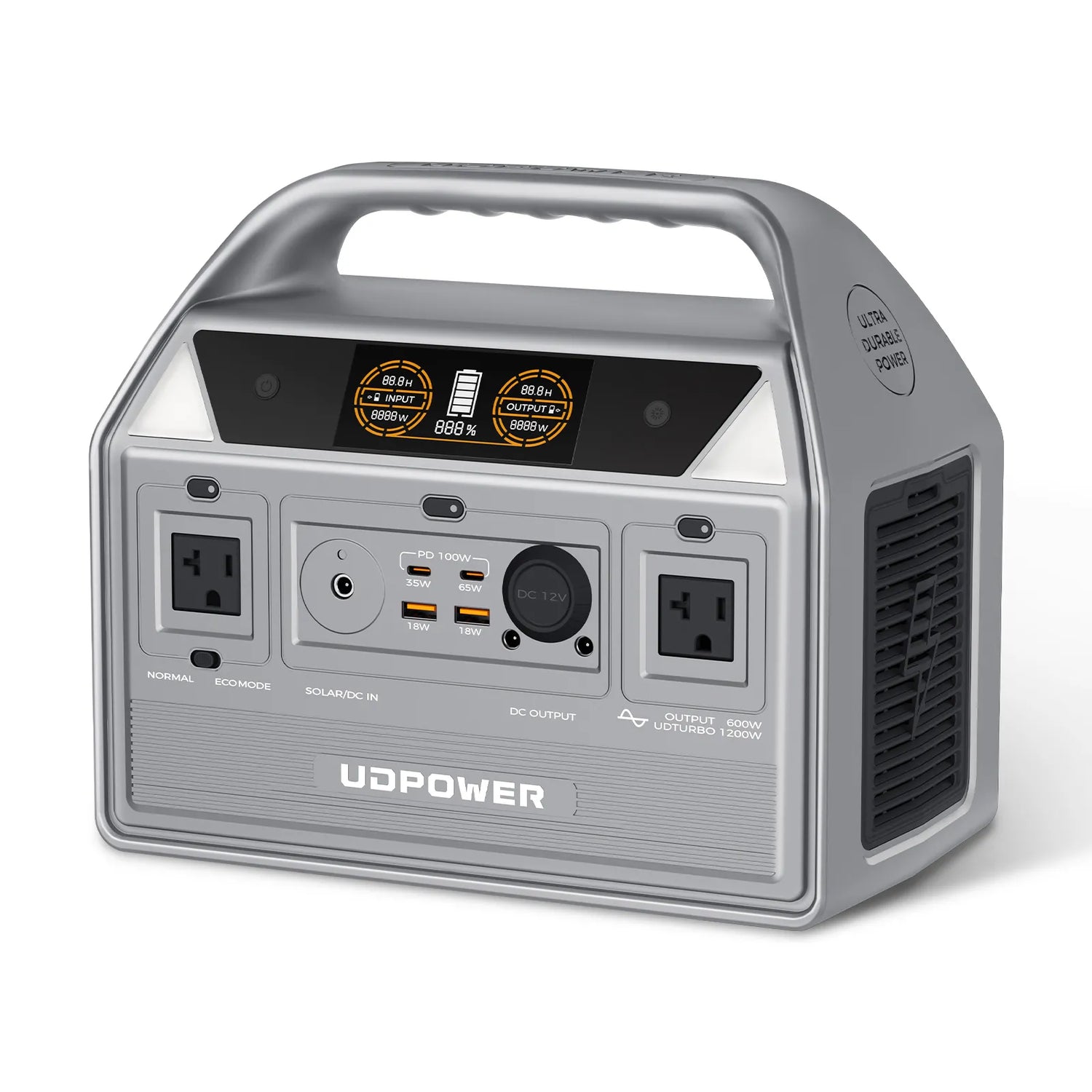
Best weekend gaming pick: UDPOWER C600
The UDPOWER C600 is the sweet spot for most Steam Deck owners who camp, travel by car, or want a quiet backup battery for gaming plus everyday electronics. It gives you 596Wh of capacity, a 65W PD port, 35W Type-C, USB-A outputs, 12V car output, and AC outlets in one portable unit.
| Capacity | 596Wh LiFePO4 |
|---|---|
| AC output | 600W rated, 1200W surge |
| USB-C output | 65W PD port + 35W Type-C |
| Weight | Approx. 12.3 lb |
| Best for | Steam Deck + phone + laptop + camera + campsite electronics |
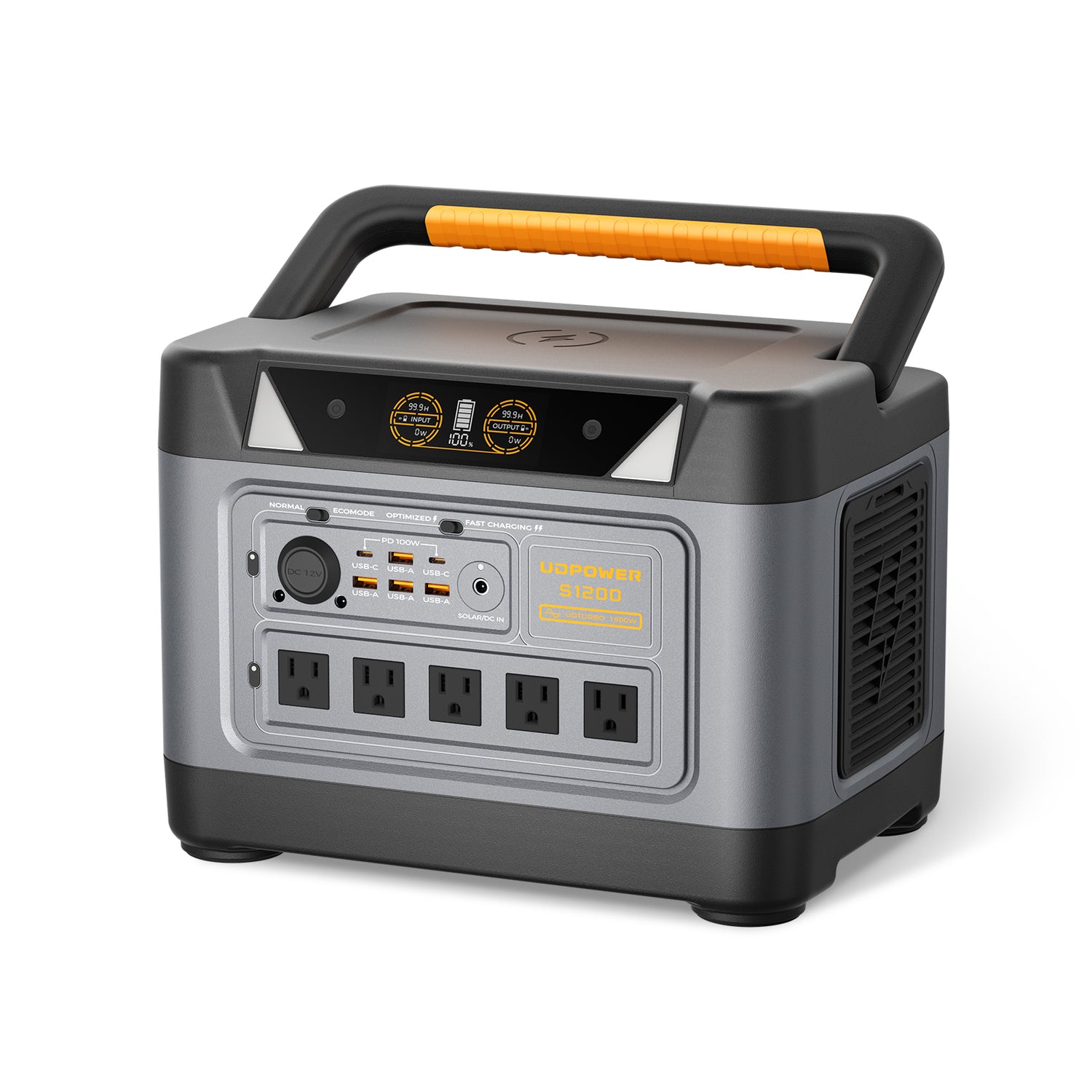
Best home backup pick: UDPOWER S1200
The UDPOWER S1200 is more power station than the Steam Deck alone needs. That is exactly why it makes sense for home backup: Steam Deck, router, phone, laptop, monitor, small fridge, lights, and other essentials can share one larger battery. The S1200 also gives dual 100W USB-C PD outputs, multiple AC outlets, and a 1,190Wh-class LiFePO4 battery.
| Capacity | 1,190Wh-class LiFePO4 |
|---|---|
| AC output | 1200W rated, 1800W surge |
| USB-C output | Dual 100W USB-C PD ports |
| Weight | Approx. 26.0 lb |
| Best for | Steam Deck + router + laptop + monitor + home backup essentials |
Steam Deck Runtime Tables With UDPOWER Models
For UDPOWER runtime planning in this article, the calculation uses 90% usable efficiency. Real runtime still changes with game load, screen brightness, Wi-Fi, temperature, battery age, and whether you charge through USB-C directly or through the AC adapter.
Estimated runtime = power station capacity in Wh × 0.90 ÷ Steam Deck power draw in watts| UDPOWER Model | Capacity Used for Math | Light / Balanced Gaming at 15W | Demanding Gaming at 25W | Heavy Load at 30W | 45W Charging Envelope | Spec Source |
|---|---|---|---|---|---|---|
| UDPOWER C400 | 256Wh × 90% = 230Wh usable estimate | About 15.4 hours | About 9.2 hours | About 7.7 hours | About 5.1 hours | C400 official page |
| UDPOWER C600 | 596Wh × 90% = 536Wh usable estimate | About 35.8 hours | About 21.5 hours | About 17.9 hours | About 11.9 hours | C600 official page |
| UDPOWER S1200 | 1,190Wh × 90% = 1,071Wh usable estimate | About 71.4 hours | About 42.8 hours | About 35.7 hours | About 23.8 hours | S1200 official page |
The 45W column is not saying the Steam Deck always consumes 45W while gaming. It is a conservative planning number for play-plus-charge, docked use, or heavier charging behavior.
Estimated Full Steam Deck Battery Equivalents
This table is useful if you think in “how many full Steam Deck batteries can I get?” instead of continuous play time.
| UDPOWER Model | Usable Energy Estimate | LCD Steam Deck 40Wh Battery | OLED Steam Deck 50Wh Battery | Best Interpretation |
|---|---|---|---|---|
| C400 | About 230Wh | About 5.8 full-battery equivalents | About 4.6 full-battery equivalents | Small travel setup with a lot more reserve than a pocket power bank. |
| C600 | About 536Wh | About 13.4 full-battery equivalents | About 10.7 full-battery equivalents | Best weekend-size choice for Steam Deck and several other devices. |
| S1200 | About 1,071Wh | About 26.8 full-battery equivalents | About 21.4 full-battery equivalents | Better for emergency backup and multi-device setups than handheld-only charging. |
Best Way to Connect a Steam Deck to a Power Station
The cleanest setup is simple: connect the Steam Deck directly to a USB-C PD output on the power station using a quality USB-C to USB-C cable. This avoids the extra conversion loss of turning battery DC into AC and then back into DC through the Steam Deck wall adapter.
| Connection Method | Works? | Efficiency | When to Use It |
|---|---|---|---|
| Power station USB-C PD → Steam Deck USB-C | Yes | Best | Use this first on C400, C600, and S1200 when the USB-C PD port is available. |
| Power station AC outlet → official 45W Steam Deck adapter | Yes | Lower | Useful if your USB-C PD port is already in use, or if you trust the original Steam Deck adapter most. |
| 12V car port → 45W USB-C PD car charger → Steam Deck | Yes, with the right PD car charger | Good | Useful in vehicles or 12V setups, but the car charger must support USB-C PD at enough wattage. |
| USB-A cable → Steam Deck | Usually poor for gaming | Low for this use | Only for slow emergency charging when nothing better is available. |
For most Steam Deck owners: choose the C400 if the Deck is the main device, choose the C600 if you also charge a laptop and campsite gear, and choose the S1200 if you want the same battery to cover gaming plus home backup essentials.
Slow Charging and Battery Drain Troubleshooting
Most Steam Deck charging problems come down to three things: not enough wattage, a charger that is USB-C but not proper USB-C PD, or a cable that limits the negotiated profile.
| Symptom | Likely Cause | What to Do |
|---|---|---|
| Battery drops while plugged in during a game | The charger is below the game’s real power need, or it is not negotiating a strong PD profile. | Use a 45W or 65W USB-C PD charger and a quality USB-C to USB-C cable. |
| Steam Deck charges slowly from a phone charger | Many phone chargers are 18W–30W or rely on fast-charge standards that are not ideal for the Deck. | Switch to a USB-C PD charger rated at 45W or higher. |
| Docked play becomes unstable | The dock, display output, USB accessories, and Deck are sharing limited power. | Use a 65W USB-C PD charger or a powered dock setup. |
| Power station AC outlet works, but USB-C does not charge the Deck | The power station’s USB/DC output may not be turned on, or the cable is not negotiating correctly. | Turn on the DC/USB output, try a different C-to-C cable, and check that the port supports at least 45W PD. |
| 100W charger does not charge faster than the official charger | The Steam Deck controls its own charging limit. | This is normal. A 100W charger is useful for laptops or multi-device travel, not faster Deck charging. |
Safety Notes for Steam Deck Charging
- Heat matters. Playing a demanding game while charging creates more heat than idle charging. Keep the Deck and charger in open air, not under blankets or inside a tight bag.
- Do not chase wattage alone. A reputable 45W or 65W USB-C PD charger is better than a cheap 100W charger with unclear safety information.
- Check the cable. Many charging issues are cable issues, especially when using third-party chargers, docks, and power stations.
- Large power stations are not airplane power banks. Models such as C400, C600, and S1200 are designed for home, car, RV, camping, and outage use, not carry-on air travel.
Need Longer Steam Deck Runtime Away From the Wall?
Start with how you actually play. For a day trip, a compact model may be enough. For a weekend campsite, the 596Wh class is more comfortable. For home backup, choose a larger station that can support the Deck plus your router, phone, laptop, lights, and other essentials.
View UDPOWER Portable Power Stations Compare UDPOWER Models View Solar Generator KitsFAQ: Steam Deck Charger Wattage
How many watts is the official Steam Deck charger?
The official Steam Deck charger is 45W USB-C Power Delivery. That applies to both the LCD and OLED versions.
Can I use a 65W charger for Steam Deck?
Yes. A 65W USB-C PD charger is safe for the Steam Deck. The Deck will only draw what it needs, and the extra capacity can help when using a dock or charging another device.
Can I use a 100W USB-C charger for Steam Deck?
Yes, as long as it is a reputable USB-C PD charger. It will not make the Steam Deck charge faster than its internal charging design allows, but it is useful if you also charge a USB-C laptop.
Is a 30W charger enough for Steam Deck?
A 30W USB-C PD charger can work for lighter games, sleep-mode charging, or slow top-ups. It is not the best choice for demanding games while charging because the battery may still drain.
Why does my Steam Deck battery drain while it says charging?
The game, screen, Wi-Fi, fan, dock, or accessories may be using more power than the charger is delivering. This is common with low-watt phone chargers or weak cables.
Does a higher-watt charger improve Steam Deck FPS?
No. Charger wattage does not directly improve game performance. It only affects whether the Deck can maintain or refill the battery while running.
Is USB-C better than the AC outlet on a power station?
For Steam Deck charging, direct USB-C PD is usually better because it avoids extra conversion losses. The AC outlet works, but it is less efficient because power goes from battery DC to AC and then back to DC through the Steam Deck adapter.
How long can the UDPOWER C600 run a Steam Deck?
Using 90% usable efficiency, the 596Wh UDPOWER C600 can run a Steam Deck for about 35.8 hours at a 15W load, about 21.5 hours at 25W, or about 17.9 hours at 30W. Real runtime depends on the game and settings.
Which UDPOWER model is best for Steam Deck?
Choose C400 for compact travel, C600 for weekend gaming and camping, and S1200 if you want Steam Deck charging plus home backup for devices like a router, laptop, lights, or small appliances.
Can I play Steam Deck while it is plugged in?
Yes. The Steam Deck is designed to be used while plugged in. For best results, use a 45W or higher USB-C PD charger and keep the device well ventilated.