





Duke Energy Power Outage Map for Florida, Indiana, and Ohio
Latest updated: June 16, 2026
Quick answer: Duke Energy customers in Florida, Indiana, and Ohio can check active outages through the official Duke Energy outage map. Search your street address or ZIP code, select the outage marker nearest your home, and review the number of customers affected, crew status, outage cause, and estimated restoration time when available.
If your home is without power but no outage appears near your address, report it through Duke Energy’s outage page, mobile app, or by texting OUT to 57801 from a mobile number associated with your account. Restoration times are estimates and may change after crews inspect the damage.
Open the Official Duke Energy Outage MapThe outage map can tell you what Duke Energy currently knows, but it cannot keep your refrigerator cold, run a CPAP machine, recharge your phone, or power essential lighting while repairs are underway. This guide explains how to read the map correctly, why restoration estimates change, and how to prepare for outages in Florida, Indiana, and Ohio.

Official Duke Energy Outage Links
Duke Energy does not serve every address in Florida, Indiana, or Ohio. Check the utility name shown on your electric bill before reporting an outage. When Duke Energy is your electric utility, use the official resources below.
| What you need | Best resource | What it provides | Official source |
|---|---|---|---|
| Check current outages | Duke Energy outage map | Outage locations, customers affected, crew status, outage cause, and restoration estimates when available | Open outage map |
| Report your home without power | Duke Energy outage portal | Online outage reporting and status checking based on your service address | Report or check an outage |
| Receive automatic updates | Duke Energy Outage Alerts | Text, email, or voice notifications about status changes and estimated restoration times | Manage outage alerts |
| Understand map terms | Duke Energy outage FAQ | Definitions for outage status, causes, customers affected, first reported time, and estimated restoration | Read the outage FAQ |
| Understand repair priorities | Duke Energy restoration process | How crews prioritize damaged infrastructure and restore the greatest number of customers safely | View the restoration process |
| Map says restored, but power is still off | Restoration update guidance | Steps for reporting a remaining local or property-specific outage | Review restoration updates |
How to Use the Duke Energy Power Outage Map
The appearance of the outage map may change, but the basic process remains similar across Duke Energy service areas.
-
Open the official outage map.
Go directly to Duke Energy’s official outage map . Avoid relying on screenshots shared through social media because outage totals and restoration estimates can change quickly. -
Select the correct service area.
Choose Florida, Indiana, or Ohio/Kentucky when prompted. The map only shows outages within the selected Duke Energy operating territory. -
Search your exact address.
Enter your street address or ZIP code instead of relying only on a citywide view. One city may contain several utilities, substations, and separate distribution circuits. -
Zoom into your neighborhood.
At a wide zoom level, several separate outages may appear as one cluster. Zooming in can reveal whether your street is part of a large outage or a smaller localized interruption. -
Select the outage marker nearest your home.
Review the customers affected, first reported time, current crew status, outage cause, and estimated restoration time if available. -
Report your individual address.
Report the outage even when a nearby outage already appears on the map. This helps Duke Energy determine which individual accounts remain without service after repairs begin. -
Refresh the map after major status changes.
Check again after receiving an alert, seeing utility crews leave the area, or noticing that neighboring properties have regained power.
What to Do if the Map Will Not Load
During major storms, heavy website traffic, browser settings, weak cellular service, or cached files may prevent the map from displaying correctly.
- Refresh the page or close and reopen the browser.
- Switch between Wi-Fi and mobile data.
- Use the Duke Energy mobile app or outage-reporting page.
- Text OUT to 57801 from the mobile number associated with your Duke Energy account.
- Ask a trusted family member outside the affected area to check your address.
- Use a battery-powered radio for emergency information when mobile service is unavailable.
What the Outage Map Information Means
The map displays several different data points. Understanding the difference between them helps prevent false expectations about when your specific home will regain power.
| Map information | What it means | What it does not guarantee |
|---|---|---|
| Customers without power | The number of customer accounts believed to be affected in the selected outage or area | It does not equal the exact number of people or buildings affected |
| Customers served | The total number of Duke Energy customer accounts in the selected service territory | It is not the number of customers currently experiencing an outage |
| First reported | The time the outage entered Duke Energy’s reporting system | It may not be the exact moment electricity was lost |
| Cause | The known or suspected reason, such as vegetation, weather, equipment damage, or a vehicle accident | An early cause may be revised after crews inspect the site |
| Crew status | The repair process may be assigned, under assessment, en route, or being worked | It does not show the exact position of every utility worker |
| Estimated time of restoration | Duke Energy’s current estimate for when service may be restored | It is not a guaranteed appointment time for your individual home |
| Latest estimated restoration | A broader estimate that may apply to the last customers in a storm-damaged area | Many customers may regain power earlier than the listed time |
| Restored notification | Duke Energy believes the main reported outage has been repaired | A smaller line, transformer, meter, breaker, or service problem may still affect your property |
Why Outage Numbers May Rise While Crews Are Working
An increasing outage count does not automatically mean repairs have stopped. During an active storm, additional trees may fall, equipment may fail, and damage assessors may identify customers who were not included in the original report.
Crews can restore one circuit while another circuit fails elsewhere. Look at the overall trend across several updates instead of comparing two map refreshes only a few minutes apart.
Florida, Indiana, and Ohio Outage Guides
The same Duke Energy map serves all three areas, but the conditions that cause outages and the preparation that matters most can differ.
| State | Common outage conditions | Best preparation priorities | Map-use tip |
|---|---|---|---|
| Florida | Hurricanes, tropical storms, strong thunderstorms, lightning, wind, flooding, and extreme heat | Charge batteries before storms arrive, protect equipment from floodwater, and prepare cooling and refrigeration plans | Check both your address and countywide conditions because tropical systems can create many separate outages |
| Indiana | Severe thunderstorms, tornadoes, straight-line winds, falling trees, ice, and winter storms | Prepare for both summer cooling and winter heating risks and keep battery lighting ready | Zoom in closely because rural or neighborhood outages may affect fewer customers than a citywide view suggests |
| Ohio | Severe storms, high winds, ice, snow, flooding, and distribution equipment damage | Plan for cold-weather outages, protect plumbing, and inspect for property-side electrical damage | Select the Ohio/Kentucky service area and report again if nearby homes regain power while yours remains out |
Florida: Using the Map During a Hurricane
During a hurricane, the first restoration estimate may cover a wide area because crews cannot fully inspect damage until winds decrease and roads become accessible. A countywide estimate may appear before Duke Energy can provide an address-specific restoration time.
Do not wait for the map to show a long outage before preparing. Charge phones, flashlights, power stations, and battery banks before severe conditions arrive. Move portable power equipment above possible flood levels and keep all connectors dry.
Florida customers can also review the Duke Energy Florida Storm Ready information .
Indiana: Small Outages Can Still Take Time
Indiana outages may range from a few homes affected by a tree limb to widespread damage caused by tornadoes, straight-line winds, or ice. A small customer count does not always mean a fast repair.
Replacing a damaged pole or repairing an isolated rural line can take longer than switching power around a larger outage with less physical damage.
During a winter outage, never use an oven, charcoal grill, camp stove, or fuel-burning generator to heat an indoor space. A portable power station can support lights, communications, blankets, and selected low-watt devices, but an electric space heater can drain a battery rapidly.
Ohio: Why Your Neighbor May Have Power First
Homes that appear close together may be connected to different circuits, transformers, or electrical phases. One side of a street may regain power while the other remains out.
If the map says power is restored but your home remains dark, check whether nearby homes are affected, inspect your breaker panel only when the area is safe and dry, and report the outage again.
How to Interpret Duke Energy Restoration Times
An estimated time of restoration, commonly called an ETR, is Duke Energy’s current projection based on known damage, weather, road access, available crews, replacement equipment, and the number of repairs ahead of your location.
Why an Estimated Restoration Time May Be Missing
- The storm is still creating new damage.
- Crews have not safely reached the affected equipment.
- Flooding, fallen trees, or blocked roads prevent access.
- Transmission lines, substations, poles, and main circuits still need to be inspected.
- The original outage contains several separate damage points.
Why the Estimate May Move Later
A restoration estimate may be extended after crews find broken poles, damaged transformers, multiple spans of downed wire, flooded equipment, or additional faults farther down the line.
A later estimate does not necessarily mean no work was completed. Crews may repair the first fault and then discover another damaged section.
Why the Estimate May Move Earlier
Power may return sooner when crews can reroute electricity, the damage is less severe than expected, replacement equipment is nearby, or additional mutual-assistance crews become available.
How Restoration Work Is Prioritized
Utilities generally begin with work that protects public safety and restores electricity to the largest number of customers. Transmission facilities, substations, hospitals, emergency services, water systems, and major distribution lines are normally addressed before smaller neighborhood lines and individual service connections.
A small outage may therefore remain after a much larger outage nearby has been repaired. Restoration order is based on safety, system structure, and the number of customers restored, not simply which household reported first.
What to Do in the First 10 Minutes of an Outage
| Time | Action | Why it matters |
|---|---|---|
| Minute 0–1 | Look outside safely and check whether nearby homes or streetlights are also out | Helps distinguish a neighborhood outage from an electrical problem inside your home |
| Minute 1–2 | Check for sparks, smoke, fallen lines, flooding, or damaged electrical equipment | Immediate hazards require distance, emergency services, and utility reporting |
| Minute 2–3 | Open the Duke Energy map and report your address | Confirms that the utility knows your individual service is affected |
| Minute 3–4 | Turn off or unplug sensitive electronics and large appliances | Reduces the risk of equipment damage and excessive load when power returns |
| Minute 4–5 | Keep refrigerator and freezer doors closed | Preserves cold air and delays food spoilage |
| Minute 5–6 | Use battery-powered lights instead of candles | Reduces fire risk during a stressful emergency |
| Minute 6–8 | Connect only priority devices to your backup power source | Prevents unnecessary battery drain while outage duration is unknown |
| Minute 8–10 | Check emergency alerts and decide whether to remain home or relocate | The electrical outage may be one part of a larger weather emergency |
Power Outage Safety Checklist
| Situation | What to do | Official source |
|---|---|---|
| Downed or sagging power line | Stay far away, assume it is energized, keep people and pets away, and report it immediately | National Weather Service |
| Gasoline generator | Operate it outdoors and at least 20 feet from doors, windows, and vents | CDC disaster safety |
| Refrigerated food | Keep the door closed. An unopened refrigerator generally keeps food cold for about four hours | FoodSafety.gov |
| Frozen food | A full unopened freezer may stay cold for about 48 hours, or about 24 hours when half full | FoodSafety.gov emergency guide |
| Medical equipment | Follow the backup plan provided by your healthcare professional or equipment supplier | Ready.gov |
| Flooded electrical equipment | Do not touch outlets, cords, breakers, appliances, meters, or power stations exposed to water | Ready.gov |
| Power returns | Reconnect appliances gradually and check for unusual smells, heat, sparks, or damaged equipment | Duke Energy outages |
Food Safety Timeline During an Outage
| Time without grid power | Refrigerator | Freezer | Recommended action |
|---|---|---|---|
| 0–4 hours | Food can generally remain safe when the refrigerator door stays closed | Keep the freezer door closed | Avoid checking food repeatedly and use an appliance thermometer when available |
| 4–24 hours | Perishable refrigerated food may no longer be safe without another cooling source | A half-full freezer may remain cold for about 24 hours | Move priority food to a cooler with ice only when necessary |
| 24–48 hours | Do not rely on appearance or smell to judge refrigerated perishables | A full freezer may remain cold for about 48 hours | Check for ice crystals and a temperature of 40°F or below |
| Beyond 48 hours | Most unprotected perishables require disposal | Frozen food requires item-by-item evaluation | Follow official food-safety guidance and discard food when in doubt |
How Much Backup Power Do You Need?
Do not choose a portable power station by looking only at the largest watt number on the product page. You need to consider two different limits.
- Output watts: Determines which appliances can operate at the same time.
- Battery watt-hours: Determines approximately how long those appliances can run.
The 0.90 factor allows for approximately 90% conversion efficiency. Actual runtime can be lower because of inverter losses, cooling fans, standby consumption, battery temperature, appliance cycling, battery condition, and startup surges.
Step 1: Create a Priority Load List
| Device | Planning wattage | Planned use | Estimated energy needed |
|---|---|---|---|
| Router and modem | 15W | 12 hours | 180Wh |
| Two LED lights | 20W combined | 6 hours | 120Wh |
| Phone charging | Varies | Several charges | Approximately 60Wh total |
| Laptop | 65W | 4 hours | 260Wh |
| CPAP example | 40W | 8 hours | 320Wh |
| Refrigerator average example | 80W average | 10 hours | 800Wh |
Step 2: Add the Energy Requirements
For the router, lights, phones, laptop, and CPAP example:
After allowing for 90% conversion efficiency:
This load plan fits the general capacity range of the UDPOWER S1200. Actual CPAP consumption must be checked using the specific machine, pressure setting, humidifier, and heated hose configuration.
If a refrigerator averaging 80W is added for 10 hours:
1,740Wh ÷ 0.90 = approximately 1,933Wh of battery capacity
This expanded plan is closer to the capacity range of the UDPOWER S2400 and provides more output headroom for refrigerator compressor startup.
Practical Backup-Power Tiers
| Outage plan | Typical devices | Suggested capacity range | Main limitation |
|---|---|---|---|
| Communication backup | Phones, router, modem, LED lights, and laptop | Approximately 250–600Wh | Not intended for long refrigerator or high-watt appliance use |
| Overnight essentials | Communications, lights, laptop, CPAP planning, fan, and limited refrigerator cycling | Approximately 1,000–1,300Wh | Requires active load management during longer outages |
| Extended essentials | Refrigerator, router, lights, phones, CPAP planning, fans, laptops, and brief kitchen use | Approximately 1,800–2,500Wh | Still not equivalent to whole-home backup or central-air support |
Recommended UDPOWER Backup Options
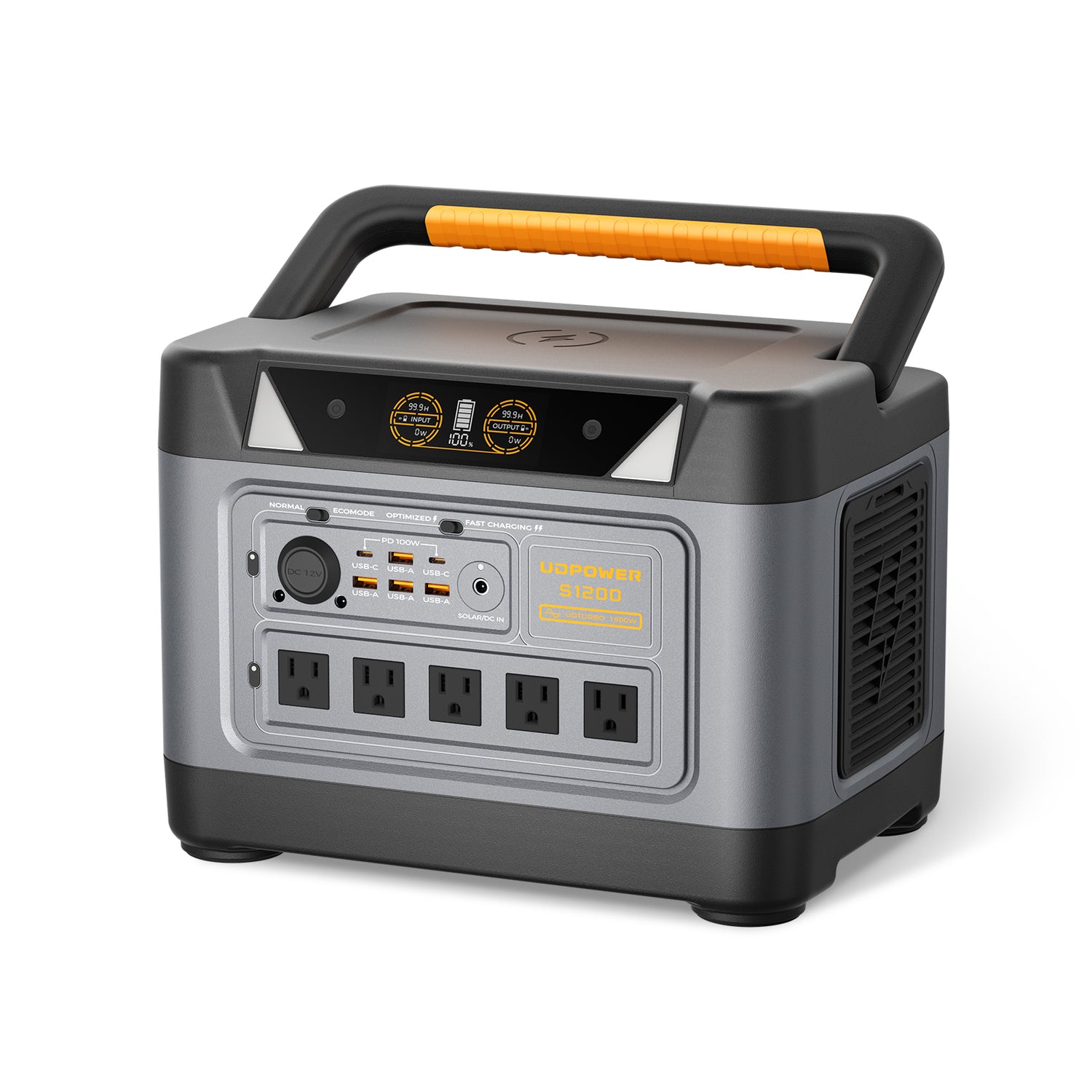
For Duke Energy customers building an essentials-first outage plan, the S1200 and S2400 are the most relevant UDPOWER models. Both use LiFePO4 batteries, provide pure sine wave AC output, support solar charging, and can power devices directly without gasoline or engine exhaust.
UDPOWER S1200 Portable Power Station
Best for: Overnight outages, apartments, condos, refrigerator planning, routers, CPAP planning, phones, lights, laptops, and households that need a unit that is easier to move.
- Battery capacity: 1,190Wh
- Rated AC output: 1,200W
- Surge output: Up to 1,800W
- Battery chemistry: LiFePO4
- Battery cycle listing: 4,000+ cycles
- Maximum solar input: 400W
- UPS transfer time: Less than 10ms
- Weight: Approximately 26 lb
- Dimensions: Approximately 13.7 × 9.5 × 9.7 inches
- Estimated usable AC energy at 90%: Approximately 1,071Wh
The S1200 is a practical middle choice when your outage plan focuses on essential electronics and one moderate appliance rather than several high-watt devices operating at the same time.
View the UDPOWER S1200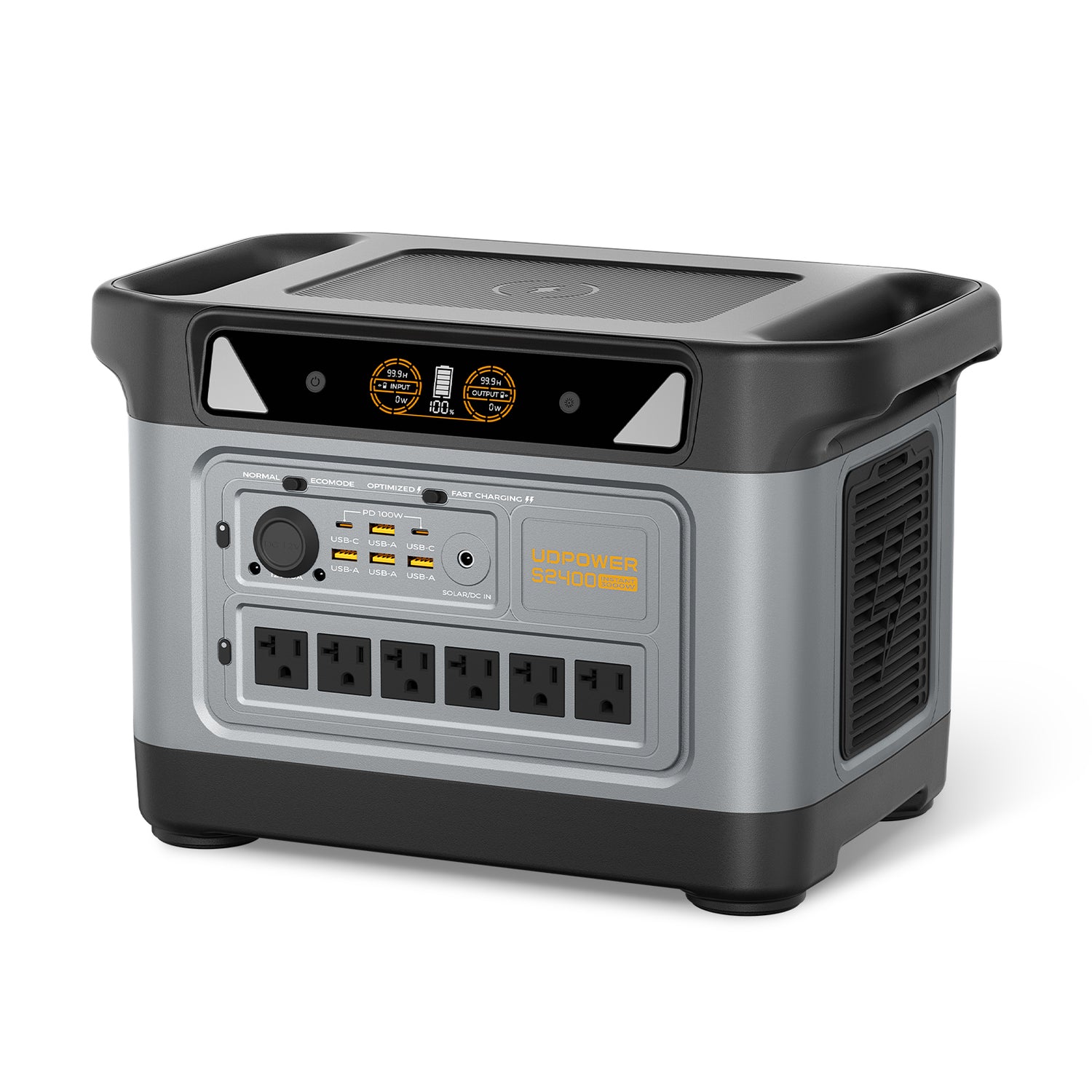
UDPOWER S2400 Portable Power Station
Best for: Longer Duke Energy outages, refrigerators operating alongside several essential devices, higher startup loads, family backup plans, and households that want more output and runtime margin.
- Battery capacity: 2,083Wh
- Rated AC output: 2,400W
- Surge output: Up to 3,000W
- Battery chemistry: LiFePO4
- Battery cycle listing: 4,000+ cycles
- AC outlets: 6
- Maximum solar input: 400W
- UPS transfer time: 10ms or less
- Weight: Approximately 40.8 lb
- Dimensions: Approximately 15.8 × 9.5 × 10.1 inches
- Estimated usable AC energy at 90%: Approximately 1,875Wh
The S2400 provides more room for refrigerator compressor startup and overlapping loads. It is the stronger option when your plan includes a refrigerator, communications, lights, fans, laptops, CPAP planning, and brief use of a higher-watt appliance.
View the UDPOWER S2400UDPOWER S1200 vs S2400 for Outage Backup
| Specification | UDPOWER S1200 | UDPOWER S2400 | Why it matters |
|---|---|---|---|
| Capacity | 1,190Wh | 2,083Wh | Higher capacity provides longer runtime at the same average load |
| Usable AC energy at 90% | Approximately 1,071Wh | Approximately 1,875Wh | Provides a more realistic planning number than nameplate capacity alone |
| Rated AC output | 1,200W | 2,400W | Determines the continuous appliance load the station can support |
| Surge output | Up to 1,800W | Up to 3,000W | Provides short startup headroom for refrigerators and motor-driven devices |
| Maximum solar input | 400W | 400W | Can extend runtime during daylight when compatible panels and suitable sunlight are available |
| Weight | Approximately 26 lb | Approximately 40.8 lb | The S1200 is easier to move, while the S2400 provides more capacity |
| Best outage role | Balanced overnight essentials | Longer and heavier mixed-load backup | Choose according to measured loads and required runtime |
| Official product page | View S1200 specifications | View S2400 specifications | Check current product specifications, bundles, and availability before purchasing |
Estimated Device Runtimes
The estimates below use the formula capacity × 90% ÷ device watts. They assume a stable load and do not include unusual startup demand, extreme temperature, battery aging, or additional devices.
| Example load | Planning wattage | S1200 estimated runtime | S2400 estimated runtime | Important note |
|---|---|---|---|---|
| Router and modem | 15W | Approximately 71 hours | Approximately 125 hours | Internet service may still fail if neighborhood network equipment loses backup power |
| CPAP example | 40W | Approximately 26.8 hours | Approximately 46.9 hours | Humidifiers, heated hoses, and pressure settings can significantly increase consumption |
| Refrigerator average example | 80W average | Approximately 13.4 hours | Approximately 23.4 hours | Compressor startup and duty cycle must remain within the station’s output limits |
| Mixed essential load | 150W | Approximately 7.1 hours | Approximately 12.5 hours | Examples may include communications, lighting, a laptop, and a fan |
| Heavier mixed load | 300W | Approximately 3.6 hours | Approximately 6.2 hours | Turning off unnecessary loads can substantially extend runtime |
| High-watt cooking load | 1,000W | Approximately 1 hour | Approximately 1.9 hours | High-watt appliances should normally be used only for short periods |
High-Watt Devices That Drain Batteries Quickly
| Device | Common power range | Outage recommendation |
|---|---|---|
| Electric space heater | 750–1,500W | Not efficient for long-duration battery heating and should only be used briefly when compatible |
| Hair dryer | 1,000–1,800W | Avoid during an outage unless there is sufficient output and stored capacity |
| Electric kettle | 1,000–1,500W | Use for a short boil and turn it off immediately afterward |
| Microwave | 900–1,500W input | Short cooking periods may be practical with a compatible high-output station |
| Portable air conditioner | Varies widely | Check both running watts and compressor surge before connecting |
| Central air conditioner | Often requires 240V and high startup current | Not a normal direct-load application for a 120V S1200 or S2400 |
How to Manage an Extended Duke Energy Outage
1. Divide Devices Into Priority Levels
Priority 1: Medical planning, communications, emergency alerts, phones, essential lighting, and safety equipment.
Priority 2: Refrigerator or freezer cycling, fans, laptops, and limited entertainment.
Priority 3: Cooking appliances, televisions, coffee makers, hair tools, and optional high-watt devices.
Do not leave every outlet active simply because it is available. Every additional load reduces the energy remaining for essential equipment.
2. Manage Refrigerator Use
Monitor refrigerator temperature with an appliance thermometer. When practical, run the refrigerator long enough to lower the internal temperature, then disconnect it while keeping the door closed.
The correct operating cycle depends on the refrigerator, room temperature, food load, weather, and how often the door is opened.
3. Recharge Before the Battery Is Empty
Possible recharge options during an extended outage include:
- Compatible solar panels in direct and unobstructed sunlight.
- Vehicle charging while the vehicle is operated safely outdoors.
- A powered location such as a relative’s home, community center, shelter, or workplace.
- Immediate AC recharging after utility power returns.
Keep the power station itself dry, shaded, and ventilated while solar panels are positioned outdoors. Do not operate the unit in standing water or connect wet plugs.
4. Keep an Energy Log
| Time | Battery level | Devices running | Action |
|---|---|---|---|
| 8:00 a.m. | 100% | Router, refrigerator, and phone charging | Begin priority-only operation |
| 12:00 p.m. | Example: 72% | Router and refrigerator cycling | Disconnect completed phone charging |
| 4:00 p.m. | Example: 48% | Router, refrigerator, and brief laptop use | Prepare a solar or other recharge option |
| 8:00 p.m. | Example: 30% | LED lights, communications, and essential equipment | Stop all nonessential AC loads |
5. Expect the Map Estimate to Change
Do not spend most of your battery capacity immediately because the first map estimate suggests a short outage. Operate conservatively until the outage cause, crew status, and restoration estimate become more certain.
6. Know When to Relocate
- Indoor temperatures become unsafe.
- Medical equipment cannot be supported reliably.
- Floodwater threatens the building or electrical equipment.
- Local authorities issue an evacuation order.
- Food, water, communications, or medication storage can no longer be maintained safely.
- Structural damage, gas odors, smoke, sparks, or electrical hazards are present.
Common Outage-Planning Mistakes
| Mistake | Why it causes problems | Better approach |
|---|---|---|
| Assuming the nearest marker represents your exact home | Nearby properties may be connected to different transformers or circuits | Search your address and report your individual outage |
| Treating the first restoration time as guaranteed | Damage assessment may reveal additional repair work | Conserve stored power until the estimate becomes more specific |
| Running every appliance immediately | High loads consume energy before the outage duration is known | Use a written priority list |
| Choosing a station only by output watts | A high-output inverter may still have insufficient battery capacity for the required hours | Calculate both peak watts and required watt-hours |
| Ignoring startup surge | Refrigerators, pumps, and motors can briefly draw more power than their normal running wattage | Test the appliance and maintain output headroom |
| Using a gasoline generator indoors | Carbon monoxide can enter living areas and cause fatal poisoning | Operate fuel-burning generators outdoors and away from openings |
| Backfeeding a wall outlet | Can energize wiring unexpectedly and endanger occupants and utility workers | Power devices directly or use approved transfer equipment installed by a professional |
| Waiting until a storm to test equipment | Missing cables, incompatible plugs, and unexpected loads may be discovered too late | Run a complete practice test before storm season |
Frequently Asked Questions
Does the Duke Energy outage map cover all of Florida, Indiana, and Ohio?
No. Duke Energy does not serve every address in these states. Check the electric utility shown on your bill. The Duke Energy map only displays outages within Duke Energy service territories.
Should I report my outage when my neighborhood is already shown on the map?
Yes. Reporting your individual address helps Duke Energy confirm which accounts remain without electricity, especially when some customers regain power before others.
How do I report a Duke Energy outage by text?
Text OUT to 57801 from a mobile number associated with your Duke Energy account. You can also report the outage through the official outage page or Duke Energy mobile app.
Why is there no estimated restoration time?
An estimate may be unavailable while weather is still causing damage, crews are assessing the area, roads are blocked, flooding prevents access, or the utility has not identified every damaged component.
Why did Duke Energy change my restoration estimate?
Crews may discover additional broken poles, damaged transformers, downed wires, vegetation damage, flooding, or smaller outages behind the original failure. Estimates can also move earlier when repairs are less extensive than expected.
Why does my neighbor have electricity while my home is still out?
Nearby homes may be supplied by different circuits, transformers, phases, or service lines. Your property may also have an individual meter, breaker, service-line, or building-wiring problem.
Is the Duke Energy outage map updated in real time?
The map provides current operational information as outage reports and crew updates enter Duke Energy’s system. It should not be interpreted as second-by-second tracking, and information may temporarily lag during widespread events.
Can I use a portable power station indoors?
A battery-based portable power station does not burn gasoline and does not create engine exhaust during normal operation. Keep ventilation openings clear, protect the unit from moisture, use compatible cables, and remain within all input and output limits.
Can a portable power station run my entire house?
Most portable units are designed to power selected devices directly rather than an entire home. The S1200 and S2400 are better suited to refrigerators, communication devices, lights, CPAP planning, fans, laptops, and selected appliances within their rated limits.
Which UDPOWER model is better for refrigerator backup?
The S1200 is a balanced option for many standard refrigerator and overnight-essential plans. The S2400 provides more battery capacity, higher output, and more startup headroom for longer outages or a refrigerator operating with several other devices.
Can solar panels keep a power station running indefinitely?
No. Solar production changes with weather, season, panel angle, shading, daylight hours, temperature, and the power station’s input limit. Solar can extend runtime, but daily consumption must remain below the energy actually collected and stored.
What should I do when the map says power is restored but my home remains out?
Check whether nearby homes are affected, inspect your breaker panel only when the area is safe and dry, and report the outage again. Do not touch damaged utility lines, meters, service masts, wet breakers, or exposed wiring.
How often should I charge my emergency power station?
Follow the manufacturer’s storage instructions, inspect the battery level periodically, and test the unit before hurricane, tornado, or winter-storm season. Do not wait until an outage to discover a discharged battery or missing cable.
Sources and Verification
- Duke Energy Outage Map
- Duke Energy Power Outage Information
- Duke Energy Outage FAQ
- Duke Energy Restoration Process
- Ready.gov Power Outage Guidance
- FoodSafety.gov Power Outage Food Safety
- UDPOWER S1200 Official Product Page
- UDPOWER S2400 Official Product Page
Prepare Before the Next Duke Energy Outage
List the devices you must keep running, record their real wattage, estimate the number of hours required, and choose a backup system with enough output capacity, battery capacity, and startup headroom.
Compare UDPOWER Models View Portable Power Stations Read the Outage Runtime GuideRelated Articles


