





Northeast Utilities Power Outage Guide: How to Check Eversource Outages and Maps
Last updated: July 31, 2026
Quick Answer
Northeast Utilities now operates under the Eversource Energy name. To check a current outage, open the official Eversource outage map, select Connecticut, Eastern Massachusetts, Western Massachusetts, or New Hampshire, and search or zoom to your area.
If your address has lost power, do not rely on the map alone. Use the official report-or-check outage page to register the outage using the phone number or account associated with the service address. Customers enrolled in Eversource text alerts can also text OUT to 23129 to report an outage or STAT to 23129 for an update.

Is Northeast Utilities Now Eversource?
Yes. Northeast Utilities adopted the Eversource Energy name in 2015, bringing several regional utility brands under one customer-facing identity. That is why older bills, bookmarks, emergency documents, local government pages, and search results may still use names such as Northeast Utilities, CL&P, NSTAR, WMECO, or PSNH.
Today, the official Eversource outage tools cover its electric service territories in Connecticut, Massachusetts, and New Hampshire. Eversource does not serve every address in those states, so verify the utility name printed on your electric bill before assuming the Eversource map applies to your home.
| Region | Older Name You May See | Current Customer-Facing Name | What to Use Today | Source |
|---|---|---|---|---|
| Connecticut | Connecticut Light & Power, often written as CL&P | Eversource | Official Eversource map and outage reporting tools | Eversource company information |
| Eastern Massachusetts | NSTAR Electric | Eversource | Select Eastern Massachusetts on the outage map | 2015 name-change report |
| Western Massachusetts | Western Massachusetts Electric Company, or WMECO | Eversource | Select Western Massachusetts on the outage map | Eversource company information |
| New Hampshire | Public Service of New Hampshire, or PSNH | Eversource | Select New Hampshire on the outage map | PSNH name-change report |
Useful search tip: Searches for “Northeast Utilities outage,” “CL&P outage map,” “NSTAR outage,” “WMECO outage,” and “PSNH outage” may lead to old pages. The current Eversource Storm Center is the safer starting point.
How to Check an Eversource Outage
The fastest way to determine whether an outage is affecting your neighborhood is to combine the public outage map with a service-address status check. The map gives regional context, while the report-or-check tool connects the outage to your specific account or phone number.
-
Open the official map.
Go to the Eversource Outage Map. Avoid relying on screenshots shared through social media because outage totals and restoration estimates can change. -
Select the correct service territory.
Choose Connecticut, Eastern Massachusetts, Western Massachusetts, or New Hampshire. Selecting the wrong territory can make it appear that no outage exists. -
Search your town or move the map to your location.
On a phone, allow the map time to load before zooming. At a wide zoom level, several nearby outages may be combined into a single cluster. -
Zoom in before interpreting a marker.
A large cluster may represent several separate incidents. Zooming in can reveal whether your street is part of the reported area. -
Select the outage marker or affected area.
Review the number of customers affected, outage status, cause when available, and estimated restoration time. -
Check your exact service address.
Use the report-or-check outage page or sign in to your Eversource account. -
Report the outage if your home is still dark.
Eversource may detect many interruptions automatically, but a customer report can help identify a smaller outage, damaged service line, or nested outage.
Report your individual address. A major neighborhood outage can hide a second problem on your street or at your home. When the larger repair is completed, your address could remain without power because of a damaged transformer, service drop, fuse, or separate line fault.
How to Read the Eversource Outage Map
The outage map is designed to show regional conditions, not the electrical status of every individual house in real time. Understanding what each map element can and cannot tell you helps prevent false assumptions.
| Map Information | What It Usually Means | How You Should Use It | Important Limitation | Official Source |
|---|---|---|---|---|
| Location marker | A known outage or a group of nearby reported outages | Select it to view available outage details | The marker may not identify every affected home | Outage Map Help |
| Cluster | Multiple nearby outages grouped together at the current zoom level | Zoom in to separate individual outage locations | A cluster is not necessarily one single equipment failure | Outage Map Help |
| Customers affected | The estimated number of accounts associated with the incident | Use it to understand the approximate scale of the outage | It is not a count of people and may change as crews investigate | Eversource Storm Center |
| Cause | A known or preliminary reason for the outage | Use it as a status update, not a complete investigation report | The cause may remain unavailable until damage is assessed | Outage Alerts |
| Estimated restoration time | The current estimate for final restoration in the indicated area | Use it to make food, medical, heating, cooling, and travel decisions | It is an estimate and may be revised as damage is discovered | Restoration explanation |
| No marker near your home | The outage may be new, small, not yet processed, or limited to your property | Report your address and check your electrical panel safely | No marker does not prove that utility power is available | Report or check outage |
Why the Map May Show Power Restored Before Your Home Is Back
A restored map area can still contain a smaller “nested outage.” For example, crews may repair the main feeder serving several streets, while a damaged transformer, secondary line, or individual service connection continues to affect a smaller group of homes.
If your neighbors regain power but your home does not, check your breaker panel only if it is dry, undamaged, and safe to approach. Then report the continued outage again. Do not touch a damaged meter, loose cable, fallen service line, or any equipment showing heat, smoke, sparks, or water exposure.
How to Report an Eversource Outage and Get Updates
Reporting the outage creates a record connected to your service address. During a major storm, this is more useful than posting a comment on a local social media page or repeatedly refreshing a third-party outage tracker.
| Method | Best Use | What You Need | Action | Official Source |
|---|---|---|---|---|
| Online report or status check | Confirming the status of your service address | Account login, account information, or associated phone number | Report or check an outage | Eversource |
| Public outage map | Seeing the scale of outages around your town or region | No account login required for general map viewing | Open the outage map | Eversource Storm Center |
| Text OUT to 23129 | Quick outage reporting from an enrolled mobile number | Enrollment in Eversource outage text alerts | Send the word OUT | Text alert instructions |
| Text STAT to 23129 | Requesting the latest available outage status | Enrollment in Eversource outage text alerts | Send the word STAT | Text alert instructions |
| Eversource contact page | Getting help when online tools are inaccessible | Your correct state and service territory | Find the correct contact option | Eversource |
| 911 followed by Eversource | Downed lines, fire, arcing, or an immediate electrical hazard | A safe location away from the hazard | Call 911 first, then notify Eversource | Downed-line safety |
During a widespread storm, phone lines may be busy. Use the online reporting tool or enrolled text alerts when possible, but call 911 immediately when there is a fire, fallen line, damaged pole, sparking equipment, or another life-threatening condition.
What an Estimated Restoration Time Really Means
An estimated time of restoration, commonly called an ETR, is not a guaranteed appointment for your individual home. Eversource explains that area-level estimates represent the expected time of final restoration in the affected area. Many customers may regain power earlier.
An estimate can move later when crews discover additional broken poles, inaccessible roads, tree damage, damaged transformers, flooding, or multiple faults on the same circuit. It can also move earlier when power is rerouted or the damage is less extensive than expected.
| Outage Situation | What It Suggests | Practical Household Action | Do Not Assume |
|---|---|---|---|
| No ETR is shown | Damage may still be under assessment | Report the outage, preserve phone battery, prepare lighting, and reduce refrigerator openings | Do not assume the outage will be brief |
| ETR is within two hours | The utility currently expects a relatively short interruption | Keep essential devices charged and avoid opening the refrigerator | Do not treat the estimate as guaranteed |
| ETR is two to four hours away | The outage may begin affecting food, medical-device, work, and communication plans | Start backup power for priority loads and confirm medication requirements | Do not power every appliance at once |
| ETR is four to twelve hours away | A longer household disruption is likely | Use a written power budget, move vulnerable food if necessary, and check on family members | Do not repeatedly open the refrigerator to check food |
| ETR extends overnight | Heating, cooling, CPAP, sump pump, and communications may require a dedicated plan | Prioritize safety-critical loads and consider relocating if indoor conditions become unsafe | Do not use a stove, grill, or fuel-burning heater indoors |
| Power returns nearby but not at your address | You may have a nested outage or property-side problem | Check safe breakers, report again, and inspect visually from a safe distance | Do not handle damaged utility equipment yourself |
Is the Problem in Your Home or on the Grid?
Before assuming the entire neighborhood is out, make a quick and safe comparison. Never inspect electrical equipment in standing water, during active sparking, or when a line or tree is touching utility equipment.
| What You Observe | More Likely Explanation | What to Do |
|---|---|---|
| Several homes and streetlights are dark | Neighborhood or utility-side outage | Check the Eversource map and report your service address |
| Only one room or one circuit is out | Tripped branch breaker, GFCI outlet, or home wiring issue | Unplug the affected load and check the appropriate breaker or GFCI if safe |
| Your entire home is out but neighbors have power | Main breaker, meter, service drop, transformer, or individual service issue | Check the main breaker only if the panel is dry and undamaged, then report the outage |
| Some lights are unusually bright while others are dim | Possible loose or damaged neutral connection | Turn off sensitive equipment and contact the utility or an electrician promptly |
| Meter, service cable, or exterior equipment is damaged | Property connection may require utility and electrician work | Stay away, report the damage, and do not attempt a repair |
| Power briefly returns and then fails again | Additional grid damage, protective equipment operation, or a separate local fault | Disconnect nonessential appliances and check the official status again |
Do not reset a wet, burned, hot, buzzing, or visibly damaged electrical panel. Do not approach a downed line, a tree touching a line, or a vehicle in contact with electrical equipment. Call 911 from a safe location and then notify Eversource.
What to Do Immediately After the Power Goes Out
During the First Five Minutes
- Use a flashlight instead of walking through dark rooms with an open flame.
- Check whether the outage affects one circuit, the whole home, or the neighborhood.
- Unplug sensitive electronics and high-watt appliances to reduce restart surges.
- Leave one light switched on so you know when utility power returns.
- Report the outage and save a screenshot or note the outage start time.
- Keep refrigerator and freezer doors closed.
Food Safety Clock
| Food Storage | Approximate Safe Window When Kept Closed | Recommended Action | Official Source |
|---|---|---|---|
| Refrigerator | About 4 hours | Keep the door closed and discard vulnerable perishables when federal safety guidance says they are no longer safe | FoodSafety.gov |
| Full freezer | About 48 hours | Keep the door closed and check for ice crystals or a safe measured temperature before refreezing food | Ready.gov |
| Half-full freezer | About 24 hours | Group frozen items together before a predicted storm and minimize door openings | FoodSafety.gov emergency guidance |
| Temperature-sensitive medicine | Depends on the medication | Follow the pharmacy or manufacturer instructions rather than using a general food-storage rule | Medication label, pharmacist, or manufacturer |
Never taste food to decide whether it is safe. Use a refrigerator or freezer thermometer when available and follow current federal food-safety guidance.
Generator and Carbon Monoxide Safety
A gasoline, propane, or charcoal-powered device must never be operated inside a home, basement, garage, carport, enclosed porch, or near doors, windows, and vents. Carbon monoxide is colorless and odorless.
Follow current CDC carbon monoxide guidance. Make sure working carbon monoxide alarms are installed in the home.
Never connect a portable generator directly to a household outlet. Backfeeding can energize utility lines and endanger lineworkers, neighbors, and household occupants. Whole-home connections require approved transfer equipment installed according to applicable electrical codes.
Backup Power for an Eversource Outage
New England outages often arrive with the conditions that make losing power especially disruptive: freezing temperatures, heavy snow, ice, thunderstorms, coastal wind, flooding, or summer heat. A portable power station can keep selected essentials running indoors without the fuel storage, engine noise, or carbon monoxide produced by a combustion generator.
A portable power station is not automatically a whole-home system. Choose it by identifying the devices that must remain powered, adding their simultaneous running watts, checking startup requirements, and estimating the required runtime.
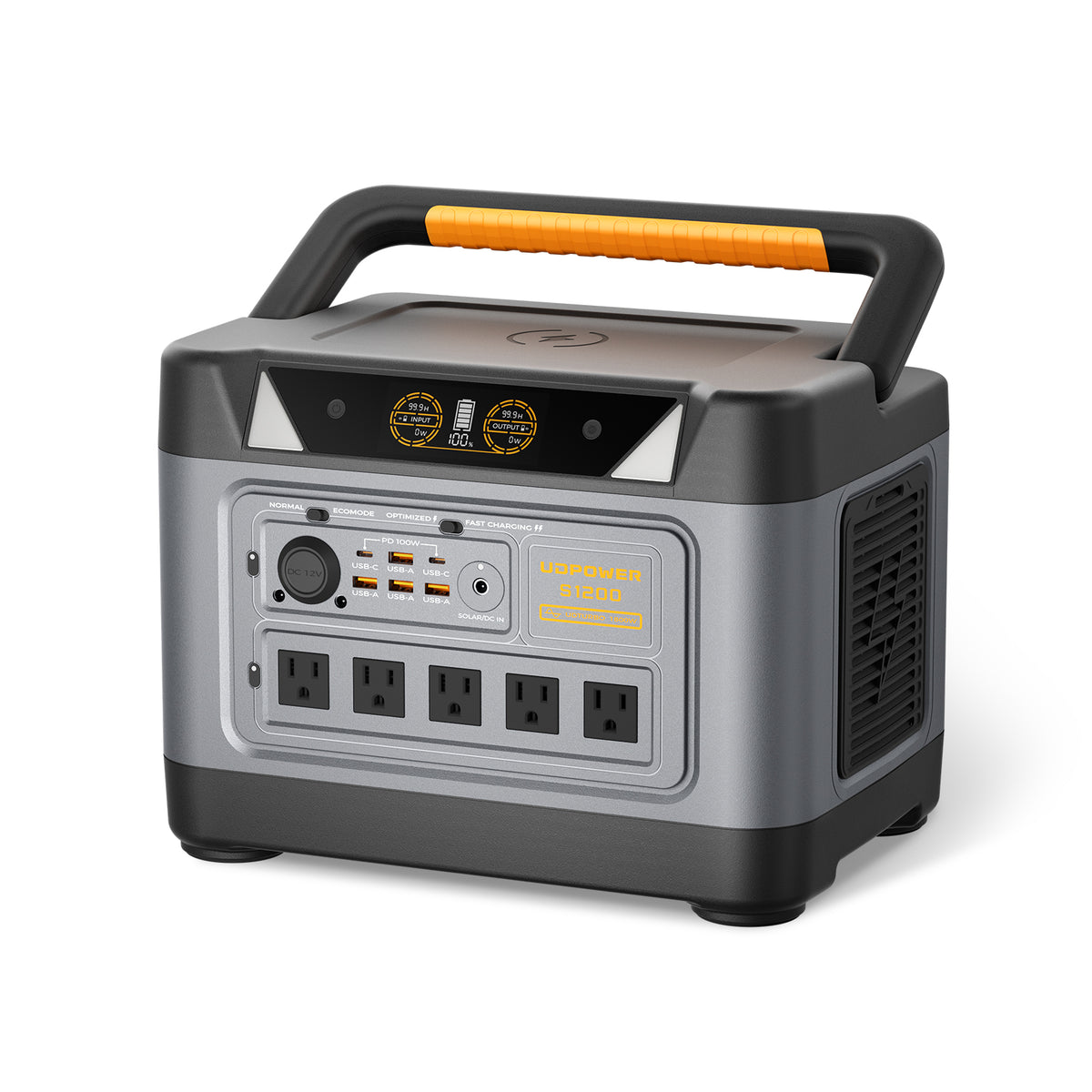
UDPOWER S1200: Best for Core Household Essentials
The S1200 is a practical outage option for households that primarily need to support a refrigerator or freezer, Wi-Fi equipment, phones, lights, a CPAP machine, laptops, a television, or other moderate-power essentials.
- Battery capacity: 1,190Wh LiFePO4
- Rated AC output: 1,200W pure sine wave
- UDTURBO output: Up to 1,800W for compatible above-rated loads, with lower conversion efficiency in this operating range
- AC outlets: 5 on the primary current version
- UPS transfer time: Less than 10 milliseconds
- Weight: Approximately 26 pounds
- Best outage fit: Refrigerator, freezer, CPAP, router, lights, phones, laptops, TV, and short emergency backup

UDPOWER S2400: Best for Longer Outages and Multiple Devices
The S2400 provides more capacity and output headroom for homes that need a longer refrigerator runtime, several simultaneous electronics, a microwave, coffee maker, higher-power appliance, or a broader emergency setup.
- Battery capacity: 2,083Wh LiFePO4
- Rated AC output: 2,400W pure sine wave
- UDTURBO output: Up to 3,000W for compatible above-rated loads, with lower conversion efficiency in this operating range
- AC outlets: 6
- UPS transfer time: Less than 10 milliseconds
- Weight: Approximately 40.8 pounds
- Best outage fit: Longer refrigerator backup, multiple essentials, microwaves, coffee makers, RV equipment, and higher-power loads
Estimated Runtime for Common Outage Loads
The estimates below use a practical calculation of battery capacity multiplied by 90% conversion efficiency, divided by the continuous device load. Actual runtime varies with temperature, battery condition, inverter consumption, device cycling, startup demand, and the number of connected devices.
| Example Continuous Load | Typical Outage Use | S1200 Estimated Runtime | S2400 Estimated Runtime | What to Check |
|---|---|---|---|---|
| 40W | Example CPAP setup without high-power heating features | About 26.8 hours | About 46.9 hours | Actual CPAP settings, humidifier, heated tube, and adapter |
| 50W | Router, modem, phones, and a small light | About 21.4 hours | About 37.5 hours | Low AC loads may be affected by inverter standby consumption |
| 100W | Example average refrigerator load over time | About 10.7 hours | About 18.7 hours | Compressor startup, room temperature, and door openings |
| 150W | Refrigerator plus router, phones, and lights | About 7.1 hours | About 12.5 hours | Total simultaneous load and refrigerator duty cycle |
| 500W | Larger combined emergency load | About 2.1 hours | About 3.7 hours | Whether all devices truly need to run at the same time |
A refrigerator does not normally draw one fixed wattage all day. Its compressor cycles, so real elapsed runtime may be longer than a continuous-load calculation. Hot rooms, frequent door openings, an aging compressor, and heavy freezer use can increase consumption.
Compare All UDPOWER Portable Power StationsBuild a Practical Outage Power Budget
The most common backup-power mistake is plugging in every convenient device instead of protecting a short list of essentials. Begin with safety, food, medical needs, communication, and lighting. Entertainment and heat-producing appliances should come later.
| Device Category | Example Planning Range | Priority | Runtime-Saving Action | Related Guide |
|---|---|---|---|---|
| Wi-Fi router and modem | Often around 10W–30W combined | High when cellular service is limited or remote work is required | Turn off unused network equipment and power through efficient ports when compatible | Power-station sizing guide |
| Phone charging | Usually a small intermittent load | High | Use USB output directly instead of running a separate AC charger | Portable power station collection |
| LED lighting | Often 5W–15W per lamp | High after dark | Light only occupied rooms | Power station safety guide |
| CPAP machine | Varies widely with pressure, humidifier, and heated tube settings | High for users who depend on it | Confirm settings and approved power options before the storm | CPAP battery runtime guide |
| Refrigerator or freezer | Running demand and startup demand vary by appliance | High during longer outages | Keep doors closed and run other high-watt devices at different times | Refrigerator backup guide |
| Microwave or coffee maker | Often a high load used for a short period | Medium | Run one high-watt appliance at a time and switch off nonessential loads first | 2000W power station guide |
| Electric space heater | Frequently around 1,500W | Use cautiously | Use targeted insulation and safe non-electric warming methods first because resistance heat drains batteries quickly | Check device compatibility |
| Well pump or sump pump | Highly dependent on motor size and startup surge | Potentially critical | Measure the actual pump and confirm voltage, wiring, and startup requirements in advance | Sizing and surge guide |
A Simple Sizing Formula
Estimated runtime = Battery capacity in Wh × 0.90 ÷ total continuous load in watts
Example: A 1,190Wh S1200 supporting a measured 150W combined load provides an initial estimate of 1,190 × 0.90 ÷ 150, or about 7.1 hours.
This is a planning estimate, not a guarantee. Motor startup, low-load inverter consumption, appliance cycling, battery temperature, and additional connected devices can change the result.
Use Load Rotation to Extend Runtime
Several devices do not need continuous power. Instead of running everything at once, keep communication or medical equipment powered continuously when necessary, then rotate the refrigerator, freezer, laptop charger, microwave, or other intermittent devices.
Load rotation also creates more output headroom for appliances with compressors or motors. Before starting a microwave, coffee maker, pump, or other high-power device, switch off nonessential loads and watch the power station display.
New England Outage Planning by Season
Winter Storms, Ice, and Nor’easters
Winter outages can quickly become more serious than a routine loss of lights. Monitor indoor temperature, protect plumbing where appropriate, check on older family members, and plan a safe place to relocate before the home becomes dangerously cold.
Electric space heaters consume large amounts of battery energy. A 1,500W heater can drain even a large portable power station quickly. Prioritize heated blankets within their rated requirements, communication, medical devices, lighting, and relocation planning rather than assuming a battery station can heat an entire home overnight.
Summer Thunderstorms and Heat
Summer outages increase refrigerator consumption because the compressor runs more often in a warm room. Fans are generally easier to support than central air conditioning, but people vulnerable to heat may need an air-conditioned shelter or another safe location.
Coastal Wind and Tropical Systems
Charge backup batteries before conditions deteriorate. Flooding can make electrical panels, extension cords, outlets, and portable equipment unsafe. Keep backup equipment above potential water levels and never operate electrical devices in wet locations unless they are specifically designed for that use.
Well Pumps and Sump Pumps
These are among the easiest loads to size incorrectly. Pumps may require a large startup current, and some residential pumps use 240V power that a standard 120V portable power station cannot supply directly. Check the pump nameplate, circuit voltage, running current, and startup requirements before a storm—not after the basement begins taking on water.
Medical and Accessibility Needs
Do not depend on a newly purchased battery without testing it first. Verify the medical device’s approved power method, expected wattage, alarm behavior, and runtime under actual settings. Keep provider, pharmacy, caregiver, and emergency contact information available offline.
A consumer portable power station or UPS function should not be represented as a substitute for a certified medical power system, clinical advice, or an emergency plan.
For current weather alerts, use the National Weather Service in addition to utility outage information.
Claims, Credits, and Outage Documentation
Eligibility for a credit or reimbursement depends on the state, outage circumstances, storm classification, duration, type of loss, and current program rules. Do not assume that every extended outage automatically qualifies.
Eversource currently provides specific extended-outage credit and food-or-medicine reimbursement information for eligible Connecticut residential customers affected for more than 96 hours during a qualifying storm. Rules and filing deadlines can change, so use the current official claim page rather than relying on an old news article or social media post.
| What to Record | Why It Matters | Practical Method | Official Resource |
|---|---|---|---|
| Outage start and restoration times | Establishes the approximate outage duration | Save outage alerts, screenshots, emails, and personal notes | Eversource claims center |
| Outage confirmation number or account record | Connects your report to the service address | Report through your Eversource account or registered phone number | Report or check outage |
| Photos of property damage | May support a property-damage claim or insurance report | Photograph only from a safe location and never approach electrical hazards | Property damage claims |
| Food or medicine loss | May be required for an eligible reimbursement request | Keep itemized lists, receipts, photos, replacement receipts, and medication documentation | Connecticut extended-outage information |
| Repair invoices | Documents work completed by electricians or other professionals | Keep diagnostic notes, invoices, receipts, and damaged-part descriptions | Property damage claim guidance |
A screenshot of the outage map alone may not establish the exact condition at your service address. Keep account-specific alerts, receipts, photographs, and a written timeline whenever a prolonged outage causes a documented loss.
Frequently Asked Questions
Is Northeast Utilities the same company as Eversource?
Northeast Utilities adopted the Eversource Energy name in 2015. Older references to Northeast Utilities, CL&P, NSTAR, WMECO, and PSNH may now lead customers to Eversource outage and service resources.
Where is the official Eversource outage map?
The official map is the Eversource Storm Center outage map. It includes service territories for Connecticut, Eastern Massachusetts, Western Massachusetts, and New Hampshire.
How do I check the outage status for my exact address?
Use the Eversource report-or-check outage tool and enter the account or phone information associated with the service address. The public map provides regional context but may not confirm every individual address.
How do I report an Eversource power outage by text?
Customers enrolled in Eversource outage text alerts can text OUT to 23129. Text STAT to the same number to request an available status update.
Why does the Eversource map show no outage when my power is off?
The interruption may be new, small, limited to your property, grouped within a cluster, or not yet connected to your address. Your home may also have a tripped breaker or damaged service connection. Report the outage even when no marker appears.
Why did my neighbors get power back before me?
Your home may be connected to a different transformer, lateral line, phase, or service drop. A larger outage may have been restored while a smaller nested outage remains. Check safe breakers and report your continued outage again.
Is the estimated restoration time guaranteed?
No. It is the utility’s current estimate based on available damage and repair information. The estimate can change when crews discover additional damage, blocked access, flooding, fallen trees, or separate equipment failures.
Does Eversource serve every customer in Connecticut, Massachusetts, and New Hampshire?
No. Other investor-owned, cooperative, and municipal utilities serve parts of these states. Check the utility name on your bill before using an outage map.
Can I use a portable power station indoors during an outage?
A battery-based portable power station does not burn gasoline or propane and does not create combustion exhaust. It can be used indoors according to its manual, provided it remains dry, ventilated, undamaged, and within its electrical and temperature limits. A fuel-burning generator must remain outdoors.
Can a portable power station run a refrigerator during an Eversource outage?
Yes, when the station has enough continuous output, enough startup capability for the compressor, and enough battery capacity for the desired runtime. The refrigerator’s actual label or measured wattage should be used rather than a generic estimate.
Which UDPOWER model is better for a home outage?
The UDPOWER S1200 is a practical choice for a refrigerator, CPAP, router, lights, phones, laptops, and other core essentials. The S2400 is better when longer runtime, multiple devices, or higher-power appliances are required.
Can the S1200 or S2400 power an entire house?
They are portable backup power stations intended for selected appliances and electronics, not automatic whole-home replacements. A complete home can contain central air conditioning, electric water heating, ranges, dryers, pumps, and 240V circuits that exceed portable-station capabilities.
How long will refrigerated food remain safe during an outage?
Federal guidance states that an unopened refrigerator generally keeps food cold for about four hours. A full unopened freezer can maintain a safe temperature for about 48 hours, or about 24 hours when half full. Follow current FoodSafety.gov guidance for individual foods.
Prepare Before the Next Eversource Outage
Check the wattage of your refrigerator, CPAP, router, lights, pumps, and other essentials before severe weather arrives. Choose enough output to start and run those devices, then choose enough battery capacity for the expected outage duration.
View Portable Power Stations Compare UDPOWER S1200 and S2400 Get the Power Station Sizing GuideRelated Articles


