





Solar Panel Connector Types: MC4, XT60, DC7909 & More
Latest update: July 7, 2026
Quick answer: most portable solar setups use one connector on the solar panel side and another connector on the power station side. MC4 is common on the panel side. DC7909, XT60, Anderson, DC5521, DC5525, and DC8020 are common on portable power station or adapter-cable ends. The connector shape only tells you whether the plug can physically fit. Before charging, you still need to confirm voltage range, current limit, polarity, and whether your power station supports that panel’s wattage.
For many UDPOWER users, the most important practical point is simple: match the panel to the power station’s solar input limits first, then choose the correct cable or adapter. For example, the UDPOWER S1200 uses a DC7909 solar input rated 12V–75V, 12A, 400W max, while UDPOWER’s 120W and 210W portable solar panels have very different voltage profiles.

What a Solar Panel Connector Actually Does
A solar connector is the physical connection point that carries DC power from your solar panel to a charge controller, power station, solar generator, or adapter cable. It is easy to treat the connector as the whole compatibility question, but that is where many charging problems begin.
Connector fit does not equal electrical compatibility. A cable can physically plug in and still be wrong if the panel voltage is too high, the polarity is reversed, the adapter is poorly made, or the power station’s solar input is not designed for that panel.
Think of the connector as the doorway. The electrical specs are the traffic rules. For portable power stations, the most important specs are usually open-circuit voltage, working voltage, current, wattage, and polarity.
For a deeper explanation of the port side of the equation, see UDPOWER’s related guide: The Complete Guide to DC Input Connector Types.
Solar Panel Connector Types: Visual Identification Guide
Before you buy an adapter cable, identify the connector by sight first. Most charging problems happen because the solar panel side and the power station side use different connector families. The images below keep the original visual value of this guide: you can compare the shape, locking tabs, barrel size, pin layout, and housing style before checking the electrical specs.
Important: a connector that looks similar is not automatically compatible. Always check the exact connector type, voltage range, current limit, polarity, and cable rating before connecting a solar panel to a portable power station.
 Quick visual map
Common Solar Connector Families
This image gives you a fast visual comparison of the connector types most ordinary users see in portable solar setups: MC4-style PV connectors, XT60, DC barrel plugs, SAE 2-pin, and Anderson-style connectors.
 PV-side connector
MC4 Solar Connector
MC4-style connectors are the most common connector type on modern solar panels. They usually appear as a positive and negative pair with locking tabs, weather seals, and black PV cable.
 Locking detail
MC4 Locked Connection
This close-up shows why MC4-style connectors are common outdoors: the plug locks in place and uses a seal to help protect the connection from weather exposure when properly assembled.
 PV-side connector
H4 / Similar PV Connectors
H4-style connectors work in the same broad category as MC4: PV-rated, weather-resistant connectors used on solar panels and PV cable assemblies. They may look close to MC4, but that does not mean every pair should be mixed.
 PV-side connector
TE / Tyco SolarLok-Style Connector
SolarLok-style connectors are another PV connector family. If your panel, extension cable, or combiner accessory uses this connector style, stay within the correct ecosystem or use a properly rated transition adapter.
 Legacy connector
MC3 Solar Connector
MC3 is an older solar connector type. You are more likely to see it on inherited, older, or legacy solar setups than on current portable solar kits.
 Vendor-specific PV connector
T4 / Vendor-Specific PV Connector
Some solar brands use connector variants that look MC4-like but have their own design details. Treat these as “verify before mating” connectors, especially if you plan to use extension cables or branch adapters.
 Less common PV connector
RADOX / Rugged PV Connector
RADOX-style and other rugged PV connector families are less common for ordinary portable power station users, but they may appear in industrial or specialized PV setups.
 Device-side connector
DC Barrel Connectors: DC5521, DC5525, and DC7909
DC barrel connectors are common on portable power stations, small DC devices, and folding solar panel adapter cables. The problem is that several sizes look similar. DC5521, DC5525, and DC7909 are not interchangeable just because they are round barrel plugs.
 Device-side connector
XT60 Connector
XT60 connectors are compact, keyed, and common in portable power ecosystems. You may see MC4-to-XT60 cables used to bring power from a solar panel into a power station or DC charging device.
 Higher-current DC connector
Anderson Powerpole / SB-Style Connector
Anderson-style connectors are often used where a rugged, higher-current DC connection is useful. They are common in RV, battery, radio, off-grid, and inverter setups.
 12V accessory connector
SAE 2-Pin Connector
SAE 2-pin connectors are common on small 12V solar chargers, battery tenders, motorcycles, RV accessories, and light-duty DC charging setups.
 Safety check
Use a Multimeter When Polarity or Voltage Is Unclear
If you are using a third-party panel or adapter cable, a quick multimeter check can prevent many mistakes. Solar panels can produce voltage whenever they are exposed to light, so confirm voltage and polarity before plugging into a power station.
Connector Types Comparison Table
The image guide above helps you identify the connector by sight. Use the table below to connect that visual identification to real-world usage and buying decisions.
| Connector type | Connector world | Where you usually see it | Best use | Main thing to verify | Common mistake |
|---|---|---|---|---|---|
| MC4 | PV-side | Modern solar panels, PV extension cables, branch connectors | Outdoor panel wiring and panel-to-adapter connections | Manufacturer compatibility, current rating, crimp quality | Mixing “MC4-compatible” connectors without checking certification |
| H4 / similar PV connector | PV-side | PV modules, inverter wiring, professional solar cable assemblies | PV-rated outdoor wiring | Exact mating compatibility | Assuming all locking PV connectors are MC4 |
| SolarLok-style connector | PV-side | Specific PV component ecosystems and older installations | System-specific PV wiring | Correct adapter and current rating | Forcing a transition to MC4 without a proper adapter |
| MC3 | Legacy PV-side | Older solar systems | Legacy system identification | System condition and upgrade path | Using old connectors without inspecting wear or damage |
| T4 / vendor-specific PV connector | PV-side | Brand-specific panels and cable kits | Use within the intended brand ecosystem | Exact model compatibility | Assuming similar shape means safe cross-mating |
| RADOX / rugged PV connector | PV-side | Industrial or specialized PV setups | Rugged PV cable assemblies | Matching connector family and ratings | Using consumer-grade adapters in a specialized setup |
| DC5521 / DC5525 | Device-side | Small DC devices, small solar panels, compact power systems | Low-power DC charging | Outer diameter, inner diameter, plug length, polarity | Confusing 5.5×2.1mm with 5.5×2.5mm |
| DC7909 / 8mm barrel | Device-side | Portable power station solar input ports and adapter cables | Solar charging into compatible power stations | Exact barrel size, polarity, voltage range, current limit | Thinking every “8mm” connector is the same |
| XT60 | Device-side | Portable solar adapters, battery cables, power station accessories | Compact DC charging connection | Polarity, wire gauge, current rating | Using thin or low-quality clone cables |
| Anderson Powerpole / SB | Device-side / DC power | RV, battery, inverter, radio, and off-grid systems | Higher-current DC connections | Housing size, keying, polarity, current rating | Assuming all Anderson-style housings mate together |
| SAE 2-pin | 12V accessory side | Battery tenders, motorcycles, RV accessories, small solar chargers | Low-to-moderate 12V charging | Polarity and current limit | Assuming polarity is universal across SAE cables |
How to Identify Your Solar Connector in 60 Seconds
Before buying an adapter cable, take a minute to identify both ends of your setup. You are not only identifying the panel connector; you are identifying the full route from panel to power station.
-
Look at the solar panel output lead.
If it has two locking plugs, it is likely an MC4-style PV connector. If it has a round barrel, it may be DC7909, DC8020, DC5521, or DC5525. If it has a yellow keyed plug, it may be XT60. -
Look at the power station’s solar input port.
Do not rely on the panel side only. A panel may use MC4, while the station may need DC7909, XT60, Anderson, or another input type. -
Check the printed input label near the port.
Good power stations usually print voltage, current, and max wattage near the input port or in the spec table. Write those down before choosing a panel. -
Compare the panel’s open-circuit voltage.
The panel’s Voc must stay within the power station’s allowed voltage range. This matters more than connector shape. -
Confirm polarity.
If you use a third-party adapter, verify positive and negative orientation. A same-shape cable can still be wired differently.
The 4-Part Compatibility Check
A reliable portable solar setup passes all four checks below. Skipping one is the reason many people buy the right-looking cable and still get no input watts on the display.
1. Connector match
The cable must physically match the solar panel output and the power station input. For many portable setups, that means MC4 on the panel side and DC7909, XT60, or Anderson on the station side.
2. Voltage range
Voltage is the first spec to check. The solar panel’s open-circuit voltage should be within the power station’s solar input range. If the panel voltage is too high, do not connect it. An adapter does not reduce voltage unless it contains an actual DC-DC converter, and most simple solar adapter cables do not.
3. Current and wattage limit
A power station’s solar input current rating is usually the maximum it will draw, not a promise that every connected panel will charge faster. A larger panel can be useful only when its voltage is compatible and the station can make use of the extra wattage. Once the input limit is reached, adding more panel wattage will not keep increasing charging speed.
4. Polarity and cable quality
Loose adapters, thin wire, reversed polarity, damaged pins, or overheated connectors can cause low input, unstable charging, or no charging at all. Use the official cable when available. When using third-party adapters, choose well-made cables with clearly marked polarity and an appropriate current rating.
| Check | What to compare | Good sign | Warning sign | What to do next |
|---|---|---|---|---|
| Connector | Panel plug and station input | Correct cable fits firmly without forcing | Loose barrel plug, forced fit, or unknown adapter | Use the official cable or confirm exact connector size |
| Voltage | Panel Voc vs station input voltage range | Panel Voc is inside the station range | Panel Voc exceeds the station max voltage | Do not connect; choose a lower-voltage panel or correct configuration |
| Current | Panel Isc/Imp vs station input current | Panel is within or near the station’s usable input range | Huge current mismatch or DIY parallel setup without planning | Use a supported kit; avoid random parallel wiring |
| Wattage | Panel watts vs station solar input limit | Panel wattage fits the station’s supported solar input | Panel wattage is far above what the station can accept | Expect clipping or choose a better-matched panel |
| Polarity | Positive and negative wiring | Polarity is marked and confirmed | Unmarked adapter, reversed SAE cable, unknown third-party lead | Verify with a multimeter or use a known-compatible cable |
UDPOWER Solar Connector and Panel Pairing Guide
UDPOWER’s portable power stations are solar-ready, but each model has its own solar input limit. That means the best connector choice depends on the station and panel together, not the panel alone.
| UDPOWER model or panel | Key solar-related spec | Recommended connector approach | Best pairing advice | Official source |
|---|---|---|---|---|
| UDPOWER S1200 Portable Power Station | 1190Wh capacity, 1200W AC output, DC7909 solar input rated 12V–75V, 12A, 400W max | Use a compatible solar cable into the DC7909 solar input | Best for users who want meaningful solar recharge without moving up to a larger station | S1200 product page |
| UDPOWER S2400 Portable Power Station | 2083Wh capacity, 2400W AC output, 3000W surge, 420W solar kit option | Use official or confirmed-compatible solar charging cable and kit configuration | Best for heavier home backup, RV, microwave, tools, and longer off-grid use | S2400 product page |
| UDPOWER 120W Portable Solar Panel | 120W rated power, 21.5V Voc, 17.92V maximum voltage, 5.582A running current, IP65, ≥22% efficiency | Use the included or confirmed-compatible cable for UDPOWER stations | Best for lighter, easier-to-carry solar charging and smaller stations | 120W solar panel page |
| UDPOWER 210W Portable Foldable Solar Panel | 210W rated power, 48.0V Voc, 40.0V maximum voltage, 5.00A running current, 15.32 lb, IP65, ≥22% efficiency | Use with compatible UDPOWER stations that accept its voltage profile | Best for S1200 and S2400 users who want faster charging from a single panel | 210W solar panel page |
C600 note: UDPOWER’s 120W solar panel page states that C600 only supports 18V solar panels and says not to use 210W solar panels with C600. For C600, choose a compatible lower-voltage panel instead of assuming a larger panel will work just because an adapter fits.
For solar panel size selection, use this related guide: UDPOWER Solar Panel Pairing Guide: 120W vs 210W vs 2×120W.
Recommended UDPOWER Solar Setups
Connector questions usually come up when someone is trying to build a working solar generator kit. These UDPOWER options keep the decision practical: choose the station first, then match the panel and cable.
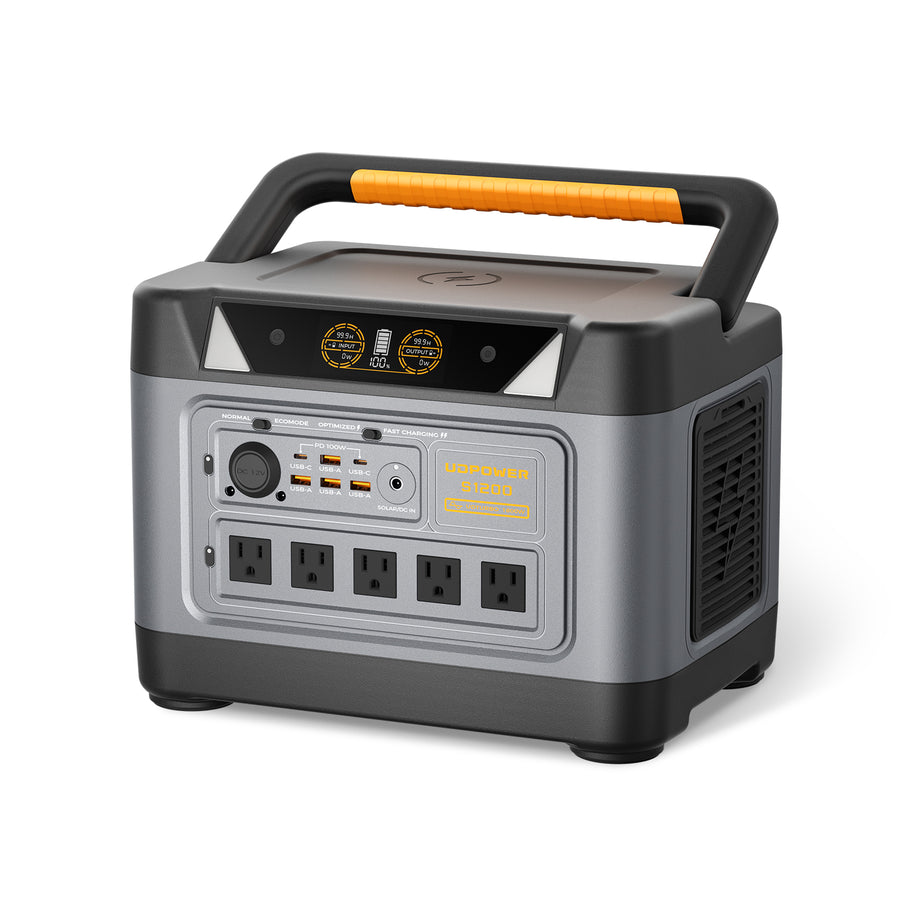 Best balanced solar-ready station
UDPOWER S1200 Portable Power Station
The S1200 is a practical fit for users who want a strong solar-ready station without carrying a very large unit. It offers 1190Wh capacity, 1200W AC output, 1800W surge support, and a DC7909 solar input rated 12V–75V, 12A, 400W max.
- Best for: refrigerator backup, CPAP planning, Wi-Fi, lights, laptops, camping, and RV essentials
- Connector focus: DC7909 solar input
- Panel pairing: 120W for portable top-off; 210W for faster single-panel charging; higher solar setups should stay within the station’s input limit
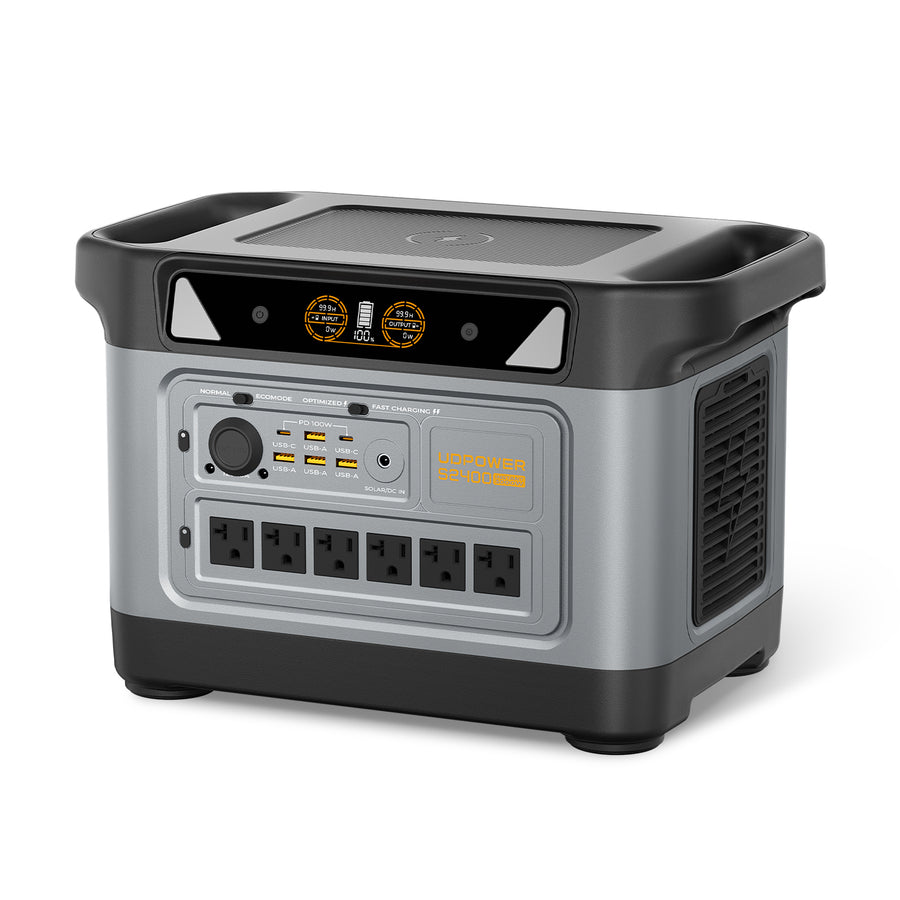 Best for larger backup needs
UDPOWER S2400 Portable Power Station
The S2400 is built for heavier loads and longer runtime. It has 2083Wh capacity, 2400W AC output, 3000W surge support, 6 AC outlets, and a 420W solar kit option for faster off-grid recharge planning.
- Best for: RV trips, power tools, microwave use, longer outages, and multi-device backup
- Connector focus: use official or verified compatible solar cable and kit configuration
- Panel pairing: 210W or 420W kit depending on charging-speed needs and portability
 Best lightweight panel
UDPOWER 120W Portable Solar Panel
The 120W panel is the easier choice when portability matters. Its official specs list 120W rated power, 21.5V open-circuit voltage, 17.92V maximum voltage, 5.582A running current, IP65 water resistance, and ≥22% efficiency.
- Best for: compact setups, road trips, smaller stations, and light solar top-off
- Connector focus: use the included or model-compatible UDPOWER solar cable
- Practical benefit: easier to carry and position than larger panels
 Best faster single-panel option
UDPOWER 210W Portable Foldable Solar Panel
The 210W panel is better when you want more charging power from one panel. Its official specs list 210W rated power, 48.0V open-circuit voltage, 40.0V maximum voltage, 5.00A running current, IP65 water resistance, ≥22% efficiency, and 15.32 lb weight.
- Best for: S1200 and S2400 users who want faster solar charging
- Connector focus: use the correct UDPOWER-compatible solar charging cable
- Important: do not assume it fits every smaller power station; check voltage compatibility first
How to Choose the Right Connector for Your Setup
Here is the simplest decision path for ordinary users.
If you already own a UDPOWER power station
Start with the station’s solar input spec. Then choose a UDPOWER panel or a third-party panel that stays inside the supported voltage and current range. After that, choose the cable. This order prevents the common mistake of shopping by connector shape first.
If you already own a solar panel
Find the panel label or manual and write down Voc, Vmp, Isc, Imp, and rated watts. Then compare those numbers with your power station’s solar input label. If the voltage is not compatible, do not solve it with a simple adapter.
If you are buying everything new
The cleanest choice is a matched solar generator kit. A matched kit reduces connector confusion because the panel, cable, and power station are intended to work together. See UDPOWER Solar Generators for solar-ready bundles.
Common Solar Connector Mistakes to Avoid
Mistake 1: Thinking “8mm” always means the same plug
Many round solar charging tips are casually called “8mm,” but DC7909 and DC8020 are not the same. A plug may feel close and still be too loose, too tight, or electrically unreliable. If your station specifies DC7909, use a true DC7909-compatible cable.
Mistake 2: Assuming an adapter changes electrical specs
Most adapter cables only change the physical connector. They do not reduce voltage, increase current capacity, regulate power, or make an incompatible panel safe. If the panel voltage is too high for the station, the correct answer is a different panel or a properly engineered charging solution, not a cheap adapter.
Mistake 3: Mixing PV connector brands in permanent setups
MC4-style PV connectors may click together even when they are not approved as a pair. In permanent or rooftop PV systems, that can become a safety and reliability issue. Portable users should still avoid random cross-mating when a proper matched cable is available.
Mistake 4: Using panels in parallel without checking current
Parallel wiring can increase current. That may be useful when the station supports it, but it is not automatically better. If your power station has a 12A solar input limit, a parallel setup that can supply far more current may simply be clipped, and poorly planned DIY wiring can create extra risk.
Mistake 5: Ignoring shade and angle after fixing the connector
A perfect connector cannot overcome bad sunlight. Portable panels should face direct sun with minimal shade. Even a railing, handle, cable, chair, tree branch, or partial shadow across one section can reduce input noticeably. Adjust the panel angle while watching the power station’s live input watts.
For more practical solar setup advice, read Can You Charge a Portable Power Station with a Solar Panel?
Troubleshooting: The Plug Fits, But It Won’t Charge
If your power station shows 0W or much lower input than expected, work through the checks below before assuming the panel or station is defective.
| Symptom | Likely cause | What to check | Practical fix |
|---|---|---|---|
| 0W input in full sun | Wrong connector, reversed polarity, incompatible voltage, or input not enabled | Connector type, polarity, panel Voc, station solar input range | Use the official cable; confirm voltage; reconnect firmly |
| Input appears and disappears | Loose barrel plug, unstable adapter, intermittent shade, or cable strain | DC7909/DC8020 fit, cable bend, plug seating, panel angle | Replace loose adapter; keep cable strain off the port |
| Panel rated 210W but input is much lower | Normal real-world loss, heat, angle, cloud, shade, or station input limit | Sun angle, shadows, panel surface temperature, live input watts | Reposition panel; test at midday in open sun |
| Two panels do not charge faster | Parallel cable not correct, station input limit reached, or mismatched panels | Panel voltage/current, parallel cable type, station max input | Use a supported UDPOWER kit or matched panels only |
| Connector gets warm | Poor contact, wrong connector, thin wire, corrosion, or overloaded adapter | Plug fit, pin condition, wire thickness, cable rating | Stop using it; replace with a properly rated cable |
Real-world solar expectation: a panel’s rated wattage is measured under ideal test conditions. In daily use, sunlight angle, heat, clouds, dust, and partial shade all matter. For planning, many users get better results by thinking in “good sun hours” instead of expecting the panel to hold its nameplate wattage all day.
Series vs Parallel: Why Connector Cables Can Be Confusing
Some solar cables are simple adapters. Others are parallel or series cables. They are not interchangeable.
| Cable type | What it does | What changes electrically | When to use it | What to avoid |
|---|---|---|---|---|
| Simple adapter cable | Changes connector shape, such as MC4 to DC7909 | Usually nothing; voltage and current remain the panel’s output | When panel specs already match the station | Using it to “fix” over-voltage |
| Parallel cable | Combines matching panels side by side | Voltage stays similar; current can increase | When the station supports the added current and panels match | Mixing different panel voltages or brands casually |
| Series cable | Connects panels end to end | Voltage increases; current stays similar | Only when the station’s voltage range supports the combined Voc | Exceeding the station’s max input voltage |
For most portable power station users, the safest path is to use a supported solar panel kit or the manufacturer-recommended cable. DIY series wiring is where over-voltage mistakes happen quickly.
Best Connector Choice by Use Case
| Use case | Best connector approach | Recommended UDPOWER direction | Why it works |
|---|---|---|---|
| Weekend camping with phones, lights, fan, and small electronics | Keep it simple with one portable panel and the correct station cable | UDPOWER 120W Solar Panel | Lightweight setup, fewer parts, easier positioning |
| Refrigerator backup, CPAP, Wi-Fi, and outage readiness | Use a solar-ready station with DC7909 input and a higher-output compatible panel | UDPOWER S1200 + compatible solar panel | Good balance of capacity, output, portability, and solar input headroom |
| RV, longer off-grid stays, tools, microwave, and heavier backup loads | Use a larger solar generator kit rather than piecing together random adapters | UDPOWER S2400 + 210W or 420W kit | Higher capacity and output better match larger loads |
| Third-party rigid panel to portable station | MC4-to-station adapter only after checking voltage/current/polarity | Compare against the station’s official solar input spec | Connector shape is only one part of compatibility |
A Plain-English Buying Checklist
Before you buy a solar panel connector or adapter cable, answer these questions:
- What connector is on the solar panel output lead?
- What connector is on the power station solar input?
- What is the panel’s open-circuit voltage?
- What voltage range does the power station accept?
- What is the station’s solar input current and wattage limit?
- Is the adapter cable only changing the plug shape, or does it include real power conversion?
- Is polarity clearly marked?
- Is the cable rated for the current you expect to use?
- Are you using one panel, two panels in parallel, or a series setup?
- Does the power station brand provide a recommended cable or bundle?
If any answer is unknown, pause before connecting. A few minutes of checking can prevent low charging performance, adapter damage, or an unsafe setup.
FAQ: Solar Panel Connector Types
Are all solar panel connectors universal?
No. Some connectors look similar, but they are not always electrically or mechanically approved to work together. MC4-style connectors are especially easy to confuse because many products look alike. For safe results, match the exact connector type, manufacturer guidance, voltage, current, and polarity.
Is MC4 the same as XT60?
No. MC4 is commonly used on the solar panel side, especially for PV leads. XT60 is a compact keyed DC connector often used on portable power accessories and adapter cables. Many setups use an MC4-to-XT60 or MC4-to-DC7909 cable to connect a panel to a power station.
What is DC7909?
DC7909 is a round barrel-style DC connector often used as a solar input on portable power stations. It is sometimes casually called an 8mm connector, but not every “8mm” connector is the same. DC7909 and DC8020 are commonly confused, so check the exact specification before buying an adapter.
Can I use any MC4-to-DC7909 cable with a portable power station?
Not automatically. The cable must be wired with the correct polarity and rated for the current. More importantly, the solar panel’s voltage and wattage must fit the power station’s solar input range. The adapter only changes the plug shape; it does not make every panel compatible.
Why does my solar panel plug fit but show 0W input?
The most common causes are wrong polarity, incompatible voltage, a loose barrel plug, poor sunlight, partial shade, a damaged cable, or a station input setting. Start by checking panel Voc, connector fit, polarity, and direct sun exposure.
Can I connect two solar panels to one power station?
Only if the power station supports the combined input and the panels are wired correctly. Parallel wiring increases current, while series wiring increases voltage. Exceeding the station’s voltage limit is unsafe. Use a supported kit or matched panels when possible.
Can an adapter reduce solar panel voltage?
A simple adapter cable cannot reduce voltage. It only changes the connector shape. If the panel voltage is above the power station’s allowed input range, do not connect it unless you are using a properly designed charging device that actually regulates voltage.
Which connector does UDPOWER S1200 use for solar charging?
The UDPOWER S1200 uses a DC7909 solar charging input. Its official solar input specification is 12V–75V, 12A, 400W max. Always compare your panel’s voltage and current specs before connecting.
Can I use the UDPOWER 210W solar panel with every UDPOWER power station?
No. The UDPOWER 210W panel is a better fit for compatible higher-input models such as S1200 and S2400. UDPOWER’s 120W panel page specifically notes that C600 only supports 18V solar panels and says not to use 210W panels with C600.
What is the safest option if I am not sure which connector I need?
Use a matched solar generator kit or the official cable recommended for your power station and panel. If you are using a third-party panel, check connector type, Voc, Vmp, Isc, Imp, rated watts, polarity, and cable current rating before connecting.
Related Reading from UDPOWER
Build a Solar Setup That Actually Matches
Do not choose a solar connector by shape alone. Start with the power station’s input limits, choose a compatible panel, and use the correct cable. UDPOWER’s solar-ready power stations and portable solar panels are designed to make that process simpler for home backup, RV travel, camping, and emergency power.
Related Articles


1 comment
You missed a plug it round has a slot on on the bottom and has 2pins in the center it used for power input