





The Complete Guide to DC Input Connector Types (with Tables)
Latest update: July 7, 2026
Quick answer: a DC input connector is the port or plug that carries direct-current power into a device, battery system, portable power station, router, monitor, vehicle accessory, or solar charging setup. The most common DC input connector families include barrel jacks such as DC5521, DC5525, DC7909, and DC8020; USB-C Power Delivery; automotive 12V plugs; Anderson Powerpole and SB connectors; XT30, XT60, and XT90; GX aviation-style circular connectors; MC4 solar connectors; and legacy connectors such as EIAJ, DIN, and D-Tap.
The important rule is simple: connector shape is only the first check. You must also match voltage, current, polarity, pinout, cable rating, and the device’s input limit. A plug that physically fits can still be unsafe or unreliable.
DC Input Connector Types: Visual Identification Guide
For this topic, pictures matter. Many DC connectors are hard to identify from the name alone, especially barrel plugs that look nearly identical. Use the image below as the first visual checkpoint before checking the electrical specs.
 Visual reference: common DC input connector types used for portable power stations, solar charging, laptops, routers, vehicle accessories, and DC power systems.
Do not identify by appearance alone. DC5521 and DC5525 can look almost the same. DC7909, DC8017, and DC8020 are all often called “8mm” in product listings, but they are not the same connector. Always confirm outer diameter, inner diameter, plug length, polarity, and the device’s input voltage range.
| Visual clue | Likely connector family | Where it is commonly used | What to check next |
|---|---|---|---|
| Round barrel plug with hollow center or center pin | Coaxial barrel connector: DC5521, DC5525, DC7909, DC8020, etc. | Routers, monitors, LED strips, laptops, power stations, small appliances | OD × ID size, plug length, voltage, current, polarity |
| Small reversible oval plug | USB-C Power Delivery | Phones, laptops, monitors, power banks, compact stations | PD voltage profile, charger wattage, cable rating, device support |
| Large vehicle-style plug with spring contacts | Automotive 12V car plug | Cars, trucks, portable fridges, inflators, power station car charging | Socket voltage, fuse rating, cable heat, plug fit |
| Red and black modular rectangular blocks | Anderson Powerpole / SB | RVs, radio gear, mobility, battery systems, high-current DC setups | Housing size, polarity, current rating, genuine contacts |
| Yellow keyed two-pin plug | XT30 / XT60 / XT90 | RC batteries, drones, portable power accessories, solar adapters | Connector model, current class, wire gauge, polarity |
| Threaded circular metal connector | GX aviation-style connector | Industrial devices, e-bikes, instruments, panel-mounted power inputs | Pin count, pinout, per-pin current, locking collar condition |
| Black locking solar connector pair | MC4 / PV connector | Solar panels and PV extension cables | Panel Voc/Isc, PV connector compatibility, adapter to station input |
Quick Connector Comparison Table
This table gives a practical map for ordinary users. The voltage and current ranges are typical use cases, not a guarantee for every cable or device. Always follow the device label and official manual first.
| Connector family | Common names / sizes | Typical use | Locking? | Main risk | Best buying check |
|---|---|---|---|---|---|
| Coaxial barrel DC | DC5521, DC5525, DC7909, DC8017, DC8020, 7.4×5.0 pin, 3.5×1.35 | Routers, LED strips, monitors, laptops, small DC devices, power station solar inputs | Usually no | Similar-looking plugs can be loose, forced, or the wrong polarity | Match OD, ID, length, voltage, current, and polarity |
| USB-C PD | USB-C PD 2.0 / 3.0 / 3.1 EPR | Laptops, phones, tablets, monitors, power banks, compact power stations | No physical lock; electronic negotiation | 5V-only USB-C source will not power a PD-only device | Confirm PD voltage profile and cable wattage |
| Automotive 12V | Car plug, cigarette lighter plug, 12V accessory plug | Vehicle charging, coolers, inflators, power station car charging | Friction fit | Loose socket contact can heat up under load | Check socket fuse rating and plug quality |
| Anderson | Powerpole 15/30/45, SB50, SB120, SB175 | RVs, radio systems, battery packs, mobility, high-current DC wiring | Yes, keyed modular housing | Polarity and housing assembly vary by setup | Match housing size, current rating, and wiring orientation |
| XT series | XT30, XT60, XT90 | RC, drones, batteries, portable power, solar adapter cables | Keyed friction fit | Low-quality clones and thin wires can overheat | Use genuine, properly rated connectors and cable gauge |
| GX circular | GX12, GX16, GX20; 2-pin to multi-pin | Industrial gear, e-bikes, instruments, panel-mounted inputs | Threaded collar | Pinout is not universal | Confirm pin count, pinout, and current per pin |
| MC4 solar | MC4 male/female PV connector pair | Solar panel output leads and PV extension cables | Yes, locking tabs | Not usually the device input; needs adapter to XT60, DC7909, etc. | Confirm panel Voc/Isc and power station solar input limit |
| Other / legacy | EIAJ, DIN, D-Tap / P-Tap | Legacy laptops, instruments, pro video batteries | Varies | Unclear pinout or raw battery voltage | Check the original device manual and measure before use |
Coaxial Barrel DC Connectors
Barrel connectors are the most common source of confusion because they are described by measurements, not just by shape. The format is usually outer diameter × inner diameter, measured in millimeters. For example, 5.5×2.1mm is often called DC5521.
Barrel connector warning: 5.5×2.1mm and 5.5×2.5mm look almost identical. A 7.9×0.9mm DC7909 plug and an 8.0×2.0mm DC8020 plug may both be marketed as “8mm,” but they are not interchangeable.
| Size | Common name | Typical use | What can go wrong | Practical check |
|---|---|---|---|---|
| 2.5×0.7mm | Micro barrel | Small gadgets, compact routers, low-power electronics | Fragile plug, low current capacity | Use only for low-power devices that specify this size |
| 3.5×1.35mm | Mini barrel | Cameras, LED accessories, small DC devices | Easy to confuse with nearby small sizes | Measure both OD and ID before buying a replacement cable |
| 4.0×1.7mm | Yellow-tip style on some adapters | Legacy laptops and small adapters | Plug length varies by brand | Match plug length as well as diameter |
| 5.5×2.1mm | DC5521 / 5521 | Routers, LED strips, hobby electronics, DC outputs on some power stations | May seem close to 5.5×2.5mm but contact can be poor | Check whether the center pin is 2.1mm or 2.5mm |
| 5.5×2.5mm | DC5525 / 5525 | Monitors, some laptops, larger adapters | Loose fit if used on a 5521 device | Do not force a tight plug or accept a loose one |
| 7.4×5.0mm with center pin | Laptop pin barrel | Some Dell / HP-style laptop adapters | Center pin may carry identification signal | Use correct laptop-specific adapter |
| 7.9×0.9mm | DC7909 / “8mm” | Solar inputs on many portable power stations, including UDPOWER S1200 and S2400 | Often confused with DC8020 or other 8mm-style plugs | Confirm DC7909 size and the station’s solar input voltage range |
| 8.0×1.7mm | DC8017 / 8017 | Some portable devices and adapters | May be sold as “8mm” but differs from DC7909 | Check the inner pin diameter before connecting |
| 8.0×2.0mm | DC8020 / 8020 | Some power adapters and solar charging ecosystems | Can feel like it fits a DC7909 port but make poor contact | Do not use as a substitute for DC7909 |
Polarity matters on barrel connectors
Many barrel-input devices are center-positive, but this is not universal. Look for the polarity symbol near the port or in the manual. If the symbol is missing and the device matters, verify with the original adapter label or a multimeter before using a third-party cable.
USB-C Power Delivery: Smart DC Input, But Not Universal
USB-C is physically simple because the plug is reversible, but the power side is more complex. USB-C Power Delivery negotiates voltage and current electronically. A device may request 5V, 9V, 12V, 15V, 20V, or higher USB PD 3.1 Extended Power Range profiles depending on the charger, cable, and device.
USB-IF says USB Power Delivery Revision 3.1 enables up to 240W over a full-featured USB Type-C cable. That does not mean every USB-C charger, cable, or device supports 240W. The charger, cable, and device all need to support the required profile.
Source: USB-IF USB Power Delivery
| USB-C situation | What it means | Common mistake | Safe approach |
|---|---|---|---|
| USB-C 5V only | Basic USB output for small electronics | Trying to power a 12V or 20V device with a 5V-only source | Use a true PD charger if the device requires PD voltage negotiation |
| USB-C PD 20V | Common laptop and high-power accessory profile | Using a cable not rated for the current needed | Use an e-marked 5A cable when required |
| USB-C PD trigger cable | Forces a selected PD voltage to a barrel output | Using the wrong voltage trigger for the device | Confirm the device voltage and current before connecting |
| USB-C to barrel adapter | Can work only when PD voltage and barrel size match | Thinking the adapter automatically knows the device | Check PD profile, barrel size, polarity, and wattage |
Automotive 12V Car Plug
The automotive 12V plug is convenient because it works with vehicles and many portable power stations. It is also mechanically imperfect. A loose plug, dirty socket, thin cable, or high-current load can create heat and voltage drop.
Typical use cases
- Charging a portable power station from a vehicle socket
- Running a 12V cooler or small inflator
- Powering car accessories and travel electronics
- Using a car-charging cable when shore power is unavailable
Vehicle sockets are often fused around 10A to 15A, depending on the vehicle. Keep loads within the vehicle’s fuse rating and stop using the plug if it feels hot, loose, or intermittent.
Anderson Powerpole and SB Connectors
Anderson-style connectors are common in modular DC systems because they are rugged, low-resistance, and easier to assemble into positive/negative pairs. You may see smaller Powerpole connectors in radio and battery setups, while larger SB connectors appear in RV, mobility, and higher-current applications.
| Anderson type | Common use | Why people like it | What to verify |
|---|---|---|---|
| Powerpole 15/30/45 | Radio gear, smaller battery systems, modular DC cables | Compact, stackable, serviceable | Contact rating, wire gauge, polarity orientation |
| SB50 | Battery packs, mobility, RV and inverter wiring | Higher-current housing and secure mating | Correct housing size and keyed color/system |
| SB120 / SB175 | Heavy DC wiring, larger battery and industrial setups | High-current capability | Installation quality, strain relief, cable size |
XT30, XT60, and XT90 Connectors
XT connectors are widely used in RC, drone, battery, portable power, and solar adapter ecosystems. They are compact, keyed, and designed for higher-current DC use compared with many small barrel plugs.
| Connector | General class | Common use | Watch out for |
|---|---|---|---|
| XT30 | Smaller keyed DC connector | Small battery packs, drones, compact electronics | Not suitable for loads beyond its rating |
| XT60 | Mid-size keyed DC connector | Portable power accessories, solar adapters, battery packs | Cheap clones, bad solder joints, wrong polarity |
| XT90 | Larger keyed DC connector | Higher-current battery systems and larger RC applications | Bulky adapters and cable strain |
For solar charging, XT60 is often seen on the panel or adapter side, while the power station may use DC7909, XT60, Anderson, or another input. Do not assume XT60 output from a panel can plug directly into every station without checking voltage and polarity.
GX Aviation-Style Circular Connectors
GX connectors use a circular housing with a threaded collar. They are popular for panel-mounted equipment because the connector can resist vibration better than a loose barrel plug. However, GX connectors are not standardized by voltage or pinout in the way ordinary shoppers expect.
When GX connectors are useful
- Panel-mounted DC input ports
- E-bikes and scooters
- Instruments and industrial devices
- DIY battery projects where a locking connector is needed
Never choose a GX connector by pin count alone. A GX16-2 connector and another GX16-2 connector may physically mate but be wired differently. Confirm the pinout before connecting power.
MC4 Solar Connectors
MC4 connectors are usually found on the solar panel side, not as the input port on most portable power stations. In a typical portable setup, the solar panel uses MC4, and an adapter cable converts MC4 to the station’s input connector, such as XT60, DC7909, Anderson, or another supported port.
| Solar setup | Connector path | What must match | Common mistake |
|---|---|---|---|
| Solar panel to portable power station | MC4 → DC7909, MC4 → XT60, or MC4 → Anderson | Panel Voc, Isc, station solar input voltage/current/wattage | Buying the adapter before checking panel specs |
| Two panels in parallel | MC4 branch cable → station adapter | Current limit and matched panel voltage | Mixing different panels or exceeding input current |
| Two panels in series | Panel positive to panel negative, then adapter to station | Combined open-circuit voltage must stay under station max input | Over-voltage from series wiring |
PV connector compatibility is more strict than ordinary adapter shopping. When mating PV connectors in a solar installation, follow manufacturer instructions and applicable electrical code. A useful overview is available here: PV connector intermateability standards overview.
For a deeper solar-specific connector guide, read Solar Panel Connector Types: How to Identify Them, Match Them, and Avoid Costly Mistakes.
Other and Legacy DC Interfaces
Some DC connectors are still important because they appear on older or professional equipment. They are not always beginner-friendly, so the safest habit is to check the original manual before buying adapters.
| Connector | Where it appears | Why it is tricky | Best practice |
|---|---|---|---|
| EIAJ barrel family | Older electronics and legacy adapters | Different EIAJ types historically mapped to voltage ranges | Match the exact EIAJ type instead of using a generic barrel adapter |
| DIN connector | Instruments, audio gear, lab equipment, legacy devices | Multi-pin wiring varies widely | Use the device pinout diagram |
| D-Tap / P-Tap | Professional video batteries and camera rigs | Often carries raw battery voltage | Verify polarity and voltage before connecting expensive gear |
How to Match a DC Source to a Device Safely
The connector is only one part of the match. Use this checklist before connecting a third-party cable, solar panel, vehicle plug, PD trigger cable, or adapter kit.
-
Check the device input voltage.
Find the label near the input port or in the manual. A 12V device should not be connected to a 20V source unless the device explicitly supports that range. -
Check the source’s output voltage.
For solar panels, use open-circuit voltage. For USB-C PD, confirm the negotiated voltage profile. For vehicles, remember that a running vehicle is usually above 12V. -
Check current and wattage.
The source must provide enough current for the device, and the cable must be rated for that current. Thin cables can heat up and cause voltage drop. -
Confirm polarity.
For barrel connectors, center-positive is common but not universal. For multi-pin connectors, pinout matters more than shape. -
Match the exact connector geometry.
For barrel plugs, confirm outer diameter, inner diameter, and length. For Anderson and XT connectors, confirm the exact model and housing. -
Avoid back-feeding power sources.
Do not connect two unrelated DC sources into one input unless you are using a proper combiner or charging controller designed for that purpose.
UDPOWER Product Connector Guide
If your goal is to charge or use a UDPOWER portable power station, focus on the station’s official input and output ports first. This avoids the common mistake of buying a cable that matches the panel side but not the power station side.
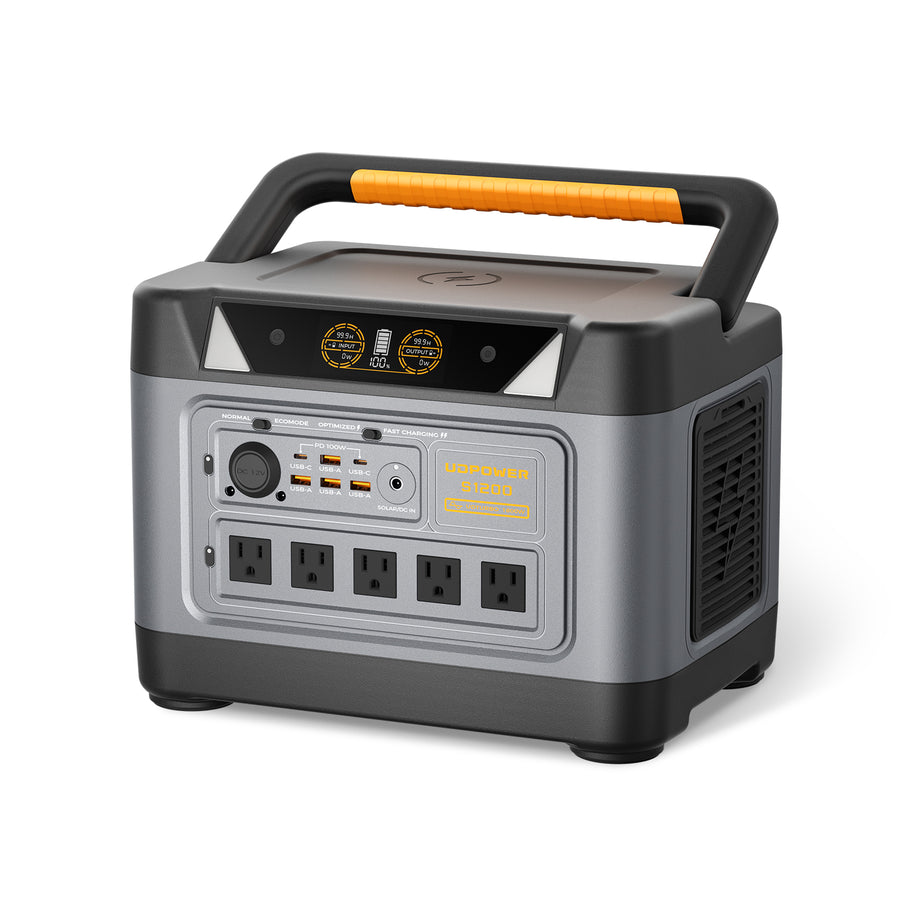 Best balanced choice
UDPOWER S1200 Portable Power Station
The S1200 is a practical choice for users who want a 1000W-class station with more output headroom. Its official specs list 1191Wh capacity, 1200W pure sine wave AC output, 1800W max surge, USB-C output up to 100W, DC5521 output rated 12V/12A total 144W max, car output rated 12V/12A total 144W max, and a DC7909 solar charging input rated 12V–75V, 12A, 400W max.
- Solar input connector: DC7909
- Solar input range: 12V–75V, 12A, 400W max
- DC output connector: DC5521 output ports
- Best use: fridge backup, CPAP planning, camping, RV essentials, router/laptop backup, light emergency power
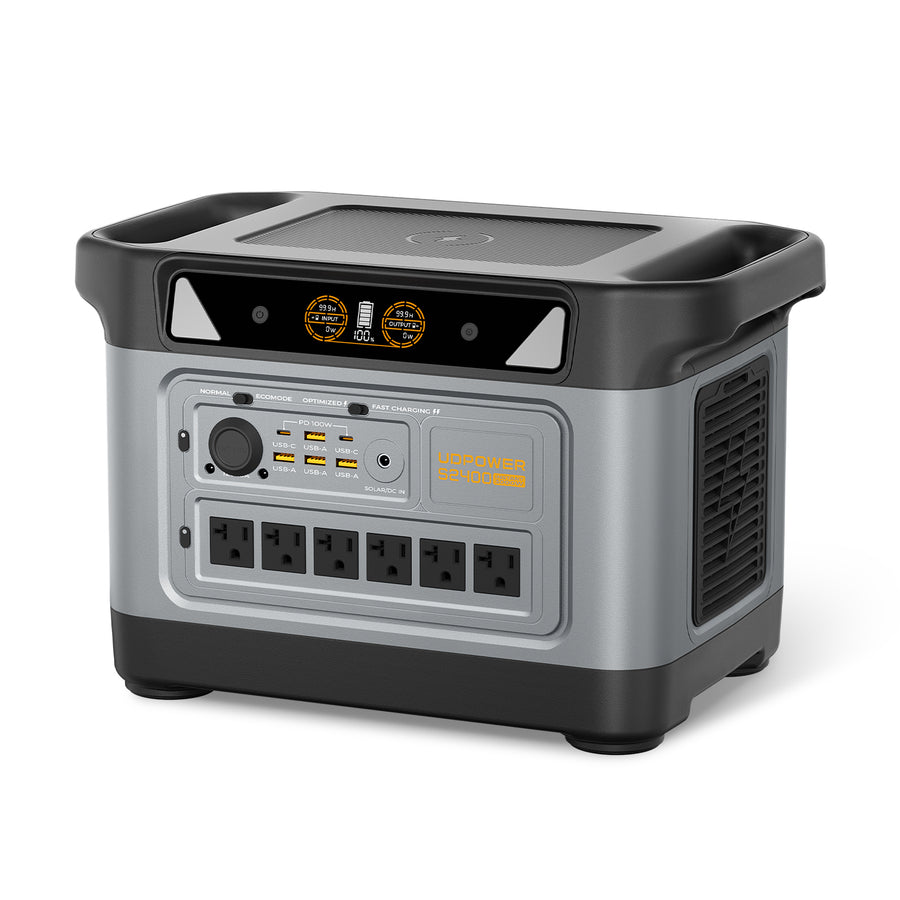 Best for larger backup loads
UDPOWER S2400 Portable Power Station
The S2400 is better for heavier loads and longer backup windows. Its official specs list 2083Wh capacity, 2400W pure sine wave AC output, up to 3000W startup surge, 6 AC outlets, USB-C output up to 100W, DC5521 output rated 12V/10A max, car output rated 12V/10A max, and a DC7909 solar charging input rated 12V–50V, 10A max.
- Solar input connector: DC7909
- Solar input range: 12V–50V, 10A max
- DC output connector: DC5521 output ports
- Best use: RV trips, longer outages, microwave use, power tools, refrigerator backup, multi-device emergency power
Real customer question: if your solar panel has an XT60 output and you want to connect it to a UDPOWER S1200, the power station side should match the S1200’s DC7909 solar input. That means you would look for an XT60-to-DC7909 solar charging cable only after confirming your panel’s voltage and current are within the S1200’s solar input range.
| UDPOWER model | Solar input connector | Solar input range | DC output ports | Recommended connector advice |
|---|---|---|---|---|
| S1200 | DC7909 | 12V–75V, 12A, 400W max | DC5521, 12V/12A total 144W max; 12V car output 144W max | Use DC7909 for solar input; use DC5521 only for compatible 12V output devices |
| S2400 | DC7909 | 12V–50V, 10A max | DC5521, 12V/10A max; 12V car output 10A max | Check solar panel Voc carefully because S2400’s input voltage limit differs from S1200 |
Common Adapter Mistakes to Avoid
Mistake 1: Treating “8mm” as one exact size
Many product listings use “8mm” loosely. DC7909, DC8017, and DC8020 can all appear under that label. For portable power stations, this matters because a wrong inner diameter can cause unstable charging, heat, or no input at all.
Mistake 2: Using a plug that fits but has the wrong voltage
A connector adapter does not convert voltage unless it contains a real converter. A barrel plug adapter, MC4-to-DC7909 cable, or XT60 adapter usually only changes the connector shape.
Mistake 3: Ignoring polarity
Reversed polarity can damage equipment. Do not assume every barrel plug is center-positive or every SAE cable is wired the same way.
Mistake 4: Using thin cables for high current
High current through thin wire can cause voltage drop and heat. Shorter, thicker, properly rated cables are safer for higher-current DC loads.
Mistake 5: Connecting solar panels without checking Voc
Solar panel open-circuit voltage matters. A solar connector may fit perfectly but still exceed the power station’s PV input voltage limit.
Mistake 6: Back-feeding two DC sources
Do not combine two unrelated DC power sources into one input without a charger, combiner, or controller designed for that exact job.
Adapter Do’s and Don’ts
| Goal | Common adapter | Good use | Do not do this |
|---|---|---|---|
| Solar panel to portable power station | MC4 → DC7909, MC4 → XT60, XT60 → DC7909 | When panel voltage/current match the station input | Assume the adapter makes any solar panel compatible |
| Vehicle socket to barrel device | Car plug → DC5521 / DC5525 | Low-to-moderate 12V devices within the socket fuse rating | Run high-current loads through cheap thin cables |
| USB-C charger to barrel device | USB-C PD trigger → barrel plug | When trigger voltage equals device input voltage | Use random USB-C to barrel cable without knowing its trigger voltage |
| 5521 to 5525 conversion | DC5521 ↔ DC5525 adapter | Only when voltage, polarity, and current also match | Accept a loose plug because it “mostly works” |
| High-current battery wiring | Anderson or XT adapter | When wire gauge and connector current rating match the load | Use low-quality clone connectors or undersized wire |
Troubleshooting: Plug Fits, But the Device Won’t Power On
| Symptom | Likely cause | What to check | Practical fix |
|---|---|---|---|
| No power at all | Wrong voltage, wrong polarity, dead source, or incompatible PD negotiation | Source voltage, polarity symbol, PD profile, device input label | Use the original adapter or a verified replacement |
| Power cuts in and out | Loose barrel fit or cable strain | OD/ID size, plug length, socket wear, cable bend | Use the exact connector size and reduce strain on the port |
| Cable or plug feels warm | Too much current, poor contact, thin wire, or bad connector | Current draw, wire gauge, connector rating | Stop using it and replace with a properly rated cable |
| USB-C cable charges phone but not laptop | Charger or cable lacks the required PD profile | Charger wattage, PD profile, cable rating | Use a charger and e-marked cable rated for the laptop |
| Solar input shows 0W | Panel voltage mismatch, wrong adapter, poor sunlight, or reversed polarity | Panel Voc, station solar input range, adapter polarity | Use a compatible panel and correct station-side connector |
FAQ: DC Input Connector Types
Is DC7909 the same as 8mm?
DC7909 is often marketed as an 8mm barrel connector, but “8mm” is not precise enough by itself. DC7909 is commonly understood as about 7.9mm outer diameter with a small center-pin interface. Other 8mm-style plugs, such as DC8017 and DC8020, are not the same and may not work safely in a DC7909 port.
What is the difference between DC5521 and DC5525?
Both have a 5.5mm outer diameter, but the inner diameter is different. DC5521 uses a 2.1mm inner diameter, while DC5525 uses a 2.5mm inner diameter. They can look nearly identical, but a mismatch can cause loose contact, forced fit, heat, or power loss.
Can I power a barrel-input device from USB-C?
Sometimes, yes, but only with the correct USB-C PD trigger cable or adapter. The trigger must request the voltage your device needs, the charger must provide enough wattage, the cable must be rated for the current, and the barrel plug must match size and polarity.
Are MC4 connectors used as device inputs?
Usually no. MC4 connectors are most often on the solar panel side. A portable power station typically uses another input connector, such as DC7909, XT60, or Anderson, so an adapter cable is needed after voltage and current compatibility are confirmed.
What connector does the UDPOWER S1200 use for solar charging?
The UDPOWER S1200 uses a DC7909 solar charging input. Its official input specification is 12V–75V, 12A, 400W max. If your panel uses XT60 or MC4, you need the correct adapter to DC7909 and must confirm the panel voltage and current are compatible.
What connector does the UDPOWER S2400 use for solar charging?
The UDPOWER S2400 uses a DC7909 solar charging input. Its official specification lists 12V–50V, 10A max for DC7909 solar charging input. Do not assume a panel that works with S1200 automatically works with S2400; check voltage range first.
Is DC8020 the same as DC7909?
No. DC8020 is typically 8.0×2.0mm, while DC7909 is a different 8mm-style barrel connector with a smaller center-pin interface. They are often confused in listings, but they are not interchangeable.
Why does an 8.0×2.0mm plug sometimes feel like it fits a DC7909 port?
The outer diameter may be close enough to enter the port, but the inner diameter and contact geometry are different. That can create loose contact, intermittent charging, voltage drop, or heat. Use the exact connector size required by the device.
Can I use any adapter if the voltage is correct?
No. Voltage is only one check. You still need to confirm connector geometry, current rating, cable thickness, polarity, and whether the device needs a smart protocol such as USB-C PD negotiation.
How do I avoid buying the wrong DC adapter?
Write down the device input voltage, current, connector size, plug length, and polarity before shopping. For barrel plugs, measure OD and ID if possible. For USB-C PD, confirm the exact voltage profile. For solar charging, check panel Voc and the station’s solar input range.
Related Reading from UDPOWER
- Solar Panel Connector Types: How to Identify Them, Match Them, and Avoid Costly Mistakes
- Can You Charge a Portable Power Station with a Solar Panel?
- How Do You Know If a Portable Power Station Can Power Your Device?
- Portable Power Stations
- Solar Generators
- Solar Panels
- CPAP Battery Backup
- Battery Powered Outlet
Choose the Right Connector Before You Plug In
The safest DC setup starts with the device input label, not the adapter listing. Match connector size, voltage, current, polarity, and cable rating first. For solar charging, also confirm panel Voc and the power station’s solar input range.
Related Articles


1 comment
I purchased a UD AS1200 and have a solar panel with 12V Battery out plug XT 60. What plug is needed for the Input connector on my solar UD 1200? Please let me know what cable I need to purchase with what connectors … XT 60 to my solar panel but what connector to my UD 1200 DC Input Port?