





How to Charge iPhone Duo: USB-C Fast Charging, MagSafe, Qi2 & Backup Power
Last updated: September 20, 2026
Quick answer: The fastest official iPhone Duo charging setup is wired USB-C with a USB-C cable and a 60W-capable or higher USB-C PD power source. Apple says this can charge iPhone Duo to as much as 50% in around 20 minutes under its laboratory test conditions.
For wireless charging, iPhone Duo supports both MagSafe and Qi2 at up to 25W. Apple says wireless charging can reach as much as 50% in around 30 minutes. For its MagSafe fast-charge setup, Apple specifies a 35W or higher power adapter.
Battery life is now clearly defined by Apple: up to 24 hours of typical mixed use, up to 44 hours of local video playback on the outer display, and up to 31 hours on the inner display. Apple confirms a dual-battery design, but it still does not publish an official battery capacity in mAh or Wh.
The iPhone Duo box includes a 1-meter USB-C charging cable, but it does not include a wall power adapter. If you already own a suitable USB-C PD charger from a newer MacBook, iPad, or another reputable device, you may not need to buy another charger.

Apple announced iPhone Duo on September 9, 2026. Preorders begin October 16 and retail availability begins October 23 in the United States. As of September 20, retail-unit 0–100% charging tests still are not available, so this guide does not present an unverified full-charge time as fact.
However, Apple now provides enough detail to explain the charging and battery picture much more precisely: dual built-in lithium-ion batteries, up to 24 hours of typical use, separate inner- and outer-display video figures, the exact conditions used for its fast-charge test, 25W MagSafe, and 25W Qi2.
Some third-party specification databases currently list a 4,700mAh capacity, but Apple does not publish that number on its U.S. technical-specification page. Until Apple, a regulatory filing, or a verified retail-device teardown establishes the capacity, this article treats the mAh figure as unconfirmed third-party data, not an official iPhone Duo specification.
iPhone Duo Charging Specs at a Glance
There are three charging numbers worth remembering: 60W for Apple's fastest wired charging setup, 25W maximum MagSafe charging, and 25W maximum Qi2 charging.
| Charging method | Recommended setup | Official charging figure | Best use | Source |
|---|---|---|---|---|
| USB-C wired | 60W-capable or higher USB-C power adapter plus USB-C cable | Up to 50% in around 20 minutes | Fastest charging, travel, quick top-ups | Apple Technical Specifications |
| MagSafe | MagSafe Charger with a 35W or higher power adapter | Up to 25W; up to 50% in around 30 minutes | Desk, bedside, convenient wireless charging | Apple Technical Specifications |
| Qi2 | Compatible Qi2 wireless charger with an adequate power supply | Up to 25W; Apple states wireless charging can reach up to 50% in around 30 minutes | Compatible third-party wireless charging setups | Apple Newsroom |
| Computer USB-C | Connect iPhone Duo directly to a compatible USB-C port | Speed depends on the computer's USB-C power output | Office or travel charging when no wall adapter is available | Apple Support |
One important detail is easy to miss: a charger's maximum wattage is not the same thing as the amount of power the iPhone continuously consumes. A 60W, 65W, 96W, or 100W USB-C charger does not continuously force that amount of power into the phone. A compatible USB-C charging system negotiates the power the device can accept.
iPhone Duo Battery Capacity and Battery Life: What Is Confirmed?
The iPhone Duo battery story needs two separate labels: Apple-confirmed battery-life figures and third-party capacity figures that Apple has not verified. Mixing those together is how an estimated mAh number can quickly get repeated online as an official specification.
| Battery data point | Current figure | Status | What it means |
|---|---|---|---|
| Battery architecture | Dual built-in rechargeable lithium-ion batteries | Apple confirmed | Apple places one high-energy battery on each side of the folding chassis and manages them as one power system. |
| Typical mixed use | Up to 24 hours | Apple confirmed | Apple's test uses a representative mix of active and passive use and assumes equal use of the inner and outer displays. |
| Local video, outer display | Up to 44 hours | Apple confirmed | The smaller outer display produces the longest official video figure. |
| Local video, inner display | Up to 31 hours | Apple confirmed | Using the larger folding display reduces Apple's local-video figure by 13 hours versus outer-display playback. |
| Streamed video, outer display | Up to 37 hours | Apple confirmed | Streaming adds network activity, so the figure is lower than local playback. |
| Streamed video, inner display | Up to 26 hours | Apple confirmed | This is the lowest of Apple's four display-specific video figures. |
| Battery capacity in mAh or Wh | Not published by Apple | Not officially confirmed | Three UK and PhoneArena currently list 4,700mAh, while other publications still label different values as estimates. Do not treat a specific mAh figure as an Apple specification yet. |
| 0–100% charge time | Not published by Apple | Not established yet | Apple publishes time-to-50% figures. Independent retail-unit full-charge testing cannot be considered established before the October 23 release. |
How much more battery life does the outer display get?
Apple's own numbers show why screen choice matters on a foldable. Local video playback is rated at 44 hours on the outer display versus 31 hours on the inner display. That is roughly a 42% longer playback figure for outer-display use. The streamed-video figures show almost the same gap: 37 hours versus 26 hours, again roughly 42% longer.
This does not mean every real-world task will last 42% longer with the phone closed. It does show that the larger 7.6-inch display can materially change runtime, which is why a single battery-life number is less informative for iPhone Duo than it is for a conventional one-screen iPhone.
Apple says its typical-use test is based on median iPhone usage and combines passive and active use across messaging, photos, music, social media, streaming video, games, web browsing, navigation, and other activity. For iPhone Duo, Apple also specifies equal usage of the inner and outer displays. Actual battery life will vary with signal strength, display choice, brightness, workload, settings, and network conditions.
What Do You Need to Charge iPhone Duo?
Apple's U.S. specification page lists two items in the iPhone Duo box:
- iPhone Duo with iOS 27
- 1-meter USB-C Charge Cable
A wall power adapter is not listed as an included item. If you are moving from an older Lightning-based iPhone, this matters because the cable connection on the phone itself is USB-C.
For the simplest fast-charging setup, you need:
- your iPhone Duo;
- a compliant USB-C charging cable;
- a USB-C power source capable of at least 60W if you want Apple's fastest quoted wired result.
If you already understand USB-C from another recent iPhone but want a broader explanation of charger types, see our guide to USB-C, wall, car, wireless, solar, and backup chargers.
How to Charge iPhone Duo with USB-C
USB-C is the best place to start if charging speed matters. You do not need to unfold the phone, navigate to a special charging mode, or change a setting before plugging it in.
- Choose the right USB-C power source. For Apple's fastest advertised wired charging result, use a USB-C adapter or USB-C PD power source capable of at least 60W.
- Connect a compatible USB-C cable. You can start with the 1-meter USB-C charge cable included with iPhone Duo.
- Plug the cable into iPhone Duo's USB-C port. Make sure the connector seats fully and does not feel loose.
- Check the battery indicator. The charging symbol should appear after the connection is recognized.
- Keep the phone reasonably cool. Heavy gaming, video processing, direct sun, or a hot car can increase device temperature and reduce charging speed.
Apple's official target is up to 50% charge in around 20 minutes with a 60W-capable adapter or higher. That is not a promise that the phone will draw 60W for all 20 minutes. Charging power normally changes as battery level and temperature change.
What did Apple actually use for the 20-minute charging test?
Apple's published footnote adds useful context that is easy to miss on the main specification table. The fast-charge testing was conducted in July 2026 using preproduction iPhone Duo units and software. The phones were drained, tested in the open configuration, and charged with USB-C or MagSafe equipment supplied by Apple.
- preproduction iPhone Duo hardware and software;
- testing conducted in July 2026;
- drained iPhone Duo units;
- phone tested in the open configuration;
- Apple USB-C Charge Cable or Apple MagSafe Charger;
- Apple 40W Dynamic Power Adapter with 60W Max, model A3351;
- wired fast charging requires a 60W-capable or higher USB-C cable and USB PD power adapter;
- charge time is measured from the appearance of the Apple logo as the phone starts up.
This explains why a real owner's stopwatch result may not match 20 minutes exactly. Starting battery state, adapter behavior, cable capability, temperature, background activity, and whether the phone is being used while charging can all change the result.
Does iPhone Duo charge at 60W?
There is an important distinction between a 60W-capable charger and a phone drawing exactly 60 watts.
Apple's wording says a 60W-capable adapter or higher is required for its approximately 20-minute 50% fast-charge test. Apple does not state on the public specification page that iPhone Duo continuously accepts exactly 60W.
That distinction matters when shopping for a charger. You should buy enough power capability to satisfy the charging requirement, rather than assuming that a 100W charger will charge the phone almost twice as fast as a 60W charger.
What Wattage Charger Should You Use for iPhone Duo?
| Charger rating | Will it charge iPhone Duo? | What to expect | Recommendation |
|---|---|---|---|
| 20W USB-C | Yes, with a compatible USB-C charger | Useful if this is what you already own, but below Apple's 60W requirement for its fastest wired result | Fine for routine or overnight charging |
| 30W USB-C | Yes | Still below the official 60W-capable fast-charge setup | Usable, but not the best purchase if speed is your priority |
| 35W USB-C | Yes | Meets Apple's adapter requirement for its MagSafe fast-charge setup, but not the 60W wired requirement | Good for MagSafe-focused users |
| 45W USB-C | Yes | More power headroom, but still below Apple's specified 60W-capable wired setup | Reasonable if you already own one |
| Apple 40W Dynamic Power Adapter with 60W Max | Yes | This is the Apple adapter identified in the company's July 2026 iPhone Duo fast-charge test footnote | Reference setup for understanding Apple's laboratory claim |
| 60W USB-C | Yes | Meets Apple's requirement for the fastest quoted wired result | Good minimum target for new wired-charger purchases |
| 65W USB-C PD | Yes, when the power source and cable are compliant | Provides slightly more capacity than Apple's 60W requirement | Excellent practical choice for phone and laptop charging |
| 96W or 100W USB-C | Yes | The higher rating does not mean the phone is forced to consume the charger's full capacity | Useful when one charger also powers laptops or several devices |
If you want one number to remember, 60W or 65W USB-C PD is the practical sweet spot for iPhone Duo wired charging. Higher-output chargers can still make sense if you also charge a MacBook, iPad, handheld gaming device, or other USB-C hardware.
How to Charge iPhone Duo with MagSafe
Apple's U.S. specifications confirm that iPhone Duo supports MagSafe wireless charging up to 25W.
- Connect the MagSafe Charger to an appropriate USB-C power adapter.
- For Apple's fastest quoted MagSafe result, use a power adapter rated at 35W or higher.
- Place the magnetic charging surface against the correct rear charging area of iPhone Duo.
- Allow the magnets to align the charger rather than deliberately leaving the charging puck off-center.
- Confirm that the charging indicator appears before leaving the phone unattended.
Apple says this setup can reach as much as 50% in around 30 minutes under its test conditions. Apple's technical specifications list a 35W-or-higher adapter requirement for the MagSafe fast-charge setup, while the company's test footnote identifies its own 40W Dynamic Power Adapter with 60W Max as the adapter used during testing.
For everyday use, MagSafe has one major advantage over a cable: convenience. If your phone spends several hours on a desk or nightstand, being able to place it on the charger without connecting a cable may matter more than saving several minutes.
Wired USB-C remains the better choice when you are leaving home soon and want the fastest possible top-up.
How to Charge iPhone Duo with Qi2
iPhone Duo also supports Qi2 wireless charging up to 25W according to Apple's U.S. specifications. Apple's launch materials state that compatible MagSafe or Qi2 wireless charging can reach as much as 50% in around 30 minutes under its test conditions.
Qi2 can be useful if you want a certified wireless charger that works across more than one device ecosystem instead of buying a charger exclusively for a single phone.
When buying a Qi2 charger, check three separate specifications:
- the charger actually supports Qi2 rather than older basic wireless charging;
- its advertised output is sufficient for the charging speed you want;
- the wall adapter supplying the wireless charger meets the accessory manufacturer's input requirement.
A high-output wall adapter does not automatically turn a lower-rated wireless charging pad into a 25W charger. The wireless charger itself, its input requirements, device compatibility, alignment, temperature, and charging protocol all matter.
Can You Use an Old iPhone, iPad, or MacBook Charger?
In many cases, yes, but the answer depends on the connector and charger output.
| Existing charger | Can you use it? | What you should know |
|---|---|---|
| Recent USB-C MacBook charger | Usually yes | Apple specifically allows higher-wattage compliant USB-C power adapters. A 60W+ model is well suited to iPhone Duo fast charging. |
| USB-C iPad charger | Usually yes | It can charge the phone, but lower-output models may not reach Apple's fastest Duo charging result. |
| 20W USB-C iPhone charger | Yes | Useful for normal charging, but below the 60W-capable requirement for Apple's approximately 20-minute 50% result. |
| Old USB-A charger | Potentially, with a compliant USB-A-to-USB-C cable | Expect substantially less charging performance than a modern USB-C PD setup. |
| Old Lightning cable | No, not directly | The iPhone Duo itself uses USB-C, so a Lightning plug does not fit the phone's charging port. |
If USB-A and USB-C terminology is confusing, our USB-A vs. USB-C guide explains the connector and power-delivery differences in practical terms.
Can You Charge iPhone Duo from a Computer?
Yes. Apple supports charging USB-C iPhones by connecting them to a compatible USB-C port on a computer.
This is useful at a desk, in a hotel room, or while traveling when you have a laptop but no spare wall adapter.
The limitation is speed. A USB-C connector tells you the shape of the connection, not automatically how much charging power that port provides. Two laptops can both have USB-C ports while supplying different amounts of power to connected devices.
If fast charging matters, connect directly to a known high-output USB-C power source instead of assuming every computer port can duplicate Apple's 60W-capable wall-charger setup.
How to Charge iPhone Duo in a Car
For wired charging in a vehicle, the most practical setup is a USB-C PD car charger connected to the vehicle's 12V accessory outlet, or a sufficiently powerful built-in USB-C port if your vehicle provides one.
The same wattage logic applies in the car:
- a low-power USB-A vehicle port may charge the phone slowly;
- a modern USB-C PD port can provide much faster charging;
- a 60W-capable USB-C PD source is the target if you want a setup comparable to Apple's fastest wired requirement.
A long road trip is also one situation where a portable power station can make sense. It provides a separate battery reserve instead of making every phone, tablet, camera, laptop, and light depend on the vehicle's USB ports.
How to Charge iPhone Duo During Camping or a Power Outage
A phone uses much less energy than a refrigerator, microwave, or space heater, so keeping iPhone Duo running during a blackout does not require an enormous power station. What matters more is having a reliable USB-C PD output and enough stored energy for your other devices.
Recommended for Phone-Centered Backup: UDPOWER C400
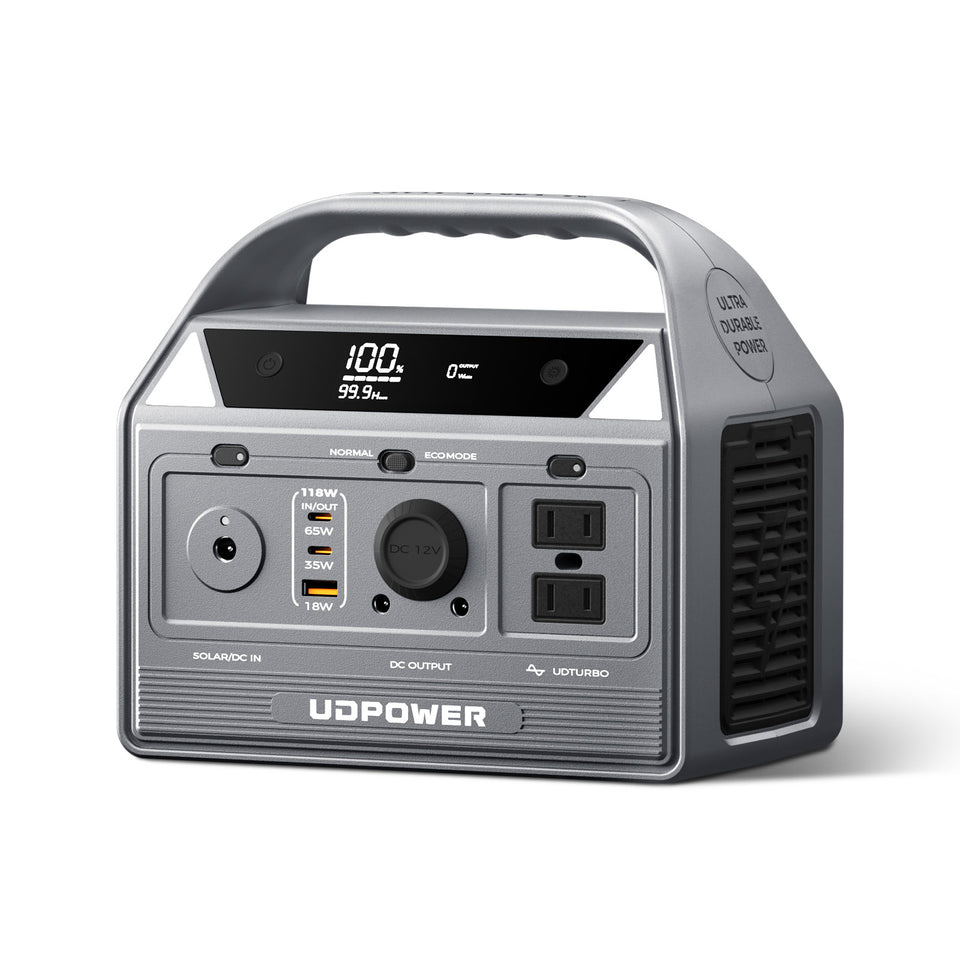
For an iPhone Duo, laptop, camera gear, lights, and other small electronics, the UDPOWER C400 Portable Power Station is a better-sized option than buying a large home-backup unit solely to charge a phone.
The key feature for iPhone Duo is the 65W USB-C PD port. Its output capability sits above Apple's 60W-capable requirement for the Duo's fastest specified wired charging setup, so you can connect the phone directly by USB-C without first converting the power station's battery energy to a 120V AC wall outlet.
Because iPhone Duo has not reached retail availability yet, it would be premature to claim an independently verified 20-minute result specifically from the C400. The 65W port provides the appropriate power ceiling, while the final charging rate is determined by USB-C power negotiation, battery state, temperature, cable compatibility, and the phone's charging controller.
View UDPOWER C400How many times can a C400 charge iPhone Duo?
There is still no defensible Apple-confirmed exact number because Apple has not published iPhone Duo battery capacity in Wh or mAh. That is the data needed to calculate full-equivalent recharges cleanly.
For conservative UDPOWER planning, the C400 provides approximately:
C400 planning energy:
256Wh × 0.90 ≈ 230Wh
Two third-party databases currently list iPhone Duo at 4,700mAh. If that figure is later verified, it could be converted to approximate battery energy only after the battery pack's nominal voltage is also established. Until then, presenting a precise “C400 charges iPhone Duo X times” claim would create false precision.
The practical takeaway is simpler: a 256Wh power station stores far more energy than a phone battery, so iPhone charging is a light-duty load for the C400. The exact full-charge count should be updated after a verified iPhone Duo battery Wh figure or a controlled retail-unit recharge test becomes available.
If your outage plan includes more than a phone, such as a Wi-Fi router, CPAP, laptop, refrigerator, or lighting, browse the full UDPOWER portable power station collection instead of sizing a backup battery around the phone alone.
For weekend travel and lighter loads, you can also compare models in the portable power stations for short trips collection.
How Should You Charge iPhone Duo for Better Battery Health?
Fast charging is convenient, but battery longevity is affected by more than charger wattage. Heat and the amount of time a lithium-ion battery remains at a very high state of charge are also important considerations.
1. You do not have to charge to 100% every time
If you only need enough battery to get through the day, there is no requirement to wait until the phone reaches 100% before unplugging it.
2. Use iPhone's charging controls
Modern iPhones include charging-management features designed to reduce the time the battery spends fully charged. Apple also provides charge-limit controls on recent generations.
Check Settings → Battery → Charging for the options available on your iPhone Duo and current iOS version.
3. Do not panic if charging pauses around 80%
A phone that stops temporarily near 80% is not automatically broken. Apple says charging can be limited because of Optimized Battery Charging, a configured Charge Limit, or elevated battery temperature.
4. Heat matters more than many people realize
Apple lists an operating ambient range of 32°F to 95°F (0°C to 35°C) for iPhone Duo. Charging in a hot parked car, direct summer sun, or while the phone is under a pillow is very different from charging on an open desk in a climate-controlled room.
If the phone becomes unusually warm, remove unnecessary heat sources and allow it to cool naturally. Charging performance may increase again once temperature returns to an appropriate range.
5. Heavy use can make fast charging feel slower
Downloading large games, running navigation at maximum brightness, gaming on the inner display, recording video, or performing other demanding tasks consumes energy while the battery is also trying to charge.
If you need the fastest possible top-up before leaving, reducing heavy activity during those first 20 minutes is more useful than simply buying an adapter with a dramatically higher wattage.
Why Is My iPhone Duo Charging Slowly?
Slow charging usually comes down to the entire charging chain rather than one component.
| Possible cause | What happens | What to try |
|---|---|---|
| Low-output charger | The phone charges but cannot reproduce Apple's fastest wired setup | Use a compliant 60W-capable or higher USB-C power source |
| Low-power computer port | USB-C connection works, but available power may be limited | Try a known USB-C PD wall charger or high-output power source |
| Damaged or unsuitable cable | Charging may become slow, intermittent, or fail | Try the included cable or another compliant USB-C cable |
| Debris in USB-C port | Connector may not seat correctly | Inspect the port carefully and follow Apple's cleaning guidance |
| Phone is hot | iOS can reduce or pause charging to protect the battery | Move the phone to a cooler environment and reduce heavy use |
| Wireless misalignment | Charging can become less reliable or inefficient | Realign the MagSafe or Qi2 charger and verify the charging indicator |
| Charge Limit or optimized charging | Charging may stop or pause near 80% | Check Settings → Battery → Charging |
| Heavy use while plugged in | Some incoming energy is immediately consumed by the phone | Reduce gaming, video processing, navigation, or other heavy workloads |
What to Do If iPhone Duo Won't Charge
If your iPhone Duo does not respond when connected to power, work through the simple possibilities before assuming the battery or USB-C port has failed.
- Check the USB-C cable and power adapter for visible damage.
- Make sure every connection is fully inserted.
- Try a known-working wall outlet.
- Try another compliant USB-C cable.
- Try another compatible power adapter.
- Inspect the USB-C port for debris that could prevent a complete connection.
- Leave the phone connected to power for approximately 30 minutes if the battery is deeply discharged.
- Restart or force-restart the iPhone if necessary.
- Make sure iOS is up to date.
Apple provides a complete troubleshooting sequence in its official iPhone charging troubleshooting guide.
Do not continue using a cable with exposed conductors, severely damaged connectors, a cracked adapter, or equipment that becomes abnormally hot. Replacing a questionable charging accessory is preferable to repeatedly testing it with a new phone.
Which iPhone Duo Charging Method Is Best?
There is no single charging method that is best in every situation. The practical choice depends on what you are doing next.
| Situation | Best charging setup | Why |
|---|---|---|
| You are leaving in 20–30 minutes | 60W+ USB-C wired charging | Matches Apple's fastest official wired setup |
| Charging overnight | USB-C or MagSafe | Maximum speed is usually less important overnight |
| Desk charging | MagSafe or Qi2 | Easy to place and remove repeatedly |
| Traveling with a MacBook | Compatible 60W+ USB-C laptop charger | One charger can serve multiple devices |
| Road trip | USB-C PD car charger or portable power station | Does not depend on a household wall outlet |
| Camping | Portable power station with USB-C PD | Can recharge phones and other electronics from stored energy |
| Power outage | Portable power station | Provides an independent energy reserve when the grid is unavailable |
Frequently Asked Questions About Charging iPhone Duo
What charger does iPhone Duo use?
iPhone Duo uses a USB-C charging connector. Apple also supports MagSafe and Qi2 wireless charging on the device.
What is the fastest way to charge iPhone Duo?
Apple's fastest official setup is wired USB-C charging with a 60W-capable power adapter or higher and a USB-C cable. Apple says this can charge iPhone Duo to as much as 50% in around 20 minutes.
Does iPhone Duo come with a charger?
It comes with a 1-meter USB-C Charge Cable, but Apple's specification page does not list a wall power adapter as an included item.
Can I use a 20W charger with iPhone Duo?
Yes, a compatible USB-C charger can charge the phone, but a 20W adapter is below Apple's 60W-capable requirement for the fastest quoted wired charging result.
Can I use a 65W charger with iPhone Duo?
Yes. A compliant 65W USB-C PD charger provides enough output capacity to meet Apple's 60W-capable fast-charging requirement. The iPhone controls the power it accepts.
Can I use a 100W MacBook charger with iPhone Duo?
Yes, assuming it is a compatible USB-C power adapter. A 100W rating represents the adapter's maximum capability; it does not mean the adapter continuously forces 100W into the phone.
Does iPhone Duo support MagSafe?
Yes. Apple's U.S. technical specifications list MagSafe wireless charging at up to 25W.
How fast is MagSafe charging on iPhone Duo?
Apple states that iPhone Duo can charge to as much as 50% in around 30 minutes using a MagSafe Charger with a 35W or higher adapter under its specified test conditions.
Does iPhone Duo support Qi2?
Yes. Apple's U.S. specifications list Qi2 wireless charging at up to 25W.
Why does my iPhone Duo stop charging at 80%?
A configured Charge Limit, Optimized Battery Charging, or elevated temperature can cause charging to pause or stop around 80%. Check Settings → Battery → Charging and make sure the phone is not excessively warm.
Can I charge iPhone Duo from my laptop?
Yes. A USB-C computer port can charge a compatible iPhone. Charging speed depends on how much power that particular USB-C port can provide.
Can I charge iPhone Duo from a portable power station?
Yes. A portable power station with a compliant USB-C PD output can charge iPhone Duo directly. For example, the UDPOWER C400 has a 65W USB-C PD output plus a separate 35W USB-C port.
What is the iPhone Duo battery capacity in mAh?
Apple does not currently publish an official mAh or Wh capacity for iPhone Duo. Some third-party specification databases list 4,700mAh, but that number has not been confirmed on Apple's U.S. technical-specification page, so it should be treated as unverified until a reliable regulatory record or retail-device teardown confirms it.
How long does the iPhone Duo battery last?
Apple rates iPhone Duo for up to 24 hours of typical mixed use. For video playback, Apple lists up to 44 hours on the outer display or 31 hours on the inner display. For streamed video, the figures are up to 37 hours on the outer display and 26 hours on the inner display.
Does iPhone Duo actually charge at a constant 60W?
Apple does not say that iPhone Duo continuously draws 60W. The official wording says a 60W-capable or higher USB-C PD power source and suitable cable are required for the company's fastest quoted wired charging result. Actual charging power can change throughout the session.
Does using the outer display improve battery life?
For Apple's video tests, yes. Local video playback is rated at up to 44 hours on the outer display versus 31 hours on the inner display, while streamed video is rated at 37 hours versus 26 hours. Real-world differences will depend on workload, brightness, network conditions, and settings.
Is wired charging better than wireless charging?
Wired USB-C is the better choice when maximum speed and efficiency matter. MagSafe and Qi2 trade some of that advantage for convenience, particularly on a desk or nightstand.
Do I need to charge iPhone Duo to 100% before using it for the first time?
No. Modern lithium-ion phones do not require an initial overnight or 100% conditioning charge before normal use. You can use and recharge the phone as needed.
How long does iPhone Duo take to charge from 0% to 100%?
Apple currently publishes time-to-50% figures rather than a definitive public 0–100% charging time. Because retail units are not scheduled to become available until October 23, 2026, it is better to wait for controlled retail-device testing before treating a specific full-charge time as established fact.
Sources and Specification References
Charging and battery specifications in this guide were rechecked against current manufacturer documentation and clearly labeled third-party sources on September 20, 2026.
| Source | Information used |
|---|---|
| Apple — iPhone Duo Technical Specifications | USB-C connector, dual batteries, 60W-capable wired fast charging, 35W MagSafe adapter requirement, 25W MagSafe, 25W Qi2, included USB-C cable, operating temperature |
| Apple Newsroom — Apple Unveils iPhone Duo | Announcement date, battery-life information, wireless charging claim, preorder and availability dates |
| Apple Support — Charge and Connect with USB-C | USB-C charging compatibility, higher-wattage adapters, computer charging |
| Apple Support — If Your iPhone Won't Charge | Charging troubleshooting, temperature-related charging limits, optimized charging and Charge Limit behavior |
| UDPOWER — C400 Portable Power Station | 256Wh capacity, 400W output, 65W + 35W USB-C outputs, PD/PPS specifications, weight and battery specifications |
| Three UK — iPhone Duo Device Support | Third-party specification listing that currently reports a 4,700mAh battery capacity; included for transparency and not treated as an Apple-confirmed figure |
| PhoneArena — iPhone Duo Specifications | Third-party specification listing that also reports 4,700mAh; retail battery testing is still listed as untested as of this update |
Need Backup Power Beyond a Wall Charger?
If you only charge iPhone Duo at home, a good USB-C PD wall charger is usually enough. If you also need power in a car, campsite, RV, or during a blackout, a portable power station gives you a much larger independent energy reserve for phones, laptops, lights, cameras, routers, and other essentials.
View the UDPOWER C400 View All Portable Power StationsNot sure which capacity fits your setup? Compare UDPOWER portable power stations by battery capacity, output, portability, and intended use.
Related Articles


