





How to Charge iPhone 17: Fast Charging, MagSafe & Backup Power
Last updated: July 6, 2026
The fastest way to charge most iPhone 17 models is not simply “use the biggest charger.” You need the right USB-C Power Delivery charger, a good cable, the right temperature, and a charging setup that fits where you actually use the phone: at home, in the car, while camping, or during a power outage.
Quick Answer: What Charger Do You Need for iPhone 17?
For iPhone 17, iPhone 17 Pro, and iPhone 17 Pro Max, use a 40W or higher USB-C Power Delivery charger with a USB-C cable for Apple’s fastest wired charging target: up to about 50% in around 20 minutes. For iPhone Air and iPhone 17e, a 20W or higher USB-C charger is enough for up to about 50% in around 30 minutes.
For wireless charging, use a MagSafe Charger with a 30W or higher USB-C adapter. MagSafe is more convenient, but wired USB-C is usually faster, cooler, and more energy-efficient.
For travel, camping, hurricane season, blackouts, or long weekends away from wall power, pair your iPhone with a small power station such as UDPOWER C400 or UDPOWER C600. For family backup, routers, laptops, lights, and multiple phones, step up to UDPOWER S1200 or UDPOWER S2400.

1. iPhone 17 Charging Wattage by Model
The iPhone 17 lineup does not charge at one fixed speed from 0% to 100%. It charges fastest when the battery is low, then slows down as it gets warmer or approaches a higher charge level. That slowdown is normal and helps manage heat and battery wear.
| Model | Fastest wired setup | Wireless setup | Best everyday choice | Source |
|---|---|---|---|---|
| iPhone 17 | 40W or higher USB-C PD adapter + USB-C cable | MagSafe Charger + 30W or higher USB-C adapter | Use wired USB-C when you need speed; use MagSafe for desk/nightstand convenience. | Apple fast charge guide |
| iPhone 17 Pro | 40W or higher USB-C PD adapter + USB-C cable | MagSafe Charger + 30W or higher USB-C adapter | Use a 40W+ USB-C charger for quick top-ups before leaving home. | Apple iPhone 17 Pro specs |
| iPhone 17 Pro Max | 40W or higher USB-C PD adapter + USB-C cable | MagSafe Charger + 30W or higher USB-C adapter | Use wired charging when battery is very low; the larger battery makes the final 20% feel slower. | Apple iPhone 17 Pro Max specs |
| iPhone Air | 20W or higher USB-C adapter + USB-C cable | MagSafe Charger + 30W or higher USB-C adapter | A 20W–30W USB-C charger is enough for most users; avoid charging under pillows or in hot cars. | Apple iPhone Air specs |
| iPhone 17e | 20W or higher USB-C adapter + USB-C cable | MagSafe Charger + 30W or higher USB-C adapter if supported by your model/accessory setup | A compact 20W+ USB-C PD charger is the practical baseline. | Apple fast charge guide |
A 65W, 100W, or 140W charger is not dangerous when it supports USB Power Delivery. The iPhone only draws the power it can safely use. The benefit of a higher-watt charger is mainly convenience: it can also charge laptops, tablets, and a power station’s USB-C input/output when supported.
2. Best Way to Charge iPhone 17 in Real Life
The “right” charging method depends on what you care about most: speed, heat control, convenience, or backup power. Here is the practical way to choose.
| Situation | Best charging method | Why it works | What to avoid |
|---|---|---|---|
| You have 20–30 minutes before leaving | USB-C wired charging | Wired charging wastes less energy as heat and is the fastest way to add usable battery quickly. | Cheap unknown adapters, damaged cables, charging while gaming, and hot dashboards. |
| Desk or nightstand charging | MagSafe or Qi2 wireless | Easy alignment and grab-and-go convenience matter more than maximum efficiency. | Thick metal cases, magnetic wallets between charger and phone, or placing the charger on a soft blanket. |
| Camping, RV, or road trip | USB-C from a portable power station | Direct USB-C from a battery power station is efficient and does not require a wall outlet. | Leaving the phone or power station in direct sun while charging. |
| Power outage at home | Portable power station + USB-C cables for phones + AC outlets for router/laptop | A power station can charge phones while also keeping essential small electronics running. | Using a gas generator indoors. Battery power stations are the practical indoor choice. |
| Long emergency kit storage | LiFePO4 power station stored partially charged | LFP battery chemistry is well-suited for backup power and long cycle life. | Storing every battery at 0% for months. |
Wired USB-C vs. MagSafe: Which Is Better?
For speed and efficiency, choose wired USB-C. For convenience, choose MagSafe. If you are using a portable power station during an outage or off-grid trip, wired USB-C usually gives you more phone recharges from the same battery capacity because less energy is lost as heat.
3. Realistic iPhone 17 Charging Time Table
Apple’s official fast-charge numbers focus on the 0% to 50% window because that is where charging is fastest. After that, the phone slows down. The table below is designed for everyday planning, not lab-perfect results.
| Model | 0–50% wired | 0–50% MagSafe | 0–80% wired estimate | 0–100% wired estimate | Notes |
|---|---|---|---|---|---|
| iPhone 17 | About 20 minutes with 40W+ | About 30 minutes with MagSafe + 30W+ | About 45–60 minutes | About 1 hour 35 minutes to 2 hours | Good balance of speed and battery size. |
| iPhone 17 Pro | About 20 minutes with 40W+ | About 30 minutes with MagSafe + 30W+ | About 50–65 minutes | About 1 hour 45 minutes to 2 hours 10 minutes | Heavy camera, GPS, hotspot, or gaming use can slow net charging. |
| iPhone 17 Pro Max | About 20 minutes with 40W+ | About 30 minutes with MagSafe + 30W+ | About 55–75 minutes | About 2 hours to 2 hours 30 minutes | Larger battery means longer total time even if the 0–50% window is fast. |
| iPhone Air | About 30 minutes with 20W+ | About 30 minutes with MagSafe + 30W+ | About 50–70 minutes | About 1 hour 40 minutes to 2 hours 15 minutes | Thin design makes heat control especially important. |
| iPhone 17e | About 30 minutes with 20W+ | Depends on accessory and model support | About 55–75 minutes | About 1 hour 45 minutes to 2 hours 20 minutes | Use a reliable USB-C PD charger rather than a low-power 5W adapter. |
These estimates assume normal room temperature, screen mostly off, and a healthy battery. Charging while using hotspot, video recording, navigation, gaming, or a thick case can make the real time longer.
4. How to Charge iPhone 17 Without Hurting Battery Health
Fast charging is normal. The bigger problem is heat. If the phone feels hot, charging speed drops and long-term battery wear can increase. The best charging routine is simple: charge quickly when you need to, keep the phone ventilated, and do not chase 100% all day.
Healthy Charging Habits
- Use USB-C wired charging for fast top-ups. It is usually cooler and more efficient than wireless charging.
- Remove thick cases if the phone gets warm. This matters most with MagSafe and car charging.
- Avoid charging in direct sun. Cars, tents, RV dashboards, and beach bags can get hot quickly.
- Do not worry if charging slows after 80%. That slowdown is normal battery management.
- Use Optimized Battery Charging when available. It helps reduce time spent sitting at full charge.
- Keep your charging kit simple. A reliable USB-C PD charger, one strong USB-C cable, and a backup power source cover most real situations.
Practical Rule
For daily use, charging between roughly 20% and 80% is a good habit. For travel, emergencies, storms, or long days outdoors, charge to 100% when you need the extra runtime. The phone is a tool—battery health matters, but reliability matters too.
5. Charging iPhone 17 During Travel, Camping, and Outages
A phone is often the first device people think about during a power outage, but it is rarely the only one. You may also need a Wi-Fi router, laptop, LED light, fan, CPAP machine, camera battery, or small cooler. That is where a portable power station makes more sense than a small pocket power bank.
| Use case | Recommended setup | Why it fits | Related UDPOWER page |
|---|---|---|---|
| Everyday carry or short day trip | Small USB-C charger or compact power bank | Enough for one phone, not ideal for group backup or home outage use. | How to know if a power station can power your device |
| Weekend camping with phones, camera, and small lights | UDPOWER C400 or C600 | Portable, USB-C ready, and useful beyond phone charging. | UDPOWER C-Series |
| RV trip or car camping with multiple people | UDPOWER C600 or S1200 | Better capacity for phones, tablets, laptops, routers, lighting, and small appliances. | Portable Power Stations |
| Home outage backup | UDPOWER S1200 or S2400 | More AC output and capacity for routers, laptops, phones, lights, fans, and refrigerator support when sized correctly. | UDPOWER S-Series |
| Off-grid solar charging | Power station + compatible solar panel | Lets you restore stored power during daylight instead of relying only on wall outlets. | UDPOWER Solar Panels |
Solar Charging Tip for iPhone Users
Do not put your iPhone in direct sun just because you are using solar power. Keep the solar panel in the sun, keep the power station shaded and ventilated, and charge the iPhone from the power station. This protects the phone from heat while still using solar energy.
6. Recommended UDPOWER Products for iPhone 17
The best power station for iPhone 17 depends on whether you only need phone charging or you also want backup power for laptops, routers, lights, fans, or small appliances. Below are the most practical UDPOWER picks, with images and product parameters taken from UDPOWER product pages.
UDPOWER C400 Portable Power Station

Choose C400 if you want a compact power station for road trips, camping, short outages, and phone/laptop charging. It is much more useful than a normal phone power bank because it also includes AC output, USB-C, USB-A, DC output, and car-related backup features.
- Capacity: 256Wh LiFePO4
- AC output: 400W pure sine wave, 800W surge
- USB-C: 2 ports, total 100W output, including 65W + 35W
- Solar input: up to 150W
- Weight: about 6.88 lbs
- Best for: iPhone 17, camera gear, small lights, laptop charging, car camping, emergency phone backup
UDPOWER C600 Portable Power Station

Choose C600 if you want a still-portable unit with much more capacity than C400. It is a better fit for families, weekend trips, multiple phones, cameras, drones, small projectors, routers, and longer emergency charging needs.
- Capacity: 596Wh LiFePO4
- AC output: 600W pure sine wave, 1200W max
- USB-C: 2 ports, total 100W output, including 65W + 35W
- Solar input: up to 240W
- Weight: 12.3 lbs
- Best for: multiple iPhones, tablets, laptops, cameras, camping lights, routers, small travel appliances
UDPOWER S1200 Portable Power Station
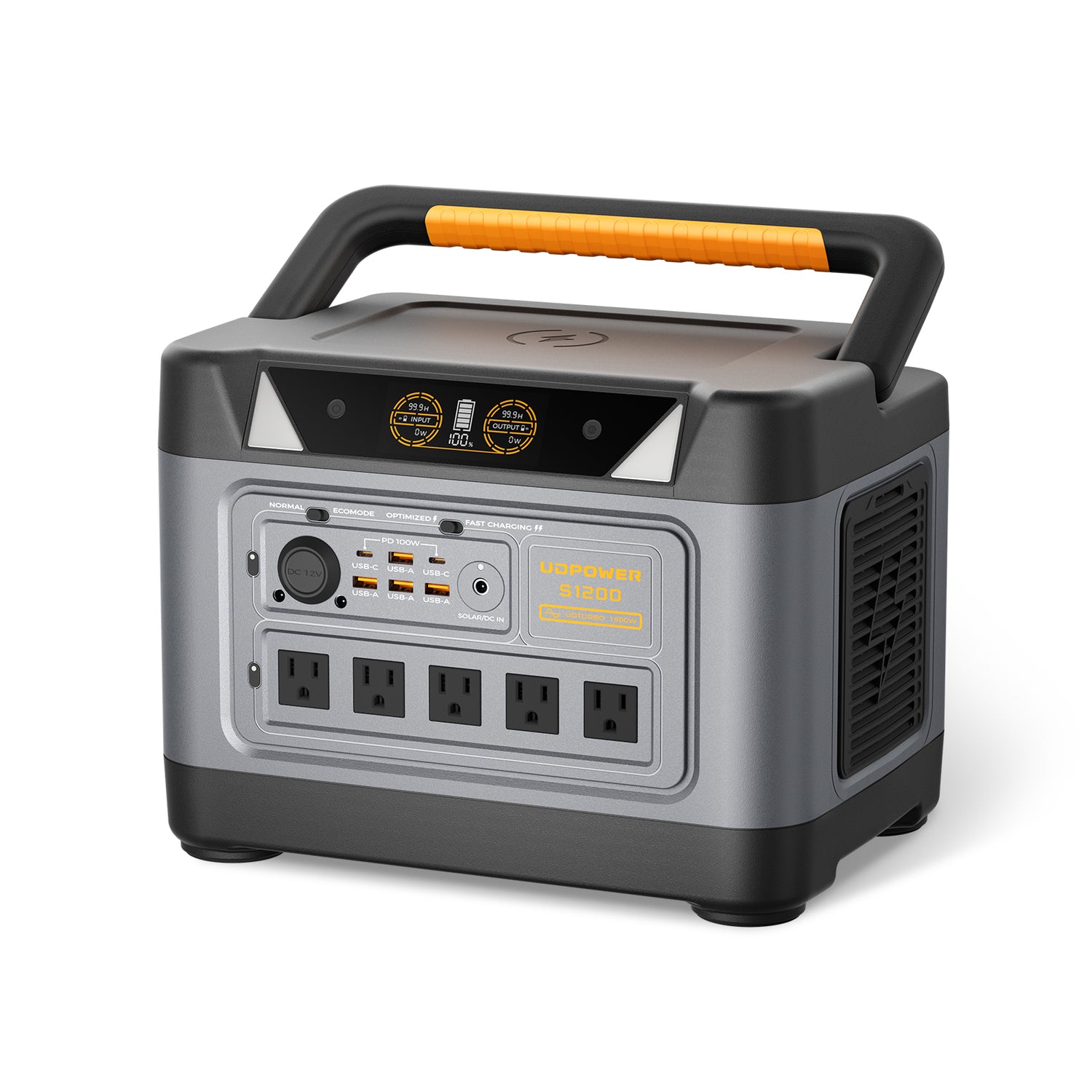
Choose S1200 when your phone is only one part of your backup plan. With higher capacity, 100W USB-C output, AC outlets, UPS support, and solar input, it is better suited for home outage preparation, RV trips, CPAP backup, routers, laptops, lights, and refrigerator support when properly sized.
- Capacity: 1191Wh LiFePO4
- AC output: 1200W pure sine wave, 1800W max
- USB-C: 2 ports, up to 100W
- Solar input: DC7909, 12V–75V, up to 400W
- UPS Prime: response time ≤10ms
- Weight: about 26.0 lbs
- Best for: family phones, Wi-Fi router, laptops, lights, CPAP, emergency backup, RV and home use
UDPOWER S2400 Portable Power Station
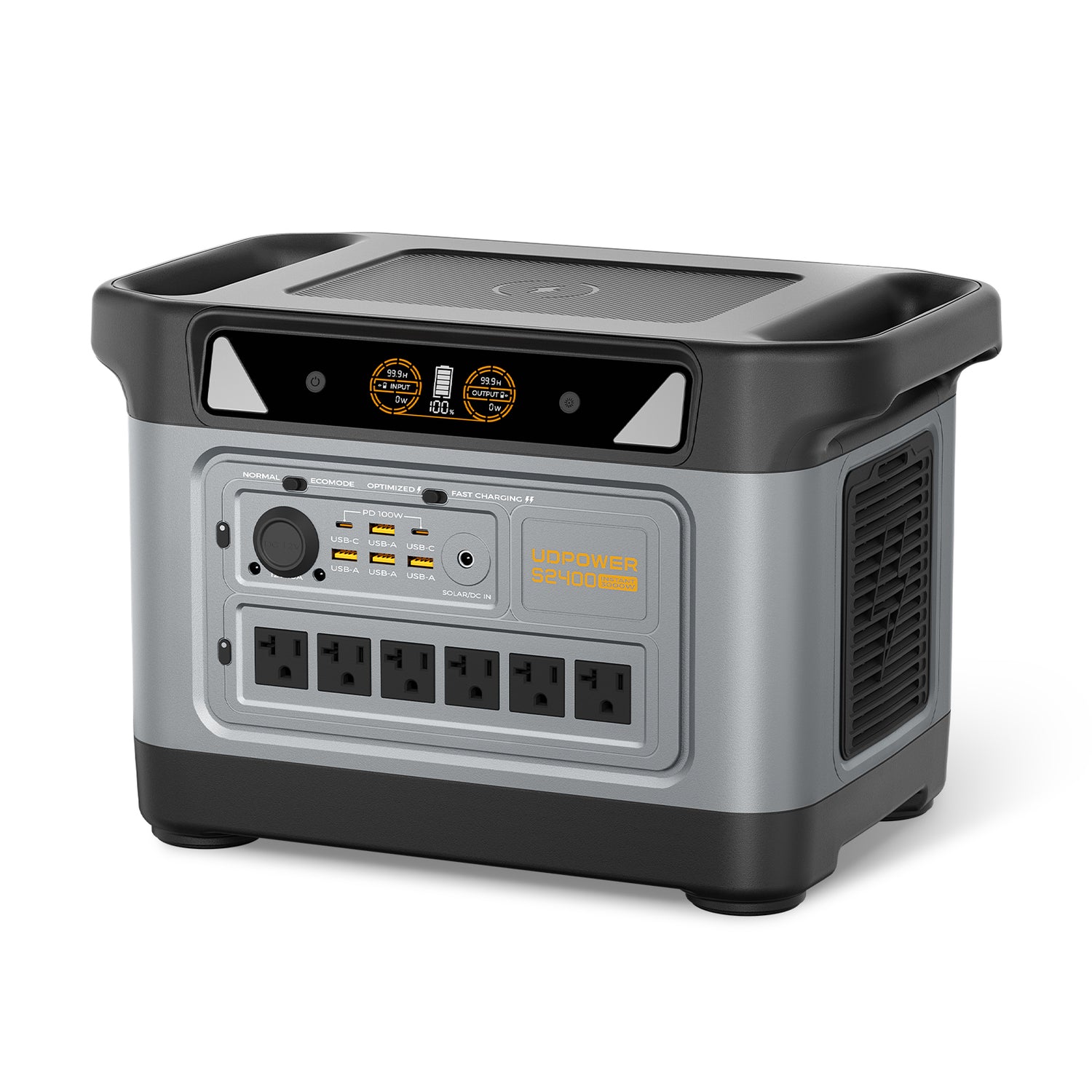
Choose S2400 if you want to power many devices beyond iPhones. It is the strongest fit here for larger emergency plans, RV setups, extended outages, refrigerators, multiple laptops, routers, fans, lights, and higher-wattage appliances within the unit’s output limits.
- Capacity: 2083Wh LiFePO4
- AC output: 2400W pure sine wave, 3000W surge
- USB-C: 2 ports, up to 100W each with PPS support
- Solar input: DC7909, 12V–50V, up to 400W
- UPS Prime: response time ≤10ms
- Weight: about 40.8 lbs
- Best for: whole-family phone charging, laptops, routers, lights, RV power, refrigerator support, extended backup
7. Estimated iPhone 17 Recharges from UDPOWER Power Stations
The table below uses a practical estimate for planning: power station capacity × 90% ÷ approximate phone battery energy for direct USB-C charging. Wireless charging through MagSafe uses more energy because it passes through more conversion steps and produces more heat, so the estimate is lower.
| UDPOWER model | Capacity | Estimated full iPhone Air recharges | Estimated full iPhone 17 recharges | Estimated full iPhone 17 Pro recharges | Estimated full iPhone 17 Pro Max recharges | Best use |
|---|---|---|---|---|---|---|
| C400 | 256Wh | About 18–19x by USB-C | About 16x by USB-C | About 14–15x by USB-C | About 11–12x by USB-C | Compact travel, car camping, short outages |
| C600 | 596Wh | About 43–45x by USB-C | About 37x by USB-C | About 32–34x by USB-C | About 27–29x by USB-C | Weekend camping, family phones, cameras, laptops |
| S1200 | 1191Wh | About 87–90x by USB-C | About 74–75x by USB-C | About 64–69x by USB-C | About 54–57x by USB-C | Home backup, RV, router, lights, CPAP, multiple devices |
| S2400 | 2083Wh | About 152–158x by USB-C | About 130x by USB-C | About 113–120x by USB-C | About 94–100x by USB-C | Extended backup, larger families, RV, outage planning |
Real results vary with cable quality, phone battery age, temperature, screen-on use, background activity, and whether you use wired USB-C or wireless charging. MagSafe is convenient, but wired USB-C gives more total phone recharges from the same power station.
When to Use the AC Outlet Instead of USB-C
Use the USB-C port whenever possible for iPhone charging. Use the AC outlet when you need to plug in a MagSafe puck with its wall adapter, charge multiple devices with a multi-port wall charger, or power other household electronics at the same time.
8. Why Your iPhone 17 Is Charging Slowly
Slow charging is usually caused by heat, a low-power charger, a weak cable, wireless alignment, or heavy phone use during charging. Before replacing your charger, check these common causes.
| Problem | Likely cause | What to do |
|---|---|---|
| Charging is slow from the start | Adapter is too low-power or does not support USB-C PD | Use a reputable USB-C PD charger: 40W+ for iPhone 17/Pro/Pro Max, 20W+ for iPhone Air/17e. |
| Fast at first, then slow after 50–80% | Normal charging taper | No fix needed. This protects the battery and controls heat. |
| Phone gets warm on MagSafe | Wireless charging heat, thick case, poor alignment, or warm room | Remove thick case, align the phone correctly, and keep the charger on a hard surface. |
| Charging barely increases while driving | Low-power car USB port, navigation, GPS, and screen use | Use a USB-C PD car charger or charge from a portable power station during stops. |
| Battery drains while plugged in | Gaming, hotspot, video recording, or navigation using power faster than the charger supplies it | Close heavy apps, turn off hotspot if possible, lock the screen, and use wired USB-C. |
| Power station seems to shut off with only a phone connected | Very low load may trigger auto-shutoff on some power stations | Use the correct DC/USB output mode, charge another small device at the same time if needed, or check the model’s low-load behavior. |
Ready to Build a Better iPhone 17 Backup Setup?
For one phone and short trips, C400 is the compact choice. For weekend camping and multiple devices, C600 is easier to live with. For home outage backup, RV use, routers, laptops, lights, and family charging, S1200 or S2400 gives you much more room to work with.
View UDPOWER portable power stations · Compare S-Series backup power · Add solar charging
10. FAQ: Charging iPhone 17
What watt charger do I need for iPhone 17?
For iPhone 17, iPhone 17 Pro, and iPhone 17 Pro Max, use a 40W or higher USB-C Power Delivery charger for Apple’s fastest wired charging target. For iPhone Air and iPhone 17e, a 20W or higher USB-C charger is enough for the official fast-charge target.
Can I use a 100W charger with iPhone 17?
Yes, if it is a reputable USB-C Power Delivery charger. The iPhone will only draw the power it can safely use. A 100W charger is useful if you also charge a laptop, tablet, or USB-C power station.
Is MagSafe slower than USB-C on iPhone 17?
In most real situations, yes. MagSafe is convenient, but wired USB-C is usually faster and more efficient. Wireless charging also creates more heat, especially with thick cases or poor alignment.
Why does my iPhone 17 charge fast at first and then slow down?
That is normal. iPhone charging speed tapers as the battery fills and as the phone manages heat. The last 20% usually takes much longer than the first 50%.
Should I charge iPhone 17 to 100% every night?
You can charge to 100% when you need the full runtime. For everyday battery health, many users prefer shorter top-ups and avoid leaving the phone hot or full for long periods. Use Optimized Battery Charging when available.
Can I charge iPhone 17 from a portable power station?
Yes. Use the power station’s USB-C port when available. Direct USB-C charging is usually more efficient than plugging a wall charger into the AC outlet, though the AC outlet is useful for MagSafe or multi-device charging adapters.
Which UDPOWER model is best just for iPhone 17 charging?
For compact travel and phone-focused backup, UDPOWER C400 is enough for many users. For multiple phones, cameras, tablets, and weekend camping, C600 is more comfortable. For home outage backup, choose S1200 or S2400.
Can I charge iPhone 17 with solar power?
Yes, but the best method is to charge a compatible power station with a solar panel, then charge the iPhone from the power station. Keep the phone out of direct sun while charging to avoid heat-related slowdowns.
Why is my iPhone 17 charging slowly in the car?
Many built-in car USB ports provide low power. Navigation, GPS, screen brightness, and heat can also reduce net charging speed. Use a USB-C PD car charger or charge from a portable power station when parked.
Is wired charging safer than wireless charging?
Both are safe when used with quality accessories. Wired charging is usually cooler and more efficient. Wireless charging is convenient, but heat control and correct alignment matter more.
Sources Checked
- Apple Support: Fast charge your iPhone
- Apple Support: How to use your MagSafe Charger with iPhone
- Apple Support: About iPhone charge speeds
- Apple: iPhone 17 Technical Specifications
- Apple: iPhone 17 Pro and iPhone 17 Pro Max Technical Specifications
- Apple: iPhone Air Technical Specifications
- UDPOWER C400 Portable Power Station
- UDPOWER C600 Portable Power Station
- UDPOWER S1200 Portable Power Station
- UDPOWER S2400 Portable Power Station
Related Articles


