





How to Charge iPhone 18: iPhone 18 Pro & Pro Max Charging Guide
Last updated: September 16, 2026
For wireless charging, both models support MagSafe up to 25W and Qi2 up to 25W. Apple specifies up to 50% in around 30 minutes when using a MagSafe Charger with a 35W or higher power adapter.

If you searched for how to charge iPhone 18, there is one important detail to know first. Apple has announced the iPhone 18 Pro and iPhone 18 Pro Max, but as of this update it has not announced a standard iPhone 18. Apple currently lists iPhone 18 Pro, iPhone 18 Pro Max, iPhone Duo, iPhone Air, iPhone 17, iPhone 17e, and iPhone 16 in its current lineup.
For that reason, this guide uses Apple's confirmed iPhone 18 Pro and iPhone 18 Pro Max charging specifications rather than assuming that a future standard iPhone 18 will use exactly the same charging system.
Is There a Standard iPhone 18?
Not yet. Apple officially introduced the iPhone 18 Pro and iPhone 18 Pro Max on September 9, 2026. The company's current product pages do not list a standard iPhone 18.
That means charging claims such as “the iPhone 18 charges at 60W” should not automatically be applied to a future standard model. Apple could use a different wired charging requirement, battery design, or wireless charging specification when or if that model is announced.
| Model | Status as of September 16, 2026 | Charging information available? | Official source |
|---|---|---|---|
| iPhone 18 | Not officially announced | No official charging specification yet | Apple Newsroom |
| iPhone 18 Pro | Officially announced | Yes | Apple Tech Specs |
| iPhone 18 Pro Max | Officially announced | Yes | Apple Tech Specs |
iPhone 18 Pro and Pro Max Charging Specs at a Glance
| Charging feature | iPhone 18 Pro | iPhone 18 Pro Max | What you need | Source |
|---|---|---|---|---|
| Charging connector | USB-C | USB-C | USB-C charging cable | Apple |
| Fast wired charging | Up to 50% in around 15 minutes | Up to 50% in around 15 minutes | 60W-capable or higher adapter with AVS plus suitable USB-C cable | Apple |
| USB PD requirement for Apple's fastest result | USB PD 3.1 or later with AVS | USB PD 3.1 or later with AVS | Compatible charger and cable | Apple Newsroom |
| MagSafe | Up to 25W | Up to 25W | MagSafe Charger | Apple |
| Apple's MagSafe fast-charge test | Up to 50% in around 30 minutes | Up to 50% in around 30 minutes | MagSafe Charger plus 35W or higher adapter | Apple |
| Qi2 wireless charging | Up to 25W | Up to 25W | Compatible Qi2 charger | Apple |
| Cable included in box | 1-meter USB-C Charge Cable | 1-meter USB-C Charge Cable | Included | Apple |
| Wall adapter included | No | No | Purchase separately or use a compatible charger you already own | Apple |
The headline “60W charging” needs some context. A 60W charger does not mean the phone draws 60 watts continuously from empty to full. USB Power Delivery allows the phone and charger to negotiate an appropriate power level, and charging naturally slows as the battery fills.
The USB Implementers Forum describes AVS as a USB Power Delivery mode that allows the device being powered to request intermediate voltages rather than relying only on fixed voltage steps. That is why the charger's supported charging protocol matters in addition to the number printed on its wattage label.
Read the USB-IF explanation of USB Power Delivery and AVS.

What Do You Need to Charge an iPhone 18 Pro?
The iPhone 18 Pro and Pro Max boxes include a 1-meter USB-C charging cable, but Apple does not list a wall power adapter as an included item.
For normal wired charging, you need:
- an iPhone 18 Pro or iPhone 18 Pro Max;
- a compatible USB-C charging cable;
- a compatible USB-C wall charger, power bank, computer port, car charger, or other USB-C power source.
For Apple's fastest specified wired result, the requirements become more specific:
- a power adapter capable of at least 60W;
- USB Power Delivery 3.1 or later;
- Adjustable Voltage Supply support;
- a USB-C charging cable capable of the required power.
How to Charge iPhone 18 Pro with USB-C
- Choose your power source. For everyday charging, use a reputable USB-C charger that meets applicable safety standards. For Apple's fastest specified charging, choose a 60W-or-higher USB PD charger that supports AVS.
- Connect the USB-C cable to the charger. Apple's included cable can be used with a compatible USB-C power source.
- Plug the other end into the USB-C port on the bottom of the iPhone.
- Check the battery indicator. The battery icon should show that charging has started.
- Leave the phone in a cool location. Heavy gaming, navigation, video recording, direct sunlight, or a hot vehicle can increase battery temperature and slow charging.
- Do not worry when charging slows near full. iPhone intentionally reduces charging speed as the battery approaches a high state of charge.
How to Charge iPhone 18 Pro
If your specific search was how to charge iPhone 18 Pro, the simplest answer is USB-C.
Plug the USB-C cable into the phone, connect the other end to a compatible USB-C power source, and charging starts automatically. You do not need to enable a “fast charging” switch.
For a quick top-up before leaving home, use the 60W-or-higher AVS-compatible charging setup described by Apple. Under Apple's test conditions, an iPhone 18 Pro can reach up to 50% in around 15 minutes.
If charging speed is less important than convenience, MagSafe is the easier desk or nightstand option. The iPhone 18 Pro supports MagSafe wireless charging at up to 25W.
How to Charge iPhone 18 Pro Max
The answer to how to charge iPhone 18 Pro Max is essentially the same because Apple specifies the same charging methods for both Pro models.
- Connect a USB-C charging cable to the phone.
- Use a compatible USB-C power adapter.
- For Apple's fastest specified result, use a 60W-or-higher AVS-capable adapter.
- Keep the phone reasonably cool while fast charging.
- Allow charging speed to taper naturally as the battery fills.
Despite the Pro Max having a larger body and longer battery-life rating, Apple gives both models the same headline fast-charge figure: up to 50% in around 15 minutes under the specified wired test conditions.
| Battery-related specification | iPhone 18 Pro | iPhone 18 Pro Max | Source |
|---|---|---|---|
| Typical use | Up to 24 hours | Up to 30 hours | Apple Tech Specs |
| Video playback | Up to 36 hours | Up to 45 hours | Apple Tech Specs |
| Streamed video playback | Up to 33 hours | Up to 40 hours | Apple Tech Specs |
| Official wired fast-charge figure | Up to 50% in around 15 minutes | Up to 50% in around 15 minutes | Apple Tech Specs |
What Watt Charger Should You Use for iPhone 18 Pro?
The best charger depends on whether you want basic charging, wireless charging, or Apple's fastest official wired result.
| Power source | Will it charge? | Expected role | Can you assume Apple's 15-minute result? |
|---|---|---|---|
| Basic USB-C charger | Generally yes, if compatible and compliant | Routine charging | No |
| 20W USB-C charger | Yes | Useful existing charger, but below Apple's new fastest-wired specification | No |
| 35W USB-C charger | Yes | Enough adapter capacity for Apple's specified MagSafe setup when paired with MagSafe Charger | Not for the 15-minute wired result |
| 60W+ USB PD charger with AVS | Yes | Apple's specified fastest wired setup | Yes, under Apple's stated test conditions |
| 65W charger without confirmed AVS support | Likely charges if USB-C compliant | Potentially fast charging, depending on protocol negotiation | No |
| 96W or 100W AVS-capable USB PD charger | Yes | Useful if the same adapter also charges a laptop or tablet | Yes, if it meets Apple's protocol and cable requirements |
Will a 100W charger damage an iPhone 18 Pro?
A properly designed USB-C Power Delivery charger does not simply force its maximum rated output into the phone. USB PD lets the connected device request the power it needs.
A higher-wattage charger can therefore be practical if you want one adapter for your iPhone, iPad, MacBook, handheld console, and other USB-C devices. What matters is protocol compatibility and charger quality, not just buying the lowest possible wattage.
Is a 65W charger enough?
Sixty-five watts is enough in terms of raw power capacity, but wattage alone is not the whole specification. If you specifically want to reproduce Apple's approximately 15-minute 50% test result, verify that the adapter supports the required USB PD implementation and AVS.
How to Charge iPhone 18 Pro with MagSafe or Qi2
MagSafe
- Connect the MagSafe Charger to a compatible USB-C power adapter.
- For Apple's quoted fast wireless result, use a 35W or higher adapter.
- Place the iPhone face up.
- Center the MagSafe charging surface against the back of the phone and allow the magnets to align it.
- Confirm the charging indicator appears.
Apple lists MagSafe charging at up to 25W and says its specified setup can charge up to 50% in around 30 minutes.
Qi2
Both iPhone 18 Pro models also support Qi2 wireless charging at up to 25W. A compatible Qi2 charger is useful when you want magnetic wireless charging but are not using Apple's MagSafe charger.
| Method | Official maximum / result | Best for | Main tradeoff |
|---|---|---|---|
| USB-C wired | Up to 50% in around 15 min with Apple's specified setup | Fastest top-ups | You need a cable |
| MagSafe | Up to 25W; up to 50% in around 30 min with specified setup | Desk and bedside convenience | More heat and generally lower efficiency than direct wired charging |
| Qi2 | Up to 25W | Compatible third-party magnetic chargers | Actual charging time varies by charger |
Can You Charge iPhone 18 Pro from a Computer, Car, or USB-A Port?
Charging from a Mac or PC
Yes. Apple supports charging an iPhone by connecting it to a computer with a cable.
The actual speed depends on how much power that computer port can provide. A high-power USB-C port may charge considerably faster than an older low-power USB port.
Make sure the computer is powered on. Apple notes that an iPhone connected to a computer that is turned off can potentially drain rather than charge.
Apple: Charge the iPhone battery
Charging in a car
A USB-C car charger is usually the cleanest option. If you are buying one specifically for fast charging, check both its wattage and supported USB Power Delivery protocols.
A vehicle's built-in USB port may provide substantially less power than a modern USB-C car adapter, especially in older cars.
Charging from USB-A
USB-A can still charge the phone when used with an appropriate cable or adapter, but it is not the setup to choose if your goal is Apple's fastest charging performance.
For newer phones, tablets, and laptops, USB-C is generally the more useful connection. For a deeper explanation, see USB-A vs. USB-C: What's the Difference?
Should You Charge iPhone 18 Pro to 80% or 100%?
You do not have to stop every charge manually at 80%. iOS already includes tools designed to reduce the amount of time the battery remains at a high state of charge.
On current iPhones, go to:
Settings → Battery → Charging
You can select a charge limit based on how you use your phone. Apple currently allows supported iPhones to use limits between 80% and 100%.
| Charging habit | Practical setting | Why it may make sense |
|---|---|---|
| Phone stays near a charger most of the day | Consider a lower Charge Limit | Reduces time spent at a very high state of charge |
| Heavy daily use | Use a higher limit that comfortably lasts your day | Battery longevity matters, but the phone still needs to be useful |
| Travel day, hiking, emergency prep | Charge to 100% when needed | Maximum runtime can matter more than minimizing battery wear on a particular day |
| Regular overnight charging | Keep Optimized Battery Charging enabled | iPhone can delay charging beyond 80% and finish closer to when you usually unplug |
Apple also notes that an iPhone with a lower charge limit may occasionally charge to 100% to maintain accurate battery state-of-charge estimates. That behavior is normal.
Why does charging slow down after about 80%?
That is expected behavior. Apple explains that iPhone charges rapidly through the earlier portion of the battery and then reduces charging speed as the battery becomes fuller. The slower final stage helps control heat and battery stress.
If you are about to leave home and need usable battery quickly, a short low-to-mid-battery fast charge is often more valuable than waiting for the final few percentage points.
Why Is My iPhone 18 Pro Charging Slowly?
Fast charging depends heavily on temperature. Apple lists an operating ambient range of 32°F to 95°F (0°C to 35°C) for iPhone 18 Pro and Pro Max.
When the phone gets too warm or too cold, iOS can automatically reduce or pause charging until the battery returns to an appropriate temperature.
| Situation | What may happen | What to do |
|---|---|---|
| Phone is sitting in direct sun | Charging may slow or pause | Move it into shade and let it cool naturally |
| Phone is in a hot parked car | Thermal protection may activate | Move it to a cooler environment before charging |
| Heavy gaming while charging | Extra heat can reduce charging speed | Pause demanding apps if you need the fastest top-up |
| Thick case traps heat | Battery temperature may rise | Remove the case if the phone becomes unusually warm |
| Very cold outdoor conditions | Charging can slow or stop temporarily | Move indoors and allow the phone to warm gradually |
Apple: Thermally Limited Charging
Can You Use Your iPhone While It Is Charging?
Yes, but what you are doing can change how quickly the battery percentage rises.
Light tasks such as messaging generally use little energy. Gaming, recording high-resolution video, navigation, hotspot use, large downloads, or other demanding workloads use more power and can produce additional heat. That means more incoming energy is being used by the phone instead of stored in the battery.
If you only have 15 or 20 minutes available and want the biggest practical battery increase, leave the phone mostly idle and keep it cool.
Can You Charge iPhone 18 Pro Overnight?
Yes. Modern iPhones manage their charging automatically, and Optimized Battery Charging is specifically designed for situations where the phone remains connected for an extended period.
Apple says the feature can pause charging around 80% and finish closer to the time when it expects you to disconnect the phone.
For users who routinely keep the phone plugged in for long periods, the Charge Limit setting provides another option.
What If the USB-C Port Gets Wet?
If the phone reports liquid in the USB-C connector, disconnect the cable.
Apple recommends allowing the connector to dry naturally in an area with airflow. Do not insert paper, cotton swabs, or other objects into the connector, and do not use compressed air or an external heat source.
Do not put the phone in rice. Small particles can enter and damage the connector.
If the back of the iPhone is dry, wireless charging may still be possible while the USB-C connector is drying.
How to Charge iPhone 18 Pro During a Power Outage, Camping Trip, or Road Trip
A phone uses relatively little energy compared with a refrigerator, coffee maker, microwave, heater, or air conditioner. That makes smartphone charging one of the easiest loads to support with a portable power station.
A portable power station becomes particularly useful when you are not charging only one iPhone. During a blackout, camping trip, road trip, or remote-work day, you may also need to keep a second phone, camera, drone, laptop, hotspot, lighting, or Wi-Fi equipment running.
There are two ways to charge from a portable power station
| Method | How it works | Advantage | Important limitation |
|---|---|---|---|
| Direct USB-C | USB-C cable connects the power station directly to the iPhone | Avoids running the AC inverter and is usually more energy-efficient | The USB-C port must support the protocol required for the charging speed you expect |
| AC outlet + wall adapter | Your normal iPhone USB-C wall adapter plugs into the power station's AC outlet | Lets you use Apple's specified AVS-compatible adapter | AC conversion adds some energy loss compared with direct DC USB-C charging |
For more on choosing between modern and legacy ports, see USB-A vs. USB-C.
You can also compare current models in the UDPOWER Portable Power Station collection.
Recommended UDPOWER Power Stations for iPhone 18 Pro Charging
You do not need a large power station simply to charge one phone. The benefit appears when you want many phone charges or need one battery to cover phones plus other electronics during travel or an outage.
UDPOWER C400: Best Overall Match for Phone, Laptop, Camera, and Travel Backup
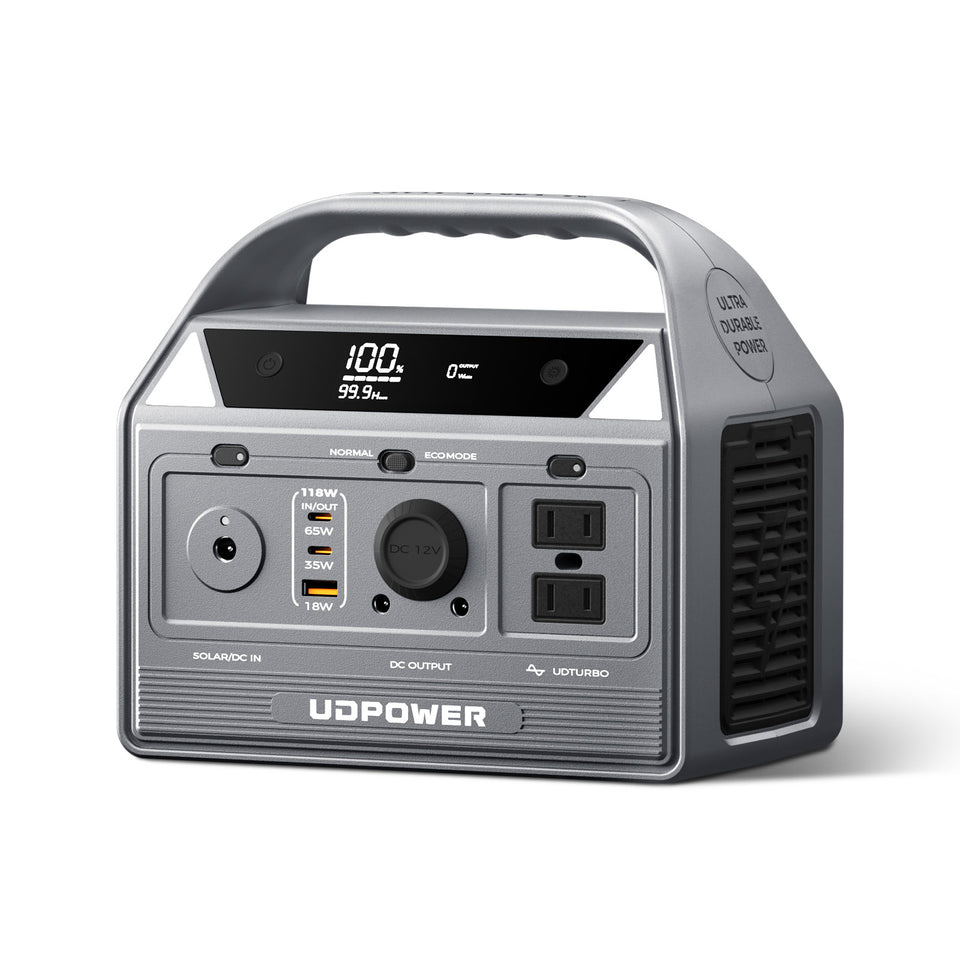
The UDPOWER C400 is the most practical choice here if your backup kit includes an iPhone, laptop, camera, drone, hotspot, lighting, or other small electronics.
- Battery capacity: 256Wh
- Rated AC output: 400W pure sine wave
- USB-C outputs: 65W + 35W, 100W total
- Published USB-C profiles: 5V/3A, 9V/3A, 12V/3A, 15V/3A, 20V/3.25A
- PPS: 3.3–21V, 3A
- Weight: approximately 6.88 lb
- Battery chemistry: LiFePO4
- AC outlets: 2
The 65W USB-C port has enough rated output capacity to charge an iPhone 18 Pro directly. However, UDPOWER's current published C400 specification identifies PD3.0/PPS behavior and does not state AVS support.
Because Apple's approximately 15-minute result specifically requires AVS, this article does not claim that direct C400 USB-C charging will necessarily reproduce Apple's fastest laboratory result.
If you specifically need Apple's fastest supported charging configuration, connect a compatible 60W-or-higher AVS wall adapter to one of the C400's AC outlets. For ordinary travel and backup charging, direct USB-C is simpler and avoids operating the AC inverter.
View UDPOWER C400UDPOWER C200: Lighter Backup for Phones and Small Electronics
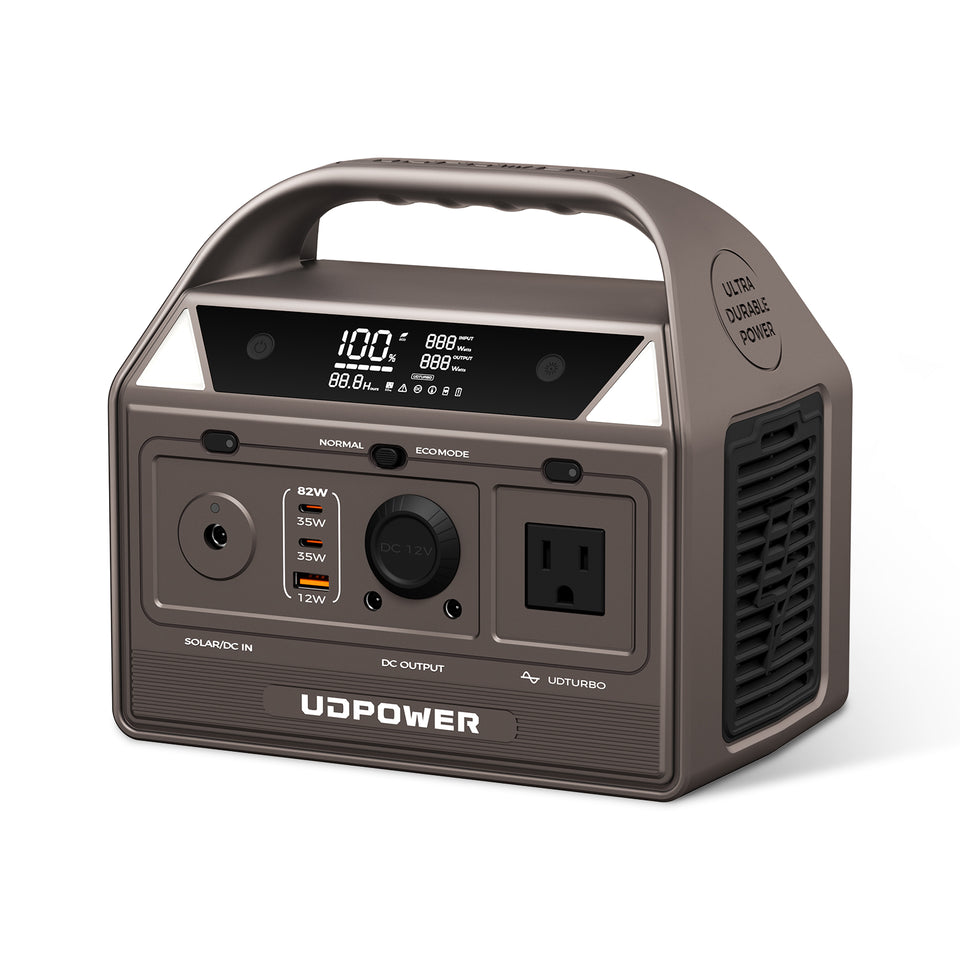
If portability matters more than high output, the UDPOWER C200 is a smaller option for phones, cameras, lights, small electronics, and short trips.
- Battery capacity: 192Wh
- Rated AC output: 200W pure sine wave
- Weight: approximately 5.4 lb
- USB-C: two 35W USB-C ports shown in the current product specifications
- Battery chemistry: LiFePO4
- AC outlet: available for your normal wall charger
The C200's direct USB-C output is below Apple's 60W specification for the fastest iPhone 18 Pro wired test, so it should not be purchased specifically for the approximately 15-minute 50% charging claim.
It can still charge an iPhone through USB-C, or you can plug an appropriate iPhone wall adapter into the C200's AC outlet when needed.
View UDPOWER C200Which UDPOWER model makes sense?
| Use case | Recommended direction | Why |
|---|---|---|
| One iPhone and a few small devices | C200 | Lightweight and more capacity than a phone alone normally needs |
| iPhone + laptop + camera + travel electronics | C400 | 65W USB-C port, second USB-C port, AC outlets, and 256Wh capacity |
| Weekend camping | C400 or larger | More useful when the battery also supports lights, camera gear, laptop, or other campsite electronics |
| Home outage with refrigerator, router, CPAP, and phones | Larger S-Series model | Phone charging becomes a small part of a much larger energy requirement |
See also:
iPhone 18 Pro Not Charging? Check These First
| Problem | Likely explanation | What to try |
|---|---|---|
| No charging icon | Loose cable, bad adapter, unpowered outlet, or damaged accessory | Reconnect both ends, try another known-good cable or adapter, and test another outlet |
| Slow Charger message | Power source cannot deliver optimal charging power | Use a more capable USB-C charger |
| Charging slows near 80% | Normal battery-management behavior | Usually no action is required |
| Charging On Hold | Phone may be too hot or too cold | Move to a moderate-temperature environment and let the phone recover |
| Stops at 80%, 85%, 90%, or another chosen level | Charge Limit may be enabled | Check Settings → Battery → Charging |
| Stops around 80% overnight | Optimized Battery Charging may be active | This is normal; iPhone may finish closer to when you usually unplug |
| Liquid Detected alert | Moisture detected in USB-C connector or accessory | Disconnect cable and allow connector to dry naturally |
| MagSafe charging is unusually slow | Heat, alignment, case, adapter, or charger limitation | Re-center charger, check power adapter, and reduce heat |
How to Charge Faster Without Hurting Everyday Battery Life
The most effective approach is not to chase the largest charger number available. Build a charging setup that controls the factors that actually affect charging speed.
- Use USB-C wired charging when speed matters.
- Use an AVS-compatible 60W-or-higher adapter when you specifically want Apple's fastest stated result.
- Use a capable cable. The charger cannot deliver a higher-power profile through an unsuitable cable.
- Keep the phone cool. Temperature can override everything else.
- Avoid demanding workloads during a short emergency top-up.
- Do not judge fast charging by the final 10–20%. Charging intentionally tapers near full.
- Use Charge Limit or Optimized Battery Charging according to your routine.
Charging Setup by Situation
| Situation | Recommended setup | Reason |
|---|---|---|
| Need battery quickly before leaving | USB-C + 60W-or-higher AVS adapter | Matches Apple's fastest published wired setup |
| Charging overnight | Compatible charger + Optimized Battery Charging | Maximum charging speed is usually unnecessary overnight |
| Work desk | MagSafe or Qi2 | Convenient repeated pick-up and put-down charging |
| Long drive | USB-C car charger | Keeps the phone powered during navigation and hotspot use |
| Camping | Portable power station + direct USB-C | Efficient for routine off-grid charging |
| Camping but fastest iPhone charging required | Power station AC outlet + verified AVS adapter | Lets you reproduce Apple's required adapter configuration off-grid |
| Home blackout | Portable power station | Can charge multiple phones while also supporting communication and other essential electronics |
Frequently Asked Questions
How do you charge an iPhone 18?
Apple has not yet announced a standard iPhone 18 as of September 16, 2026. The officially announced iPhone 18 Pro and Pro Max charge through USB-C and also support MagSafe and Qi2 wireless charging.
How do you charge an iPhone 18 Pro?
Connect a USB-C cable to the USB-C port on the iPhone 18 Pro and connect the other end to a compatible power source. For Apple's fastest specified wired charging, use a 60W-capable or higher USB PD charger with AVS.
How do you charge an iPhone 18 Pro Max?
Use a USB-C charging cable and a compatible USB-C power adapter. Apple specifies the same approximately 15-minute 50% fast-charge target for both iPhone 18 Pro and iPhone 18 Pro Max when using the required 60W-or-higher AVS charging setup.
Does iPhone 18 Pro come with a charger?
Apple's technical specifications list a 1-meter USB-C Charge Cable in the box, but they do not list a wall power adapter. The adapter is therefore purchased separately or reused from a compatible charger you already own.
What watt charger does iPhone 18 Pro need?
You do not need 60W simply to make the phone charge. However, Apple specifies a 60W-capable or higher power adapter with AVS for its fastest wired result of up to 50% in around 15 minutes.
Can I use a 65W charger with iPhone 18 Pro?
Yes, a compatible USB-C charger can charge the phone. However, a 65W label by itself does not confirm support for Apple's required AVS charging profile. Check the charger's USB Power Delivery specifications if you want Apple's fastest stated charging result.
Can I use a 100W charger with iPhone 18 Pro?
Yes, provided it is a properly designed compatible USB-C Power Delivery charger. A 100W rating represents the charger's maximum capability; the iPhone negotiates the power it uses.
Does iPhone 18 Pro support MagSafe?
Yes. Apple specifies MagSafe wireless charging at up to 25W for both iPhone 18 Pro and iPhone 18 Pro Max.
Does iPhone 18 Pro support Qi2?
Yes. Both iPhone 18 Pro models support Qi2 wireless charging at up to 25W.
How long does an iPhone 18 Pro take to charge?
Apple currently publishes a partial-charge figure rather than a universal 0–100% charging time. Under its specified wired test conditions, the phone can reach up to 50% in around 15 minutes. Full charging takes longer because charging speed decreases as the battery fills.
Why does my iPhone 18 Pro stop charging at 80%?
Optimized Battery Charging, a user-selected Charge Limit, or temperature management can cause charging to pause or stop near 80%. Check Settings → Battery → Charging to see which charging options are active.
Is it safe to charge iPhone 18 Pro overnight?
Yes. iPhone includes battery-management features designed for extended charging. Optimized Battery Charging can reduce the time the battery remains fully charged by delaying part of the charge until closer to when you normally unplug it.
Can I charge iPhone 18 Pro from a portable power station?
Yes. You can connect the phone directly to a compatible USB-C output or plug your regular wall charger into the power station's AC outlet. Direct USB-C is generally more energy-efficient, while the AC method is useful when you specifically need a charger protocol that the power station's built-in USB-C port does not provide.
Can the UDPOWER C400 charge iPhone 18 Pro?
Yes. The C400 provides USB-C outputs including a 65W port, as well as AC outlets. Its published USB-C specification lists PD3.0/PPS rather than AVS, so direct charging should not automatically be assumed to reproduce Apple's approximately 15-minute test result. A verified AVS wall adapter can instead be used through the C400's AC outlet.
Why is my iPhone charging slowly even with a powerful charger?
Possible causes include incompatible charging protocols, an unsuitable cable, high or low battery temperature, demanding phone use while charging, wireless alignment, or normal charging slowdown as the battery approaches full.
Related Charging Guides
Bottom Line
For iPhone 18 Pro and iPhone 18 Pro Max, USB-C wired charging is the best choice when speed matters. Apple's fastest published setup uses a 60W-capable or higher USB Power Delivery charger with AVS and can reach up to 50% in around 15 minutes under Apple's test conditions.
MagSafe and Qi2 both support up to 25W when convenience matters more than absolute charging speed. For everyday battery care, use iPhone's Charge Limit and Optimized Battery Charging tools rather than trying to micromanage every charge by hand.
When charging away from a wall outlet, a portable power station gives you two useful options: efficient direct USB-C charging for routine use, or an AC outlet for a verified AVS wall adapter when you specifically want to match Apple's fastest charging requirements.
Need More Than a Phone Charger?
If your travel or emergency setup includes an iPhone, laptop, camera, hotspot, lights, or other electronics, compare portable power stations by battery capacity, USB-C output, weight, and real-world use case.
Related Articles


