





How Easy Is a Portable Power Station to Use?
Latest updated: June 22, 2026
A portable power station is generally very easy to use: charge the battery, turn on the output you need, and plug in your device. There is no fuel to pour, engine to start, oil to change, or permanent wiring to install.
The part that requires a little learning is not operating the power station—it is choosing the correct outlet, staying within the wattage limit, and estimating how long the battery will last. Most first-time users can learn the basic controls in about 10 minutes.

If you are wondering how easy a portable power station is to use, it helps to separate the question into three parts. Physically operating one is simple. Matching it to an appliance takes basic wattage knowledge. Planning reliable backup power requires checking battery capacity, runtime, charging options, and startup surge.
This guide walks through the complete process from opening the box to powering a refrigerator, CPAP machine, laptop, campsite, or emergency setup. It also explains the mistakes that make an otherwise simple power station feel complicated.
The Three Levels of Portable Power Station Ease
Calling a power station “easy to use” can be misleading unless we define what easy means. A useful way to judge ease of use is to look at three separate levels.
1. Physical operation: very easy
Basic operation is similar to using a large rechargeable power bank. You press the main power button, activate the AC or DC output, and connect your device.
Most models include an LCD screen that shows:
- Remaining battery percentage
- Incoming charging watts
- Outgoing load watts
- Estimated charging or discharging time
- Warning symbols if the station is overloaded or too hot
You normally do not need tools, electrical installation, gasoline, engine maintenance, or an electrician for ordinary portable use.
2. Appliance matching: easy after learning two numbers
The two numbers that matter most are watts and watt-hours:
- Watts (W) tell you whether the station can operate a device.
- Watt-hours (Wh) help estimate how long the station can operate it.
For example, a 600W power station can normally run a device that draws 100W, but it should not be expected to operate a 1,500W space heater. The plug may fit, but the electrical load is too high.
For a deeper explanation, see What Is a Portable Power Station? A Beginner’s Guide.
3. Backup planning: moderately easy
Reliable emergency planning takes more thought than simply plugging in a phone. You need to know which devices are essential, how much power they use, how long they must run, and how the station will be recharged if an outage lasts more than one day.
This is why a small station may be extremely easy to carry but unsuitable for a refrigerator, while a larger station may be easier to rely on during an outage but heavier to move.
Practical conclusion: portable power stations are easy to operate, but the easiest ownership experience comes from choosing the correct size before you buy.
How to Use a Portable Power Station for the First Time
The following process works for most modern portable power stations. Always check the manual for model-specific buttons, charging limits, and temperature requirements.
Step 1: Inspect the unit and accessories
Check the enclosure, screen, ports, charging cables, and connectors for visible damage. Do not use a battery product that has been crushed, punctured, soaked, or damaged during shipping.
Step 2: Place it on a stable, dry surface
Keep the station upright with space around its cooling vents. Do not place clothing, blankets, bags, or other objects against the air inlets and outlets.
Step 3: Charge it before depending on it
Connect the supplied AC charging cable or adapter to a compatible wall outlet. Watch the input reading on the display to confirm that charging has started.
Step 4: Turn on the main power
Press or hold the main power button as directed by the manual. The screen should display the battery level and current input or output.
Step 5: Activate the correct output section
AC outlets, USB ports, and 12V DC ports may have separate control buttons. A household appliance will not receive power from an AC outlet until the AC output is enabled.
Step 6: Test a low-power device first
Start with a phone charger, lamp, laptop, or another familiar device. Confirm that the output wattage appears on the display and that the connected device operates normally.
Step 7: Test your intended appliance before an emergency
Do not wait for a blackout to discover that a refrigerator has a high startup surge or that a CPAP setup behaves differently with the heated humidifier enabled. Run a real test while utility power is still available.
Step 8: Recharge and store it in an accessible place
After testing, recharge the battery and store it somewhere dry, temperature-controlled, and easy to reach. Check the battery periodically instead of leaving it forgotten for years.
The 10-minute readiness test: charge the station, power a small load, verify the display, test the main appliance you bought it for, and confirm that you know which cable recharges it. Completing these steps eliminates most first-use confusion.
Understanding the Controls and Ports
The front panel may look busy at first, but each group of ports has a specific purpose.
| Port or Control | What It Does | Common Uses | Beginner Check |
|---|---|---|---|
| Main power button | Turns the station or display on and off | Required before using most functions | Some models require a short press; others require holding the button |
| AC output button | Activates household-style outlets | Refrigerators, laptops, TVs, CPAP machines, small appliances | Check the appliance wattage before connecting it |
| USB-A | Provides standard USB charging | Phones, lights, cameras, accessories | Charging speed depends on the port and device |
| USB-C Power Delivery | Provides higher-power USB charging on supported ports | Laptops, tablets, phones, cameras | Use a USB-C cable rated for the required power |
| 12V car outlet | Provides DC power without using a household AC plug | Portable refrigerators, air pumps, automotive accessories | Confirm voltage, current, and connector compatibility |
| Solar/DC input | Accepts compatible solar or vehicle charging input | Camping, RV travel, off-grid recharging | Panel voltage and current must remain within the station’s input limits |
| Eco mode | May shut down outputs when the detected load remains very low | Reducing standby battery drain | Test overnight medical devices, routers, and other low-power loads before relying on them |
| LCD display | Shows battery, input, output, estimated time, and warnings | Monitoring the complete setup | Use the live output reading instead of relying only on an appliance label |
On a phone, drag the table sideways to view all columns.
Which Tasks Are Easy and Which Take Practice?
| Task | Practical Difficulty | Typical Learning Time | What You Need to Know |
|---|---|---|---|
| Charging from a wall outlet | Very easy | 1–2 minutes | Use the supplied charging cable and confirm input on the screen |
| Charging a phone or laptop | Very easy | 1–2 minutes | Select a compatible USB port and cable |
| Running a small AC appliance | Easy | About 5 minutes | Turn on AC output and remain below the rated wattage |
| Estimating runtime | Moderate | About 10 minutes | Battery Wh, device watts, and conversion losses |
| Running a refrigerator | Moderate | One test cycle | Average draw, compressor startup surge, and cycling |
| Using it as backup for a CPAP | Moderate | One overnight test | Humidifier power, hose heating, Eco mode, and required runtime |
| Charging from a car | Easy | About 5 minutes | Use the correct cable and avoid draining a parked vehicle battery |
| Setting up a solar panel | Moderate | 15–30 minutes | Connector type, voltage range, current limit, panel angle, and shade |
| Connecting to home electrical circuits | Professional task | Varies | Never backfeed a household outlet; use approved equipment and qualified installation |
On a phone, drag the table sideways to view all columns.
How to Know What a Portable Power Station Can Run
Before plugging in an appliance, compare the appliance’s required wattage with the station’s rated AC output.
Find the device wattage
Look at the appliance label, power adapter, manual, manufacturer website, or a plug-in watt meter. If the label provides volts and amps but not watts, use:
Watts = Volts × Amps
Example: 120V × 3A = 360W
Add the wattage of devices used at the same time
A 100W television, 60W laptop charger, and 20W router create a combined load of approximately 180W. The total simultaneous load—not just the largest single device—must remain within the station’s rated output.
Allow for startup surge
Devices with compressors, pumps, and motors can briefly draw more power when starting. Refrigerators, freezers, power tools, and some pumps may therefore require more startup headroom than their normal running wattage suggests.
Do not confuse surge output with continuous output
Surge power is available only for a brief startup demand. It does not mean a station can continuously operate an appliance above its normal rated output.
High-heat appliances drain batteries quickly. Space heaters, hair dryers, electric kettles, hot plates, and some coffee makers may draw 1,000–1,800W. A station may be powerful enough to start them but still provide a much shorter runtime than a first-time buyer expects.
How to Estimate Portable Power Station Runtime
A practical planning formula is:
Estimated runtime = battery capacity in Wh × 0.90 ÷ device watts
The 0.90 factor allows for normal conversion losses. Actual runtime can still change because of temperature, battery condition, inverter overhead, appliance cycling, power mode, and changing device demand.
Example
A 1,190Wh station powering a steady 100W load:
1,190Wh × 0.90 ÷ 100W = approximately 10.7 hours
This is a planning estimate, not a guaranteed result. A refrigerator, for example, turns its compressor on and off rather than drawing one fixed wattage continuously.
| UDPOWER Model | 20W Load | 40W Load | 60W Load | 100W Load | 500W Load | 1,200W Load |
|---|---|---|---|---|---|---|
| C600 596Wh / 600W |
About 26.8 hours | About 13.4 hours | About 8.9 hours | About 5.4 hours | About 1.1 hours | Load exceeds rated output |
| S1200 1,190Wh / 1,200W |
About 53.6 hours | About 26.8 hours | About 17.9 hours | About 10.7 hours | About 2.1 hours | About 0.9 hours |
| S2400 2,083Wh / 2,400W |
About 93.7 hours | About 46.9 hours | About 31.2 hours | About 18.7 hours | About 3.7 hours | About 1.6 hours |
Estimates use 90% conversion efficiency and a steady load. On a phone, drag the table sideways to view all columns.
For cycling appliances and more detailed planning, use the battery runtime estimator guide or read How Long Does a Power Station Last?.
Easy-to-Use UDPOWER Models by Power Need
The easiest model to own is not automatically the smallest or the most powerful. It is the model that has enough output and capacity for your actual equipment without adding unnecessary weight.

UDPOWER C600: easiest for portable everyday power
- Battery capacity: 596Wh
- Rated AC output: 600W
- Peak output: 1,200W
- Weight: 12.3 lb
- AC outlets: 2
- Solar input: Up to 240W within the listed input range
Best for: laptops, phones, cameras, projectors, fans, portable refrigerators, weekend camping, road trips, and light outage backup.
The C600 is the easiest of these three models to carry. It is a practical choice when portability matters more than running high-wattage kitchen or heating appliances.
Source: official UDPOWER C600 specifications
View UDPOWER C600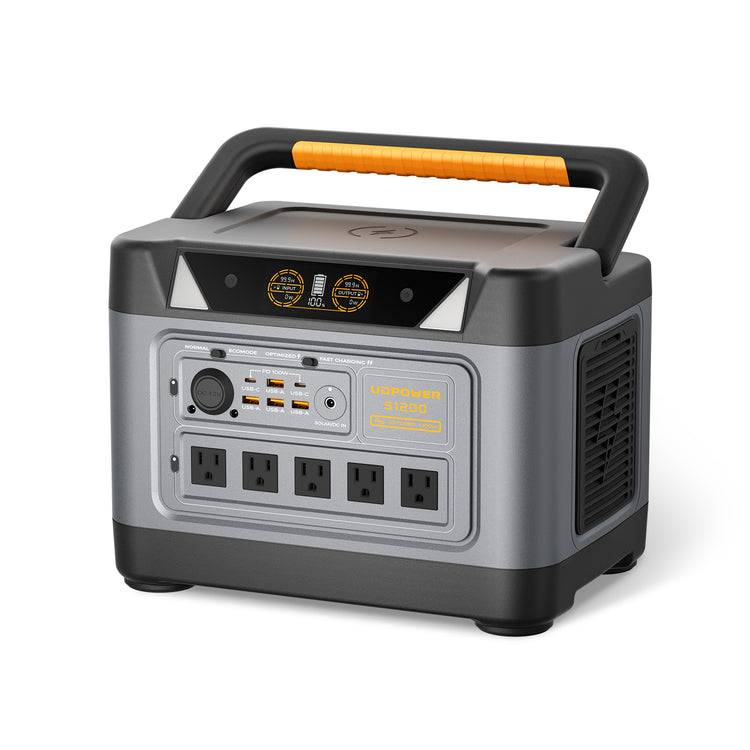
UDPOWER S1200: easiest all-around home and camping choice
- Battery capacity: 1,190Wh
- Rated AC output: 1,200W
- Surge output: 1,800W
- Weight: Approximately 26 lb
- AC outlets: 5
- Solar input: Up to 400W
- Backup switching: UPS mode with a listed response time of 10 milliseconds or less
Best for: refrigerators, CPAP machines, internet equipment, televisions, laptops, lighting, RV trips, and practical home outage backup.
The S1200 provides more appliance compatibility and runtime than a compact station while remaining manageable for one person to carry. For many households, it offers the simplest balance between portability and useful backup capacity.
Source: official UDPOWER S1200 specifications
View UDPOWER S1200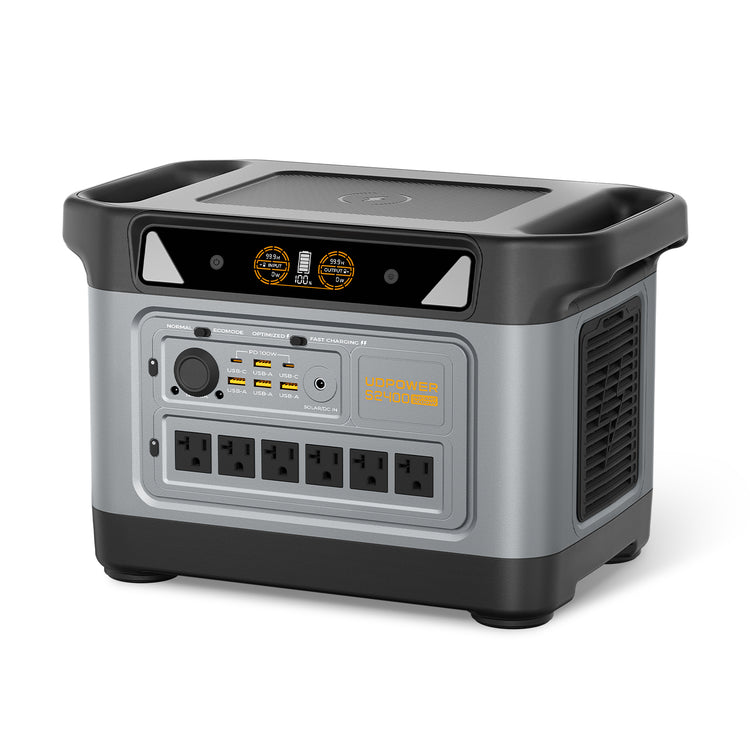
UDPOWER S2400: easiest for larger appliances and longer backup
- Battery capacity: 2,083Wh
- Rated AC output: 2,400W
- Surge output: 3,000W
- Weight: Approximately 40.8 lb
- AC outlets: 6
- Solar setup: Compatible with UDPOWER’s two-panel 210W kit; third-party panels must remain within the listed input voltage and current limits
Best for: larger refrigerators, microwaves, coffee makers, power tools, multiple devices, RV base camps, and higher-demand emergency setups.
The S2400 is heavier, but its larger inverter and battery reduce the need to constantly decide which appliance can be connected. For higher-demand users, having enough headroom can make daily operation easier than trying to manage an undersized station.
Source: official UDPOWER S2400 specifications
View UDPOWER S2400How Easy Is It to Recharge a Portable Power Station?
Most portable power stations support several charging methods. Wall charging is the simplest and most predictable. Vehicle and solar charging are convenient during travel but require more planning.
Wall outlet charging
Connect the supplied cable or adapter to a normal compatible outlet. This is usually the fastest and easiest way to prepare the station before a trip or outage.
Vehicle charging
A compatible car charging cable can recharge the station while traveling. Vehicle charging is generally slower than wall charging. It is safer to charge while the engine is running so the station does not drain the vehicle’s starter battery.
Solar charging
Solar charging is easy after the panel and connector have been matched correctly:
- Confirm that the panel’s open-circuit voltage remains within the station’s input range.
- Confirm that the current, wattage, and connector are compatible.
- Place the entire panel in direct sunlight.
- Avoid shadows from trees, roof racks, cables, buildings, or the user’s body.
- Adjust the angle while watching the live input wattage on the station’s display.
Solar panel wattage is a rated maximum under test conditions. Real input changes with sun angle, clouds, temperature, shade, panel orientation, and charging limits.
Do not connect panels only because the plugs appear to fit. Electrical compatibility matters. Never exceed the power station’s listed solar input voltage or current limits.
For solar-ready packages, browse UDPOWER solar generators.
Is a Portable Power Station Easier Than a Gas Generator?
For indoor electronics, camping, overnight medical devices, and short outages, a portable power station is usually easier to operate. A gas generator can provide longer power when fuel is available, but it requires more setup, maintenance, and safety precautions.
| Ownership Task | Portable Power Station | Gas Generator |
|---|---|---|
| Starting | Press a button | May require fuel checks, choke settings, pulling a cord, or electric start |
| Indoor operation | Generally suitable indoors when kept dry, ventilated, and used as directed | Must remain outdoors and safely away from buildings because of exhaust |
| Noise | Usually quiet except for cooling fans | Continuous engine noise |
| Fuel | Recharge from wall, vehicle, compatible solar, or generator | Requires gasoline, propane, or another supported fuel |
| Maintenance | No engine oil, spark plugs, or carburetor | Periodic engine and fuel-system maintenance |
| Runtime extension | Requires recharging or additional battery capacity | Can continue running when more fuel is safely added as directed |
| High-power loads | Limited by inverter output and battery capacity | Larger models may support substantial continuous loads |
On a phone, drag the table sideways to view all columns.
Common Beginner Mistakes That Make Power Stations Feel Difficult
Forgetting to turn on the output section
The main screen may be on while the AC or DC outlet group remains off. Turn on the output associated with the port you are using.
Assuming every household plug is compatible
A plug fitting into an AC outlet does not mean the station has enough output to run the appliance. Check continuous and startup wattage first.
Buying by watts alone
Rated output determines what can run, but battery capacity determines runtime. A powerful inverter paired with a small battery may run a high-wattage appliance only briefly.
Buying by watt-hours alone
A large battery does not help when the inverter cannot start the intended appliance. Capacity and output must both match the job.
Expecting nameplate capacity at the outlet
Some stored energy is used by the inverter, control electronics, cooling system, and voltage conversion. Runtime calculations should include an efficiency allowance.
Ignoring low-load auto-shutoff behavior
Eco settings can turn off outputs when the detected load remains below a threshold. This matters for routers, small LED lights, and some medical setups. Test the exact load in advance.
Using high-heat appliances without checking runtime
A heater or kettle can consume more energy in one hour than a router uses over several days. High wattage is both an output and runtime issue.
Waiting until an outage to test the system
The easiest time to identify a missing cable, incompatible plug, overload, or unexpected setting is before an emergency.
Covering the cooling vents
Soft bedding, clothing, vehicle cargo, and tent walls can block airflow. Keep adequate space around the ventilation openings.
Connecting incompatible solar panels
Connector appearance alone is not enough. Confirm voltage, current, polarity, wattage, and input specifications.
Quick Troubleshooting Guide
| Problem | Likely Cause | What to Check |
|---|---|---|
| AC appliance receives no power | AC output is off | Turn on the main unit and then activate the AC output section |
| Station shuts down with a small load | Eco or low-load shutoff | Review the power mode and test with Eco mode adjusted as allowed by the manual |
| Appliance starts and immediately stops | Startup surge or overload | Disconnect other loads and compare appliance startup demand with station surge capability |
| Battery drains faster than expected | Actual wattage is higher than assumed | Read the live output display or use a watt meter; check heaters, humidifiers, pumps, and accessories |
| Solar input is much lower than panel rating | Shade, poor angle, clouds, heat, or input limitation | Move into full direct sun and adjust the panel while watching input watts |
| Solar input remains at zero | Connector, polarity, voltage, cable, or panel issue | Confirm complete electrical compatibility and inspect every connection |
| Cooling fan turns on | High load, fast charging, or elevated temperature | Keep vents clear and reduce the load if the unit displays a temperature warning |
| Station will not charge in extreme weather | Battery protection has limited charging | Move the station into its approved charging temperature range before trying again |
| Error remains after removing the load | Protection state has not reset | Disconnect charging and all loads, fully power down the unit, wait briefly, and restart according to the manual |
On a phone, drag the table sideways to view all columns.
Beginner Buying Checklist: Choose a Station That Stays Easy to Use
- List the exact devices you want to power. Avoid buying for a vague idea such as “emergency use.”
- Find each device’s running wattage. Use the label, manual, manufacturer information, or a watt meter.
- Check startup surge. Pay special attention to refrigerators, freezers, pumps, and motor-driven tools.
- Add simultaneous loads. Include every device that may be used at the same time.
- Calculate daily watt-hours. Multiply watts by hours of use.
- Add an efficiency and reserve allowance. Do not plan around using every advertised watt-hour.
- Check the ports. Count AC outlets and confirm USB-C, USB-A, car outlet, or DC requirements.
- Check the carrying weight. A unit is only portable when the intended user can safely move it.
- Choose a recharge plan. Decide whether you will use a wall outlet, vehicle, solar panel, or a combination.
- Verify warranty and support. Backup equipment should have clear documentation and an accessible support channel.
- Run a full test at home. Confirm compatibility before camping, travel, or severe weather.
For a camping-specific calculation, read How Many Wh Do I Need for Camping?.
Frequently Asked Questions
Are portable power stations difficult for beginners to use?
No. Basic operation usually involves charging the battery, pressing the main power button, activating the required output, and plugging in a device. Beginners mainly need to learn the difference between watts and watt-hours.
Do I need an electrician to use a portable power station?
Not for normal portable use through the built-in AC, USB, and DC ports. Professional help may be required when connecting backup equipment to household circuits. Never backfeed power through a wall outlet.
Can a portable power station be used indoors?
A battery power station does not burn gasoline or create engine exhaust, so it can generally be used indoors. Keep it dry, leave the cooling vents unobstructed, and follow the manufacturer’s operating temperature and safety instructions.
How do I turn on the AC outlets?
Turn on the main power station and then press the separate AC output button. The screen or an indicator light should confirm that the AC section is active.
Can I use a portable power station while it is charging?
Many models support some form of pass-through operation, but capabilities and limitations vary. Check the instructions for the exact model, especially when using high-wattage appliances or backup functions.
How do I know whether it can run my appliance?
Compare the appliance’s running and startup wattage with the station’s continuous and surge output. Also add the wattage of any other devices that will operate at the same time.
Can a portable power station run a refrigerator?
Yes, when the station has enough continuous output, startup surge capability, and battery capacity. Refrigerators cycle on and off, so the most accurate method is to test the actual refrigerator and observe its real energy use.
Can I plug an extension cord into a portable power station?
A suitable extension cord can generally be used with an AC outlet, but it must be correctly rated for the appliance and total load. Keep it dry, fully inspect it, avoid damaged cords, and do not exceed the station or cord rating.
Is solar charging difficult?
The physical setup is simple, but the panel must have compatible voltage, current, polarity, wattage, and connectors. Once compatibility is confirmed, place the panel in direct sunlight and adjust its angle while monitoring input watts.
What size portable power station is easiest for a beginner?
A 500–600Wh model is easy to carry and works well for phones, laptops, fans, cameras, and light camping. A roughly 1,000–1,200Wh model is often easier for refrigerator, CPAP, RV, and home-backup use because it provides more runtime and appliance headroom.
Why does my power station turn off when almost nothing is connected?
Eco or low-load protection may shut down an output when the device draw remains below a set threshold. Review the power mode and test critical low-wattage equipment before relying on it overnight.
How often should I check a stored power station?
Follow the storage instructions for the exact model and inspect its battery level periodically. Avoid leaving emergency equipment completely forgotten until the day it is needed.
Choose Portable Power Without Guessing
Start with the appliances you need to run, calculate their combined wattage and daily energy use, and then choose enough output and battery capacity for a realistic reserve.
View Portable Power Stations View Home Backup Options Get the Runtime GuideRelated Articles


