





What Is a Plug-and-Play Battery? Uses, Runtime & Sizing
Latest updated: June 30, 2026
A plug-and-play battery is an all-in-one rechargeable power system that can power devices without requiring you to build or wire a separate battery system.
In the portable-power market, the term usually refers to a portable power station containing battery cells, a battery management system, a charger, an inverter, and built-in AC, USB, or DC outlets. You charge the unit, turn on the correct output, and plug your device directly into it.
“Plug and play” describes convenience—not unlimited power, automatic whole-home backup, or permission to connect the unit to a household wall outlet or electrical panel.

What Does “Plug-and-Play Battery” Mean?
A plug-and-play battery is a ready-to-use energy storage product designed to remove most of the wiring, component matching, and electrical assembly required by a traditional battery bank.
For normal portable use, you do not separately buy and connect a battery, inverter, charge controller, display, AC receptacle, and safety system. Those parts are already integrated into one enclosure.
The most familiar example is a portable power station. It charges from a wall outlet, vehicle socket, or compatible solar panel and then powers equipment through its own outlets.
The most important distinction: a portable plug-and-play battery receives power from a wall outlet for charging, but it normally supplies power through the outlets located on the battery itself. It should not be confused with a grid-interactive home battery designed to send energy through household wiring.
“Plug and play” is not a performance rating
The phrase does not tell you how much energy the battery stores, how much power it can deliver, whether it has UPS functionality, or whether it can run a refrigerator. Those answers come from the actual specifications.
Before buying, check:
- Capacity in watt-hours: how much energy is stored.
- Continuous output in watts: how much power it can deliver steadily.
- Surge output: short startup support for motors and compressors.
- AC voltage: whether it matches your equipment.
- Outlet types: AC, USB-C, USB-A, 12V car socket, or DC5521.
- Charging limits: wall, car, and solar input ratings.
- UPS mode: whether it can switch to battery power automatically.
- Safety testing: applicable certifications and protection systems.
Three Products That May Be Called a Plug-and-Play Battery
The name is used loosely, so two products described as “plug-and-play batteries” may work very differently.
| Product type | How it connects | Typical purpose | Installation | Important limitation |
|---|---|---|---|---|
| Portable power station | Devices plug into outlets on the unit | Camping, emergency essentials, RVs, CPAP, mobile work | Usually no fixed wiring | Does not automatically power household circuits |
| Grid-interactive plug-in home battery | May exchange energy through a compatible household circuit | Energy-rate management or selected home backup | Depends on product, location, electrical code, and utility rules | Must be specifically designed and approved for grid interaction |
| Removable equipment battery | Slides or plugs into a specific tool, appliance, or vehicle | Powering one compatible product family | No electrical construction, but compatibility is restricted | Usually cannot power general household appliances |
This guide focuses on the first category: portable, all-in-one battery power stations such as the products in the UDPOWER plug-and-play battery collection.
What Is Inside a Plug-and-Play Battery?
The convenience comes from integrating several components that would otherwise need to be selected and connected separately.
| Component | What it does | Why it matters to the user |
|---|---|---|
| Rechargeable battery cells | Store electrical energy as direct current | Determine the basic capacity, weight, lifespan, and chemistry of the system |
| Battery management system | Monitors cell voltage, current, temperature, charging, and discharging | Helps prevent overcharge, excessive discharge, overheating, and short circuits |
| Inverter | Converts battery DC power into household-style AC power | Allows ordinary 120V appliances to use the stored energy |
| Charging system | Controls incoming wall, vehicle, or solar power | Lets the battery recharge without a separate external charge controller in normal use |
| AC and DC outputs | Provide connections for appliances, phones, laptops, lights, and 12V equipment | Reduces the need for separate adapters and distribution panels |
| Display and controls | Show battery level, input watts, output watts, and estimated remaining time | Help users manage loads and see whether charging is working correctly |
| Cooling and protection hardware | Manages internal heat and isolates faults | Supports stable operation when charging or powering heavier equipment |
The U.S. Department of Energy explains that batteries store DC electricity while an inverter converts that electricity into AC power used by household equipment. UL Solutions describes UL 2743 as a standard covering portable power packs housed in an enclosure and intended to provide portable power when grid power is unavailable.
Technical references: U.S. Department of Energy inverter guide and UL portable power pack testing overview.
How Does a Plug-and-Play Battery Work?
- The battery is charged. Energy enters from a wall outlet, vehicle charging cable, or compatible solar panel.
- The charging system regulates the input. It controls voltage and current so the internal battery cells charge within their permitted range.
- The battery management system monitors conditions. It watches temperature, current, state of charge, and cell behavior.
- The user turns on the required output. AC outlets, USB ports, and DC ports may have separate switches.
- The inverter supplies AC power when needed. It converts stored DC energy into 120V AC for compatible appliances.
- The display tracks real-time use. Input and output readings help the user avoid overloads and estimate remaining runtime.
What does “pure sine wave” mean?
A pure sine wave inverter is designed to produce AC power with a waveform similar to normal utility power. It is generally the preferred choice for laptops, CPAP equipment, refrigerators, TVs, audio equipment, and other electronics that may not operate properly on rougher modified-sine-wave output.
Why the number of outlets can be misleading
Five AC outlets do not mean the station can provide five times its rated power. Every connected device shares the same total output limit.
For example, a station rated for 1,200W continuous output can support several devices at once only when their combined running load remains within 1,200W and their startup demand stays within the station’s supported surge range.
How to Set Up a Plug-and-Play Battery in Five Minutes
- Check the appliance label. Find its input watts or calculate watts by multiplying volts by amps.
- Confirm output compatibility. Make sure the appliance’s running watts and startup surge are within the power station’s limits.
- Place the unit correctly. Use a dry, stable surface with open space around the cooling vents.
- Turn the power station on. Then activate the AC or DC output needed by the appliance.
- Plug the appliance directly into the unit. Do not connect the power station’s AC output to a household wall receptacle.
- Watch the output reading. Verify that the load is stable and not approaching the station’s limit.
- Test before an emergency. Run the intended equipment long enough to confirm compatibility, noise, cycling, and actual runtime.
Never use a male-to-male cord or attempt to energize a house by plugging the battery into a wall outlet. That can create dangerous backfeed. Home electrical integration requires compatible equipment and review by a qualified electrician.
What Can a Plug-and-Play Battery Run?
It can run any compatible device whose voltage, continuous wattage, startup surge, and connector requirements fall within the battery’s specifications.
| Device | Typical planning load | What to check | Suggested power-station class |
|---|---|---|---|
| Wi-Fi router | About 5–20W | Power adapter voltage and low-load auto-shutoff behavior | Small 200–300Wh class or larger |
| LED light | About 5–15W | Whether AC or DC operation is more efficient | Small 200–300Wh class or larger |
| CPAP machine | Often 30–60W, but heated humidifiers may increase use | Humidifier, heated hose, pressure setting, AC-versus-DC adapter, and UPS compatibility | About 500Wh for overnight use; more for multiple nights |
| Laptop | About 45–100W while charging or working | USB-C PD requirement or AC adapter wattage | 250Wh or larger |
| Portable refrigerator | Often 40–100W while the compressor runs | Compressor startup, duty cycle, ambient temperature, and thermostat setting | 500Wh or larger |
| Full-size refrigerator | Commonly 100–250W while running | Startup surge, defrost cycle, age, and actual measured consumption | About 1,000Wh with adequate surge support |
| Television | About 50–150W | Screen size, brightness, and connected equipment | 250–600Wh or larger |
| Coffee maker | Often 600–1,500W | Heating wattage and brewing duration | 1,200W-output station or larger, depending on the appliance label |
| Microwave | Often 1,000–1,800W input | Use the electrical input rating, not only the advertised cooking wattage | 2,000W-class station is usually more appropriate |
| Space heater | Usually 750–1,500W | High continuous demand and very short battery runtime | Large-capacity, high-output station; often inefficient for long outages |
These are planning ranges, not guaranteed appliance specifications. Always use the rating label or a plug-in watt meter. For refrigerator-specific data, see How Many Watts Does a Fridge Use?
Running watts and startup watts are different
A refrigerator may draw a moderate amount after the compressor starts but briefly need much more power during startup. Pumps, power tools, air compressors, and other motor-driven devices can behave the same way.
A battery must meet both requirements:
- The appliance’s normal demand must stay within the station’s continuous output rating.
- The appliance’s startup demand must stay within the supported surge capability.
Surge power is not continuous power. A unit advertised with an 1,800W maximum or surge rating may still have a 1,200W continuous AC rating. Use the continuous rating when planning sustained loads.
How Long Will a Plug-and-Play Battery Last?
Runtime depends on stored energy, appliance power, conversion losses, environmental conditions, and whether the appliance cycles on and off.
Practical runtime formula:
Estimated runtime in hours = battery capacity in Wh × 0.90 ÷ device watts
The 90% factor is a planning estimate for conversion and system losses. Actual results can be lower when the load is very small, very large, temperature is extreme, or cooling fans and internal electronics consume additional power.
Estimated UDPOWER runtime by load
On a phone, swipe the table horizontally to see every model.| Continuous load | Possible example | C400 256Wh |
C600 596Wh |
S1200 1,190Wh |
S2400 2,083Wh |
|---|---|---|---|---|---|
| 10W | Router or LED lighting | About 23.0 hr | About 53.6 hr | About 107.1 hr | About 187.5 hr |
| 40W | CPAP without heavy humidifier use | About 5.8 hr | About 13.4 hr | About 26.8 hr | About 46.9 hr |
| 60W | Portable refrigerator equivalent continuous load | About 3.8 hr | About 8.9 hr | About 17.9 hr | About 31.2 hr |
| 100W | Laptop, TV, or projector | About 2.3 hr | About 5.4 hr | About 10.7 hr | About 18.7 hr |
| 300W | Small cooking device or work equipment | About 0.8 hr | About 1.8 hr | About 3.6 hr | About 6.2 hr |
| 500W | Small appliance | Not recommended above continuous rating | About 1.1 hr | About 2.1 hr | About 3.7 hr |
| 1,000W | Coffee maker or cooking appliance | Not supported continuously | Not supported continuously | About 1.1 hr | About 1.9 hr |
| 1,500W | Space heater or high-power appliance | Not supported continuously | Not supported continuously | Not supported continuously | About 1.2 hr |
Figures use rated capacity × 90% ÷ continuous load. They do not include compressor cycling, startup surges, automatic shutoff behavior, battery aging, or extreme temperatures.
Why a refrigerator may run longer than the table suggests
A refrigerator normally cycles rather than drawing its rated running power every minute. A unit that draws 120W when the compressor is operating may average much less over a full day. Room temperature, door openings, food temperature, defrost cycles, and thermostat settings all affect the result.
Why a CPAP may run for less time than expected
Heated humidification and a heated hose can raise consumption substantially. Users seeking overnight backup should test the exact CPAP configuration rather than relying only on the machine’s maximum adapter rating.
For additional runtime examples, see How Long Does a 500Wh Battery Last?
How to Choose the Right Plug-and-Play Battery
Step 1: List everything that will run at the same time
Add the running watts of all simultaneous devices. Do not add appliances you plan to use separately.
Example emergency load:
- Refrigerator while compressor runs: 180W
- Router: 12W
- Two LED lights: 20W
- Laptop charger: 65W
- Combined running load: 277W
You would then verify the refrigerator’s startup surge and choose a station with sufficient headroom above the 277W combined running load.
Step 2: Separate watt-hours from watts
These two specifications answer different questions:
- Watt-hours tell you how long.
- Watts tell you what can run.
A large-capacity battery with a low-output inverter may run small equipment for a long time but still fail to start a high-wattage appliance. A high-output battery with modest capacity may start the appliance but run it only briefly.
Step 3: Add a realistic reserve
Avoid sizing a system so the calculation ends at exactly zero. A reserve helps account for conversion loss, colder weather, battery aging, unexpected loads, and longer-than-planned outages.
A practical approach is to add approximately 15% to 25% above your minimum calculated energy requirement.
Step 4: Check charging speed and solar limits
A large battery is less useful off-grid if you cannot restore enough energy each day. Compare:
- Maximum wall-charging input
- Maximum solar wattage
- Accepted solar voltage and current
- Connector type
- Expected sunlight at the location
Step 5: Check the ports, not just the outlet count
Confirm whether you need:
- Multiple 120V AC outlets
- USB-C Power Delivery for a laptop
- USB-A charging
- A regulated 12V car outlet
- DC5521 connections
- Wireless charging
- UPS pass-through support
Step 6: Read marketing terms carefully
| Marketing phrase | What it may mean | What you should verify |
|---|---|---|
| “1,800W max” | May refer to brief surge output rather than continuous output | Rated continuous AC wattage |
| “Solar ready” | Has a solar-compatible input | Voltage range, current limit, maximum wattage, and connector |
| “Indoor power” | No fuel combustion or exhaust during normal operation | Ventilation, temperature, water protection, clear vents, and battery condition |
| “UPS backup” | Can switch from wall power to battery output | Switchover time, supported ports, load limit, and device compatibility |
| “Powers a refrigerator” | May support some refrigerators | Your refrigerator’s running watts, startup surge, and expected daily energy use |
| “Expandable” | May accept a compatible expansion battery | Exact supported battery model and connection method |
Recommended UDPOWER Plug-and-Play Batteries
UDPOWER offers several LiFePO4 portable power stations for different load and runtime requirements. The most useful way to compare them is by continuous output, capacity, charging limits, weight, and intended use—not by price or outlet count alone.
Swipe horizontally on mobile to compare every specification.| Model | Capacity | Continuous AC output | Surge output | AC outlets | Maximum solar input | Weight | UPS listing | Best fit |
|---|---|---|---|---|---|---|---|---|
| UDPOWER C400 | 256Wh | 400W | 800W | 2 | 150W | Approximately 6.88 lb | No dedicated UPS mode listed in the current technical specifications | Light travel, cameras, laptops, routers, and short-duration backup |
| UDPOWER C600 | 596Wh | 600W | 1,200W | 2 | 240W | Approximately 12.3 lb | No dedicated UPS specification shown in the current product specification table | Weekend camping, car refrigerators, creators, CPAP testing, and medium backup loads |
| UDPOWER S1200 | 1,190Wh | 1,200W | 1,800W | 5 | 400W | Approximately 26.0 lb | UPS mode with response time of 10ms or less | Home essentials, refrigerators, RV use, work equipment, and multi-night CPAP backup |
| UDPOWER S2400 | 2,083Wh | 2,400W | 3,000W | 6 | Up to 400W according to the current product FAQ | Approximately 40.8 lb | UPS mode with response time of 10ms or less | Higher-wattage appliances, longer refrigerator backup, RV kitchens, and larger emergency loads |
Specifications were checked against the current official product pages on June 30, 2026. Product configurations may be updated, so verify the current page before purchasing.

UDPOWER C400: Best for Light, Portable Power
The C400 is the most portable option in this comparison. Its 256Wh capacity and 400W continuous AC output suit laptops, camera equipment, phones, routers, LED lights, and other smaller loads.
It is a better match for short trips and mobile work than for long refrigerator backup or high-wattage heating appliances. The unit also supports up to 150W solar input and weighs approximately 6.88 pounds.
View UDPOWER C400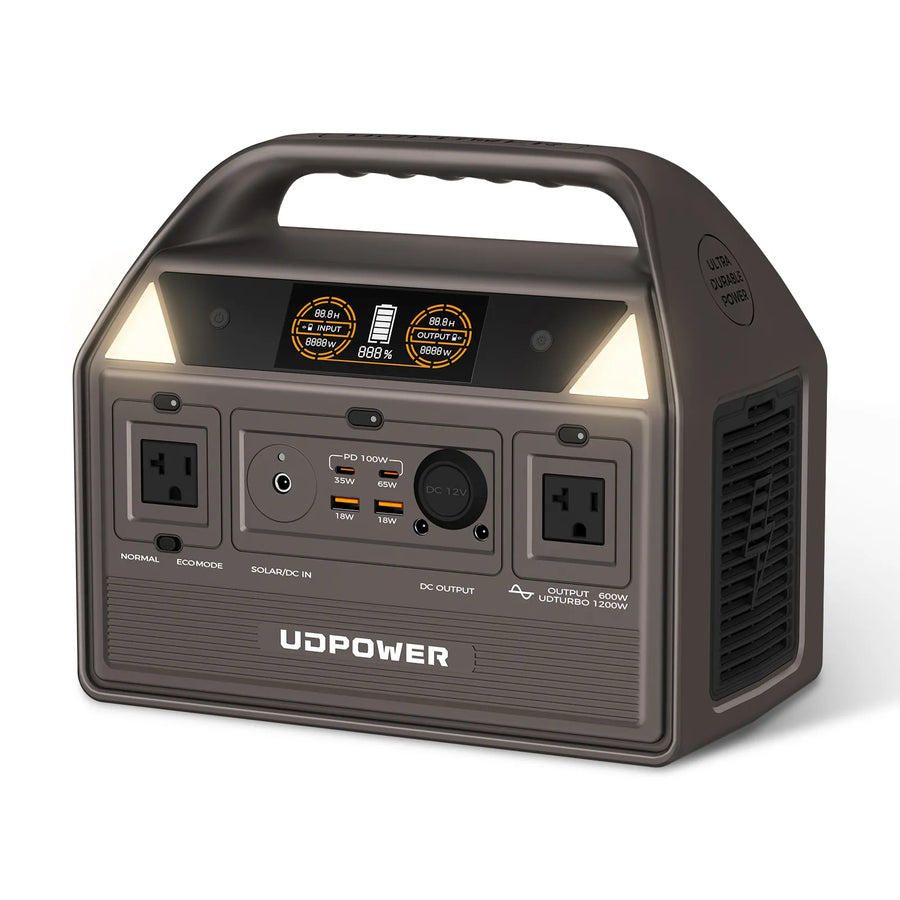
UDPOWER C600: Best Balance for Camping and Medium Loads
The C600 increases capacity to 596Wh while remaining easy to carry at approximately 12.3 pounds. Its 600W continuous output can support car refrigerators, laptops, projectors, fans, lighting, communication equipment, and many campsite devices.
For a steady 60W load, the planning estimate is approximately 8.9 hours. Actual refrigerator operation may be longer because compressors cycle on and off.
View UDPOWER C600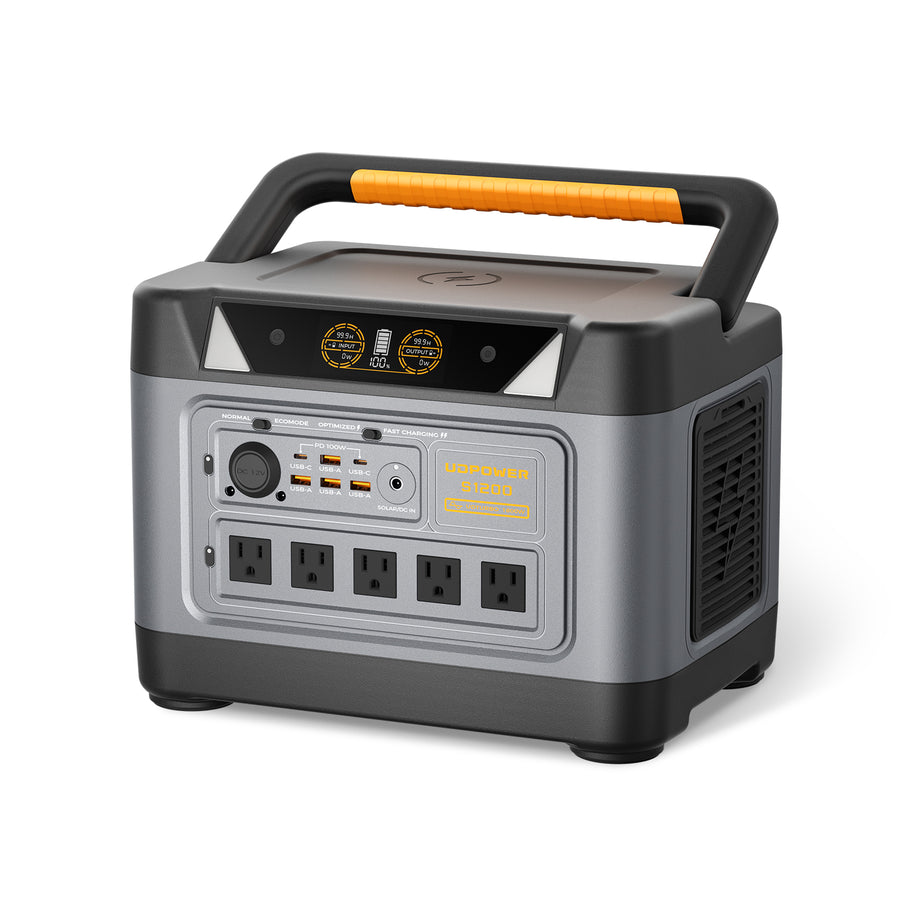
UDPOWER S1200: Best for Home Essentials and RV Backup
The S1200 combines approximately 1,190Wh of capacity with 1,200W continuous AC output and 1,800W surge support. It is suitable for selected home essentials, refrigerators, electronics, RV equipment, and longer CPAP operation when the connected equipment is compatible.
It provides five AC outlets, supports up to 400W solar input, and includes UPS mode with a listed response time of 10ms or less. Devices that require uninterrupted operation should still be tested before relying on the setup during an outage.
View UDPOWER S1200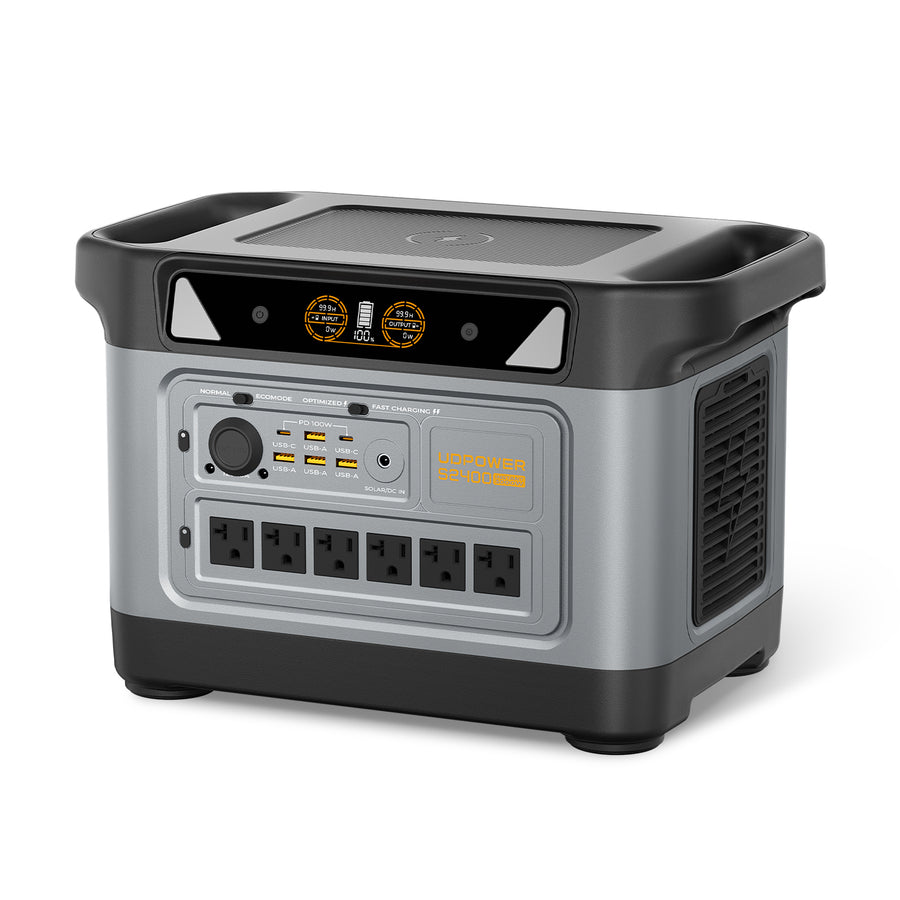
UDPOWER S2400: Best for Higher-Wattage Appliances
The S2400 offers 2,083Wh of stored energy, 2,400W continuous AC output, and up to 3,000W surge support. That makes it more appropriate for appliances such as many microwaves, coffee makers, larger refrigerators, work equipment, and multiple simultaneous essentials.
It has six AC outlets, 120V output, and UPS mode with a response time of 10ms or less. It is not a 240V whole-home system and should not be used to backfeed a home electrical panel.
View UDPOWER S2400Quick model selection
Choose the C400 when portability matters most and your devices stay below 400W continuous.
Choose the C600 for a portable refrigerator, weekend camping, creative equipment, and medium backup needs.
Choose the S1200 for a refrigerator plus smaller essentials, RV use, longer outages, or UPS-supported electronics.
Choose the S2400 when you need more capacity, six AC outlets, or continuous output above 1,200W.
Plug-and-Play Battery vs. Other Power Options
| Power option | Setup difficulty | AC appliance support | Indoor use | Best advantage | Main limitation |
|---|---|---|---|---|---|
| Plug-and-play portable battery | Low | Yes, within inverter limits | Can be used indoors when operated according to instructions | Fast setup, portability, multiple charging methods | Finite capacity and fixed output limits |
| USB power bank | Very low | Usually no household AC output | Yes, with normal battery precautions | Small and inexpensive for phones | Not designed for most appliances |
| Traditional computer UPS | Low | Yes, for supported electronics | Yes, according to product instructions | Automatic backup for computers and networking equipment | Often limited runtime and less suitable for outdoor use |
| DIY battery bank | High | Only with a properly sized inverter | Depends on design, enclosure, wiring, and installation | Can be customized and expanded | Requires component matching, wiring knowledge, protection, and maintenance |
| Installed home battery | High | Can support selected circuits or larger home loads | Designed for fixed residential installation | Automatic integration with household circuits | Higher cost and professional installation requirements |
| Gas generator | Moderate | Yes, according to generator rating | No; combustion generators must not operate indoors or in enclosed spaces | Long runtime when fuel is available | Fuel, exhaust, noise, maintenance, and carbon monoxide risk |
Plug-and-play battery vs. power bank
A power bank is mainly designed for phones, tablets, and USB devices. A portable plug-and-play battery adds much more capacity, an inverter, household AC outlets, higher-power USB-C, and often vehicle or solar charging.
Plug-and-play battery vs. UPS
A traditional UPS is usually optimized to keep a computer or networking device running through a short interruption. A portable power station may provide much longer runtime and outdoor portability, but not every model has a true UPS mode.
When UPS operation matters, verify the listed switchover time and test the actual equipment. A fast switchover specification does not guarantee that every medical device, server, or sensitive instrument will respond identically.
Plug-and-play battery vs. installed home battery
A portable station powers devices connected directly to the unit. An installed home battery is designed to integrate with household circuits, protection equipment, and often the utility grid.
For a broader explanation of home backup limits, see Can a Solar Generator Power a House?
How Do You Recharge a Plug-and-Play Battery?
1. Wall charging
Wall charging is normally the fastest and most predictable method. Use the cable or adapter specified for the model and avoid damaged outlets, loose plugs, or undersized extension cords.
2. Vehicle charging
A 12V vehicle socket can restore energy while driving, but it is generally slower than high-power wall charging. Confirm that the vehicle socket, fuse, cable, and battery input all support the intended current.
3. Solar charging
A compatible solar panel can recharge the station away from the grid. The panel must remain within the power station’s accepted voltage and current range and use the correct connector.
Actual solar input is usually lower than the panel’s nameplate rating because of clouds, panel angle, temperature, shade, cable loss, and seasonal sunlight. Even a narrow shadow across part of a panel can reduce production.
Explore complete power-station-and-panel combinations in the UDPOWER solar generator collection.
Can you use a plug-and-play battery while it is charging?
Many portable power stations support pass-through operation, but limits vary. Heavy simultaneous charging and discharging can create more heat and may slow charging. For critical applications, check the product instructions and avoid operating continuously near the maximum output while recharging.
Important Plug-and-Play Battery Safety Rules
A battery power station does not produce carbon monoxide or combustion exhaust, which makes it more suitable for indoor power than a gas generator. That does not mean every type of use is risk-free.
- Power devices from the unit’s outlets. Do not connect the station’s AC output to a household receptacle.
- Never backfeed a home. A male-to-male cord or improvised panel connection can energize wiring unexpectedly and endanger occupants or utility workers.
- Keep vents clear. Do not place the unit against curtains, bedding, clothing, or other material that blocks cooling airflow.
- Keep it dry. Unless the complete product is specifically rated for water exposure, protect the power station, outlets, and connectors from rain, standing water, and condensation.
- Stay within the charging limits. Solar panels and adapters must match the required voltage, current, polarity, and connector.
- Do not exceed the continuous output. Repeated overloads can shut down the unit and may prevent essential equipment from operating when needed.
- Inspect before use. Stop using the unit if the enclosure is swollen, cracked, unusually hot, leaking, producing an abnormal odor, or making unexpected sounds.
- Avoid damaged or daisy-chained power strips. Connected cords and distribution equipment must be properly rated for the total load.
- Follow temperature limits. Charging and discharging outside the permitted range can reduce performance or trigger protection.
- Test medical and critical equipment. Confirm runtime, adapter compatibility, startup behavior, and UPS switching before relying on it during an outage.
Home wiring warning: transfer switches and other home electrical connections must be compatible with the power source and installed or reviewed by a qualified electrician. Current UDPOWER portable power stations provide U.S. 120V output and are designed primarily to power selected devices directly, not an entire 120/240V home panel.
For more information about the danger of backfeeding, see the Electrical Safety Foundation International’s generator and transfer-switch safety guidance.
When a Plug-and-Play Battery Is Not the Right Choice
A portable battery is not the best solution for every load.
You need continuous whole-home power
A portable 120V power station cannot normally operate a complete residential panel, central air conditioner, electric range, electric water heater, well system, or other hardwired 240V equipment.
You need several days of high-power heating
Resistance heaters consume energy quickly. A 1,500W heater can empty even a large portable station in a relatively short time. Fuel-based heating, insulation, or a purpose-built home backup system may be more practical during a long winter outage.
You require unlimited runtime without recharging
A battery stores a fixed amount of energy. Longer outages require load management, solar recharging, vehicle charging, grid access, or another energy source.
You need automatic backup for household circuits
A station with UPS mode can automatically support devices plugged directly into its designated outputs. That is different from automatically powering lights and receptacles throughout the house.
You need 240V output
Current UDPOWER portable stations discussed in this guide provide U.S. 120V AC output. They are not designed to operate standard 240V household appliances.
Frequently Asked Questions
Is a plug-and-play battery the same as a portable power station?
In many consumer listings, yes. “Plug-and-play battery” often describes a portable power station with an integrated battery, inverter, charger, battery management system, and outlets. However, the term can also be used for removable equipment batteries or newer grid-interactive home batteries, so the product specifications still matter.
Do I need an electrician to use a plug-and-play battery?
You normally do not need an electrician when plugging compatible devices directly into the power station’s own outlets. Electrical work may be required if you want to connect any backup source to household circuits, a transfer switch, or an electrical panel.
Can I plug a portable battery into a wall outlet to power my house?
No. A portable station can be plugged into a wall outlet for charging, but its output must not be connected back into a household receptacle. That can create dangerous backfeed. Power devices directly from the station unless a qualified electrician has approved a compatible transfer system.
Can a plug-and-play battery run a refrigerator?
Yes, when the station’s continuous and surge output meet the refrigerator’s requirements. Runtime depends on battery capacity, compressor duty cycle, startup surge, room temperature, door openings, defrost operation, and refrigerator efficiency.
Can I use one for CPAP backup?
Yes, many portable power stations can run a CPAP machine. Check the CPAP’s wattage, adapter, humidifier, heated hose, and required runtime. For automatic outage backup, confirm that the selected power station has an appropriate UPS mode and test it with the exact CPAP setup. See the UDPOWER CPAP battery backup guide.
How long will a 600Wh plug-and-play battery last?
Using a 90% planning efficiency, a 600Wh battery provides roughly 540Wh of usable AC energy. That is about 13.5 hours at 40W, 9 hours at 60W, 5.4 hours at 100W, or 1.8 hours at 300W. Actual runtime varies.
Are plug-and-play batteries safe to use indoors?
They do not burn fuel or produce carbon monoxide during normal operation, so they are suitable for indoor use when the manufacturer’s instructions are followed. Keep the unit dry, leave cooling vents open, use compatible charging equipment, stay within temperature limits, and stop using a damaged or swollen battery.
Does every plug-and-play battery work automatically during an outage?
No. Automatic backup requires a model with UPS or pass-through functionality, and only devices connected through the supported outputs receive power. A standard portable station may require the user to turn on its AC or DC output manually.
Can I charge a plug-and-play battery with solar panels?
Yes, when the panel voltage, current, wattage, connector, and polarity match the battery’s solar input specifications. A panel’s advertised wattage is not a guaranteed charging rate because weather, shade, panel angle, and temperature affect real output.
Can I use a plug-and-play battery while it is charging?
Many models support pass-through use, but operating near maximum output while charging can increase heat and slow recharging. Check the instructions for the specific model and test any critical equipment in advance.
What size plug-and-play battery do I need?
Add the watts of devices that will operate at the same time, verify the highest startup surge, and calculate required energy with watt-hours. Then add a reserve for losses and unexpected use. Smaller 250Wh models suit electronics and short trips, while approximately 1,000Wh to 2,000Wh models are better for refrigerators, RV loads, longer CPAP backup, and home essentials.
Can a plug-and-play battery run a 1,500W appliance?
Only if its continuous AC output is at least 1,500W and its surge capability meets the appliance’s startup demand. Even when supported, a 1,500W load drains a portable battery quickly. Among the UDPOWER models in this guide, the S2400 is the appropriate continuous-output class for a 1,500W load.
Can a plug-and-play battery run 240V appliances?
Not unless the product specifically provides compatible 240V output. The UDPOWER C400, C600, S1200, and S2400 discussed here provide U.S. 120V AC output and are not intended for 240V appliances or an entire 120/240V residential panel.
Choose a Plug-and-Play Battery for Your Actual Load
Start with the devices you need to run, their combined wattage, startup surge, and required hours. Then compare capacity, output, charging speed, ports, weight, and UPS support.
View Plug-and-Play Battery Selection View All Portable Power Stations Get More Portable Power GuidesTechnical Sources and Verification
UDPOWER product capacities, output ratings, port counts, weights, charging limits, product images, and UPS specifications were checked against the official product pages linked in the comparison table.
- UL Solutions: Portable Power Pack Testing and UL 2743
- U.S. Department of Energy: Inverters and Grid Services Basics
- U.S. Department of Energy: Solar Energy and Storage Basics
- Electrical Safety Foundation International: Backfeed and Transfer-Switch Safety
Runtime figures are planning estimates rather than guaranteed performance. Always verify the appliance label, startup requirements, environmental conditions, and the latest product manual before relying on a battery for medical equipment or emergency backup.
Related Articles


