How Much Does Starlink Internet Cost in the U.S.?
ZacharyWilliamUpdated: April 28, 2026
Starlink is not just a monthly internet bill. The real cost includes the service plan, hardware, taxes, shipping, accessories, electricity, and—if you want internet during storms or power outages—backup power.
Quick Answer: What Does Starlink Cost?
For most U.S. users, Starlink usually costs about $50–$120 per month for home service or about $50–$165 per month for Roam service, before taxes, shipping, and any optional accessories. Hardware pricing changes often, but personal kits are commonly shown around $199–$349 depending on the kit, promotion, and service type.
For a realistic first-year budget, plan for roughly $950–$1,800+ for a typical home setup, or about $400–$950 if you only use Roam for a few travel months. Always enter your service address on Starlink’s checkout page before buying, because pricing and availability can change by location.

1. Starlink Cost Snapshot
If you are trying to decide whether Starlink is worth it, start with three numbers: monthly service, hardware, and the first-year total. The table below gives a practical starting point for U.S. buyers.
| Cost Item | Typical U.S. Range | What It Means | Source |
|---|---|---|---|
| Home service | About $50–$120/mo | Residential pricing depends on address, capacity, and plan tier. | Starlink service plans |
| Roam service | About $50–$165/mo | Designed for travel, RVs, camping, remote work, and portable use. | Starlink Roam |
| Personal hardware | Often about $199–$349 | Mini and Standard kit pricing changes often with promotions. | Starlink hardware offers |
| Electricity | About $2.50–$13+ per month | Depends on Starlink model, hours used, dish heating, and local electric rate. | Starlink power use |
| Backup power | Optional | Needed if you want Starlink to stay online during blackouts, storms, camping, or off-grid work. | UDPOWER portable power stations |
Important Pricing Note
Starlink prices are not always identical for every address. Your exact monthly price, hardware cost, shipping, taxes, and available plan names should be confirmed at checkout.
2. Monthly Starlink Plans
Starlink’s personal plans usually fall into two buckets: Residential for a fixed home address and Roam for portable use. The best plan depends less on speed claims and more on how you actually use the internet.
| Plan Type | Common Monthly Price | Best For | Data / Usage Notes | What to Check Before Buying | Source |
|---|---|---|---|---|---|
| Residential 100 Mbps | About $50/mo where available | Lower-cost home internet in eligible areas | Availability and performance depend on location. | Confirm your exact service address and plan speed. | Starlink Residential |
| Residential 200 Mbps | About $80/mo where available | Everyday home use, streaming, video calls, and work-from-home | Good middle-ground plan when available. | Check whether this plan is shown for your address. | Starlink service plans |
| Residential MAX | About $120/mo | Households that want the highest available residential tier | May be a better fit for heavier households or more demanding users. | Check local congestion, expected speeds, and plan terms. | Starlink Residential |
| Roam 100GB | About $50/mo | Camping, weekend trips, seasonal use, and occasional remote work | Includes a high-speed data bucket; plan details can change. | Check whether 100GB is enough for streaming and work calls. | Starlink Roam |
| Roam Unlimited | About $165/mo | Full-time RVers, remote workers, mobile households, and longer trips | Better when Starlink is your main internet source on the road. | Check in-motion rules, regional use, and account terms. | Starlink Roam |
For most homes, Residential is simpler. For RVs, camping, cabins, road trips, and people who move the dish often, Roam is usually the plan family to compare first.
3. Hardware and Upfront Costs
The monthly fee only covers service. You also need the Starlink kit. Hardware prices change frequently, especially when Starlink runs regional promotions, so treat the table below as a planning guide rather than a permanent price list.
| Hardware | Typical Advertised Range | Why People Choose It | Power Consideration | Source |
|---|---|---|---|---|
| Starlink Mini Kit | Often shown around $199–$249 during offers | Portable, compact, lower power draw, good for travel and quick setup | Typically 20–40W average; requires a suitable power source for USB-C use. | Starlink Mini power |
| Starlink Standard Kit | Often around $349 before promotions | Common home and general-use kit | Standard-class kits can use more energy than Mini, especially in poor weather. | Starlink power specs |
| Mounts and accessories | Varies | Needed for roof, pole, wall, RV, cabin, or cleaner cable routing | A better mount can improve sky view and reduce dropouts. | Starlink |
| Backup battery / power station | Optional, varies by runtime goal | Keeps Starlink online during outages, camping, and off-grid use | Size by watt-hours, not just watt output. | UDPOWER power stations |
Simple Rule
If you only care about monthly home internet cost, compare the service plan first. If you care about remote work, RV internet, emergency backup, or storm readiness, compare hardware and power next.
4. What Starlink Costs in Year One
Year-one cost is the easiest way to compare Starlink with cable, fiber, 5G home internet, or a cellular hotspot. Use this formula:
Estimated first-year cost = hardware + monthly service × active months + taxes + shipping + accessories + optional backup power.
| Scenario | Example Hardware | Hardware Estimate | Monthly Plan Estimate | Active Months | Estimated Service + Hardware Total | Best Fit |
|---|---|---|---|---|---|---|
| Lower-cost home plan | Standard Kit | $349 | $50/mo | 12 | About $949 before taxes and extras | Eligible homes that want the lowest available residential tier |
| Mid-tier home plan | Standard Kit | $349 | $80/mo | 12 | About $1,309 before taxes and extras | Streaming, video calls, and everyday home use |
| Higher-tier home plan | Standard Kit | $349 | $120/mo | 12 | About $1,789 before taxes and extras | Heavier home internet use where available |
| Weekend travel plan | Mini or Standard Kit | $199–$349 | $50/mo | 3 | About $349–$499 before taxes and extras | Camping season, summer trips, cabins, or occasional RV weekends |
| Year-round Roam 100GB | Mini or Standard Kit | $199–$349 | $50/mo | 12 | About $799–$949 before taxes and extras | Light mobile use with a predictable data bucket |
| Year-round Roam Unlimited | Mini or Standard Kit | $199–$349 | $165/mo | 12 | About $2,179–$2,329 before taxes and extras | Full-time RVers and remote workers who rely on Starlink often |
These examples do not include taxes, shipping, optional mounts, professional installation, regional fees, or battery backup. That is why two people can both say they “pay for Starlink” and still have very different real costs.
6. Electricity Cost to Run Starlink
Electricity is not the biggest Starlink cost, but it is a real cost—especially if you run it 24/7 or power it from a battery. Starlink’s power use varies by model, weather, boot/search behavior, network load, and whether dish heating is active.
| Starlink Setup | Typical Average Power | 30-Day Energy Use If 24/7 | Estimated Monthly Electricity Cost | Notes | Source |
|---|---|---|---|---|---|
| Starlink Mini | 20–40W | 14.4–28.8 kWh | About $2.53–$5.05 | Best choice when low power draw matters. | Starlink Mini power |
| Standard Actuated | 50–75W | 36–54 kWh | About $6.32–$9.48 | Useful planning range for older standard-style setups. | Starlink power specs |
| Standard-class kit | 75–100W | 54–72 kWh | About $9.48–$12.64 | A practical budget range for many standard home setups. | Starlink power specs |
| Performance Gen 3 | About 110W | 79.2 kWh | About $13.90 | Higher-performance hardware uses more energy. | Starlink Performance specs |
Electricity estimate uses a 30-day month and 17.55¢/kWh, based on the EIA U.S. residential electricity price table for February 2026. Your local rate may be higher or lower.
How to Estimate Your Own Electricity Cost
Monthly cost = watts ÷ 1000 × hours used per month × your electricity rate.
Example: 80W × 720 hours ÷ 1000 × $0.1755 = about $10.11 per month.
7. Keeping Starlink Online During Outages, RV Trips, and Off-Grid Use
If you are researching Starlink because your home internet fails during storms, or because you need internet while camping or traveling, the power source becomes part of the cost. Starlink needs continuous power for the dish and router. A portable power station gives you a quiet, fuel-free way to keep Starlink and your work devices running.
Runtime Formula
Estimated runtime = battery capacity × usable efficiency ÷ Starlink watts.
The table below uses 85% usable AC efficiency because many people power Starlink through the original AC adapter. Actual runtime can vary with weather, dish heating, connected devices, and battery condition.
| UDPOWER Model | Battery Capacity | Rated AC Output | Estimated Runtime: Starlink Mini 20–40W | Estimated Runtime: Standard-Class 75–100W | Estimated Runtime: Performance 110W | Best For |
|---|---|---|---|---|---|---|
| C400 | 256Wh | 400W | About 5.4–10.9 hours | About 2.2–2.9 hours | About 2.0 hours | Short sessions, quick backup, light travel |
| C600 | 596Wh | 600W | About 12.7–25.3 hours | About 5.1–6.8 hours | About 4.6 hours | Camping, weekend backup, laptop + Starlink use |
| S1200 | 1,190Wh | 1,200W | About 25.3–50.6 hours | About 10.1–13.5 hours | About 9.2 hours | Longer outage coverage, RV workdays, home essentials |
| S2400 | 2,083Wh | 2,400W | About 44.3–88.5 hours | About 17.7–23.6 hours | About 16.1 hours | Long outages, multi-device backup, Starlink plus appliances |
Recommended UDPOWER Setups for Starlink Users

UDPOWER C400 — Compact Backup for Short Starlink Sessions
The UDPOWER C400 is a compact LiFePO4 power station with 256Wh capacity and 400W AC output. It is best for short Starlink sessions, phone charging, laptop work, and light emergency use.
- Capacity: 256Wh
- AC output: 400W
- Battery chemistry: LiFePO4, 4,000+ cycles
- Good fit: Starlink Mini, short work sessions, car camping, quick backup

UDPOWER C600 — Better for Camping, RV Internet, and Weekend Backup
The UDPOWER C600 offers 596Wh capacity and 600W AC output, giving you more runtime for Starlink, laptops, lights, phones, cameras, and small camping devices.
- Capacity: 596Wh
- AC output: 600W
- Weight: 12.3 lbs
- Good fit: weekend trips, camping, RV stops, several hours of Starlink Standard backup
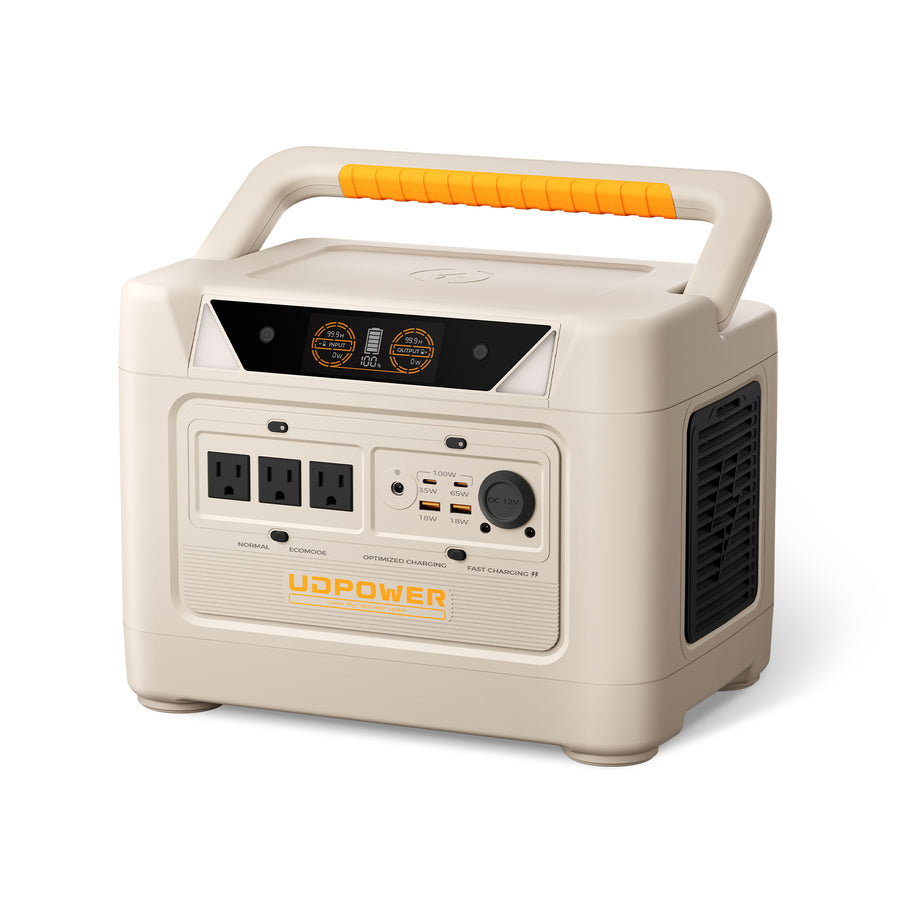
UDPOWER S1200 — Stronger All-Round Backup for Starlink + Work Devices
The UDPOWER S1200 is a better fit when Starlink is not the only device you need to run. Its 1,190Wh capacity, 1,200W output, UPSPRIME switchover, and quiet operation make it practical for home backup, RV workdays, and longer outages.
- Capacity: 1,190Wh
- AC output: 1,200W
- Weight: 26.0 lbs
- UPSPRIME switchover: less than 10ms
- Good fit: Starlink Standard, laptop, router, lights, CPAP, and small appliances
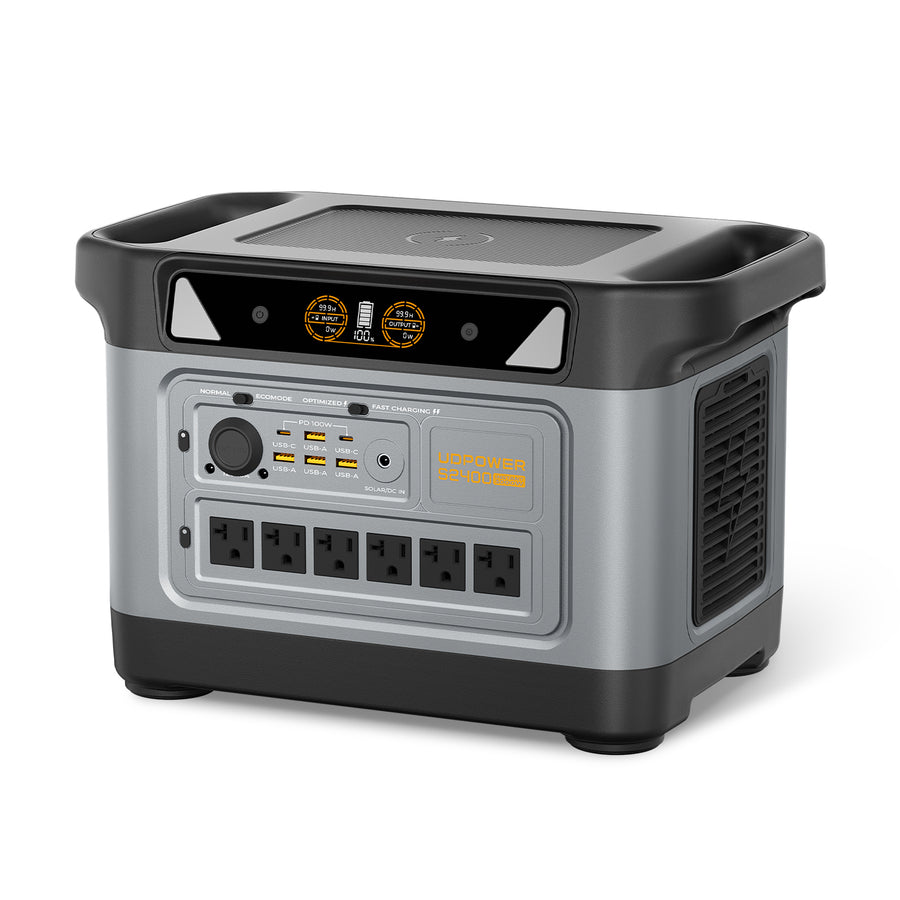
UDPOWER S2400 — Long Runtime for Starlink, Home Backup, and Multi-Device Power
The UDPOWER S2400 is the strongest option here for people who want Starlink to stay online through longer outages while also powering other essentials. It has 2,083Wh capacity, 2,400W AC output, 6 AC outlets, 10 DC outputs, UPS-style backup, and up to 400W solar charging support.
- Capacity: 2,083Wh
- AC output: 2,400W
- Surge support: up to 3,000W
- Ports: 6 AC outlets + 10 DC outputs
- Solar input: 12–50V, 10A max, up to 400W solar charging
- Good fit: Starlink plus refrigerator, laptops, lights, Wi-Fi gear, and longer emergency backup
8. Which Starlink Plan Fits Your Use Case?
The cheapest plan is not always the best plan. Pick based on where the dish will be used, how often you need it, and whether you need internet during outages.
| Your Situation | Plan to Compare First | Hardware to Compare First | Power Setup to Consider | Why |
|---|---|---|---|---|
| Rural home with weak cable or no fiber | Residential | Standard Kit | S1200 or S2400 if outages are common | Fixed-home use is usually simpler than Roam. |
| Weekend camping and occasional trips | Roam 100GB | Mini Kit | C400 or C600 | Lower monthly cost and lower power draw matter more than unlimited data. |
| Full-time RV life | Roam Unlimited | Mini or Standard Kit | S1200 or S2400 with solar charging | You need more data, more uptime, and a larger energy buffer. |
| Remote work from a cabin | Residential or Roam, depending on location and movement | Standard Kit | S2400 plus compatible solar | Longer runtime and solar charging reduce downtime. |
| Emergency backup internet | Residential or account-specific backup option | Existing Starlink kit | S1200 for moderate backup, S2400 for longer backup | The internet plan is only useful during an outage if the dish has power. |
Related Reading from UDPOWER
If you are budgeting Starlink for off-grid or backup use, read these next:
FAQ: Starlink Internet Cost
How much does Starlink cost per month?
In the U.S., Starlink commonly starts around $50 per month for certain Residential or Roam plans, while higher residential or unlimited mobile plans can cost more. Your exact price depends on address, service type, promotion, and availability.
How much is Starlink hardware?
Personal Starlink hardware is often shown around $199–$349 depending on kit type and promotion. Mini and Standard kit prices can change quickly, so confirm the price during checkout.
Is Starlink cheaper than cable or fiber?
Usually not if you already have reliable cable or fiber. Starlink is often more attractive where cable, fiber, or 5G home internet is unavailable, unstable, or too slow.
What is the cheapest Starlink plan?
The cheapest commonly advertised personal plans are usually around $50 per month, but availability depends on location and service type. Check your address on Starlink’s website before assuming that price is available to you.
How much does Starlink Roam cost?
Roam 100GB is commonly shown around $50 per month, while Roam Unlimited is commonly shown around $165 per month. Roam is designed for travel, camping, RV use, and portable internet.
Does Starlink have hidden fees?
Starlink may involve extra costs such as taxes, shipping, optional mounts, longer cables, regional price differences, electricity, and backup power if you want the service to work during outages.
How much electricity does Starlink use?
Starlink Mini typically uses about 20–40W on average. Standard-class kits may use around 50–100W depending on model and conditions, while higher-performance kits can use more.
How much does it cost to run Starlink 24/7?
Using a U.S. residential electricity rate of 17.55¢/kWh, a 75–100W standard setup costs roughly $9.48–$12.64 per 30-day month. A 20–40W Mini costs roughly $2.53–$5.05 per 30-day month.
Can I use Starlink only for a few months?
Many travelers compare Roam plans for seasonal use. However, pause, standby, cancellation, and reactivation rules can change, so check the current terms in your Starlink account before planning a seasonal budget.
Can a portable power station run Starlink?
Yes. A portable power station can run Starlink if it has enough output power and battery capacity. For planning, divide usable watt-hours by Starlink’s average watts. For example, a 596Wh power station with 85% usable AC efficiency gives about 506Wh of usable energy.
What size battery do I need for Starlink?
For short Starlink Mini sessions, a compact power station can work. For a standard Starlink kit through an outage or full workday, a 1,000Wh-class or 2,000Wh-class power station gives much more practical runtime.
Is Starlink worth the cost?
Starlink is usually worth considering if your other internet options are slow, unreliable, unavailable, or not portable. If you already have reliable fiber or cable, Starlink may be harder to justify unless you need backup or mobile internet.
Need Starlink During an Outage?
Do not budget only for the internet plan. If the power goes out, Starlink stops unless the dish and router have backup power. Choose your power station based on the Starlink model, expected watts, and the number of hours you need to stay online.
View Portable Power Stations See S2400 for Longer Backup Get the Off-Grid Starlink GuideSources
External links are provided as nofollow references. Pricing can change, so always confirm the final price on Starlink’s checkout page.