





How Much Power Does a 3D Printer Use?
Latest updated: June 24, 2026
Most desktop 3D printers use less electricity than people expect. The confusing part is that a printer does not draw one fixed wattage from start to finish. Power rises sharply while the heated bed and nozzle warm up, then drops and cycles as the printer maintains temperature.
This guide explains typical wattage, electricity cost, the difference between rated and actual power, how to measure your own printer, and how to size backup power for a long print.
Quick Answer
A typical home FDM 3D printer commonly averages about 60 to 150 watts after it reaches printing temperature. Initial heat-up may briefly draw 150 to 500 watts, while large, enclosed, chamber-heated, or very fast-heating printers can draw more.
Small desktop resin printers often operate around 30 to 100 watts. Professional resin systems with active heating can require several hundred watts.
At a measured average of 120W, an eight-hour print uses:
Using the U.S. residential average of 18.83 cents per kWh reported for March 2026, that print costs about $0.18 in electricity.

Typical 3D Printer Power Use by Printer Type
Use the following ranges for early planning only. The exact figure depends on the printer, input voltage, material, temperature settings, room conditions, enclosure, and accessories.
| Printer type | Typical average while printing | Possible heat-up or maximum draw | Main electricity users | Best planning approach |
|---|---|---|---|---|
| Compact open-frame FDM printer | 50–100W | 150–300W | Bed heater, hotend, fans, motors, controller | Measure a complete PLA print rather than relying on the power-supply label. |
| Standard heated-bed FDM printer | 70–180W | 200–500W | Heated bed is often the largest load during warm-up | Check both maximum input and average watts. |
| Fast or enclosed desktop FDM printer | 100–300W | 350–1,500W or more on some models | High-power bed, hotend, enclosure fans, chamber heating | Use the specification for the correct 120V or 220–240V version. |
| Small MSLA resin printer | 30–100W | Often close to the adapter or printer rating | UV light source, screen, control board, Z-axis motor | Include a resin heater if one is used. |
| Professional heated resin printer | 100–400W | 200–600W | Resin heating, chamber control, pumps, light source | Use manufacturer workspace and UPS requirements. |
| Industrial powder-bed or SLS system | Several kilowatts | May require a dedicated circuit | Powder-bed heaters, chamber heating, laser, extraction | Follow site-specific electrical requirements. |
Watts, Watt-Hours, and Kilowatt-Hours
Three units appear frequently when people discuss 3D printer electricity use:
- Watts (W): the printer’s power draw at a particular moment.
- Watt-hours (Wh): the total energy used or stored over time.
- Kilowatt-hours (kWh): the unit shown on a utility bill. One kWh equals 1,000Wh.
Example: An 80W Printer Running for 10 Hours
The correct calculation uses average power over the entire print. A single reading during warm-up or a number printed on the power supply will not provide an accurate job cost.
Real Power Examples Published by 3D Printer Manufacturers
Official examples demonstrate why there is no universal “3D printer wattage.” Some manufacturers publish measured averages, while others publish maximum input for electrical and UPS planning.
| Printer or family | Published figure | What the figure represents | Official source |
|---|---|---|---|
| Original Prusa MK-series | 80W with generic PLA; 120W with generic ABS | Measured average at a 26°C room temperature | Prusa Knowledge Base |
| Bambu Lab A1 | 5W idle and 95W average while printing PLA in the manufacturer’s 220V example | Operating average rather than maximum heat-up demand | Bambu Lab A1 FAQ |
| Bambu Lab H2S | 180W printing PETG, 200W printing PLA, and 330W printing PC | Material-specific consumption published for a larger heated system | Bambu Lab H2S FAQ |
| Formlabs Form 4 generation | 480W maximum | Maximum workspace power requirement for a professional resin printer | Formlabs Support |
A measured average is useful for cost and runtime calculations. A maximum-input figure is more important when checking inverter, UPS, outlet, and circuit compatibility.
How Much Does a 3D Printer Cost to Run?
The next table uses the March 2026 U.S. residential average electricity price of 18.83 cents per kWh. Your local utility price may be higher or lower, and time-of-use plans can change the cost according to the hour of the day.
| Measured average power | Energy for 8 hours | Cost per 8-hour print | Cost for 30 daily prints | Typical context |
|---|---|---|---|---|
| 50W | 0.40 kWh | About $0.08 | About $2.26 | Small resin printer or very efficient FDM printer |
| 80W | 0.64 kWh | About $0.12 | About $3.62 | Efficient desktop printer using PLA |
| 120W | 0.96 kWh | About $0.18 | About $5.42 | Heated-bed FDM printer or warmer material |
| 150W | 1.20 kWh | About $0.23 | About $6.78 | Fast or enclosed desktop printer |
| 200W | 1.60 kWh | About $0.30 | About $9.04 | Larger printer or higher-temperature material |
| 300W | 2.40 kWh | About $0.45 | About $13.56 | Large heated system or workstation with accessories |
Electricity-rate source: U.S. Energy Information Administration .
Cost by Print Duration
| Average load | 2-hour print | 8-hour print | 24-hour print | 72-hour print |
|---|---|---|---|---|
| 80W | 0.16 kWh / about $0.03 | 0.64 kWh / about $0.12 | 1.92 kWh / about $0.36 | 5.76 kWh / about $1.08 |
| 120W | 0.24 kWh / about $0.05 | 0.96 kWh / about $0.18 | 2.88 kWh / about $0.54 | 8.64 kWh / about $1.63 |
| 200W | 0.40 kWh / about $0.08 | 1.60 kWh / about $0.30 | 4.80 kWh / about $0.90 | 14.40 kWh / about $2.71 |
| 300W | 0.60 kWh / about $0.11 | 2.40 kWh / about $0.45 | 7.20 kWh / about $1.36 | 21.60 kWh / about $4.07 |
For most home printers, filament, resin, failed parts, maintenance, and post-processing supplies cost more than the electricity used by one successful print.
What Changes a 3D Printer’s Power Consumption?
1. Heated-Bed Size and Temperature
The heated bed is often the largest load in a desktop FDM printer. A large bed contains more material to heat and has more surface area through which heat can escape.
PLA commonly uses a lower bed temperature than ABS, ASA, nylon, or polycarbonate. Holding a bed near 100°C throughout a long job generally takes more energy than maintaining it near 55–60°C.
2. Nozzle Temperature
The hotend heater draws strongly while warming, then cycles to maintain the set temperature. Higher-temperature materials increase heat loss and keep the heater active for a larger portion of the print.
3. Room Temperature and Drafts
A printer in a cold garage usually needs more energy than the same printer in a stable indoor room. Cold air and drafts remove heat from the bed, nozzle, resin chamber, and enclosure.
4. Enclosures and Active Chamber Heaters
A correctly designed enclosure can reduce heat loss. An active chamber heater, however, adds another electrical load. Follow the printer manufacturer’s enclosure instructions because excessive heat can shorten the life of electronics not designed for a hot chamber.
5. Material
| Material | General heat demand | Likely effect on electricity use | Main reason |
|---|---|---|---|
| PLA | Lower | Usually among the lowest for FDM printing | Moderate nozzle temperature and relatively cool bed |
| PETG | Moderate | Often slightly higher than PLA | Higher nozzle and bed temperatures |
| ABS or ASA | High | Can be noticeably higher on long jobs | Hot bed, hot nozzle, enclosure often recommended |
| Nylon or polycarbonate | High to very high | Potentially much higher | High nozzle temperature and controlled thermal environment |
| Standard photopolymer resin | Low to moderate | Often lower than heated-bed FDM printing | No large heated bed on many hobby machines |
| Temperature-controlled resin | Moderate to high | Higher than an unheated hobby resin printer | Vat, resin, or chamber heating |
6. Print Speed
Faster printing can increase motor, fan, and controller demand, but the job also finishes sooner. A printer drawing more watts for fewer hours may use less total energy than a slower printer that keeps the bed hot all day.
Compare total kWh per completed part, not only the wattage shown at one moment.
7. Accessories Around the Printer
A computer, filament dryer, resin heater, wash-and-cure station, ventilation fan, air filter, camera, lighting, and network equipment can equal or exceed the printer’s own power use.
How to Measure Your 3D Printer’s Actual Power Use
A properly rated plug-in electricity meter is the simplest way to obtain a dependable figure for your printer, material, room, and settings.
Measure These Five Stages
- Idle draw: turn on the printer without heating.
- Maximum warm-up draw: heat the bed and nozzle from room temperature.
- First-layer average: record consumption while the printer lays down the first layer.
- Stable-print average: check the reading after temperatures have settled.
- Total job energy: reset the meter before printing and record the final kWh.
Calculate Average Watts from the Final kWh Reading
A 10-hour job that uses 0.9 kWh averaged:
Why a Single Live Reading Is Misleading
The bed and hotend heaters cycle. A meter might show 45W at one moment and 250W a few seconds later. Accumulated kWh across the entire print is more useful for cost, while an averaged watt reading is more useful for battery-runtime estimates.
Measure More Than One Print
For a realistic baseline, measure:
- a short PLA print;
- a normal print that represents your usual workload;
- a high-temperature print;
- the printer plus every accessory that must stay powered.
These readings give you a minimum, normal, and demanding-use profile instead of one number that may not represent future jobs.
Can a Portable Power Station Run a 3D Printer?
Yes. Many desktop 3D printers can run from a portable power station, provided the printer’s maximum demand and total energy requirement fit within the power station’s rated limits.
Check Rated AC Output First
The power station’s continuous rated AC output must be higher than the printer’s maximum input requirement. Do not use the printer’s stable-print average as the only compatibility check.
A printer may average 95W after warming up but draw several hundred watts during its initial heating cycle.
Then Check Battery Capacity
Output watts determine whether the printer can operate. Battery watt-hours determine approximately how long it can operate.
The runtime estimates below use 90% conversion efficiency for UDPOWER portable power stations. Actual results change with load, inverter overhead, battery condition, temperature, printer heating cycles, and accessories.
Use Pure Sine Wave AC Power
Pure sine wave output is the appropriate choice for the printer’s power supply and control electronics. Avoid an unknown or low-quality modified-sine-wave inverter.
Check Transfer Time for Outage Protection
A high-capacity battery does not automatically provide uninterrupted transfer. If the goal is to prevent a printer from restarting during a power failure, check the power station’s UPS or EPS transfer specification and test it with the actual printer.
For a complete compatibility process, read how to determine whether a portable power station can power your device .
Estimated 3D Printer Runtime on UDPOWER Power Stations
These calculations use the measured average combined load. Confirm maximum input separately before connecting the printer.
| UDPOWER model | Official capacity and output | 80W average load | 120W average load | 200W average load | 300W average load |
|---|---|---|---|---|---|
| C600 | 596Wh / 600W | About 6.7 hours | About 4.5 hours | About 2.7 hours | About 1.8 hours |
| S1200 | 1,190Wh / 1,200W | About 13.4 hours | About 8.9 hours | About 5.4 hours | About 3.6 hours |
| S2400 | 2,083Wh / 2,400W | About 23.4 hours | About 15.6 hours | About 9.4 hours | About 6.2 hours |
Formula: capacity × 90% ÷ average load. Results are planning estimates, not guaranteed runtimes.
Example: Printer Plus Accessories
A printer that averages 120W may appear to run for about 8.9 hours on the S1200:
Add an 80W computer and a 60W filament dryer, and the total becomes 260W:
This is why the entire printing workstation must be included in runtime planning.
Recommended UDPOWER Models for 3D Printing
Choose a model based on maximum printer input, total connected load, required runtime, and whether fast outage transfer is important.

UDPOWER C600: Compact Backup for Verified Lower-Power Printers
The C600 is a portable option for compact resin printers and lower-power FDM printers whose maximum input remains safely below its 600W rated output.
- Battery capacity: 596Wh
- Rated output: 600W
- Peak output: 1,200W
- Battery: LiFePO4, 4,000+ cycles
- AC outlets: 2
- UPS function: No
- Best for: shorter prints and portable setups where automatic outage transfer is not required
Estimated runtime is about 6.7 hours at an 80W average load or 4.5 hours at 120W.
View UDPOWER C600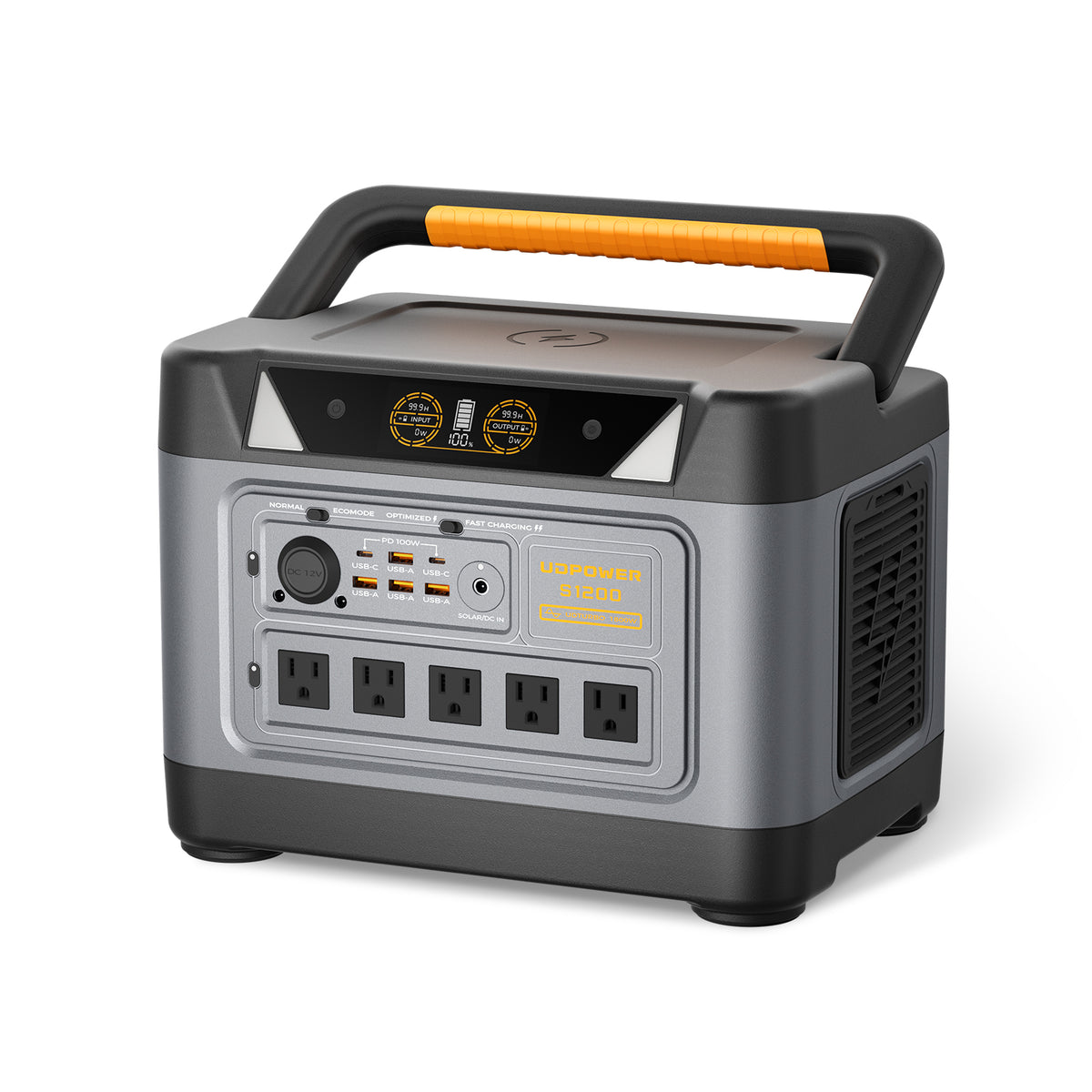
UDPOWER S1200: Best Overall Choice for One Desktop 3D Printer
The S1200 provides more output headroom and runtime than a compact station. It is a practical fit for one desktop printer plus light supporting equipment after the total maximum and average loads have been checked.
- Battery capacity: 1,190Wh
- Rated output: 1,200W pure sine wave
- UDTURBO support: up to 1,800W
- Battery: LiFePO4, 4,000+ cycles
- AC outlets: 5 on the current gray version
- UPS transfer: less than 10ms
- Best for: one desktop printer, long jobs, computer, camera, router, and light ventilation
Estimated runtime is about 8.9 hours at a 120W average load or 5.4 hours at 200W.
View UDPOWER S1200
UDPOWER S2400: For Long Prints and Multi-Device Workstations
The S2400 is better suited to long jobs, larger desktop printers, or setups that must keep a printer, computer, dryer, ventilation, monitoring, and network equipment operating together.
- Battery capacity: 2,083Wh
- Rated output: 2,400W pure sine wave
- UDTURBO support: up to 3,000W
- Battery: LiFePO4, 4,000+ cycles
- AC outlets: 6
- UPS transfer: less than 10ms
- Best for: long prints, demanding desktop printers, and multiple connected devices
Estimated runtime is about 15.6 hours at a 120W average load or 9.4 hours at 200W.
View UDPOWER S2400How to Protect a Long Print from Power Outages
A short power interruption can ruin a print that has already been running for many hours. Backup planning therefore involves both battery capacity and transfer behavior.
Check the Printer’s Power-Loss Recovery
Some printers save their position and can resume after an outage. Recovery is not always perfect. The part may cool, detach from the bed, develop a visible layer line, or fail to restart correctly.
Test the recovery feature with an unimportant print before depending on it.
Understand UPS Runtime
A traditional computer UPS may transfer quickly but provide only a few minutes of runtime under a heated printer load. That can be enough to bridge a short interruption or allow a controlled stop, but not a long blackout.
A larger portable power station can store far more energy. It still needs a transfer time that the printer can tolerate.
See the detailed comparison: UPS vs. portable power station .
Run a Controlled Transfer Test
- Charge the backup source and place it on a stable, ventilated surface.
- Connect only the 3D printer.
- Begin a small test print and wait until the bed and nozzle stabilize.
- Simulate a wall-power loss according to the backup product’s instructions.
- Confirm that the printer does not restart, display an error, or lose communication.
- Repeat with required accessories connected, while remaining below the rated output.
How to Reduce 3D Printer Electricity Use
Use the Lowest Reliable Temperature
Use temperatures that produce good adhesion and layer bonding without unnecessary heat. Do not lower them so far that the part fails, because reprinting the job wastes more energy and material.
Avoid Unnecessary Preheating
Prepare the file, build plate, filament, and tools before turning on the heaters. Leaving a bed at temperature while slicing or repairing a model adds energy without producing the part.
Prevent Failed Prints
Clean the build surface, verify the first layer, use dry filament, inspect supports, and maintain the motion system. Reliability is one of the most effective energy-saving measures.
Turn Off Idle Accessories
Computers, dryers, cameras, lights, air filters, and wash-and-cure equipment can remain powered long after they are needed. Shut them down when the workflow allows.
Batch Parts Carefully
Printing several small parts together can avoid repeated heat-up cycles. It is only efficient when the setup is reliable, because one detached part can damage neighboring parts or ruin the full batch.
Use Enclosures as Designed
A suitable enclosure can reduce heat loss for high-temperature materials. Do not trap a printer’s electronics or power supply in excessive heat unless the manufacturer designed the machine for that environment.
Schedule Around Time-of-Use Rates
Customers on time-of-use utility plans may pay less by running long prints during off-peak hours. Review noise, fire safety, supervision, and manufacturer guidance before operating any printer overnight or while unattended.
Frequently Asked Questions
How many watts does a typical 3D printer use?
A typical desktop FDM printer often averages about 60–150W after warm-up. Heat-up demand may briefly reach 150–500W, while large or chamber-heated printers can require more.
Do 3D printers use a lot of electricity?
Most hobby printers do not use a large amount compared with electric heaters, ovens, clothes dryers, or air conditioners. An 80W printer running for eight hours uses 0.64 kWh, costing about $0.12 at 18.83 cents per kWh.
How much does it cost to run a 3D printer for eight hours?
At 18.83 cents per kWh, an eight-hour print costs about $0.12 at an 80W average, $0.18 at 120W, $0.30 at 200W, or $0.45 at 300W.
Does a 350W power supply mean the printer always uses 350W?
No. The figure describes the power supply’s capacity or the printer’s rated maximum. Actual average consumption during a print may be much lower after the bed and nozzle reach temperature.
Does the heated bed use most of the electricity?
On many FDM printers, the bed is the largest single load, especially during warm-up. Its size, target temperature, room temperature, insulation, and enclosure strongly affect consumption.
Does ABS use more electricity than PLA?
Usually. ABS generally requires a hotter bed, a hotter nozzle, and often an enclosure. Prusa reports an 80W average for generic PLA and 120W for generic ABS on an MK-series printer under its test conditions.
Do resin printers use less power than FDM printers?
Small hobby resin printers often use less power because they do not have a large heated bed. Professional systems with active resin or chamber heating can consume several hundred watts.
Does faster printing save electricity?
It can. A faster printer may draw more watts while operating but finish sooner. Measure total kWh per completed part to determine whether a faster profile actually saves energy.
Can a portable power station run a 3D printer?
Yes, when the station’s rated AC output exceeds the printer’s maximum input and its battery capacity supports the desired runtime. Pure sine wave output is recommended.
What size power station is suitable for a 3D printer?
A 596Wh, 600W model may support a verified lower-power printer for several hours. A 1,190Wh, 1,200W model provides more headroom and runtime for one desktop printer. A 2,083Wh, 2,400W model is better for long jobs, larger printers, or multiple accessories.
How long will a 1,000Wh battery run a 3D printer?
With a 90% planning efficiency, a 1,000Wh battery provides about 900Wh. That is approximately 11.3 hours at 80W, 7.5 hours at 120W, 4.5 hours at 200W, or 3 hours at 300W.
Can a UPS prevent a failed print during a blackout?
A compatible UPS can bridge a short outage if its transfer is fast enough and its output supports the printer. Battery runtime may be limited, so test the setup before relying on it for an important print.
Can solar panels power a 3D printer?
Yes, when solar panels recharge a compatible portable power station that provides stable AC power to the printer. Solar production changes with weather and sun angle, so stored battery energy is needed to keep the print stable.
Should a filament dryer and computer be included in the calculation?
Yes. Add the average watts of every device that must remain powered. The power station and circuit must also support their combined maximum demand.
Is it safe to leave a 3D printer running overnight?
Follow the printer manufacturer’s instructions and local safety guidance. Keep the printer maintained, use a suitable outlet, avoid damaged wiring, keep flammable materials away, and use smoke detection. Backup power does not replace safe supervision and installation.
Choose Backup Power for Your 3D Printer
Start with the printer’s maximum input, measure the complete workstation’s average watts, and decide how many hours of backup you need.
View Portable Power Stations Compare UDPOWER Models Read the Portable Power Station GuideSources and Related Reading
External Data Sources
- Prusa Knowledge Base: MK-Series Power Consumption
- Bambu Lab A1 FAQ
- Bambu Lab H2S FAQ
- Formlabs Form 4 Workspace Requirements
- U.S. Energy Information Administration: Residential Electricity Prices
Related UDPOWER Guides
- Compare UDPOWER Portable Power Stations
- How to Know Whether a Power Station Can Run Your Device
- UPS vs. Portable Power Station
- How a Portable Power Station Works
- Portable Power Station Safety Guide
UDPOWER product specifications and image URLs were checked against the official C600, S1200, and S2400 product pages on June 24, 2026. Runtime figures are estimates based on 90% conversion efficiency and should not be treated as guaranteed operating times.
Related Articles


