





How Many Amps Does a TV Use?
Last updated: July 28, 2026
Most modern TVs use about 0.2 to 1.5 amps from a standard 120V U.S. outlet while the screen is on. A typical 55-inch LED TV usually draws about 0.67 to 1.00 amp, while a 65-inch model often falls around 0.83 to 1.50 amps. Very large, extra-bright, or older plasma TVs can exceed 2 amps.
Use this quick formula when your TV lists watts instead of amps: amps = watts ÷ volts. A 100W TV on a 120V outlet uses about 0.83 amp.
For battery backup, do not choose a power station by amps alone. Check the TV’s watts for output compatibility and the power station’s watt-hours for runtime.

How Many Amps Does a TV Use by Screen Size?
The table below is a practical planning guide for modern TVs connected to a 120V household outlet. The range is more useful than a single average because picture mode, screen technology, HDR brightness, and the exact model can change the draw substantially.

| TV size and type | Typical running watts | Approx. amps at 120V | Conservative planning value | What changes the result |
|---|---|---|---|---|
| 24-inch LED | 20–35W | 0.17–0.29A | 0.30A | Small bedroom and kitchen models are usually efficient. |
| 32-inch LED | 30–55W | 0.25–0.46A | 0.50A | Common for bedrooms, vans, and RVs. |
| 43-inch LED | 50–90W | 0.42–0.75A | 0.75A | HDR and high backlight settings push use toward the upper end. |
| 50-inch LED | 70–110W | 0.58–0.92A | 1.00A | Picture mode and panel efficiency create a wide range. |
| 55-inch LED or OLED | 80–120W | 0.67–1.00A | 1.00A | OLED draw changes with the brightness of the scene on screen. |
| 65-inch LED, QLED, or OLED | 100–180W | 0.83–1.50A | 1.50A | Bright 4K HDR content can raise short-term consumption. |
| 75-inch and larger modern TV | 140–250W+ | 1.17–2.08A+ | Use the model label | Mini-LED backlights, screen brightness, and size matter more here. |
| Older 55-inch plasma TV | 200–400W | 1.67–3.33A | Use the model label | Plasma sets usually draw far more power and produce more heat. |
Sources and exact-model checks: Review the UDPOWER TV wattage guide, compare certified models in the ENERGY STAR Television Product Finder, and confirm the rating on your TV or manufacturer manual.
How to Calculate a TV’s Amp Draw
For a simple household estimate, divide the TV’s watts by the outlet voltage.
Example: 100W ÷ 120V = 0.83A
| TV power | Calculation at 120V | Estimated current | Typical situation |
|---|---|---|---|
| 30W | 30 ÷ 120 | 0.25A | Small, efficient TV |
| 60W | 60 ÷ 120 | 0.50A | 32- to 43-inch TV |
| 100W | 100 ÷ 120 | 0.83A | Common planning value for a living-room TV |
| 150W | 150 ÷ 120 | 1.25A | Large TV or TV plus a few accessories |
| 200W | 200 ÷ 120 | 1.67A | Large bright TV or older display |
| 300W | 300 ÷ 120 | 2.50A | Extra-large or older high-consumption TV |
Calculation source: The relationship is watts = volts × amps. See the UDPOWER volts-to-watts conversion guide for more examples.
The result is a useful planning estimate, but a TV is an electronic AC load. Its measured current can differ slightly from watts divided by 120 because voltage fluctuates and power factor is not always exactly 1. When a plug-in meter displays both watts and amps, use its measured amp reading for the most exact answer.
How to Read the Power Label Without Mixing Up the Numbers
The label on the TV, external power brick, or manual may show several electrical ratings. They do not all describe the current coming from the wall.
| What the label says | What it means | How to use it |
|---|---|---|
| 120V~ 1.2A | AC input rating | Use 1.2A as a conservative upper planning value unless the manual says otherwise. |
| Power consumption: 100W | Rated or typical power | 100W ÷ 120V = about 0.83A. |
| 19V DC, 4.74A | Low-voltage output from an external adapter | Do not treat 4.74A as wall current. The adapter output is about 90W, so the 120V wall-side current is roughly 0.75A plus conversion loss. |
| 95 kWh/year | Estimated annual energy use under a test assumption | Useful for comparing TVs and cost, but it does not directly show the instant amp draw. |
| 15A circuit required | Branch-circuit recommendation | It does not mean the TV continuously pulls 15 amps. |
How to Find Your TV’s Actual Amps
- Check the back label. Look for watts, amps, input voltage, or a model number.
- Check the manufacturer manual. Search the exact model number and look for “power consumption,” “rated power,” or “typical power.”
- Use a plug-in energy meter. Plug the meter into the wall, plug the TV into the meter, and read both watts and amps while the TV is playing normal content.
- Test more than one picture mode. Compare Standard or Cinema mode with Vivid mode, then play bright HDR content for a more realistic high-use reading.
- Measure the complete setup separately. Add the router, streaming box, soundbar, game console, and other devices that must remain on during an outage.
A portable power station display can also provide a quick watt reading. Turn off other outputs, connect only the TV, and watch the displayed output while changing brightness or content. For a broader explanation of compatibility and runtime, read Can You Run a TV Off a Portable Power Station?
12V RV TV Amps Versus 120V Household TV Amps
This is where many battery calculations go wrong. The same number of watts requires much more current at 12V than at 120V. A 60W television uses about 0.50A on the 120V AC side, but an equivalent 60W load needs about 5A from a nominal 12V source before conversion losses.
Example: 100W ÷ 12V ÷ 0.90 = about 9.3A from the battery
| TV or setup power | Current at 120V AC | Ideal current at 12V DC | Approx. 12V battery current at 90% efficiency |
|---|---|---|---|
| 30W | 0.25A | 2.5A | 2.8A |
| 60W | 0.50A | 5.0A | 5.6A |
| 100W | 0.83A | 8.3A | 9.3A |
| 150W | 1.25A | 12.5A | 13.9A |
Method: Current equals watts divided by voltage. The battery-side estimate adds a 90% conversion assumption. Actual RV battery voltage commonly changes as the battery charges and discharges, so measured current will vary.
Should an RV use a native 12V TV or a 120V TV through an inverter?
A native 12V TV can avoid the AC inverter conversion step, which may improve efficiency and simplify a small RV setup. A 120V household TV usually offers more model choices and can plug directly into a portable power station’s AC outlet. Whichever route you choose, confirm the TV input voltage, connector polarity, fuse rating, and the output limit of the RV circuit or power station.
Explore practical travel options in the portable power stations for RV and camping collection.
Your TV Is Usually Not the Whole Load
For an outage, tailgate, or RV movie night, the useful number is the current used by everything that must run at the same time. A game console can use more power than the television, and a soundbar, router, or cable box can noticeably reduce battery runtime.
| Setup | Devices included | Estimated total watts | Approx. amps at 120V | Backup planning note |
|---|---|---|---|---|
| Small streaming setup | 45W TV + 5W streaming stick + 10W router | 60W | 0.50A | A compact power station can cover a short viewing session. |
| Typical living-room setup | 100W TV + 5W streamer + 10W router + 35W soundbar | 150W | 1.25A | Use the total load, not the TV rating, for runtime. |
| Large home-theater setup | 150W TV + 5W streamer + 10W router + 50W sound system | 215W | 1.79A | Choose more battery capacity for a full movie or long outage. |
| Gaming setup | 150W TV + 200W console + 10W router + 50W sound system | 410W | 3.42A | The console may become the largest part of the load. |
Source and method: Device values are realistic planning examples rather than guaranteed ratings. Check each device label, add the watts, then divide the total by 120V.
Can a TV Share a 15-Amp Circuit?
Usually, yes. A 100W television draws only about 0.83A at 120V, so the TV itself uses a small portion of a typical 15A household circuit. Problems are more likely when the same circuit also supplies a space heater, hair dryer, window air conditioner, vacuum, or another high-wattage appliance.
A 15A, 120V circuit has a theoretical maximum of 1,800W, but that number is not a recommended everyday target. Wiring conditions, other outlets on the same circuit, continuous-load rules, and local electrical code all matter.
If a breaker repeatedly trips, an outlet becomes warm, a plug fits loosely, or you notice buzzing or discoloration, stop using that outlet and have the circuit checked by a qualified electrician.
What Size Portable Power Station Do You Need for a TV?
Once a power station has enough AC output for the television and accessories, battery capacity becomes the main decision. A TV rarely needs the high surge capacity required by a refrigerator or pump, but a larger battery keeps the screen, router, and streaming equipment running longer.
| UDPOWER model | Capacity | Rated AC output | 60W setup | 100W TV | 150W setup | 215W setup |
|---|---|---|---|---|---|---|
| C400 | 256Wh | 400W | About 3.8 hr | About 2.3 hr | About 1.5 hr | About 1.1 hr |
| C600 | 596Wh | 600W | About 8.9 hr | About 5.4 hr | About 3.6 hr | About 2.5 hr |
| S1200 | 1,191Wh | 1,200W | About 17.9 hr | About 10.7 hr | About 7.1 hr | About 5.0 hr |
Product sources: Specifications are linked to the official UDPOWER product pages. Runtime uses a 90% conversion assumption. Actual results vary with inverter overhead, screen brightness, audio volume, battery temperature, battery condition, and additional devices. Very low loads may see lower runtime because fixed inverter consumption becomes a larger share of the total.
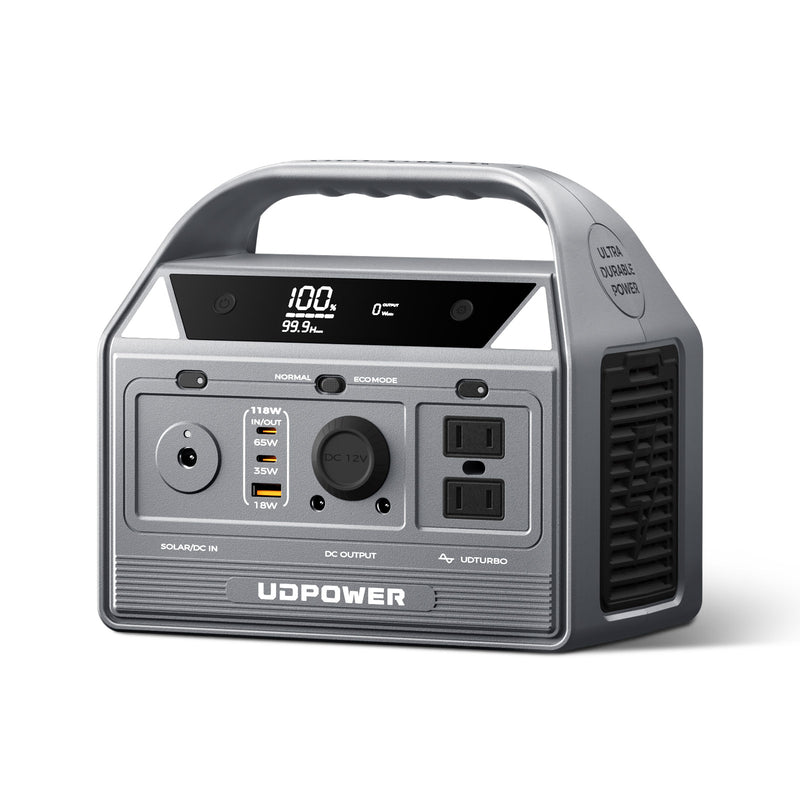
UDPOWER C400: Best for a Small TV or Short Backup Session
The C400 combines a 256Wh LiFePO4 battery, 400W pure sine wave AC output, two AC outlets, and a 6.88 lb body. It is a practical match for a compact TV, streaming device, and router when portability matters more than all-night runtime.
- 100W TV: about 2.3 hours by the 90% planning formula
- 150W complete setup: about 1.5 hours
- Best fit: bedrooms, tailgates, short RV stops, and brief outages
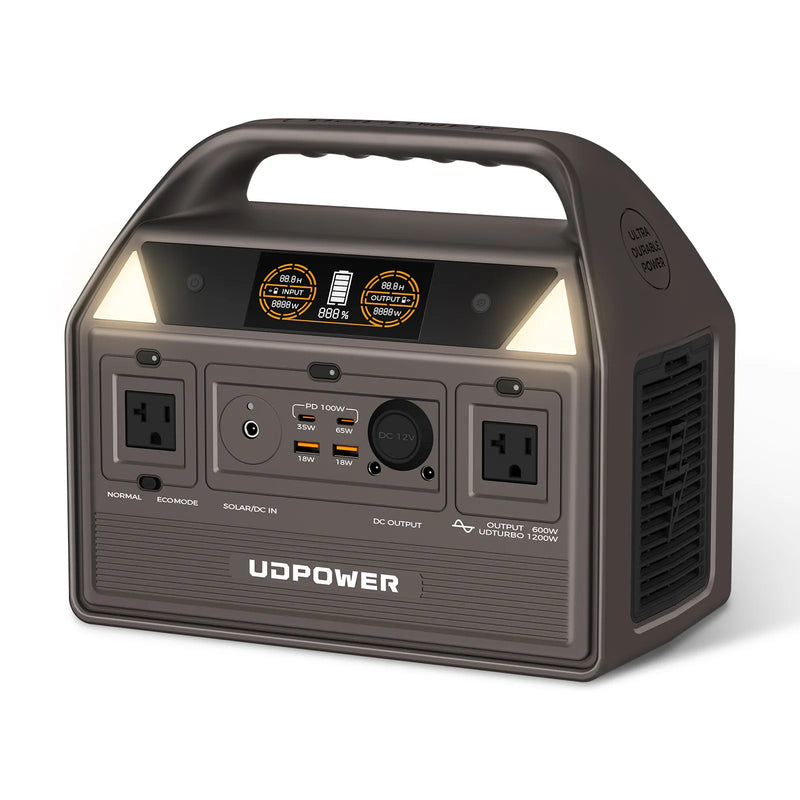
UDPOWER C600: Best Overall Balance for TV, Wi-Fi, and Streaming
The C600 provides 596Wh of LiFePO4 capacity, 600W rated pure sine wave output, two AC outlets, and a 12.3 lb design. For many homes and RVs, it offers the most useful balance between carrying weight and several hours of entertainment backup.
- 100W TV: about 5.4 hours by the 90% planning formula
- 150W complete setup: about 3.6 hours
- Best fit: a full movie, evening outage, camping, or RV use

UDPOWER S1200: Best for Longer Outages and a Full Media Setup
The S1200 has a 1,191Wh LiFePO4 battery, 1,200W pure sine wave output, 1,800W maximum surge capability, five AC outlets, and UPS switching rated at 10 milliseconds or less. It is the better choice when the television must run with a router, sound system, charging devices, or other home essentials.
- 100W TV: about 10.7 hours by the 90% planning formula
- 150W complete setup: about 7.1 hours
- Best fit: long outages, home backup, gaming, and multiple electronics
How Much Electricity Does a TV Use?
Amps describe current at a moment in time. Your electric bill is based on energy in kilowatt-hours. To estimate monthly use:
| Average load | Use per day | Monthly energy | Sample cost at $0.18/kWh |
|---|---|---|---|
| 60W | 4 hours | 7.2 kWh | $1.30 |
| 100W | 4 hours | 12.0 kWh | $2.16 |
| 150W | 4 hours | 18.0 kWh | $3.24 |
| 215W entertainment setup | 4 hours | 25.8 kWh | $4.64 |
Method: These are calculation examples using a hypothetical $0.18/kWh rate, not a national price claim. Replace it with the rate on your own utility bill.
Does a TV use power when it is off?
Yes, most TVs use a small amount of standby power so the remote, network connection, clock, or quick-start feature can respond. ENERGY STAR notes that certified televisions must use 0.5W or less in Sleep Mode, although other networked standby modes and connected devices can use more. See the ENERGY STAR television guidance.
| Standby load | Annual energy | Sample annual cost at $0.18/kWh | Example |
|---|---|---|---|
| 0.5W | 4.38 kWh | $0.79 | Efficient TV sleep mode |
| 3W | 26.28 kWh | $4.73 | TV with a higher-power quick-start or network mode |
| 10W | 87.6 kWh | $15.77 | Combined TV, soundbar, streamer, and console standby load |
How to Reduce TV Amps and Extend Battery Runtime
- Lower the backlight or OLED brightness. This usually changes power use more than lowering the volume.
- Use Standard, Cinema, or an efficient picture preset. Vivid and Dynamic modes are designed for bright showrooms and often draw more power.
- Enable automatic brightness control. The TV can reduce brightness in a darker room instead of running the backlight at maximum.
- Stream through the TV’s built-in apps when practical. This can avoid running a separate game console or media player just to watch video.
- Turn off unused accessories. A soundbar, subwoofer, console, cable box, and router all reduce portable power station runtime.
- Disable quick-start and network wake features you do not use. This reduces standby consumption.
- Measure after changing settings. A plug-in meter or power station display shows whether a setting made a meaningful difference.
Frequently Asked Questions
How many amps does a 55-inch TV use?
A modern 55-inch TV commonly uses about 0.67 to 1.00 amp at 120V, based on a typical 80W to 120W running range. Bright HDR content or an inefficient model can use more.
How many amps does a 65-inch TV use?
A 65-inch TV often draws about 0.83 to 1.50 amps at 120V when using 100W to 180W. Check the exact model because a highly efficient OLED and a bright mini-LED TV can behave differently.
How many amps does a 32-inch TV use?
Many 32-inch LED TVs draw about 0.25 to 0.46 amp from a 120V outlet. A small native 12V RV television may draw several amps on the 12V side even though its wattage is modest.
How many amps does a smart TV use?
“Smart” features do not create one fixed amp rating. Most modern smart TVs still fall within the size-based ranges in this guide. Screen size, panel technology, and brightness usually affect active use more than the smart operating system itself.
How many amps does a 12V TV use?
Divide its watts by the actual DC voltage. A 60W TV uses about 5A at a nominal 12V before losses. If a 120V TV is powered from a 12V battery through an inverter, the battery-side current will be higher because of conversion loss.
Does a TV use amps when turned off?
Usually, yes. Standby features need a small amount of power. The amp draw may be tiny, but the TV, streaming box, soundbar, and game console together can create a noticeable always-on load.
Can a TV run on a 15-amp outlet?
Yes. Most televisions use far less than 15 amps. The important check is the total load from every device sharing the circuit, especially heaters, hair dryers, air conditioners, and other high-wattage appliances.
How many TVs can run on one 15-amp circuit?
There is no safe universal count because TV wattage and other circuit loads vary. Add the watts of every TV and device on the circuit, confirm which outlets share the breaker, and leave appropriate capacity rather than planning to use the breaker’s full theoretical limit.
Does a TV have a large startup surge?
Most modern TVs do not have the large motor-starting surge associated with refrigerators, pumps, or air conditioners. There may be a brief inrush when the power supply charges, but rated output and battery runtime usually matter more than surge capacity for a TV-only setup.
What is the most accurate way to measure TV amps?
Use a plug-in energy meter that displays RMS amps and watts. Measure normal viewing, bright HDR content, and standby mode. Also measure accessories separately so you know the full backup load.
What size power station runs a TV?
For a TV, first make sure the power station’s continuous AC output exceeds the total device wattage. Then choose capacity by desired runtime. A 256Wh unit suits short sessions, a 596Wh unit provides several hours for many setups, and a 1,191Wh unit is better for long outages and multiple electronics.
Is “amps per hour” the correct term for a TV?
Not for normal household power use. Amps describe current at a moment in time. Amp-hours describe battery charge, and watt-hours describe stored or consumed energy. For a portable power station, compare the TV’s watts with the station’s watt-hours.
The Bottom Line
Most modern TVs draw less than 2 amps on a 120V U.S. outlet, and many common 32- to 65-inch models stay between roughly 0.25 and 1.50 amps. The fastest estimate is watts divided by 120, but the most reliable answer comes from a plug-in meter or the manufacturer’s exact model data.
For home backup or RV use, calculate the full setup—not just the screen. Add the TV, router, streaming device, sound system, and game console in watts. Then use total watts to check output compatibility and watt-hours to estimate battery runtime.
Choose Backup Power for Your Actual TV Setup
Compare capacity, output, weight, ports, and expected use before choosing a model. Start with the total watts of everything you need to keep running.
Compare UDPOWER Models View Portable Power Stations Get the TV Backup GuideRelated Articles


