
Road Trip Guide: How to Plan, Pack, Budget, and Power a Better Drive
Planning a road trip involves more than choosing a destination and following a navigation app. This practical guide explains how to build a realistic route, organize daily driving time, prepare your vehicle, estimate fuel and travel costs, pack emergency supplies, plan for weak cellular service, and handle delays or unexpected problems.
It also includes mobile-friendly planning tables, sample itineraries, a complete packing checklist, road trip power calculations, and recommendations for choosing a UDPOWER portable power station for weekend drives, family travel, car camping, national park trips, and RV adventures.
Latest updated: July 27, 2026
A good road trip is not simply a long drive with a few attractions saved on your phone. It is a moving travel plan that has to balance driving time, fuel, food, lodging, weather, vehicle condition, personal energy, device charging, and backup options.
Quick Answer
The best way to plan a road trip is to build it in this order: choose a realistic destination, divide the route into manageable driving days, confirm your vehicle is ready, reserve anything with limited availability, calculate fuel and daily costs, pack an emergency kit, download offline information, and create a backup plan for every overnight stop.
Do not schedule every day to the minute. Leave room for traffic, weather, scenic stops, meal breaks, unexpected closures, and the simple fact that people become tired. A road trip usually feels better when the itinerary contains fewer mandatory stops and more optional ones.

The Five Parts of a Successful Road Trip
Most road trip guides focus heavily on destinations and packing. Those are important, but they are only two pieces of the trip. A reliable plan covers five connected systems.
| Planning system | Main question | What can go wrong | Best preventive action |
|---|---|---|---|
| Route | Where are you going, and what roads will you use? | Closures, construction, mountain roads, long fuel gaps, or missed exits | Save the main route, an alternate route, and key stops offline |
| Time | How much driving can you comfortably complete each day? | Fatigue, late arrivals, rushed meals, and missed check-in windows | Plan breaks and add a time buffer instead of using navigation time alone |
| Vehicle | Is the car ready for the mileage, terrain, and weather? | Tire failure, battery trouble, overheating, poor visibility, or no usable spare | Complete a pre-trip inspection and test emergency equipment |
| Resources | Where will you get fuel, food, water, sleep, and electricity? | Closed gas stations, sold-out lodging, dead devices, or insufficient supplies | Mark critical resource stops before marking optional attractions |
| Recovery | What will you do when the original plan stops working? | Weather, illness, traffic, breakdowns, canceled reservations, or lost service | Create one fallback overnight option and one alternate route per driving day |
Protect the parts of the trip that are difficult to replace. A prepaid park entry, ferry crossing, special event, or remote campsite may need a firm schedule. A roadside viewpoint or lunch stop usually does not.
Choose the Right Type of Road Trip
The phrase “road trip” can describe a two-night weekend drive, a national park loop, a cross-country relocation, an RV vacation, or several weeks of car camping. Each version needs a different pace and packing strategy.
| Trip type | Typical priority | Main planning risk | Useful power setup |
|---|---|---|---|
| Weekend getaway | More destination time, less driving | Trying to cover too much distance in two or three days | Phone power bank or compact power station for devices and a cooler |
| National park loop | Reservations, weather, daylight, and trail access | Limited lodging, weak service, entrance rules, or seasonal road closures | Offline navigation plus enough stored power for phones, cameras, lights, and a fridge |
| Cross-country drive | Consistent daily progress without exhausting the driver | Overly long days followed by late hotel arrivals | Reliable vehicle charging plus backup battery capacity for overnight use |
| Car camping trip | Safe overnight locations, food storage, weather, and power | Running out of energy for a fridge, fan, light, or medical device | Mid-capacity power station with car or solar recharging |
| RV road trip | Vehicle size, campsite access, hookups, water, waste, and electrical loads | Choosing roads or campsites that do not fit the RV | Higher-capacity power station for selected appliances and off-grid flexibility |
First-time RV travelers can also use the beginner’s guide to RV travel in the USA to understand route planning, campsite arrival, setup, hookups, and common first-trip mistakes.
How to Plan a Road Trip Route
Start with the trip’s fixed points rather than drawing a route through every interesting place you can find. Too many saved locations make the map look exciting but often produce a frustrating schedule.
Step 1: Mark the fixed points
Add your starting location, final destination, reserved lodging, timed park entries, event tickets, ferry crossings, and any stop that cannot easily be moved.
Step 2: Add essential resource stops
Identify fuel stations, grocery stores, restrooms, medical facilities, EV chargers when relevant, and safe overnight areas. These stops matter more than another roadside photo.
Step 3: Add one main experience per day
Choose the place or activity you would be disappointed to miss. Everything else becomes optional. This prevents the day from collapsing when traffic or weather costs you two hours.
Step 4: Build an alternate route
Save a second route around mountain passes, major cities, flood-prone roads, or long construction zones. The alternate route does not have to be equally scenic. It only has to keep the trip moving safely.
Step 5: Check destination-specific rules
National parks, campgrounds, scenic roads, tribal lands, ferries, and private attractions may have entry windows, vehicle restrictions, seasonal closures, or reservation requirements. Check the official destination page instead of relying only on an old travel post.
The National Park Service recommends checking the individual park website or NPS app before visiting. Popular campgrounds, lodging, trails, tours, or entrances may require advance reservations, and plans can change with weather or road conditions. Check current NPS trip-planning information.
Use a Three-Level Stop List
| Stop level | Meaning | Examples | What to do when delayed |
|---|---|---|---|
| Must do | The trip would lose its purpose without it | Wedding, reserved tour, national park destination, family visit | Protect the time and remove lower-priority stops |
| Would like to do | Important, but movable | Scenic trail, museum, restaurant, historic downtown | Move it to another day or shorten the visit |
| Only if convenient | A bonus rather than a requirement | Roadside attraction, additional overlook, shopping stop | Skip it without changing the main trip |
Build a Realistic Driving Schedule
Navigation apps estimate movement time. They do not fully account for fuel, meals, restrooms, children, pets, road construction, photo stops, weather, parking, or finding your hotel room after arrival.
Add the expected stop time before deciding whether a day is reasonable. A route showing six hours of driving can easily become eight hours from hotel departure to hotel check-in.
| Day style | Planned wheel time | Best for | Important caution |
|---|---|---|---|
| Scenic day | About 3–5 hours | National parks, coastal roads, small towns, hiking, photography | Mountain and scenic roads may take longer than mileage suggests |
| Balanced travel day | About 5–7 hours | Making progress while keeping time for meals and one main activity | Arrival can still become late when traffic or weather changes |
| Transit-heavy day | About 7–9 hours | Crossing less-interesting areas or reaching a major destination | Use sparingly and shorten the next day when possible |
These are itinerary-planning ranges, not safety limits. Driver experience, sleep, road type, weather, traffic, age, health, and time of day all matter. Stop when tired rather than trying to complete a planned mileage target.
AAA recommends scheduling breaks every couple of hours during long drives. Use the stop to walk, use the restroom, switch drivers, check the weather, and reassess whether the original arrival time is still realistic. Read AAA’s cross-country road trip guidance.
A Better Daily Schedule
- Leave after everyone has slept, eaten, and used the restroom.
- Place the most demanding drive before late-afternoon fatigue.
- Plan a real meal stop rather than relying entirely on snacks.
- Refuel before reaching an isolated area, not after the warning light appears.
- Try to arrive before dark when visiting an unfamiliar rural campground.
- Keep the next morning flexible after an unusually long driving day.
Road Trip Vehicle Checklist
A vehicle does not need to look old to have a weak battery, underinflated tire, worn wiper, damaged hose, or missing emergency tool. Complete the inspection early enough to order a replacement part or schedule service.
| Item | What to check | When to get help | Source |
|---|---|---|---|
| Tires | Cold tire pressure, tread, sidewall damage, uneven wear, and spare tire condition | Cracks, bulges, exposed material, repeated pressure loss, or insufficient tread | NHTSA |
| Battery | Slow starting, corrosion, warning lights, battery age, and charging-system performance | The engine cranks slowly, electronics behave unusually, or the battery repeatedly needs a jump | NHTSA |
| Fluids | Engine oil, coolant, brake fluid, transmission fluid where serviceable, and washer fluid | Leaks, low levels that return after filling, overheating, or unusual fluid color or smell | NHTSA road trip tips |
| Lights | Headlights, high beams, brake lights, turn signals, hazards, and license-plate lights | Dim, intermittent, cracked, or nonworking lights | NHTSA |
| Visibility | Wiper blades, windshield damage, mirrors, washer spray, and defroster | Wipers smear badly, cracks obstruct vision, or the defroster does not clear the glass | NHTSA |
| Emergency equipment | Jack, lug wrench, wheel-lock key, jumper cables, reflective warning devices, and flashlight | You cannot locate, reach, or safely operate the equipment | Ready.gov |
The correct pressure is normally listed on the driver-side door placard or in the owner’s manual. The maximum pressure molded into the tire sidewall is not automatically the correct operating pressure for your vehicle.
Test the Equipment You Are Carrying
Owning a tire inflator, jump pack, jack, or power station does not help much when it is discharged, buried below luggage, missing an adapter, or unfamiliar to the driver. Test essential equipment at home and load it where it can be reached without emptying the entire vehicle on the shoulder of a highway.
Calculate Your Road Trip Budget
Road trip costs are usually underestimated because travelers calculate fuel and lodging but forget parking, tolls, attraction fees, convenience-store purchases, campground fees, laundry, pet charges, and last-minute changes.
Estimated fuel used:
Total trip miles ÷ vehicle’s realistic miles per gallon
Estimated fuel cost:
Fuel used × expected average price per gallon
Total road trip budget:
Fuel + lodging + food + tolls + parking + activities + supplies + emergency buffer
Use the fuel economy your vehicle actually achieves on similar roads. A rooftop cargo box, trailer, heavy load, mountain route, strong wind, stop-and-go traffic, or extended idling can reduce real-world efficiency.
| Budget category | How to estimate it | Frequently forgotten cost | How to control it |
|---|---|---|---|
| Fuel | Trip miles ÷ realistic MPG × expected fuel price | Extra mileage from detours, local sightseeing, or searching for lodging | Add non-route mileage before calculating the total |
| Lodging | Nightly rate plus taxes and required fees | Parking, resort, pet, or late-cancellation fees | Check the final checkout total and cancellation deadline |
| Food | Meals per person per day plus snacks and drinks | Repeated convenience-store stops | Carry water, breakfast items, and one easy meal |
| Tolls and parking | Review the route and each major destination | Hotel parking, park shuttles, downtown garages, or cash-only locations | Save payment methods and carry a small backup amount |
| Activities | Entrance, tour, rental, permit, and reservation fees | Equipment rental or required transportation | Choose one paid priority activity instead of booking every option |
| Emergency buffer | Set aside part of the trip budget for changes | Replacement tire, extra hotel night, urgent transport, or changed route | Keep it separate from normal daily spending |
Complete Road Trip Packing List
Pack by function rather than by room. The most important distinction is between items needed inside the vehicle, items used only at the destination, and emergency equipment that must remain accessible.
| Category | Essential items | Useful additions | Where to store them |
|---|---|---|---|
| Documents | Driver’s license, registration, insurance information, reservations, emergency contacts | Printed copies and roadside-assistance information | Driver-accessible folder, not under luggage |
| Navigation | Phone mount, charging cable, offline maps, destination addresses | Paper map and written overnight-stop information | Front cabin |
| Vehicle emergency | Jumper cables, reflective triangle, flashlight, jack, lug wrench, usable spare or repair kit | Tire inflator, work gloves, basic tools, rain layer | Reachable without unloading the whole trunk |
| Personal safety | First-aid supplies, medications, water, weather-appropriate clothing | Emergency blanket, spare glasses, sunscreen, insect repellent | Inside the cabin or top of luggage |
| Food and cleanup | Water bottles, snacks, napkins, trash bags, hand wipes | Cooler, reusable utensils, food-storage containers | Stable location away from pedals and driver movement |
| Electronics | Phone cables, vehicle charger, camera batteries, power bank | Portable power station, extension cable, solar panel for off-grid use | Secure, ventilated, dry area |
| Comfort | Layer, sunglasses, comfortable shoes, tissues | Travel pillow, blanket, earplugs, seat organizer | Passenger-accessible area |
| Destination gear | Clothing, toiletries, planned activity equipment | Daypack, laundry bag, folding chair, camp light | Rear luggage area |
Basic Vehicle Emergency Kit
- Jumper cables or a fully charged jump starter
- Reflective warning triangle or roadside visibility device
- Flashlight with working batteries
- Phone charger that works in the vehicle
- First-aid supplies and personal medications
- Water and nonperishable snacks
- Blanket or weather-appropriate protection
- Paper map or written route backup
- Jack, lug wrench, and wheel-lock key when applicable
- Roadside-assistance contact details
Ready.gov maintains a current list of recommended vehicle emergency supplies, including jumper cables, reflective warning equipment, a phone charger, blanket, map, food, and water. Review the Ready.gov car emergency checklist.
Plan Food, Water, and Rest Stops
Food planning is not about preparing every meal in advance. It is about avoiding the moment when everyone is hungry, the next restaurant is an hour away, and the driver makes a poor decision simply to end the discussion.
Carry Three Types of Food
- Immediate food: something easy to eat during an unexpected delay.
- Meal replacement: enough food to replace one planned restaurant meal.
- Destination food: items intended for the hotel, campsite, or picnic area.
| Road trip food type | Examples | Why it helps | Main caution |
|---|---|---|---|
| Low-mess snacks | Nuts, crackers, dried fruit, bars, whole fruit | Reduces unplanned stops and keeps energy more stable | Consider allergies, heat, and choking risk for children |
| Cold items | Sandwiches, yogurt, cheese, cut fruit, prepared meals | Provides a real meal without waiting for a restaurant | Keep food at safe temperatures and avoid repeated warming |
| Water | Refillable bottles plus an emergency reserve | Useful during heat, breakdowns, hikes, and long rural stretches | Do not store bottles where they can roll under the pedals |
| Comfort item | Coffee, tea, favorite snack, or child-friendly option | Makes long travel days feel less restrictive | Avoid relying on excessive caffeine to overcome real fatigue |
Throw away trash, refill water, move the next snack forward, check the fuel range, confirm the next address, and make sure charging cables have not fallen between seats. A two-minute reset prevents clutter and small frustrations from building all day.
Prepare for Weak Cellular Service
A phone with a full battery is not the same as a working navigation system. Rural highways, mountain routes, deserts, forests, and national parks may have weak or unavailable cellular service.
Offline Road Trip Preparation
- Download map areas for the full route, not only the final destination
- Save hotel and campground addresses in a note
- Take screenshots of reservation numbers and entry instructions
- Save the alternate route before leaving reliable service
- Download music, podcasts, or children’s entertainment
- Carry a charging cable that has already been tested
- Keep a paper map or written route for remote travel
- Tell a trusted person where you expect to be during isolated sections
The NPS app can provide park maps and trip information, and some content can be prepared for offline use before arrival. See the National Park Service planning recommendations.
How to Calculate Road Trip Power Needs
Vehicle USB ports are often enough for one or two phones while driving. They become less convenient when the trip includes laptops, cameras, drones, a portable refrigerator, campsite lights, a fan, a projector, a CPAP machine, or several passengers charging at once.
Choose the smallest power source that safely covers both the highest wattage and the total energy needed between charging opportunities.
| Power source | Best use | Main advantage | Main limitation |
|---|---|---|---|
| Vehicle USB port | Phone or navigation device while driving | No extra equipment beyond a cable | Limited ports and power; depends on the vehicle |
| Phone power bank | Phones, earbuds, and small USB devices | Compact and easy to carry | Usually cannot run AC appliances or a long-duration cooler |
| Portable power station | Multiple devices, laptops, cameras, coolers, lights, fans, and compatible appliances | AC, USB, and DC output in one rechargeable system | Capacity is finite and larger models add weight |
| Portable power station plus solar | Multi-day car camping, RV travel, and off-grid stops | Can recover part of the daily energy use away from outlets | Solar output varies with sunlight, angle, shade, temperature, and input limits |
Road Trip Energy Formula
Energy used by one device:
Device watts × hours used = watt-hours
Total daily energy:
Add the watt-hours of every device used during the day
Estimated AC runtime:
Power station capacity × 0.90 ÷ device watts
The 90% factor is a practical planning allowance for UDPOWER runtime estimates. Actual results vary with device cycling, startup surge, inverter use, temperature, cable losses, battery condition, and the difference between AC and DC output.
Sample Family Road Trip Power Budget
| Device | Planning assumption | Daily use | Estimated daily energy |
|---|---|---|---|
| Portable 12V cooler | 35W average while cycling | 12 hours | 420Wh |
| Laptop | 65W charger draw | 2 hours | 130Wh |
| Four phones | About 12Wh per full charge | One full charge each | 48Wh |
| Camera or drone battery | One combined charging session | About 60Wh | 60Wh |
| LED camp light | 10W | 4 hours | 40Wh |
| Estimated total | Example only; replace with your real device information | 698Wh per day | |
| UDPOWER model | Rated capacity | Planning energy at 90% | Approximate coverage of the 698Wh example |
|---|---|---|---|
| C600 | 596Wh | About 536Wh | About 0.8 day without recharging |
| S1200 | 1,190Wh | About 1,071Wh | About 1.5 days without recharging |
| S2400 | 2,083Wh | About 1,875Wh | About 2.7 days without recharging |
A refrigerator or cooler does not necessarily draw its rated power continuously. Ambient temperature, ventilation, thermostat setting, how often it is opened, and whether warm food is added can significantly change daily consumption. Test the real setup before departure.
Power Station Safety Inside a Vehicle
- Secure the unit so it cannot slide or become a projectile during hard braking.
- Keep ventilation openings clear.
- Keep the unit dry and away from loose drinks or melting cooler ice.
- Do not leave it charging in a closed vehicle exposed to extreme heat.
- Stay within the listed charging and operating temperature range.
- Use the correct charging cable and connector for the model.
- Avoid draining the vehicle’s starter battery by charging with the engine off.
- Check appliance running watts and startup surge before using an AC outlet.
For a more detailed setup, read the portable power setup guide for road trips, fishing, and picnics .
Recommended UDPOWER Power Stations for Road Trips
The right product depends on what you will run, how many days you will be away from a wall outlet, and how much weight you are comfortable loading and unloading. The largest model is not automatically the best road trip model.

UDPOWER C600 Portable Power Station
The C600 is the most travel-focused choice in this group. At 12.3 pounds, it is much easier to move between the vehicle, picnic table, tent, hotel, and home than a large backup unit. Its 596Wh capacity suits phones, cameras, laptops, lights, selected portable coolers, and other devices that remain within its output limits.
| Capacity | 596Wh |
|---|---|
| Rated AC output | 600W pure sine wave |
| Maximum surge | 1,200W |
| Weight | 12.3 lbs |
| Dimensions | 11.1 × 6.1 × 9.4 inches |
| Solar input | Up to 240W |
| Best road trip use | Weekend travel, photography, mobile work, campsite lighting, and moderate cooler use |
| Official source | UDPOWER C600 product page |
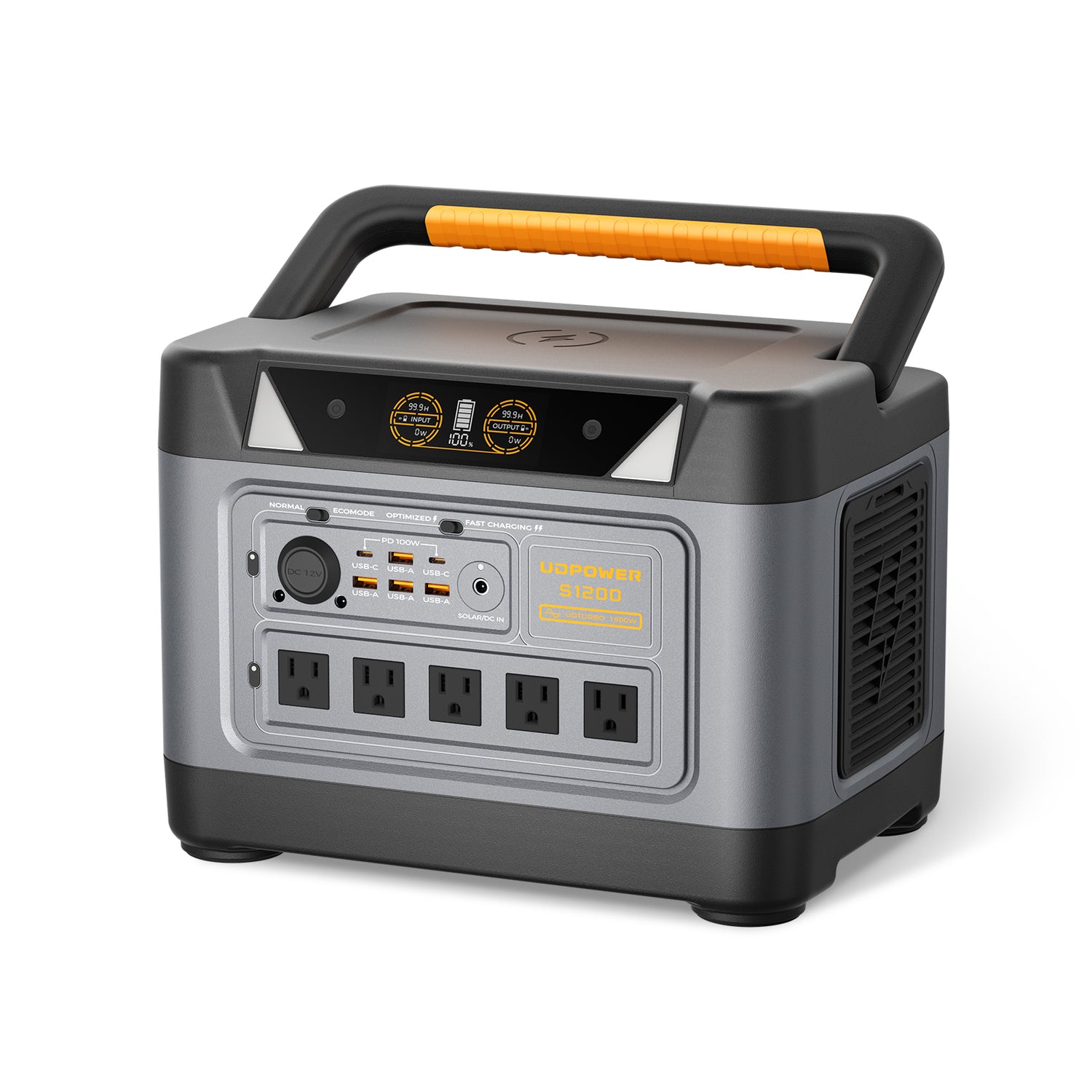
UDPOWER S1200 Portable Power Station
The S1200 offers a useful middle ground for family travel, longer car-camping stops, portable refrigeration, laptop work, cameras, CPAP use, and multiple devices. Its 1,200W rated AC output also supports a wider range of compatible appliances than smaller travel units, provided the combined running load and startup surge remain within the station’s limits.
| Capacity | 1,190Wh |
|---|---|
| Rated AC output | 1,200W pure sine wave |
| Maximum surge | 1,800W |
| AC outlets | 5 on the standard current model |
| Weight | Approximately 26.0 lbs |
| Dimensions | 13.7 × 9.5 × 9.7 inches |
| Solar input | Up to 400W through the specified DC input |
| Best road trip use | Family travel, multi-device charging, CPAP, extended cooler use, and longer campsite stays |
| Official source | UDPOWER S1200 product page |
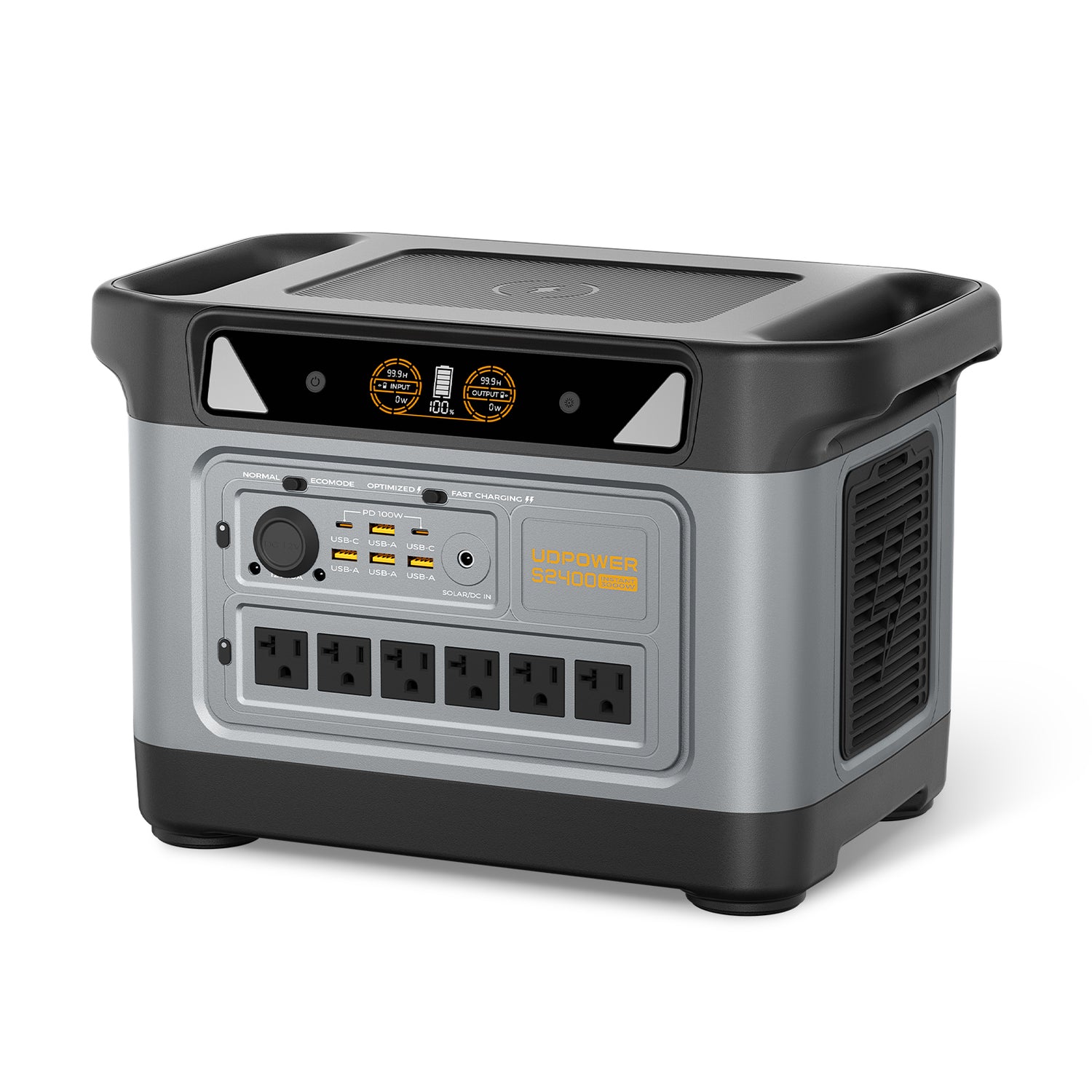
UDPOWER S2400 Portable Power Station
The S2400 is designed for travelers who need more runtime, more AC outlets, and higher appliance compatibility. It makes the most sense in an RV, trailer, van, truck, long-duration campsite, or vehicle-supported basecamp where its 40.8-pound weight is less important than its 2,083Wh capacity and 2,400W rated output.
| Capacity | 2,083Wh |
|---|---|
| Rated AC output | 2,400W pure sine wave |
| Maximum surge | 3,000W |
| AC outlets | 6 |
| Weight | Approximately 40.8 lbs |
| Dimensions | 15.8 × 9.5 × 10.1 inches |
| Solar input | Up to 400W within the listed voltage and current limits |
| Best road trip use | RV trips, extended basecamp use, multiple appliances, and longer off-grid stays |
| Official source | UDPOWER S2400 product page |
Choose the C600 when portability matters most. Choose the S1200 when you need a stronger balance of runtime, output, and manageable vehicle storage. Choose the S2400 when the vehicle is supporting a powered campsite or RV setup and you expect larger or simultaneous loads.
Compare additional sizes in the UDPOWER portable power station collection or review the portable power stations selected for longer trips .
Road Trip Itinerary Templates
Three-Day Scenic Road Trip
| Day | Driving plan | Main activity | Backup plan |
|---|---|---|---|
| Day 1 | Short drive after breakfast; arrive before evening | One town, trail, museum, or scenic area | Skip the optional stop and go directly to lodging |
| Day 2 | Minimal driving | The trip’s main destination | Indoor or lower-elevation activity for poor weather |
| Day 3 | Return route with one planned break | Optional lunch or viewpoint | Drive directly home if the group is tired |
Seven-Day Cross-Country Segment
| Day type | Suggested purpose | Planning focus |
|---|---|---|
| Days 1–2 | Moderate progress | Build rhythm without starting the trip exhausted |
| Day 3 | Longer transit day | Use a simple route and confirmed lodging |
| Day 4 | Short scenic or recovery day | Laundry, groceries, vehicle check, and one main activity |
| Days 5–6 | Moderate progress | Keep arrival times realistic and refuel before remote sections |
| Day 7 | Short final leg | Avoid finishing the trip with the hardest drive |
National Park Road Trip Day
- Check the official park page and weather before leaving lodging.
- Enter early enough to avoid turning the day into a parking search.
- Complete the highest-priority activity first.
- Carry food, water, layers, offline information, and charged devices.
- Choose a turnaround time before starting a long trail or scenic drive.
- Leave enough daylight for the return road and campground setup.
What to Do When the Road Trip Goes Wrong
A backup plan should be simple enough to use when people are tired or stressed. Do not depend on remembering a complicated procedure during an emergency.
| Problem | First action | Next decision | Useful preparation |
|---|---|---|---|
| Vehicle warning light | Move to a safe location when possible and check the owner’s manual | Whether it is safe to continue or roadside help is needed | Roadside assistance, service records, and emergency contacts |
| Flat tire | Leave traffic lanes and increase visibility | Use the spare, repair kit, or call for assistance | Known spare condition, wheel-lock key, jack, and reflective warning equipment |
| Dead phone | Use the backup cable, power bank, or power station | Whether another traveler has the route and reservation details | Offline maps and printed or saved addresses |
| Severe weather | Stop checking attractions and focus on a safe route or shelter | Delay, reroute, or stay another night | Weather alerts, flexible reservation, and emergency supplies |
| Road closure | Confirm the closure through an official transportation or park source | Use the saved alternate route or change the overnight stop | Fuel reserve and offline alternate route |
| No available lodging | Stop driving while still alert and search nearby towns | Use the backup hotel, campground, or safe legal overnight option | At least one fallback location per travel day |
| Driver fatigue | Stop driving | Switch drivers, rest, or change the overnight plan | Schedule buffer and flexible cancellation terms |
A prepaid room, event ticket, or planned mileage target is not a reason to continue driving when the driver is exhausted, the road is unsafe, or the vehicle is showing a serious problem.
Common Road Trip Mistakes
1. Planning by mileage alone
Two hundred miles of interstate driving is different from two hundred miles of mountain, coastal, city, or national park roads.
2. Treating every saved location as mandatory
A long attraction list creates pressure to rush through the places you actually care about.
3. Reaching remote areas with a low fuel level
Refuel before the isolated section, especially at night, during poor weather, or when stations have limited hours.
4. Packing emergency equipment under everything else
The jack, flashlight, first-aid kit, warm layer, and warning triangle should remain accessible.
5. Depending on one phone, cable, or navigation app
Carry a second charging method and save essential route and reservation information offline.
6. Testing new equipment for the first time on the trip
Test the cooler, tent, solar panel, car charger, power station, air mattress, and cooking equipment before departure.
7. Using appliance wattage without checking startup surge
Refrigerators, compressors, pumps, and some tools may briefly draw more power when starting. Check both continuous output and startup demand.
8. Leaving batteries in a hot parked vehicle
Vehicle interiors can become extremely hot. Follow the battery product’s operating, charging, and storage temperature limits.
9. Arriving at unfamiliar campsites after dark
Darkness makes it harder to find the site, identify hazards, level an RV, set up a tent, or understand campground traffic patterns.
10. Scheduling the hardest driving day at the end
Fatigue accumulates. A shorter final day gives the trip room to recover from earlier delays.
Final 24-Hour Road Trip Checklist
- Check the full route, weather, closures, and destination alerts
- Confirm lodging, campground, entry, and activity reservations
- Download offline maps and save destination addresses
- Check tire pressure when the tires are cold
- Confirm the spare tire, jack, lug wrench, and wheel-lock key are present
- Check engine oil, coolant, washer fluid, lights, and wipers
- Fill the fuel tank or charge the vehicle
- Charge phones, power banks, cameras, and the portable power station
- Test all required charging cables
- Pack medications where they remain accessible
- Load water, snacks, and one backup meal
- Place emergency equipment where it can be reached
- Secure heavy items and keep objects away from the driver’s footwell
- Share the route and expected overnight stops with a trusted person
- Sleep adequately before the first driving day
Frequently Asked Questions About Road Trips
What is the best way to plan a road trip?
Start with fixed destinations and reservations, divide the route into realistic daily driving sections, identify fuel and overnight stops, inspect the vehicle, download offline information, and create an alternate route. Add optional attractions only after the essential parts of the trip are secure.
How many miles should I drive per day on a road trip?
There is no universal daily mileage. Road type, traffic, weather, driver experience, sleep, passengers, and planned activities matter more than a single number. Many trips work better when most days contain moderate driving and only an occasional long transit day.
How often should I stop during a long drive?
Plan a break about every couple of hours as a starting point, and stop sooner when tired, uncomfortable, hungry, or losing concentration. Children, pets, medical needs, and difficult roads may require more frequent stops.
What should I check on my car before a road trip?
Check cold tire pressure, tread, spare tire, fluids, battery condition, lights, wipers, brakes, belts, hoses, air conditioning or heating, and emergency equipment. Schedule professional service when you notice leaks, warning lights, unusual noises, poor braking, overheating, or repeated battery trouble.
What are the most important things to pack for a road trip?
Carry identification, vehicle documents, medications, water, food, charging cables, offline navigation, first-aid supplies, a flashlight, jumper cables, reflective warning equipment, weather protection, and the tools needed to access or repair the spare tire.
How can I reduce road trip costs?
Use realistic fuel economy, limit unnecessary detours, compare the final lodging total, carry water and simple food, avoid repeated convenience-store purchases, combine nearby attractions, and keep an emergency buffer separate from daily spending.
Do I need to book hotels before a road trip?
Reserve lodging in popular parks, resort areas, event cities, remote towns, and peak-season destinations. Flexible travel in areas with many hotels may allow same-day booking, but keep a fallback location and understand the cancellation terms.
How do I prepare for a road trip with no cellular service?
Download maps for the full route, save reservation information and addresses offline, carry a paper backup, charge devices, save the alternate route, and tell someone when you expect to enter and leave an isolated area.
Can I charge a portable power station while driving?
Compatible UDPOWER models can be charged from a vehicle using the correct car-charging cable. Charge while the engine is running, secure the unit, keep vents clear, and do not exceed the product’s input limits.
What size portable power station is best for a road trip?
A compact unit such as the C600 is suitable for weekend travel and moderate device use. The S1200 is better for family trips, longer cooler runtime, CPAP, laptops, and multiple devices. The S2400 is better suited to RV travel, powered basecamps, larger appliances, and longer stays away from outlets.
Can a portable power station run a car refrigerator?
It can run many compatible portable refrigerators when the refrigerator’s running watts and startup surge remain within the station’s output limits. Runtime depends on the fridge’s average consumption, outside temperature, insulation, thermostat setting, door openings, and the power station’s usable capacity.
Do I need a solar panel for a road trip?
Not necessarily. Wall and vehicle charging may be enough when you drive daily or stay in hotels. Solar becomes more useful during multi-day car camping, RV travel, or extended stops away from outlets. Confirm panel voltage, current, connector, and the station’s maximum solar input before connecting it.
Is it safe to leave a portable power station in the car?
It can be transported in a vehicle when secured and protected, but it should not be left in a closed parked vehicle exposed to extreme heat. Keep it dry, avoid blocking vents, and follow the manufacturer’s charging, operating, and storage temperature limits.
Is it legal to sleep in a car during a road trip?
Rules vary by state, city, property, rest area, park, and campground. Do not assume that an open parking lot permits overnight sleeping. Check posted signs and current local or property-specific rules, and use designated legal overnight areas whenever possible.
What should I do when road trip plans fall behind schedule?
Remove optional stops first, protect safe driving breaks, contact lodging when arrival will be late, and use the saved alternate plan. Do not try to recover lost time by speeding, skipping necessary rest, or driving while exhausted.
Road Trip Planning Sources
Build a Road Trip Power Setup That Matches the Drive
Start with the devices you truly need, calculate their daily watt-hours, and choose a power station that covers both running wattage and the time between charging opportunities. Avoid carrying unnecessary weight, but do not depend on a battery that is too small for refrigeration, medical comfort, navigation, or communication.
View Power Stations for Long Trips Compare All UDPOWER Models Get the Road Trip Power GuideRelated Articles





