
Houseboat Types, Utilities, and Layout: A Guide for Beginners and Optimization
This guide explains the main types of houseboats, the utility systems beginners need to understand, and the layout choices that improve comfort, storage, and daily usability. It covers shore power, battery backup, freshwater, waste handling, ventilation, and practical optimization ideas for both weekend use and liveaboard living. The article also includes quiet onboard power suggestions with UDPOWER products for backup energy, device charging, and low-noise everyday support.
Buying or setting up a houseboat usually looks simple from the dock. Then real life shows up. Where does the power come from when you’re not plugged in? How much freshwater is enough for a weekend? What’s the smartest way to place the galley, head, bed, batteries, and storage so the boat feels comfortable instead of cramped?
This guide is built for beginners who want straight answers and for owners who want a smarter layout. We’ll cover the main houseboat types, the utility systems that actually matter, and the layout choices that make day-to-day life easier. You’ll also find practical load-planning ideas and a few quiet-power options from UDPOWER that make a lot of sense for houseboats, especially for anchor time, overnight stays, dockside outages, and low-noise living.

What counts as a houseboat?
At the simplest level, a houseboat is a boat designed around living space first. That means sleeping, cooking, sitting, and bathroom space are not afterthoughts. They are the whole point. Discover Boating notes that houseboats are meant for spending extended time aboard, while Boat Trader draws a useful line between a true houseboat and a floating house: if it has an engine or drive system, it functions as a vessel; if it is strictly lodging, it’s closer to a floating home.

| Term | What it usually means | Best fit | Source |
|---|---|---|---|
| Houseboat | A liveable boat with sleeping, cooking, and bathroom space; some are built for cruising and some for longer stays. | Vacationing, weekending, or liveaboard use | Discover Boating |
| Floating house / floating home | Residential living space on the water, usually more static and utility-focused than travel-focused. | Permanent moorage or marina living | Boat Trader |
| Liveaboard | A person using a boat as a primary or long-stay residence, whether seasonal or full-time. | Marina-based living or long-term cruising | Discover Boating |
Beginner shortcut: don’t shop by marketing language alone. Shop by propulsion, utility setup, storage, sleeping plan, and how often you’ll actually move the boat.
The mistake beginners make most often: they compare a houseboat to a condo on the water. In real use, it behaves more like a small home, a mechanical system, and a boat all at the same time. That is why utility access and layout matter so much.
Main houseboat types explained simply
If you remember only one split, remember this one: cruising houseboats versus non-cruising houseboats. From there, hull style, size, and intended use do the rest of the sorting.

| Type | How it works in real life | Big upside | Main tradeoff | Best for | Source |
|---|---|---|---|---|---|
| Cruising houseboat | Designed to move under its own power on lakes, rivers, and calmer inland water. | You can change views, anchor out, and treat the boat as both lodging and transport. | Less interior freedom than a fully static setup, plus more focus on helm, fuel, and weight balance. | Vacation owners and mobile weekenders | Rightboat |
| Non-cruising / static houseboat | Usually moored long-term and built more like a compact waterfront home. | More usable living space and easier customization. | You give up real mobility and become more dependent on moorage and dock utilities. | Liveaboards and semi-permanent marina living | Rightboat |
| Pontoon or flat-bottom style | Common for calm inland water and rental-style leisure use. | Stable feel, open decks, friendly for entertaining. | Not ideal for rougher water or people expecting yacht-like performance. | Lake weekends and family recreation | Boat Trader |
| Catamaran or multi-hull style | Uses multiple hulls or pontoons for buoyancy and deck area. | Strong platform stability and wide floor plan options. | Beam can complicate moorage and transport decisions. | Owners prioritizing stability and open plan space | Boat Trader |
| Canal-style / narrow layout | Longer, slimmer layout built around narrow waterways and compact navigation. | Efficient movement and simple linear interior planning. | Less width means tighter furniture, storage, and passage space. | Narrow waterways and owners comfortable with compact living | Rightboat |
| Luxury multi-deck houseboat | Large, comfort-first layout with bigger salon, larger galley, upper deck, and entertainment features. | Feels the closest to a conventional vacation property. | Bigger systems, more maintenance, and usually bigger moorage requirements. | Families, groups, and premium liveaboard use | Discover Boating |
One more practical point: Houseboating.org suggests choosing based mainly on size, budget, and amenities. That sounds basic, but it’s the right lens. Most bad decisions happen when people overvalue appearance and undervalue sleeping privacy, storage, holding capacity, and real utility access.
Which type should most beginners choose?
| If this sounds like you... | Start here | Why |
|---|---|---|
| You want weekend fun, easy entertaining, and calm-water use. | Cruising lake houseboat or pontoon-style houseboat | Friendly learning curve and straightforward leisure layout. |
| You want a floating small home more than a travel vessel. | Static or non-cruising houseboat | More livable square footage and better room for utility optimization. |
| You expect to work remotely, cook often, and stay aboard for long stretches. | Larger liveaboard-oriented houseboat with strong utility access | Comfort comes more from storage, water, waste, ventilation, and power than from luxury finishes. |
| You will move often and dock in different places. | Practical cruising houseboat with simple systems | Every extra layer of complexity becomes another thing to manage on travel days. |
How houseboat utilities work
Houseboat comfort comes down to six systems: shore power, battery power, freshwater, hot water, waste handling, and heating/cooling or ventilation. Internet, cooking fuel, bilge monitoring, and safety alarms matter too, but those first six determine whether the boat feels easy or annoying.

1) Electrical power: dock power, batteries, and backup
When the boat is in a marina, shore power is usually the easiest source of AC electricity. Discover Boating explains that shore power connects land-based electricity to the boat, while Boat Trader notes that a basic shore power setup includes an onboard inlet and an AC breaker panel that distributes power to outlets, battery charging, air-conditioning, refrigeration, and other onboard systems.
When you are away from the dock—or when you want quiet power without running a generator—your battery system matters more. That usually means a house battery bank for core loads, plus an inverter if you want to run normal household-plug devices from stored battery power.
2) Freshwater: tank size matters more than you think
Freshwater usually feeds sinks, the shower, and sometimes the water heater. If you are docked, you may have a hookup. If you are moving or anchoring out, you are living from tank capacity. That changes the way you shower, wash dishes, and plan trip length. BoatUS also warns that dockside freshwater hookups can create flooding risks if fittings or hoses fail, so dock water should not be treated as a “set and forget” system.
3) Waste: this is the system you should understand before you need it
In U.S. waters, sewage handling is regulated. The Coast Guard and EPA both explain marine sanitation device rules, which exist to prevent untreated sewage discharge. On liveaboard-style floating systems, waste may be handled by holding tanks or dock-connected pump systems depending on the setup. Either way, beginners should never buy a houseboat without understanding toilet type, holding capacity, pump-out routine, and local marina rules.
4) Heating, cooling, and moisture control
Condensation, damp corners, and stale air can ruin a good boat. Floating-home guidance points out that heating and cooling systems may resemble land-based systems, but insulation levels, pipe exposure, and noise become more noticeable on the water. In plain English: airflow and insulation are layout issues, not just equipment issues.
5) Connectivity and daily-use systems
Wi-Fi, cellular backup, device charging, monitors, pumps, and safety alarms don’t sound glamorous, but these are the systems that make a houseboat actually liveable. Discover Boating specifically points out that liveaboards need a connectivity plan, whether that means marina Wi-Fi, cellular, or another setup.
| Utility | What beginners should ask | Good sign | Red flag | Source |
|---|---|---|---|---|
| Shore power | What service does the boat support? What panel feeds what loads? | Clearly labeled panel, marine-grade cord, known dock service | Mystery adapters, unclear wiring history, overloaded add-ons | Discover Boating · Boat Trader |
| Battery + inverter | Which loads are DC only, AC only, or optional? What can run overnight without a generator? | Simple load list and realistic runtime plan | Owner says “everything runs fine” but cannot explain battery behavior | UDPOWER Runtime Calculator |
| Freshwater | Tank size? Dock hookup? Leak history? Winterizing routine? | Easy access to lines, clear shutoffs, recent maintenance | Permanent pressurized dock water left on without supervision | BoatUS Foundation |
| Waste system | Holding tank size? Pump-out frequency? Installed toilet type? Local rules? | Documented system and known pump-out routine | Seller avoids the topic or can’t explain discharge limits | EPA · U.S. Coast Guard |
| Heating and cooling | How loud is it, and where are the warmest/coldest zones? | Quiet system, good airflow, sensible vent placement | One loud unit doing all the work with no zoning | Floating Home Guide (PDF) |
| Connectivity | What happens if marina Wi-Fi is weak or dock power drops? | Simple backup charging and internet plan | Entire work setup depends on one fragile dock connection | Discover Boating |
Utility truth that saves money: most houseboat comfort problems are not “power problems.” They are planning problems. A smart load list, realistic water budget, and clear waste routine will usually improve your onboard life more than one expensive gadget.
A simple utility stack most beginners can understand

| Layer | What it covers | Example onboard jobs |
|---|---|---|
| Primary power | Shore power when docked | Air conditioning, water heater, battery charging, outlets, galley appliances |
| Battery layer | Quiet power without running a generator | Lights, router, phones, fans, laptop, TV, monitoring gear, small electronics |
| Recharge layer | Solar or charger support to reduce dependence on fuel or dock time | Keeping batteries topped up, covering light daily loads |
| Water layer | Fresh tank or dock connection | Shower, handwashing, dishwashing, toilet supply depending on system |
| Waste layer | Holding tank, MSD, pump-out, or dock-connected system | Toilet use, legal sewage handling, odor control, marina compliance |
| Comfort layer | Ventilation, heating, cooling, dehumidifying | Sleep quality, mildew control, comfort during shoulder seasons |
Layout principles that make life easier
A beginner layout should be easy to walk, easy to clean, easy to service, and easy to live with on a rainy day. If a floor plan looks great in photos but makes you sidestep chairs, kneel to reach valves, or open three doors to get to your charger, it is not optimized.

1) Put the “utility wall” on one side if possible
Whenever a layout allows it, grouping the galley sink, head, shower, water heater, electrical panel, and battery access along the same service side can simplify plumbing runs, shorten wiring, and reduce maintenance frustration. It also keeps more of the opposite side open for living space.
2) Separate wet zones from sleep zones
Water and damp air spread fast in small spaces. Try to keep the head, shower, entry area, and galley in one clear zone, and avoid making the berth area the main walkway or drip path.
3) Respect the traffic path
A good path lets one person move from bow entry to salon to galley to head without making the whole boat stop. The best beginner layouts feel obvious to walk through. The bad ones feel like a furniture maze.
4) Store heavy things low and near the center
Whether it’s batteries, canned goods, tools, spare water, or a portable power station, heavy items are easier to live with when they are stored low, secure, and close to the middle of the boat. That improves both stability and access.
5) Create one “work surface” that can do more than one job
On small and mid-size houseboats, the best countertop is often not the biggest one. It’s the one placed where it can support food prep, device charging, chart work, laptop use, and quick repairs without blocking the walkway.
6) Build for service access, not just pretty finish
Access panels, battery access, valve access, breaker access, pump access, and hose inspection points should all be easy to reach. The Floating Home Guide is blunt about early maintenance preventing bigger spills and expensive problems, and that same logic applies here.
| Layout choice | Why it helps | Common mistake |
|---|---|---|
| Single-side utility concentration | Simpler service runs and easier troubleshooting | Plumbing and power scattered everywhere |
| Clear central walkway | Boat feels larger and works better for two people | Dinette, cooler, and steps all collide in one path |
| Low heavy storage | Safer movement and more stable feel | Heavy gear stacked high or far outboard |
| Dedicated charging shelf or locker | Keeps cables, phones, radios, and batteries organized | Charging gear spread over the galley and berth |
| Wet zone near entry/head | Reduces water tracking through the whole boat | Shower or sink use immediately soaking the sleep area |
| Cross-ventilation path | Better comfort and less stale air | Big windows but poor actual airflow |
Sample layout ideas by use case
These are not strict blueprint rules. They are practical starting points. The right layout depends on whether you treat your houseboat like a weekend cabin, a family cruiser, or a true liveaboard home.

| Use case | Smart layout priorities | What to skip | Power note |
|---|---|---|---|
| Couple’s weekend houseboat | Open salon, compact galley, one good berth, simple head, flexible dinette | Overbuilt guest sleeping that steals storage | Focus on quiet overnight loads: lights, fans, devices, router, TV |
| Family cruising houseboat | Traffic path, privacy partitions, easy snack/drink access, durable wet zone, bigger fridge area | Fancy but fragile furniture in high-traffic areas | Expect bigger mixed loads and more daytime charging demand |
| Remote-work liveaboard | Real desk or convertible worktop, strong ventilation, charging station, tool storage, backup internet spot | Treating the dinette as the only workspace forever | Plan for router, laptop, monitor, task lights, and overnight network gear |
| Static marina liveaboard | Full-time storage, pantry depth, laundry strategy, easy service access, stronger moisture control | Oversized entertainment features before fixing utility flow | Dock power may be primary, but quiet backup is still valuable |
One practical observation from liveaboard life: the best layout on day one is not always the best layout after six months. People usually end up wanting more charging convenience, more shoe and wet-gear control, and easier access to water, tools, and cleaning supplies than they expected.
Power planning for a houseboat: think in jobs, not just watts
For houseboats, portable power usually works best when it covers the quiet jobs: overnight electronics, charging, backup internet, fans, work gear, and small galley support. High-draw heat and full-time air conditioning are different conversations. That’s why the cleanest way to plan is by job type.
| Job type | Typical onboard examples | Portable power fit | Planning tip |
|---|---|---|---|
| Low draw, long runtime | LED lighting, Wi-Fi router, phone charging, tablet charging, nav electronics on standby | Excellent | These are the easiest loads to cover quietly overnight. |
| Medium draw, flexible use | Laptop, TV, small fan, camera charging, intermittent pump support | Very good | Add up your actual hours, not just the device label. |
| Short burst loads | Blender, coffee gear, small galley tools, compact appliance bursts | Possible with the right unit | Check surge and rated output, not just battery size. |
| Heavy continuous loads | Space heat, big air conditioning, high-watt cooking appliances | Usually poor fit for small portable units | These drain batteries fast and often belong on shore power, generator, or a larger dedicated system. |
If you need help turning device labels into realistic runtime, use the UDPOWER Runtime Calculator. And if your houseboat use is closer to off-grid camping or RV-style solar planning, the Off the Grid Camping guide and How Many Watts of Solar Do I Need for an RV? are both surprisingly relevant because the sizing logic is the same: list your loads, estimate hours, then size for reality instead of wishful thinking.
Houseboat optimization checklist

- Map every major utility before moving furniture: AC panel, water shutoff, pump-out access, battery access, and bilge access.
- Create one dedicated charging zone for phones, radios, lamps, and laptops.
- Store heavy spares low and secure.
- Keep one dry-entry landing zone for shoes, jackets, and wet gear.
- Label breakers, valves, and tank indicators in plain language.
- Plan one backup for each critical comfort: light, internet, drinking water, and toilet function.
- Use quiet backup power for electronics first; don’t expect a compact power station to replace a whole dock pedestal.
- Re-check hose age, clamp condition, and dock-water habits before you trust the boat for longer stays.
| Area | Low-effort improvement | High-value payoff |
|---|---|---|
| Power | Add a dedicated charging station and backup battery plan | Less cable chaos and better resilience during dock outages |
| Water | Label shutoffs and reduce waste points | Fewer leaks and easier troubleshooting |
| Waste | Write down the pump-out routine and approved products | Fewer odor surprises and less system abuse |
| Layout | Clear one real walkway and remove storage creep | Boat immediately feels larger and calmer |
| Comfort | Improve airflow around berth and head | Better sleep and less dampness |
| Workability | Add access panels or make service spaces easier to reach | Maintenance becomes faster and less dreaded |
UDPOWER picks for quieter onboard power

Portable power stations are not a full substitute for every built-in marine system. But they are excellent for covering the quiet, useful layer of houseboat life: lights, routers, phones, laptops, fans, monitoring gear, small electronics, and short off-dock stretches. These picks make the most sense when you want less generator noise, cleaner cable management, or a backup plan for marina power hiccups.

UDPOWER C400
The C400 is the easiest “keep the basics alive” option for a houseboat. It’s small enough to move from salon to berth to upper deck, which makes it especially useful for device charging, backup lighting, entertainment electronics, or a work corner that doesn’t need much power but does need reliability.
| Spec | Value | Why it fits houseboat use |
|---|---|---|
| Capacity | 256Wh | Good for light-duty backup and device charging. |
| Rated output | 400W | Covers common low and moderate electronics jobs. |
| Fast charging | 1.5 hours | Easy to top back up during dock time. |
| Battery life | 4,000+ cycles | Helpful if you use it regularly as a small everyday utility box. |
| Solar input | Up to 150W | Works with a compact panel for gentle off-dock recharging. |
Sources: UDPOWER C400 product page · UDPOWER Runtime Calculator

UDPOWER C600
The C600 is the sweet spot for many houseboat owners because it covers a wider slice of daily life without getting awkward to carry. If your goal is a real backup layer for router + lights + laptop + phones + fan + TV, this is the size that starts to feel genuinely useful rather than merely convenient.
| Spec | Value | Why it fits houseboat use |
|---|---|---|
| Capacity | 596Wh | Much better breathing room for evening and overnight mixed loads. |
| Rated output | 600W | Supports a broader mix of electronics and small appliances. |
| Surge | 1200W | More forgiving with short startup spikes. |
| Weight | 12.3 lbs | Portable enough to move around the boat without dreading it. |
| Battery | LiFePO4 | Strong fit for repeated utility use. |
Source: UDPOWER C600 product page

UDPOWER S1200
If your houseboat use is closer to a floating cabin than a casual day boat, the S1200 is where backup power starts to feel substantial. It makes the most sense for owners who want a quieter alternative for longer dock outages, heavier electronics, more serious work setups, or bigger overnight loads while staying within realistic portable-power expectations.
| Spec | Value | Why it fits houseboat use |
|---|---|---|
| Rated output | 1200W | Useful when your onboard gear mix is more demanding. |
| Surge output | 1800W | Gives more startup headroom than smaller units. |
| Battery size | ~1190Wh | Better suited to longer overnight coverage. |
| Battery chemistry | LiFePO4 | Good for repeat-use backup planning. |
| Solar input | Up to 400W | Better match for owners who want more real recharging potential. |
Sources: UDPOWER S1200 product page · Portable Power Station vs. Generator
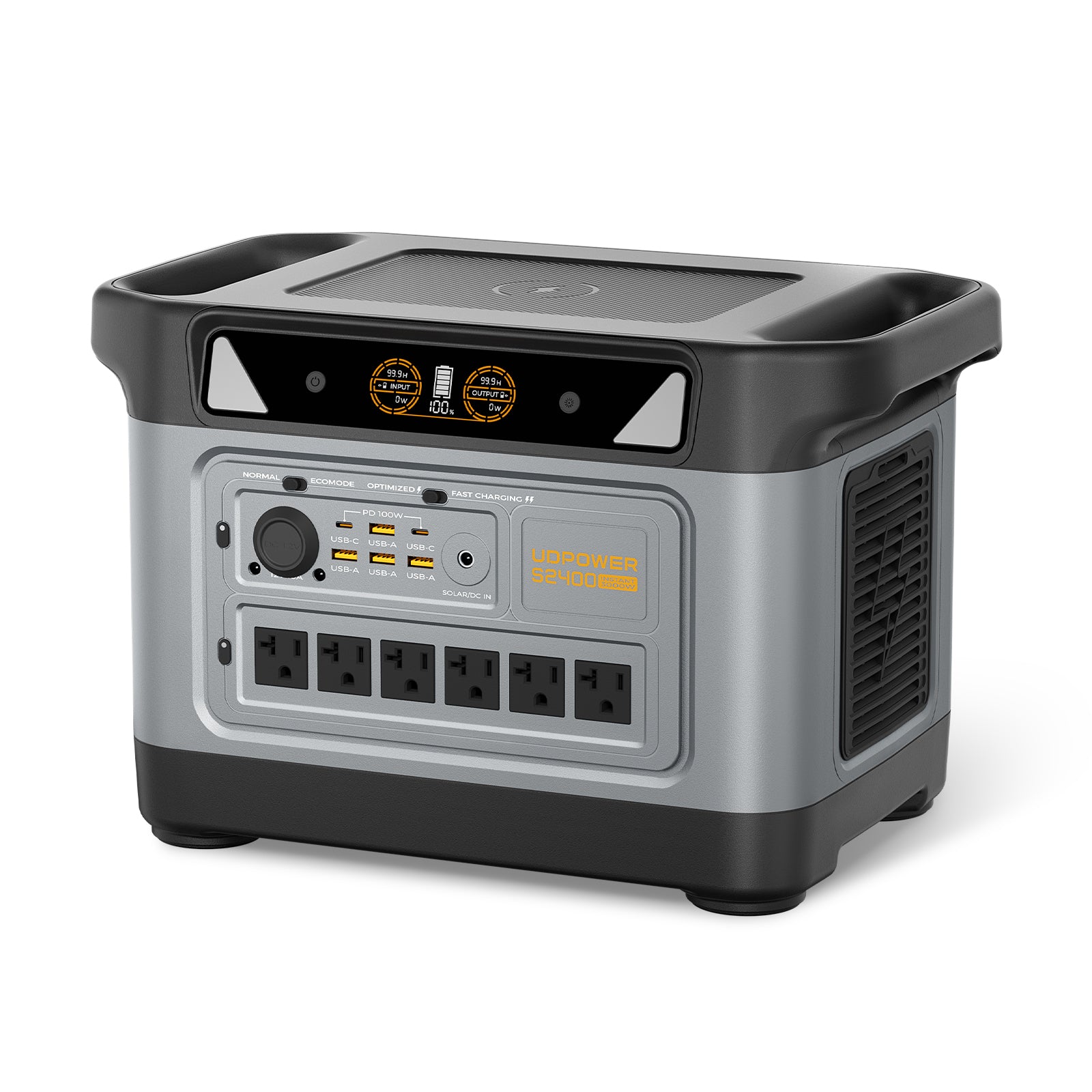
UDPOWER S2400
If your houseboat setup is closer to a serious liveaboard, a floating workspace, or a marina-based backup plan, the S2400 makes more sense than a mid-size unit. It gives you much more room for longer overnight coverage, more simultaneous devices, and heavier onboard backup use without jumping straight into a permanently installed system. For houseboat owners dealing with dock outages, work gear, communications equipment, and longer unplugged stretches, this is the model that feels meaningfully more capable.
| Spec | Value | Why it fits houseboat use |
|---|---|---|
| Capacity | 2,083Wh | Much better fit for longer overnight coverage and multi-device backup. |
| Rated output | 2,400W | Handles a much wider range of onboard backup needs. |
| Fast charging | 1.5H | Useful when you need to recover power quickly during dock time. |
| Battery | LiFePO4, 4,000+ cycles | Better suited to repeat-use backup planning. |
| Solar input | Up to 400W | More realistic for owners who want meaningful portable solar support. |
| Outputs | 6 AC + 10 DC | Better for more complex onboard electronics and charging routines. |
| UPS-style backup | ≤10ms | Helpful for sensitive essentials during brief dock power interruptions. |
Source: UDPOWER S2400 product page
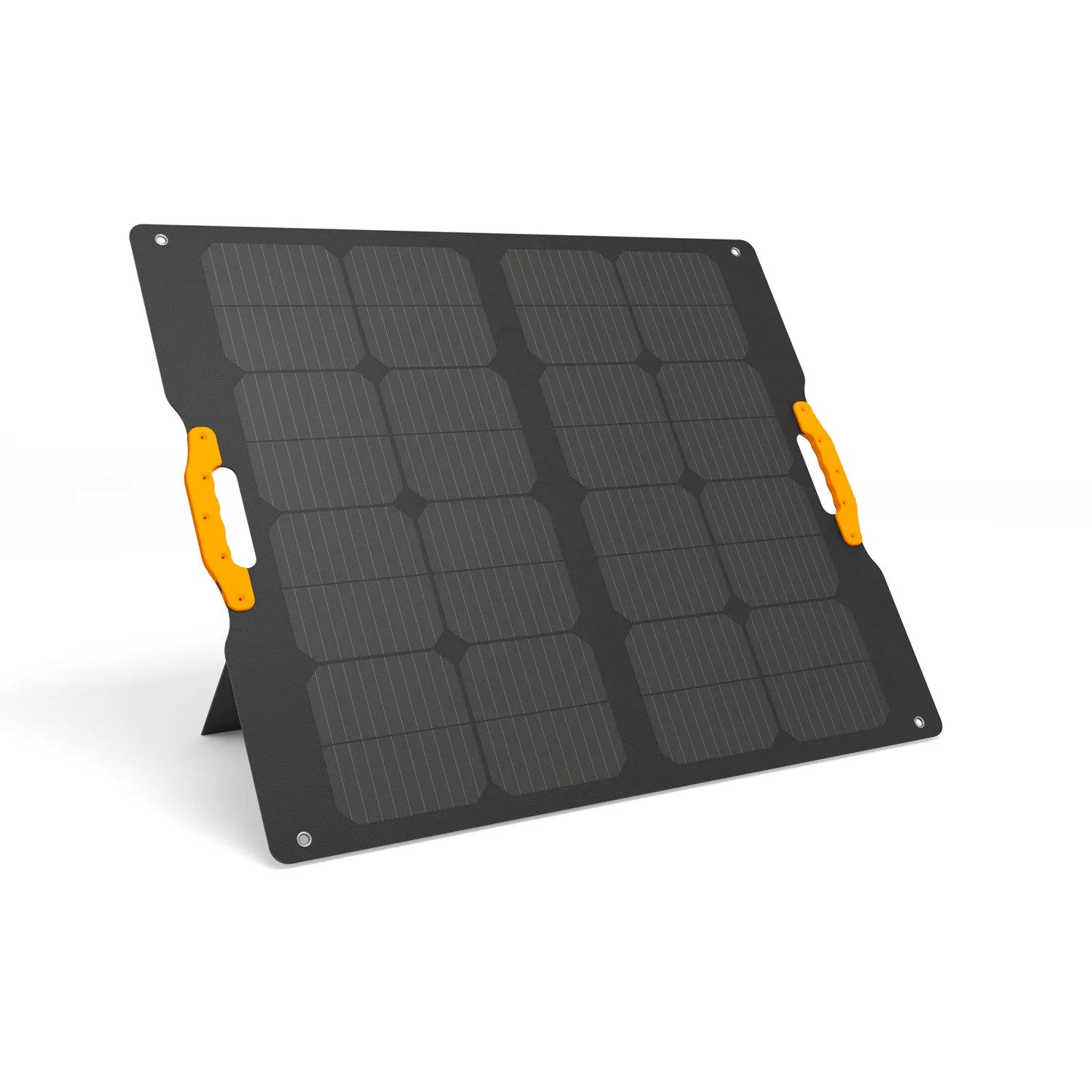
UDPOWER 120W Portable Solar Panel
This panel is not about pretending your houseboat has endless solar roof space. It is about practical topping-up. For lightly loaded days, shoulder-season use, or keeping a portable station healthier between dock sessions, a foldable 120W panel is a simple, low-hassle piece of the puzzle.
| Spec | Value | Why it fits houseboat use |
|---|---|---|
| Rated power | 120W | Reasonable portable size for topping up light-to-medium battery use. |
| Efficiency | 22% | Useful when deck space and sun angle are limited. |
| Protection | IP65 | Better suited to outdoor deck life than fragile indoor-only gear. |
| Weight | 8.93 lbs | Portable enough to deploy when you want it, then stow it away. |
| Tilt | 60°–90° adjustable | Helps squeeze more from available sun. |
Sources: UDPOWER 120W panel product page · How Many Watts of Solar Do I Need?
Houseboat FAQ
What is the difference between a houseboat and a floating home?
A houseboat is usually understood as a liveable boat, and many have some form of propulsion. A floating home is more like residential lodging on the water and is often less focused on travel.
What utilities do beginners need to understand first?
Start with shore power, battery power, freshwater, waste handling, and ventilation. Those five systems affect daily comfort more than decorative upgrades do.
Can a portable power station replace shore power on a houseboat?
Not as a full replacement for everything. It works best as a quiet backup or a practical solution for lighter loads like lighting, internet gear, laptops, phones, fans, and small electronics.
What is the biggest layout mistake on a beginner houseboat?
Letting furniture and decorative choices block access to real systems. On a boat, easy access to panels, valves, pumps, batteries, and storage matters every week, not just during a repair.
How should I think about houseboat optimization?
Think in layers: safe utilities first, then comfort, then storage, then style. A houseboat feels “optimized” when it is easy to move through, easy to maintain, and easy to live with in bad weather or low-power situations.
Final takeaway: the best houseboat is not the one with the flashiest finish. It’s the one whose type fits your water, whose utilities match your real routine, and whose layout makes ordinary days feel easy instead of improvised.
Related Articles





