
Smart Home Energy Management: A Practical Homeowner’s Guide to Lower Bills, Smarter Backup, and Better Control
Smart home energy management helps homeowners understand where electricity goes, reduce waste, automate daily energy use, and protect essential devices during outages. This guide explains how to build a practical home energy plan using smart thermostats, energy-monitoring plugs, appliance schedules, solar charging, and portable power station backup. It also includes priority load tables, runtime examples, UDPOWER product recommendations, and a 30-day setup plan for ordinary U.S. households.
Smart home energy management is not just about buying a smart thermostat or watching an app dashboard. Done well, it helps you understand where power goes, reduce waste, shift flexible loads away from expensive hours, and keep essential devices running when the grid goes down.
Quick Answer
Smart home energy management means using connected devices, energy data, schedules, and backup power to control how your home uses electricity. A strong setup usually starts with measurement, then adds smart thermostats, smart plugs, appliance schedules, solar charging where practical, and a battery backup plan for essentials such as Wi-Fi, lights, phones, CPAP machines, security equipment, and refrigerators.
For most U.S. households, the best first move is not a full whole-home system. Start with a 30-day energy audit, identify your must-run loads, automate the biggest waste points, and build a backup plan around realistic wattage. A portable power station can be a practical middle step before expensive whole-home battery installation, especially if your goal is keeping essentials powered rather than running every appliance in the house.

What Smart Home Energy Management Really Means
A smart home energy management system is the practical layer between your power bill, your appliances, and your daily routine. It can be simple, like a smart thermostat plus a few smart plugs. It can also be more advanced, with circuit-level energy monitoring, solar panels, battery storage, EV charging schedules, and utility demand response programs.
The point is not to make the home “high tech” for its own sake. The point is to make better power decisions automatically:
- Turn down heating or cooling when nobody is home.
- Stop wasting standby power from devices that do not need to stay on.
- Run flexible loads such as laundry, dishwashing, dehumidifiers, or EV charging during cheaper hours when your utility plan rewards it.
- Keep essential devices powered during short outages.
- Use solar input more intentionally if you own portable or rooftop solar panels.
In plain homeowner terms: smart energy management tells you what is using power, what can be reduced, what can be moved to a better time, and what should stay protected during an outage.
Why Smart Home Energy Management Matters Now
Electricity is becoming more dynamic. Many homes now have more plug-in devices, more work-from-home equipment, more battery-powered gear, more security cameras, and sometimes EVs or solar panels. At the same time, utilities in many regions are expanding time-of-use rates, peak alerts, and demand response programs.
That changes the goal. Saving energy is still important, but timing is becoming just as important. A dishwasher cycle at 2 p.m. may cost less than the same cycle during a 5 p.m. peak window. A battery charged before a storm can be more useful than a battery left half full. A refrigerator, router, and CPAP machine may matter more during an outage than a large TV or space heater.
| Trend | What it means for homeowners | Smart energy move | Source |
|---|---|---|---|
| Heating and cooling remain major controllable loads | Small schedule changes can reduce HVAC runtime without changing your whole lifestyle. | Install an ENERGY STAR smart thermostat or build a better setback schedule. | ENERGY STAR smart thermostat FAQ |
| Thermostat setbacks can reduce heating and cooling costs | A properly scheduled thermostat can save meaningful energy when comfort settings are relaxed for long enough. | Use a 7°–10°F setback for about 8 hours where comfort, humidity, pets, and home conditions allow. | U.S. Department of Energy |
| Time-variable pricing and demand response are expanding | Some households can earn credits or reduce bills by lowering demand during utility peak events. | Pre-cool, delay appliance cycles, reduce EV charging, or switch essentials to backup power during peak windows. | U.S. Department of Energy demand response guide |
| Energy use varies by home, climate, and equipment | Generic advice is only a starting point. Your own load profile matters more than averages. | Use an energy monitor, smart plug, or appliance label to identify your real wattage before sizing backup. | U.S. EIA Residential Energy Consumption Survey |
The 5-Layer Framework: Measure, Reduce, Shift, Back Up, Automate
Most smart home energy articles jump straight to gadgets. That is why many people buy smart devices but never see a clear result. A better approach is to build your system in layers.
| Layer | Goal | Simple tools | Best first action | What success looks like |
|---|---|---|---|---|
| 1. Measure | Find out where your power actually goes. | Utility bill, smart plugs, whole-home energy monitor, appliance labels. | Track your top 10 daily loads for one week. | You know which devices are always on, which appliances spike demand, and which loads are worth automating. |
| 2. Reduce | Cut waste before buying bigger backup equipment. | LED lighting, smart thermostat, power strips, efficient appliance settings. | Remove idle loads and fix thermostat schedules. | Your baseline use drops without making the home uncomfortable. |
| 3. Shift | Move flexible loads away from expensive or stressed grid hours. | Delay-start appliances, smart plugs, smart EV charger, thermostat pre-cooling. | Schedule laundry, dishwashing, and charging outside peak hours. | You use the same appliances but at better times. |
| 4. Back up | Protect essential devices during outages. | Portable power station, UPS-capable battery, solar panel, labeled emergency outlet plan. | Build a must-run load list before choosing battery size. | Wi-Fi, phones, lights, medical essentials, and selected food storage remain powered long enough for your needs. |
| 5. Automate | Make good decisions happen without daily attention. | Smart home hub, routines, app alerts, demand response settings. | Create three routines: away, sleep, and outage-ready. | The home reacts to occupancy, time, power price, weather, and battery status. |
Practical rule: Do not automate a bad energy habit. Measure it first, reduce the waste, then automate the improved version.
Home Energy Priority Map: What Should Stay On, What Should Wait
A smart energy plan becomes much easier when you group household loads by priority. This is especially important if you are adding battery backup. A battery can keep a home functional, but only if you ask it to power the right things.
| Priority level | Common devices | Typical planning watts | Smart energy action | Backup note |
|---|---|---|---|---|
| Must-run essentials | Wi-Fi router, modem/ONT, phone charging, LED lamp, security hub, medical device such as CPAP. | 10–80W per device, depending on model. | Put these on labeled outlets or a small backup station. | These are the first loads to protect because they use modest power and deliver high value. |
| Food and basic comfort | Refrigerator, small fan, compact freezer, small cooking device, laptop. | 60–300W average for many household loads; startup surge may be higher. | Use schedules, avoid opening fridge doors, and run only when needed during outages. | Check running watts and surge before relying on battery power. |
| Flexible loads | Dishwasher, laundry, dehumidifier, robot vacuum, pool pump, EV charging. | Varies widely; many exceed 500W while operating. | Shift to off-peak hours or solar-rich hours. | Usually not first priority during an outage unless there is a specific need. |
| High-drain comfort loads | Space heater, electric oven, dryer, large microwave, central HVAC compressor. | 750–5,000W+, depending on appliance. | Reduce runtime, use safer lower-power alternatives, or keep on grid power. | These can drain batteries quickly and may exceed portable power station output limits. |
The most overlooked part of smart energy management is not the app; it is load discipline. During normal days, load discipline saves money. During outage days, it extends runtime.
Recommended UDPOWER Options for Smart Home Backup
Smart energy management should include a backup layer for the devices you cannot afford to lose. UDPOWER portable power stations are useful for renters, apartment dwellers, RV owners, and homeowners who want a cleaner, quieter backup option for essential loads without installing a permanent whole-home battery system.
Use the product matches below as planning guidance. Always check the appliance label and startup wattage before connecting high-demand equipment.
UDPOWER C400 Portable Power Station

Best for: Wi-Fi, phones, laptops, LED lights, small fans, cameras, and light emergency backup.
Official specs: 256Wh capacity, 400W AC output, 800W surge, LiFePO4 battery, 4,000+ cycles, 9 output ports, solar ready.
View UDPOWER C400UDPOWER C600 Portable Power Station

Best for: Longer Wi-Fi and device backup, mini fridge, CPAP support, fans, laptops, cameras, and weekend power planning.
Official specs: 596Wh capacity, 600W rated output, 1,200W peak, LiFePO4 battery, 4,000+ cycles, 2 AC outlets, USB-C, USB-A, and 12V car outlet.
View UDPOWER C600UDPOWER S1200 Portable Power Station
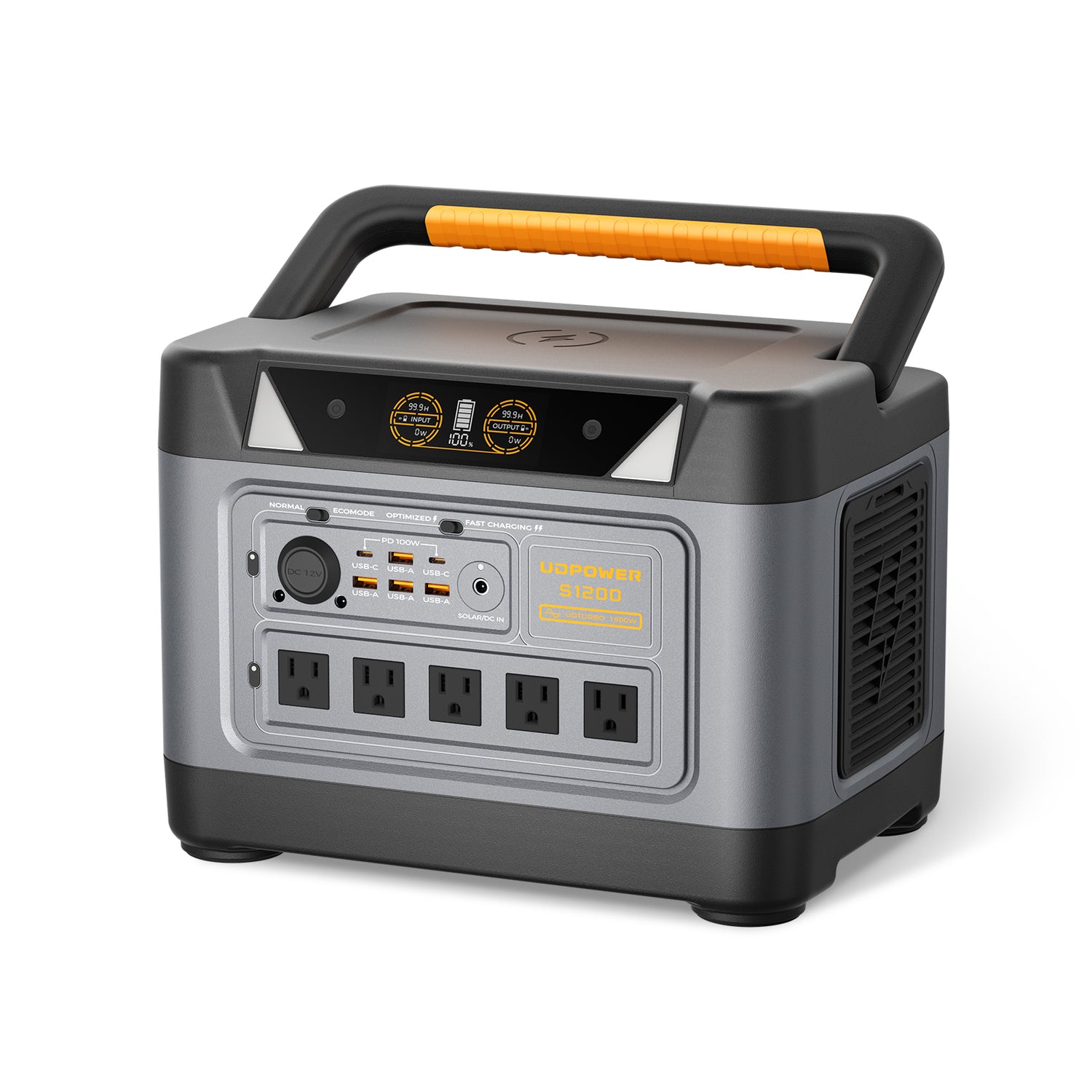
Best for: Refrigerator support, Wi-Fi, lights, phones, CPAP, fans, small appliances, and households that want UPS-style support for selected essentials.
Official specs: 1,190Wh capacity, 1,200W rated pure sine wave output, UDTURBO up to 1,800W surge, LiFePO4 battery, 4,000+ cycles, fast charging in about 1.5 hours, UPSPRIME switchover under 10ms, and 5-year warranty.
View UDPOWER S1200UDPOWER S2400 Portable Power Station
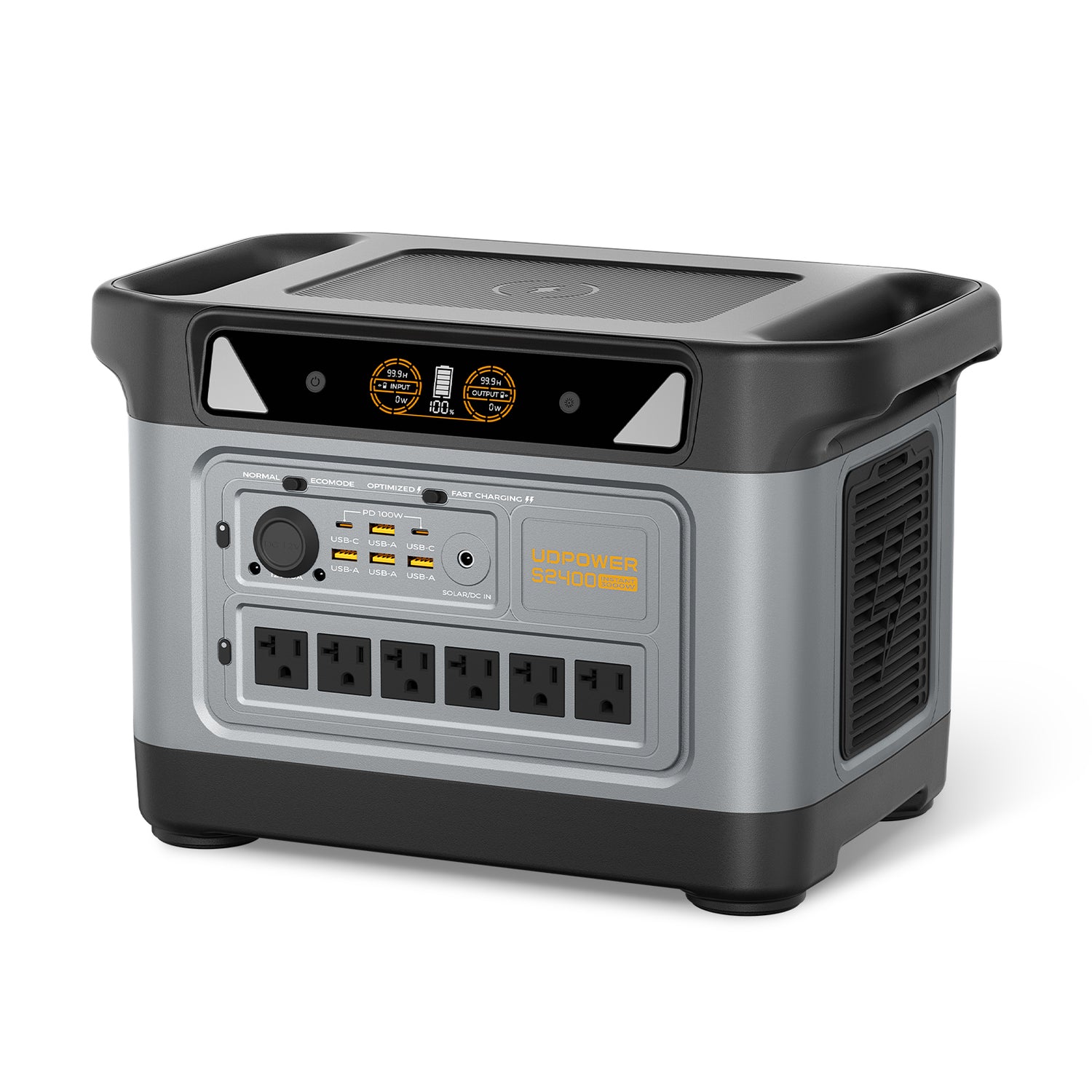
Best for: Longer refrigerator runtime, larger household essentials, routers, lights, CPAP machines, work-from-home equipment, and more serious outage preparation.
Official specs: 2,083Wh capacity, 2,400W pure sine wave AC output, UDTURBO surge support up to 3,000W, 6 AC outlets, 10 DC outputs, UPSPRIME switchover time under 10ms, solar input 12–50V and 10A max with up to 400W solar charging.
View UDPOWER S2400| Home energy use case | Recommended UDPOWER option | Why it fits | Official product source |
|---|---|---|---|
| Apartment or renter backup for Wi-Fi, phone, laptop, light, and small fan. | C400 | Compact 256Wh capacity with 400W output for light essential devices. | UDPOWER C400 page |
| Overnight essentials, CPAP planning, mini fridge, router, lights, and device charging. | C600 | 596Wh battery and 600W output give more runtime than compact units without becoming a large home system. | UDPOWER C600 page |
| Refrigerator plus Wi-Fi, lights, phone charging, CPAP, and small comfort devices. | S1200 | 1,190Wh capacity, 1,200W output, UPSPRIME under 10ms, and multiple AC/DC outputs make it a strong home-essential backup option. | UDPOWER S1200 page |
| Longer outage planning, larger appliances within rating, more ports, and stronger solar support. | S2400 | 2,083Wh capacity, 2,400W output, 3,000W surge support, 6 AC outlets, and up to 400W solar input. | UDPOWER S2400 page |
For a broader product overview, visit the UDPOWER portable power station collection. For solar charging accessories, see the UDPOWER solar panels collection.
Backup Runtime Examples for Common Smart Home Loads
Battery backup runtime depends on the load, battery capacity, inverter efficiency, temperature, battery age, and whether the appliance cycles on and off. For AC loads, a practical estimate is:
Estimated runtime = battery capacity × 0.85 ÷ device watts
The 0.85 factor allows for inverter loss and real-world conditions. Keep a reserve if the device is important.
| Load | Planning watts | C600 estimate | S1200 estimate | S2400 estimate | Smart energy note |
|---|---|---|---|---|---|
| Router/modem | 20W | About 25.3 hours | About 50.6 hours | About 88.5 hours | One of the best backup loads because it uses little power and keeps communication online. |
| Router + security hub + small LED light | 45W | About 11.3 hours | About 22.5 hours | About 39.4 hours | Good “night outage” bundle for most households. |
| CPAP machine | 30W | About 16.9 hours | About 33.7 hours | About 59.0 hours | Actual runtime varies with humidifier, pressure, heated hose, and model. |
| Laptop workstation | 65W | About 7.8 hours | About 15.6 hours | About 27.2 hours | Charge directly through USB-C where possible to reduce conversion losses. |
| Refrigerator average draw | 80W | About 6.3 hours | About 12.6 hours | About 22.1 hours | Compressor startup surge matters. Keep doors closed to extend runtime. |
| Small fan | 50W | About 10.1 hours | About 20.2 hours | About 35.4 hours | A fan often delivers more comfort per watt than high-drain heating or cooling devices. |
Smart Devices Worth Buying First
The best smart energy device depends on whether your main problem is high bills, outage risk, or lack of visibility. Here is a practical buying order for ordinary homes.
| Priority | Device or upgrade | What it solves | Who should buy it first | What to avoid |
|---|---|---|---|---|
| 1 | Smart thermostat | Reduces HVAC runtime and improves schedule control. | Homes with central heating/cooling and inconsistent occupancy. | Buying before checking HVAC compatibility, C-wire needs, and utility rebates. |
| 2 | Smart plug with energy monitoring | Reveals real wattage for devices such as entertainment centers, office gear, fans, dehumidifiers, and small appliances. | Anyone who wants low-cost proof before buying larger equipment. | Using cheap plugs for high-watt appliances beyond their rating. |
| 3 | Whole-home energy monitor | Shows circuit-level or whole-home power patterns. | Homeowners with high bills, solar, EVs, or unknown energy spikes. | Installing inside an electrical panel unless you are qualified or hire a professional. |
| 4 | Portable power station | Adds a backup layer for essential loads and portable solar charging. | Homes that want outage protection for selected devices without a permanent battery installation. | Expecting a portable station to act like a full whole-home generator. |
| 5 | Solar panel or solar-ready charging plan | Extends off-grid use and supports emergency recharging when sunlight is available. | Campers, RV users, storm-prep households, and anyone with good outdoor sun exposure. | Assuming rated solar output happens all day; shade, glass, clouds, and angle reduce input. |
A smart thermostat can produce savings by reducing heating and cooling use. ENERGY STAR says certified smart thermostats save about 8% of heating and cooling bills on average, or roughly $50 per year. The U.S. Department of Energy also notes that thermostat setbacks can save as much as 10% a year on heating and cooling when applied correctly. Those numbers are not guarantees for every home, but they show why HVAC control is usually a better first target than random small gadgets.
Time-of-Use Strategy for Ordinary Homes
If your utility has time-of-use rates, smart energy management becomes a scheduling problem. You are not only asking “How much power does this use?” You are also asking “When should this run?”
| Load | Can it be shifted? | Smart schedule idea | Comfort or safety caution |
|---|---|---|---|
| Dishwasher | Usually yes | Use delay start after peak hours. | Do not run when you are uncomfortable leaving the appliance unattended. |
| Laundry | Usually yes | Wash off-peak; avoid electric dryer during peak if possible. | Clean lint filters and follow dryer safety rules. |
| Water heating | Sometimes | Use built-in scheduling or utility-approved demand response controls if compatible. | Do not create unsafe water temperatures or poor sanitation conditions. |
| EV charging | Often yes | Charge overnight or during utility-designated low-cost periods. | Leave enough range for your real driving needs. |
| HVAC cooling | Partly | Pre-cool before peak hours, then relax the setting during peak. | Watch indoor humidity, pets, older adults, infants, and medical needs. |
| Battery backup charging | Yes | Recharge before storms or during cheaper grid hours where practical. | Keep enough reserve for emergency loads. |
A simple peak-hour routine
- Check your utility’s peak window.
- Move dishwasher, laundry, and EV charging outside that window.
- Pre-cool or pre-heat gently before the peak period if your home and climate allow.
- Turn off entertainment, office, and charging loads that do not need to run.
- Keep your backup station charged if storms, outages, or grid alerts are likely.
How Solar and Battery Backup Fit Into Smart Home Energy Management
Solar panels and batteries do not automatically make a home smart. They become smarter when you connect them to a clear operating plan: charge when the source is cheap or available, discharge only for priority loads, and avoid wasting battery capacity on high-drain appliances that are not essential.
For portable backup, a solar panel can extend runtime during camping, RV travel, and emergency situations. UDPOWER’s 120W portable solar panel is designed for compatible UDPOWER power stations and lists a 120W rated output, 21.5V open-circuit voltage, 17.92V maximum power voltage, IP65 weather-resistant design, and adjustable 60°–90° tilt bracket.

| Solar or battery scenario | Smart management rule | Why it matters | Related UDPOWER page |
|---|---|---|---|
| Portable solar charging | Place panels in direct sunlight, avoid window glass, reduce shade, and adjust angle during the day. | Solar output changes constantly. Angle and shade can make a large difference. | 120W portable solar panel |
| Battery backup during storm season | Charge the station before the storm, then run only priority loads during the outage. | A full battery used carefully is more useful than a larger battery drained by nonessential loads. | Portable power stations |
| Refrigerator backup | Confirm startup surge, keep doors closed, and run only when needed if preserving battery is more important than convenience. | Compressors cycle, so real runtime depends on temperature, door openings, and appliance efficiency. | S1200 home-essential backup |
| CPAP backup | Know your pressure setting and whether heated humidification is on. | Humidifiers and heated hoses can sharply increase power use. | CPAP battery backup guide |
Smart Home Energy Automation Examples That Actually Help
Good automations should be boring, safe, and easy to override. They should not create comfort problems or hide risky electrical behavior.
| Automation | Trigger | Action | Why it works |
|---|---|---|---|
| Away mode | Everyone leaves home. | Relax thermostat, turn off selected plugs, keep security and refrigerator running. | Cuts waste without affecting essential devices. |
| Sleep mode | Nighttime schedule. | Dim or turn off lights, shut down office equipment, keep medical and security devices on. | Reduces overnight standby draw and keeps critical loads protected. |
| Peak-rate mode | Utility peak window begins. | Pause flexible loads and delay appliance cycles. | Targets the most expensive hours instead of reducing comfort all day. |
| Storm-ready mode | Severe weather alert or planned outage notice. | Charge power station, phones, laptops, and battery lights. | Prepares before the outage instead of reacting after the grid fails. |
| Solar-use mode | Good sun and battery has available capacity. | Charge the power station or run flexible low-priority loads. | Uses available solar input while keeping emergency reserve in mind. |
30-Day Smart Home Energy Management Setup Plan
You do not need to transform the entire home in one weekend. A slower setup usually works better because you learn from your own usage data.
| Timeline | What to do | What to record | Decision to make |
|---|---|---|---|
| Days 1–3 | Review your utility bill, rate plan, and outage history. | Monthly kWh, peak hours, outage frequency, critical devices. | Is your main goal lower bills, outage backup, or both? |
| Days 4–10 | Use smart plugs or labels to estimate watts for top devices. | Router, office setup, fridge, CPAP, lights, fans, entertainment center. | Which devices are must-run during an outage? |
| Days 11–15 | Fix obvious waste. | Idle devices, unused chargers, poor thermostat schedules, lights left on. | Which waste can be removed without automation? |
| Days 16–20 | Build three routines: away, sleep, and peak-rate. | Comfort limits, device exceptions, manual override needs. | Which automations are safe enough to run every day? |
| Days 21–25 | Size backup power using your must-run list. | Watts, desired hours, startup surge, reserve requirement. | Do you need compact backup, home essentials backup, or longer runtime? |
| Days 26–30 | Run a test outage. | Actual runtime, cable placement, family instructions, recharge time. | What needs labeling, simplification, or more capacity? |
Common Smart Home Energy Management Mistakes
- Buying gadgets before measuring loads. A smart plug is cheaper than guessing wrong on a major battery or appliance decision.
- Only chasing total kWh. On time-of-use plans, the hour of use may matter almost as much as the amount of use.
- Trying to back up the whole house with a portable station. Portable power stations are best for selected essentials. Large central HVAC, dryers, ovens, and space heaters can drain or overload batteries quickly.
- Ignoring startup surge. Refrigerators, pumps, and motor-driven appliances may draw much more power at startup than during normal running.
- Letting automation reduce safety or comfort. Pets, medical equipment, humidity, pipes, food safety, and vulnerable family members come before savings.
- Leaving backup gear untested. A power station should be charged, labeled, and tested before the storm, not after the lights go out.
Related UDPOWER Guides and Product Pages
Use these internal resources to continue building a practical smart energy plan:
- Portable Power Station Collection — compare backup power options by capacity and output.
- Solar Panels Collection — choose compatible solar charging options.
- Can a Solar Generator Power a House? — understand what solar generators can and cannot do for home backup.
- Can You Charge a Portable Power Station with a Solar Panel? — learn solar charging basics before buying panels.
- How Long Will a CPAP Run on a Battery Backup? — useful for medical and overnight backup planning.
- How Many Watts Does a Crock Pot Use? — helpful for appliance wattage and runtime planning.
- What Should You Do During a Gale Warning? — a storm-prep guide that pairs well with backup power planning.
FAQ: Smart Home Energy Management
What is smart home energy management?
Smart home energy management is the use of connected devices, schedules, energy monitoring, and backup power planning to reduce waste, control electricity use, shift flexible loads, and protect essential devices during outages.
Do I need a full home energy management system?
Not always. Many households can start with a smart thermostat, a few energy-monitoring plugs, better appliance schedules, and a portable power station for essential backup. A full system makes more sense for homes with solar, EV charging, high bills, or frequent outages.
What saves the most energy in a smart home?
HVAC control is usually one of the highest-value starting points because heating and cooling are major household loads. Smart thermostats, good setback schedules, sealing/insulation improvements, and efficient equipment can make a larger difference than small plug-in gadgets alone.
Can smart plugs lower my electric bill?
Smart plugs can help when they control devices that waste standby power or run longer than needed. Their bigger value is measurement: they show real wattage so you can make better decisions about schedules and backup sizing.
Is a portable power station part of smart home energy management?
Yes, if it is used as a planned backup layer. It can keep selected essential loads running during outages and can be paired with compatible solar panels for portable recharging. It is not the same as a permanent whole-home battery system.
Which UDPOWER model is best for smart home backup?
For light backup, the C400 is suitable for small electronics and basic essentials. The C600 is a stronger mid-size option for overnight essentials. The S1200 is a practical pick for home-essential backup such as Wi-Fi, lights, CPAP, and refrigerator support. The S2400 is better when you need longer runtime, more output, and more outlets.
Can a smart home energy system run my entire house during an outage?
Only a properly sized whole-home backup system can do that. A portable power station is better used for selected loads. Prioritize communication, lighting, medical devices, food storage, and small comfort devices before high-drain appliances.
How do I calculate backup runtime?
Use this estimate for AC loads: battery capacity × 0.85 ÷ device watts. For example, a 1,190Wh station powering an 80W average load is roughly 1,190 × 0.85 ÷ 80, or about 12.6 hours. Real results vary.
Can solar panels make my smart home more efficient?
Solar panels help most when you use or store the energy intentionally. For portable solar, direct sunlight, correct angle, and low shade matter. For rooftop solar, scheduling flexible loads during strong production hours can improve self-use.
What should renters do for smart energy management?
Renters can still use smart plugs, LED bulbs, portable energy monitors, smart thermostats where allowed, and portable power stations. Avoid permanent electrical work unless the landlord approves it and a qualified professional handles installation.
Build a Smarter, More Resilient Home Energy Plan
Start with the loads that matter most, then choose backup capacity around real wattage instead of guesswork. If your goal is outage readiness, begin with Wi-Fi, phones, lights, CPAP, refrigerator support, and a simple recharge plan.
View UDPOWER Portable Power Stations View S1200 for Home Essentials View S2400 for Longer Runtime View Compatible Solar PanelsRelated Articles





