





Outdoor Camera Charging Guide: Portable Power for Creators
Last updated: September 7, 2026
A few spare batteries or a USB-C PD power bank may be enough for a day hike. Once your kit includes two camera bodies, action cameras, drones, a laptop, gimbal, monitor, audio gear or LED lights, a portable power station becomes much more useful because it combines high-capacity battery storage with USB-C, USB-A, AC and DC outputs.
For car-accessible photography, road trips and lightweight basecamps, the UDPOWER C400 offers 256Wh of capacity, 400W rated AC output, two USB-C ports with up to 100W combined output and only about 6.88 lb of weight. For multi-camera production, extended video work or multi-day basecamp use, the UDPOWER S1200 expands capacity to 1,190Wh with 1,200W rated AC output, five AC outlets, two USB-C ports and up to 400W solar input.

A dead camera battery is annoying at home. Outdoors, it can end a sunrise shoot, interrupt a wildlife sequence, stop a long exposure halfway through the night or leave a drone grounded when conditions are finally right.
The solution is not automatically to buy the largest battery you can carry. A better outdoor camera power plan starts by understanding how your exact gear charges, then sizing the energy reserve around the shoot.
Outdoor Camera Charging Is an Energy-Budget Problem, Not Just a Wattage Problem
Portable power stations are often marketed by output: 200W, 400W, 1,200W and so on. That number is important for high-power appliances, but camera charging usually demands relatively little instantaneous power.
For a photographer, watt-hours are often more important than watts.
A 400W station does not mean your camera gets “400 watts.” It means the station can support connected equipment up to its documented output limits. Your camera charger still draws only what it requires.
| Number | What It Tells You | Why It Matters for Photography |
|---|---|---|
| Watts (W) | How much power a device is using at a particular moment | Important for laptop chargers, drone hubs, lights and the total load connected at once |
| Watt-hours (Wh) | How much electrical energy is stored or consumed over time | The most useful number for estimating how many batteries you can recharge |
| USB-C PD profile | The voltage and current combinations supported by a USB-C Power Delivery connection | Determines whether compatible cameras, laptops and chargers can negotiate the power they require |
This leads to a useful rule:
The Best Ways to Charge Cameras Outdoors
There is no universal camera-charging method. Even two cameras with USB-C ports can behave differently. One may charge only while switched off, another may accept external power while recording, and another may require a specific battery or USB Power Delivery source.
The safest starting point is always the charging section of your exact camera manual.
| Method | Best For | Advantages | What to Check |
|---|---|---|---|
| USB-C PD directly to camera | Modern mirrorless and cinema cameras that officially support USB charging or power | Fewer conversion steps, less gear, no AC charger required | Camera manual, supported battery, PD requirements and whether charging works while camera is on |
| USB-powered external battery charger | Rotating two or more removable camera batteries | You can keep shooting with one battery while another charges | Correct battery model, USB input requirement and charger quality |
| Original AC battery charger | Maximum compatibility with the camera maker's normal charging workflow | Simple and familiar; works from a power station's AC outlet | Charger input voltage and station AC output |
| Manufacturer-approved DC coupler or external power accessory | Long interviews, livestreams, astrophotography and time-lapse | Avoids repeatedly swapping internal batteries | Exact camera compatibility, regulated voltage and official accessory requirements |
| 12V camera or battery charger | Vehicle-based photography and specialized field chargers | Can avoid AC inverter conversion | The charger must explicitly support the station's 12V output range |
| Solar panel → power station → camera | Multi-day basecamps and off-grid trips | Replenishes stored energy during daylight | Solar input limits, weather, shade, panel angle and daily energy demand |
1. USB-C PD direct to the camera
Direct USB-C charging is usually the simplest field setup when your camera officially supports it. You eliminate the wall charger and can connect the camera directly to a USB-C PD port on a portable power source.
A higher-rated PD port does not mean that the camera is forced to accept the port's maximum wattage. Compatible USB-C PD devices negotiate supported voltage and current profiles. What matters is whether the power source includes a profile that the camera accepts.
For example, Sony's official α7 IV guide states that the camera can charge from a compatible external USB source and supports faster charging with USB Power Delivery. Sony recommends a USB-PD source supporting 9V/3A or 9V/2A for charging. Sony α7 IV charging guide.
2. External USB battery charger
For still photographers, this is often more useful than plugging the camera itself into a cable.
You can keep one battery in the camera, place a depleted pack in the charger and rotate batteries throughout the day. Dual-bay chargers are especially useful at camp, provided the charger is designed for your exact battery type.
3. The original AC charger
If your camera does not support USB charging, there is nothing wrong with using its original battery charger from a portable power station's pure sine wave AC outlet.
The tradeoff is efficiency. The power station converts battery DC to AC, then the camera charger converts AC back to DC for the battery. Direct USB or DC charging can avoid some of those conversion steps when supported.
For a short trip, the difference may not matter. For a five-day remote shoot where every watt-hour matters, it can.
4. External camera power for long recording
A time-lapse, interview or continuous video shoot may require something different from ordinary battery charging. Some cameras support USB power while operating; others use a manufacturer-approved DC coupler, battery eliminator or external power accessory.
Charging and Powering a Camera Over USB-C Are Not the Same Thing
This distinction causes a surprising amount of confusion in the field.
Charging means the external source is replenishing energy stored in the camera battery. Power supply or power delivery means the external source is helping operate the camera.
A camera can support one behavior without doing both at the same time.
| Camera Example | Official Behavior | Practical Field Lesson | Source |
|---|---|---|---|
| Sony α7 IV | USB Type-C can supply power while the camera is operating, but the battery is not charged during USB power supply | External USB can extend shooting time, but do not assume the internal battery is being refilled while recording | Sony Help Guide |
| Canon EOS R6 Mark II | Supported USB power adapter can charge compatible batteries when off and supply power when the camera is on | Canon notes that remaining battery charge may still decline while the camera is externally powered | Canon Manual |
| Nikon Z8 | USB Power Delivery can supply operating power when enabled; charging behavior changes with camera state | Nikon explicitly distinguishes USB power delivery from battery charging | Nikon Z8 Manual |
This is why statements such as “USB-C cameras can shoot forever from a power bank” are too broad. Test the complete camera, battery, cable and power-source combination before a paid assignment, long time-lapse or remote trip.
How to Calculate Camera Battery Watt-Hours
Camera batteries are often labeled in volts and milliamp-hours. To compare them directly with a portable power station, convert the battery to watt-hours.
If the battery is labeled in mAh:
Wh = Voltage × mAh ÷ 1,000
For example, Sony specifies its NP-FZ100 battery at 7.2V and 2,280mAh:
That matches Sony's published 16.4Wh specification. Sony NP-FZ100 specifications.
| Gear | Battery | Published Capacity | Why It Matters for Planning | Source |
|---|---|---|---|---|
| Sony mirrorless cameras using NP-FZ100 | NP-FZ100 | 16.4Wh | Four full battery-equivalents represent about 65.6Wh before charging losses | Sony |
| Fujifilm cameras using NP-W235 | NP-W235 | 16Wh | A similar energy class to many full-size mirrorless batteries | Fujifilm USA |
| DJI Air 3S | Intelligent Flight Battery | 62.5Wh | One drone battery can require roughly four times the energy of a 16Wh mirrorless battery | DJI |
| GoPro HERO13 Black | Enduro | 1,900mAh | Manufacturer runtime can be more useful than mAh alone when battery voltage is not shown on the shopping page | GoPro |
This table also reveals why a kit that looks small can consume a surprising amount of energy. Four mirrorless batteries may be less demanding than two large drone batteries.
Build a One-Day Photography Power Budget
Do this before buying a power station.
-
List everything that needs to be charged.
Include camera batteries, drone packs, phone, gimbal, monitor, wireless microphone, GPS, satellite communicator, laptop, SSD and lights. -
Record energy per charge or watts × hours.
For removable batteries, use their Wh rating. For continuous devices, multiply watts by operating hours. -
Multiply by how many times you expect to recharge each device.
A 16.4Wh camera battery charged four times uses 65.6Wh at the battery before conversion losses. -
Add the entire kit together.
Do not size the battery from the camera alone if the laptop and drone will use most of your energy. -
Add conversion losses and reserve.
For UDPOWER planning in this guide, use 90% conversion efficiency, then keep additional reserve rather than planning to reach 0% every night.
Example: a real creator day
| Device | Planning Assumption | Energy Needed |
|---|---|---|
| Mirrorless camera batteries | 4 × 16.4Wh | 65.6Wh |
| DJI Air 3S batteries | 2 × 62.5Wh | 125Wh |
| Laptop | 65W average charging load × 1.5 hours | 97.5Wh |
| LED light | 30W × 2 hours | 60Wh |
| Phone and small electronics | Planning allowance | 15Wh |
| Total device-side energy | 363.1Wh |
Now allow for conversion:
Add a 20% trip reserve:
403Wh × 1.20 = about 484Wh target capacity
This is a much better buying method than saying, “I have a camera, so I need a 300W power station.”
How Many Camera Batteries Can a Portable Power Station Charge?
A simple planning formula is:
The 90% factor is a conservative planning allowance. Real results vary with charging method, charger efficiency, cable losses, temperature, battery condition and whether the station is powering other gear.
| Battery Example | Battery Energy | C400 256Wh | S1200 1,190Wh | Official Battery Source |
|---|---|---|---|---|
| Sony NP-FZ100 | 16.4Wh | About 14 full battery-equivalents | About 65 full battery-equivalents | Sony |
| Fujifilm NP-W235 | 16Wh | About 14.4 full battery-equivalents | About 67 full battery-equivalents | Fujifilm USA |
| DJI Air 3S battery | 62.5Wh | About 3.7 full battery-equivalents | About 17.1 full battery-equivalents | DJI |
These figures are not promises that you will see exactly that number of complete charges. They are a way to compare capacity before a trip.
The difference between mirrorless and drone batteries is also obvious: the C400 can theoretically replenish many conventional camera batteries, but a few large drone batteries can consume most of a 256Wh station quickly.
What Size Portable Power Station Does a Photographer Need?
The right size depends more on the mission than the camera brand.
| Shooting Scenario | Typical Gear | Practical Power Approach | Why |
|---|---|---|---|
| Day hike | One camera, phone, headlamp | Spare camera batteries or compact USB-C power bank | Weight matters more than large energy capacity |
| Car-accessible landscape day | Two bodies, phone, tablet, battery chargers | About 200–300Wh | Enough reserve for repeated charging without adding excessive bulk |
| Wildlife weekend | Two bodies, many camera batteries, laptop, small accessories | 300–700Wh depending on laptop use | Camera batteries are modest loads, but data backup can become the largest consumer |
| Drone + camera trip | Mirrorless body, drone batteries, controller, phone | 300–1,000Wh | Drone batteries can consume far more energy than camera batteries |
| Astrophotography night | Camera, external power, dew heater, laptop, tracker | 500–1,200Wh depending on heater and computer use | Continuous overnight loads matter more than the camera itself |
| Multi-camera video production | Multiple bodies, monitors, audio, laptops, gimbals, lights | 1,000Wh+ | Many devices operate and charge simultaneously |
| Multi-day off-grid basecamp | Cameras, drones, laptop, lighting and communications | 1,000Wh+ plus realistic solar recovery | Daily recharge capacity matters as much as battery size |
For a broader approach to sizing by watt-hours, see How Many Wh Do I Need for Camping?. Camera gear fits the same basic energy-budget method.
Recommended UDPOWER Power Stations for Outdoor Camera Charging
For photography, the most important UDPOWER differences are capacity, weight, USB-C capability and how much other production equipment you expect to run.
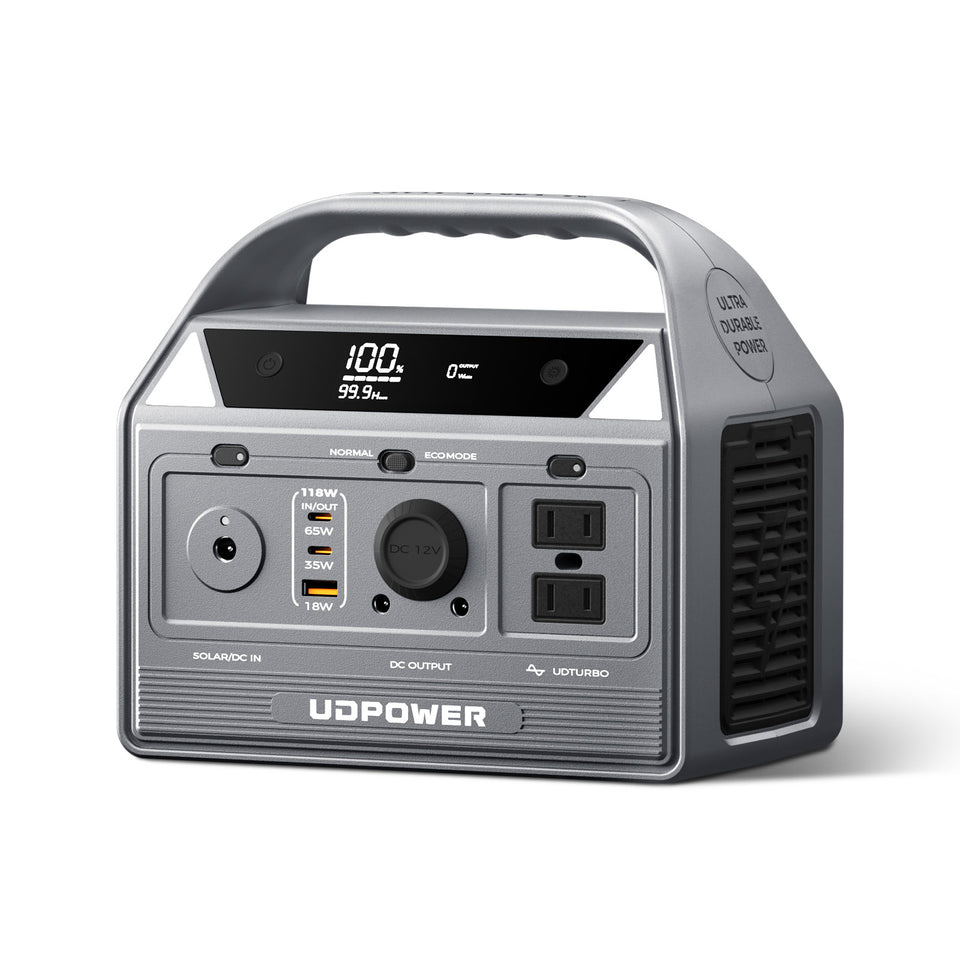
UDPOWER C400: Best Fit for Car Photography, Road Trips and Compact Creator Kits
The UDPOWER C400 is the most balanced choice for photographers who want substantially more capacity than a conventional power bank without carrying a full-size basecamp station.
- Capacity: 256Wh
- Rated AC output: 400W pure sine wave
- Surge support: up to 800W
- AC outlets: 2
- USB-C: 2 ports, up to 100W combined output with 65W + 35W ports
- USB-A: up to 18W
- 12V car/DC output: up to 136W total within published limits
- Solar input: up to 150W
- Weight: approximately 6.88 lb
- Dimensions: 8.27 × 5.12 × 7.09 in
- Battery chemistry: LiFePO4
- Warranty: 5 years
For camera work, the two USB-C ports are more important than the 400W inverter. A compatible camera, USB-C battery charger or laptop can use DC output directly while the AC outlets remain available for original camera chargers.
Using the conservative 90% planning method, the C400 provides approximately 230Wh of planning energy. That is roughly 14 Sony NP-FZ100 battery-equivalents or about 3.7 DJI Air 3S battery-equivalents before considering any other connected gear.
View UDPOWER C400
UDPOWER S1200: Best for Multi-Camera Production and Off-Grid Basecamps
The UDPOWER S1200 makes more sense when camera charging is only one part of the load. A production setup may also need a laptop, external monitor, drone charger, LED lights, audio equipment, storage devices and communications gear.
- Capacity: 1,190Wh
- Rated AC output: 1,200W pure sine wave
- UDTURBO support: up to 1,800W for compatible higher-power devices
- AC outlets: 5
- USB-C: 2 ports, up to 100W total according to current specifications
- USB-A: 4 ports
- DC5521: 2 outputs
- 12V car output: up to 144W within published limits
- Solar input: up to 400W
- UPS response: ≤10ms
- Weight: approximately 26.0 lb
- Dimensions: 13.7 × 9.5 × 9.7 in
- Battery chemistry: LiFePO4
- Warranty: 5 years
At 90% planning efficiency, 1,190Wh represents approximately 1,071Wh of planning energy. Camera batteries alone barely challenge that capacity, but a laptop, drones and lighting can quickly justify the larger station.
The S1200 is therefore better viewed as a production base battery than a camera charger.
View UDPOWER S1200| Feature | UDPOWER C400 | UDPOWER S1200 | Photography Impact |
|---|---|---|---|
| Capacity | 256Wh | 1,190Wh | S1200 gives far more margin for laptops, drones and lighting |
| Rated AC output | 400W | 1,200W | Both easily cover normal camera chargers; S1200 handles larger production loads |
| USB-C | 65W + 35W, 100W total | 2 ports, 100W total | Useful for direct camera, charger and laptop connections |
| AC outlets | 2 | 5 | S1200 supports more original chargers at once |
| Solar input | 150W max | 400W max | S1200 can recover energy faster when paired with an appropriately sized compatible solar setup |
| Weight | About 6.88 lb | About 26.0 lb | C400 is much easier to move around a vehicle or short-access location |
| Best use | Day shoots, road trips, wildlife, car camping, small drone kits | Production basecamp, multi-camera video, extended off-grid use | Choose around the entire kit rather than the camera alone |
| Official specifications | C400 product page | S1200 product page | Always confirm current specifications before purchase |
Which Output Should You Use First?
If several charging options work with your gear, use the simplest direct connection that your equipment officially supports.
| Priority | Connection | Why |
|---|---|---|
| 1 | USB-C PD direct to compatible camera or charger | Simple cable setup and avoids running the AC inverter |
| 2 | USB-A or USB-C external battery charger | Lets you rotate removable batteries while continuing to shoot |
| 3 | Compatible regulated 12V charger | Useful for specialized vehicle-based camera or drone charging |
| 4 | Original AC charger | Excellent compatibility, but introduces an additional inverter conversion stage |
If you are using only USB and DC devices, switch off unused AC output when your power station provides independent output controls. That avoids keeping an inverter active when you do not need it.
Using Solar Panels for Multi-Day Camera Charging
A larger battery solves one night. A balanced charging system solves a multi-day trip.
Solar is especially useful at a basecamp where you shoot around sunrise and sunset while the station can recharge during stronger midday sun.
The key question is not the solar panel's advertised wattage. It is how many watt-hours you can realistically recover each day.
Suppose your panel averages 80W of actual input for four strong hours:
If your photography kit consumes 250Wh per day, that could approximately replace the energy you used. If your kit consumes 600Wh per day, the battery will still decline unless you increase solar recovery, reduce consumption or add another charging source.
Actual output changes with clouds, shade, sun angle, panel temperature and time of day. A panel's rated wattage should never be treated as guaranteed continuous output.
UDPOWER's current portable solar panel collection includes 120W and 210W foldable options. The C400 accepts up to 150W solar input, while the S1200 accepts up to 400W. Always stay within the power station's specified voltage, current and wattage limits.
For a full off-grid charging plan, read How to Get Power When Camping Off Grid.
Cold, Heat, Rain and Outdoor Camera Charging
Battery specifications are normally measured under controlled conditions. The field is not controlled.
Cold weather
Cold can reduce effective battery performance and slow charging. Canon's EOS R6 Mark II manual, for example, notes that charging takes longer at low temperatures. Canon EOS R6 Mark II manual.
Keep spare camera batteries reasonably warm inside an inner pocket or insulated pouch when shooting in freezing conditions, and do not assume that a battery which appears depleted in extreme cold is permanently empty.
Also respect the portable power station's own charging-temperature limits.
| Model | Discharging | Charging | Storage | Source |
|---|---|---|---|---|
| C400 | -4°F to 113°F (-20°C to 45°C) | 32°F to 104°F (0°C to 40°C) | 32°F to 104°F (0°C to 40°C) | C400 specifications |
| S1200 | -4°F to 113°F (-20°C to 45°C) | 23°F to 104°F (-5°C to 40°C) | 32°F to 104°F (0°C to 40°C) | S1200 specifications |
Hot weather
Do not leave the station baking inside a closed vehicle or in direct midday sun simply because you are shooting nearby. Shade the battery system, allow ventilation and stay within the published operating range.
The same applies to camera batteries and drone packs. A hot battery may delay or refuse charging until it cools into its permitted range.
Rain and wet ground
Keep the power station and all electrical connections dry. Place the station on a stable raised surface rather than directly on wet ground.
UDPOWER currently rates its foldable solar panels IP65, but that does not make the entire charging system waterproof. Connectors, cable ends, the station itself and other equipment still need protection. The solar panel should not be submerged or left through prolonged heavy rain. See current UDPOWER solar-panel guidance.
Do not sacrifice weather protection just to charge
Opening a camera's USB port cover may affect its intended weather protection. During rain, surf or blowing snow, it can be safer to rotate sealed spare batteries rather than leaving a charging cable connected to an exposed camera port.
Can You Fly With a Portable Power Station for a Photography Trip?
This is one of the most important details for destination photographers.
According to the FAA's current passenger guidance:
- Rechargeable lithium batteries from 0–100Wh are generally permitted within applicable rules.
- Batteries from 101–160Wh require airline approval and are subject to additional limits.
- Batteries above 160Wh are forbidden on passenger aircraft.
- Spare lithium batteries and power banks must be carried in carry-on baggage rather than checked baggage when they are otherwise permitted.
The FAA specifically lists stand-alone lithium battery-powered generators exceeding the 160Wh limit as forbidden on passenger aircraft. FAA Airline Passengers and Batteries.
| Battery | Capacity | Passenger Aircraft Status |
|---|---|---|
| Typical small camera battery | Often well below 100Wh | Generally within the lower FAA Wh category, subject to battery and baggage rules |
| UDPOWER C400 | 256Wh | Above the 160Wh passenger-aircraft limit |
| UDPOWER S1200 | 1,190Wh | Above the 160Wh passenger-aircraft limit |
A Better Field Charging Workflow
Having enough battery capacity is useful. Managing it well is what keeps a shoot running.
Charge in order of consequence
Do not plug in every dead battery at once just because the power station has enough ports.
A sensible priority might be:
- Primary camera battery
- Second camera body
- Drone battery needed for the next flight
- Phone or emergency communication
- Laptop required for backup
- Secondary accessories
- Nonessential convenience devices
Rotate instead of waiting until everything is empty
When a camera battery reaches a low level, replace it with a charged spare and immediately begin replenishing the depleted one. A rolling rotation is easier to manage than reaching camp with six empty batteries.
Use daylight for recovery
During a multi-day trip, recharge the station from solar during the strongest sunlight rather than waiting until evening. Store that energy for nighttime battery charging and laptop work.
Protect data before convenience
When the station is running low, a safe card backup may be more valuable than charging a speaker or lighting the entire campsite.
If your workflow requires transferring irreplaceable footage to a laptop and external SSD, make sure sufficient battery remains to finish the transfer before starting it.
Photograph charger labels before leaving home
Take a phone photo of the electrical label on every important charger. If you need to replace a cable or troubleshoot compatibility in the field, you will have its input and output specifications with you.
Test the complete kit before the trip
Do not discover at the trailhead that your camera refuses to charge from a particular cable or that the USB charger only works when connected to a different PD profile.
At home, connect:
- The exact power station
- The exact USB-C cable
- The exact camera
- The battery you intend to use
- The exact external charger
- The drone hub
- The laptop
- Any DC coupler or external power accessory
Then run the combination long enough to verify actual behavior.
Ready-to-Use Outdoor Camera Power Setups
| Scenario | Power Setup | How to Use It |
|---|---|---|
| Sunrise landscape | Camera spares + small PD power bank | Keep the kit light and charge camera only when needed |
| Road-trip photography | C400 + USB-C + original AC charger | Charge cameras directly through USB when supported and keep AC available for legacy chargers |
| Wildlife blind | C400 kept near the vehicle or blind base | Rotate batteries quietly without running an engine or generator |
| Astrophotography | S1200 or capacity sized from overnight Wh | Power camera, laptop, tracker and dew-control equipment according to measured load |
| Drone mapping or aerial video | C400 for a small kit; larger station for repeated high-capacity packs | Calculate drone batteries in Wh because they can dominate the energy budget |
| Multi-day creator basecamp | S1200 + compatible solar panel | Use solar for daytime recovery and stored power for nighttime charging and editing |
Outdoor Camera Charging Checklist
- I know the Wh rating of each camera and drone battery.
- I know whether my camera supports USB charging, USB power supply or both.
- I have checked the camera manual instead of assuming all USB-C ports behave the same way.
- I have tested the exact USB-C cable and charger before the trip.
- I have at least one spare charging cable.
- I have enough spare batteries to continue shooting while another battery charges.
- I have calculated the entire day's Wh use, not just the camera body.
- I have included laptop, drone, phone, lighting, gimbal and audio loads.
- I have added conversion losses and emergency reserve.
- I will use direct USB or DC charging when it is officially supported and practical.
- I will use the original AC charger when compatibility matters more than maximum efficiency.
- I have checked outdoor charging temperature limits.
- I have a way to keep the power station dry and shaded.
- I will not place electrical equipment in wet grass or standing water.
- I have checked solar voltage, current and wattage compatibility before connecting a panel.
- I understand that real solar output will normally vary below the panel's rated wattage.
- I have a charging priority order if energy becomes limited.
- I have checked FAA and airline battery restrictions if the trip involves flying.
Related UDPOWER Camera, Camping and Off-Grid Guides
Frequently Asked Questions
What is the best way to charge a camera outdoors?
If your camera officially supports USB-C charging, a compatible USB-C PD connection is usually the simplest method. For cameras without in-camera USB charging, use a compatible external USB battery charger or the camera's original AC charger connected to a portable power station. Always check the exact camera manual because charging and external power behavior varies by model.
Can I charge my camera directly from a portable power station?
Yes, if the camera supports charging from one of the power station's compatible outputs. Modern cameras may support USB-C charging, while older cameras can usually use their original AC battery charger from the station's AC outlet. Check voltage, charging protocol and camera-manufacturer requirements before connecting equipment.
How many watts does a camera charger need?
Camera charging usually requires far less power than household appliances, but there is no universal wattage. USB camera chargers may require only modest power, while USB-C PD cameras and multi-bay chargers can use more. Check the input or output rating on the exact charger. For photographers, battery capacity in watt-hours is often more important than buying a power station with extremely high inverter wattage.
How do I calculate how many times a power station can charge my camera battery?
Divide the power station's usable watt-hours by the camera battery's watt-hours. For conservative UDPOWER planning, use: power station Wh × 0.90 ÷ camera battery Wh. A 256Wh C400 therefore provides about 230Wh of planning energy. With a 16.4Wh Sony NP-FZ100 battery, that is approximately 14 full battery-equivalents under the planning assumptions.
Is USB-C charging more efficient than using an AC camera charger?
Direct USB-C charging can reduce conversion stages because the power station does not need to convert battery DC into 120V AC before the camera charger converts it back to DC. Actual efficiency varies by power station, charger, cable and camera, so use direct USB-C when it is officially supported, but do not avoid an original AC charger when it provides better compatibility or reliability.
Can I power a camera over USB-C while recording?
Some cameras can, but USB charging and USB power supply are not the same feature. For example, Sony's α7 IV can receive USB power while shooting but does not charge the installed battery at the same time. Canon and Nikon models also have model-specific conditions. Check the exact camera manual and test the setup before a long recording session.
What size portable power station is best for photography?
A simple camera-only day trip may not need a power station at all. Around 200–300Wh is useful for road trips, camera batteries, phones and light laptop use. Larger 500–1,000Wh systems make more sense when drones or laptops become important, while 1,000Wh or more is better for multi-camera production, lighting, astrophotography accessories and multi-day basecamps.
Is the UDPOWER C400 good for camera charging?
Yes. The C400 has 256Wh of capacity, 400W rated AC output, two USB-C ports with up to 100W combined output, an 18W USB-A port, two AC outlets and up to 150W solar input. At about 6.88 lb, it is a practical option for car-accessible landscape photography, road trips, wildlife shoots and compact creator setups.
When should I choose the S1200 instead of the C400?
Choose the S1200 when your load extends well beyond camera batteries. Its 1,190Wh capacity is better suited to multi-camera video production, repeated drone charging, laptop editing, monitors, audio gear, lighting and multi-day basecamp use. It also supports up to 400W solar input, providing more recharge potential for extended off-grid trips.
Can solar panels charge camera batteries while camping?
Yes, but the most practical setup is normally solar panel to portable power station, then power station to camera or battery charger. The station stores changing solar output and provides stable USB, AC or DC power later. Actual solar production depends on sun intensity, clouds, shading, temperature, panel angle and the power station's input limit.
Can I charge camera batteries in freezing weather?
Charging limits vary by battery and camera manufacturer. Cold weather can slow charging, and both the camera battery and portable power station must remain within their specified charging-temperature ranges. Keep batteries reasonably warm and never force charging outside the manufacturer's permitted conditions.
Can I take a UDPOWER portable power station on an airplane?
The C400 at 256Wh and S1200 at 1,190Wh both exceed the FAA's 160Wh passenger-aircraft limit for rechargeable lithium batteries. FAA guidance states that batteries above 160Wh are forbidden on passenger aircraft and specifically lists lithium battery-powered generators exceeding that limit as prohibited. Check current FAA and airline rules before every flight.
Build Your Camera Power Plan Before You Leave Home
The most reliable outdoor camera charging setup is not the one with the largest watt number on the box. It is the setup you have already measured and tested.
Start with the Wh rating of your batteries. Add the laptop, drone, lighting and communication gear that will actually be used. Confirm which camera ports support charging and which support external operation. Add conversion losses and reserve. Then choose the smallest battery system that comfortably covers that workload.
For a day hike, that may still be a few spare batteries. For a road trip or wildlife shoot, a compact station such as the C400 can become a useful charging hub. For a multi-day production basecamp, the S1200 provides enough stored energy to treat camera charging as one small part of a much larger creator workflow.
Choose the Right Power Setup for Your Camera Gear
Match battery capacity to your actual camera, drone, laptop and lighting energy budget instead of choosing by inverter wattage alone.
Compare Portable Power Stations View UDPOWER C400 View UDPOWER S1200 View Solar Generator Setups Get the Watt-Hour Planning GuideBattery-charge counts and runtime figures are planning estimates rather than guaranteed results. Actual performance varies with charger efficiency, output method, cable losses, temperature, battery condition and simultaneous loads. Always verify current UDPOWER specifications on the official product page and follow the charging instructions supplied by your camera, battery and accessory manufacturer.
Related Articles


