





How Many Watts Does a Modem Use?
Last updated: August 26, 2026

Modems are among the lowest-power devices in a home, but they normally run 24 hours a day. That makes their wattage relevant for three reasons: electricity use adds up over time, even a small battery can keep a modem running for hours during an outage, and the difference between powering only a modem and powering your entire internet connection can dramatically change backup runtime.
The last point is the one that causes the most confusion. Keeping a cable modem powered does not necessarily give you usable Wi-Fi. Many homes also need a separate router. Fiber customers may need an optical network terminal, or ONT. Mesh systems and Ethernet switches can add still more continuous load.
How Many Watts Does a Modem Use?
For a typical U.S. home internet setup, a useful starting point is:
| Network Device | Typical Planning Range | Good Number to Use for Backup Planning | What Changes the Load? |
|---|---|---|---|
| Standalone cable modem | About 6–12W | 10W | DOCSIS generation, Ethernet speed, chipset and number of active interfaces |
| Higher-performance or multi-gig cable modem | About 8–20W | 15W | 2.5GbE/10GbE hardware, additional channels and processing |
| Modem/router gateway | About 10–25W | 20–25W | Wi-Fi radios, antennas, routing, voice service and extra interfaces |
| Separate modem + Wi-Fi router | About 15–35W combined | 20–30W | Router performance, Wi-Fi generation, number of radios and attached devices |
| Fiber ONT + router | Varies by equipment | Measure the combined load | ONT model, router, integrated voice hardware and backup equipment |
These are planning ranges rather than universal specifications. Your own equipment may fall outside them.
Modem vs. Router vs. Gateway vs. ONT: Know What You Are Measuring
Before calculating wattage, identify which boxes actually have to stay powered. The word “modem” is often used loosely for several different devices.
Modem
A cable or DSL modem connects your home network to your internet service provider. A standalone modem normally does not provide the Wi-Fi coverage your phones and laptops use.
Wi-Fi Router
A router creates your local home network and usually broadcasts Wi-Fi. If your modem and router are two separate boxes, both generally need power for normal wireless internet access.
Gateway
A gateway combines the modem and router into one unit. ISP-provided equipment from companies such as Xfinity and Cox is commonly designed this way. Because a gateway also runs Wi-Fi radios and routing hardware, it can use noticeably more power than a basic standalone modem.
Fiber ONT
Fiber internet usually uses an optical network terminal instead of a traditional cable modem. If the ONT loses power, your router can remain powered and continue broadcasting a Wi-Fi network, but that Wi-Fi may have no internet connection.
Mesh Nodes and Network Switches
Mesh Wi-Fi nodes, Ethernet switches, PoE equipment and other networking hardware add their own continuous load. During an extended outage, turning off nonessential nodes can meaningfully increase battery runtime.
For a complete outage setup, see UDPOWER's guide to keeping Wi-Fi and internet running during a power outage.
Real-World Modem Power Consumption Examples
Actual published measurements show why one universal modem wattage number does not work. Basic cable modems can remain in the single digits, while advanced gateways with several network interfaces and Wi-Fi radios may exceed 20 watts.
| Brand / Model | Equipment Type | Published Power Figure | Source |
|---|---|---|---|
| ARRIS SB8200 | DOCSIS 3.1 cable modem | About 5.9W measured | The Power Consumption Database |
| ARRIS SB8200v3 | DOCSIS 3.1 cable modem | About 9.7W measured | The Power Consumption Database |
| Motorola MB8600 | DOCSIS 3.1 cable modem | About 6W measured; database also records a higher 17W value | The Power Consumption Database |
| NETGEAR CM1000v2 | DOCSIS 3.1 cable modem | 7.24W ready-state power | NETGEAR Small Network Equipment Energy Information |
| NETGEAR CM1100 | DOCSIS 3.1 cable modem | 7.31W ready-state power | NETGEAR Small Network Equipment Energy Information |
| CommScope XB7 / TG4482A | DOCSIS 3.1 integrated gateway | 23.6W ready-state power | CableLabs Comcast SNE Energy Reporting |
| Vantiva CGM4331COM | DOCSIS 3.1 integrated gateway | 17W ready-state power | CableLabs Comcast SNE Energy Reporting |
The takeaway is more useful than memorizing any individual model: basic standalone modems tend to be very small electrical loads, while all-in-one gateways can consume two or three times as much power.
How Much Electricity Does a Modem Use per Day?
Watts describe the rate at which the modem is using power. Your electric bill is based on energy consumed over time, normally measured in kilowatt-hours.
Watts × 24 ÷ 1,000
Because modems generally stay powered around the clock, even a small difference in wattage appears in annual energy use.
| Continuous Load | Energy per Day | Energy per 30-Day Month | Energy per Year |
|---|---|---|---|
| 6W | 0.144 kWh | 4.32 kWh | 52.6 kWh |
| 8W | 0.192 kWh | 5.76 kWh | 70.1 kWh |
| 10W | 0.240 kWh | 7.20 kWh | 87.6 kWh |
| 15W | 0.360 kWh | 10.80 kWh | 131.4 kWh |
| 20W | 0.480 kWh | 14.40 kWh | 175.2 kWh |
| 25W | 0.600 kWh | 18.00 kWh | 219.0 kWh |
| 30W | 0.720 kWh | 21.60 kWh | 262.8 kWh |
How Much Does It Cost to Run a Modem?
Multiply monthly kWh by the electricity rate on your utility bill.
Monthly energy use in kWh × electricity price per kWh
For example, at a hypothetical electricity price of $0.20 per kWh:
- A 10W modem uses about 7.2 kWh per month, costing roughly $1.44.
- A 20W gateway uses about 14.4 kWh per month, costing roughly $2.88.
- A 30W complete network setup uses about 21.6 kWh per month, costing roughly $4.32.
Use the rate from your own electric bill rather than relying on a national average, since residential rates vary significantly by state and utility.
How to Find Your Modem's Actual Wattage
If you need an accurate number for battery backup or electricity calculations, use the following methods in order of accuracy.
Connect the modem's AC adapter through a plug-in electricity meter. Let the modem finish booting and establish a normal internet connection before recording the reading.
If you are planning backup power, an even better test is to plug the modem, router and any required ONT or network switch into the same metered power strip and record the total.
Some manufacturers and service providers publish energy information for small network equipment. This is preferable to estimating from an adapter when a tested operating value is available.
If the adapter says 12V and 1A, multiply volts by amps:
That does not mean the modem continuously consumes 12 watts. It means the adapter is capable of supplying up to approximately 12 watts on its DC output under its rated conditions.
What Affects Modem Power Consumption?
DOCSIS Generation and Hardware
Newer cable modems may contain faster processors, more channels and higher-speed Ethernet interfaces. That does not automatically mean every newer modem draws more power, but performance features can increase the electrical load.
Integrated Wi-Fi
A standalone modem only handles the internet connection. A gateway may also run multiple Wi-Fi radios, antennas, routing, firewall functions and smart-home connectivity. This is why gateway wattage can be much higher.
Ethernet Speed
Multi-gigabit Ethernet interfaces require more capable networking hardware than basic Gigabit Ethernet. The effect varies by design, but it is another reason not to assume every DOCSIS 3.1 modem consumes the same power.
Voice and Additional Network Functions
ISP gateways may include telephone service, Bluetooth, Zigbee, MoCA or additional networking hardware. CableLabs equipment listings demonstrate how dramatically the feature set can differ between models.
Operating State
Power consumption can change during startup, firmware activity or network operation. For backup sizing, a normal steady-state measurement is usually more useful than the largest instantaneous number you observe.
For an Outage, Do Not Calculate the Modem Alone
This is the most important practical lesson in this guide.
If your goal is simply to answer “how many watts does my modem use?”, measure the modem. If your goal is to keep the internet working during a blackout, measure everything that has to remain on.
| Backup Setup | Useful Planning Load | What Needs Power? | Best Use Case |
|---|---|---|---|
| Standalone modem only | About 8–15W | Cable or DSL modem | Testing or wired connection where no separate router is needed |
| Gateway only | About 15–25W | Combined modem + router | Many ISP-provided all-in-one systems |
| Modem + router | About 20–30W | Two separate network devices | Common home Wi-Fi setup |
| ONT + router | Measure combined load | Fiber ONT + router | Fiber internet |
| Modem + router + mesh node | About 30–40W or more | Main network plus extra Wi-Fi node | Larger homes where extended coverage is essential |
UDPOWER's broader portable power station outage runtime guide uses a similar approach: add every essential device first, then size the battery from the complete continuous load.
How Long Can a Portable Power Station Run a Modem?
Modems and routers are unusually good candidates for battery backup because their continuous power demand is small.
For UDPOWER runtime planning, the following estimates use approximately 90% conversion efficiency:
Battery capacity in Wh × 0.90 ÷ total device watts
Using current UDPOWER battery capacities, the theoretical planning estimates are:
| Internet Load | C200 192Wh |
C400 256Wh |
C600 596Wh |
S1200 1,190Wh |
|---|---|---|---|---|
| 8W basic modem | ≈21.6 hrs | ≈28.8 hrs | ≈67.0 hrs | ≈133.9 hrs |
| 15W modem or light gateway | ≈11.5 hrs | ≈15.4 hrs | ≈35.8 hrs | ≈71.4 hrs |
| 20W basic modem + router setup | ≈8.6 hrs | ≈11.5 hrs | ≈26.8 hrs | ≈53.5 hrs |
| 30W complete home network | ≈5.8 hrs | ≈7.7 hrs | ≈17.9 hrs | ≈35.7 hrs |
| 40W network + extra node/switch | ≈4.3 hrs | ≈5.8 hrs | ≈13.4 hrs | ≈26.8 hrs |
These are planning estimates, not guaranteed runtimes. Actual results depend on the power station's own operating consumption, AC inverter efficiency, temperature, battery condition, attached equipment and power-saving behavior.
You can also enter your measured load and battery capacity into the UDPOWER Portable Power Station Runtime Calculator.
Which UDPOWER Power Station Makes Sense for a Modem and Router?
You do not need hundreds or thousands of watts of output just to run network equipment. For internet backup, battery capacity and low-load runtime matter far more than maximum AC output.
That means the best choice depends primarily on how long you want the network to stay online and whether you also plan to power phones, laptops, lights or other emergency equipment.

UDPOWER C400 Portable Power Station
The UDPOWER C400 has a 256Wh LiFePO4 battery and 400W rated AC output. A modem and router only use a small fraction of that output capacity, making the C400 better suited to this job than its watt rating might suggest.
Using a 20W network load and a 90% planning efficiency, 256Wh provides approximately 11.5 hours of calculated runtime before accounting for additional low-load inverter overhead.
- 256Wh battery capacity
- 400W rated AC output
- LiFePO4 battery chemistry
- 4,000+ cycle positioning on the current product page
- Two AC outlets for a separate modem and router
- Supports multiple charging methods including solar
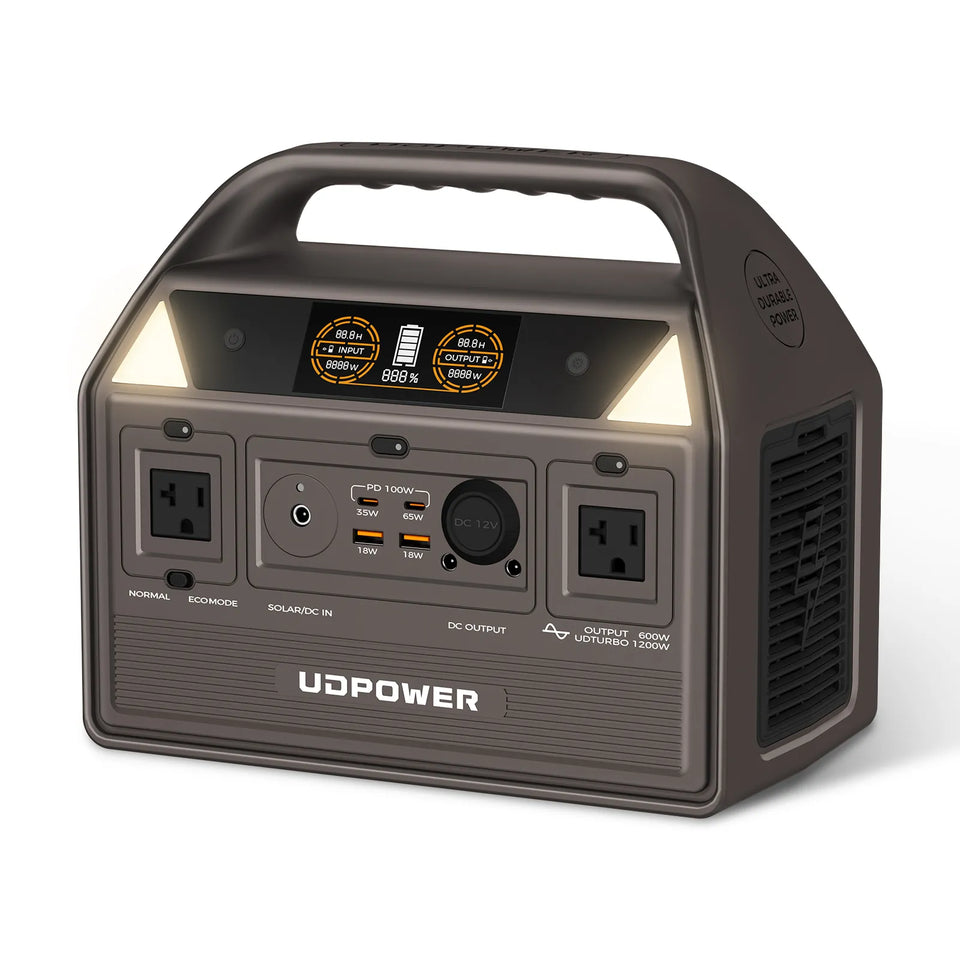
UDPOWER C600 Portable Power Station
For longer outages, the UDPOWER C600 increases battery capacity to 596Wh while providing 600W rated output.
At a continuous 20W modem-and-router load, the same 90% planning formula gives approximately 26.8 hours. A 30W network setup calculates to approximately 17.9 hours.
- 596Wh LiFePO4 battery
- 600W rated output
- 4,000+ cycle positioning
- Multiple AC, USB and DC outputs
- Up to 240W solar input listed on the current product page
- 5-year warranty protection for UDPOWER power stations
If your backup plan also includes laptops, lighting, refrigeration or other emergency loads, compare the full UDPOWER portable power station lineup rather than sizing the battery from the modem alone.
How to Make Your Internet Backup Last Longer
1. Power Only the Network Equipment You Actually Need
During a long blackout, there is little benefit in keeping three mesh nodes running if the main router covers the part of the house you are using. Every always-on device reduces runtime.
2. Separate Network Backup From High-Draw Appliances
A modem and router may use only 20–30W. A microwave, electric kettle, heater or hair dryer can consume hundreds or more than a thousand watts. A few minutes of high-power appliance use can consume energy that would otherwise keep your network online for many hours.
3. Keep Using the Original AC Adapters Unless You Know the DC Requirements
Some network equipment runs internally on DC power, and direct DC operation can sometimes avoid AC conversion losses. However, voltage, connector size and polarity must match exactly. For most users, the safest and simplest option is the manufacturer's original adapter plugged into the power station's AC outlet.
4. Measure the Whole Network With One Watt Meter
This gives you a better runtime estimate than adding maximum adapter ratings together.
5. Create a Dedicated Outage Configuration
If you have a large home network, decide in advance which router, mesh node and switch are truly required. An “outage mode” can reduce a 40–50W network to 20–30W and significantly increase runtime.
6. Save Phones and Laptops for Intermittent Charging
Do not leave every device connected to the backup battery continuously. Charge mobile electronics when needed rather than turning a low-power internet backup into a general charging station.
Remote workers can also use the load-planning approach in UDPOWER's remote work setup and backup power guide.
Can the Modem Have Power but the Internet Still Be Down?
Yes.
A battery can keep equipment inside your home running, but it cannot guarantee that your internet provider's infrastructure remains operational.
During a widespread outage, several things can happen:
- Your router continues broadcasting Wi-Fi but the modem or ONT has no connection.
- Your own modem and router work normally, but neighborhood cable equipment has lost power.
- Your ISP's backup batteries eventually run out during a prolonged outage.
- A physical cable or fiber line is damaged by the same storm that caused the electrical outage.
- The provider experiences a network outage unrelated to your home power.
For emergency planning, keep a cellular hotspot or phone tethering option available when possible. During major storms and regional outages, having two independent communication paths is more useful than simply buying a larger battery.
So, What Wattage Should You Actually Use?
If you came here because you need one number, use the following:
- 10W as a quick planning figure for a basic standalone modem.
- 20–25W for many all-in-one modem/router gateways.
- 20–30W for a basic separate modem + Wi-Fi router setup.
- 30–40W+ when mesh nodes, switches or other networking equipment must stay powered.
Those figures are good for preliminary planning. For a battery purchase or a multi-day outage strategy, measure your exact setup.
Frequently Asked Questions
How many watts does a modem use?
A typical standalone home cable modem often uses roughly 6–12 watts during normal operation. Some models are lower, while higher-performance or multi-gig equipment can use more.
How many watts does a modem and router use together?
A basic separate modem and Wi-Fi router commonly fall around 15–35 watts combined. About 20–30 watts is a practical range for initial battery-backup planning, but measuring your exact equipment is better.
Does a modem use electricity when nobody is online?
Yes. A modem remains connected to the ISP and continues operating even when nobody is actively browsing, so most of its power consumption continues around the clock.
Does downloading or streaming make a modem use much more electricity?
Network activity can affect consumption, but a modem is not like a refrigerator or power tool with enormous load swings. For normal home backup planning, its steady operating draw is usually the more important number.
Does a modem/router gateway use more power than a standalone modem?
Usually, yes. A gateway also powers routing hardware and Wi-Fi radios. Published CableLabs data includes advanced gateways with ready-state consumption in the high teens or above 20 watts.
If my adapter says 12V 2A, does my modem use 24 watts?
Not necessarily. Multiplying 12V by 2A gives a 24W adapter output rating, but that is normally the maximum capacity of the adapter rather than the modem's constant real-world consumption.
How much electricity does a 10W modem use in one day?
A continuous 10W load uses approximately 0.24 kWh in 24 hours. Over a 30-day month, that is about 7.2 kWh.
Can a portable power station run a modem?
Yes. Modems and routers are low-wattage loads, so even compact portable power stations can provide many hours of backup. Battery capacity and low-load efficiency matter more than high output wattage for this application.
How long will a 256Wh battery run a modem and router?
Using a 20W combined load and 90% conversion-efficiency planning factor, a 256Wh battery calculates to approximately 11.5 hours. Actual runtime may be lower because the power station itself consumes energy, especially when operating an AC inverter at very low loads.
Why is my Wi-Fi working during an outage but websites will not load?
Your router can continue broadcasting Wi-Fi even when the modem, fiber ONT or your ISP's upstream network is unavailable. A Wi-Fi signal only confirms that your device can communicate with the router; it does not guarantee an active internet connection.
Do I need to power the ONT during a fiber internet outage?
Yes, if your fiber setup uses a separate ONT that requires household power. Keeping only the Wi-Fi router powered will not restore the fiber connection if the ONT is off.
Should I keep all mesh Wi-Fi nodes running during a blackout?
Only if you need the coverage. Each additional node adds continuous power consumption. During a long outage, running only the main router and the minimum number of required nodes can significantly extend battery runtime.
Build a Backup Plan Around Runtime, Not Just Watts
A modem requires very little output power. The more useful question is how many watt-hours you need to keep your complete internet setup online for the length of outage you are preparing for.
Measure your modem, router and ONT together, decide how many hours of connectivity you want, then choose the battery capacity that matches that target.
View Portable Power StationsData Sources
Device wattage figures in this guide use publicly available manufacturer, industry and measured-device data where available. Individual equipment can consume different amounts depending on configuration and operating conditions.
- The Power Consumption Database — Cable Modems
- CableLabs — Comcast Small Network Equipment Energy Information
- CableLabs — Cox Small Network Equipment Energy Information
- NETGEAR Small Network Equipment Voluntary Agreement Energy Information
- Google Search Central — Optimizing for Generative AI Features
Related Articles


