





Gaming PC Backup Power: How to Keep Your PC Running During a Power Outage
Last updated: August 14, 2026
Quick Answer
A portable power station can keep a gaming PC running during a power outage, but you should choose one from the actual power draw of the complete gaming setup, not from the wattage printed on the PC's power supply.
Measure the PC while playing a demanding game, then add the monitor, modem/router and anything else you want to keep powered. A setup drawing 400W, for example, should be treated as a 400W load—not as an 850W load simply because the computer has an 850W PSU.
After confirming that the backup source has enough continuous AC output, use battery capacity in watt-hours to estimate runtime. For UDPOWER power stations, this guide uses a practical 90% conversion factor: runtime ≈ battery Wh × 0.90 ÷ actual load watts.
For many single-PC gaming setups, the UDPOWER S1200 provides a practical balance of output, capacity and portability. The UDPOWER S2400 is the stronger option for higher measured loads, longer outages, multiple monitors or users who want substantially more runtime reserve.

Can a Portable Power Station Run a Gaming PC?
Yes. A gaming PC ultimately plugs into a normal AC outlet, so a portable power station with a compatible pure sine wave AC inverter can power it just as it powers other household electronics.
The important part is separating two specifications that are often confused:
- Continuous AC output in watts tells you how large a load the power station can support.
- Battery capacity in watt-hours tells you approximately how long that load can run.
A power station may have a large battery but still be unsuitable if its inverter cannot support the PC's actual load. Conversely, a unit may have plenty of output power but a relatively small battery, meaning it runs the computer successfully but only for a short period.
How Many Watts Does a Gaming PC Actually Use?
There is no single "gaming PC wattage." A compact esports machine and a flagship system with a top-end GPU, powerful CPU and multiple displays can be hundreds of watts apart.
UDPOWER's existing computer wattage guide discusses desktop and gaming PC consumption in more detail. For backup planning, however, the more useful approach is to think in terms of complete setup load measured at the wall.
| Complete Gaming Setup | Useful Planning Range | What Might Be Included | Backup Planning |
|---|---|---|---|
| Efficient gaming setup | About 200–350W | Efficient desktop, one monitor, modem/router | Relatively easy load for a medium or large power station |
| Mainstream gaming setup | About 350–500W | Mid-range gaming tower, gaming monitor, networking equipment | Runtime becomes as important as inverter output |
| Performance gaming setup | About 500–700W | Higher-power GPU/CPU, larger monitor, router and accessories | A larger-capacity backup becomes increasingly useful |
| High-end gaming setup | About 700–900W | Enthusiast hardware, ultrawide or multiple displays | Check both inverter headroom and battery runtime carefully |
| Extreme gaming/workstation setup | 900W+ | Flagship GPU/CPU combination, multiple high-refresh displays or additional equipment | Measure the system directly before selecting backup power |
These are planning ranges, not electrical standards. Your own measured wattage should override any generic chart.
Why High-End Gaming PCs Can Draw So Much Power
Graphics hardware alone shows how wide the range can become. NVIDIA currently lists the GeForce RTX 5090 at 575W Total Graphics Power. That is the GPU specification—not the total wall consumption of the computer. The CPU, motherboard, memory, storage, cooling, PSU losses and displays still use additional power.
See NVIDIA's RTX 5090 specifications for the current official power specification.
Why Your PSU Wattage Is the Wrong Number for Backup Runtime
One of the easiest ways to oversize—or sometimes incorrectly size—a gaming PC battery backup is to use the wattage printed on the computer's PSU.
An 850W power supply does not mean the PC constantly consumes 850W. A 1,000W PSU does not mean the computer constantly consumes 1,000W.
The PSU rating describes how much power that power supply is designed to provide to the computer's components. Actual wall consumption changes continuously according to GPU load, CPU load, frame rate, game engine, graphics settings and background activity.
Example
Imagine a PC with an 850W PSU. You connect a wall power meter and observe:
| Activity | Example Wall Reading | Which Number Matters for Backup Planning? |
|---|---|---|
| Windows desktop / light use | 110W | Useful for light-use runtime |
| Typical game | 410W | Useful for normal gaming runtime |
| Most demanding game tested | 485W | Important for inverter sizing |
| PSU label | 850W | Not the actual wall load |
If the complete setup actually draws around 485W at its highest observed gaming load, that is a much more useful starting point than pretending the computer is an 850W continuous load.
How to Measure Your Real Gaming PC Load
If you are spending money on backup power, measuring the system is worth doing. A simple wall power meter can replace a large amount of guesswork.
- Connect the PC to a properly rated wall power meter. Make sure the meter itself is suitable for the load being tested.
- Launch one of the most demanding games you actually play. Do not size the battery from a Windows desktop or game menu reading.
- Use your normal resolution and graphics settings. If you normally play at 4K, test at 4K. If you normally use ray tracing, test with it enabled.
- Play long enough for the system to reach normal sustained operating conditions. Watch both the typical reading and the highest reading you observe.
- Measure the monitor and network equipment too. Either measure them together with the computer or add their consumption separately.
- Repeat with more than one game. A CPU-heavy title and a GPU-heavy title may not produce the same wall consumption.
What Should Be Included in a Gaming PC Backup Load?
The PC tower is only part of the setup. Decide what you actually want to remain usable when the utility power disappears.
| Device | Include It? | Why |
|---|---|---|
| Gaming PC tower | Yes | The main load |
| Primary monitor | Yes | The computer is not very useful without a display |
| Modem / router / fiber terminal | Usually | Needed for online gaming, communication and internet access |
| Second or third monitor | Optional | Can be turned off to preserve runtime |
| Speakers | Optional | Headphones may use less of the backup budget |
| RGB lighting / decorative lighting | Usually optional | Not essential during a long outage |
| Phone charger | Optional but useful | Small energy cost compared with a gaming PC |
| Printer and other office equipment | Usually no | Avoid adding unnecessary loads unless needed |
A Realistic Example
| Device | Measured Example |
|---|---|
| Gaming PC during gameplay | 430W |
| Gaming monitor | 50W |
| Modem + router | 20W |
| Complete backup load | 500W |
That setup should be treated as a 500W gaming backup load. It should not automatically be treated as a 750W, 850W or 1,000W load simply because one of those numbers happens to appear on the PC's power supply.
How to Size a Portable Power Station for a Gaming PC
Sizing becomes much easier when you separate it into two questions.
Step 1: Can the Power Station Support the Load?
Compare your highest measured complete-setup wattage with the power station's continuous AC output rating.
The continuous output must be above the actual connected load. Additional headroom is useful because game loads change, accessories may be added, and future GPU or monitor upgrades can increase consumption.
Step 2: How Long Do You Want the PC to Run?
Once the inverter is large enough, look at battery capacity. This is where watt-hours become useful.
For example, a 1,190Wh battery used with a 500W complete gaming setup gives:
That is a planning estimate rather than a guarantee. Game load changes from scene to scene, battery temperature matters, and conversion losses vary with operating conditions.
Step 3: Decide Whether You Need Minutes or Hours
This question changes the entire purchase decision.
- If you mainly want enough time to save work and shut down safely, a conventional gaming UPS may be sufficient.
- If you want the PC, monitor and internet connection to continue operating for one or more hours, battery capacity becomes a much bigger priority.
Gaming PC Backup Runtime Chart
The following table uses actual complete setup load, not PSU wattage and not power-station model names.
Calculations use 90% conversion efficiency for planning. S1200 capacity is 1,190Wh and S2400 capacity is 2,083Wh.
| Actual Complete Setup Load | UDPOWER S1200 1,190Wh |
UDPOWER S2400 2,083Wh |
Example Use Case |
|---|---|---|---|
| 250W | About 4.28 hours | About 7.50 hours | Efficient PC or low-power gaming configuration |
| 300W | About 3.57 hours | About 6.25 hours | Efficient gaming setup |
| 400W | About 2.68 hours | About 4.69 hours | Mainstream gaming PC + monitor + network |
| 500W | About 2.14 hours | About 3.75 hours | Typical performance-oriented single-PC setup |
| 600W | About 1.78 hours | About 3.12 hours | Higher-power gaming setup |
| 700W | About 1.53 hours | About 2.68 hours | Performance / enthusiast gaming setup |
| 800W | About 1.34 hours | About 2.34 hours | High-end PC and display setup |
| 900W | About 1.19 hours | About 2.08 hours | Very high-power gaming system |
| 1,000W | About 1.07 hours* | About 1.87 hours | Extreme gaming/workstation-class setup |
*The S1200 has a 1,200W rated AC output, so a measured 1,000W load is below its rated limit. However, a gaming setup that regularly operates around this level leaves much less output headroom and drains the battery quickly. For this type of system, the S2400 is the more sensible choice.
Official specifications: UDPOWER S1200 and UDPOWER S2400 .
Do Not Plan Around 0% Battery If the PC Is Important
The runtime chart shows theoretical planning time using the 90% conversion factor. If the outage duration is uncertain, it is sensible to keep some battery reserve instead of deliberately gaming until the station reaches empty.
For example, if your calculated runtime is 2.1 hours, you might decide in advance that you will switch from gaming to light computer use or shut the PC down well before the full calculated time is exhausted.
Gaming UPS vs Portable Power Station: They Solve Different Problems
A conventional UPS and a portable power station with UPS functionality can both help during outages, but they are not identical products.
| Question | Traditional Gaming UPS | Large Portable Power Station |
|---|---|---|
| Primary purpose | Protect electronics and bridge short outages | Provide stored energy for longer backup use |
| Typical battery size | Relatively small | Hundreds to thousands of watt-hours |
| Typical gaming runtime | Often measured in minutes | Can be measured in hours depending on load and battery size |
| Automatic voltage regulation | Common on line-interactive UPS models | Depends on the product design |
| Portable use away from desk | Limited | Designed for multiple backup, travel and off-grid applications |
| Best choice when... | You need seconds or minutes to ride through an interruption or shut down safely | You want significantly longer operating time |
APC's current Back-UPS Pro for Gaming is rated at 1500VA/900W. APC provides a manufacturer example of approximately 13 minutes for a gaming PC with one monitor, with router/modem included in its runtime assumptions.
See APC Gaming UPS .
That does not mean every 900W UPS lasts exactly 13 minutes. Actual runtime depends on the connected load and battery design. It does illustrate an important distinction: traditional UPS products often prioritize short-duration protection, while a 1–2kWh portable power station is designed around much more stored energy.
UDPOWER also has a broader comparison in Portable Power Station vs UPS for Home Backup .
What About Pure Sine Wave?
Pure sine wave output is a good choice for modern gaming computers, especially systems using active-PFC power supplies.
CyberPower states that its PFC Sinewave UPS systems are designed for equipment requiring Active PFC power-source compatibility, while APC also uses pure sine wave output on its gaming UPS products.
Technical references: CyberPower PFC Sinewave and APC Back-UPS Pro for Gaming .
The Smart Backup Plan Changes With the Length of the Outage
Battery backup is not only about asking, "How long can I keep gaming?" A better question is, "What should I do with the stored energy if I do not know when the grid will return?"
| Outage Situation | Practical Response | Why |
|---|---|---|
| Brief flicker / several seconds | Let the UPS function bridge the interruption if your system is compatible | Avoids an unnecessary PC restart |
| 5–15 minutes | Continue normally while watching battery status | The outage may end before energy management becomes important |
| 15–60 minutes | Consider lowering GPU load and unnecessary accessories | Preserves useful battery reserve |
| 1–3 hours | Decide whether continuing the game is worth the remaining battery | GPU-heavy gaming may consume several hundred watts continuously |
| Unknown multi-hour blackout | Switch to light PC use or shut the gaming PC down | Internet, phones and communications can run much longer on the same stored energy |
Why This Matters
Suppose your full gaming setup consumes 600W. A UDPOWER S2400 is estimated at about 3.12 hours at that load.
If you stop gaming and your PC, monitor and network gear together fall to 200W, the same 2,083Wh battery has a planning estimate of roughly:
The battery did not get larger. You simply changed how quickly you were using it.
How to Make a Gaming PC Last Longer on Backup Power
Gaming is unusual among home backup loads because the user has significant control over consumption. You may be able to reduce the load without shutting the computer down.
1. Cap the Frame Rate
If your GPU is rendering far more frames than you need, setting a reasonable FPS limit can reduce GPU workload in many games.
The actual savings vary by game and hardware, so use the power station's live output display or a wall power meter to see whether it helps your system.
2. Reduce the GPU Power Limit
Many desktop GPUs allow users to set a lower power target in the manufacturer's software. A moderate reduction can sometimes save significant wattage while keeping the game playable.
Test any performance or power settings before an emergency rather than changing unfamiliar settings for the first time during a blackout.
3. Turn Off Extra Monitors
If you normally use two or three displays, keep only the primary gaming monitor running. The savings are smaller than reducing GPU load, but they are easy to achieve.
4. Lower Display Brightness
Display power is only one part of the total load, but every reduction helps when the outage lasts longer than expected.
5. Disconnect Nonessential Accessories
Speakers, decorative lighting, additional chargers and other desk accessories should not consume battery capacity unless you actually need them.
6. Switch to Light Computer Use
This is often the biggest runtime extension available. A powerful PC can consume far less electricity while browsing, messaging or working than while the CPU and GPU are both under a demanding gaming load.
Can Solar Panels Keep a Gaming PC Running During a Long Outage?
Solar can extend backup time and help recharge a portable power station, but it should not automatically be treated as unlimited gaming power.
Both the current UDPOWER S1200 and S2400 support up to 400W of solar input. Actual solar production varies with sunlight, panel angle, weather, temperature and the total panel configuration.
Why the Numbers Matter
Imagine the gaming setup is drawing 550W while the station is receiving 300W of real solar input. Solar is helping significantly, but the gaming system is still consuming energy faster than solar is replacing it.
In that situation, solar can dramatically extend runtime, but it does not make the battery remain full indefinitely.
On the other hand, if you stop gaming and reduce the system to a much lighter desktop workload, available solar input may cover a much larger share of the active load.
Best UDPOWER Portable Power Stations for Gaming PC Backup
The correct product depends on your measured watts and desired runtime. The S1200 and S2400 are not recommended because gaming PCs "need 1,200W or 2,400W." Those numbers are simply the stations' rated AC output specifications.
The recommendation comes from comparing the actual PC setup load with each station's output capability and battery capacity.
UDPOWER S1200
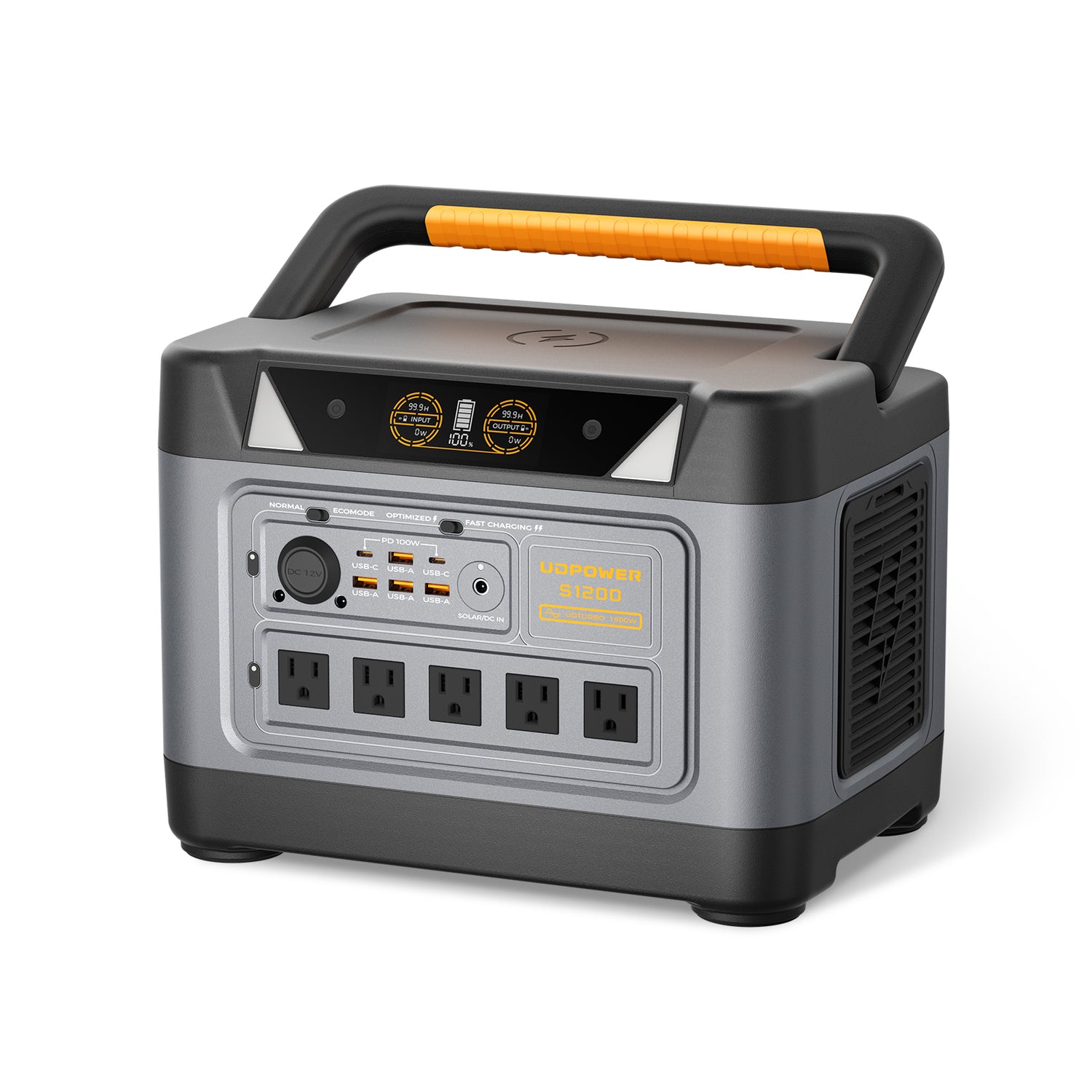
- Battery capacity: 1,190Wh LiFePO4
- Rated AC output: 1,200W pure sine wave
- UDTURBO capability: up to 1,800W for compatible loads
- UPS response: less than 10ms
- AC outlets: 5 on the current gray version
- Total output ports: 14
- Solar input: up to 400W
- Battery cycle life: 4,000+ cycles
- Weight: approximately 26.0 lb
- Warranty: 5 years
When the S1200 Makes Sense
The S1200 is a practical match for many single-PC gaming setups whose measured load stays comfortably below its 1,200W rated AC output.
The bigger reason to choose it is not the "1200W" in the model specification. It is the combination of 1,190Wh of stored energy, sufficient output headroom for many gaming systems, pure sine wave AC and less-than-10ms UPSPRIME switching.
| Measured Gaming Load | Estimated S1200 Runtime | Practical Interpretation |
|---|---|---|
| 300W | About 3.57 hr | Strong fit for an efficient gaming setup |
| 400W | About 2.68 hr | Strong fit |
| 500W | About 2.14 hr | Good balance of runtime and portability |
| 600W | About 1.78 hr | Still practical for shorter outages |
| 700W | About 1.53 hr | Works, but capacity may become the deciding factor |
| 800W | About 1.34 hr | Consider S2400 if longer runtime is important |
UDPOWER S2400
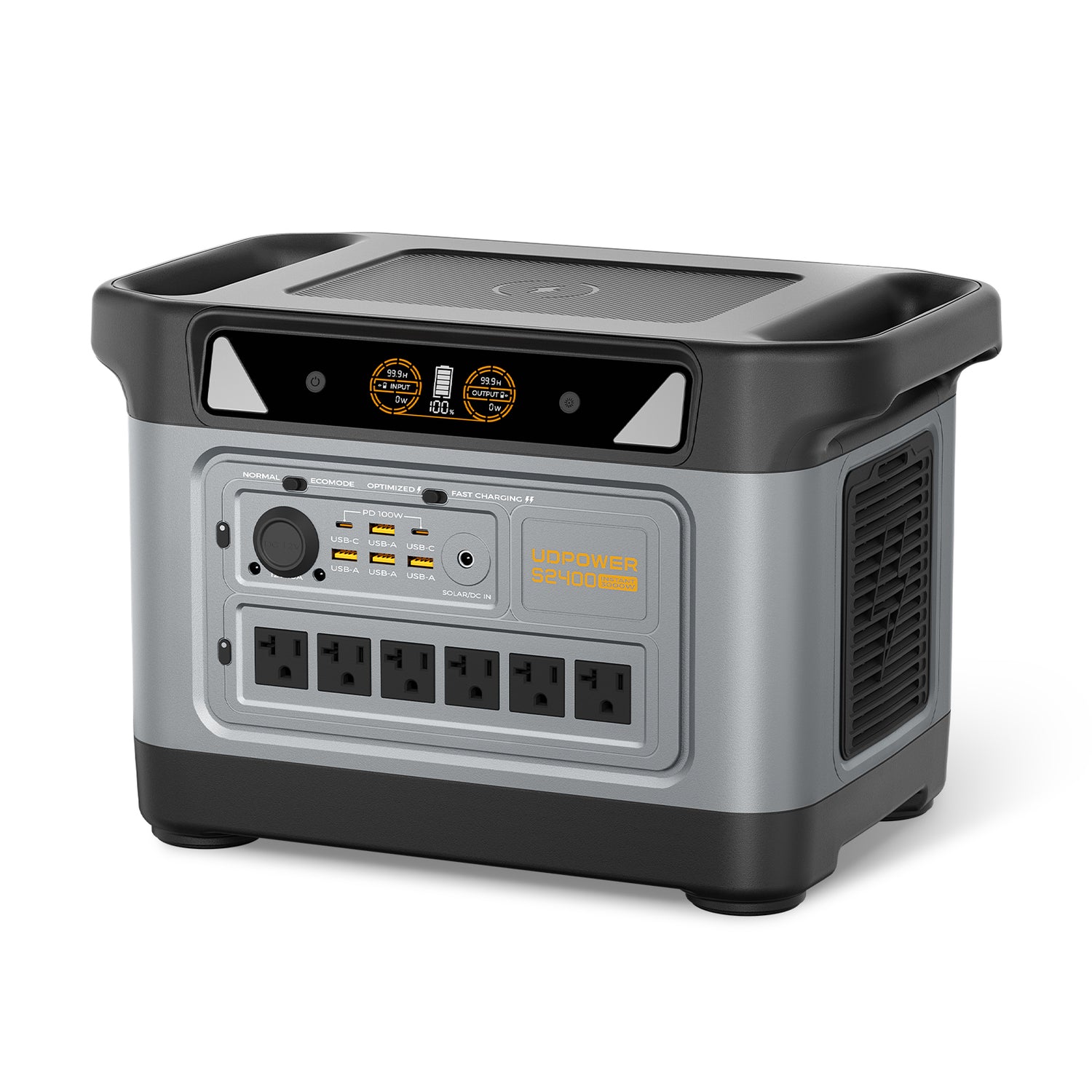
- Battery capacity: 2,083Wh LiFePO4
- Rated AC output: 2,400W pure sine wave
- UDTURBO capability: up to 3,000W for compatible loads
- UPS response: 10ms or less
- AC outlets: 6
- Total output ports: 15
- Solar input: up to 400W
- Battery cycle life: 4,000+ cycles
- Weight: approximately 40.8 lb
- Warranty: 5 years
When the S2400 Makes More Sense
The S2400 is not only for a PC that requires more inverter power. Its much larger 2,083Wh battery can make it the better choice even when the gaming setup could easily operate from the S1200.
For example, a measured 500W gaming setup is well within both models' output capabilities, but estimated runtime changes from about 2.14 hours on the S1200 to about 3.75 hours on the S2400.
That makes battery capacity—not maximum wattage—the main reason some gamers should move to the larger model.
| Measured Gaming Load | Estimated S2400 Runtime | Practical Interpretation |
|---|---|---|
| 400W | About 4.69 hr | Excellent for longer backup |
| 500W | About 3.75 hr | Strong long-runtime choice |
| 600W | About 3.12 hr | Strong fit |
| 700W | About 2.68 hr | Well suited to performance systems |
| 800W | About 2.34 hr | Better choice for higher-power setups |
| 900W | About 2.08 hr | More practical than running close to the S1200's range |
| 1,000W | About 1.87 hr | Recommended of the two models for extreme setups |
S1200 or S2400? Choose by Load and Runtime
| Your Measured Complete Setup | Recommended Direction | Reason |
|---|---|---|
| Below about 400W | S1200 for most users | Plenty of output capability with strong runtime for a single setup |
| 400–600W | S1200 for value; S2400 for longer runtime | Both easily support the load, so desired runtime becomes the main difference |
| 600–800W | S1200 can work; S2400 becomes increasingly attractive | Larger battery provides significantly more useful outage time |
| 800–1,000W | S2400 preferred | More output headroom and much larger battery capacity |
| Above 1,000W | Measure carefully and compare against S2400 specifications | Extreme systems should not be sized from a generic gaming-PC chart |
For a direct specification comparison, see UDPOWER S1200 vs S2400 .
How to Set Up Gaming PC Backup Power
- Charge the power station fully before you need it.
- Place it where ventilation remains unobstructed. Do not bury the unit under a desk blanket, against a heater or inside an enclosed cabinet.
- Connect the PC and only the devices you actually want backed up. Start with the tower, primary display and necessary networking hardware.
- Check the live output wattage during normal gaming. Compare it with your wall-meter measurements.
- Test outage behavior before relying on it. Save important work, place the system under a representative load, then perform a controlled test of the backup function.
- Repeat the test under real gaming load. A PC remaining online at an idle Windows desktop does not prove that the same system will behave identically while the GPU is heavily loaded.
What About the UDPOWER UPS Function?
UDPOWER currently lists UPSPRIME switching at less than 10ms for the S1200 and 10ms or less for the S2400.
These specifications make the products suitable for testing as backup sources for computer equipment, but individual PC power supplies and connected equipment can respond differently to transfer events.
Do You Need to Keep the Router on Too?
If your goal is online gaming, powering only the PC and monitor solves only part of the problem. The modem, router or fiber terminal may also need backup power.
Networking equipment generally consumes far less electricity than a gaming PC, so keeping it powered often adds only a modest load compared with the tower.
There is one important limitation: your battery can keep your network equipment running, but it cannot restore an internet provider's upstream equipment if the ISP itself loses service.
Should You Keep Gaming Through a Long Blackout?
Technically, you can continue gaming as long as the power station can support the load and enough battery remains.
Whether you should is a different question.
During a short utility interruption, continuing the session makes sense. During a storm or regional blackout with no restoration estimate, several hours of stored battery capacity may become more valuable for internet access, communications, lighting, phones or other essentials.
A useful rule is to decide in advance what you will do at different battery percentages. For example, you might game while the battery is comfortably charged, then switch to light PC use if the remaining capacity reaches your emergency reserve.
8 Common Gaming PC Backup Power Mistakes
1. Using the PSU Rating as Actual PC Consumption
The PSU label is a capacity specification. Measure actual wall draw instead.
2. Forgetting the Monitor
Runtime calculations should include the display you intend to use during the outage.
3. Forgetting the Router and Modem
An online gaming setup is not really online backup if the network equipment immediately shuts down.
4. Buying an Inverter With Almost No Headroom
Gaming workloads fluctuate. Avoid sizing the backup source around a single perfect-condition reading.
5. Calculating Runtime as Battery Wh ÷ Load With No Losses
AC conversion is not 100% efficient. This guide uses 90% for UDPOWER runtime planning.
6. Assuming Maximum Solar Input Happens All Day
Clouds, sun angle, temperature and panel placement change real-world solar production.
7. Never Testing the UPS Function
Test the exact PC, monitor and power supply before an emergency.
8. Gaming Until the Battery Reaches Empty
During an uncertain outage, preserving some stored energy for communication or safe computer shutdown may be more useful than maximizing gaming time.
Quick Gaming PC Backup Sizing Examples
| Measured Setup | Actual Load | S1200 Runtime | S2400 Runtime | Practical Choice |
|---|---|---|---|---|
| Efficient esports PC + monitor + router | 300W | 3.57 hr | 6.25 hr | S1200 unless very long runtime is needed |
| Mainstream gaming PC + 1440p monitor + router | 400W | 2.68 hr | 4.69 hr | S1200 for most users |
| Performance PC + large monitor + network | 500W | 2.14 hr | 3.75 hr | S1200 or S2400 based on desired runtime |
| High-performance PC + ultrawide display | 650W | About 1.65 hr | About 2.88 hr | S1200 for shorter backup; S2400 for longer outages |
| High-end gaming setup + multiple devices | 800W | 1.34 hr | 2.34 hr | S2400 increasingly makes more sense |
| Extreme gaming/workstation setup | 1,000W | 1.07 hr | 1.87 hr | S2400 preferred |
These are examples based on measured total load, not recommendations to assume your computer consumes one of these exact values.
Gaming PC Backup Power FAQ
Can a portable power station run a gaming PC?
Yes. A portable power station can run a gaming PC when its continuous AC output exceeds the complete setup's actual power draw and it provides compatible AC power. Battery capacity then determines approximately how long the setup can run.
How big of a battery backup do I need for a gaming PC?
Measure the gaming PC, monitor and networking equipment under a demanding real gaming load. Choose a backup source whose continuous AC output is comfortably above the highest measured load, then select battery watt-hours according to how long you want the setup to remain online.
Does an 850W PSU mean my gaming PC uses 850 watts?
No. An 850W PSU rating describes the power supply's output capability, not the computer's constant electricity consumption. Actual wall power changes with CPU load, GPU load, game, frame rate and other system activity.
How long will a 1,000Wh battery run a gaming PC?
Using 90% usable AC energy for planning, a 1,000Wh battery provides about 900Wh. That is approximately 2.25 hours at 400W, 1.8 hours at 500W, 1.5 hours at 600W or about 1.13 hours at 800W. Real runtime will vary.
Is a UPS or portable power station better for a gaming PC?
A conventional UPS is often the better choice when the priority is short-duration power protection and enough time to ride through a brief interruption or shut down safely. A large portable power station becomes more attractive when you want substantially longer runtime and a battery that can also support other equipment.
Is pure sine wave important for a gaming PC?
Pure sine wave output is a good choice for modern gaming PCs, particularly systems using active-PFC power supplies. Major UPS manufacturers also offer pure sine wave products specifically for this type of equipment.
Can the UDPOWER S1200 run a gaming PC?
Yes, provided the complete connected load remains within the S1200's 1,200W rated AC output. Its 1,190Wh battery is especially useful for gaming setups drawing several hundred watts, where estimated runtime can range from several hours at lower loads to around one to two hours at higher gaming loads.
When should I choose the UDPOWER S2400 instead of the S1200?
Choose the S2400 when your measured gaming setup has a higher sustained load, when you use multiple displays or additional equipment, or when you simply need more runtime. Its 2,083Wh battery provides substantially more stored energy than the S1200's 1,190Wh battery.
Will a 600W power station run a gaming PC?
It can run some efficient gaming setups if their actual complete load stays comfortably below 600W. However, many performance gaming PCs can approach that limit once the monitor and other equipment are included, so measuring the system before buying is important.
Can I keep gaming during a blackout?
Yes, if your backup source has enough output and battery capacity. During a long or uncertain outage, reducing GPU power, limiting frame rate, turning off extra monitors or switching to light computer use can preserve much more battery energy.
Should the router and monitor be connected to the backup too?
Usually yes if you want a usable gaming setup during the outage. Include the monitor, modem, router or fiber equipment in the total wattage calculation because all connected devices draw from the same battery.
Can solar panels recharge the power station while I am gaming?
Yes, solar input can help replace some of the energy being used and may extend runtime. However, if the gaming setup consumes more power than the solar panels are actually producing, the battery will continue to discharge. Solar output also changes with sunlight, weather and panel position.
Will a 10ms UPS transfer time keep a gaming PC running?
It may work with many systems, but compatibility depends on the computer's power supply and connected equipment. UDPOWER specifies less than 10ms for the S1200 and 10ms or less for the S2400. Test your exact gaming setup under a representative load before relying on it during a real outage.
Technical Sources
Choose Backup Power From Your Actual Gaming Load
Measure the PC, monitor and network equipment first. Then compare that real wattage with the power station's AC output and choose enough battery capacity for the outage duration you want to cover.
A lower-power gaming setup may get several hours from the S1200, while a high-end system or user who wants longer runtime may benefit substantially from the S2400.
Compare Portable Power Stations View S1200 View S2400Related Articles


