





Portable Power Station for Construction Sites: Worksite Power Sizing Guide
Last updated:

A construction site does not use electricity the same way a campsite or a house does. A refrigerator may cycle quietly for hours. A jobsite can jump from two battery chargers and LED lights to a circular saw, vacuum, grinder, or compressor in seconds.
That makes choosing a portable power station for construction sites less about buying the biggest battery and more about understanding how the crew actually works.
This guide shows you how to size portable worksite power around real tool behavior, estimate full-shift energy use, plan charger stations, decide when one large unit or two smaller units make more sense, and recognize the jobs where battery power is not the right solution.
- Is a Portable Power Station Good for Construction Sites?
- The Four Checks That Determine Whether It Will Work
- Choose Power by Job Type
- Typical Worksite Tool Power Requirements
- Portable Power Station Runtime for Worksite Loads
- Why Tool Trigger Time Matters More Than an Eight-Hour Shift
- Using a Power Station as a Tool-Battery Charging Hub
- Full-Shift Construction Power Example
- Recommended Worksite Power Configurations
- Recommended UDPOWER Power Stations for Worksites
- Power Station vs. Generator vs. Temporary Power
- Cords, GFCI, Dust, Rain and Jobsite Safety
- Can Solar Keep a Jobsite Power Station Running?
- When a Portable Power Station Is the Wrong Choice
- Worksite Troubleshooting
- Construction-Site Power Buying Checklist
- Frequently Asked Questions
Is a Portable Power Station Good for Construction Sites?
Yes, for the right kind of construction work.
A battery power station is particularly useful when the crew needs quiet power, wants to avoid engine exhaust at the point of use, moves between rooms or floors frequently, or mainly uses cordless tools and needs a central place to recharge batteries.
Common good fits include:
- Interior remodeling and finish carpentry
- Punch-list and warranty work
- Electrical and low-voltage installation
- Inspection and commissioning equipment
- Tool-battery charging stations
- LED work lights
- Laptops, tablets, routers, laser levels and cameras
- Short-cycle use of grinders, rotary hammers, vacuums and selected saws
- Mobile service vans and temporary site offices
- Remote work where utility power has not yet been connected
A portable station is less attractive when the work is dominated by large motors, continuous resistance heating, several high-draw corded tools at once, or equipment that requires 240V.
The Four Checks That Determine Whether a Power Station Will Work
1. Check the Voltage First
Before comparing wattage, confirm that the equipment voltage matches the power station.
UDPOWER S-Series AC outlets are designed for standard U.S. 120V equipment. A machine that requires 240V is not made compatible simply because its watt rating appears to fit.
This immediately rules out some welders, large compressors, pumps, heaters and fixed shop equipment.
2. Add the Loads That Will Actually Run at the Same Time
Do not add every tool owned by the crew. Add the equipment that can realistically operate together.
If a 1,500W saw is always used with a 900W dust extractor, the source has to deal with both loads at the same time.
If the vacuum is switched off while the saw is cutting, the simultaneous load is different.
When a tool gives volts and amps instead of watts, a quick screening calculation is:
For example, a 120V tool marked 15A gives a conservative screening value of about 1,800W. Actual running consumption may be lower, while motor startup can briefly demand more.
3. Account for Startup and Inrush Current
Motors do not always draw the same amount of power from the instant you pull the trigger until the tool reaches operating speed.
Circular saws, compressors, vacuums, pumps, table saws and other motor-driven tools can create a higher electrical demand during startup or when the tool is heavily loaded.
There is no reliable rule that says every motor has the same two-times, three-times or five-times surge. Motor type, soft-start electronics, mechanical load, temperature and tool design all matter.
For a deeper explanation, see What Does Surge Current Mean?.
4. Calculate Shift Energy in Watt-Hours
Output tells you whether the station can run the equipment. Battery capacity determines how long it can keep doing it.
A 1,500W saw running continuously for two hours would theoretically require about 3,000Wh before conversion losses.
The same 1,500W saw with only 12 minutes of actual motor-on time uses roughly:
That difference is why construction-site energy planning should use actual trigger time, not simply the number of hours the crew is on site.
Choose Portable Worksite Power by Job Type
| Job Pattern | Typical Loads | Best Starting Point | Main Concern |
|---|---|---|---|
| Inspection or mobile site office | Laptop, router, laser, camera batteries, printer, lights | Small or mid-size power station | Runtime matters more than high AC output |
| Electrician or low-voltage crew | Chargers, testers, laptop, lights, occasional drill or vacuum | Mid-size battery station | Several chargers may overlap |
| Finish carpenter | Chargers, miter saw, track saw, vacuum, lights | Higher-output station | Saw and dust extraction may need power together |
| Drywall, flooring or tile work | Vacuum, grinder, mixer, chargers, lighting | Mid- to high-output station | Grinding and vacuum loads can be substantial |
| Single high-demand 120V tool cell | Table saw, rotary hammer, grinder or vacuum | High-output station | Motor startup and hard-load events |
| Multiple crews using high-draw tools all day | Several saws, large compressors, heaters, extraction | Temporary utility power or generator system | Continuous energy demand becomes too high for a portable battery |
| Remote multi-day site | Mixed chargers, lighting, tools and electronics | Hybrid battery + generator or solar strategy | Daily energy replacement matters as much as battery capacity |
| 240V construction equipment | Selected welders, compressors, pumps and fixed machinery | Equipment-specific temporary power or generator | A 120V station cannot replace a required 240V supply |
Typical Worksite Tool Power Requirements
Tool category averages are useful for screening, but they are not a substitute for the label on your exact tool. Two circular saws or two compressors can behave very differently.
| Tool or Load | Representative Input | Planning Value | What It Means for a Power Station | Example Source |
|---|---|---|---|---|
| LED task lighting | About 20–100W per light | 20–100W | Easy output load, but long runtime can consume significant Wh | Check the light's own label |
| Laptop, router, laser and site electronics | Varies | About 60–200W combined in many setups | Usually low output demand; energy use builds over a full shift | Check each AC adapter |
| High-rate dual-bay tool charger | 120–127V, up to 4A example | Up to about 480W by label conversion | Two or more high-rate chargers can become a major continuous load | Milwaukee M18 charger manual |
| 4-1/2-inch angle grinder | 7.5A example | About 900W at 120V | Usually intermittent, but heavy grinding can keep the motor near high load | Bosch GWS8-45 |
| 7-1/4-inch circular saw | 15A, 120V example | Up to about 1,800W by nameplate screening | High output and startup headroom matter more than total shift runtime | Bosch CS10 |
| 10-inch jobsite table saw | 15A, 120V example | Up to about 1,800W by nameplate screening | Use a high-output source and account for dust extraction if it runs simultaneously | Bosch 4100XC-10 |
| Shop vacuum or dust extractor | Varies widely | Check exact model | A continuous vacuum can consume more shift energy than an intermittently used saw | Use the equipment nameplate |
| Air compressor | Varies widely | Use nameplate plus startup test | Compressor startup can be the limiting event even when normal running watts appear acceptable | Use the compressor manual |
The important distinction is that a tool's advertised horsepower, cutting capacity or mechanical output is not the number you should use to size a power station. Look for the tool's electrical input rating.
Portable Power Station Runtime for Common Worksite Loads
For normal AC planning, this guide uses a 90% conversion-efficiency assumption for UDPOWER portable power stations.
This is a planning estimate rather than a guaranteed runtime. Temperature, battery state, power factor, motor cycling, tool load, extension cords and above-rated UDTURBO operation can change the result.
| Continuous AC Load | UDPOWER S1200 1,190Wh / 1,200W |
UDPOWER S2400 2,083Wh / 2,400W |
Typical Jobsite Example |
|---|---|---|---|
| 100W | About 10.7 hours | About 18.7 hours | Lights, laptop, router, laser or inspection gear |
| 250W | About 4.3 hours | About 7.5 hours | Moderate charger bank or electronics cart |
| 500W | About 2.1 hours | About 3.7 hours | Large charger bank or mixed support loads |
| 900W | About 1.2 hours | About 2.1 hours | Grinder, rotary hammer or vacuum-class load |
| 1,200W | About 0.9 hour | About 1.6 hours | Upper normal output range for S1200 |
| 1,800W | Above normal 1,200W rating; compatible UDTURBO loads only and lower efficiency should be expected | About 1.0 hour | High-draw 120V tool or dust-control equipment |
| 2,400W | Not a normal fit | About 0.8 hour | Upper rated-output range of S2400 |
A table like this is most useful for loads that remain fairly steady. For saws, grinders and other trigger-operated tools, the duty-cycle method below produces a much more realistic estimate.
Why Tool Trigger Time Matters More Than an Eight-Hour Shift
A common mistake is to see a crew working from 7 a.m. to 3 p.m. and assume every tool needs eight hours of battery runtime.
In practice, many construction tools spend most of the day switched off.
A circular saw may be on site for eight hours but its motor may run for only 15 minutes. A vacuum may run for 90 minutes. Lights may stay on for the entire shift. Chargers can run for hours even though the cordless tools themselves are intermittent.
Calculate each one separately.
| Load | Planning Power | Actual Active Time | Estimated Energy |
|---|---|---|---|
| 1,800W circular-saw-class load | 1,800W | 12 minutes | 360Wh |
| 900W vacuum | 900W | 30 minutes | 450Wh |
| 200W charger bank | 200W | 3 hours | 600Wh |
| 80W work lights | 80W | 8 hours | 640Wh |
The saw has the highest power requirement, but the lights can consume more total energy during the shift.
This is one of the most useful distinctions in construction-site battery sizing:
For a broader compatibility method, read How to Know If a Portable Power Station Can Power Your Device.
Using a Power Station as a Tool-Battery Charging Hub
For many modern crews, the best use of a portable power station is not running every tool directly. It is keeping cordless-tool batteries, lights, radios, phones and electronics charged throughout the day.
This changes the sizing problem.
Use the Charger's AC Input Rating
Do not size the power station from the cordless battery voltage alone. A battery marked 18V, 20V or 40V does not tell you how much AC power the charger draws from the station.
Look at the charger input label for volts, amps or watts.
A charger rated at 120V and 4A could represent up to about 480W of AC input by simple nameplate conversion. Several fast chargers running together can therefore use much more power than expected.
Estimate the Energy Going Into Tool Batteries
If a battery pack lists watt-hours, use that number. If it only lists nominal voltage and amp-hours, the basic stored-energy calculation is:
For example, six tool batteries that each store about 100Wh represent roughly 600Wh of energy inside the packs.
The power station will need to supply more than 600Wh from its battery because the inverter, charger electronics and the tool battery's own charging process are not lossless.
Using the same 90% AC planning factor, the S1200 has about 1,071Wh of planning AC energy and the S2400 about 1,875Wh before additional charger losses are considered.
This makes both stations practical charging hubs, but the actual number of tool batteries per charge depends on:
- The pack's Wh rating
- How empty each pack is
- Charger efficiency
- Whether several chargers run simultaneously
- Whether the station is also powering lights, laptops or tools
Stagger Fast Chargers When Necessary
If four chargers do not need to start at the same time, stagger them. This lowers simultaneous load and leaves more inverter headroom for lighting or occasional tool use.
A simple jobsite rule is to divide loads into two groups:
- Base loads: chargers, lights, communications and electronics that stay connected for long periods.
- Tool loads: saws, grinders, hammers, vacuums and other equipment that cycles on and off.
Keeping these groups separate makes both runtime and overload behavior much easier to predict.
Worked Example: An Indoor Remodeling Crew
Assume a crew is working inside an occupied building where noise and exhaust matter. During the day they need lights, battery charging, electronics, a vacuum and intermittent saw use.
| Load | Planning Power | Active Time | Estimated Energy |
|---|---|---|---|
| Two LED work lights | 80W combined | 8 hours | 640Wh |
| Four-tool charger bank | 360W combined | 2.5 hours equivalent full-rate charging | 900Wh |
| Laptop, router and laser | 100W combined | 6 hours | 600Wh |
| Vacuum | 900W | 15 minutes | 225Wh |
| Saw | 1,600W planning load | 12 minutes | 320Wh |
| Shift subtotal | — | — | 2,685Wh |
| Plus 15% field reserve | — | — | About 3,088Wh |
This crew has an important mismatch: the maximum simultaneous power may be manageable with a high-output station, but the full-shift energy requirement is greater than one 2,083Wh battery can supply without recharging.
Possible solutions include:
- Recharge during lunch
- Use two stations
- Move long-duration lighting to a smaller dedicated unit
- Reduce charger overlap
- Recharge from available temporary utility power
- Use a safely located outdoor generator for bulk recharging on a remote site
- Add realistic solar charging when site conditions allow
The lesson is simple: choosing only by maximum watts would miss the real problem.
Recommended Portable Power Configurations for Construction Sites
Setup 1: Mobile Inspection and Site Office
Typical equipment: laptop, monitor, mobile printer, router, radios, camera batteries, laser level and LED lighting.
The loads are modest, so battery capacity and portability matter more than very high inverter output.
Keep the station off the floor, keep cables away from walkways, and use USB-C or other direct DC outputs where practical to avoid unnecessary AC conversion.
Setup 2: Dedicated Charger and Lighting Station
Typical equipment: two to six battery chargers, work lights, radios and a tablet or laptop.
Measure each charger's AC input and determine how many are likely to charge at full rate at the same time. A group of small chargers can be easy to support, while several high-rate chargers may require a much larger inverter than expected.
Setup 3: Indoor Finish Crew
Typical equipment: cordless-tool chargers, lights, miter saw or track saw, shop vacuum and electronics.
Use a higher-output station and identify combinations that cannot run together. A saw that runs perfectly by itself may overload the source when the vacuum starts at the same time.
Setup 4: One High-Demand 120V Tool Cell
Typical equipment: table saw, grinder, rotary hammer, vacuum or other demanding corded equipment used one major tool at a time.
Reserve the high-output station for the primary tool. Put chargers and long-duration lighting on another source where possible.
This creates a useful two-station pattern:
- Station A: high-demand, intermittent tool loads
- Station B: chargers, lights, laptop and communications
Two properly sized units can sometimes be more useful than one larger station because crews can work in separate areas, one unit can recharge while the other remains in service, and low-priority loads no longer consume the inverter headroom needed by the primary tool.
Setup 5: Remote Hybrid Worksite
For longer jobs without utility service, consider a hybrid strategy rather than forcing one power source to do everything.
A fuel generator can remain outdoors for bulk charging and truly continuous high-energy loads, while battery stations provide quiet power indoors, during occupied-building work, during quiet hours, or wherever running an engine would be inappropriate.
Recommended UDPOWER Portable Power Stations for Worksites
The best UDPOWER model depends on the job pattern rather than simply choosing the biggest battery. The specifications below are based on current official UDPOWER product information.
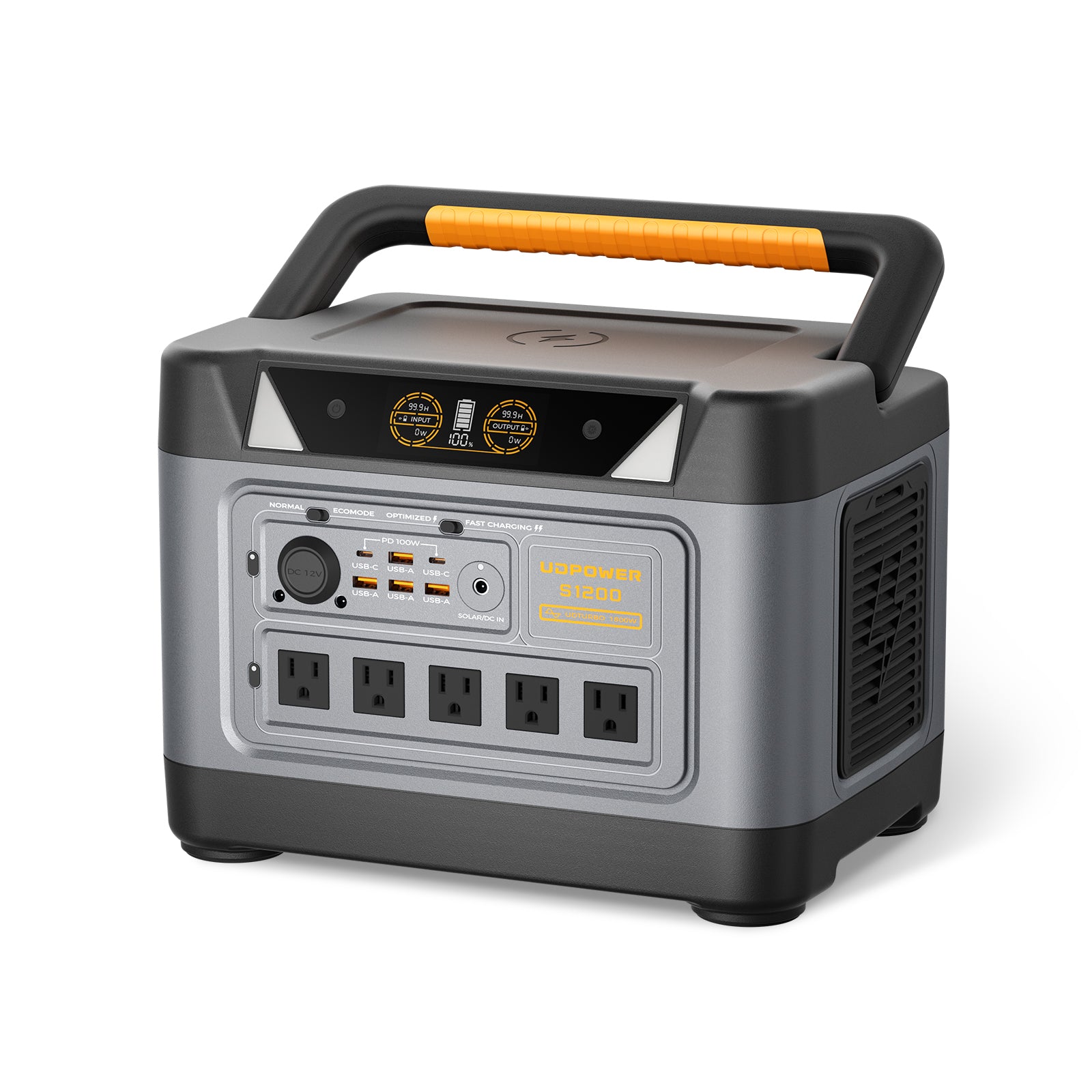
UDPOWER S1200: Best for Chargers, Finish Work and Mobile Crews
- Battery capacity: 1,190Wh
- Rated AC output: 1,200W pure sine wave
- UDTURBO: supports compatible higher-power loads up to 1,800W, with reduced conversion efficiency above rated output
- Solar input: up to 400W
- Weight: approximately 26.0 lb
- UPS switching: less than 10 ms
- 5-AC version: 14 total outputs
- 3-AC version: 10 total outputs
Best worksite fit: charger stations, lighting, electronics, indoor finish crews, small vacuums, moderate corded equipment and jobs where portability matters.
The S1200's 1,200W rating should be the normal planning baseline. UDTURBO expands compatibility with selected higher-power loads, but it should not be interpreted as a guarantee that every 1,800W motor tool will start or run normally.
View UDPOWER S1200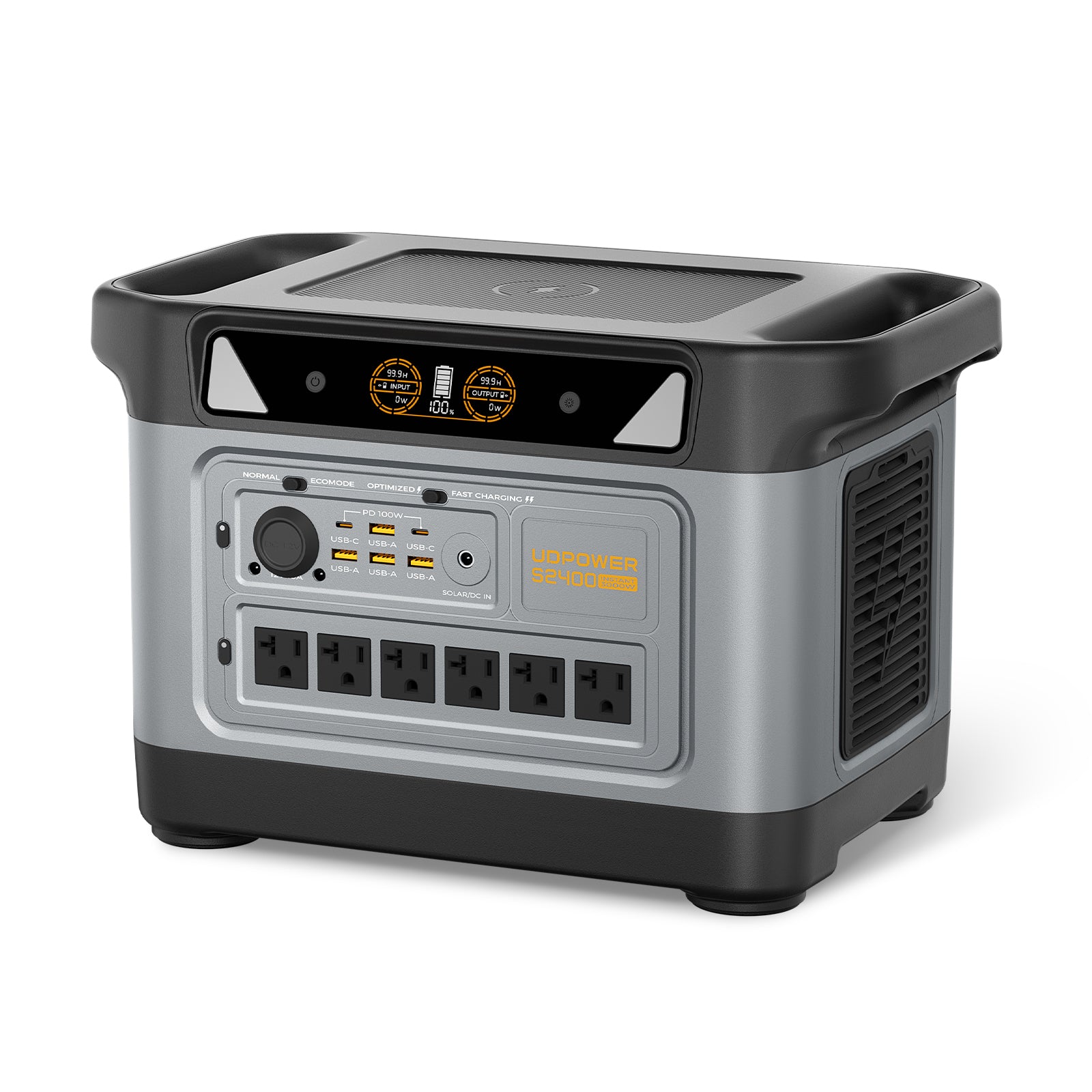
UDPOWER S2400: Best for Higher-Demand 120V Work
- Battery capacity: 2,083Wh
- Rated AC output: 2,400W pure sine wave
- UDTURBO: supports compatible higher-power loads up to 3,000W, with reduced conversion efficiency above rated output
- Solar input: up to 420W
- Weight: approximately 40.8 lb
- UPS switching: 10 ms or less
- Total outputs: 15
- AC output voltage: 120V for the U.S. model
Best worksite fit: larger charger banks, one high-demand 120V tool cell, saws used in controlled cycles, dust-control equipment and crews that need considerably more output headroom than the S1200 provides.
The S2400 does not turn a 240V machine into a compatible load. Always match voltage first, then check rated power, startup behavior and shift energy.
View UDPOWER S2400| Specification | UDPOWER S1200 | UDPOWER S2400 | Why It Matters on a Jobsite |
|---|---|---|---|
| Battery capacity | 1,190Wh | 2,083Wh | Determines how much work can be completed between recharges |
| Rated AC output | 1,200W | 2,400W | Sets the normal continuous AC load range |
| UDTURBO compatible-load range | Up to 1,800W | Up to 3,000W | Adds compatibility for selected above-rated loads, but efficiency decreases |
| Maximum solar input | 400W | 420W | Important when daily solar charging is part of the work plan |
| Weight | About 26.0 lb | About 40.8 lb | S1200 is easier to move between rooms and floors; S2400 trades weight for more energy and output |
| Best worksite role | Charging, lighting and moderate mixed loads | Higher-demand 120V tools and larger mixed loads | Choose around the crew's work pattern, not only battery size |
| Official source | S1200 specifications | S2400 specifications | Compare UDPOWER models |
Portable Power Station vs. Generator vs. Temporary Jobsite Power
No single power source is ideal for every construction site.
| Factor | Portable Power Station | Fuel Generator | Temporary Utility Power |
|---|---|---|---|
| Indoor point-of-use operation | Good fit when used according to product and site safety requirements | No. Engine generators produce carbon monoxide and belong outdoors | Good when professionally installed and available |
| Noise | Low | Significant | Low at point of use |
| Fuel storage | No gasoline or propane required | Required | Not required on site |
| Energy duration | Limited by battery capacity and recharge opportunities | Can continue as long as fuel and safe operating conditions are available | Effectively continuous while service remains available |
| Short, intermittent tool use | Excellent use case | Works, but may mean running an engine for brief loads | Excellent |
| Several high-draw tools all day | Often impractical without a larger battery system | Often more practical when correctly sized | Usually best when available and properly distributed |
| 240V equipment | Not supported by standard 120V UDPOWER S-Series AC output | Possible with an appropriately rated generator | Possible with properly designed temporary service |
| Maintenance | Relatively low | Engine, fuel and maintenance requirements | Depends on temporary distribution system |
For occupied buildings, interior remodeling and punch-list work, a battery station can remove a major source of noise and local engine exhaust.
For remote continuous heavy work, a generator can still be the practical energy source. The U.S. Consumer Product Safety Commission advises that portable generators be used outside only and at least 20 feet from a building, with exhaust directed away from doors, windows and vents. See CPSC carbon-monoxide guidance.
Cords, GFCI, Dust, Rain and Worksite Safety
Inspect Cords and Equipment Before the Shift
Crushed insulation, missing grounding pins, damaged connectors and improvised repairs create shock and fire hazards.
OSHA guidance addresses inspection and safe use of cord-and-plug-connected equipment. Review the rules that apply to your workplace and employer program rather than assuming a portable battery removes those requirements.
OSHA construction power-tool electrical safety
Use the Correct Extension Cord
A long or undersized cord can create voltage drop. A motor may start poorly, lose torque, draw more current or run hotter.
- Use grounded, jobsite-appropriate cords
- Match cord gauge to load and length
- Keep high-current runs as short as practical
- Do not continue using damaged cords
- Keep connectors away from water and traffic
- Avoid unnecessary adapters and connection points
See OSHA 1926.405 wiring requirements.
Do Not Assume a Power Station Replaces Jobsite GFCI Requirements
Construction-site electrical protection requirements still apply. Depending on the work and installation, OSHA rules may involve GFCI protection or an assured equipment grounding conductor program.
A battery power station should not be treated as a way around the site's electrical-safety program.
See OSHA's GFCI interpretation.
If you are troubleshooting unexpected trips, read Why a Portable Power Station May Be Involved in GFCI Tripping.
Protect the Station From Dust and Water
Place the station on a stable, dry and raised surface with enough space around its cooling vents.
Keep it away from:
- Standing water
- Wet concrete
- Grinding sparks
- Heavy cutting dust
- Falling debris
- Vehicle traffic
- Blocked ventilation
Do not assume a consumer portable power station is a substitute for weatherproof construction-site distribution equipment.
For broader precautions, see Power Station Safety: What to Know Before You Buy and Use One.
Can Solar Panels Keep a Construction-Site Power Station Running All Day?
Sometimes, but solar should be planned in watt-hours rather than by looking only at the panel's advertised wattage.
A 420W panel does not deliver exactly 420W from sunrise to sunset. Real solar input changes with:
- Time of day
- Cloud cover
- Shade from buildings, equipment or trees
- Panel angle
- Panel temperature
- Season
- Cable losses
- Power-station solar input limits
- Battery temperature and state of charge
A more useful worksite calculation is:
If a panel system averages 300W for four productive hours, that provides roughly 1,200Wh before additional charging variables are considered.
That could replace much of a light charger-and-electronics workload. It would not support a crew consuming 3,000Wh or 4,000Wh per day without another charging source.
For current UDPOWER models:
- S1200 supports up to 400W solar input.
- S2400 supports up to 420W solar input.
Browse UDPOWER portable solar panels if solar recharging is part of the jobsite plan.
When a Portable Power Station Is the Wrong Construction-Site Solution
| Red Flag | Why It Matters | Better Direction |
|---|---|---|
| The equipment requires 240V | A 120V station cannot supply the required voltage | Correctly designed 240V temporary service or generator |
| Several high-draw tools operate continuously | Energy demand quickly exceeds practical portable battery capacity | Temporary service or properly sized generator system |
| Large compressor repeatedly fails to start | Motor startup may exceed inverter behavior even when running watts appear acceptable | Use a source designed for the compressor's actual starting requirement |
| Saw and dust extractor must both run at high load continuously | Combined load can use most or all of a portable station's output | Separate loads or use higher-capacity jobsite power |
| Resistance heating is the primary load | Heaters consume large amounts of energy continuously | Use a site-appropriate heating plan |
| No recharge source exists for several days | Stored energy is eventually depleted regardless of inverter size | Add realistic solar, rotation capacity or generator charging |
| Power equipment will sit in heavy rain, flooding or conductive debris | Consumer stations are not substitutes for site-rated electrical distribution equipment | Use equipment rated for the environment |
For a broader look at battery-system limitations, see Disadvantages of Portable Power Stations.
Worksite Troubleshooting: Why Does the Power Station Shut Down?
The Tool Shuts the Station Off Immediately
- Disconnect every other load.
- Fully charge the station.
- Check that the tool is 120V.
- Inspect the extension cord and shorten it if possible.
- Start the tool alone.
- Repeat with the real blade, bit, hose or accessory installed.
- Add the vacuum, charger or lighting load one at a time.
If the tool works alone but not with another device connected, the issue may be simultaneous load rather than the tool itself.
If the tool repeatedly shuts down a correctly sized station even when used alone, its real startup or loaded demand may not be a good match for that inverter.
The Tool Runs but Runtime Is Much Shorter Than Expected
Check whether the original calculation missed:
- Battery chargers
- Lights
- Fans
- Routers and laptops
- Vacuum operating time
- More tool trigger time than planned
- Cold or hot conditions
- Above-rated UDTURBO operation
- Extension-cord and conversion losses
The Tool Sounds Weak or Runs Hot
Stop using it and investigate. Check the supply voltage, extension-cord gauge and length, connectors, tool ventilation, blade or bit condition and the tool manufacturer's requirements.
Do not continue operating a motor that is struggling, repeatedly tripping or overheating.
Solar Cannot Replace the Energy Used During the Shift
Compare daily Wh used with daily Wh actually harvested.
If the crew consumes 2,800Wh and the solar system produces only 1,000Wh during the available daylight window, the battery will continue losing net energy each day even though solar charging is working normally.
Construction-Site Portable Power Buying Checklist
Electrical Fit
- Is every planned load 120V?
- What is the highest combined running load?
- Which motor or tool has the hardest startup?
- Which tools must run at the same time?
- Does dust extraction need to operate with the saw or grinder?
Energy Fit
- How many minutes is each high-draw tool actually running?
- Which base loads remain connected all day?
- How much energy do the battery chargers need?
- Is at least a modest end-of-shift reserve included?
- Can the station recharge during lunch?
- Can one unit recharge while another remains in service?
Jobsite Fit
- Can the crew comfortably move the station between work areas?
- Are there enough AC outlets for the planned loads?
- Can the station stay dry and protected from debris?
- Can ventilation remain unobstructed?
- What GFCI or grounding program applies to the site?
- Will extension-cord length create unnecessary voltage drop?
Recharge Fit
- Is utility charging available before or during the shift?
- Is vehicle charging practical?
- Is solar realistic given shade and weather?
- Would a hybrid generator-and-battery setup make more sense?
Frequently Asked Questions
What size portable power station do I need for a construction site?
For lights, laptops, radios and moderate battery charging, a smaller station may be enough. Mixed chargers and corded tools usually benefit from a 1,000Wh-class or larger battery and more AC output. High-demand 120V tools may require a 2,000Wh-class station with substantially more inverter headroom. Calculate simultaneous running watts, startup behavior and total shift Wh rather than choosing by battery capacity alone.
Can a portable power station run a circular saw?
Yes, if the power station can handle the exact saw's input and startup behavior. Some 7-1/4-inch corded saws are rated at 15A and 120V, giving a conservative nameplate screening value of about 1,800W. Test the actual saw, blade, material and extension cord before relying on it at a jobsite.
Can a portable power station run a table saw?
A high-output portable power station can run some 120V jobsite table saws, but the exact result depends on the saw's rated input, soft-start design, mechanical load and startup behavior. A 15A saw should be treated as a demanding load, especially when a vacuum or dust extractor must run at the same time.
Can a portable power station run an air compressor?
Some small compressors can work, but compressors are one of the harder loads to predict because startup demand changes with motor design, tank pressure and compressor size. Check the exact compressor label and test it from the intended station before putting it into a work plan.
How long will a portable power station run power tools?
Runtime depends on battery Wh, AC conversion losses and actual tool trigger time. Using a 90% planning factor, a 1,190Wh S1200 provides about 1,071Wh of planning AC energy and a 2,083Wh S2400 about 1,875Wh. An intermittent saw may remain available through an entire workday because it runs for only minutes at a time, while a continuous vacuum or charger bank can drain the battery much faster.
Can I use a portable power station indoors on a construction site?
A battery power station does not produce combustion exhaust at the point of use, which makes it useful for many indoor applications. It still needs dry placement, clear ventilation, undamaged cords, correct load sizing and compliance with the site's electrical-safety requirements.
Can I use a portable power station in the rain?
Do not assume a portable power station is rainproof. Keep the unit dry, keep connectors away from water, protect it from wet concrete and standing water, and use electrical equipment rated for exposed construction conditions where required.
Does a portable power station eliminate the need for GFCI protection?
No. Using a battery station does not automatically remove construction-site electrical-protection requirements. Follow the applicable OSHA rules, local code, employer safety program and equipment instructions for the work being performed.
Is a power station better than a generator for contractors?
It depends on the job. Battery stations are excellent for quiet indoor work, charging, electronics and intermittent tools. Fuel generators are often more practical for remote sites with continuous high energy demand. Many crews benefit from using both: the generator stays outdoors for bulk energy while the battery station handles quiet or indoor work.
Can solar panels keep a construction-site power station charged?
They can replace part or all of the day's energy when actual solar harvest is greater than the crew's daily consumption. Calculate average solar input multiplied by productive charging hours rather than assuming the panel produces its rated wattage all day.
Is one large power station better than two smaller stations?
Not always. One larger station provides more output in one location. Two appropriately sized units let a crew separate chargers and lights from high-demand tools, work in different areas, and recharge one unit while the other remains in service. For multi-room renovation work, two stations can also reduce long extension-cord runs.
Can a portable power station replace temporary jobsite power?
It can replace temporary power for selected quiet, mobile and intermittent loads. It is not a universal replacement for required 240V equipment, several high-draw crews, welding, continuous electric heating or large industrial motors. Match the power source to the actual job rather than trying to make one system handle every task.
Build the Right Worksite Power Setup
Start with the exact tools and chargers your crew uses. Add the loads that operate together, identify the hardest motor startup, calculate real trigger time and shift energy, then choose enough output and capacity with room for real-world delays.
Compare UDPOWER Models Shop Portable Power Stations View Solar Generator KitsRelated Articles


