How Do You Charge the Galaxy S25 Ultra? (Complete 2025 Guide)
ZacharyWilliam
Updated November 2025 · This guide covers wired 45W USB‑C PD PPS, 15W Qi2 wireless, battery‑care settings, car and travel tips, light troubleshooting, and a short note on the S26 Ultra.

What you need
Charger A USB‑C wall charger rated 45W with USB Power Delivery (PD) and PPS supports the fastest wired speeds. A 25W PD charger works too, just slower.
Cable Use a quality USB‑C to USB‑C cable. For best results with 45W, pick a cable that’s USB‑IF certified. The S25 Ultra can negotiate 45W using a 15V/3A or 10V/4.5A profile.
Wireless pad A Qi2‑certified pad or stand delivers up to 15W wirelessly to the S25 Ultra. For magnetic alignment, use a compatible magnetic case.
The phone doesn’t ship with a charger in the box.
Wired fast charging (up to 45W)
- Plug a PD/PPS 45W charger into a wall outlet, then connect a USB‑C to USB‑C cable.
- Connect the cable to your S25 Ultra. The lock screen should say Super fast charging and show an estimated time.
- For the quickest top‑ups, start charging between 10–40% battery and leave the phone idle (screen off).
- The S25 Ultra supports PD 3.0 with PPS; many USB‑IF certified 45–65W laptop chargers work fine.
- Charge speed naturally tapers as you approach full to protect the battery—this is by design.
Wireless charging (Qi2 up to 15W)
Place the phone centered on a Qi2‑certified pad/stand. You’ll see Fast wireless charging on screen. If alignment is finicky, use a magnetic case designed for Samsung’s Qi2 layout.
| Method | Typical max power | When to use it |
|---|---|---|
| USB‑C PD/PPS wall charger | Up to 45W | Fastest top‑ups at home/office |
| Qi2 wireless pad/stand | Up to 15W | Convenient desk/nightstand charging |
| Reverse wireless (Wireless PowerShare) | Up to 4.5W | Top up buds or a friend’s phone |
Battery‑care settings to extend lifespan
Protect battery lets you limit charge to reduce wear.
- One UI 6.1+ Settings → Battery → Battery protection and choose Basic, Adaptive, or Maximum.
- Adaptive learns your sleep schedule and finishes near wake‑up time.
Make fast charging reliable
- Use a known‑good PD/PPS charger and cable; reseat connectors firmly.
- If you don’t see Super fast charging, restart the phone and try another cable/brick.
- Keep the phone cool; heat reduces charging speed.
Car, plane, and on‑the‑go charging
- Car: Use a PD/PPS car adapter rated 30–45W on the front USB‑C port. Avoid cheap “QC‑only” adapters for best results.
- Power banks: Look for PD 30–45W with PPS. A 10,000–20,000 mAh bank comfortably tops up the Ultra several times.
- Airplanes: Many seats provide 60W USB‑C or AC outlets; bring your own 45W PD/PPS charger and cable.
Portable power options
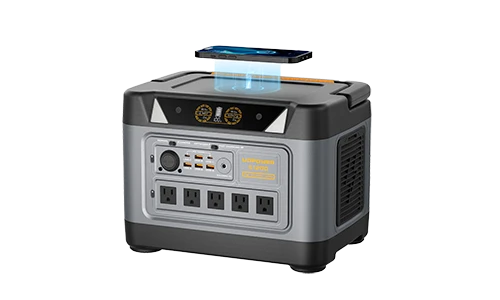
UDPOWER S1200 (home backup & camps)

- AC output: 1200W (1800W surge)
- USB‑C: up to 100W PD with PPS
- Wireless pad: up to 15W
- UPS mode ≤10ms; LiFePO₄ cells
Pairs well with a 45–65W USB‑C PD phone charger or directly via the station’s USB‑C ports.
UDPOWER C600 (lighter, travel‑friendly)

- USB‑C PD up to 65W (plus a second 35W Type‑C)
- Two AC outlets; car and DC outputs
We’re keeping this recommendation light and relevant—either unit makes phone charging easy on trips or during power outages.
↑ Back to topTroubleshooting tips
- No “Super fast charging” message: Try a different cable/port/charger; confirm your brick supports PD with PPS; clean the USB‑C port.
- Charges slowly after an update: Restart, then check Settings → Battery to confirm fast modes are enabled. Update your charger firmware if applicable.
- Wireless is hot/slow: Remove thick cases, realign on the coil, and ensure the pad has good airflow.
Quick note: Galaxy S26 Ultra charging (what we know so far)
Leaks suggest the S26 Ultra may bump wired charging to around 60W PD/PPS and wireless to roughly 25W (Qi2.2). Until Samsung makes it official, treat these numbers as provisional. If you’re buying accessories today, PD/PPS chargers in the 45–65W range and Qi2 pads will be safe long‑term bets.
↑ Back to topFAQs
How do I confirm 45W is active? When you plug in, the lock screen should show Super fast charging. You can also open Settings → Battery to see the charging status.
Do I need Samsung’s 45W charger? No—any reputable USB‑C PD/PPS 45–65W charger typically works. Certified cables and cool temperatures help maintain peak speeds.
Is wireless bad for battery health? Not if you keep heat in check. For overnight charging, consider battery protection modes and a ventilated stand.