





AC vs. DC Power Stations: Differences, Uses & Buying Guide
Last updated:
AC vs. DC Power Stations: The Direct Answer
An AC power station uses an inverter to turn the direct current stored in its battery into the 120-volt alternating current used by standard U.S. wall plugs. A DC power station supplies power through connections such as USB-C, USB-A, a 12V car outlet, or barrel-style DC ports.
In practice, most modern portable power stations are not exclusively AC or DC. They are hybrid battery systems that store energy as DC and provide both AC and DC outputs. The useful buying question is therefore not simply “Should I buy AC or DC?” It is: Which ports, voltage, continuous output, surge capability, and battery capacity match the devices I actually need to run?
Use a compatible direct DC or USB-C connection when your device supports it and you want to avoid unnecessary conversion. Use AC when the device has a household plug, needs 120V power, or does not have a verified compatible DC connection.

Fast decision rule: If the device plugs into a household wall outlet, start with the power station’s AC output. If it normally runs from USB-C, USB-A, or a verified 12V connection, use the matching DC output. Never connect a DC device based on plug shape alone.
What “AC Power Station” and “DC Power Station” Really Mean
AC stands for alternating current. Its direction changes repeatedly, and it is the form of electricity normally supplied through household outlets. In the United States, common household power is approximately 120V at 60 Hz. The U.S. Department of Energy explains that AC became widely used because its voltage could be transformed for practical long-distance distribution.
DC stands for direct current. It flows in one direction. Batteries store and release DC electricity, while solar panels also produce DC electricity. Phones, tablets, laptops, cameras, LEDs, routers, and other electronics ultimately use DC internally, even when they are charged from an AC wall outlet.
For basic electrical definitions, see the U.S. Department of Energy AC and DC overview and the U.S. Energy Information Administration glossary.
Important clarification: The battery inside a portable power station is a DC battery. Even a product marketed as an “AC power station” stores DC energy first. Its AC outlets work because an internal inverter converts that DC energy into AC electricity.
Why the labels can be misleading
Small power banks and specialized battery packs may be DC-only, especially when they contain only USB or 12V outputs. Larger portable power stations usually include an inverter, household AC receptacles, USB ports, and one or more other DC outputs.
This means a shopper should avoid judging a unit only by whether a product description says “AC” or “DC.” Instead, inspect the actual output panel and specifications:
- Number and type of AC outlets
- Rated continuous AC output
- Startup or surge support
- Whether the AC waveform is pure sine wave
- USB-C Power Delivery output
- USB-A output
- 12V car-style outlet rating
- DC barrel-port voltage, current, size, and polarity
- Whether AC and DC output sections have separate control buttons
How Electricity Moves Through a Portable Power Station
The easiest way to understand AC and DC power stations is to follow the energy from the battery to the connected device.
Path 1: Powering a household AC appliance
Path 2: Charging a USB-C laptop directly
Path 3: Charging the same laptop through its wall charger
The third path includes two major conversion stages. That does not make it unsafe or incorrect, but it can use more energy than a compatible direct USB-C connection.
Practical takeaway: Use direct USB-C or regulated DC when it is fully compatible with the device. Keep the AC outlet available for appliances that genuinely require household AC power.
AC vs. DC Power Station Comparison
| Comparison Point | AC Output | DC Output | What It Means for the User |
|---|---|---|---|
| Electricity delivered | Alternating current | Direct current | AC resembles household outlet power. DC is used by batteries, USB devices, automotive accessories, and many electronics. |
| Energy path | Battery DC passes through an inverter | Battery DC passes through a regulated DC converter | Both paths involve electronics, but direct DC can avoid the additional DC-to-AC-to-DC path used by many device adapters. |
| Typical ports | U.S. 120V household receptacles | USB-C, USB-A, 12V car outlet, DC5521 or similar ports | Match the output to the device’s original power connection and electrical requirements. |
| Common devices | Refrigerators, TVs, fans, CPAP adapters, microwaves, coffee makers, power tools | Phones, tablets, laptops, cameras, drones, LED lights, 12V coolers, routers | Some devices support more than one connection method. |
| Output limit | Restricted by the inverter’s rated continuous wattage | Restricted by the wattage, voltage, and current rating of each individual port or shared output group | A station may have a 1,200W AC rating but a USB-C port limited to 100W. |
| Startup demand | Important for compressors, pumps, motors, and some power tools | Usually less relevant for phones and laptops, but still important for 12V compressors and refrigerators | Check both running watts and startup demand. |
| Waveform | Pure sine wave is preferred for broad compatibility | Not described as a sine wave | The sine-wave specification applies to the inverter-generated AC output, not the USB or 12V DC ports. |
| Efficiency | Includes inverter use and may include another conversion inside the device’s adapter | Can reduce conversion steps when a compatible direct connection is available | Direct DC often helps with low-power electronics, but the exact difference varies by device, cable, converter, and load. |
| Idle consumption | The inverter can consume energy whenever the AC section is left on | DC control circuits also consume energy, usually with a different low-load threshold | Turn off unused output sections to conserve battery capacity. |
| Compatibility risk | Main concerns are voltage, frequency, wattage, surge, and waveform | Voltage, current, polarity, connector dimensions, and charging protocol must all match | A DC connector that physically fits can still be electrically incompatible. |
| Best overall use | Maximum appliance compatibility | Efficient charging and operation of compatible electronics | A hybrid station with both output types gives the most flexibility. |
| Technical source | See the U.S. Department of Energy explanation of inverters and AC/DC electricity. | ||
Which Output Should You Use for Each Device?
The most reliable approach is to check the label on the device or its original adapter. Look for input voltage, frequency, current, wattage, and any polarity marking.
| Device | Usually Best Connection | What to Check | Why |
|---|---|---|---|
| Smartphone | USB-C or USB-A | Cable type and charging standard | Direct USB charging avoids using the AC inverter and a separate wall charger. |
| USB-C laptop | High-output USB-C PD when supported | Required USB-C wattage and whether the cable supports it | A 100W laptop may charge slowly or not charge from a lower-output USB-C port. |
| Laptop with proprietary charger | AC outlet | Charger input wattage and station AC rating | Use the original manufacturer-approved adapter when no verified direct DC cable is available. |
| Home Wi-Fi router | Compatible regulated DC cable or original AC adapter | Voltage, polarity, connector size, and current requirement | Direct DC may improve runtime, but using the wrong barrel cable can damage the router. |
| 12V portable refrigerator | 12V car-style outlet when compatible | Refrigerator input range, startup current, plug condition, and station port rating | A direct 12V connection can avoid running the AC inverter. |
| Household refrigerator | AC outlet | Running watts and compressor startup surge | Standard household refrigerators are designed for 120V AC power. |
| CPAP machine | Manufacturer-approved DC cable when available; otherwise the original AC adapter | CPAP model, voltage, humidifier use, heated tube, and cable approval | Heating features can draw substantially more power than basic airflow operation. |
| Camera or drone battery charger | USB-C when officially supported; otherwise AC charger | Charging voltage and manufacturer requirements | Many newer chargers support USB-C, while older chargers require an AC outlet. |
| Microwave or coffee maker | AC outlet | Rated watts and total simultaneous AC load | Heating appliances normally require high-power household AC. |
| LED camping light | USB or compatible DC output | Voltage and low-power auto-shutoff behavior | Extremely low-wattage lights may fall below the station’s automatic output threshold. |
Do not choose a DC cable by connector shape alone. Before connecting a barrel-style DC cable, confirm all four items: output voltage, required current, connector dimensions, and polarity. A plug can fit physically while providing the wrong voltage or reversed polarity.
Is DC More Efficient Than AC?
A compatible direct DC connection can be more efficient because it may remove one conversion step. However, “DC is always more efficient” is too broad. The actual result depends on the station’s DC converter, inverter efficiency, connected load, cable loss, device adapter, temperature, and standby consumption.
Where the extra conversion occurs
Consider a laptop that internally operates from DC:
- AC method: station battery DC → inverter AC → laptop adapter DC → laptop.
- USB-C method: station battery DC → regulated USB-C DC → laptop.
The USB-C method has a shorter energy path, provided the station, cable, and laptop negotiate the correct USB Power Delivery profile.
When AC is still the better choice
Efficiency is not the only consideration. AC is the better option when:
- The appliance only accepts a standard wall plug.
- No manufacturer-approved direct DC cable is available.
- The required DC voltage is not provided by the station.
- The device needs more power than the available USB-C or DC port.
- You are unsure about barrel connector size, polarity, or charging protocol.
Do not leave the AC inverter on unnecessarily
The inverter uses some energy even when the connected load is very small. If you finish using AC appliances but continue charging phones through USB, switch off the AC section while leaving the required DC section on.
UDPOWER power stations may also automatically turn off very small loads after a set period. The approximate thresholds and timing depend on the selected mode. Read how low-power automatic shutoff works before relying on an ultra-low-wattage router, sensor, light, or camera overnight.
Wattage, Surge Power, and Pure Sine Wave Output
AC versus DC tells you how electricity is delivered. It does not tell you whether the power station is large enough to operate a device. For AC appliances, three additional specifications matter.
1. Continuous output
Continuous output is the amount of AC power the station is designed to supply during normal operation. A 1,200W station should not be treated as a 1,800W continuous station simply because it lists higher surge support.
2. Startup or surge demand
Refrigerators, pumps, compressors, and motor-driven tools may briefly require more power when starting than they use while running. Check both the normal running wattage and the startup requirement.
3. AC waveform
A pure sine wave inverter produces AC electricity that more closely resembles utility power than a modified sine wave inverter. It is the preferred choice for broad compatibility with laptops, TVs, audio equipment, motor-driven loads, CPAP adapters, and other sensitive or electronically controlled devices.
Example: A refrigerator may average well under 200W while running but require several times that amount for a brief compressor startup. Capacity in watt-hours determines approximate runtime; inverter wattage and surge support determine whether the refrigerator can start.
For more sizing detail, see the UDPOWER S1200 and S2400 comparison .
USB-C, 12V, and DC Port Compatibility
USB-C does not automatically mean maximum charging speed
USB-C describes the connector. The available charging power depends on the port, device, cable, and supported USB Power Delivery profiles. A laptop that requires 100W may not charge normally from a 35W USB-C port, even though the cable fits.
USB Power Delivery can support multiple negotiated voltage levels. The USB Implementers Forum states that newer USB PD specifications can support substantially higher power, but both the source and cable must be designed for the required level. See the USB-IF explanation of USB Power Delivery.
12V car outlets have current limits
A 12V car-style socket is useful for portable refrigerators, inflators, lighting, and automotive accessories. It is not an unlimited output. Multiply voltage by available current to estimate the port’s maximum wattage:
For example, a regulated 12V, 10A output has a theoretical limit of 120W. The actual station specification and connected device must still be checked.
DC barrel connections require four matches
- Voltage: The output voltage must match the device.
- Current: The source must be able to provide at least the current required by the device, without exceeding the port’s rating.
- Connector dimensions: Outer and inner diameter must match.
- Polarity: Center-positive and center-negative are not interchangeable.
Read what an AC adapter does and how to read its label before replacing an original adapter with a direct DC connection.
AC and DC Choices by Real-World Scenario
| Scenario | Use AC For | Use DC For | Best Strategy |
|---|---|---|---|
| Weekend camping | Blender, projector, appliance chargers, AC fan | Phones, USB lights, camera batteries, 12V refrigerator | Keep the AC inverter off until an AC-only appliance is needed. |
| RV travel | Small kitchen appliances, TV, tool chargers, devices with wall adapters | 12V refrigerator, lights, USB electronics, compatible router | Use DC for continuous low-power loads and reserve AC capacity for occasional higher-power appliances. |
| Home outage | Refrigerator, TV, fans, appliance adapters | Phones, tablets, USB-C laptop, compatible internet equipment | Prioritize essential loads and avoid running unnecessary heating appliances. |
| CPAP backup | Original CPAP power adapter | Manufacturer-approved CPAP DC cable | Test the exact setup before an outage, including humidifier and heated-tube settings. |
| Photography or drone work | AC-only camera and drone chargers | USB-C chargers, phone, monitor, camera accessories | Use direct USB-C where supported and verify each charging profile. |
| Mobile office | Monitor or equipment that requires a wall adapter | USB-C laptop, phone, tablet, hotspot | A high-output USB-C port can reduce the need to keep the AC inverter running all day. |
| Power tools | Battery chargers and corded tools within the AC rating | USB work lights and low-voltage accessories | Check startup demand and combined wattage before connecting multiple tools. |
Whatever the scenario, test the intended equipment before an emergency. Separate AC and DC sections may require their own buttons. The guide How Easy Is a Portable Power Station to Use? walks through the normal startup and output-selection process.
Recommended UDPOWER AC/DC Portable Power Stations
UDPOWER portable power stations combine pure sine wave AC output with USB and 12V DC connections. The best model depends primarily on the highest appliance wattage, required runtime, number of connections, and how frequently the unit must be moved.

UDPOWER C600: Best for Compact Mixed AC and DC Use
The C600 is suited to road trips, camping, mobile electronics, light home backup, photography, and users who need a manageable station for both USB devices and lower-wattage AC equipment.
- Battery capacity: 596Wh
- Rated AC output: 600W
- Peak support: Up to 1,200W
- Battery chemistry: LiFePO4
- Listed cycle life: 4,000+ cycles
- AC connections: 2 AC outlets
- DC connections: 65W USB-C PD, 35W USB-C, 2 × 18W USB-A, and a 12V car outlet
Choose it when: most loads are phones, laptops, cameras, lights, routers, mini-fridges, or other equipment below its continuous AC rating.
View UDPOWER C600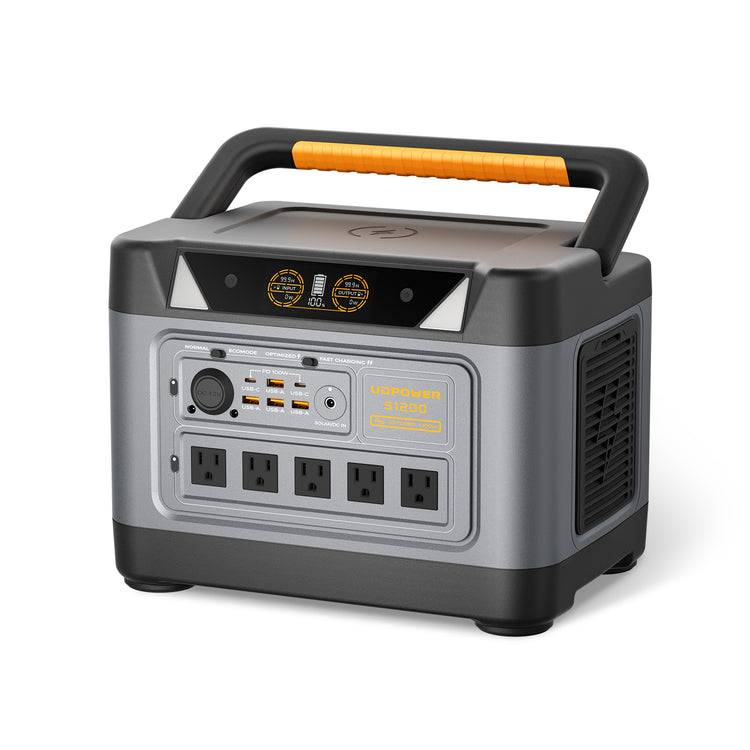
UDPOWER S1200: Best Balance of AC Power, DC Ports, and Portability
The S1200 is the practical middle choice for refrigerator backup, camping, RV electronics, CPAP use, internet equipment, TVs, laptops, fans, and mixed family charging.
- Battery capacity: 1,190Wh
- Rated AC output: 1,200W pure sine wave
- UDTURBO support: Up to 1,800W
- Battery chemistry: LiFePO4
- Listed cycle life: 4,000+ cycles
- AC connections: 5 AC outlets on the current gray model
- DC connections: 4 USB-A, 2 USB-C, 2 DC5521, 1 car outlet, and 1 wireless charging surface
- Solar input: Up to 400W
- UPS transfer: Less than 10 ms as listed by UDPOWER
Choose it when: you need considerably more runtime and AC capability than a compact station, but do not regularly need more than 1,200W of continuous AC output.
View UDPOWER S1200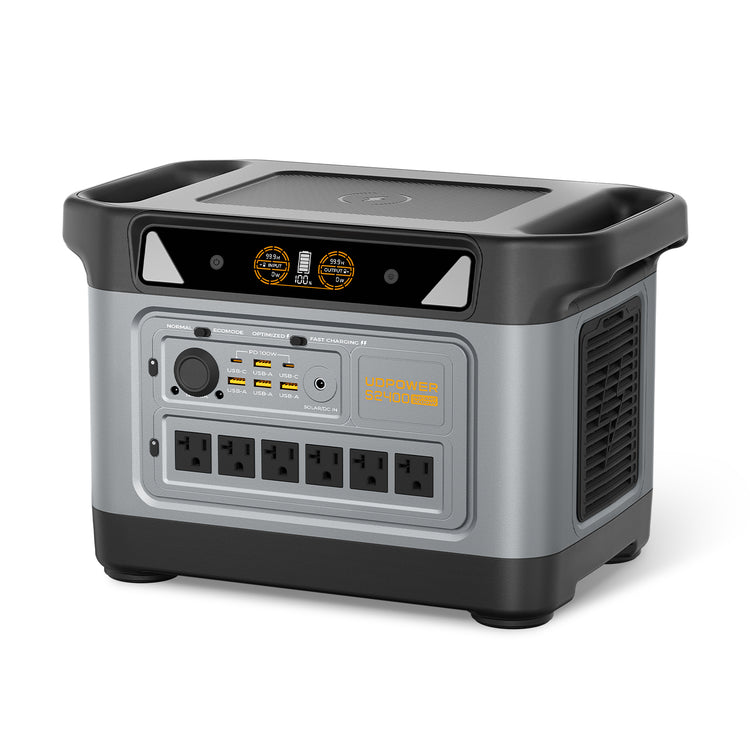
UDPOWER S2400: Best for Larger AC Appliances and Longer Backup
The S2400 provides more continuous inverter output and battery capacity for larger appliances, longer outages, RV use, tools, and households that need to operate several devices at the same time.
- Battery capacity: 2,083Wh
- Rated AC output: 2,400W pure sine wave
- UDTURBO support: Up to 3,000W
- Battery chemistry: LiFePO4
- Listed cycle life: 4,000+ cycles
- AC connections: 6 AC outlets
- DC connections: 10 outputs including USB-A, USB-C, DC5521, a 12V car outlet, and wireless charging
- Solar input: Up to 400W
- UPS transfer: Less than 10 ms as listed by UDPOWER
Choose it when: your combined continuous AC load may exceed 1,200W, you need more startup headroom, or you want longer runtime from a single station.
View UDPOWER S2400UDPOWER Model Comparison
| Model | Capacity | Rated AC Output | Higher-Power Support | AC Outlets | Notable DC Outputs | Best Match | Official Source |
|---|---|---|---|---|---|---|---|
| UDPOWER C600 | 596Wh | 600W | Up to 1,200W peak | 2 | 65W USB-C, 35W USB-C, 2 × 18W USB-A, 12V car outlet | Camping, road trips, laptops, cameras, small appliances | C600 specifications |
| UDPOWER S1200 | 1,190Wh | 1,200W pure sine wave | UDTURBO up to 1,800W | 5 | 4 USB-A, 2 USB-C, 2 DC5521, car outlet, wireless charging | Refrigerator, CPAP, RV, home essentials, mixed devices | S1200 specifications |
| UDPOWER S2400 | 2,083Wh | 2,400W pure sine wave | UDTURBO up to 3,000W | 6 | 10 DC outputs including USB, DC5521, car outlet, and wireless charging | Larger appliances, tools, longer outages, shared family loads | S2400 specifications |
Estimated Runtime Examples
Runtime depends on the battery capacity and actual device power draw, not simply on whether the device uses AC or DC. For UDPOWER planning, a useful estimate is:
The following values use a 90% conversion-efficiency estimate. They are planning figures rather than guaranteed runtimes.
| Example Average Load | C600 596Wh |
S1200 1,190Wh |
S2400 2,083Wh |
Important Note |
|---|---|---|---|---|
| 12W router or similar low-power device | About 44.7 hours | About 89.3 hours | About 156.2 hours | Very low loads may trigger automatic shutoff depending on output type and operating mode. |
| 40W CPAP without major heating load | About 13.4 hours | About 26.8 hours | About 46.9 hours | Humidifiers, heated tubes, pressure settings, and mask leakage can change consumption. |
| 60W portable refrigerator average | About 8.9 hours | About 17.9 hours | About 31.2 hours | Compressor cycling, ambient temperature, ventilation, and startup demand affect real performance. |
| 100W TV, laptop setup, or similar load | About 5.4 hours | About 10.7 hours | About 18.7 hours | Screen brightness, charging state, and accessories change the average load. |
| 500W continuous appliance | About 1.1 hours | About 2.1 hours | About 3.7 hours | Confirm startup demand and avoid exceeding the model’s continuous output. |
Actual runtime may be lower or higher due to battery condition, temperature, cable loss, inverter standby consumption, device cycling, startup events, and whether AC or direct DC output is used.
AC/DC Power Station Buying Checklist
1. Make a device list
Write down every appliance and electronic device you expect to operate. Separate household-plug devices from USB, 12V, and other DC devices.
2. Record running and startup wattage
Use the appliance label, manual, or a plug-in watt meter. Motor-driven devices may need much more power for startup than during normal operation.
3. Count the required ports
Confirm that the station has enough AC outlets, USB-C ports, USB-A ports, and 12V connections. Avoid assuming that two similarly sized stations have the same port arrangement.
4. Check individual port ratings
Total station wattage does not determine USB-C output. A station may have a high-power inverter but a lower-output USB-C port.
5. Verify DC voltage and polarity
For routers, CPAP machines, refrigerators, and barrel-connected equipment, verify the exact voltage, current, connector size, and polarity before purchasing a cable.
6. Calculate battery capacity
Multiply each device’s average wattage by the number of hours it must run, then include conversion loss and a reasonable reserve.
7. Check pure sine wave output
Choose pure sine wave AC output for broad compatibility with household appliances and sensitive electronics.
8. Plan how the station will be recharged
Consider wall charging, vehicle charging, and compatible solar input. Solar panels produce DC electricity, which the station’s charging controller regulates before storing it in the battery.
Common AC and DC Mistakes
Mistake 1: Assuming every modern station is either AC-only or DC-only
Most full-size portable power stations provide both. Compare their actual port layout and ratings instead of relying on a broad product label.
Mistake 2: Using AC for every small electronic device
Phones, tablets, and USB-C laptops can often be powered directly from USB, allowing the AC inverter to remain off.
Mistake 3: Assuming a fitting DC plug is compatible
Connector dimensions do not confirm voltage, current, or polarity.
Mistake 4: Confusing battery capacity with inverter output
Watt-hours describe stored energy. Watts describe the rate at which power can be delivered. A large battery can still have an inverter too small for a high-power appliance.
Mistake 5: Ignoring startup power
A refrigerator, pump, or compressor may appear to fit the continuous rating but fail to start if its brief startup demand is too high.
Mistake 6: Assuming every USB-C port provides the same wattage
USB-C connections can differ greatly. Check the wattage printed beside the port and the device’s charging requirement.
Mistake 7: Leaving all output sections enabled
Keep only the outputs you are actively using turned on. This reduces unnecessary standby consumption.
Mistake 8: Testing the system for the first time during an outage
Connect every essential device in advance. Confirm startup behavior, port controls, cable compatibility, runtime, and recharge time while utility power is still available.
Basic Safety Rules for AC and DC Power Stations
- Keep the power station, plugs, cables, and connected equipment dry.
- Do not plug or unplug energized equipment with wet hands.
- Keep cooling vents unobstructed during charging and discharging.
- Do not exceed the continuous AC rating or individual DC port rating.
- Replace damaged, loose, scorched, or excessively hot cables.
- Use cables intended for the voltage, current, connector, and operating environment.
- Do not connect the station’s AC output to a household wall receptacle. Backfeeding a home circuit is dangerous.
- Only connect a power station to household circuits through equipment and procedures specifically approved for that purpose.
- Do not expose an ordinary portable power station to rain merely because it is being used outdoors.
- Follow the power station manual and the connected device manufacturer’s instructions.
OSHA notes that moisture on connectors can create a path for electrical current. Review OSHA guidance on flexible cords and wet connectors for additional background.
Frequently Asked Questions
Is a portable power station AC or DC?
Its battery stores DC electricity. Most modern portable power stations then provide both regulated DC outputs and inverter-generated AC outlets, so the complete unit is usually a hybrid AC/DC system.
Are batteries AC or DC?
Batteries supply direct current. AC output from a battery power station must be created by an inverter.
Can I use AC and DC outputs at the same time?
Many portable power stations allow simultaneous AC and DC use. The combined load must remain within the station’s overall limits and the individual rating of each port. Check the model manual for restrictions.
Will a device run longer from DC than from AC?
It may run longer from a compatible direct DC connection because that path can avoid an extra conversion. The improvement is not guaranteed and depends on the station, device, cable, load, and converter efficiency.
Is DC safer than AC?
Many consumer DC ports operate at lower voltage than 120V household AC, but low-voltage DC can still cause overheating, short circuits, damaged wiring, or fire when improperly connected. Both output types should be used according to their ratings.
Can the 12V port power any device marked 12V?
No. Confirm the device’s accepted voltage range, current demand, startup load, connector, and polarity. Some equipment labeled 12V may expect the wider voltage range normally present in a vehicle.
Is USB-C always better than using a laptop’s AC charger?
USB-C is convenient and may reduce conversion loss when the laptop, power station, and cable support the required Power Delivery level. Use the original AC charger when the available USB-C port does not provide enough power or compatibility is uncertain.
Why does my device not work after I plug it into the power station?
The required output section may not be enabled. Turn on the main power, then activate the AC or DC output associated with the selected port. Also check the device wattage, cable, connector, and low-power auto-shutoff settings.
Does the inverter consume power when nothing is connected?
Yes, an enabled inverter and its control electronics can consume standby power even with little or no connected load. Turn off the AC section when it is not needed.
Why is pure sine wave important?
Pure sine wave output more closely resembles normal utility AC and provides broader compatibility with sensitive electronics, motors, audio equipment, appliance controls, and medical-device adapters.
Can I connect a solar panel to an AC or DC output?
No. A solar panel must connect to the power station’s designated solar or DC charging input using a compatible cable and electrical range. Output ports are intended to power devices, not accept solar charging.
Can an AC power station run a refrigerator?
Yes, when its continuous AC output and startup capability exceed the refrigerator’s requirements. Runtime depends on battery capacity, compressor cycling, room temperature, refrigerator efficiency, and door-opening frequency.
Should I buy a DC-only power station?
A DC-only unit may be suitable when every device uses USB or a verified low-voltage DC connection and low weight is the priority. A hybrid station is more versatile for outages, camping, RVs, and household appliances because it provides both AC and DC outputs.
Which UDPOWER model is best for mixed AC and DC use?
Choose the C600 for compact lower-wattage use, the S1200 for a balanced home-backup and camping setup, or the S2400 when larger appliances, higher combined loads, and longer runtime are the priority.
Choose the Right AC/DC Power Setup
Start with your actual devices, identify their AC or DC connection, compare running and startup wattage, and choose enough battery capacity for the number of hours you need.
View All Portable Power Stations Compare S1200 and S2400 Get Product Selection HelpRelated Articles


